


Zoom connector
OAuth 2.0CommunicationCalendarConnect to Zoom. Schedule meetings, manage recordings, and handle video conferencing workflows
Zoom connector
-
Install the SDK
Section titled “Install the SDK”Terminal window npm install @scalekit-sdk/nodeTerminal window pip install scalekit -
Set your credentials
Section titled “Set your credentials”Add your Scalekit credentials to your
.envfile. Find values in app.scalekit.com > Developers > API Credentials..env SCALEKIT_ENVIRONMENT_URL=<your-environment-url>SCALEKIT_CLIENT_ID=<your-client-id>SCALEKIT_CLIENT_SECRET=<your-client-secret> -
Set up the connector
Section titled “Set up the connector”Register your Zoom credentials with Scalekit so it handles the token lifecycle. You do this once per environment.
Dashboard setup steps
Register your Scalekit environment with the Zoom connector so Scalekit handles the authentication flow and token lifecycle for you. The connection name you create will be used to identify and invoke the connection programmatically. You’ll need your app credentials from the Zoom App Marketplace.
-
Set up auth redirects
-
In Scalekit dashboard, go to AgentKit > Connections > Create Connection. Find Zoom and click Create. Copy the redirect URI. It looks like
https://<SCALEKIT_ENVIRONMENT_URL>/sso/v1/oauth/<CONNECTION_ID>/callback.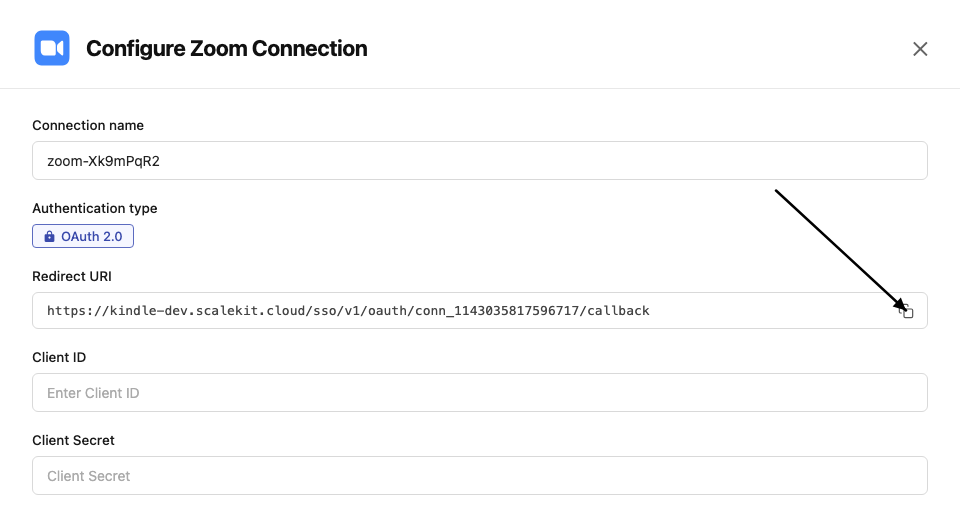
-
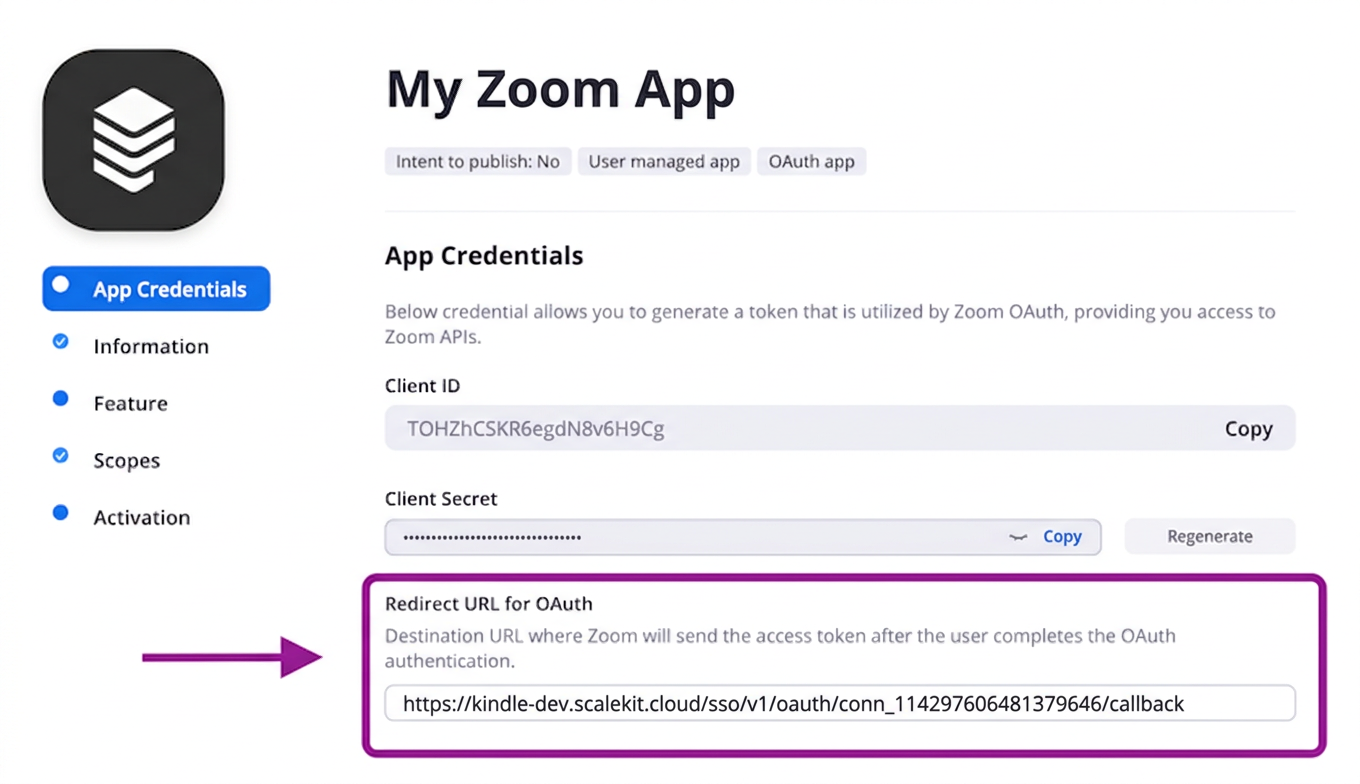
In the Zoom App Marketplace, open your app and go to App Credentials.
-
Paste the copied URI into the Redirect URL for OAuth field and also add it to the OAuth allow list.
-
-
Get client credentials
- In the Zoom App Marketplace, open your app and go to App Credentials:
- Client ID — listed under Client ID
- Client Secret — listed under Client Secret
- In the Zoom App Marketplace, open your app and go to App Credentials:
-
Add credentials in Scalekit
-
In Scalekit dashboard, go to AgentKit > Connections and open the connection you created.
-
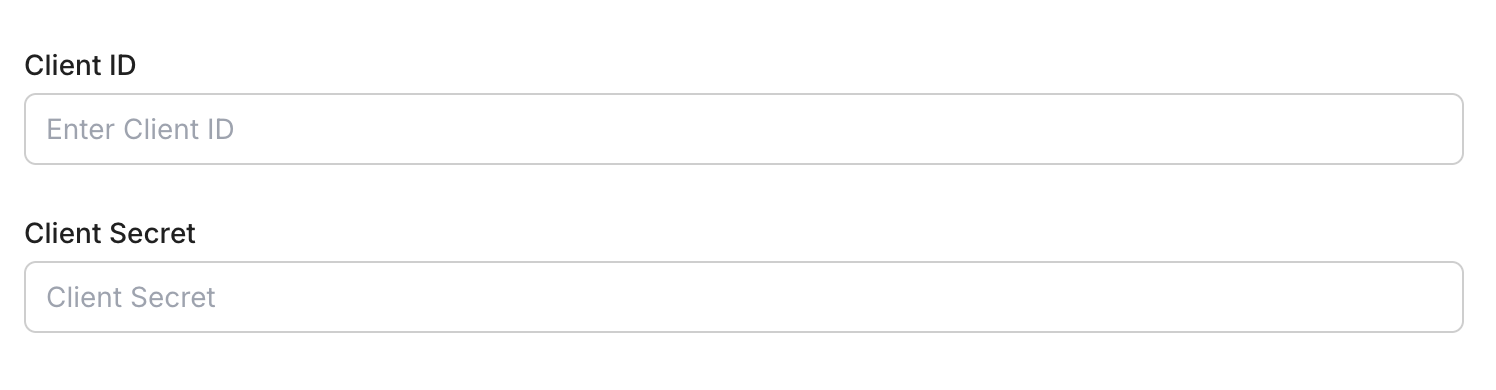
Enter your credentials:
- Client ID (from your Zoom app)
- Client Secret (from your Zoom app)
- Permissions — select the scopes your app needs
-
Click Save.
-
-
-
Authorize and make your first call
Section titled “Authorize and make your first call”quickstart.ts import { ScalekitClient } from '@scalekit-sdk/node'import 'dotenv/config'const scalekit = new ScalekitClient(process.env.SCALEKIT_ENV_URL,process.env.SCALEKIT_CLIENT_ID,process.env.SCALEKIT_CLIENT_SECRET,)const actions = scalekit.actionsconst connector = 'zoom'const identifier = 'user_123'// Generate an authorization link for the userconst { link } = await actions.getAuthorizationLink({ connectionName: connector, identifier })console.log('Authorize Zoom:', link)process.stdout.write('Press Enter after authorizing...')await new Promise(r => process.stdin.once('data', r))// Make your first callconst result = await actions.executeTool({connector,identifier,toolName: 'zoom_chat_channels_list',toolInput: {},})console.log(result)quickstart.py import osfrom scalekit.client import ScalekitClientfrom dotenv import load_dotenvload_dotenv()scalekit_client = ScalekitClient(env_url=os.getenv("SCALEKIT_ENV_URL"),client_id=os.getenv("SCALEKIT_CLIENT_ID"),client_secret=os.getenv("SCALEKIT_CLIENT_SECRET"),)actions = scalekit_client.actionsconnection_name = "zoom"identifier = "user_123"# Generate an authorization link for the userlink_response = actions.get_authorization_link(connection_name=connection_name,identifier=identifier,)print("Authorize Zoom:", link_response.link)input("Press Enter after authorizing...")# Make your first callresult = actions.execute_tool(tool_input={},tool_name="zoom_chat_channels_list",connection_name=connection_name,identifier=identifier,)print(result)
What you can do
Section titled “What you can do”Connect this agent connector to let your agent:
- List webinars, webinar registrants, tracking fields — List all scheduled webinars for a Zoom user
- Update webinar, webinar registrant status, tracking field — Update an existing Zoom webinar’s topic, schedule, or agenda
- Add webinar registrant, webinar panelist, meeting registrant — Register a new attendee for a Zoom webinar
- Get webinar, tracking field, meeting poll — Retrieve details of a scheduled Zoom webinar, including its settings, agenda, and occurrence information
- Delete webinar, tracking field, group — Permanently delete a scheduled Zoom webinar
- Create webinar, tracking field, meeting poll — Schedule a new Zoom webinar for a user
Common workflows
Section titled “Common workflows”Proxy API call
const result = await actions.request({ connectionName: 'zoom', identifier: 'user_123', path: '/v2/users/me', method: 'GET',});console.log(result);result = actions.request( connection_name='zoom', identifier='user_123', path="/v2/users/me", method="GET")print(result)Execute a tool
const result = await actions.executeTool({ connector: 'zoom', identifier: 'user_123', toolName: 'zoom_list', toolInput: {},});console.log(result);result = actions.execute_tool( tool_input={}, tool_name='zoom_list', connection_name='zoom', identifier='user_123',)print(result)Tool list
Section titled “Tool list”Use the exact tool names from the Tool list below when you call execute_tool. If you’re not sure which name to use, list the tools available for the current user first.
zoom_chat_channel_create#Create a new Team Chat channel.3 params
Create a new Team Chat channel.
namestringrequiredName of the channelmembersarrayoptionalList of member objects with email field to add to the channeltypeintegeroptionalChannel type: 1=private, 2=private with external users, 3=public, 4=new externalzoom_chat_channel_delete#Delete a Team Chat channel.1 param
Delete a Team Chat channel.
channel_idstringrequiredThe channel IDzoom_chat_channel_get#Get details of a specific Team Chat channel.1 param
Get details of a specific Team Chat channel.
channel_idstringrequiredThe channel IDzoom_chat_channel_member_invite#Invite one or more members to a Team Chat channel.2 params
Invite one or more members to a Team Chat channel.
channel_idstringrequiredThe channel IDmembersarrayrequiredArray of member objects with email fieldzoom_chat_channel_member_remove#Remove a member from a Team Chat channel.2 params
Remove a member from a Team Chat channel.
channel_idstringrequiredThe channel IDmember_idstringrequiredThe member ID or email to removezoom_chat_channel_members_list#List members of a Team Chat channel.3 params
List members of a Team Chat channel.
channel_idstringrequiredThe channel IDnext_page_tokenstringoptionalToken for next page of resultspage_sizeintegeroptionalNumber of members per page (max 50)zoom_chat_channel_messages_list#List messages in a Zoom Team Chat channel.5 params
List messages in a Zoom Team Chat channel.
channel_idstringrequiredThe channel ID to list messages fromuser_idstringrequiredThe user ID or 'me' for the authenticated userdatestringoptionalDate to retrieve messages for (yyyy-MM-dd). Defaults to today.next_page_tokenstringoptionalToken for next pagepage_sizeintegeroptionalNumber of messages per page (max 50)zoom_chat_channel_update#Update the name or settings of a Team Chat channel.2 params
Update the name or settings of a Team Chat channel.
channel_idstringrequiredThe channel IDnamestringoptionalNew name for the channelzoom_chat_channels_list#List all Zoom Team Chat channels the authenticated user belongs to.2 params
List all Zoom Team Chat channels the authenticated user belongs to.
next_page_tokenstringoptionalToken for next pagepage_sizeintegeroptionalNumber of channels per page (max 50)zoom_chat_message_send#Send a message in a Zoom Team Chat channel or to a user.4 params
Send a message in a Zoom Team Chat channel or to a user.
messagestringrequiredThe message text to senduser_idstringrequiredSender's user ID or 'me'to_channelstringoptionalChannel ID to send the message toto_jidstringoptionalJID of the user to send a direct message tozoom_group_create#Create a new user group in the Zoom account.1 param
Create a new user group in the Zoom account.
namestringrequiredName of the groupzoom_group_delete#Delete a Zoom group.1 param
Delete a Zoom group.
group_idstringrequiredThe group ID to deletezoom_group_get#Get the details of a specific Zoom group.1 param
Get the details of a specific Zoom group.
group_idstringrequiredThe group IDzoom_group_update#Rename an existing Zoom group.2 params
Rename an existing Zoom group.
group_idstringrequiredThe group ID to updatenamestringrequiredNew name for the groupzoom_groups_list#List all groups in the Zoom account.0 params
List all groups in the Zoom account.
zoom_meeting_create#Schedule a new Zoom meeting for a user.8 params
Schedule a new Zoom meeting for a user.
topicstringrequiredMeeting topic/titleuser_idstringrequiredUser ID or 'me' for the authenticated useragendastringoptionalMeeting description or agendadurationintegeroptionalMeeting duration in minutespasswordstringoptionalMeeting passcode (max 10 chars)start_timestringoptionalMeeting start time in ISO 8601 UTC formattimezonestringoptionalTimezone for the meeting (e.g. America/New_York)typeintegeroptional1=Instant, 2=Scheduled, 3=Recurring no fixed time, 8=Recurring fixed timezoom_meeting_delete#Delete a Zoom meeting.2 params
Delete a Zoom meeting.
meeting_idstringrequiredThe meeting ID to deleteoccurrence_idstringoptionalOccurrence ID for recurring meeting instanceszoom_meeting_get#Retrieve details of a specific Zoom meeting.1 param
Retrieve details of a specific Zoom meeting.
meeting_idstringrequiredThe meeting IDzoom_meeting_invitation_get#Retrieve the invitation text for a Zoom meeting.1 param
Retrieve the invitation text for a Zoom meeting.
meeting_idstringrequiredThe meeting IDzoom_meeting_poll_create#Create a poll for a scheduled Zoom meeting.5 params
Create a poll for a scheduled Zoom meeting.
meeting_idstringrequiredThe meeting IDquestionsarrayrequiredArray of poll question objectstitlestringrequiredTitle of the pollanonymousbooleanoptionalWhether to keep the poll anonymouspoll_typeintegeroptional1 = classic Poll, 2 = Advanced Poll (enables rating/matching/rank order/short-long answer question types)zoom_meeting_poll_get#Get the details of a specific Zoom meeting poll.2 params
Get the details of a specific Zoom meeting poll.
meeting_idstringrequiredThe meeting IDpoll_idstringrequiredThe poll IDzoom_meeting_polls_list#List all polls created for a Zoom meeting.1 param
List all polls created for a Zoom meeting.
meeting_idstringrequiredThe meeting IDzoom_meeting_recordings_delete#Delete all cloud recordings for a specific meeting.2 params
Delete all cloud recordings for a specific meeting.
meeting_idstringrequiredThe meeting ID or UUIDactionstringoptionaltrash (move to trash, default) or delete (permanent)zoom_meeting_recordings_get#Retrieve all cloud recordings for a specific meeting.1 param
Retrieve all cloud recordings for a specific meeting.
meeting_idstringrequiredThe meeting ID or UUIDzoom_meeting_registrant_add#Register a participant for a Zoom meeting.5 params
Register a participant for a Zoom meeting.
emailstringrequiredRegistrant's email addressfirst_namestringrequiredRegistrant's first namemeeting_idstringrequiredThe meeting IDlast_namestringoptionalRegistrant's last nameoccurrence_idsstringoptionalComma-separated occurrence IDs for recurring meetingszoom_meeting_registrant_status_update#Approve, deny, or cancel one or more registrants for a Zoom meeting.4 params
Approve, deny, or cancel one or more registrants for a Zoom meeting.
actionstringrequiredAction to take on the given registrantsmeeting_idstringrequiredThe meeting IDregistrantsarrayrequiredArray of registrant objects to update, each with id and/or emailoccurrence_idstringoptionalOccurrence ID for recurring meetingszoom_meeting_registrants_list#List all registrants for a Zoom meeting.5 params
List all registrants for a Zoom meeting.
meeting_idstringrequiredThe meeting IDnext_page_tokenstringoptionalToken for next pageoccurrence_idstringoptionalOccurrence ID for recurring meetingspage_sizeintegeroptionalNumber of records per page (max 300)statusstringoptionalFilter by status: pending, approved, deniedzoom_meeting_status_update#Update the status of a Zoom meeting (e.g., end a meeting in progress).2 params
Update the status of a Zoom meeting (e.g., end a meeting in progress).
actionstringrequiredAction to perform: 'end' to end the meetingmeeting_idstringrequiredThe meeting IDzoom_meeting_update#Update an existing Zoom meeting's details.7 params
Update an existing Zoom meeting's details.
meeting_idstringrequiredThe meeting ID to updateagendastringoptionalNew meeting agendadurationintegeroptionalNew duration in minutespasswordstringoptionalNew meeting passcodestart_timestringoptionalNew start time in ISO 8601 UTC formattimezonestringoptionalTimezone for the meetingtopicstringoptionalNew meeting topiczoom_meetings_list#List all meetings scheduled by a user.4 params
List all meetings scheduled by a user.
user_idstringrequiredUser ID or 'me' for the authenticated usernext_page_tokenstringoptionalToken for next page of resultspage_sizeintegeroptionalNumber of records per page (max 300)typestringoptionalFilter: scheduled, live, upcoming, upcoming_meetings, previous_meetingszoom_past_meeting_get#Retrieve details of an ended Zoom meeting.1 param
Retrieve details of an ended Zoom meeting.
meeting_uuidstringrequiredThe meeting UUID (double-encode if contains / or //)zoom_phone_call_logs_list#Retrieve account-level Zoom Phone call logs within a date range, including caller, callee, duration, and call result. Requires a Zoom Phone license and phone:read:admin scope.5 params
Retrieve account-level Zoom Phone call logs within a date range, including caller, callee, duration, and call result. Requires a Zoom Phone license and phone:read:admin scope.
fromstringoptionalStart date of the range in yyyy-MM-dd formatnext_page_tokenstringoptionalToken for next pagepage_sizeintegeroptionalNumber of records per page (max 300)tostringoptionalEnd date of the range in yyyy-MM-dd formattypestringoptionalFilter by call typezoom_phone_users_list#List all users enabled with a Zoom Phone license on the account, including their extension and phone numbers. Requires a Zoom Phone license and phone:read:admin scope.3 params
List all users enabled with a Zoom Phone license on the account, including their extension and phone numbers. Requires a Zoom Phone license and phone:read:admin scope.
next_page_tokenstringoptionalToken for next pagepage_sizeintegeroptionalNumber of records per page (max 100)site_idstringoptionalFilter users by a specific Zoom Phone sitezoom_recordings_list#List all cloud recordings for a user.7 params
List all cloud recordings for a user.
user_idstringrequiredUser ID or 'me' for the authenticated userfromstringoptionalStart date in yyyy-MM-dd format (default: current date minus 1 month)mcstringoptionalSet to true to retrieve recordings from Zoom Roomnext_page_tokenstringoptionalToken for next pagepage_sizeintegeroptionalNumber of records per page (max 300)tostringoptionalEnd date in yyyy-MM-dd format (max 1 month range)trashbooleanoptionalSet to true to list trashed recordingszoom_report_daily_usage#Retrieve the account-level daily usage report showing new users, meetings, participants, and meeting minutes for each day of a given month. Requires owner or admin privileges and report:read scope.2 params
Retrieve the account-level daily usage report showing new users, meetings, participants, and meeting minutes for each day of a given month. Requires owner or admin privileges and report:read scope.
monthintegerrequiredMonth to retrieve the report for (1-12)yearintegerrequiredYear to retrieve the report forzoom_report_meeting_participants#Retrieve a report of participants who attended a past Zoom meeting, including join/leave times. Requires a Pro or higher plan and report:read scope.3 params
Retrieve a report of participants who attended a past Zoom meeting, including join/leave times. Requires a Pro or higher plan and report:read scope.
meeting_idstringrequiredThe meeting ID or UUID to retrieve the participants report fornext_page_tokenstringoptionalToken for next pagepage_sizeintegeroptionalNumber of records per page (max 300)zoom_report_user_meetings#Retrieve a report of meetings hosted by a Zoom user within a date range, including duration and participant counts. Requires a Pro or higher plan and report:read scope.6 params
Retrieve a report of meetings hosted by a Zoom user within a date range, including duration and participant counts. Requires a Pro or higher plan and report:read scope.
fromstringrequiredStart date of the report range in yyyy-MM-dd formattostringrequiredEnd date of the report range in yyyy-MM-dd formatuser_idstringrequiredUser ID or 'me' for the authenticated usernext_page_tokenstringoptionalToken for next pagepage_sizeintegeroptionalNumber of records per page (max 300)typestringoptionalType of meetings to include: past, pastOne, or livezoom_report_webinar_participants#Retrieve a report of participants who attended a past Zoom webinar, including join/leave times. Requires a Pro or higher plan and report:read scope.3 params
Retrieve a report of participants who attended a past Zoom webinar, including join/leave times. Requires a Pro or higher plan and report:read scope.
webinar_idstringrequiredThe webinar ID or UUID to retrieve the participants report fornext_page_tokenstringoptionalToken for next pagepage_sizeintegeroptionalNumber of records per page (max 300)zoom_tracking_field_create#Create a custom tracking field for meetings and webinars.4 params
Create a custom tracking field for meetings and webinars.
fieldstringrequiredName of the tracking fieldfield_requiredbooleanoptionalWhether this tracking field is required when scheduling a meeting or webinar. Maps to Zoom's 'required' field.recommended_valuesarrayoptionalSuggested values for this tracking fieldvisiblebooleanoptionalWhether this tracking field is visible when scheduling a meeting or webinarzoom_tracking_field_delete#Delete a custom tracking field.1 param
Delete a custom tracking field.
field_idstringrequiredThe tracking field ID to deletezoom_tracking_field_get#Get the details of a specific tracking field.1 param
Get the details of a specific tracking field.
field_idstringrequiredThe tracking field IDzoom_tracking_field_update#Update a custom tracking field.5 params
Update a custom tracking field.
field_idstringrequiredThe tracking field ID to updatefieldstringoptionalNew name of the tracking fieldfield_requiredbooleanoptionalWhether this tracking field is required when scheduling a meeting or webinar. Maps to Zoom's 'required' field.recommended_valuesarrayoptionalSuggested values for this tracking fieldvisiblebooleanoptionalWhether this tracking field is visible when scheduling a meeting or webinarzoom_tracking_fields_list#List the account's custom tracking fields used for meetings and webinars.0 params
List the account's custom tracking fields used for meetings and webinars.
zoom_user_delete#Disassociate or permanently delete a Zoom user.3 params
Disassociate or permanently delete a Zoom user.
user_idstringrequiredThe user ID to deleteactionstringoptionaldisassociate (default) or deletetransfer_emailstringoptionalEmail to transfer data to before deletionzoom_user_get#Retrieve details of a specific Zoom user.1 param
Retrieve details of a specific Zoom user.
user_idstringrequiredUser ID or 'me' for the authenticated userzoom_user_permissions_get#Retrieve permissions for a Zoom user.1 param
Retrieve permissions for a Zoom user.
user_idstringrequiredUser ID or 'me' for the authenticated userzoom_user_settings_get#Retrieve settings for a Zoom user.1 param
Retrieve settings for a Zoom user.
user_idstringrequiredUser ID or 'me' for the authenticated userzoom_user_update#Update a Zoom user's profile information.8 params
Update a Zoom user's profile information.
user_idstringrequiredUser ID or 'me' for the authenticated usercompanystringoptionalUser's company namedisplay_namestringoptionalNew display namefirst_namestringoptionalNew first namejob_titlestringoptionalUser's job titlelast_namestringoptionalNew last namelocationstringoptionalUser's locationphone_numberstringoptionalUser's phone numberzoom_users_list#List all users on a Zoom account.4 params
List all users on a Zoom account.
next_page_tokenstringoptionalToken for next pagepage_sizeintegeroptionalNumber of records per page (max 300)role_idstringoptionalFilter users by role IDstatusstringoptionalFilter by status: active, inactive, pendingzoom_webinar_create#Schedule a new Zoom webinar for a user. Requires a Zoom account with a webinar license.7 params
Schedule a new Zoom webinar for a user. Requires a Zoom account with a webinar license.
topicstringrequiredWebinar topic/titleuser_idstringrequiredUser ID or 'me' for the authenticated user who will host the webinaragendastringoptionalWebinar description or agendadurationintegeroptionalWebinar duration in minutesstart_timestringoptionalWebinar start time in ISO 8601 UTC formattimezonestringoptionalTimezone for the webinar (e.g. America/New_York)typeintegeroptionalWebinar type: 5=Webinar, 6=Recurring webinar with no fixed time, 9=Recurring webinar with fixed timezoom_webinar_delete#Permanently delete a scheduled Zoom webinar. This action is irreversible and cancels the webinar for all registrants.2 params
Permanently delete a scheduled Zoom webinar. This action is irreversible and cancels the webinar for all registrants.
webinar_idstringrequiredThe webinar ID to deleteoccurrence_idstringoptionalOccurrence ID to delete a single occurrence of a recurring webinarzoom_webinar_get#Retrieve details of a scheduled Zoom webinar, including its settings, agenda, and occurrence information.2 params
Retrieve details of a scheduled Zoom webinar, including its settings, agenda, and occurrence information.
webinar_idstringrequiredThe webinar ID to retrieveoccurrence_idstringoptionalOccurrence ID for a recurring webinarzoom_webinar_panelist_add#Add one or more panelists to a Zoom webinar.2 params
Add one or more panelists to a Zoom webinar.
panelistsarrayrequiredArray of panelist objects, each with name and emailwebinar_idstringrequiredThe webinar IDzoom_webinar_registrant_add#Register a new attendee for a Zoom webinar. Returns a join URL for the registrant.4 params
Register a new attendee for a Zoom webinar. Returns a join URL for the registrant.
emailstringrequiredRegistrant's email addressfirst_namestringrequiredRegistrant's first namewebinar_idstringrequiredThe webinar ID to register the attendee forlast_namestringoptionalRegistrant's last namezoom_webinar_registrant_status_update#Approve, deny, or cancel one or more registrants for a Zoom webinar.4 params
Approve, deny, or cancel one or more registrants for a Zoom webinar.
actionstringrequiredAction to take on the given registrantsregistrantsarrayrequiredArray of registrant objects to update, each with id and/or emailwebinar_idstringrequiredThe webinar IDoccurrence_idstringoptionalOccurrence ID for recurring webinarszoom_webinar_registrants_list#List all registrants for a Zoom webinar.4 params
List all registrants for a Zoom webinar.
webinar_idstringrequiredThe webinar ID to list registrants fornext_page_tokenstringoptionalToken for next pagepage_sizeintegeroptionalNumber of records per page (max 300)statusstringoptionalFilter by registrant status: pending, approved, deniedzoom_webinar_update#Update an existing Zoom webinar's topic, schedule, or agenda. Only the fields you provide are changed.6 params
Update an existing Zoom webinar's topic, schedule, or agenda. Only the fields you provide are changed.
webinar_idstringrequiredThe webinar ID to updateagendastringoptionalNew webinar agendadurationintegeroptionalNew duration in minutesstart_timestringoptionalNew start time in ISO 8601 UTC formattimezonestringoptionalNew timezone for the webinartopicstringoptionalNew webinar topiczoom_webinars_list#List all scheduled webinars for a Zoom user.3 params
List all scheduled webinars for a Zoom user.
user_idstringrequiredUser ID or 'me' for the authenticated usernext_page_tokenstringoptionalToken for next pagepage_sizeintegeroptionalNumber of records per page (max 300)