


ClickUp connector
OAuth 2.0Project ManagementCollaborationProductivityConnect to ClickUp. Manage tasks, projects, workspaces, and team collaboration
ClickUp connector
-
Install the SDK
Section titled “Install the SDK”Terminal window npm install @scalekit-sdk/nodeTerminal window pip install scalekit -
Set your credentials
Section titled “Set your credentials”Add your Scalekit credentials to your
.envfile. Find values in app.scalekit.com > Developers > API Credentials..env SCALEKIT_ENVIRONMENT_URL=<your-environment-url>SCALEKIT_CLIENT_ID=<your-client-id>SCALEKIT_CLIENT_SECRET=<your-client-secret> -
Set up the connector
Section titled “Set up the connector”Register your ClickUp credentials with Scalekit so it handles the token lifecycle. You do this once per environment.
Dashboard setup steps
Register your Scalekit environment with the ClickUp connector so Scalekit handles the authentication flow and token lifecycle for you. The connection name you create will be used to identify and invoke the connection programmatically. Then complete the configuration in your application as follows:
-
Set up auth redirects
-
In Scalekit dashboard, go to AgentKit > Connections > Create Connection. Find ClickUp and click Create. Copy the redirect URI. It looks like
https://<SCALEKIT_ENVIRONMENT_URL>/sso/v1/oauth/<CONNECTION_ID>/callback.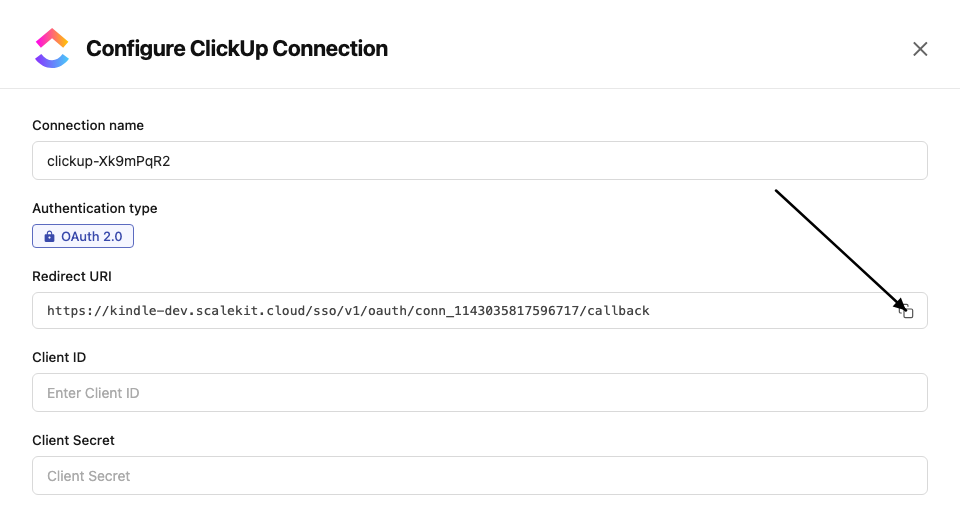
-
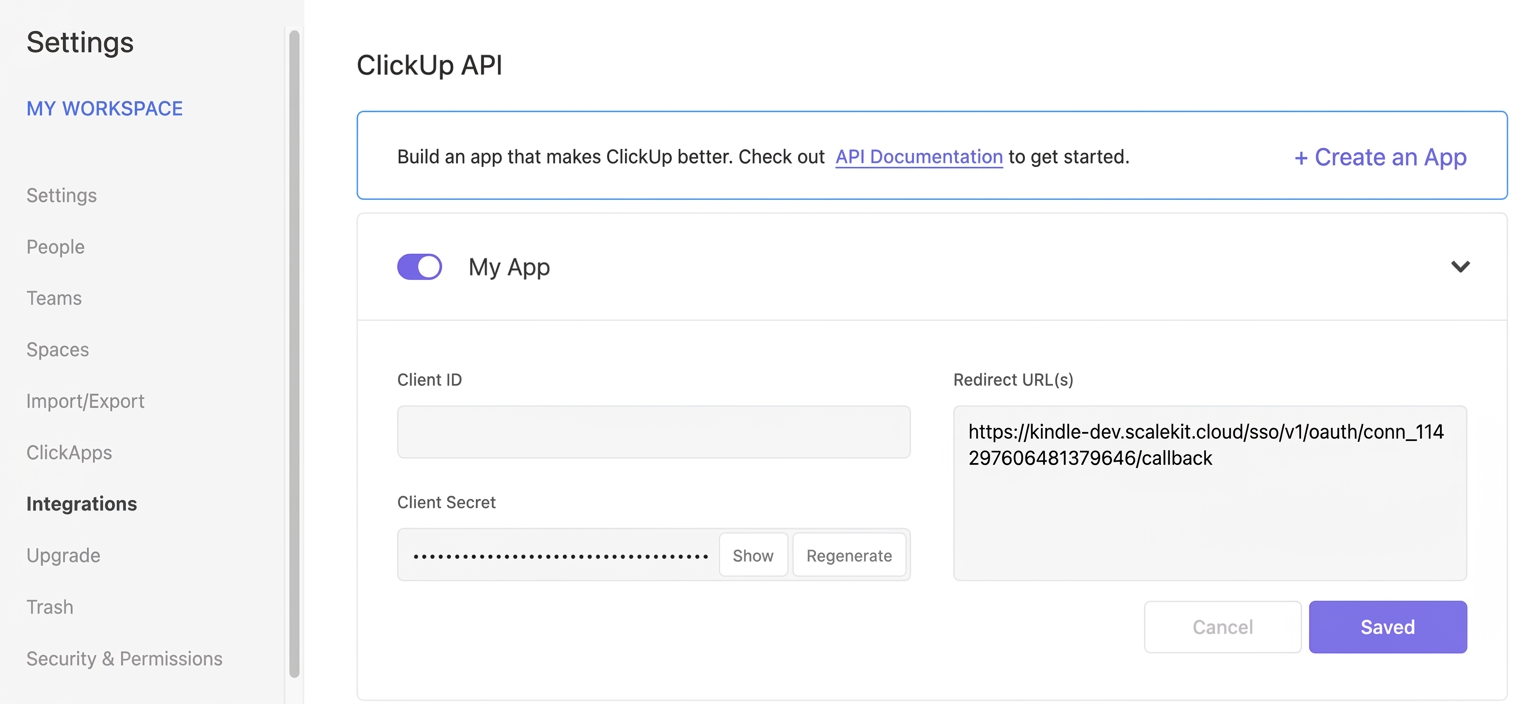
In ClickUp, click your Workspace avatar (lower-left corner) → Settings → Integrations → ClickUp API.
-
Open your application and paste the copied URI under Redirect URL(s), then save.
-
-
Get client credentials
On your ClickUp application page (Settings → Integrations → ClickUp API):
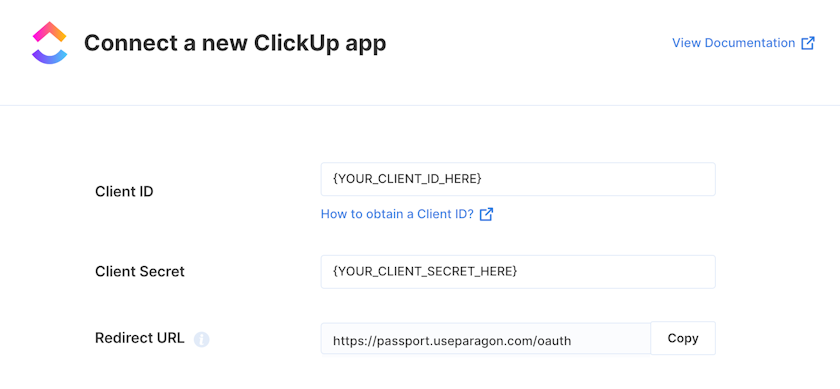
- Client ID — found under Client ID on your app page
- Client Secret — found under Client Secret on your app page
-
Add credentials in Scalekit
-
In Scalekit dashboard, go to AgentKit > Connections and open the connection you created.
-
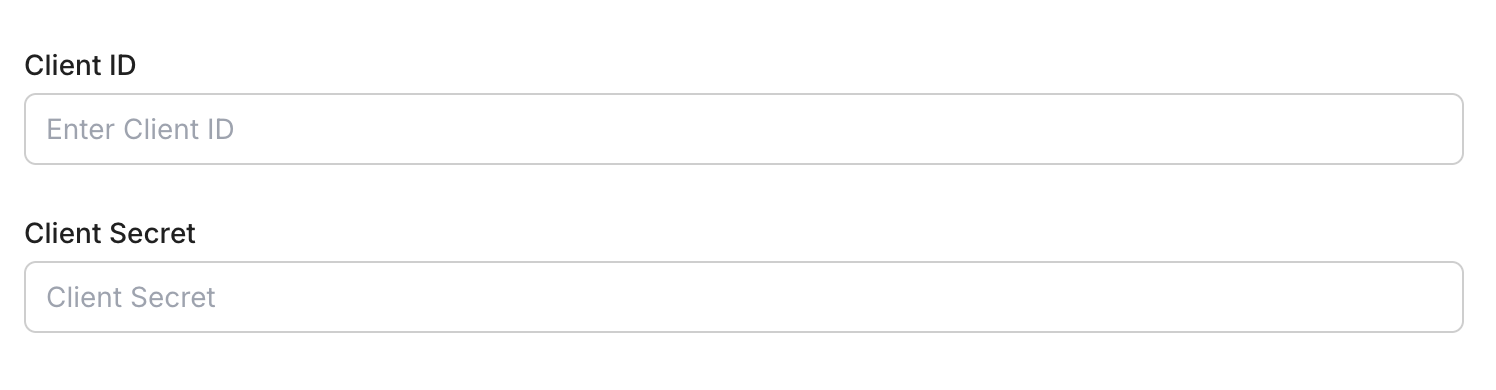
Enter your credentials:
- Client ID (from your ClickUp app page)
- Client Secret (from your ClickUp app page)
-
Click Save.
-
-
Connect a user account
- Click the Connected Accounts tab, then Add Account.
- Enter your user’s ID and click Create Account — you’ll be redirected to ClickUp to authorize access.
-
-
Authorize and make your first call
Section titled “Authorize and make your first call”quickstart.ts import { ScalekitClient } from '@scalekit-sdk/node'import 'dotenv/config'const scalekit = new ScalekitClient(process.env.SCALEKIT_ENV_URL,process.env.SCALEKIT_CLIENT_ID,process.env.SCALEKIT_CLIENT_SECRET,)const actions = scalekit.actionsconst connector = 'clickup'const identifier = 'user_123'// Generate an authorization link for the userconst { link } = await actions.getAuthorizationLink({ connectionName: connector, identifier })console.log('Authorize ClickUp:', link)process.stdout.write('Press Enter after authorizing...')await new Promise(r => process.stdin.once('data', r))// Make your first callconst result = await actions.executeTool({connector,identifier,toolName: 'clickup_user_get',toolInput: {},})console.log(result)quickstart.py import osfrom scalekit.client import ScalekitClientfrom dotenv import load_dotenvload_dotenv()scalekit_client = ScalekitClient(env_url=os.getenv("SCALEKIT_ENV_URL"),client_id=os.getenv("SCALEKIT_CLIENT_ID"),client_secret=os.getenv("SCALEKIT_CLIENT_SECRET"),)actions = scalekit_client.actionsconnection_name = "clickup"identifier = "user_123"# Generate an authorization link for the userlink_response = actions.get_authorization_link(connection_name=connection_name,identifier=identifier,)print("Authorize ClickUp:", link_response.link)input("Press Enter after authorizing...")# Make your first callresult = actions.execute_tool(tool_input={},tool_name="clickup_user_get",connection_name=connection_name,identifier=identifier,)print(result)
What you can do
Section titled “What you can do”Connect this agent connector to let your agent:
- Manage tasks — create, update, delete, and search tasks; set priorities, due dates, assignees, and statuses
- Manage lists — create, update, and delete lists in folders or as folderless lists; get members
- Manage folders — create, update, and delete folders; list all folders in a space
- Manage spaces — create, update, and delete spaces; manage space tags and views
- Manage comments — add, update, and delete comments on tasks and lists
- Manage goals — create, update, delete, and list goals and their key results
- Track time — list and create time entries for tasks
- Manage checklists — create task checklists and checklist items
- Manage webhooks — create, update, delete, and list workspace webhooks
- Access workspace data — get user info, list workspaces, spaces, and views
Common workflows
Section titled “Common workflows”Proxy API call
const result = await actions.request({ connectionName: 'clickup', identifier: 'user_123', path: '/api/v2/user', method: 'GET',});console.log(result);result = actions.request( connection_name='clickup', identifier='user_123', path="/api/v2/user", method="GET")print(result)Execute a tool
const result = await actions.executeTool({ connector: 'clickup', identifier: 'user_123', toolName: 'clickup_list', toolInput: {},});console.log(result);result = actions.execute_tool( tool_input={}, tool_name='clickup_list', connection_name='clickup', identifier='user_123',)print(result)Tool list
Section titled “Tool list”Use the exact tool names from the Tool list below when you call execute_tool. If you’re not sure which name to use, list the tools available for the current user first.
clickup_chat_channels_list#List Chat channels in a ClickUp Workspace, including regular channels, direct messages, and group direct messages.7 params
List Chat channels in a ClickUp Workspace, including regular channels, direct messages, and group direct messages.
workspace_idstringrequiredThe Workspace ID to list Chat channels forcursorstringoptionalPagination cursor from a previous responsedescription_formatstringoptionalFormat to render each channel's description ininclude_closedbooleanoptionalIf true, includes closed direct messages and group direct messages. Defaults to false.is_followerbooleanoptionalIf true, only return channels the authenticated user follows. Defaults to false.limitintegeroptionalMaximum number of channels to return per page (1-100). Defaults to 50.with_message_sinceintegeroptionalOnly return channels with messages since this Unix timestamp (milliseconds)clickup_chat_message_create#Send a top-level message into a ClickUp Chat channel. Note: the real ClickUp v3 endpoint for this requires both a workspace_id and channel_id in the path (unlike some early docs listings) — use clickup_chat_channels_list to find a channel_id first.7 params
Send a top-level message into a ClickUp Chat channel. Note: the real ClickUp v3 endpoint for this requires both a workspace_id and channel_id in the path (unlike some early docs listings) — use clickup_chat_channels_list to find a channel_id first.
channel_idstringrequiredThe ID of the Chat channel to post the message intocontentstringrequiredThe message content (max 40,000 characters)workspace_idstringrequiredThe Workspace ID the channel belongs tocontent_formatstringoptionalFormat of the content fieldfollowersarrayoptionalArray of user IDs to add as followers of this message (max 10)post_titlestringoptionalTitle for the message when type is "post"typestringoptionalType of message to createclickup_checklist_delete#Permanently delete a checklist and all of its checklist items from a ClickUp task.1 param
Permanently delete a checklist and all of its checklist items from a ClickUp task.
checklist_idstringrequiredThe unique identifier of the checklist to deleteclickup_checklist_item_create#Add a new item to an existing ClickUp task checklist.3 params
Add a new item to an existing ClickUp task checklist.
checklist_idstringrequiredChecklist ID (UUID)namestringrequiredItem labelassigneeintegeroptionalUser ID to assign to this itemclickup_checklist_item_delete#Permanently delete a single line item from a ClickUp checklist.2 params
Permanently delete a single line item from a ClickUp checklist.
checklist_idstringrequiredThe unique identifier of the checklist that contains the itemchecklist_item_idstringrequiredThe unique identifier of the checklist item to deleteclickup_checklist_item_update#Rename, reassign, resolve, or nest a ClickUp checklist item.6 params
Rename, reassign, resolve, or nest a ClickUp checklist item.
checklist_idstringrequiredThe unique identifier of the checklist that contains the itemchecklist_item_idstringrequiredThe unique identifier of the checklist item to updateassigneestringoptionalUser ID to assign this checklist item to. Pass null to unassign.namestringoptionalNew text for the checklist itemparentstringoptionalThe checklist_item_id of another item to nest this item under. Pass null to un-nest.resolvedbooleanoptionalWhether the checklist item is marked as resolved (checked off)clickup_checklist_update#Rename a ClickUp checklist or change its position among the other checklists on a task.3 params
Rename a ClickUp checklist or change its position among the other checklists on a task.
checklist_idstringrequiredThe unique identifier of the checklist to updatenamestringoptionalNew name for the checklistpositionintegeroptionalDisplay order of this checklist among the other checklists on the task. Use 0 to place it at the top.clickup_comment_create#Add a new comment to a ClickUp task. Supports assigning the comment to a user and sending notifications.4 params
Add a new comment to a ClickUp task. Supports assigning the comment to a user and sending notifications.
comment_textstringrequiredThe content of the commentnotify_allbooleanrequiredWhen true, notifies the comment creator in addition to other watcherstask_idstringrequiredThe unique identifier of the task to comment onassigneeintegeroptionalUser ID to assign this comment toclickup_comment_create_list#Add a new comment to a ClickUp list. Supports assigning the comment to a user and sending notifications.4 params
Add a new comment to a ClickUp list. Supports assigning the comment to a user and sending notifications.
assigneeintegerrequiredUser ID to assign this comment tocomment_textstringrequiredThe content of the commentlist_idstringrequiredThe unique identifier of the list to comment onnotify_allbooleanrequiredWhen true, also notifies the comment creatorclickup_comment_delete#Permanently delete a ClickUp comment by comment ID. This action cannot be undone.1 param
Permanently delete a ClickUp comment by comment ID. This action cannot be undone.
comment_idstringrequiredThe unique identifier of the comment to deleteclickup_comment_get_list#Retrieve comments on a ClickUp list. Returns up to 25 most recent comments by default. Use start and start_id for pagination.3 params
Retrieve comments on a ClickUp list. Returns up to 25 most recent comments by default. Use start and start_id for pagination.
list_idstringrequiredThe unique identifier of the liststartintegeroptionalUnix timestamp in milliseconds of a reference comment for paginationstart_idstringoptionalID of a reference comment for paginationclickup_comment_get_task#Retrieve comments on a ClickUp task. Returns up to 25 most recent comments. Use start and start_id for pagination.3 params
Retrieve comments on a ClickUp task. Returns up to 25 most recent comments. Use start and start_id for pagination.
task_idstringrequiredThe unique identifier of the taskstartintegeroptionalUnix timestamp in milliseconds of a reference comment for paginationstart_idstringoptionalID of a reference comment for paginationclickup_comment_thread_create#Post a threaded reply to an existing ClickUp comment.5 params
Post a threaded reply to an existing ClickUp comment.
comment_idstringrequiredThe unique identifier of the parent comment to reply tocomment_textstringrequiredThe plain text content of the replyassigneeintegeroptionalUser ID to assign the reply togroup_assigneestringoptionalGroup (user group) ID to assign the reply tonotify_allbooleanoptionalWhen true, notifies all comment participantsclickup_comment_thread_list#Retrieve the threaded replies on a ClickUp comment. The parent comment itself is not included in the response.1 param
Retrieve the threaded replies on a ClickUp comment. The parent comment itself is not included in the response.
comment_idstringrequiredThe unique identifier of the parent comment to fetch replies forclickup_comment_update#Update an existing ClickUp comment. Supports changing comment text, assignee, and resolved status.5 params
Update an existing ClickUp comment. Supports changing comment text, assignee, and resolved status.
assigneeintegerrequiredUser ID to assign this comment tocomment_idstringrequiredThe unique identifier of the comment to updatecomment_textstringrequiredNew text content for the commentresolvedbooleanrequiredWhether the comment is marked as resolvedgroup_assigneestringoptionalUser group ID to assign this comment toclickup_custom_field_list#View the Custom Fields (and their configuration options) available on a ClickUp list.2 params
View the Custom Fields (and their configuration options) available on a ClickUp list.
list_idstringrequiredThe ID of the list to fetch available Custom Fields forinclude_applied_objectsbooleanoptionalWhen true, includes applied_objects for task-type-scoped Custom Fieldsclickup_custom_field_value_remove#Clear the value of a Custom Field on a ClickUp task.4 params
Clear the value of a Custom Field on a ClickUp task.
field_idstringrequiredThe UUID of the Custom Field to cleartask_idstringrequiredThe unique identifier of the task to clear the field value oncustom_task_idsbooleanoptionalWhen true, task_id is treated as a custom task ID instead of a ClickUp task ID. Requires team_id.team_idintegeroptionalThe Workspace ID. Required when custom_task_ids is true.clickup_custom_field_value_set#Set the value of a Custom Field on a ClickUp task. The shape of the value depends on the field's type (text, number, dropdown, date, people, money, etc).5 params
Set the value of a Custom Field on a ClickUp task. The shape of the value depends on the field's type (text, number, dropdown, date, people, money, etc).
field_idstringrequiredThe UUID of the Custom Field to settask_idstringrequiredThe unique identifier of the task to set the field value onvaluestringrequiredJSON-encoded value to set, matching the field's type. Text/URL/email/phone: a JSON string, e.g. "In Progress". Number/Money: a JSON number, e.g. 42. Dropdown/Label: a JSON string option UUID or array of UUIDs. Date: a Unix millisecond timestamp number. People/Task relationship: a JSON object like {"add":[183],"rem":[]}. Manual Progress: {"current":20}.custom_task_idsbooleanoptionalWhen true, task_id is treated as a custom task ID instead of a ClickUp task ID. Requires team_id.team_idintegeroptionalThe Workspace ID. Required when custom_task_ids is true.clickup_custom_task_types_list#List the custom task types (e.g. Bug, Sprint) configured for a ClickUp Workspace, so their IDs can be used to set a task's type correctly.1 param
List the custom task types (e.g. Bug, Sprint) configured for a ClickUp Workspace, so their IDs can be used to set a task's type correctly.
team_idstringrequiredThe workspace (team) ID to list custom task types forclickup_doc_create#Create a new ClickUp Doc in a Workspace, optionally nested under a Space, Folder, List, or the Workspace root.6 params
Create a new ClickUp Doc in a Workspace, optionally nested under a Space, Folder, List, or the Workspace root.
workspace_idstringrequiredThe ID of the Workspace to create the Doc increate_pagebooleanoptionalWhen true, also creates a first blank page in the new DocnamestringoptionalThe name of the new Docparent_idstringoptionalThe ID of the Space, Folder, List, or Workspace that will contain this Docparent_typestringoptionalThe type of container parent_id refers tovisibilitystringoptionalVisibility of the new Docclickup_doc_get#Fetch metadata for a single ClickUp Doc by ID.2 params
Fetch metadata for a single ClickUp Doc by ID.
doc_idstringrequiredThe ID of the Doc to fetchworkspace_idstringrequiredThe ID of the Workspace the Doc belongs toclickup_doc_page_create#Create a new page inside a ClickUp Doc, optionally nested under a parent page.7 params
Create a new page inside a ClickUp Doc, optionally nested under a parent page.
doc_idstringrequiredThe ID of the Doc to add the page toworkspace_idstringrequiredThe ID of the Workspace the Doc belongs tocontentstringoptionalThe content of the new pagecontent_formatstringoptionalThe format the content field is written in. Default is text/md.namestringoptionalThe name of the new pageparent_page_idstringoptionalThe ID of the parent page to nest this new page undersub_titlestringoptionalSubtitle of the new pageclickup_doc_page_get#Fetch the content of a single page in a ClickUp Doc.4 params
Fetch the content of a single page in a ClickUp Doc.
doc_idstringrequiredThe ID of the Doc the page belongs topage_idstringrequiredThe ID of the page to fetchworkspace_idstringrequiredThe ID of the Workspace the Doc belongs tocontent_formatstringoptionalFormat to return the page content in. Default is text/md.clickup_doc_page_listing#Retrieve the page tree (IDs, titles, and nesting) for a ClickUp Doc, without full page content.3 params
Retrieve the page tree (IDs, titles, and nesting) for a ClickUp Doc, without full page content.
doc_idstringrequiredThe ID of the Doc to list pages forworkspace_idstringrequiredThe ID of the Workspace the Doc belongs tomax_page_depthintegeroptionalThe maximum nesting depth of pages/subpages to return. Use -1 for no limit. Default is -1.clickup_doc_page_update#Update the title or content of a page in a ClickUp Doc. Content can replace, append to, or prepend to the existing page content.8 params
Update the title or content of a page in a ClickUp Doc. Content can replace, append to, or prepend to the existing page content.
doc_idstringrequiredThe ID of the Doc the page belongs topage_idstringrequiredThe ID of the page to updateworkspace_idstringrequiredThe ID of the Workspace the Doc belongs tocontentstringoptionalNew content for the page, applied according to content_edit_modecontent_edit_modestringoptionalHow the content field is applied to the existing page content. Default is replace.content_formatstringoptionalThe format the content field is written in. Default is text/md.namestringoptionalNew name for the pagesub_titlestringoptionalNew subtitle for the pageclickup_doc_search#Search for ClickUp Docs in a Workspace, with optional filters for creator, parent location, and archived/deleted state.9 params
Search for ClickUp Docs in a Workspace, with optional filters for creator, parent location, and archived/deleted state.
workspace_idstringrequiredThe ID of the Workspace to search Docs inarchivedbooleanoptionalWhen true, include archived Docs in the results. Default is false.creatorintegeroptionalFilter results to Docs created by this user IDcursorstringoptionalPagination cursor from a previous response's next_cursordeletedbooleanoptionalWhen true, include deleted Docs in the results. Default is false.idstringoptionalFilter results to a specific Doc IDlimitintegeroptionalNumber of results per page (10-100). Default is 50.parent_idstringoptionalFilter results to Docs whose parent matches this IDparent_typestringoptionalThe type of container parent_id refers toclickup_folder_create#Create a new folder within a ClickUp space to organize lists and tasks.2 params
Create a new folder within a ClickUp space to organize lists and tasks.
namestringrequiredThe name for the new folderspace_idstringrequiredThe ID of the space to create the folder inclickup_folder_delete#Permanently delete a ClickUp folder. This action cannot be undone.1 param
Permanently delete a ClickUp folder. This action cannot be undone.
folder_idstringrequiredThe unique identifier of the folder to deleteclickup_folder_get#Retrieve details of a specific ClickUp folder by folder ID, including the lists it contains.1 param
Retrieve details of a specific ClickUp folder by folder ID, including the lists it contains.
folder_idstringrequiredThe unique identifier of the folderclickup_folder_get_all#Retrieve all folders within a ClickUp space. Optionally filter to include archived folders.2 params
Retrieve all folders within a ClickUp space. Optionally filter to include archived folders.
space_idstringrequiredThe unique identifier of the spacearchivedbooleanoptionalInclude archived folders in resultsclickup_folder_update#Rename an existing ClickUp folder.2 params
Rename an existing ClickUp folder.
folder_idstringrequiredThe unique identifier of the folder to updatenamestringrequiredNew name for the folderclickup_folder_views_list#Retrieve all views defined at the folder level in ClickUp (task and page views such as board, calendar, doc, etc).1 param
Retrieve all views defined at the folder level in ClickUp (task and page views such as board, calendar, doc, etc).
folder_idstringrequiredThe ID of the folder to list views forclickup_goal_create#Create a new goal in a ClickUp workspace. Goals help track high-level objectives with due dates and owner assignments.6 params
Create a new goal in a ClickUp workspace. Goals help track high-level objectives with due dates and owner assignments.
colorstringrequiredColor for the goal (hex code)descriptionstringrequiredDescription of the goaldue_dateintegerrequiredDue date as Unix timestamp in millisecondsmultiple_ownersbooleanrequiredAllow multiple owners for this goalnamestringrequiredName of the goalteam_idstringrequiredThe workspace (team) IDclickup_goal_delete#Remove a Goal from a ClickUp Workspace.1 param
Remove a Goal from a ClickUp Workspace.
goal_idstringrequiredGoal ID (UUID)clickup_goal_get#Retrieve the details of a ClickUp Goal including its targets.1 param
Retrieve the details of a ClickUp Goal including its targets.
goal_idstringrequiredGoal ID (UUID)clickup_goal_get_all#Retrieve all goals in a ClickUp workspace. Optionally filter to include or exclude completed goals.2 params
Retrieve all goals in a ClickUp workspace. Optionally filter to include or exclude completed goals.
team_idstringrequiredThe workspace (team) IDinclude_completedbooleanoptionalInclude completed goals in results (defaults to true)clickup_goal_key_result_create#Add a Target (Key Result) to a ClickUp Goal, tracking progress as a number, currency, boolean, percentage, or automatically from linked tasks/lists.9 params
Add a Target (Key Result) to a ClickUp Goal, tracking progress as a number, currency, boolean, percentage, or automatically from linked tasks/lists.
goal_idstringrequiredThe unique identifier of the goal to add the key result tolist_idsarrayrequiredList IDs to link with this key resultnamestringrequiredThe name of the key resultownersarrayrequiredArray of user IDs who own this key resultsteps_endintegerrequiredTarget (ending) value for progress trackingsteps_startintegerrequiredStarting value for progress trackingtask_idsarrayrequiredTask IDs to link with this key resulttypestringrequiredHow progress is tracked for this key resultunitstringrequiredUnit of measurement for the tracked valueclickup_goal_key_result_delete#Permanently delete a Target (Key Result) from a ClickUp Goal.1 param
Permanently delete a Target (Key Result) from a ClickUp Goal.
key_result_idstringrequiredThe unique identifier of the key result to deleteclickup_goal_key_result_update#Update the current progress value and an optional note on a ClickUp Goal's key result.3 params
Update the current progress value and an optional note on a ClickUp Goal's key result.
key_result_idstringrequiredThe unique identifier of the key result to updatenotestringrequiredA note describing this progress updatesteps_currentintegerrequiredThe current progress valueclickup_goal_update#Update an existing ClickUp goal. Supports renaming, changing due date, description, color, and managing owners.5 params
Update an existing ClickUp goal. Supports renaming, changing due date, description, color, and managing owners.
colorstringrequiredUpdated color for the goal (hex code)descriptionstringrequiredUpdated description of the goaldue_dateintegerrequiredUpdated due date as Unix timestamp in millisecondsgoal_idstringrequiredThe unique identifier (UUID) of the goal to updatenamestringrequiredNew name for the goalclickup_guest_invite#Invite a guest to a ClickUp Workspace by email, with fine-grained permission flags. This endpoint is only available on ClickUp's Enterprise plan.8 params
Invite a guest to a ClickUp Workspace by email, with fine-grained permission flags. This endpoint is only available on ClickUp's Enterprise plan.
emailstringrequiredEmail address of the guest to inviteteam_idstringrequiredThe workspace (team) ID to invite the guest tocan_create_viewsbooleanoptionalWhether the guest can create new viewscan_edit_tagsbooleanoptionalWhether the guest can create and edit tagscan_see_points_estimatedbooleanoptionalWhether the guest can see Scrum point estimates on taskscan_see_time_estimatedbooleanoptionalWhether the guest can see time estimates on taskscan_see_time_spentbooleanoptionalWhether the guest can see time tracked on taskscustom_role_idintegeroptionalID of a custom role to assign to the guestclickup_list_create#Create a new list within a ClickUp folder. Supports setting name, description, due date, priority, and assignee.6 params
Create a new list within a ClickUp folder. Supports setting name, description, due date, priority, and assignee.
folder_idstringrequiredThe ID of the folder to create the list innamestringrequiredThe name for the new listassigneeintegeroptionalUser ID to assign to the listcontentstringoptionalDescription of the listdue_dateintegeroptionalDue date for the list as Unix timestamp in millisecondspriorityintegeroptionalPriority level: 1 (urgent), 2 (high), 3 (normal), 4 (low)clickup_list_create_folderless#Create a new list directly within a ClickUp space (not inside a folder). Useful for top-level organization.5 params
Create a new list directly within a ClickUp space (not inside a folder). Useful for top-level organization.
namestringrequiredThe name for the new listspace_idstringrequiredThe ID of the space to create the list incontentstringoptionalDescription of the listdue_dateintegeroptionalDue date as Unix timestamp in millisecondspriorityintegeroptionalPriority level: 1 (urgent), 2 (high), 3 (normal), 4 (low)clickup_list_create_folderless_from_template#Create a new folderless ClickUp list directly inside a space using an existing list template. The list ID is returned immediately, but the list's contents may still be populating asynchronously for large templates.4 params
Create a new folderless ClickUp list directly inside a space using an existing list template. The list ID is returned immediately, but the list's contents may still be populating asynchronously for large templates.
namestringrequiredThe name of the new listspace_idstringrequiredThe ID of the space to create the list intemplate_idstringrequiredThe ID of the list template to applyreturn_immediatelybooleanoptionalWhen true (default), the response returns the future list ID right away without waiting for the template to finish applyingclickup_list_create_from_template#Create a new ClickUp list inside a folder using an existing list template. The list ID is returned immediately, but the list's contents may still be populating asynchronously for large templates.3 params
Create a new ClickUp list inside a folder using an existing list template. The list ID is returned immediately, but the list's contents may still be populating asynchronously for large templates.
folder_idstringrequiredThe ID of the folder to create the list innamestringrequiredThe name of the new listtemplate_idstringrequiredThe ID of the list template to applyclickup_list_delete#Permanently delete a ClickUp list and all its contents. This action cannot be undone.1 param
Permanently delete a ClickUp list and all its contents. This action cannot be undone.
list_idstringrequiredThe unique identifier of the list to deleteclickup_list_get#Retrieve details of a specific ClickUp list by list ID.1 param
Retrieve details of a specific ClickUp list by list ID.
list_idstringrequiredThe unique identifier of the listclickup_list_get_all#Retrieve all lists within a ClickUp folder. Optionally filter to include or exclude archived lists.2 params
Retrieve all lists within a ClickUp folder. Optionally filter to include or exclude archived lists.
folder_idstringrequiredThe unique identifier of the folderarchivedbooleanoptionalInclude archived lists in resultsclickup_list_get_folderless#Retrieve all lists in a ClickUp space that are not inside a folder. These are top-level lists within the space.2 params
Retrieve all lists in a ClickUp space that are not inside a folder. These are top-level lists within the space.
space_idstringrequiredThe unique identifier of the spacearchivedbooleanoptionalInclude archived lists in resultsclickup_list_members_list#Retrieve Workspace members who have explicit access to a specific ClickUp List.1 param
Retrieve Workspace members who have explicit access to a specific ClickUp List.
list_idintegerrequiredList IDclickup_list_update#Update an existing ClickUp list. Supports renaming, updating description, due date, priority, assignee, and status color.6 params
Update an existing ClickUp list. Supports renaming, updating description, due date, priority, assignee, and status color.
list_idstringrequiredThe unique identifier of the list to updatenamestringrequiredNew name for the listcontentstringoptionalUpdated description for the listdue_dateintegeroptionalUpdated due date as Unix timestamp in millisecondspriorityintegeroptionalPriority level: 1 (urgent), 2 (high), 3 (normal), 4 (low)unset_statusbooleanoptionalSet to true to remove the list colorclickup_list_view_create#Create a new view (list, board, calendar, table, gantt, etc) scoped to a ClickUp list.3 params
Create a new view (list, board, calendar, table, gantt, etc) scoped to a ClickUp list.
list_idstringrequiredThe ID of the list to create the view innamestringrequiredThe name of the new viewtypestringrequiredThe view typeclickup_list_views_list#Retrieve all views in a ClickUp List.1 param
Retrieve all views in a ClickUp List.
list_idintegerrequiredList IDclickup_space_create#Create a new space within a ClickUp workspace. Spaces are the top-level organizational units that contain folders and lists.3 params
Create a new space within a ClickUp workspace. Spaces are the top-level organizational units that contain folders and lists.
multiple_assigneesbooleanrequiredAllow multiple assignees on tasks in this spacenamestringrequiredThe name for the new spaceteam_idstringrequiredThe workspace (team) ID to create the space inclickup_space_delete#Permanently delete a ClickUp space from your workspace. This action cannot be undone.1 param
Permanently delete a ClickUp space from your workspace. This action cannot be undone.
space_idstringrequiredThe unique identifier of the space to deleteclickup_space_get#Retrieve details of a specific ClickUp space by space ID.1 param
Retrieve details of a specific ClickUp space by space ID.
space_idstringrequiredThe unique identifier of the spaceclickup_space_get_all#Retrieve all spaces available in a ClickUp workspace (team). Optionally include archived spaces.2 params
Retrieve all spaces available in a ClickUp workspace (team). Optionally include archived spaces.
team_idstringrequiredThe workspace (team) IDarchivedbooleanoptionalInclude archived spaces in resultsclickup_space_tag_create#Create a new tag in a ClickUp Space.4 params
Create a new tag in a ClickUp Space.
space_idstringrequiredSpace IDtag_namestringrequiredTag nametag_bgstringoptionalBackground color (hex)tag_fgstringoptionalForeground color (hex)clickup_space_tag_delete#Remove a tag from a ClickUp Space.4 params
Remove a tag from a ClickUp Space.
space_idstringrequiredSpace IDtag_namestringrequiredTag name to deletetag_bgstringoptionalBackground color (hex)tag_fgstringoptionalForeground color (hex)clickup_space_tag_update#Rename a ClickUp Space tag or change its foreground/background colors.5 params
Rename a ClickUp Space tag or change its foreground/background colors.
new_namestringrequiredThe new name for the tagspace_idstringrequiredThe ID of the space that owns the tagtag_bgstringrequiredNew background color (hex)tag_fgstringrequiredNew foreground color (hex)tag_namestringrequiredThe current name of the tag to updateclickup_space_tags_list#Retrieve all task tags available in a ClickUp Space.1 param
Retrieve all task tags available in a ClickUp Space.
space_idstringrequiredSpace IDclickup_space_update#Update an existing ClickUp space. Supports renaming, changing color, privacy settings, and enabling multiple assignees.5 params
Update an existing ClickUp space. Supports renaming, changing color, privacy settings, and enabling multiple assignees.
colorstringrequiredColor for the space (hex code)multiple_assigneesbooleanrequiredAllow multiple assignees on tasksnamestringrequiredNew name for the spaceprivatebooleanrequiredWhether this space is privatespace_idstringrequiredThe unique identifier of the space to updateclickup_space_views_list#Retrieve all views in a ClickUp Space.1 param
Retrieve all views in a ClickUp Space.
space_idintegerrequiredSpace IDclickup_task_checklist_create#Add a new checklist to a ClickUp task.4 params
Add a new checklist to a ClickUp task.
namestringrequiredChecklist nametask_idstringrequiredTask IDcustom_task_idsbooleanoptionalUse custom task IDsteam_idintegeroptionalWorkspace ID (required if custom_task_ids=true)clickup_task_create#Create a new task in a ClickUp list. Supports setting name, description, assignees, status, priority, due date, start date, and more.9 params
Create a new task in a ClickUp list. Supports setting name, description, assignees, status, priority, due date, start date, and more.
list_idstringrequiredThe ID of the list to create the task innamestringrequiredThe name or title of the taskdescriptionstringoptionalPlain text description of the taskdue_dateintegeroptionalDue date as Unix timestamp in millisecondsnotify_allbooleanoptionalWhen true, notifies task creator and all assignees/watchersparentstringoptionalID of a parent task to create this as a subtaskpriorityintegeroptionalPriority level: 1 (urgent), 2 (high), 3 (normal), 4 (low)start_dateintegeroptionalStart date as Unix timestamp in millisecondsstatusstringoptionalThe status of the task (must match a status in the list)clickup_task_create_from_template#Create a new ClickUp task using an existing task template. The template must be added to your workspace before use.3 params
Create a new ClickUp task using an existing task template. The template must be added to your workspace before use.
list_idstringrequiredThe ID of the list where the task will be creatednamestringrequiredThe name for the new task being created from the templatetemplate_idstringrequiredThe ID of the task template to useclickup_task_delete#Permanently delete a ClickUp task by task ID. This action cannot be undone.1 param
Permanently delete a ClickUp task by task ID. This action cannot be undone.
task_idstringrequiredThe unique identifier of the task to deleteclickup_task_dependency_add#Create a waiting-on/blocking dependency between two ClickUp tasks. Provide exactly one of depends_on or dependency_of.5 params
Create a waiting-on/blocking dependency between two ClickUp tasks. Provide exactly one of depends_on or dependency_of.
task_idstringrequiredThe task that is waiting on or blocking another taskcustom_task_idsbooleanoptionalWhen true, task IDs are treated as custom task IDs. Requires team_id.dependency_ofstringoptionalThe ID of the task that is waiting for task_id to complete. Use this or depends_on, not both.depends_onstringoptionalThe ID of the task that must be completed before task_id. Use this or dependency_of, not both.team_idintegeroptionalThe Workspace ID. Required when custom_task_ids is true.clickup_task_dependency_delete#Remove a waiting-on/blocking dependency between two ClickUp tasks.5 params
Remove a waiting-on/blocking dependency between two ClickUp tasks.
dependency_ofstringrequiredThe task ID that depends on task_iddepends_onstringrequiredThe task ID that task_id depends ontask_idstringrequiredThe task the dependency is set oncustom_task_idsbooleanoptionalWhen true, task IDs are treated as custom task IDs. Requires team_id.team_idintegeroptionalThe Workspace ID. Required when custom_task_ids is true.clickup_task_get#Retrieve details of a specific ClickUp task by task ID. Returns task properties, assignees, status, dates, and custom fields.3 params
Retrieve details of a specific ClickUp task by task ID. Returns task properties, assignees, status, dates, and custom fields.
task_idstringrequiredThe unique identifier of the taskinclude_markdown_descriptionbooleanoptionalReturn task description in Markdown formatinclude_subtasksbooleanoptionalInclude subtasks in the responseclickup_task_link_add#Link two ClickUp tasks together (a non-dependency relationship shown on both tasks).4 params
Link two ClickUp tasks together (a non-dependency relationship shown on both tasks).
links_tostringrequiredThe task to link totask_idstringrequiredThe task to link fromcustom_task_idsbooleanoptionalWhen true, task IDs are treated as custom task IDs. Requires team_id.team_idintegeroptionalThe Workspace ID. Required when custom_task_ids is true.clickup_task_link_delete#Remove a link between two ClickUp tasks.4 params
Remove a link between two ClickUp tasks.
links_tostringrequiredThe task to unlink fromtask_idstringrequiredThe source task of the linkcustom_task_idsbooleanoptionalWhen true, task IDs are treated as custom task IDs. Requires team_id.team_idintegeroptionalThe Workspace ID. Required when custom_task_ids is true.clickup_task_list#Retrieve tasks from a specific ClickUp list. Supports filtering by status, assignee, tags, and date ranges. Returns up to 100 tasks per page.7 params
Retrieve tasks from a specific ClickUp list. Supports filtering by status, assignee, tags, and date ranges. Returns up to 100 tasks per page.
list_idstringrequiredThe ID of the list to retrieve tasks fromarchivedbooleanoptionalReturn archived tasksinclude_closedbooleanoptionalInclude closed tasks in the resultsorder_bystringoptionalField to sort tasks by: id, created, updated, or due_datepageintegeroptionalPage number for pagination (starts at 0)reversebooleanoptionalDisplay results in reverse ordersubtasksbooleanoptionalInclude subtasks in the resultsclickup_task_members_list#Retrieve Workspace members who have access to a specific ClickUp task.1 param
Retrieve Workspace members who have access to a specific ClickUp task.
task_idstringrequiredTask IDclickup_task_search#Search and filter tasks across an entire ClickUp workspace (team). Supports filtering by spaces, lists, folders, statuses, assignees, tags, and date ranges.8 params
Search and filter tasks across an entire ClickUp workspace (team). Supports filtering by spaces, lists, folders, statuses, assignees, tags, and date ranges.
team_idstringrequiredThe workspace (team) ID to search tasks withindue_date_gtintegeroptionalFilter tasks with due date greater than this Unix timestamp in millisecondsdue_date_ltintegeroptionalFilter tasks with due date less than this Unix timestamp in millisecondsinclude_closedbooleanoptionalInclude closed tasks in the resultsorder_bystringoptionalSort field: id, created, updated, or due_datepageintegeroptionalPage number for pagination (starts at 0)reversebooleanoptionalDisplay results in reverse ordersubtasksbooleanoptionalInclude subtasks in the resultsclickup_task_tag_add#Attach an existing Space tag to a ClickUp task.4 params
Attach an existing Space tag to a ClickUp task.
tag_namestringrequiredThe name of the tag to add. The tag must already exist in the task's space.task_idstringrequiredThe unique identifier of the task to tagcustom_task_idsbooleanoptionalWhen true, task_id is treated as a custom task ID instead of a ClickUp task ID. Requires team_id.team_idintegeroptionalThe Workspace ID. Required when custom_task_ids is true.clickup_task_tag_remove#Detach a tag from a ClickUp task. The tag definition itself is not deleted.4 params
Detach a tag from a ClickUp task. The tag definition itself is not deleted.
tag_namestringrequiredThe name of the tag to removetask_idstringrequiredThe unique identifier of the task to untagcustom_task_idsbooleanoptionalWhen true, task_id is treated as a custom task ID instead of a ClickUp task ID. Requires team_id.team_idintegeroptionalThe Workspace ID. Required when custom_task_ids is true.clickup_task_templates_list#List the task templates available in a ClickUp Workspace, so their template IDs can be used with task/list creation-from-template tools.2 params
List the task templates available in a ClickUp Workspace, so their template IDs can be used with task/list creation-from-template tools.
team_idstringrequiredThe workspace (team) ID to list task templates forpageintegeroptionalPage number for paginationclickup_task_update#Update an existing ClickUp task. Supports updating name, description, status, priority, due date, start date, and other fields.9 params
Update an existing ClickUp task. Supports updating name, description, status, priority, due date, start date, and other fields.
task_idstringrequiredThe unique identifier of the task to updatearchivedbooleanoptionalSet to true to archive the taskdescriptionstringoptionalUpdated task description. Use a space character to clear the description.due_dateintegeroptionalDue date as Unix timestamp in millisecondsnamestringoptionalNew name for the taskpriorityintegeroptionalPriority level: 1 (urgent), 2 (high), 3 (normal), 4 (low)start_dateintegeroptionalStart date as Unix timestamp in millisecondsstatusstringoptionalNew status for the tasktime_estimateintegeroptionalTime estimate in millisecondsclickup_time_entries_list#Retrieve time entries within a date range for a ClickUp Workspace.9 params
Retrieve time entries within a date range for a ClickUp Workspace.
team_idstringrequiredWorkspace IDassigneeintegeroptionalFilter by user IDend_dateintegeroptionalEnd date (Unix ms)folder_idintegeroptionalFilter by folder IDis_billablebooleanoptionalFilter by billable statuslist_idintegeroptionalFilter by list IDspace_idintegeroptionalFilter by space IDstart_dateintegeroptionalStart date (Unix ms)task_idstringoptionalFilter by task IDclickup_time_entry_create#Log a time entry for a task in a ClickUp Workspace.7 params
Log a time entry for a task in a ClickUp Workspace.
durationintegerrequiredDuration in millisecondsstartintegerrequiredStart timestamp (Unix ms)team_idstringrequiredWorkspace IDassigneeintegeroptionalUser ID to assign entry tobillablebooleanoptionalMark as billabledescriptionstringoptionalTime entry descriptiontidstringoptionalTask ID to associate withclickup_time_entry_delete#Permanently delete a tracked time entry from a ClickUp Workspace.2 params
Permanently delete a tracked time entry from a ClickUp Workspace.
team_idstringrequiredWorkspace IDtimer_idstringrequiredThe ID of the time entry to deleteclickup_time_entry_get#Fetch a single time entry from a ClickUp Workspace by ID.6 params
Fetch a single time entry from a ClickUp Workspace by ID.
team_idstringrequiredWorkspace IDtimer_idstringrequiredThe ID of the time entry to fetchinclude_approval_detailsbooleanoptionalInclude approval details for this time entryinclude_approval_historybooleanoptionalInclude the approval history for this time entryinclude_location_namesbooleanoptionalInclude List, Folder, and Space names in the responseinclude_task_tagsbooleanoptionalInclude the associated task's tags in the responseclickup_time_entry_running_get#Get the currently running time entry (live timer) for a user in a ClickUp Workspace, if any.2 params
Get the currently running time entry (live timer) for a user in a ClickUp Workspace, if any.
team_idstringrequiredWorkspace IDassigneeintegeroptionalUser ID to check for a running timer. Defaults to the authenticated user.clickup_time_entry_start#Start a live timer for the authenticated user in a ClickUp Workspace, optionally associated with a task.5 params
Start a live timer for the authenticated user in a ClickUp Workspace, optionally associated with a task.
team_idstringrequiredWorkspace IDbillablebooleanoptionalMark the time entry as billabledescriptionstringoptionalDescription for the running time entrytagsarrayoptionalTags to apply to the running time entrytidstringoptionalTask ID to associate the timer withclickup_time_entry_stop#Stop the currently running time entry (live timer) for the authenticated user in a ClickUp Workspace.1 param
Stop the currently running time entry (live timer) for the authenticated user in a ClickUp Workspace.
team_idstringrequiredWorkspace IDclickup_time_entry_update#Update an existing ClickUp time entry's description, duration, task association, billable flag, or tags.10 params
Update an existing ClickUp time entry's description, duration, task association, billable flag, or tags.
tagsarrayrequiredTags to set on this time entryteam_idstringrequiredWorkspace IDtimer_idstringrequiredThe ID of the time entry to updatebillablebooleanoptionalMark the time entry as billabledescriptionstringoptionalNew description for the time entrydurationintegeroptionalNew duration in millisecondsendintegeroptionalNew end timestamp (Unix ms). Requires start to also be set.startintegeroptionalNew start timestamp (Unix ms). Requires end to also be set.tag_actionstringoptionalHow the tags field is applied relative to the entry's existing tagstidstringoptionalTask ID to associate the time entry withclickup_user_get#Retrieve the details of the authenticated ClickUp user account.0 params
Retrieve the details of the authenticated ClickUp user account.
clickup_view_delete#Permanently delete a ClickUp view.1 param
Permanently delete a ClickUp view.
view_idstringrequiredThe unique identifier of the view to deleteclickup_view_get#Fetch the configuration of a single ClickUp view (list, board, calendar, table, gantt, etc).1 param
Fetch the configuration of a single ClickUp view (list, board, calendar, table, gantt, etc).
view_idstringrequiredThe unique identifier of the view to fetchclickup_view_tasks_list#Retrieve all tasks in a specific ClickUp view.2 params
Retrieve all tasks in a specific ClickUp view.
view_idstringrequiredView IDpageintegeroptionalPage number (starts at 0)clickup_view_update#Rename or retype a ClickUp view, and optionally overwrite its advanced configuration (grouping, sorting, filters, columns, team_sidebar, settings) with a raw config object.4 params
Rename or retype a ClickUp view, and optionally overwrite its advanced configuration (grouping, sorting, filters, columns, team_sidebar, settings) with a raw config object.
namestringrequiredThe name of the viewtypestringrequiredThe view typeview_idstringrequiredThe unique identifier of the view to updateconfigobjectoptionalAdvanced view configuration to send as-is: grouping, divide, sorting, filters, columns, team_sidebar, settings. Merged into the request body alongside name and type.clickup_webhook_create#Create a new webhook in a ClickUp workspace to monitor specific events. Use '*' for the events field to subscribe to all events.6 params
Create a new webhook in a ClickUp workspace to monitor specific events. Use '*' for the events field to subscribe to all events.
endpointstringrequiredThe URL that will receive webhook payloadseventsarrayrequiredList of events to subscribe to, or ["*"] for all eventsteam_idstringrequiredThe workspace (team) IDlist_idintegeroptionalFilter webhook to a specific list IDspace_idintegeroptionalFilter webhook to a specific space IDtask_idstringoptionalFilter webhook to a specific task IDclickup_webhook_delete#Delete a ClickUp webhook, stopping it from monitoring events. This action cannot be undone.1 param
Delete a ClickUp webhook, stopping it from monitoring events. This action cannot be undone.
webhook_idstringrequiredThe unique identifier (UUID) of the webhook to deleteclickup_webhook_get_all#Retrieve all webhooks created via the API for a ClickUp workspace. Only returns webhooks created by the authenticated user.1 param
Retrieve all webhooks created via the API for a ClickUp workspace. Only returns webhooks created by the authenticated user.
team_idstringrequiredThe workspace (team) IDclickup_webhook_update#Update an existing ClickUp webhook. Change the endpoint URL, subscribed events, or webhook status.4 params
Update an existing ClickUp webhook. Change the endpoint URL, subscribed events, or webhook status.
endpointstringrequiredNew destination URL for the webhookeventsarrayrequiredList of events to subscribe to, or ["*"] for all eventsstatusstringrequiredStatus of the webhook (active or inactive)webhook_idstringrequiredThe unique identifier (UUID) of the webhook to updateclickup_workspace_members_list#Retrieve all members in a ClickUp Workspace. Returns all workspaces the authenticated user can access, each with its embedded members array; filter the result for the workspace matching team_id.1 param
Retrieve all members in a ClickUp Workspace. Returns all workspaces the authenticated user can access, each with its embedded members array; filter the result for the workspace matching team_id.
team_idstringrequiredWorkspace IDclickup_workspace_seats_get#Retrieve seat utilization data for a ClickUp Workspace, showing member and guest seat counts.1 param
Retrieve seat utilization data for a ClickUp Workspace, showing member and guest seat counts.
team_idstringrequiredWorkspace IDclickup_workspaces_list#Retrieve all ClickUp Workspaces available to the authenticated user.0 params
Retrieve all ClickUp Workspaces available to the authenticated user.