


Vercel connector
OAuth 2.0Developer ToolsConnect to Vercel. Access user profile, teams, projects, deployments, and environment settings.
Vercel connector
-
Install the SDK
Section titled “Install the SDK”Terminal window npm install @scalekit-sdk/nodeTerminal window pip install scalekit -
Set your credentials
Section titled “Set your credentials”Add your Scalekit credentials to your
.envfile. Find values in app.scalekit.com > Developers > API Credentials..env SCALEKIT_ENVIRONMENT_URL=<your-environment-url>SCALEKIT_CLIENT_ID=<your-client-id>SCALEKIT_CLIENT_SECRET=<your-client-secret> -
Set up the connector
Section titled “Set up the connector”Register your Vercel credentials with Scalekit so it handles the token lifecycle. You do this once per environment.
Dashboard setup steps
Register your Scalekit environment with the Vercel connector so Scalekit handles the OAuth flow and token lifecycle for your users. Follow every step below from start to finish — by the end you will have a working connection.
-
Create a Vercel OAuth integration
You need a Vercel OAuth integration to get the Client ID and Client Secret that Scalekit will use to authorize your users.
Go to the Vercel Integrations Console:
-
Open vercel.com/dashboard/integrations/console in your browser and sign in.
-
Click Create Integration (top right of the page).
-
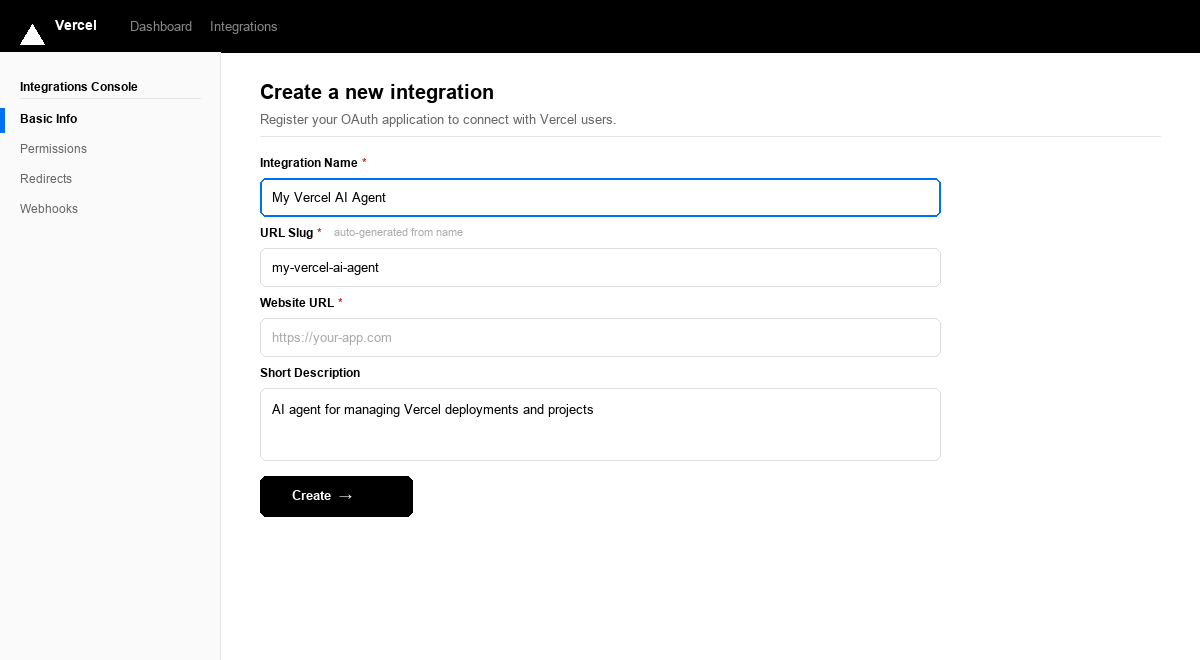
Fill in the form:
Field What to enter Integration Name A recognizable name, e.g. My Vercel AI AgentURL Slug Auto-generated from the name — you can leave it as-is Website URL Your app’s public URL. For testing you can use https://localhostShort Description Brief description of your integration -
Leave the Redirects section empty for now. You will add the Scalekit callback URL in the next step.
-
Click Create →.
After the integration is created, Vercel takes you to the integration’s settings page. Keep this tab open.
-
-
Copy the redirect URI from Scalekit
Scalekit gives you a callback URL that Vercel will redirect users back to after they authorize your app. You need to register this URL in your Vercel integration.
In the Scalekit dashboard:
- Go to app.scalekit.com and sign in.
- In the left sidebar, click AgentKit > Connections > Create Connection.
- Search for Vercel and click Create.
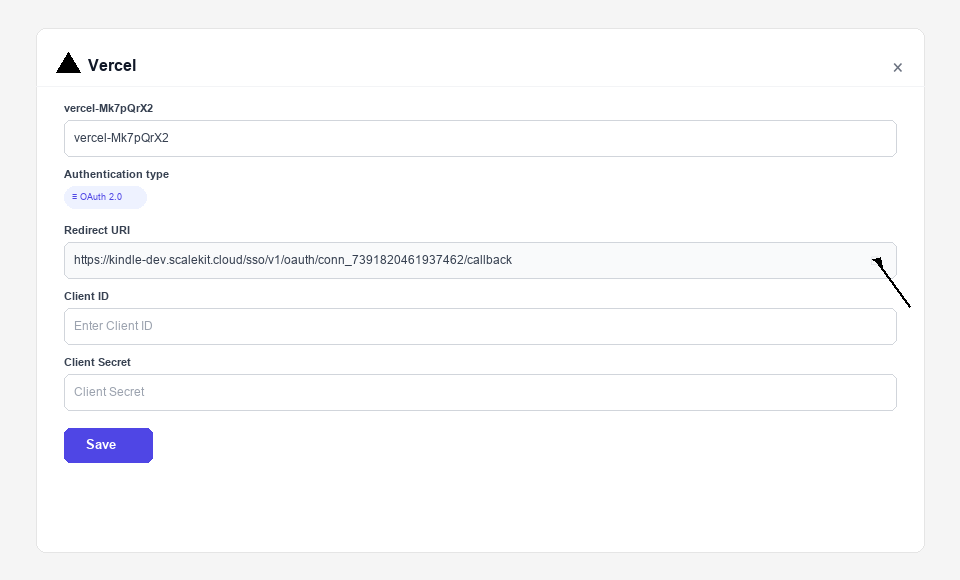
- A connection details panel opens. Find the Redirect URI field — it looks like:
https://<YOUR_ENV>.scalekit.cloud/sso/v1/oauth/conn_<ID>/callback
- Click the copy icon next to the Redirect URI to copy it to your clipboard.
-
Add the redirect URI and copy credentials from Vercel
Switch back to the Vercel integration tab you left open.
Register the redirect URI:
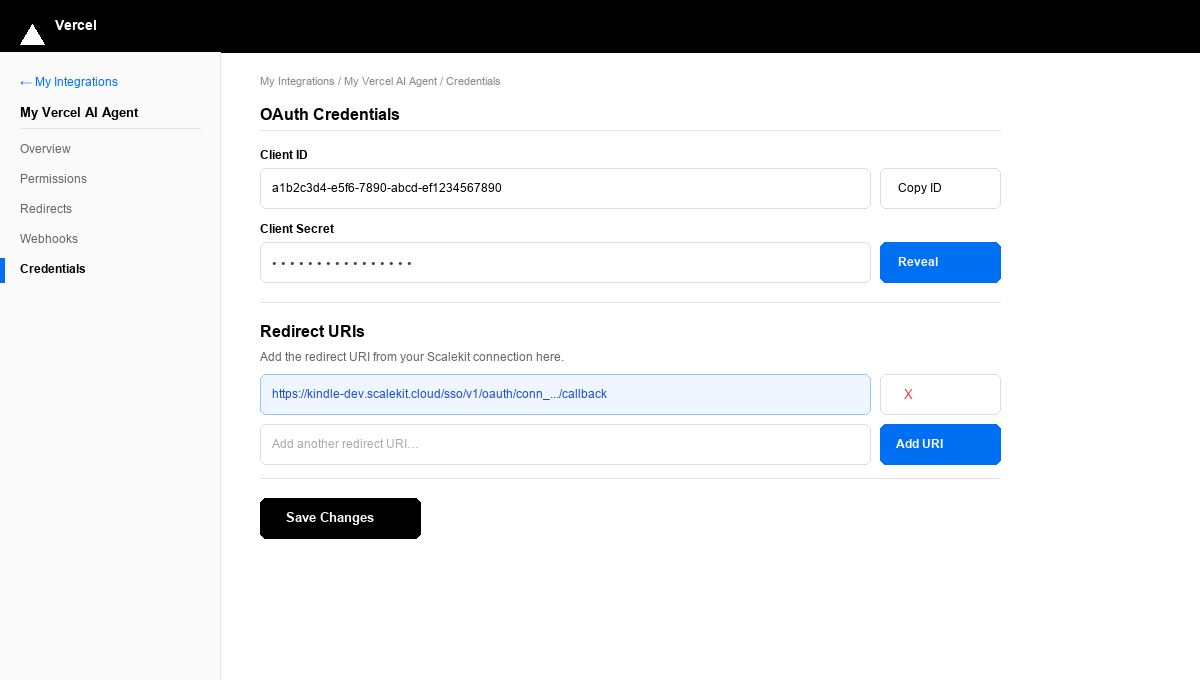
- In the left sidebar of your integration settings, click Credentials.
- Scroll down to the Redirect URIs section.
- Paste the redirect URI you copied from Scalekit into the input field.
- Click Add URI — the URI appears highlighted in the list.
- Click Save Changes.
Copy your credentials:
- Scroll up to the OAuth Credentials section.
- Client ID — shown in plain text. Click Copy ID to copy it.
- Client Secret — click Reveal to show the secret, then copy it.
Paste both values somewhere safe (a password manager or secrets vault). You will enter them into Scalekit in the next step.
-
Configure permissions in Vercel
Permissions (scopes) control which Vercel API resources your integration can access on behalf of the user.
-
In the Vercel integration settings sidebar, click Permissions.
-
Enable the scopes your integration needs:
Scope Access granted openidRequired to issue an ID token for user identification emailUser’s email address profileUser’s name, username, and profile picture offline_accessRefresh token for long-lived access without re-authorization -
Click Save Changes.
-
-
Add credentials in Scalekit
Switch back to the Scalekit dashboard tab.
-
Go to AgentKit > Connections and click the Vercel connection you created in Step 2.
-
Fill in the credentials form:
Field Value Client ID Paste the Client ID from Step 3 Client Secret Paste the Client Secret from Step 3 Scopes Enter the scopes you enabled in Step 4, e.g. openid profile email offline_access -
Click Save.
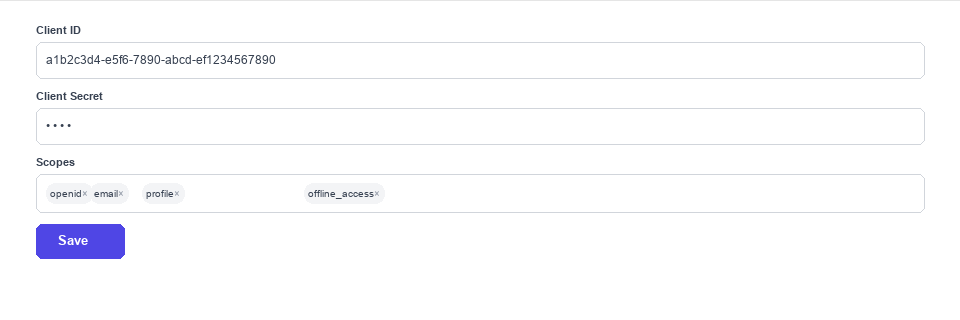
Your Vercel connection is now configured. Scalekit will use these credentials to run the OAuth flow whenever a user connects their Vercel account.
-
-
-
Authorize and make your first call
Section titled “Authorize and make your first call”quickstart.ts import { ScalekitClient } from '@scalekit-sdk/node'import 'dotenv/config'const scalekit = new ScalekitClient(process.env.SCALEKIT_ENV_URL,process.env.SCALEKIT_CLIENT_ID,process.env.SCALEKIT_CLIENT_SECRET,)const actions = scalekit.actionsconst connector = 'vercel'const identifier = 'user_123'// Generate an authorization link for the userconst { link } = await actions.getAuthorizationLink({ connectionName: connector, identifier })console.log('Authorize Vercel:', link)process.stdout.write('Press Enter after authorizing...')await new Promise(r => process.stdin.once('data', r))// Make your first callconst result = await actions.executeTool({connector,identifier,toolName: 'vercel_aliases_list',toolInput: {},})console.log(result)quickstart.py import osfrom scalekit.client import ScalekitClientfrom dotenv import load_dotenvload_dotenv()scalekit_client = ScalekitClient(env_url=os.getenv("SCALEKIT_ENV_URL"),client_id=os.getenv("SCALEKIT_CLIENT_ID"),client_secret=os.getenv("SCALEKIT_CLIENT_SECRET"),)actions = scalekit_client.actionsconnection_name = "vercel"identifier = "user_123"# Generate an authorization link for the userlink_response = actions.get_authorization_link(connection_name=connection_name,identifier=identifier,)print("Authorize Vercel:", link_response.link)input("Press Enter after authorizing...")# Make your first callresult = actions.execute_tool(tool_input={},tool_name="vercel_aliases_list",connection_name=connection_name,identifier=identifier,)print(result)
What you can do
Section titled “What you can do”Connect this agent connector to let your agent:
- Update team member, drain, domain — Change a Vercel team member’s role, or confirm an unconfirmed member’s request to join the team
- Create sandbox, drain, blob store — Creates a Vercel Sandbox — an ephemeral, isolated Linux microVM for running untrusted or AI-generated code
- Unpause project — Resume a paused Vercel project by its project ID
- Rollback project — Points a Vercel project’s production traffic back to a previous production deployment
- Pause project — Pause a Vercel project by its project ID
- List project members, project checks, feature flags — Returns the members of a specific Vercel project, including their computed project role
Common workflows
Section titled “Common workflows”Proxy API call
const result = await actions.request({ connectionName: 'vercel', identifier: 'user_123', path: '/v2/user', method: 'GET',});console.log(result);result = actions.request( connection_name='vercel', identifier='user_123', path="/v2/user", method="GET")print(result)Execute a tool
const result = await actions.executeTool({ connector: 'vercel', identifier: 'user_123', toolName: 'vercel_alias_create', toolInput: {},});console.log(result);result = actions.execute_tool( tool_input={}, tool_name='vercel_alias_create', connection_name='vercel', identifier='user_123',)print(result)Tool list
Section titled “Tool list”Use the exact tool names from the Tool list below when you call execute_tool. If you’re not sure which name to use, list the tools available for the current user first.
vercel_alias_create#Assigns an alias (custom domain) to a Vercel deployment.3 params
Assigns an alias (custom domain) to a Vercel deployment.
aliasstringrequiredThe alias hostname to assign.deployment_idstringrequiredThe deployment ID to assign the alias to.team_idstringoptionalTeam ID if the deployment belongs to a team.vercel_alias_delete#Removes an alias from a Vercel deployment.2 params
Removes an alias from a Vercel deployment.
alias_or_idstringrequiredThe alias hostname or ID to delete.team_idstringoptionalTeam ID if the alias belongs to a team.vercel_alias_get#Returns information about a specific alias by its ID or hostname.2 params
Returns information about a specific alias by its ID or hostname.
alias_or_idstringrequiredThe alias hostname or ID.team_idstringoptionalTeam ID if the alias belongs to a team.vercel_aliases_list#Returns all aliases for the authenticated user or team, with optional domain and deployment filtering.4 params
Returns all aliases for the authenticated user or team, with optional domain and deployment filtering.
domainstringoptionalFilter aliases by domain.limitintegeroptionalMaximum number of aliases to return.sinceintegeroptionalTimestamp in ms for pagination.team_idstringoptionalTeam ID to list aliases for.vercel_auth_tokens_list#Retrieve a list of the authenticated user's personal access tokens (metadata only — id, name, type, and timestamps; never the token value itself).0 params
Retrieve a list of the authenticated user's personal access tokens (metadata only — id, name, type, and timestamps; never the token value itself).
vercel_blob_store_create#Creates a new Vercel Blob store for file storage. Vercel Blob had zero coverage before this tool.5 params
Creates a new Vercel Blob store for file storage. Vercel Blob had zero coverage before this tool.
namestringrequiredName for the new Blob store (max 70 characters).accessstringoptionalAccess level for the store. Defaults to public.project_idstringoptionalProject ID to scope this store to.regionstringoptionalRegion to create the store in.team_idstringoptionalTeam ID to create the store under.vercel_certs_list#Returns all SSL certificates for the authenticated user or team, including their common names, auto-renew status, and expiration.1 param
Returns all SSL certificates for the authenticated user or team, including their common names, auto-renew status, and expiration.
team_idstringoptionalTeam ID to list certificates for.vercel_check_create#Creates a new check on a Vercel deployment. Used by integrations to report status of external checks like test suites or audits.5 params
Creates a new check on a Vercel deployment. Used by integrations to report status of external checks like test suites or audits.
blockingbooleanrequiredIf true, this check must pass before deployment is considered ready.deployment_idstringrequiredThe deployment ID to create a check for.namestringrequiredDisplay name for the check.detailsUrlstringoptionalURL where users can view check details.team_idstringoptionalTeam ID if the deployment belongs to a team.vercel_check_update#Updates the status and conclusion of a deployment check. Used to report check results back to Vercel.6 params
Updates the status and conclusion of a deployment check. Used to report check results back to Vercel.
check_idstringrequiredThe check ID to update.deployment_idstringrequiredThe deployment ID the check belongs to.conclusionstringoptionalCheck conclusion: succeeded, failed, skipped, canceled.detailsUrlstringoptionalURL where users can view check details.statusstringoptionalCheck status: running, completed.team_idstringoptionalTeam ID if the deployment belongs to a team.vercel_checks_list#Returns all checks attached to a Vercel deployment (e.g. from third-party integrations).2 params
Returns all checks attached to a Vercel deployment (e.g. from third-party integrations).
deployment_idstringrequiredThe deployment ID to list checks for.team_idstringoptionalTeam ID if the deployment belongs to a team.vercel_deployment_aliases_list#Returns all aliases assigned to a specific Vercel deployment.2 params
Returns all aliases assigned to a specific Vercel deployment.
deployment_idstringrequiredThe deployment ID to get aliases for.team_idstringoptionalTeam ID if the deployment belongs to a team.vercel_deployment_cancel#Cancels a Vercel deployment that is currently building or queued.2 params
Cancels a Vercel deployment that is currently building or queued.
deployment_idstringrequiredThe deployment ID to cancel.team_idstringoptionalTeam ID if the deployment belongs to a team.vercel_deployment_create#Creates a new Vercel deployment for a project, optionally from a Git ref or with inline files.4 params
Creates a new Vercel deployment for a project, optionally from a Git ref or with inline files.
namestringrequiredThe project name to deploy.git_sourcestringoptionalJSON object with Git source info, e.g. {"type":"github","ref":"main","repoId":"123"}.targetstringoptionalDeployment target: production or preview. Default is preview.team_idstringoptionalTeam ID if deploying to a team project.vercel_deployment_delete#Deletes a Vercel deployment by its ID.2 params
Deletes a Vercel deployment by its ID.
deployment_idstringrequiredThe deployment ID to delete.team_idstringoptionalTeam ID if the deployment belongs to a team.vercel_deployment_events_list#Returns build log events for a Vercel deployment. Useful for debugging build errors.4 params
Returns build log events for a Vercel deployment. Useful for debugging build errors.
deployment_idstringrequiredThe deployment ID to get events for.limitintegeroptionalMaximum number of log events to return.sinceintegeroptionalTimestamp in ms to fetch events after.team_idstringoptionalTeam ID if the deployment belongs to a team.vercel_deployment_file_get#Retrieve the base64-encoded content of a single file from a Vercel deployment by file ID.4 params
Retrieve the base64-encoded content of a single file from a Vercel deployment by file ID.
deployment_idstringrequiredThe unique deployment identifier.file_idstringrequiredThe unique file identifier, from List Deployment Files.pathstringoptionalPath to the file to fetch (only applies to Git deployments).team_idstringoptionalTeam ID if the deployment belongs to a team.vercel_deployment_files_list#Retrieve the source file tree of a Vercel deployment, if it was created with a retrievable files key.2 params
Retrieve the source file tree of a Vercel deployment, if it was created with a retrievable files key.
deployment_idstringrequiredThe unique deployment identifier.team_idstringoptionalTeam ID if the deployment belongs to a team.vercel_deployment_get#Returns details of a specific Vercel deployment by its ID or URL, including build status, target, and metadata.2 params
Returns details of a specific Vercel deployment by its ID or URL, including build status, target, and metadata.
id_or_urlstringrequiredThe deployment ID (dpl_xxx) or deployment URL.team_idstringoptionalTeam ID if the deployment belongs to a team.vercel_deployment_runtime_logs_get#Returns a stream of runtime function logs (serverless, edge function, edge middleware, and request logs) for a Vercel deployment. Distinct from the build/lifecycle events returned by the existing deployment events tool. Response is newline-delimited JSON log records, not a single JSON document.3 params
Returns a stream of runtime function logs (serverless, edge function, edge middleware, and request logs) for a Vercel deployment. Distinct from the build/lifecycle events returned by the existing deployment events tool. Response is newline-delimited JSON log records, not a single JSON document.
deployment_idstringrequiredThe deployment ID to fetch runtime logs for.project_idstringrequiredThe project ID the deployment belongs to.team_idstringoptionalTeam ID if the deployment belongs to a team.vercel_deployments_list#Returns a list of deployments for the authenticated user or a specific project/team, with filtering and pagination.6 params
Returns a list of deployments for the authenticated user or a specific project/team, with filtering and pagination.
fromintegeroptionalTimestamp in ms for pagination cursor.limitintegeroptionalMaximum number of deployments to return.project_idstringoptionalFilter deployments by project ID or name.statestringoptionalFilter by deployment state: BUILDING, ERROR, INITIALIZING, QUEUED, READY, CANCELED.targetstringoptionalFilter by target environment: production or preview.team_idstringoptionalFilter deployments by team ID.vercel_dns_record_create#Creates a new DNS record for a domain managed by Vercel. Supports A, AAAA, CNAME, TXT, MX, SRV, and CAA records.7 params
Creates a new DNS record for a domain managed by Vercel. Supports A, AAAA, CNAME, TXT, MX, SRV, and CAA records.
domainstringrequiredThe domain to create the DNS record for.namestringrequiredSubdomain name, or empty string for root domain.typestringrequiredRecord type: A, AAAA, CNAME, TXT, MX, SRV, CAA.valuestringrequiredThe record value (IP address, hostname, text, etc.).mx_priorityintegeroptionalPriority for MX records.team_idstringoptionalTeam ID if the domain belongs to a team.ttlintegeroptionalTime-to-live in seconds. Default is 60.vercel_dns_record_delete#Deletes a DNS record from a domain managed by Vercel.3 params
Deletes a DNS record from a domain managed by Vercel.
domainstringrequiredThe domain the DNS record belongs to.record_idstringrequiredThe ID of the DNS record to delete.team_idstringoptionalTeam ID if the domain belongs to a team.vercel_dns_record_update#Updates an existing DNS record for a domain managed by Vercel.8 params
Updates an existing DNS record for a domain managed by Vercel.
record_idstringrequiredThe ID of the DNS record to update.commentstringoptionalA comment to add context on what this DNS record is for.mx_priorityintegeroptionalNew priority for MX records.namestringoptionalNew subdomain name, or empty string for root domain.team_idstringoptionalTeam ID if the domain belongs to a team.ttlintegeroptionalNew time-to-live in seconds (60-2147483647).typestringoptionalNew record type.valuestringoptionalNew record value (IP address, hostname, text, etc.).vercel_dns_records_list#Returns all DNS records for a domain managed by Vercel.4 params
Returns all DNS records for a domain managed by Vercel.
domainstringrequiredThe domain to list DNS records for.limitintegeroptionalMaximum number of records to return.sinceintegeroptionalTimestamp in ms for pagination.team_idstringoptionalTeam ID if the domain belongs to a team.vercel_domain_add#Adds a domain to the authenticated user or team's Vercel account.2 params
Adds a domain to the authenticated user or team's Vercel account.
namestringrequiredThe domain name to add.team_idstringoptionalTeam ID to add the domain to.vercel_domain_claim#Claims ownership of a domain for the authenticated team by verifying the TXT record obtained from Get Domain Verification Record. Transfers ownership even if the domain is currently owned by another user or team.2 params
Claims ownership of a domain for the authenticated team by verifying the TXT record obtained from Get Domain Verification Record. Transfers ownership even if the domain is currently owned by another user or team.
domainstringrequiredThe domain name to claim ownership of.team_idstringoptionalTeam ID to transfer ownership into.vercel_domain_config_get#Checks how a domain is configured (CNAME, A record, or dns-01 challenge) and whether it resolves correctly to Vercel.4 params
Checks how a domain is configured (CNAME, A record, or dns-01 challenge) and whether it resolves correctly to Vercel.
domainstringrequiredThe domain name to check the configuration for.project_id_or_namestringoptionalProject ID or name to associate with the domain, when the domain is not yet associated with a project.strictbooleanoptionalWhen true, only include nameservers assigned directly to this domain (not the parent zone's).team_idstringoptionalTeam ID if the domain belongs to a team.vercel_domain_delete#Removes a domain from the authenticated user or team's Vercel account.2 params
Removes a domain from the authenticated user or team's Vercel account.
domainstringrequiredThe domain name to delete.team_idstringoptionalTeam ID if the domain belongs to a team.vercel_domain_get#Returns information about a specific domain including verification status, nameservers, and registrar.2 params
Returns information about a specific domain including verification status, nameservers, and registrar.
domainstringrequiredThe domain name to look up.team_idstringoptionalTeam ID if the domain belongs to a team.vercel_domain_update#Updates whether an apex domain is a DNS zone using Vercel's nameservers, or moves the domain out to a different user or team.5 params
Updates whether an apex domain is a DNS zone using Vercel's nameservers, or moves the domain out to a different user or team.
domainstringrequiredThe apex domain to update or move.opstringrequiredThe operation to perform: 'update' to change the zone flag, or 'move-out' to transfer the domain to another user or team.destinationstringoptionalFor op='move-out': the user or team to move the domain to.team_idstringoptionalTeam ID if the domain belongs to a team.zonebooleanoptionalFor op='update': whether this domain intends to use Vercel's nameservers as a DNS zone.vercel_domain_verification_get#Get the TXT verification record needed to claim ownership of a domain for the authenticated team. Add this TXT record to _vercel.{domain} in DNS, then call Claim Domain Ownership.2 params
Get the TXT verification record needed to claim ownership of a domain for the authenticated team. Add this TXT record to _vercel.{domain} in DNS, then call Claim Domain Ownership.
domainstringrequiredThe domain name to get the verification record for.team_idstringoptionalTeam ID to claim the domain into.vercel_domains_list#Returns all domains registered or added to the authenticated user or team's Vercel account.3 params
Returns all domains registered or added to the authenticated user or team's Vercel account.
limitintegeroptionalMaximum number of domains to return.sinceintegeroptionalTimestamp in ms for pagination.team_idstringoptionalTeam ID to list domains for.vercel_drain_create#Creates a new Vercel Drain that continuously exports observability data (logs, traces, analytics, etc) from projects to an external endpoint. This is the current replacement for the deprecated Log Drains API.7 params
Creates a new Vercel Drain that continuously exports observability data (logs, traces, analytics, etc) from projects to an external endpoint. This is the current replacement for the deprecated Log Drains API.
namestringrequiredA name for the drain.projectsstringrequiredWhether the drain applies to some projects (use project_ids) or all projects in the team.schemasobjectrequiredWhich data types to export and their schema versions, e.g. {"log": {"version": "v1"}}.deliveryobjectoptionalDelivery configuration for where and how data is sent (webhook, OpenTelemetry, or S3-compatible bucket).project_idsarrayoptionalProject IDs to scope this drain to. Required when projects='some'.samplingarrayoptionalSampling rules to reduce data volume.team_idstringoptionalTeam ID to create the drain under.vercel_drain_delete#Permanently deletes a Vercel Drain and stops its data export.2 params
Permanently deletes a Vercel Drain and stops its data export.
drain_idstringrequiredThe ID of the drain to delete.team_idstringoptionalTeam ID the drain belongs to.vercel_drain_get#Fetch a single Vercel Drain by ID.2 params
Fetch a single Vercel Drain by ID.
drain_idstringrequiredThe ID of the drain to fetch.team_idstringoptionalTeam ID the drain belongs to.vercel_drain_update#Updates the configuration of an existing Vercel Drain, such as its name, project scope, delivery target, sampling, or enabled status.8 params
Updates the configuration of an existing Vercel Drain, such as its name, project scope, delivery target, sampling, or enabled status.
drain_idstringrequiredThe ID of the drain to update.deliveryobjectoptionalNew delivery configuration for where and how data is sent.namestringoptionalNew name for the drain.project_idsarrayoptionalProject IDs to scope this drain to, when projects='some'.projectsstringoptionalWhether the drain applies to some projects (use project_ids) or all projects in the team.samplingarrayoptionalNew sampling rules to reduce data volume.statusstringoptionalEnable or disable the drain.team_idstringoptionalTeam ID the drain belongs to.vercel_drains_list#Returns all Drains configured for a Vercel team.1 param
Returns all Drains configured for a Vercel team.
team_idstringoptionalTeam ID to list drains for.vercel_edge_cache_invalidate_by_tag#Marks one or more Vercel edge cache tags as stale, causing cache entries associated with those tags to be revalidated in the background on the next request. No edge-cache management existed before this tool.4 params
Marks one or more Vercel edge cache tags as stale, causing cache entries associated with those tags to be revalidated in the background on the next request. No edge-cache management existed before this tool.
project_id_or_namestringrequiredThe project ID or name whose cache tags to invalidate.tagsarrayrequiredJSON array of cache tags to invalidate.targetstringoptionalRestrict invalidation to a specific environment.team_idstringoptionalTeam ID if the project belongs to a team.vercel_edge_config_create#Creates a new Edge Config store for storing read-only configuration data close to users at the edge.2 params
Creates a new Edge Config store for storing read-only configuration data close to users at the edge.
slugstringrequiredA unique slug for the Edge Config store.team_idstringoptionalTeam ID to create the Edge Config under.vercel_edge_config_delete#Permanently deletes an Edge Config store and all its items.2 params
Permanently deletes an Edge Config store and all its items.
edge_config_idstringrequiredThe Edge Config store ID to delete.team_idstringoptionalTeam ID if the Edge Config belongs to a team.vercel_edge_config_get#Returns details of a specific Edge Config store by its ID.2 params
Returns details of a specific Edge Config store by its ID.
edge_config_idstringrequiredThe Edge Config store ID.team_idstringoptionalTeam ID if the Edge Config belongs to a team.vercel_edge_config_item_get#Returns the value of a specific item from an Edge Config store by key.3 params
Returns the value of a specific item from an Edge Config store by key.
edge_config_idstringrequiredThe Edge Config store ID.item_keystringrequiredThe key of the item to retrieve.team_idstringoptionalTeam ID if the Edge Config belongs to a team.vercel_edge_config_items_list#Returns all key-value items stored in an Edge Config store.2 params
Returns all key-value items stored in an Edge Config store.
edge_config_idstringrequiredThe Edge Config store ID.team_idstringoptionalTeam ID if the Edge Config belongs to a team.vercel_edge_config_items_update#Creates, updates, or deletes items in an Edge Config store using a list of patch operations.3 params
Creates, updates, or deletes items in an Edge Config store using a list of patch operations.
edge_config_idstringrequiredThe Edge Config store ID.itemsstringrequiredJSON array of patch operations. Each item has 'operation' (create/update/upsert/delete), 'key', and optionally 'value'.team_idstringoptionalTeam ID if the Edge Config belongs to a team.vercel_edge_config_token_create#Creates a new read token for an Edge Config store to be used in application code.3 params
Creates a new read token for an Edge Config store to be used in application code.
edge_config_idstringrequiredThe Edge Config store ID.labelstringrequiredA descriptive label for the token.team_idstringoptionalTeam ID if the Edge Config belongs to a team.vercel_edge_config_tokens_delete#Deletes one or more read tokens from an Edge Config store.3 params
Deletes one or more read tokens from an Edge Config store.
edge_config_idstringrequiredThe Edge Config store ID.tokensstringrequiredJSON array of token IDs to delete.team_idstringoptionalTeam ID if the Edge Config belongs to a team.vercel_edge_config_tokens_list#Returns all read tokens for an Edge Config store.2 params
Returns all read tokens for an Edge Config store.
edge_config_idstringrequiredThe Edge Config store ID.team_idstringoptionalTeam ID if the Edge Config belongs to a team.vercel_edge_configs_list#Returns all Edge Config stores for the authenticated user or team.1 param
Returns all Edge Config stores for the authenticated user or team.
team_idstringoptionalTeam ID to list Edge Configs for.vercel_env_var_create#Creates a new environment variable for a Vercel project with the specified key, value, and target environments.6 params
Creates a new environment variable for a Vercel project with the specified key, value, and target environments.
id_or_namestringrequiredThe project ID or name.keystringrequiredThe environment variable key.valuestringrequiredThe environment variable value.targetstringoptionalJSON array of targets: production, preview, development. Defaults to all.team_idstringoptionalTeam ID if the project belongs to a team.typestringoptionalVariable type: plain or secret. Default is plain.vercel_env_var_delete#Deletes an environment variable from a Vercel project.3 params
Deletes an environment variable from a Vercel project.
env_idstringrequiredThe environment variable ID to delete.id_or_namestringrequiredThe project ID or name.team_idstringoptionalTeam ID if the project belongs to a team.vercel_env_var_get#Retrieve a single environment variable of a Vercel project, including its decrypted value.3 params
Retrieve a single environment variable of a Vercel project, including its decrypted value.
env_idstringrequiredThe unique ID of the environment variable to fetch.id_or_namestringrequiredThe project ID or name.team_idstringoptionalTeam ID if the project belongs to a team.vercel_env_var_update#Updates an existing environment variable for a Vercel project.5 params
Updates an existing environment variable for a Vercel project.
env_idstringrequiredThe environment variable ID to update.id_or_namestringrequiredThe project ID or name.targetstringoptionalJSON array of new targets: production, preview, development.team_idstringoptionalTeam ID if the project belongs to a team.valuestringoptionalNew value for the environment variable.vercel_env_vars_list#Returns all environment variables for a Vercel project, including their targets (production, preview, development) and encryption status.3 params
Returns all environment variables for a Vercel project, including their targets (production, preview, development) and encryption status.
id_or_namestringrequiredThe project ID or name.decryptbooleanoptionalIf true, returns decrypted values for sensitive variables.team_idstringoptionalTeam ID if the project belongs to a team.vercel_feature_flags_list#Returns the Vercel Feature Flags configured for a project. The list can be filtered by state and searched; supports pagination. Vercel Feature Flags had zero coverage before this tool.6 params
Returns the Vercel Feature Flags configured for a project. The list can be filtered by state and searched; supports pagination. Vercel Feature Flags had zero coverage before this tool.
project_id_or_namestringrequiredThe project ID or name.cursorstringoptionalPagination cursor to continue from.limitintegeroptionalMaximum number of flags to return.searchstringoptionalSearch flags by their slug or description (case-insensitive).statestringoptionalFilter by flag state: active or archived. Defaults to active.team_idstringoptionalTeam ID if the project belongs to a team.vercel_project_checks_list#Returns all checks configured for a Vercel project using the current project-scoped Checks v2 API, optionally filtered by which deployment lifecycle stage they block. Distinct from the existing checks tools, which target the older v1 API scoped to a single deployment.3 params
Returns all checks configured for a Vercel project using the current project-scoped Checks v2 API, optionally filtered by which deployment lifecycle stage they block. Distinct from the existing checks tools, which target the older v1 API scoped to a single deployment.
project_id_or_namestringrequiredThe project ID or name.blocksstringoptionalFilter checks by the deployment lifecycle stage they block.team_idstringoptionalTeam ID if the project belongs to a team.vercel_project_create#Creates a new Vercel project with a given name, framework, and optional Git repository.5 params
Creates a new Vercel project with a given name, framework, and optional Git repository.
namestringrequiredThe name of the project.frameworkstringoptionalFramework preset, e.g. nextjs, vite, gatsby, nuxtjs, create-react-app.git_repositorystringoptionalJSON object with 'type' (github/gitlab/bitbucket) and 'repo' (owner/name) fields.root_directorystringoptionalRoot directory of the project within the repository.team_idstringoptionalTeam ID to create the project under.vercel_project_delete#Permanently deletes a Vercel project and all its deployments, domains, and environment variables.2 params
Permanently deletes a Vercel project and all its deployments, domains, and environment variables.
id_or_namestringrequiredThe project ID or name to delete.team_idstringoptionalTeam ID if the project belongs to a team.vercel_project_domain_add#Assigns a domain to a Vercel project with an optional redirect target.5 params
Assigns a domain to a Vercel project with an optional redirect target.
id_or_namestringrequiredThe project ID or name.namestringrequiredThe domain name to assign to the project.git_branchstringoptionalGit branch to associate this domain with for preview deployments.redirectstringoptionalRedirect target domain if this domain should redirect.team_idstringoptionalTeam ID if the project belongs to a team.vercel_project_domain_delete#Removes a domain assignment from a Vercel project.3 params
Removes a domain assignment from a Vercel project.
domainstringrequiredThe domain name to remove from the project.id_or_namestringrequiredThe project ID or name.team_idstringoptionalTeam ID if the project belongs to a team.vercel_project_domain_verify#Attempts to verify an unverified domain assigned to a Vercel project by checking its verification TXT/CNAME challenge.3 params
Attempts to verify an unverified domain assigned to a Vercel project by checking its verification TXT/CNAME challenge.
domainstringrequiredThe domain name to verify.id_or_namestringrequiredThe project ID or name.team_idstringoptionalTeam ID if the project belongs to a team.vercel_project_domains_list#Returns all domains assigned to a specific Vercel project.3 params
Returns all domains assigned to a specific Vercel project.
id_or_namestringrequiredThe project ID or name.productionbooleanoptionalFilter to production domains only.team_idstringoptionalTeam ID if the project belongs to a team.vercel_project_get#Returns details of a specific Vercel project including its framework, Git repository, environment variables summary, and domains.2 params
Returns details of a specific Vercel project including its framework, Git repository, environment variables summary, and domains.
id_or_namestringrequiredThe project ID or name.team_idstringoptionalTeam ID if the project belongs to a team.vercel_project_members_list#Returns the members of a specific Vercel project, including their computed project role. Distinct from the existing team-members tool, which lists membership at the team level rather than a single project.6 params
Returns the members of a specific Vercel project, including their computed project role. Distinct from the existing team-members tool, which lists membership at the team level rather than a single project.
id_or_namestringrequiredThe project ID or name.limitintegeroptionalMaximum number of members to return.searchstringoptionalSearch project members by name, username, or email.sinceintegeroptionalTimestamp in ms to only include members added after this time.team_idstringoptionalTeam ID if the project belongs to a team.untilintegeroptionalTimestamp in ms to only include members added before this time.vercel_project_pause#Pause a Vercel project by its project ID. Blocks the active Production Deployment and disables auto-assigning custom production domains until the project is unpaused.2 params
Pause a Vercel project by its project ID. Blocks the active Production Deployment and disables auto-assigning custom production domains until the project is unpaused.
project_idstringrequiredThe ID of the project to pause.team_idstringoptionalTeam ID if the project belongs to a team.vercel_project_rollback#Points a Vercel project's production traffic back to a previous production deployment.4 params
Points a Vercel project's production traffic back to a previous production deployment.
deployment_idstringrequiredThe ID of the deployment to roll back to.project_idstringrequiredThe ID of the project to roll back.descriptionstringoptionalThe reason for the rollback.team_idstringoptionalTeam ID if the project belongs to a team.vercel_project_unpause#Resume a paused Vercel project by its project ID. Re-enables the active Production Deployment and auto-assigning custom production domains.2 params
Resume a paused Vercel project by its project ID. Re-enables the active Production Deployment and auto-assigning custom production domains.
project_idstringrequiredThe ID of the project to unpause.team_idstringoptionalTeam ID if the project belongs to a team.vercel_project_update#Updates a Vercel project's name, framework, build command, output directory, or other settings.7 params
Updates a Vercel project's name, framework, build command, output directory, or other settings.
id_or_namestringrequiredThe project ID or name to update.build_commandstringoptionalCustom build command override.frameworkstringoptionalFramework preset to apply.install_commandstringoptionalCustom install command override.namestringoptionalNew project name.output_directorystringoptionalCustom output directory override.team_idstringoptionalTeam ID if the project belongs to a team.vercel_projects_list#Returns all projects for the authenticated user or team, with optional search and pagination.4 params
Returns all projects for the authenticated user or team, with optional search and pagination.
fromintegeroptionalTimestamp in ms for pagination cursor.limitintegeroptionalMaximum number of projects to return.searchstringoptionalFilter projects by name search query.team_idstringoptionalTeam ID to list projects for. Omit for personal projects.vercel_sandbox_create#Creates a Vercel Sandbox — an ephemeral, isolated Linux microVM for running untrusted or AI-generated code. Named sandboxes have a unique name within a project and support automatic snapshotting on shutdown. Vercel Sandbox had zero coverage before this tool.10 params
Creates a Vercel Sandbox — an ephemeral, isolated Linux microVM for running untrusted or AI-generated code. Named sandboxes have a unique name within a project and support automatic snapshotting on shutdown. Vercel Sandbox had zero coverage before this tool.
envobjectoptionalDefault environment variables for the sandbox, as a JSON object of string key/value pairs. Inherited by all commands unless overridden.imagestringoptionalContainer image to use for the sandbox, instead of the default runtime image.namestringoptionalName for the sandbox. Must be unique per project and URL-safe (alphanumeric, hyphens, underscores).portsarrayoptionalJSON array of port numbers to expose from the sandbox (each 1024-65535). Each port is reachable via a unique URL. Maximum of 15 ports.project_idstringoptionalThe target project slug or ID the sandbox will be assigned to.resourcesobjectoptionalJSON object defining the sandbox VM resources: vcpus (integer, 1 or an even number, default 2) and memory (integer, MB, must equal vcpus * 2048).runtimestringoptionalThe runtime environment for the sandbox. Determines pre-installed language runtimes and tools. Defaults to node24.sourceobjectoptionalJSON object describing where to initialize the sandbox filesystem from. One of: {"type": "git", "url": "...", "username": "...", "password": "...", "depth": 1, "revision": "..."} to clone a Git repo; {"type": "tarball", "url": "..."} to download and extract a gzipped tarball; or {"type": "snapshot", "snapshotId": "..."} to restore from an existing snapshot.team_idstringoptionalTeam ID to create the sandbox under.timeoutintegeroptionalMaximum duration in milliseconds the sandbox can run before being automatically stopped.vercel_team_create#Creates a new Vercel team with the specified slug and optional name.2 params
Creates a new Vercel team with the specified slug and optional name.
slugstringrequiredA unique URL-friendly identifier for the team.namestringoptionalDisplay name for the team.vercel_team_delete#Permanently deletes a Vercel team and all its associated resources.1 param
Permanently deletes a Vercel team and all its associated resources.
team_idstringrequiredThe team ID or slug to delete.vercel_team_get#Returns details of a specific Vercel team by its ID or slug.1 param
Returns details of a specific Vercel team by its ID or slug.
team_idstringrequiredThe team ID or slug.vercel_team_member_invite#Invites a user to a Vercel team by email address with a specified role.3 params
Invites a user to a Vercel team by email address with a specified role.
emailstringrequiredEmail address of the user to invite.team_idstringrequiredThe team ID or slug.rolestringoptionalRole to assign: OWNER, MEMBER, VIEWER, DEVELOPER, BILLING.vercel_team_member_remove#Removes a member from a Vercel team by their user ID.2 params
Removes a member from a Vercel team by their user ID.
team_idstringrequiredThe team ID or slug.user_idstringrequiredThe user ID of the member to remove.vercel_team_member_update#Change a Vercel team member's role, or confirm an unconfirmed member's request to join the team. The authenticated user must be an owner of the team.4 params
Change a Vercel team member's role, or confirm an unconfirmed member's request to join the team. The authenticated user must be an owner of the team.
team_idstringrequiredThe ID of the team the member belongs to.uidstringrequiredThe ID of the member to update.confirmedbooleanoptionalSet to true to accept a user who requested access to the team.rolestringoptionalNew role for the member in the team. Default is MEMBER.vercel_team_members_list#Returns all members of a Vercel team including their roles and join dates.4 params
Returns all members of a Vercel team including their roles and join dates.
team_idstringrequiredThe team ID or slug.limitintegeroptionalMaximum number of members to return.rolestringoptionalFilter by role: OWNER, MEMBER, VIEWER, DEVELOPER, BILLING.sinceintegeroptionalTimestamp in ms to fetch members joined after this time.vercel_team_update#Updates a Vercel team's name, slug, description, or other settings.4 params
Updates a Vercel team's name, slug, description, or other settings.
team_idstringrequiredThe team ID or slug to update.descriptionstringoptionalNew description for the team.namestringoptionalNew display name for the team.slugstringoptionalNew URL-friendly slug for the team.vercel_teams_list#Returns all teams the authenticated user belongs to, with pagination support.3 params
Returns all teams the authenticated user belongs to, with pagination support.
limitintegeroptionalMaximum number of teams to return.sinceintegeroptionalTimestamp in milliseconds to fetch teams created after this time.untilintegeroptionalTimestamp in milliseconds to fetch teams created before this time.vercel_user_get#Returns the authenticated user's profile including name, email, username, and account details.0 params
Returns the authenticated user's profile including name, email, username, and account details.
vercel_webhook_create#Creates a new webhook that sends event notifications to the specified URL for Vercel deployment and project events.4 params
Creates a new webhook that sends event notifications to the specified URL for Vercel deployment and project events.
eventsstringrequiredJSON array of event types to subscribe to, e.g. ["deployment.created","deployment.succeeded"].urlstringrequiredThe HTTPS endpoint URL to receive webhook payloads.project_idsstringoptionalJSON array of project IDs to scope this webhook to. Omit for all projects.team_idstringoptionalTeam ID to create the webhook for.vercel_webhook_delete#Permanently deletes a Vercel webhook.2 params
Permanently deletes a Vercel webhook.
webhook_idstringrequiredThe webhook ID to delete.team_idstringoptionalTeam ID if the webhook belongs to a team.vercel_webhook_get#Returns details of a specific Vercel webhook by its ID.2 params
Returns details of a specific Vercel webhook by its ID.
webhook_idstringrequiredThe webhook ID.team_idstringoptionalTeam ID if the webhook belongs to a team.vercel_webhooks_list#Returns all webhooks configured for the authenticated user or team.1 param
Returns all webhooks configured for the authenticated user or team.
team_idstringoptionalTeam ID to list webhooks for.