


Snowflake connector
OAuth 2.0AnalyticsDatabasesConnect to Snowflake to manage and analyze your data warehouse workloads
Snowflake connector
-
Install the SDK
Section titled “Install the SDK”Terminal window npm install @scalekit-sdk/nodeTerminal window pip install scalekit -
Set your credentials
Section titled “Set your credentials”Add your Scalekit credentials to your
.envfile. Find values in app.scalekit.com > Developers > API Credentials..env SCALEKIT_ENVIRONMENT_URL=<your-environment-url>SCALEKIT_CLIENT_ID=<your-client-id>SCALEKIT_CLIENT_SECRET=<your-client-secret> -
Set up the connector
Section titled “Set up the connector”Register your Snowflake credentials with Scalekit so it handles the token lifecycle. You do this once per environment.
Dashboard setup steps
Register your Scalekit environment with the Snowflake connector so Scalekit handles the authentication flow and token lifecycle for you. The connection name you create will be used to identify and invoke the connection programmatically. You’ll need to create an OAuth Security Integration in your Snowflake account.
-
Set up auth redirects
-
In Scalekit dashboard, go to AgentKit > Connections > Create Connection.
-
Find Snowflake from the list of providers and click Create. Copy the redirect URI. It looks like
https://<SCALEKIT_ENVIRONMENT_URL>/sso/v1/oauth/<CONNECTION_ID>/callback.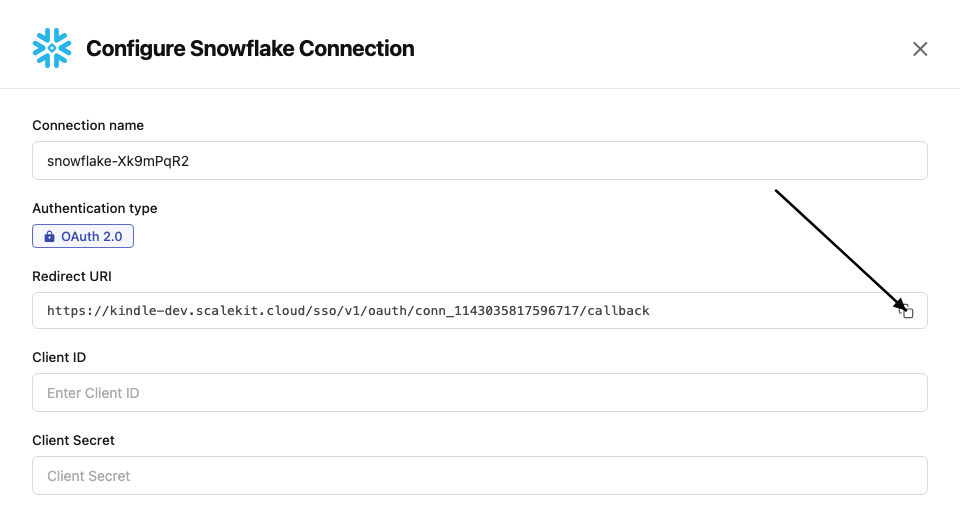
-
Log into your Snowflake account (Snowsight) and run the following SQL to create an OAuth Security Integration, replacing
<redirect_uri>with the URI you copied:CREATE OR REPLACE SECURITY INTEGRATION scalekit_oauthTYPE = OAUTHOAUTH_CLIENT = CUSTOMOAUTH_CLIENT_TYPE = 'CONFIDENTIAL'OAUTH_REDIRECT_URI = '<redirect_uri>'ENABLED = TRUE;
-
-
Get client credentials
-
After creating the integration, run the following SQL to retrieve the client credentials:
SELECT SYSTEM$SHOW_OAUTH_CLIENT_SECRETS('SCALEKIT_OAUTH'); -
This returns a JSON object containing:
- Client ID — value of
OAUTH_CLIENT_ID - Client Secret — value of
OAUTH_CLIENT_SECRET_2(orOAUTH_CLIENT_SECRET_1)
- Client ID — value of
-
-
Add credentials in Scalekit
-
In Scalekit dashboard, go to AgentKit > Connections and open the connection you created.
-
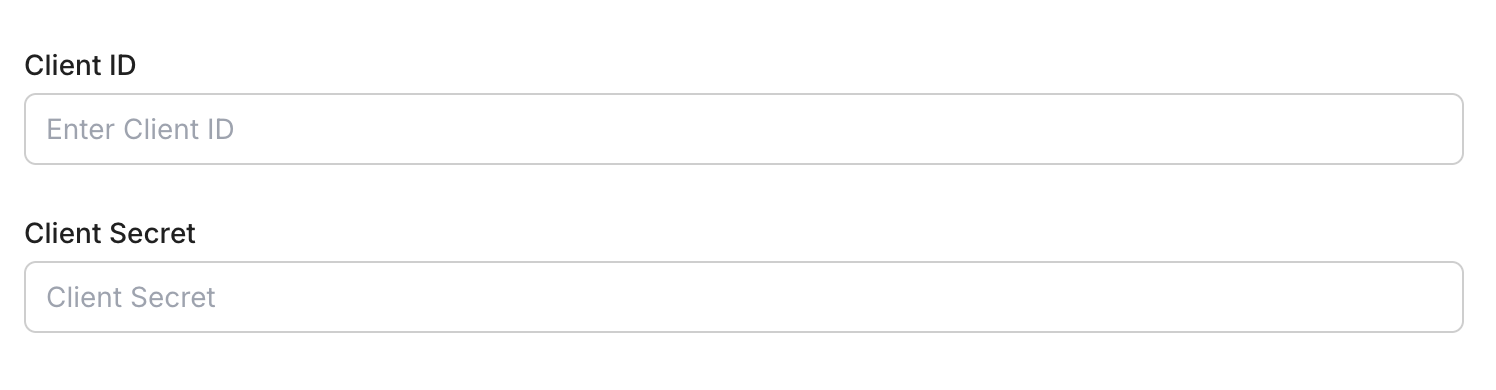
Enter your credentials:
- Client ID (from the SQL output)
- Client Secret (from the SQL output)
-
Click Save.
-
-
-
Authorize and make your first call
Section titled “Authorize and make your first call”quickstart.ts import { ScalekitClient } from '@scalekit-sdk/node'import 'dotenv/config'const scalekit = new ScalekitClient(process.env.SCALEKIT_ENV_URL,process.env.SCALEKIT_CLIENT_ID,process.env.SCALEKIT_CLIENT_SECRET,)const actions = scalekit.actionsconst connector = 'snowflake'const identifier = 'user_123'// Generate an authorization link for the userconst { link } = await actions.getAuthorizationLink({ connectionName: connector, identifier })console.log('Authorize Snowflake:', link)process.stdout.write('Press Enter after authorizing...')await new Promise(r => process.stdin.once('data', r))// Make your first callconst result = await actions.executeTool({connector,identifier,toolName: 'snowflake_cancel_query',toolInput: { statement_handle: 'YOUR_STATEMENT_HANDLE' },})console.log(result)quickstart.py import osfrom scalekit.client import ScalekitClientfrom dotenv import load_dotenvload_dotenv()scalekit_client = ScalekitClient(env_url=os.getenv("SCALEKIT_ENV_URL"),client_id=os.getenv("SCALEKIT_CLIENT_ID"),client_secret=os.getenv("SCALEKIT_CLIENT_SECRET"),)actions = scalekit_client.actionsconnection_name = "snowflake"identifier = "user_123"# Generate an authorization link for the userlink_response = actions.get_authorization_link(connection_name=connection_name,identifier=identifier,)print("Authorize Snowflake:", link_response.link)input("Press Enter after authorizing...")# Make your first callresult = actions.execute_tool(tool_input={"statement_handle":"YOUR_STATEMENT_HANDLE"},tool_name="snowflake_cancel_query",connection_name=connection_name,identifier=identifier,)print(result)
What you can do
Section titled “What you can do”Connect this agent connector to let your agent:
- Table undrop, drop, clone — Restore a recently dropped table from Time Travel using the Table REST API (POST /api/v2/databases/{database}/schemas/{schema}/tables/{name}:undrop)
- Schema undrop, drop, alter — Restore a recently dropped schema from Time Travel using the Schema REST API (POST /api/v2/databases/{database}/schemas/{name}:undrop)
- Database undrop, drop, clone — Restore a recently dropped Snowflake database from Time Travel using the Database REST API (POST /api/v2/databases/{name}:undrop)
- Warehouse suspend, resume, rename — Suspend a running Snowflake warehouse, releasing its compute resources (POST /api/v2/warehouses/{name}:suspend)
- User revoke role from, grant role to, drop — Run REVOKE ROLE
<role_name>FROM USER<user_name>via the SQL statements API - Role revoke privilege from, grant privilege to, drop — Run REVOKE [GRANT OPTION FOR]
<privileges>ON<object_type><object_name>FROM ROLE<role_name>[RESTRICT | CASCADE] via the SQL statements API
Common workflows
Section titled “Common workflows”Don’t worry about your Snowflake account domain in the path. Scalekit automatically resolves {{domain}} from the connected account’s configuration. For example, a request with path="/api/v2/statements" will be sent to https://myorg-myaccount.snowflakecomputing.com/api/v2/statements automatically.
Proxy API call
const result = await actions.request({ connectionName: 'snowflake', identifier: 'user_123', path: '/api/v2/statements', method: 'POST',});console.log(result);result = actions.request( connection_name='snowflake', identifier='user_123', path="/api/v2/statements", method="POST")print(result)Execute a tool
const result = await actions.executeTool({ connector: 'snowflake', identifier: 'user_123', toolName: 'snowflake_cancel_query', toolInput: {},});console.log(result);result = actions.execute_tool( tool_input={}, tool_name='snowflake_cancel_query', connection_name='snowflake', identifier='user_123',)print(result)Tool list
Section titled “Tool list”Use the exact tool names from the Tool list below when you call execute_tool. If you’re not sure which name to use, list the tools available for the current user first.
snowflake_alter_database#Create the specified database if it does not already exist, or alter its properties if it does, using the Database REST API (PUT /api/v2/databases/{name}). Snowflake requires the full property set even when changing only one value.5 params
Create the specified database if it does not already exist, or alter its properties if it does, using the Database REST API (PUT /api/v2/databases/{name}). Snowflake requires the full property set even when changing only one value.
database_namestringrequiredName of the database to create or altercommentstringoptionalComment to attach to the databasedata_retention_time_in_daysintegeroptionalNumber of days of Time Travel history retained for objects in the databasekindstringoptionalDatabase durability level: PERMANENT or TRANSIENTmax_data_extension_time_in_daysintegeroptionalMaximum number of days Snowflake can extend data retention to keep dependent streams from becoming stalesnowflake_alter_schema#Create the specified schema if it does not already exist, or alter its properties if it does, using the Schema REST API (PUT /api/v2/databases/{database}/schemas/{name}). Snowflake requires the full property set even when changing only one value.7 params
Create the specified schema if it does not already exist, or alter its properties if it does, using the Schema REST API (PUT /api/v2/databases/{database}/schemas/{name}). Snowflake requires the full property set even when changing only one value.
database_namestringrequiredDatabase that contains the schemaschema_namestringrequiredName of the schema to create or altercommentstringoptionalComment to attach to the schemadata_retention_time_in_daysintegeroptionalNumber of days of Time Travel history retained for objects in the schemakindstringoptionalSchema durability level: PERMANENT or TRANSIENTmanaged_accessbooleanoptionalWhether grants on objects in the schema are managed by the schema owner rolemax_data_extension_time_in_daysintegeroptionalMaximum number of days Snowflake can extend data retention to keep dependent streams from becoming stalesnowflake_alter_table#Create the specified table if it does not already exist, or alter its properties if it does, using the Table REST API (PUT /api/v2/databases/{database}/schemas/{schema}/tables/{name}). Snowflake requires the full property set (including all columns) even when changing only one value.10 params
Create the specified table if it does not already exist, or alter its properties if it does, using the Table REST API (PUT /api/v2/databases/{database}/schemas/{schema}/tables/{name}). Snowflake requires the full property set (including all columns) even when changing only one value.
database_namestringrequiredDatabase that contains the tableschema_namestringrequiredSchema that contains the tabletable_namestringrequiredName of the table to create or alterchange_trackingbooleanoptionalWhether to enable change tracking on the table for use with streamscluster_byarrayoptionalOne or more columns or column expressions to use as the clustering keycolumnsarrayoptionalFull ordered list of column definitions for the table. Each column is an object with at least 'name' and 'datatype', and may also include 'nullable' (boolean), 'default' (string expression), and 'comment'. Snowflake requires the complete column set on every call, even when altering just one other property.commentstringoptionalComment to attach to the tabledata_retention_time_in_daysintegeroptionalNumber of days of Time Travel history retained for the tablekindstringoptionalTable durability level: PERMANENT, TRANSIENT, or TEMPORARYmax_data_extension_time_in_daysintegeroptionalMaximum number of days Snowflake can extend data retention to keep dependent streams from becoming stalesnowflake_alter_warehouse#Create the specified warehouse if it does not already exist, or alter its properties if it does, using the Warehouse REST API (PUT /api/v2/warehouses/{name}). Snowflake requires the full property set even when changing only one value.11 params
Create the specified warehouse if it does not already exist, or alter its properties if it does, using the Warehouse REST API (PUT /api/v2/warehouses/{name}). Snowflake requires the full property set even when changing only one value.
warehouse_namestringrequiredName of the warehouse to create or alterauto_resumestringoptionalWhether to automatically resume the warehouse when a statement is submitted to itauto_suspendintegeroptionalIdle time in seconds before the warehouse automatically suspendscommentstringoptionalComment to attach to the warehousemax_cluster_countintegeroptionalMaximum number of clusters for a multi-cluster warehousemin_cluster_countintegeroptionalMinimum number of clusters for a multi-cluster warehouseresource_monitorstringoptionalName of an existing resource monitor to assign to the warehousescaling_policystringoptionalScaling policy for a multi-cluster warehouse: STANDARD or ECONOMYwait_for_completionstringoptionalWhether to block the response until an in-progress resize finishes provisioningwarehouse_sizestringoptionalCompute size of the warehousewarehouse_typestringoptionalType of warehouse: STANDARD or SNOWPARK-OPTIMIZEDsnowflake_cancel_query#Cancel a running Snowflake SQL API statement by statement handle.2 params
Cancel a running Snowflake SQL API statement by statement handle.
statement_handlestringrequiredSnowflake statement handle to cancelrequest_idstringoptionalOptional request ID used when the statement was submittedsnowflake_clone_database#Create a new database as a zero-copy clone of an existing database, optionally as of a past point in time, using the Database REST API (POST /api/v2/databases/{source_database_name}:clone). Equivalent to CREATE DATABASE ... CLONE ...5 params
Create a new database as a zero-copy clone of an existing database, optionally as of a past point in time, using the Database REST API (POST /api/v2/databases/{source_database_name}:clone). Equivalent to CREATE DATABASE ... CLONE ...
database_namestringrequiredName for the new database produced by the clonesource_database_namestringrequiredName of the existing database to clone fromcommentstringoptionalComment to attach to the new databasecreate_modestringoptionalBehavior when a database with this name already existspoint_of_timeobjectoptionalTime Travel reference identifying the historical state of the source database to clonesnowflake_clone_table#Create a new table as a zero-copy clone of an existing table, optionally as of a past point in time and optionally into a different database/schema, using the Table REST API (POST /api/v2/databases/{database}/schemas/{schema}/tables/{source_table_name}:clone). Equivalent to CREATE TABLE ... CLONE ...10 params
Create a new table as a zero-copy clone of an existing table, optionally as of a past point in time and optionally into a different database/schema, using the Table REST API (POST /api/v2/databases/{database}/schemas/{schema}/tables/{source_table_name}:clone). Equivalent to CREATE TABLE ... CLONE ...
database_namestringrequiredDatabase that contains the source tableschema_namestringrequiredSchema that contains the source tablesource_table_namestringrequiredName of the existing table to clone fromtable_namestringrequiredName for the new table produced by the clonecommentstringoptionalComment to attach to the new tablecopy_grantsbooleanoptionalWhether to retain any explicit grants on an existing table of the same name when create_mode is orReplacecreate_modestringoptionalBehavior when a table with the new name already existspoint_of_timeobjectoptionalTime Travel reference identifying the historical state of the source table to clonetarget_databasestringoptionalDatabase for the newly created table. Defaults to the source table's database.target_schemastringoptionalSchema for the newly created table. Defaults to the source table's schema.snowflake_create_database#Create a new Snowflake database using the Database REST API (POST /api/v2/databases). Equivalent to CREATE DATABASE.6 params
Create a new Snowflake database using the Database REST API (POST /api/v2/databases). Equivalent to CREATE DATABASE.
database_namestringrequiredName of the new databasecommentstringoptionalComment to attach to the databasecreate_modestringoptionalBehavior when a database with this name already existsdata_retention_time_in_daysintegeroptionalNumber of days of Time Travel history retained for objects in the databasekindstringoptionalDatabase durability level: PERMANENT or TRANSIENTmax_data_extension_time_in_daysintegeroptionalMaximum number of days Snowflake can extend data retention to keep dependent streams from becoming stalesnowflake_create_role#Create a new Snowflake account role using the Role REST API (POST /api/v2/roles). Equivalent to CREATE ROLE.3 params
Create a new Snowflake account role using the Role REST API (POST /api/v2/roles). Equivalent to CREATE ROLE.
role_namestringrequiredName of the new rolecommentstringoptionalComment to attach to the rolecreate_modestringoptionalBehavior when a role with this name already existssnowflake_create_schema#Create a new schema inside a Snowflake database using the Schema REST API (POST /api/v2/databases/{database}/schemas). Equivalent to CREATE SCHEMA.8 params
Create a new schema inside a Snowflake database using the Schema REST API (POST /api/v2/databases/{database}/schemas). Equivalent to CREATE SCHEMA.
database_namestringrequiredDatabase the new schema will belong toschema_namestringrequiredName of the new schemacommentstringoptionalComment to attach to the schemacreate_modestringoptionalBehavior when a schema with this name already existsdata_retention_time_in_daysintegeroptionalNumber of days of Time Travel history retained for objects in the schemakindstringoptionalSchema durability level: PERMANENT or TRANSIENTmanaged_accessbooleanoptionalWhether grants on objects in the schema are managed by the schema owner rolemax_data_extension_time_in_daysintegeroptionalMaximum number of days Snowflake can extend data retention to keep dependent streams from becoming stalesnowflake_create_table#Create a new table in a Snowflake schema using the Table REST API (POST /api/v2/databases/{database}/schemas/{schema}/tables). Equivalent to CREATE TABLE.11 params
Create a new table in a Snowflake schema using the Table REST API (POST /api/v2/databases/{database}/schemas/{schema}/tables). Equivalent to CREATE TABLE.
columnsarrayrequiredOrdered list of column definitions for the new table. Each column is an object with at least 'name' and 'datatype', and may also include 'nullable' (boolean), 'default' (string expression), and 'comment'.database_namestringrequiredDatabase that will contain the new tableschema_namestringrequiredSchema that will contain the new tabletable_namestringrequiredName of the new tablechange_trackingbooleanoptionalWhether to enable change tracking on the table for use with streamscluster_byarrayoptionalOne or more columns or column expressions to use as the clustering keycommentstringoptionalComment to attach to the tablecopy_grantsbooleanoptionalWhether to retain any explicit grants on an existing table of the same name when create_mode is orReplacecreate_modestringoptionalBehavior when a table with this name already existsdata_retention_time_in_daysintegeroptionalNumber of days of Time Travel history retained for the tablekindstringoptionalTable durability level: PERMANENT, TRANSIENT, or TEMPORARYsnowflake_create_user#Create a new Snowflake user using the User REST API (POST /api/v2/users). Equivalent to CREATE USER.13 params
Create a new Snowflake user using the User REST API (POST /api/v2/users). Equivalent to CREATE USER.
user_namestringrequiredLogin identifier for the new usercommentstringoptionalComment to attach to the usercreate_modestringoptionalBehavior when a user with this name already existsdefault_namespacestringoptionalDatabase (and optionally schema) used by default for this user's sessionsdefault_rolestringoptionalRole used by default for this user's sessionsdefault_warehousestringoptionalWarehouse used by default for this user's sessionsdisabledbooleanoptionalWhether the user account is created in a disabled statedisplay_namestringoptionalName shown for the user in SnowsightemailstringoptionalEmail address of the userlogin_namestringoptionalName the user types to log inmust_change_passwordbooleanoptionalWhether the user must set a new password at next loginpasswordstringoptionalInitial password for the useruser_typestringoptionalType of user: PERSON, SERVICE, or LEGACY_SERVICEsnowflake_create_warehouse#Create a new Snowflake virtual warehouse using the Warehouse REST API (POST /api/v2/warehouses). Equivalent to CREATE WAREHOUSE.12 params
Create a new Snowflake virtual warehouse using the Warehouse REST API (POST /api/v2/warehouses). Equivalent to CREATE WAREHOUSE.
warehouse_namestringrequiredName of the new warehouseauto_resumestringoptionalWhether to automatically resume the warehouse when a statement is submitted to itauto_suspendintegeroptionalIdle time in seconds before the warehouse automatically suspendscommentstringoptionalComment to attach to the warehousecreate_modestringoptionalBehavior when a warehouse with this name already existsinitially_suspendedstringoptionalWhether the warehouse is created in the Suspended state instead of starting immediatelymax_cluster_countintegeroptionalMaximum number of clusters for a multi-cluster warehousemin_cluster_countintegeroptionalMinimum number of clusters for a multi-cluster warehouseresource_monitorstringoptionalName of an existing resource monitor to assign to the warehousescaling_policystringoptionalScaling policy for a multi-cluster warehouse: STANDARD or ECONOMYwarehouse_sizestringoptionalCompute size of the warehousewarehouse_typestringoptionalType of warehouse: STANDARD or SNOWPARK-OPTIMIZEDsnowflake_drop_database#Permanently remove a Snowflake database using the Database REST API (DELETE /api/v2/databases/{name}). Equivalent to DROP DATABASE.3 params
Permanently remove a Snowflake database using the Database REST API (DELETE /api/v2/databases/{name}). Equivalent to DROP DATABASE.
database_namestringrequiredName of the database to dropif_existsbooleanoptionalWhether to suppress the not-found error if the database does not existrestrictbooleanoptionalWhether to block the drop if foreign keys outside this database depend on itsnowflake_drop_role#Permanently remove a Snowflake account role using the Role REST API (DELETE /api/v2/roles/{name}). Equivalent to DROP ROLE.2 params
Permanently remove a Snowflake account role using the Role REST API (DELETE /api/v2/roles/{name}). Equivalent to DROP ROLE.
role_namestringrequiredName of the role to dropif_existsbooleanoptionalWhether to suppress the not-found error if the role does not existsnowflake_drop_schema#Permanently remove a schema from a Snowflake database using the Schema REST API (DELETE /api/v2/databases/{database}/schemas/{name}). Equivalent to DROP SCHEMA.4 params
Permanently remove a schema from a Snowflake database using the Schema REST API (DELETE /api/v2/databases/{database}/schemas/{name}). Equivalent to DROP SCHEMA.
database_namestringrequiredDatabase that contains the schemaschema_namestringrequiredName of the schema to dropif_existsbooleanoptionalWhether to suppress the not-found error if the schema does not existrestrictbooleanoptionalWhether to block the drop if foreign keys outside this schema depend on itsnowflake_drop_table#Permanently remove a table from a Snowflake schema using the Table REST API (DELETE /api/v2/databases/{database}/schemas/{schema}/tables/{name}). Equivalent to DROP TABLE.4 params
Permanently remove a table from a Snowflake schema using the Table REST API (DELETE /api/v2/databases/{database}/schemas/{schema}/tables/{name}). Equivalent to DROP TABLE.
database_namestringrequiredDatabase that contains the tableschema_namestringrequiredSchema that contains the tabletable_namestringrequiredName of the table to dropif_existsbooleanoptionalWhether to suppress the not-found error if the table does not existsnowflake_drop_user#Permanently remove a Snowflake user using the User REST API (DELETE /api/v2/users/{name}). Equivalent to DROP USER.2 params
Permanently remove a Snowflake user using the User REST API (DELETE /api/v2/users/{name}). Equivalent to DROP USER.
user_namestringrequiredLogin identifier of the user to dropif_existsbooleanoptionalWhether to suppress the not-found error if the user does not existsnowflake_drop_warehouse#Permanently remove a Snowflake virtual warehouse using the Warehouse REST API (DELETE /api/v2/warehouses/{name}). Equivalent to DROP WAREHOUSE.2 params
Permanently remove a Snowflake virtual warehouse using the Warehouse REST API (DELETE /api/v2/warehouses/{name}). Equivalent to DROP WAREHOUSE.
warehouse_namestringrequiredName of the warehouse to dropif_existsbooleanoptionalWhether to suppress the not-found error if the warehouse does not existsnowflake_execute_query#Execute one or more SQL statements against Snowflake using the SQL API. Requires a valid Snowflake OAuth2 connection. Use semicolons to submit multiple statements.12 params
Execute one or more SQL statements against Snowflake using the SQL API. Requires a valid Snowflake OAuth2 connection. Use semicolons to submit multiple statements.
statementstringrequiredSQL statement to execute. Use semicolons to send multiple statements in one request.asyncbooleanoptionalExecute statement asynchronously and return a statement handlebindingsobjectoptionalBind variables object for '?' placeholders in the SQL statementdatabasestringoptionalDatabase to use when executing the statementnullablebooleanoptionalWhen false, SQL NULL values are returned as the string "null"parametersobjectoptionalStatement-level Snowflake parameters as a JSON objectrequest_idstringoptionalUnique request identifier (UUID) used for idempotent retriesretrybooleanoptionalSet true when resubmitting a previously sent request with the same request_idrolestringoptionalRole to use when executing the statementschemastringoptionalSchema to use when executing the statementtimeoutintegeroptionalMaximum number of seconds to wait for statement executionwarehousestringoptionalWarehouse to use when executing the statementsnowflake_get_columns#Query INFORMATION_SCHEMA.COLUMNS for column metadata.7 params
Query INFORMATION_SCHEMA.COLUMNS for column metadata.
databasestringrequiredDatabase namecolumn_name_likestringoptionalOptional column name patternlimitintegeroptionalMaximum rowsrolestringoptionalOptional roleschemastringoptionalOptional schema filtertablestringoptionalOptional table filterwarehousestringoptionalOptional warehousesnowflake_get_query_partition#Get a specific result partition for a Snowflake SQL API statement.3 params
Get a specific result partition for a Snowflake SQL API statement.
partitionintegerrequiredPartition index to fetch (0-based)statement_handlestringrequiredSnowflake statement handle returned by Execute Queryrequest_idstringoptionalOptional request ID used when the statement was submittedsnowflake_get_query_status#Get Snowflake SQL API statement status and first partition result metadata by statement handle.2 params
Get Snowflake SQL API statement status and first partition result metadata by statement handle.
statement_handlestringrequiredSnowflake statement handle returned by Execute Queryrequest_idstringoptionalOptional request ID used when the statement was submittedsnowflake_get_referential_constraints#Query INFORMATION_SCHEMA.REFERENTIAL_CONSTRAINTS.6 params
Query INFORMATION_SCHEMA.REFERENTIAL_CONSTRAINTS.
databasestringrequiredDatabase namelimitintegeroptionalMaximum rowsrolestringoptionalOptional roleschemastringoptionalOptional schema filtertablestringoptionalOptional table filterwarehousestringoptionalOptional warehousesnowflake_get_schemata#Query INFORMATION_SCHEMA.SCHEMATA for schema metadata.5 params
Query INFORMATION_SCHEMA.SCHEMATA for schema metadata.
databasestringrequiredDatabase namelimitintegeroptionalMaximum rowsrolestringoptionalOptional roleschema_likestringoptionalOptional schema patternwarehousestringoptionalOptional warehousesnowflake_get_table_constraints#Query INFORMATION_SCHEMA.TABLE_CONSTRAINTS.7 params
Query INFORMATION_SCHEMA.TABLE_CONSTRAINTS.
databasestringrequiredDatabase nameconstraint_typestringoptionalOptional constraint type filterlimitintegeroptionalMaximum rowsrolestringoptionalOptional roleschemastringoptionalOptional schema filtertablestringoptionalOptional table filterwarehousestringoptionalOptional warehousesnowflake_get_tables#Query INFORMATION_SCHEMA.TABLES for table metadata in a Snowflake database.6 params
Query INFORMATION_SCHEMA.TABLES for table metadata in a Snowflake database.
databasestringrequiredDatabase namelimitintegeroptionalMaximum number of rowsrolestringoptionalOptional roleschemastringoptionalOptional schema filtertable_name_likestringoptionalOptional table name patternwarehousestringoptionalOptional warehousesnowflake_grant_privilege_to_role#Run GRANT <privileges> ON <object_type> <object_name> TO ROLE <role_name> via the SQL statements API, optionally WITH GRANT OPTION. Grants one or more privileges on a specific securable object to an account role. Re-running with the same privileges/object/role is a no-op.7 params
Run GRANT <privileges> ON <object_type> <object_name> TO ROLE <role_name> via the SQL statements API, optionally WITH GRANT OPTION. Grants one or more privileges on a specific securable object to an account role. Re-running with the same privileges/object/role is a no-op.
object_namestringrequiredFully-qualified name of the object to grant privileges onobject_typestringrequiredType of the securable object the privileges apply toprivilegesarrayrequiredOne or more privileges to grant, e.g. ["SELECT", "INSERT"] or ["ALL PRIVILEGES"]. Valid values depend on object_type.role_namestringrequiredName of the role that will receive the privilegesrolestringoptionalOptional execution rolewarehousestringoptionalOptional warehouse to execute the statement onwith_grant_optionbooleanoptionalWhether the receiving role can in turn grant these privileges to other rolessnowflake_grant_role_to_user#Run GRANT ROLE <role_name> TO USER <user_name> via the SQL statements API. Grants an existing account role to an existing user, giving that user the role's privileges. Re-running with the same role/user is a no-op.4 params
Run GRANT ROLE <role_name> TO USER <user_name> via the SQL statements API. Grants an existing account role to an existing user, giving that user the role's privileges. Re-running with the same role/user is a no-op.
role_namestringrequiredName of the existing role to grantuser_namestringrequiredLogin name of the user who will receive the rolerolestringoptionalOptional execution rolewarehousestringoptionalOptional warehouse to execute the statement onsnowflake_rename_warehouse#Rename a Snowflake warehouse to a new, unique identifier using the Warehouse REST API (POST /api/v2/warehouses/{name}:rename). Equivalent to ALTER WAREHOUSE ... RENAME TO ...3 params
Rename a Snowflake warehouse to a new, unique identifier using the Warehouse REST API (POST /api/v2/warehouses/{name}:rename). Equivalent to ALTER WAREHOUSE ... RENAME TO ...
current_namestringrequiredCurrent name of the warehouse to renamenew_namestringrequiredNew name for the warehouseif_existsbooleanoptionalWhether to suppress the not-found error if the warehouse does not existsnowflake_resume_warehouse#Bring a suspended Snowflake warehouse back to a running state by provisioning compute resources (POST /api/v2/warehouses/{name}:resume). Equivalent to ALTER WAREHOUSE ... RESUME.1 param
Bring a suspended Snowflake warehouse back to a running state by provisioning compute resources (POST /api/v2/warehouses/{name}:resume). Equivalent to ALTER WAREHOUSE ... RESUME.
warehouse_namestringrequiredName of the warehouse to resumesnowflake_revoke_privilege_from_role#Run REVOKE [GRANT OPTION FOR] <privileges> ON <object_type> <object_name> FROM ROLE <role_name> [RESTRICT | CASCADE] via the SQL statements API. Removes one or more previously granted privileges on a specific securable object from an account role. Re-running once the privileges are no longer granted is a no-op.8 params
Run REVOKE [GRANT OPTION FOR] <privileges> ON <object_type> <object_name> FROM ROLE <role_name> [RESTRICT | CASCADE] via the SQL statements API. Removes one or more previously granted privileges on a specific securable object from an account role. Re-running once the privileges are no longer granted is a no-op.
object_namestringrequiredFully-qualified name of the object to revoke privileges onobject_typestringrequiredType of the securable object the privileges apply toprivilegesarrayrequiredOne or more privileges to revoke, e.g. ["SELECT", "INSERT"] or ["ALL PRIVILEGES"]. Valid values depend on object_type.role_namestringrequiredName of the role to revoke the privileges fromcascade_optionstringoptionalHow to handle privileges the role in turn granted to others: RESTRICT fails if any exist, CASCADE revokes them toogrant_option_onlybooleanoptionalWhen true, only revokes the grant option (the ability to re-grant), leaving the underlying privilege grant intactrolestringoptionalOptional execution rolewarehousestringoptionalOptional warehouse to execute the statement onsnowflake_revoke_role_from_user#Run REVOKE ROLE <role_name> FROM USER <user_name> via the SQL statements API. Removes a previously granted account role from a user. Re-running once the role is no longer granted is a no-op.4 params
Run REVOKE ROLE <role_name> FROM USER <user_name> via the SQL statements API. Removes a previously granted account role from a user. Re-running once the role is no longer granted is a no-op.
role_namestringrequiredName of the role to revokeuser_namestringrequiredLogin name of the user to remove the role fromrolestringoptionalOptional execution rolewarehousestringoptionalOptional warehouse to execute the statement onsnowflake_show_databases_schemas#Run SHOW DATABASES or SHOW SCHEMAS.5 params
Run SHOW DATABASES or SHOW SCHEMAS.
object_typestringrequiredObject type to showdatabase_namestringoptionalOptional database scope for SHOW SCHEMASlike_patternstringoptionalOptional LIKE patternrolestringoptionalOptional rolewarehousestringoptionalOptional warehousesnowflake_show_grants#Run SHOW GRANTS in common modes (to role, to user, of role, on object).7 params
Run SHOW GRANTS in common modes (to role, to user, of role, on object).
grant_viewstringrequiredSHOW GRANTS variantobject_namestringoptionalObject name for on_objectobject_typestringoptionalObject type for on_objectrolestringoptionalOptional execution rolerole_namestringoptionalRole name (for to_role/of_role)user_namestringoptionalUser name (for to_user)warehousestringoptionalOptional warehousesnowflake_show_imported_exported_keys#Run SHOW IMPORTED KEYS or SHOW EXPORTED KEYS for a table. For reliable execution in this environment, use fully-qualified scope (database_name + schema_name + table_name).6 params
Run SHOW IMPORTED KEYS or SHOW EXPORTED KEYS for a table. For reliable execution in this environment, use fully-qualified scope (database_name + schema_name + table_name).
key_directionstringrequiredWhich command to runtable_namestringrequiredTable name (use with schema_name and database_name for fully-qualified scope)database_namestringoptionalOptional database name (recommended with schema_name)rolestringoptionalOptional roleschema_namestringoptionalOptional schema name (recommended with database_name)warehousestringoptionalOptional warehousesnowflake_show_primary_keys#Run SHOW PRIMARY KEYS with optional scope. When using schema_name (or schema_name + table_name), database_name is required for fully-qualified scope.5 params
Run SHOW PRIMARY KEYS with optional scope. When using schema_name (or schema_name + table_name), database_name is required for fully-qualified scope.
database_namestringoptionalOptional database name for scope (required when schema_name is set)rolestringoptionalOptional roleschema_namestringoptionalOptional schema name for scopetable_namestringoptionalOptional table name for scopewarehousestringoptionalOptional warehousesnowflake_show_warehouses#Run SHOW WAREHOUSES.3 params
Run SHOW WAREHOUSES.
like_patternstringoptionalOptional LIKE patternrolestringoptionalOptional rolewarehousestringoptionalOptional warehousesnowflake_suspend_warehouse#Suspend a running Snowflake warehouse, releasing its compute resources (POST /api/v2/warehouses/{name}:suspend). Equivalent to ALTER WAREHOUSE ... SUSPEND.1 param
Suspend a running Snowflake warehouse, releasing its compute resources (POST /api/v2/warehouses/{name}:suspend). Equivalent to ALTER WAREHOUSE ... SUSPEND.
warehouse_namestringrequiredName of the warehouse to suspendsnowflake_undrop_database#Restore a recently dropped Snowflake database from Time Travel using the Database REST API (POST /api/v2/databases/{name}:undrop). Equivalent to UNDROP DATABASE.1 param
Restore a recently dropped Snowflake database from Time Travel using the Database REST API (POST /api/v2/databases/{name}:undrop). Equivalent to UNDROP DATABASE.
database_namestringrequiredName of the dropped database to restoresnowflake_undrop_schema#Restore a recently dropped schema from Time Travel using the Schema REST API (POST /api/v2/databases/{database}/schemas/{name}:undrop). Equivalent to UNDROP SCHEMA.2 params
Restore a recently dropped schema from Time Travel using the Schema REST API (POST /api/v2/databases/{database}/schemas/{name}:undrop). Equivalent to UNDROP SCHEMA.
database_namestringrequiredDatabase that contains the dropped schemaschema_namestringrequiredName of the dropped schema to restoresnowflake_undrop_table#Restore a recently dropped table from Time Travel using the Table REST API (POST /api/v2/databases/{database}/schemas/{schema}/tables/{name}:undrop). Equivalent to UNDROP TABLE.3 params
Restore a recently dropped table from Time Travel using the Table REST API (POST /api/v2/databases/{database}/schemas/{schema}/tables/{name}:undrop). Equivalent to UNDROP TABLE.
database_namestringrequiredDatabase that contains the dropped tableschema_namestringrequiredSchema that contains the dropped tabletable_namestringrequiredName of the dropped table to restore