


Salesforce connector
OAuth 2.0CRM & SalesConnect to Salesforce CRM. Manage leads, opportunities, accounts, and customer relationships
Salesforce connector
-
Install the SDK
Section titled “Install the SDK”Terminal window npm install @scalekit-sdk/nodeTerminal window pip install scalekit -
Set your credentials
Section titled “Set your credentials”Add your Scalekit credentials to your
.envfile. Find values in app.scalekit.com > Developers > API Credentials..env SCALEKIT_ENVIRONMENT_URL=<your-environment-url>SCALEKIT_CLIENT_ID=<your-client-id>SCALEKIT_CLIENT_SECRET=<your-client-secret> -
Set up the connector
Section titled “Set up the connector”Register your Salesforce credentials with Scalekit so it handles the token lifecycle. You do this once per environment.
Dashboard setup steps
Register your Scalekit environment with the Salesforce connector using Salesforce’s External Client App (ECA) model. ECA is the recommended approach for distributing OAuth integrations to any Salesforce customer org. You need two orgs: a Partner Business Org for app creation and packaging, and a Developer Edition Org for namespace registration.
-
Prepare your Salesforce orgs
You need two orgs before starting:
- Partner Business Org — sign up at the Salesforce Partner Community. This org acts as your Dev Hub and is where you create and package the External Client App.
- Developer Edition Org — create one from your Partner Business Org. Use this org only to register a namespace.
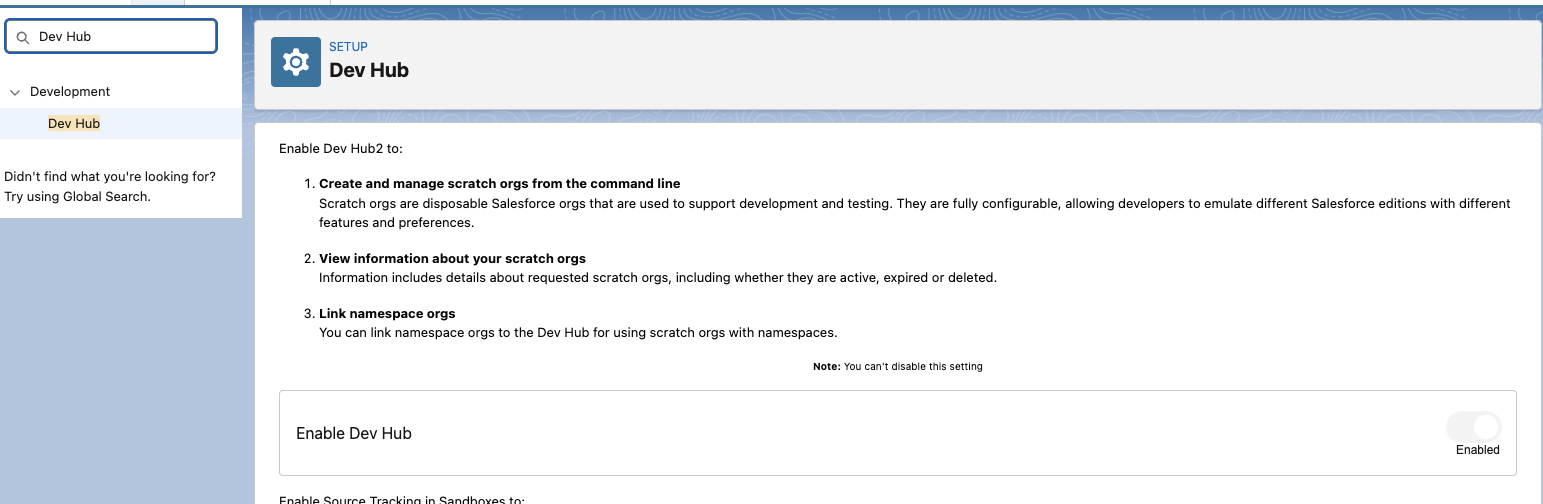
In your Partner Business Org, enable the Dev Hub:
- Go to Setup > Quick Find: Dev Hub.
- Enable Dev Hub and Unlocked Packages and Second-Generation Managed Packages.
-
Register a namespace
Create the namespace in your Developer Edition Org
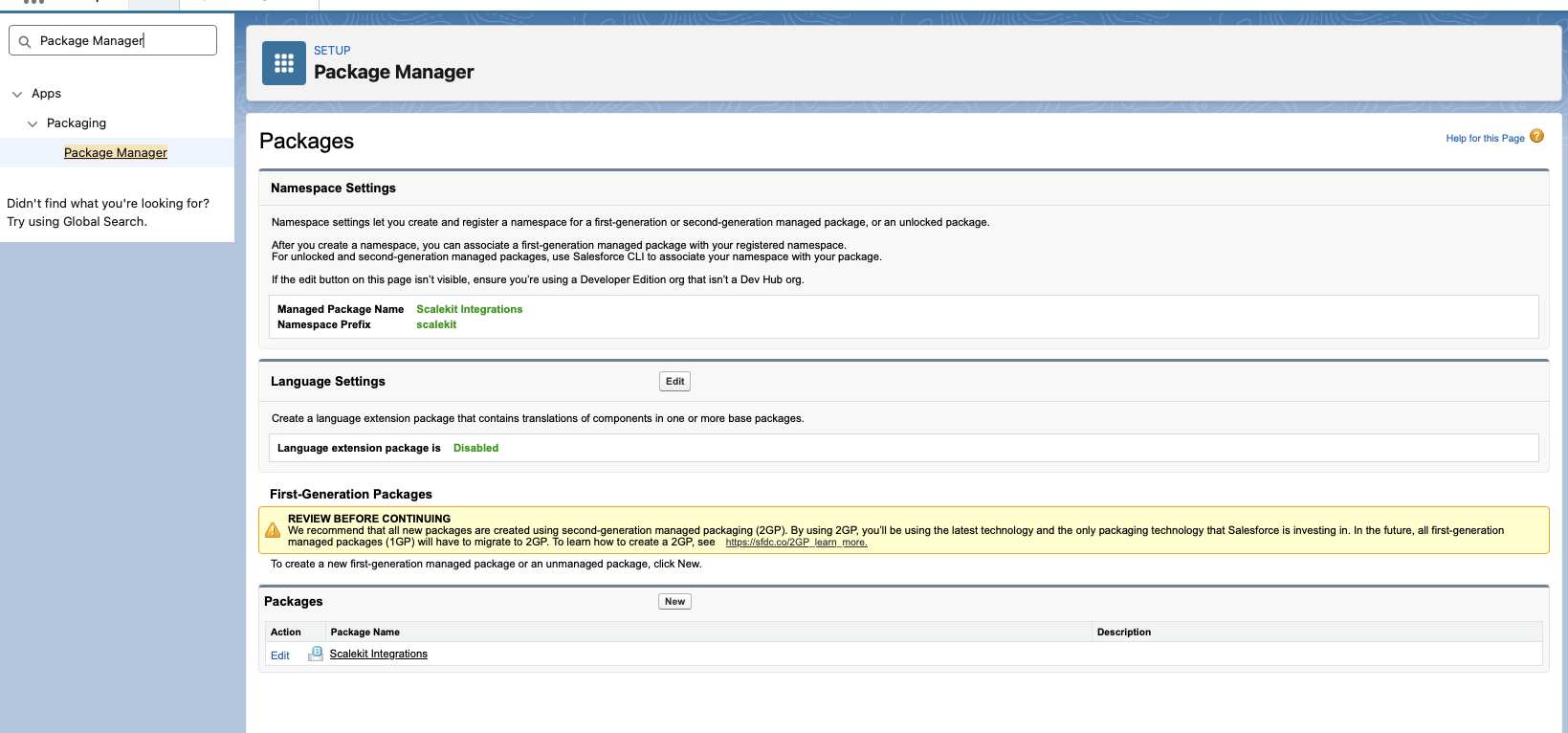
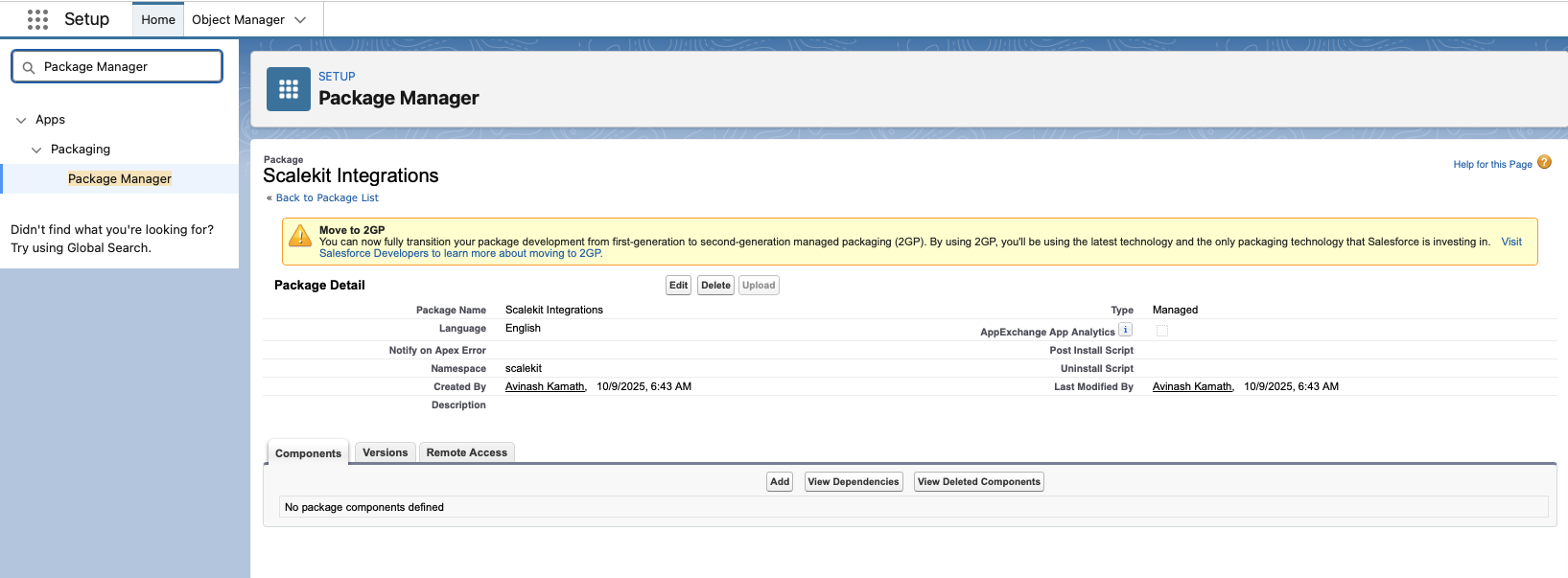
- Log in to your Developer Edition Org and go to Setup > Apps > Packaging > Package Manager.
- Click Edit next to the Namespace Prefix field.
- Enter your desired namespace identifier.
- Click Check Availability to confirm the namespace is not already taken.
- Click Review, then Save to finalize the namespace.
Note the namespace string — you will add it to your project config in a later step.
Link the namespace to your Dev Hub
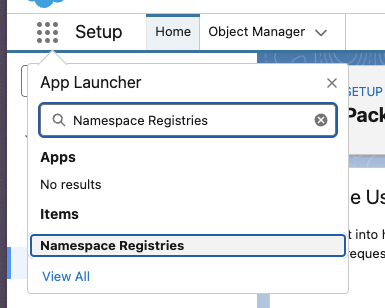
- Log in to your Partner Business Org and open the App Launcher.
- Search for and open Namespace Registries.
- Click Link Namespace.
- When prompted, authenticate using the credentials of the Developer Edition Org where you created the namespace.
- After logging in and granting access, your namespace appears in the registry list.
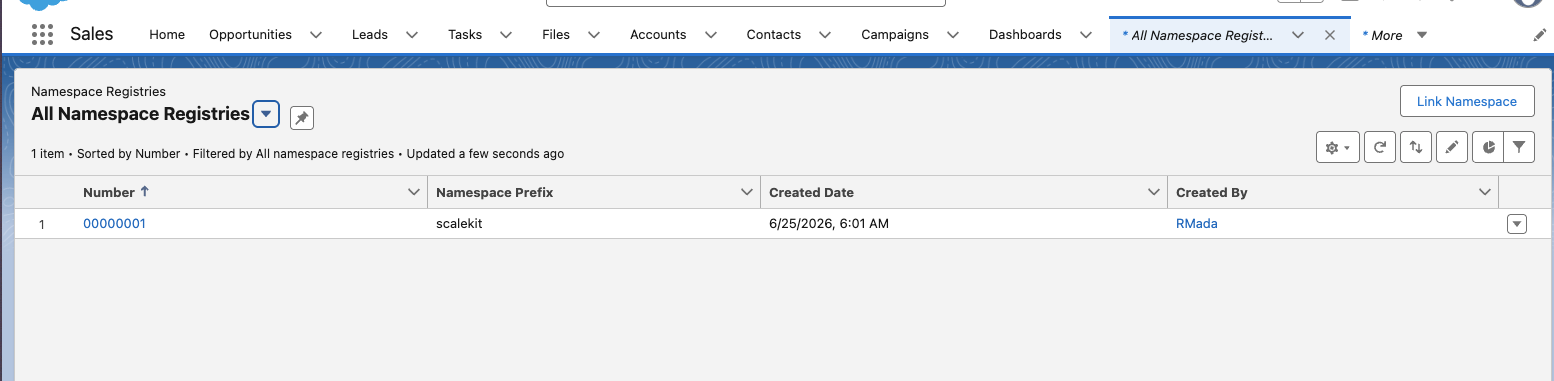
-
Copy the redirect URI from Scalekit
-
In the Scalekit dashboard, go to AgentKit > Connections > Create Connection.
-
Find Salesforce from the list of providers and click Create.
-
Copy the redirect URI. It looks like:
https://<SCALEKIT_ENVIRONMENT_URL>/sso/v1/oauth/<CONNECTION_ID>/callback
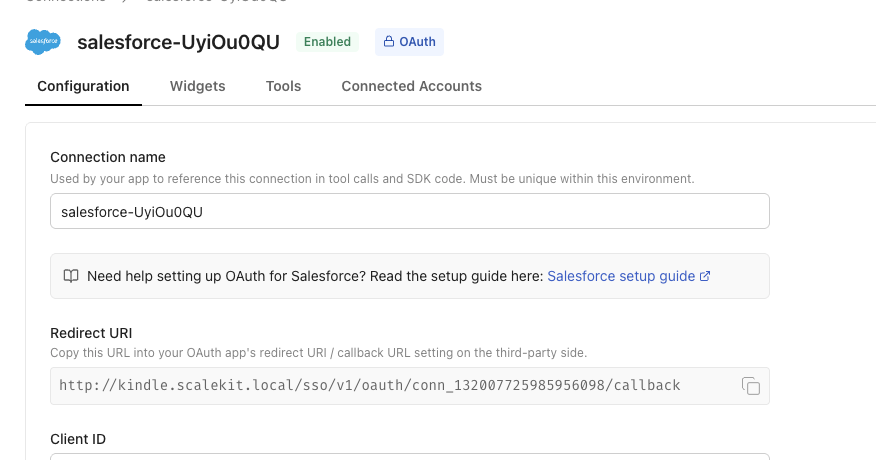
-
-
Create the External Client App
In your Partner Business Org, go to Setup > Platform Tools > Apps > External Client Apps and click New.
Configure the app with the following settings:
Setting Value Distribution State Packaged API (OAuth) Enabled Callback URL Redirect URI copied from Scalekit OAuth Scopes Access identity URL ( id), manage user data via APIs (api), perform requests at any time (refresh_token)Authorization Code and Credentials Flow Enabled Require user credentials in POST body for Authorization Code Flow Unchecked Require Proof Key for Code Exchange (PKCE) Checked 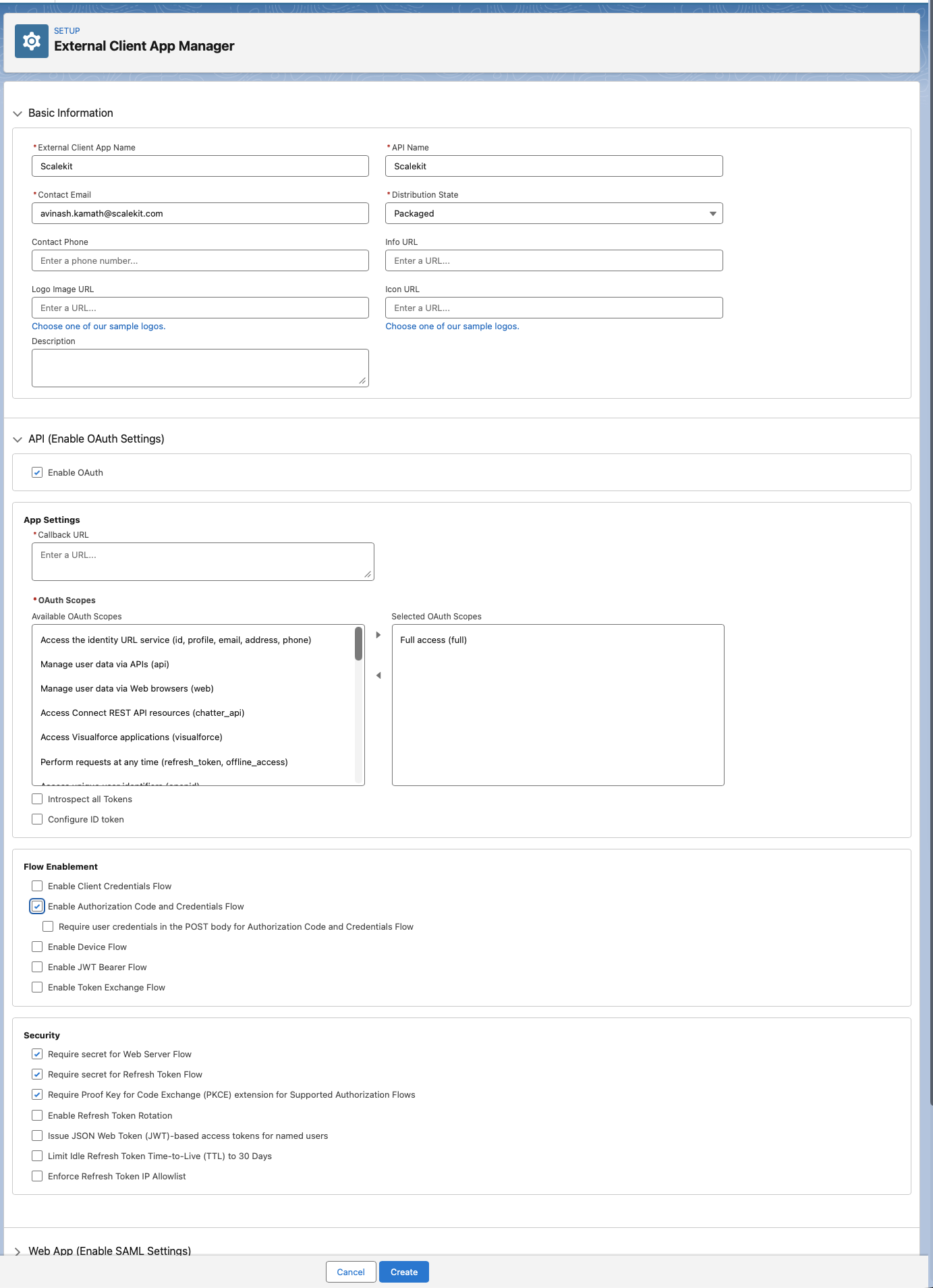
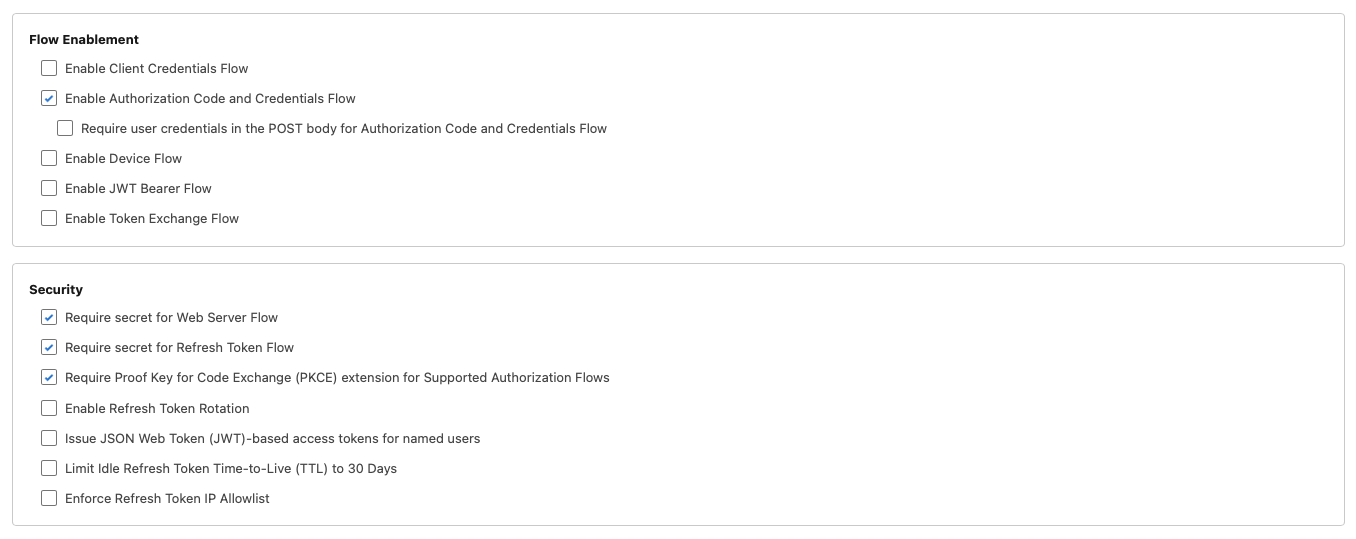
After saving, go to OAuth Settings > Consumer Key and Secret to retrieve your credentials:
- Consumer Key
- Consumer Secret — click Reveal to view and copy

-
Package and distribute the app
Use the Salesforce CLI to package the External Client App and generate an install URL. Complete these sub-steps in order.
-
Install the Salesforce CLI
Install the
sfCLI from the Salesforce CLI setup guide, or via npm:Terminal window npm install -g @salesforce/cliVerify the installation:
Terminal window sf --version -
Authenticate to your Dev Hub
Log in to your Partner Business Org and set it as the default Dev Hub:
Terminal window sf org login web --set-default-dev-hub --alias DevHub -
Create a DX project
Terminal window sf project generate --name my-integrationcd my-integration -
Set the namespace
Open
sfdx-project.jsonand add your namespace to the project definition:{"namespace": "<your-namespace>"} -
Retrieve the External Client App metadata
Pull the ECA configuration from your Partner Business Org into the project:
Terminal window sf project retrieve start --metadata ExternalClientApplication ExtlClntAppOauthSettings -
Create the managed package
Run this once to create the package definition:
Terminal window sf package create --name "Your App Display Name" --package-type Managed --path force-app -
Create a package version
Terminal window sf package version create --package "Your App Display Name" --installation-key-bypass --wait 10Note the version ID (starts with
04t...) from the output. -
Promote the version to released
Terminal window sf package version promote --package <VERSION_ID> -
Get the install URL
Construct the install URL using the promoted version ID:
https://login.salesforce.com/packaging/installPackage.apexp?p0=<VERSION_ID>
-
-
Add credentials in Scalekit
- In the Scalekit dashboard, go to AgentKit > Connections and open the connection you created.
- Enter your credentials:
- Client ID — Consumer Key from your External Client App
- Client Secret — Consumer Secret from your External Client App
- Package Install URL — the install URL from the previous step
- Permissions — any additional OAuth scopes beyond the defaults (see Salesforce OAuth Scopes documentation)
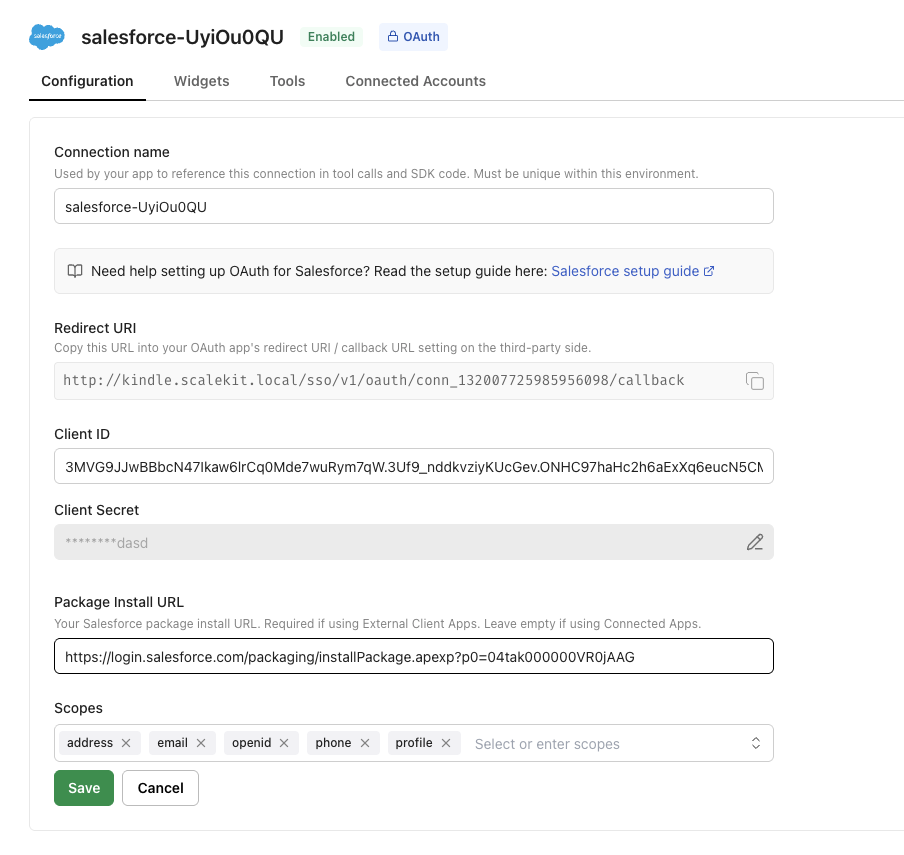
- Click Save.
-
How users install the package
A Salesforce admin must install the package in their org once before anyone in that org can connect. After the admin installs it, other users in the same org do not need to install it again — they can skip past the install screen.
Scalekit always shows the Install package screen first when a user opens the magic link:
- Admin (first time) — click Install to open the Salesforce package installation page and complete the installation.
- Non-admin or subsequent users — click Copy link to send the install URL to the org’s Salesforce admin, or click I’ve installed the package directly if the admin has already installed it.
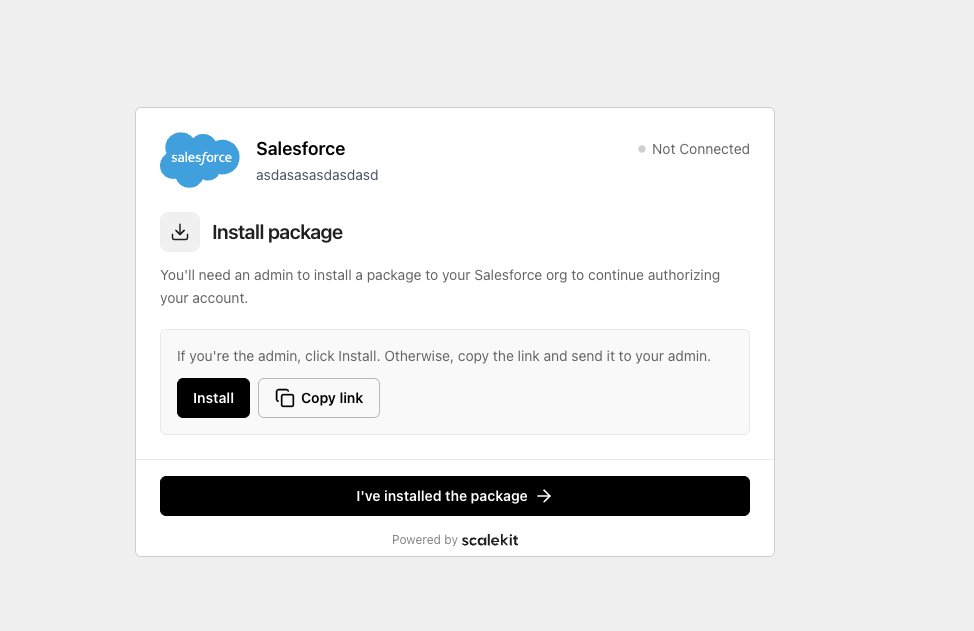
After clicking Install, Salesforce opens the package installation page:
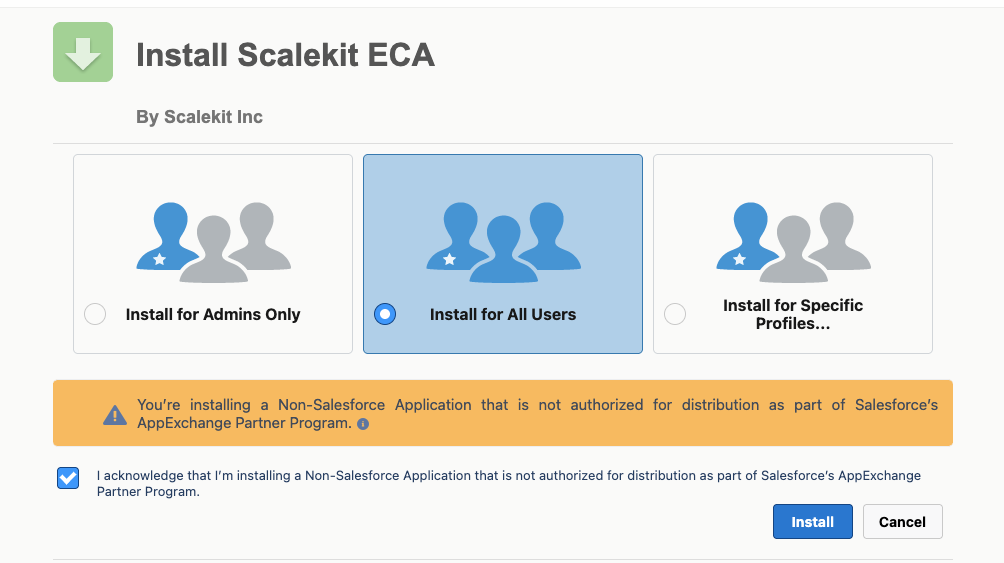
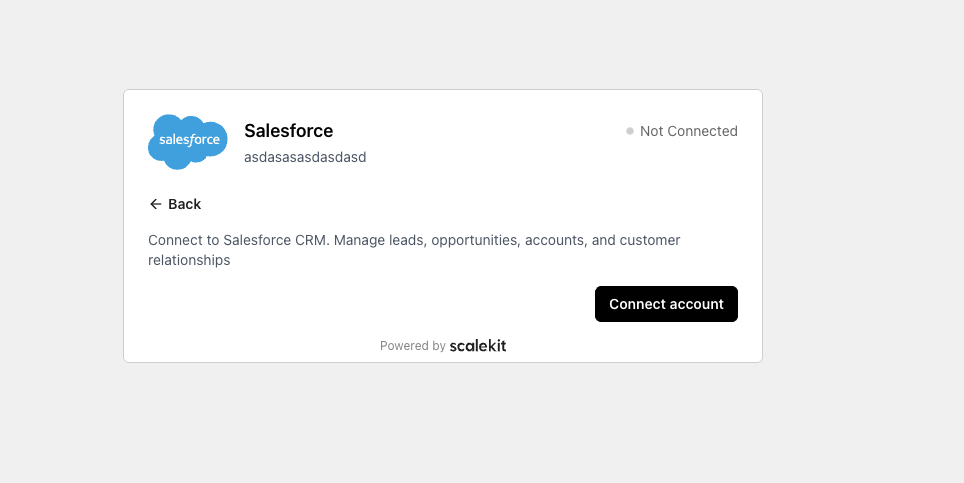
Once installation is complete, return to the magic link and click I’ve installed the package. This takes the user to the Connect account screen where they complete the OAuth authorization:
-
-
Authorize and make your first call
Section titled “Authorize and make your first call”quickstart.ts import { ScalekitClient } from '@scalekit-sdk/node'import 'dotenv/config'const scalekit = new ScalekitClient(process.env.SCALEKIT_ENV_URL,process.env.SCALEKIT_CLIENT_ID,process.env.SCALEKIT_CLIENT_SECRET,)const actions = scalekit.actionsconst connector = 'salesforce'const identifier = 'user_123'// Generate an authorization link for the userconst { link } = await actions.getAuthorizationLink({ connectionName: connector, identifier })console.log('Authorize Salesforce:', link)process.stdout.write('Press Enter after authorizing...')await new Promise(r => process.stdin.once('data', r))// Make your first callconst result = await actions.executeTool({connector,identifier,toolName: 'salesforce_limits_get',toolInput: {},})console.log(result)quickstart.py import osfrom scalekit.client import ScalekitClientfrom dotenv import load_dotenvload_dotenv()scalekit_client = ScalekitClient(env_url=os.getenv("SCALEKIT_ENV_URL"),client_id=os.getenv("SCALEKIT_CLIENT_ID"),client_secret=os.getenv("SCALEKIT_CLIENT_SECRET"),)actions = scalekit_client.actionsconnection_name = "salesforce"identifier = "user_123"# Generate an authorization link for the userlink_response = actions.get_authorization_link(connection_name=connection_name,identifier=identifier,)print("Authorize Salesforce:", link_response.link)input("Press Enter after authorizing...")# Make your first callresult = actions.execute_tool(tool_input={},tool_name="salesforce_limits_get",connection_name=connection_name,identifier=identifier,)print(result)
What you can do
Section titled “What you can do”Connect this agent connector to let your agent:
- Read CRM records — retrieve accounts, contacts, leads, opportunities, and cases by ID or search query
- Create and update records — open leads, close opportunities, update deal stages, and edit contacts
- Log activities — create tasks and events linked to any CRM record
- Run SOQL queries — execute arbitrary Salesforce Object Query Language queries for custom data retrieval
- Search across objects — find records by name, email, phone, or any field value
- Call the Metadata API — use SOAP proxy calls to inspect and modify Salesforce org metadata
Common workflows
Section titled “Common workflows”Make your first call
Once a user authorizes the connection, make a request to Salesforce through the Scalekit proxy. The example below retrieves the authenticated user’s profile — a useful sanity-check call.
const result = await actions.request({ connectionName: 'salesforce', identifier: 'user_123', method: 'GET', path: '/chatter/users/me',})
console.log(result)result = actions.request( connection_name='salesforce', identifier='user_123', method="GET", path="/chatter/users/me",)print(result)Query records with SOQL
Retrieve this month’s open opportunities, sorted by deal size:
const result = await actions.request({ connectionName: 'salesforce', identifier: 'user_123', method: 'GET', path: '/query', params: { q: 'SELECT Id, Name, Amount, StageName, CloseDate FROM Opportunity WHERE CloseDate = THIS_MONTH ORDER BY Amount DESC LIMIT 10', },})
console.log(result.records)result = actions.request( connection_name='salesforce', identifier='user_123', method="GET", path="/query", params={ "q": "SELECT Id, Name, Amount, StageName, CloseDate FROM Opportunity WHERE CloseDate = THIS_MONTH ORDER BY Amount DESC LIMIT 10" },)
print(result["records"])Log a sales call and advance a lead
Find a lead by email, update its status, then log a completed task — all in one agent turn.
This workflow uses Scalekit’s tool calling API (execute_tool), which maps directly to the tool names in the tool list below.
// 1. Search for the leadconst searchResult = await actions.request({ connectionName: 'salesforce', identifier: 'user_123', method: 'GET', path: '/query', params: { q: "SELECT Id, Status FROM Lead WHERE Email = 'jane@acme.com' LIMIT 1" },})const lead = searchResult.records[0]
// 2. Update the lead statusawait actions.request({ connectionName: 'salesforce', identifier: 'user_123', method: 'PATCH', path: `/sobjects/Lead/${lead.Id}`, body: { Status: 'Working - Contacted' },})
// 3. Log a completed task linked to the leadawait actions.request({ connectionName: 'salesforce', identifier: 'user_123', method: 'POST', path: '/sobjects/Task', body: { WhoId: lead.Id, Subject: 'Discovery call — follow up in 3 days', Status: 'Completed', ActivityDate: '2025-04-10', },})# 1. Find the lead by emaillead = actions.execute_tool( tool_name="salesforce_lead_search", connection_name='salesforce', identifier='user_123', tool_input={"query": "jane@acme.com"},)
# 2. Update the lead statusactions.execute_tool( tool_name="salesforce_lead_update", connection_name='salesforce', identifier='user_123', tool_input={ "lead_id": lead.result["Id"], "Status": "Working - Contacted", },)
# 3. Log a completed task linked to the leadactions.execute_tool( tool_name="salesforce_task_create", connection_name='salesforce', identifier='user_123', tool_input={ "WhoId": lead.result["Id"], "Subject": "Discovery call — follow up in 3 days", "Status": "Completed", "ActivityDate": "2025-04-10", },)Tool list
Section titled “Tool list”Use the exact tool names from the Tool list below when you call execute_tool. If you’re not sure which name to use, list the tools available for the current user first.
salesforce_account_create#Create a new Account in Salesforce. Supports standard fields15 params
Create a new Account in Salesforce. Supports standard fields
NamestringrequiredAccount NameAccountNumberstringoptionalAccount number for the organizationAnnualRevenuenumberoptionalAnnual revenueBillingCitystringoptionalBilling cityBillingCountrystringoptionalBilling countryBillingPostalCodestringoptionalBilling postal codeBillingStatestringoptionalBilling state/provinceBillingStreetstringoptionalBilling streetDescriptionstringoptionalDescriptionIndustrystringoptionalIndustryNumberOfEmployeesintegeroptionalNumber of employeesOwnerIdstringoptionalRecord owner (User/Queue Id)PhonestringoptionalMain phone numberRecordTypeIdstringoptionalRecord Type IdWebsitestringoptionalWebsite URLsalesforce_account_delete#Delete an existing Account from Salesforce by account ID. This is a destructive operation that permanently removes the account record.1 param
Delete an existing Account from Salesforce by account ID. This is a destructive operation that permanently removes the account record.
account_idstringrequiredID of the account to deletesalesforce_account_get#Retrieve details of a specific account from Salesforce by account ID. Returns account properties and associated data.2 params
Retrieve details of a specific account from Salesforce by account ID. Returns account properties and associated data.
account_idstringrequiredID of the account to retrievefieldsstringoptionalComma-separated list of fields to include in the responsesalesforce_account_update#Update an existing Account in Salesforce by account ID. Allows updating account properties like name, phone, website, industry, billing information, and more.45 params
Update an existing Account in Salesforce by account ID. Allows updating account properties like name, phone, website, industry, billing information, and more.
account_idstringrequiredID of the account to updateAccountNumberstringoptionalAccount number for the organizationAccountSourcestringoptionalLead source for this accountAnnualRevenuenumberoptionalAnnual revenueBillingCitystringoptionalBilling cityBillingCountrystringoptionalBilling countryBillingGeocodeAccuracystringoptionalBilling geocode accuracyBillingLatitudenumberoptionalBilling address latitudeBillingLongitudenumberoptionalBilling address longitudeBillingPostalCodestringoptionalBilling postal codeBillingStatestringoptionalBilling state/provinceBillingStreetstringoptionalBilling streetCleanStatusstringoptionalData.com clean statusDescriptionstringoptionalDescriptionDunsNumberstringoptionalD-U-N-S NumberFaxstringoptionalFax numberIndustrystringoptionalIndustryJigsawstringoptionalData.com keyJigsawCompanyIdstringoptionalJigsaw company IDNaicsCodestringoptionalNAICS codeNaicsDescstringoptionalNAICS descriptionNamestringoptionalAccount NameNumberOfEmployeesintegeroptionalNumber of employeesOwnerIdstringoptionalRecord owner (User/Queue Id)OwnershipstringoptionalOwnership typeParentIdstringoptionalParent Account IdPhonestringoptionalMain phone numberRatingstringoptionalAccount ratingRecordTypeIdstringoptionalRecord Type IdShippingCitystringoptionalShipping cityShippingCountrystringoptionalShipping countryShippingGeocodeAccuracystringoptionalShipping geocode accuracyShippingLatitudenumberoptionalShipping address latitudeShippingLongitudenumberoptionalShipping address longitudeShippingPostalCodestringoptionalShipping postal codeShippingStatestringoptionalShipping state/provinceShippingStreetstringoptionalShipping streetSicstringoptionalSIC codeSicDescstringoptionalSIC descriptionSitestringoptionalAccount site or locationTickerSymbolstringoptionalStock ticker symbolTradestylestringoptionalTrade style nameTypestringoptionalAccount typeWebsitestringoptionalWebsite URLYearStartedstringoptionalYear the company startedsalesforce_accounts_list#Retrieve a list of accounts from Salesforce using a pre-built SOQL query. Returns basic account information.1 param
Retrieve a list of accounts from Salesforce using a pre-built SOQL query. Returns basic account information.
limitnumberrequiredNumber of results to return per pagesalesforce_bulk_job_get#Get the status and progress of a Bulk API 2.0 ingest job by ID — state (Open, UploadComplete, InProgress, JobComplete, Aborted, Failed), record counts, and object/operation metadata. Works for jobs created by any client (Data Loader, other integrations, or Salesforce Setup), not only ones created through this connector.1 param
Get the status and progress of a Bulk API 2.0 ingest job by ID — state (Open, UploadComplete, InProgress, JobComplete, Aborted, Failed), record counts, and object/operation metadata. Works for jobs created by any client (Data Loader, other integrations, or Salesforce Setup), not only ones created through this connector.
job_idstringrequiredID of the Bulk API 2.0 ingest job to check.salesforce_case_create#Create a new Case record in Salesforce. Allows setting standard Case fields.14 params
Create a new Case record in Salesforce. Allows setting standard Case fields.
AccountIdstringoptionalRelated Account IdContactIdstringoptionalRelated Contact IdDescriptionstringoptionalDetailed description of the caseOriginstringoptionalCase originOwnerIdstringoptionalRecord owner (User/Queue Id)PrioritystringoptionalCase priorityReasonstringoptionalCase reasonStatusstringoptionalCase statusSubjectstringoptionalSubject line of the caseSuppliedCompanystringoptionalCompany supplied by the customerSuppliedEmailstringoptionalEmail supplied by the customerSuppliedNamestringoptionalName supplied by the customerSuppliedPhonestringoptionalPhone supplied by the customerTypestringoptionalCase typesalesforce_case_delete#Delete an existing Case record from Salesforce by ID. This is a destructive operation that permanently removes the record.1 param
Delete an existing Case record from Salesforce by ID. This is a destructive operation that permanently removes the record.
case_idstringrequiredID of the case to deletesalesforce_case_get#Retrieve a Case record from Salesforce by ID. Optionally specify which fields to return.2 params
Retrieve a Case record from Salesforce by ID. Optionally specify which fields to return.
case_idstringrequiredID of the case to retrievefieldsstringoptionalComma-separated list of fields to include in the responsesalesforce_case_update#Update an existing Case record in Salesforce by ID. Allows updating standard Case fields.15 params
Update an existing Case record in Salesforce by ID. Allows updating standard Case fields.
case_idstringrequiredID of the case to updateAccountIdstringoptionalRelated Account IdContactIdstringoptionalRelated Contact IdDescriptionstringoptionalDetailed description of the caseOriginstringoptionalCase originOwnerIdstringoptionalRecord owner (User/Queue Id)PrioritystringoptionalCase priorityReasonstringoptionalCase reasonStatusstringoptionalCase statusSubjectstringoptionalSubject line of the caseSuppliedCompanystringoptionalCompany supplied by the customerSuppliedEmailstringoptionalEmail supplied by the customerSuppliedNamestringoptionalName supplied by the customerSuppliedPhonestringoptionalPhone supplied by the customerTypestringoptionalCase typesalesforce_chatter_comment_create#Add a comment to a Salesforce Chatter post (feed element).2 params
Add a comment to a Salesforce Chatter post (feed element).
feed_element_idstringrequiredThe ID of the Chatter post to comment ontextstringrequiredThe text body of the commentsalesforce_chatter_comment_delete#Delete a comment from a Salesforce Chatter post.1 param
Delete a comment from a Salesforce Chatter post.
comment_idstringrequiredThe ID of the Chatter comment to deletesalesforce_chatter_comments_list#List all comments on a Salesforce Chatter post (feed element).3 params
List all comments on a Salesforce Chatter post (feed element).
feed_element_idstringrequiredThe ID of the Chatter post to list comments forpagestringoptionalPage token for retrieving the next page of resultspage_sizenumberoptionalNumber of comments to return per page (default: 25, max: 100)salesforce_chatter_post_create#Create a new post (feed element) on a Salesforce Chatter feed. Use 'me' as subject_id to post to the current user's feed.4 params
Create a new post (feed element) on a Salesforce Chatter feed. Use 'me' as subject_id to post to the current user's feed.
textstringrequiredThe text body of the Chatter postis_rich_textbooleanoptionalIf true, the text body will be treated as HTML rich text. Default is false (plain text).message_segmentsarrayoptionalAdvanced: provide raw Salesforce message segments array for full rich text control (bold, italic, links, mentions, etc.). When provided, overrides 'text' and 'is_rich_text'. Each segment must have a 'type' field (Text, MarkupBegin, MarkupEnd, Mention, Link). MarkupBegin/End use markupType: Bold, Italic, Underline, Paragraph, etc.subject_idstringoptionalThe ID of the subject (user, record, or group) to post to. Use 'me' for the current user's feed.salesforce_chatter_post_delete#Delete a Salesforce Chatter post (feed element) by its ID.1 param
Delete a Salesforce Chatter post (feed element) by its ID.
feed_element_idstringrequiredThe ID of the Chatter post to deletesalesforce_chatter_post_get#Retrieve a specific Salesforce Chatter post (feed element) by its ID.1 param
Retrieve a specific Salesforce Chatter post (feed element) by its ID.
feed_element_idstringrequiredThe ID of the Chatter feed element (post) to retrieve.salesforce_chatter_posts_search#Search Salesforce Chatter posts (feed elements) by keyword across all feeds.3 params
Search Salesforce Chatter posts (feed elements) by keyword across all feeds.
qstringrequiredSearch query string to find matching Chatter postspagestringoptionalPage token for retrieving the next page of resultspage_sizenumberoptionalNumber of results to return per page (default: 25, max: 100)salesforce_chatter_user_feed_list#Retrieve feed elements (posts) from a Salesforce user's Chatter news feed. Use 'me' as the user ID to get the current user's feed.4 params
Retrieve feed elements (posts) from a Salesforce user's Chatter news feed. Use 'me' as the user ID to get the current user's feed.
user_idstringrequiredThe ID of the user whose Chatter feed to retrieve. Use 'me' for the current user.pagestringoptionalPage token for retrieving the next page of results. Use the value from the previous response's nextPageToken.page_sizenumberoptionalNumber of feed elements to return per page (default: 25, max: 100)sort_paramstringoptionalSort order for feed elements. Options: LastModifiedDateDesc (default), CreatedDateDesc, MostRecentActivitysalesforce_composite#Execute multiple Salesforce REST API requests in a single call using the Composite API. Allows for efficient batch operations and related data retrieval.1 param
Execute multiple Salesforce REST API requests in a single call using the Composite API. Allows for efficient batch operations and related data retrieval.
composite_requeststringrequiredJSON string containing composite request with multiple sub-requestssalesforce_composite_batch#Execute up to 25 REST API subrequests in a single Composite Batch call. Each subrequest runs independently (no cross-subrequest rollback) and counts against API rate limits individually; results are returned in request order.1 param
Execute up to 25 REST API subrequests in a single Composite Batch call. Each subrequest runs independently (no cross-subrequest rollback) and counts against API rate limits individually; results are returned in request order.
batch_requestsstringrequiredJSON array of subrequests, each with method, url, and optional richInput/referenceId/httpHeaderssalesforce_composite_sobjects_create#Create multiple Salesforce sObject records (of the same or different types) in a single Collections API request. Do not include an id field — Salesforce assigns one.2 params
Create multiple Salesforce sObject records (of the same or different types) in a single Collections API request. Do not include an id field — Salesforce assigns one.
recordsstringrequiredJSON array of sObject records, each with an attributes.type and its fieldsall_or_nonestringoptionalWhether to roll back all records if any single record failssalesforce_composite_sobjects_delete#Delete multiple Salesforce records (of the same or different types) in a single Collections API request, by ID. Up to 200 record IDs per request.2 params
Delete multiple Salesforce records (of the same or different types) in a single Collections API request, by ID. Up to 200 record IDs per request.
record_idsstringrequiredComma-separated list of record IDs to deleteall_or_nonestringoptionalWhether to roll back all records if any single record failssalesforce_composite_sobjects_get#Retrieve multiple Salesforce records of the same object type by ID in a single Collections API request, returning only the requested fields.3 params
Retrieve multiple Salesforce records of the same object type by ID in a single Collections API request, returning only the requested fields.
fieldsstringrequiredComma-separated list of fields to include in the response (required by this endpoint)record_idsstringrequiredComma-separated list of record IDs to retrieve (same object type, up to ~800)sobject_typestringrequiredThe Salesforce SObject API name (all IDs must be this type)salesforce_composite_sobjects_update#Update multiple Salesforce sObject records (of the same or different types) in a single Collections API request. Each record must include its id alongside attributes.type.2 params
Update multiple Salesforce sObject records (of the same or different types) in a single Collections API request. Each record must include its id alongside attributes.type.
recordsstringrequiredJSON array of sObject records, each with an attributes.type and its fieldsall_or_nonestringoptionalWhether to roll back all records if any single record failssalesforce_composite_tree_create#Create a tree of up to 200 related sObject records (e.g. an Account with nested Contacts) in a single call, with relationships between the new records resolved server-side. Distinct from the flat Collections API (salesforce_composite_sobjects_create), which cannot express parent/child nesting in one request.2 params
Create a tree of up to 200 related sObject records (e.g. an Account with nested Contacts) in a single call, with relationships between the new records resolved server-side. Distinct from the flat Collections API (salesforce_composite_sobjects_create), which cannot express parent/child nesting in one request.
recordsstringrequiredJSON array of root sObject tree records. Each record needs attributes.type and attributes.referenceId (a caller-assigned temporary ID unique within the request), plus its fields. Nested child relationships are embedded as '<RelationshipName>': {"records": [...]}, each child record also needing its own attributes.type/referenceId.sobject_typestringrequiredThe root Salesforce SObject API name for the tree (e.g., Account).salesforce_contact_create#Create a new contact in Salesforce. Allows setting contact properties like name, email, phone, account association, and other standard fields.15 params
Create a new contact in Salesforce. Allows setting contact properties like name, email, phone, account association, and other standard fields.
LastNamestringrequiredLast name of the contact (required)AccountIdstringoptionalSalesforce Account Id associated with this contactDepartmentstringoptionalDepartment of the contactDescriptionstringoptionalFree-form descriptionEmailstringoptionalEmail address of the contactFirstNamestringoptionalFirst name of the contactLeadSourcestringoptionalLead source for the contactMailingCitystringoptionalMailing cityMailingCountrystringoptionalMailing countryMailingPostalCodestringoptionalMailing postal codeMailingStatestringoptionalMailing state/provinceMailingStreetstringoptionalMailing streetMobilePhonestringoptionalMobile phone of the contactPhonestringoptionalPhone number of the contactTitlestringoptionalJob title of the contactsalesforce_contact_delete#Delete an existing Contact record from Salesforce by ID. This is a destructive operation that permanently removes the record.1 param
Delete an existing Contact record from Salesforce by ID. This is a destructive operation that permanently removes the record.
contact_idstringrequiredID of the contact to deletesalesforce_contact_get#Retrieve details of a specific contact from Salesforce by contact ID. Returns contact properties and associated data.2 params
Retrieve details of a specific contact from Salesforce by contact ID. Returns contact properties and associated data.
contact_idstringrequiredID of the contact to retrievefieldsstringoptionalComma-separated list of fields to include in the responsesalesforce_contact_update#Update an existing Contact record in Salesforce by ID. Allows updating standard Contact fields.16 params
Update an existing Contact record in Salesforce by ID. Allows updating standard Contact fields.
contact_idstringrequiredID of the contact to updateAccountIdstringoptionalSalesforce Account Id associated with this contactDepartmentstringoptionalDepartment of the contactDescriptionstringoptionalFree-form descriptionEmailstringoptionalEmail address of the contactFirstNamestringoptionalFirst name of the contactLastNamestringoptionalLast name of the contactLeadSourcestringoptionalLead source for the contactMailingCitystringoptionalMailing cityMailingCountrystringoptionalMailing countryMailingPostalCodestringoptionalMailing postal codeMailingStatestringoptionalMailing state/provinceMailingStreetstringoptionalMailing streetMobilePhonestringoptionalMobile phone of the contactPhonestringoptionalPhone number of the contactTitlestringoptionalJob title of the contactsalesforce_dashboard_clone#Clone an existing dashboard in Salesforce. Creates a copy of the source dashboard in the specified folder.3 params
Clone an existing dashboard in Salesforce. Creates a copy of the source dashboard in the specified folder.
folderIdstringrequiredFolder to place the cloned dashboardsource_dashboard_idstringrequiredID of the dashboard to clonenamestringoptionalName for the cloned dashboardsalesforce_dashboard_get#Retrieve dashboard data and results from Salesforce by dashboard ID. Returns dashboard component data and results from all underlying reports.4 params
Retrieve dashboard data and results from Salesforce by dashboard ID. Returns dashboard component data and results from all underlying reports.
dashboard_idstringrequiredID of the dashboard to retrievefilter1stringoptionalFirst dashboard filter value (DashboardFilterOption ID)filter2stringoptionalSecond dashboard filter value (DashboardFilterOption ID)filter3stringoptionalThird dashboard filter value (DashboardFilterOption ID)salesforce_dashboard_metadata_get#Retrieve metadata for a Salesforce dashboard, including dashboard components, filters, layout, and the running user.1 param
Retrieve metadata for a Salesforce dashboard, including dashboard components, filters, layout, and the running user.
dashboard_idstringrequiredThe unique ID of the Salesforce dashboardsalesforce_dashboard_update#Update a Salesforce dashboard. Supports renaming, moving to a folder, and saving sticky filters. Use GET dashboard first to find filter IDs.4 params
Update a Salesforce dashboard. Supports renaming, moving to a folder, and saving sticky filters. Use GET dashboard first to find filter IDs.
dashboard_idstringrequiredID of the dashboard to updatefiltersarrayoptionalDashboard filters to save (array)folderIdstringoptionalFolder to move the dashboard tonamestringoptionalNew name for the dashboardsalesforce_global_describe#Retrieve metadata about all available SObjects in the Salesforce organization. Returns list of all objects with basic information.0 params
Retrieve metadata about all available SObjects in the Salesforce organization. Returns list of all objects with basic information.
salesforce_lead_create#Create a new Lead record in Salesforce. Allows setting standard Lead fields.21 params
Create a new Lead record in Salesforce. Allows setting standard Lead fields.
CompanystringrequiredCompany the lead belongs to (required)LastNamestringrequiredLast name of the lead (required)AnnualRevenuenumberoptionalAnnual revenue of the lead's companyCitystringoptionalCityCountrystringoptionalCountryDescriptionstringoptionalFree-form descriptionEmailstringoptionalEmail address of the leadFirstNamestringoptionalFirst name of the leadIndustrystringoptionalIndustry of the lead's companyLeadSourcestringoptionalLead sourceMobilePhonestringoptionalMobile phone of the leadNumberOfEmployeesintegeroptionalNumber of employeesOwnerIdstringoptionalRecord owner (User/Queue Id)PhonestringoptionalPhone number of the leadPostalCodestringoptionalPostal codeRatingstringoptionalLead ratingStatestringoptionalState/provinceStatusstringoptionalLead statusStreetstringoptionalStreet addressTitlestringoptionalJob title of the leadWebsitestringoptionalCompany websitesalesforce_lead_delete#Delete an existing Lead record from Salesforce by ID. This is a destructive operation that permanently removes the record.1 param
Delete an existing Lead record from Salesforce by ID. This is a destructive operation that permanently removes the record.
lead_idstringrequiredID of the lead to deletesalesforce_lead_get#Retrieve a Lead record from Salesforce by ID. Optionally specify which fields to return.2 params
Retrieve a Lead record from Salesforce by ID. Optionally specify which fields to return.
lead_idstringrequiredID of the lead to retrievefieldsstringoptionalComma-separated list of fields to include in the responsesalesforce_lead_update#Update an existing Lead record in Salesforce by ID. Allows updating standard Lead fields.22 params
Update an existing Lead record in Salesforce by ID. Allows updating standard Lead fields.
lead_idstringrequiredID of the lead to updateAnnualRevenuenumberoptionalAnnual revenue of the lead's companyCitystringoptionalCityCompanystringoptionalCompany the lead belongs to (required)CountrystringoptionalCountryDescriptionstringoptionalFree-form descriptionEmailstringoptionalEmail address of the leadFirstNamestringoptionalFirst name of the leadIndustrystringoptionalIndustry of the lead's companyLastNamestringoptionalLast name of the lead (required)LeadSourcestringoptionalLead sourceMobilePhonestringoptionalMobile phone of the leadNumberOfEmployeesintegeroptionalNumber of employeesOwnerIdstringoptionalRecord owner (User/Queue Id)PhonestringoptionalPhone number of the leadPostalCodestringoptionalPostal codeRatingstringoptionalLead ratingStatestringoptionalState/provinceStatusstringoptionalLead statusStreetstringoptionalStreet addressTitlestringoptionalJob title of the leadWebsitestringoptionalCompany websitesalesforce_limits_get#Retrieve organization limits information from Salesforce. Returns API usage limits, data storage limits, and other organizational constraints.0 params
Retrieve organization limits information from Salesforce. Returns API usage limits, data storage limits, and other organizational constraints.
salesforce_object_describe#Retrieve detailed metadata about a specific SObject in Salesforce. Returns fields, relationships, and other object metadata.1 param
Retrieve detailed metadata about a specific SObject in Salesforce. Returns fields, relationships, and other object metadata.
sobjectstringrequiredSObject API name to describesalesforce_opportunities_list#Retrieve a list of opportunities from Salesforce using a pre-built SOQL query. Returns basic opportunity information.1 param
Retrieve a list of opportunities from Salesforce using a pre-built SOQL query. Returns basic opportunity information.
limitnumberoptionalNumber of results to return per pagesalesforce_opportunity_create#Create a new opportunity in Salesforce. Allows setting opportunity properties like name, amount, stage, close date, and account association.16 params
Create a new opportunity in Salesforce. Allows setting opportunity properties like name, amount, stage, close date, and account association.
CloseDatestringrequiredExpected close date (YYYY-MM-DD, required)NamestringrequiredOpportunity name (required)StageNamestringrequiredCurrent sales stage (required)AccountIdstringoptionalAssociated Account IdAmountnumberoptionalOpportunity amountCampaignIdstringoptionalRelated Campaign IdCustom_Field__cstringoptionalExample custom field (replace with your org’s custom field API name)DescriptionstringoptionalOpportunity descriptionForecastCategoryNamestringoptionalForecast category nameLeadSourcestringoptionalLead sourceNextStepstringoptionalNext step in the sales processOwnerIdstringoptionalRecord owner (User/Queue Id)PricebookIdstringoptionalAssociated Price Book IdProbabilitynumberoptionalProbability percentage (0–100)RecordTypeIdstringoptionalRecord Type Id for OpportunityTypestringoptionalOpportunity typesalesforce_opportunity_delete#Delete an existing Opportunity record from Salesforce by ID. This is a destructive operation that permanently removes the record.1 param
Delete an existing Opportunity record from Salesforce by ID. This is a destructive operation that permanently removes the record.
opportunity_idstringrequiredID of the opportunity to deletesalesforce_opportunity_get#Retrieve details of a specific opportunity from Salesforce by opportunity ID. Returns opportunity properties and associated data.2 params
Retrieve details of a specific opportunity from Salesforce by opportunity ID. Returns opportunity properties and associated data.
opportunity_idstringrequiredID of the opportunity to retrievefieldsstringoptionalComma-separated list of fields to include in the responsesalesforce_opportunity_update#Update an existing opportunity in Salesforce by opportunity ID. Allows updating opportunity properties like name, amount, stage, and close date.16 params
Update an existing opportunity in Salesforce by opportunity ID. Allows updating opportunity properties like name, amount, stage, and close date.
opportunity_idstringrequiredID of the opportunity to updateAccountIdstringoptionalAssociated Account IdAmountnumberoptionalOpportunity amountCampaignIdstringoptionalRelated Campaign IdCloseDatestringoptionalExpected close date (YYYY-MM-DD)DescriptionstringoptionalOpportunity descriptionForecastCategoryNamestringoptionalForecast category nameLeadSourcestringoptionalLead sourceNamestringoptionalOpportunity nameNextStepstringoptionalNext step in the sales processOwnerIdstringoptionalRecord owner (User/Queue Id)Pricebook2IdstringoptionalAssociated Price Book IdProbabilitynumberoptionalProbability percentage (0–100)RecordTypeIdstringoptionalRecord Type Id for OpportunityStageNamestringoptionalCurrent sales stageTypestringoptionalOpportunity typesalesforce_query_all#Execute a SOQL query against Salesforce data, including records recently deleted (in the recycle bin) or archived. Same query syntax as salesforce_query_soql, but scans the queryAll resource instead of query.1 param
Execute a SOQL query against Salesforce data, including records recently deleted (in the recycle bin) or archived. Same query syntax as salesforce_query_soql, but scans the queryAll resource instead of query.
querystringrequiredSOQL query string to executesalesforce_query_next_page#Fetch the next page of results from a previous SOQL query. Use the nextRecordsUrl returned when a query response has done=false.1 param
Fetch the next page of results from a previous SOQL query. Use the nextRecordsUrl returned when a query response has done=false.
cursorstringrequiredThe record cursor from a previous SOQL query response. Extract the cursor ID from the nextRecordsUrl (e.g. '01gxx0000002GJm-2000' from '/services/data/v66.0/query/01gxx0000002GJm-2000')salesforce_query_soql#Execute SOQL queries against Salesforce data. Supports complex queries with joins, filters, and aggregations.1 param
Execute SOQL queries against Salesforce data. Supports complex queries with joins, filters, and aggregations.
querystringrequiredSOQL query string to executesalesforce_report_create#Create a new report in Salesforce using the Analytics API. Minimal verified version with only confirmed working fields.13 params
Create a new report in Salesforce using the Analytics API. Minimal verified version with only confirmed working fields.
namestringrequiredReport namereportTypestringrequiredThe report type's API name from your Salesforce org (e.g. Opportunity, AccountList). Find valid values in Setup > Report TypesaggregatesstringoptionalAggregates configuration (JSON array)chartstringoptionalChart configuration (JSON object)descriptionstringoptionalReport descriptiondetailColumnsstringoptionalDetail columns (JSON array of field names)folderIdstringoptionalFolder ID where report will be storedgroupingsAcrossstringoptionalColumn groupings (JSON array)groupingsDownstringoptionalRow groupings (JSON array)reportBooleanFilterstringoptionalFilter logicreportFiltersstringoptionalReport filters (JSON array)reportFormatstringoptionalReport format type. TABULAR (default, no groupings), SUMMARY (supports row groupings), or MATRIX (supports row and column groupings)scopestringoptionalReport scope. organization (all records) or team (current user's team records)salesforce_report_delete#Delete an existing report from Salesforce by report ID. This is a destructive operation that permanently removes the report and cannot be undone.1 param
Delete an existing report from Salesforce by report ID. This is a destructive operation that permanently removes the report and cannot be undone.
report_idstringrequiredID of the report to deletesalesforce_report_execute_with_filters#Run a Salesforce report synchronously while overriding its filters, groupings, or aggregates for this run only (the saved report definition is not modified). Provide reportMetadata as a JSON object string with the fields to override.2 params
Run a Salesforce report synchronously while overriding its filters, groupings, or aggregates for this run only (the saved report definition is not modified). Provide reportMetadata as a JSON object string with the fields to override.
report_idstringrequiredThe unique ID of the Salesforce reportreport_metadatastringrequiredJSON object with reportMetadata overrides (filters, groupingsDown, groupingsAcross, etc.)salesforce_report_instance_results_get#Fetch the results of a previously queued asynchronous report run, by report ID and instance ID. Results are retained for a rolling 24-hour period after the run completed.2 params
Fetch the results of a previously queued asynchronous report run, by report ID and instance ID. Results are retained for a rolling 24-hour period after the run completed.
instance_idstringrequiredThe ID of the asynchronous report run instancereport_idstringrequiredThe unique ID of the Salesforce reportsalesforce_report_instances_list#List up to 2000 asynchronous run instances of a Salesforce report, sorted by run request date. Use with salesforce_report_run_async and salesforce_report_instance_results_get.1 param
List up to 2000 asynchronous run instances of a Salesforce report, sorted by run request date. Use with salesforce_report_run_async and salesforce_report_instance_results_get.
report_idstringrequiredThe unique ID of the Salesforce reportsalesforce_report_list#List up to 200 tabular, matrix, or summary reports recently viewed by the current user, via the Salesforce Analytics API.0 params
List up to 200 tabular, matrix, or summary reports recently viewed by the current user, via the Salesforce Analytics API.
salesforce_report_metadata_get#Retrieve report, report type, and related metadata for a Salesforce report. Returns information about report structure, fields, groupings, and configuration.1 param
Retrieve report, report type, and related metadata for a Salesforce report. Returns information about report structure, fields, groupings, and configuration.
report_idstringrequiredThe unique ID of the Salesforce reportsalesforce_report_results_get#Run a Salesforce report synchronously using its saved filters and return the results (fact map, groupings, and metadata). Best for reports that finish quickly; use salesforce_report_run_async for long-running reports.2 params
Run a Salesforce report synchronously using its saved filters and return the results (fact map, groupings, and metadata). Best for reports that finish quickly; use salesforce_report_run_async for long-running reports.
report_idstringrequiredThe unique ID of the Salesforce reportinclude_detailsstringoptionalWhether to include detail rows in addition to summary datasalesforce_report_run_async#Queue an asynchronous run of a Salesforce report and return an instance ID immediately. Use for long-running reports that risk the API's synchronous timeout; poll salesforce_report_instance_results_get with the returned instance ID to fetch results (retained for 24 hours). Optionally override filters for this run via reportMetadata.2 params
Queue an asynchronous run of a Salesforce report and return an instance ID immediately. Use for long-running reports that risk the API's synchronous timeout; poll salesforce_report_instance_results_get with the returned instance ID to fetch results (retained for 24 hours). Optionally override filters for this run via reportMetadata.
report_idstringrequiredThe unique ID of the Salesforce reportreport_metadatastringoptionalOptional JSON object with reportMetadata overrides for this async runsalesforce_report_update#Update an existing report in Salesforce by report ID. Minimal verified version with only confirmed working fields. Only updates fields that are provided.13 params
Update an existing report in Salesforce by report ID. Minimal verified version with only confirmed working fields. Only updates fields that are provided.
report_idstringrequiredID of the report to updateaggregatesstringoptionalAggregates configuration (JSON array)chartstringoptionalChart configuration (JSON object)descriptionstringoptionalUpdated report descriptiondetailColumnsstringoptionalDetail columns (JSON array of field names)folderIdstringoptionalMove report to different foldergroupingsAcrossstringoptionalColumn groupings (JSON array)groupingsDownstringoptionalRow groupings (JSON array)namestringoptionalUpdated report namereportBooleanFilterstringoptionalFilter logicreportFiltersstringoptionalReport filters (JSON array)reportFormatstringoptionalReport format type. TABULAR (default, no groupings), SUMMARY (supports row groupings), or MATRIX (supports row and column groupings)scopestringoptionalReport scope. organization (all records) or team (current user's team records)salesforce_search_parameterized#Execute parameterized searches against Salesforce data. Provides simplified search interface with predefined parameters.3 params
Execute parameterized searches against Salesforce data. Provides simplified search interface with predefined parameters.
search_textstringrequiredText to search forsobjectstringrequiredSObject type to search infieldsstringoptionalComma-separated list of fields to returnsalesforce_search_sosl#Execute SOSL searches against Salesforce data. Performs full-text search across multiple objects and fields.1 param
Execute SOSL searches against Salesforce data. Performs full-text search across multiple objects and fields.
search_querystringrequiredSOSL search query string to executesalesforce_sobject_create#Create a new record for any Salesforce SObject type (Account, Contact, Lead, Opportunity, custom objects, etc.). Provide the object type and fields as a dynamic object.2 params
Create a new record for any Salesforce SObject type (Account, Contact, Lead, Opportunity, custom objects, etc.). Provide the object type and fields as a dynamic object.
fieldsobjectrequiredObject containing field names and values to set on the new recordsobject_typestringrequiredThe Salesforce SObject API name (e.g., Account, Contact, Lead, CustomObject__c)salesforce_sobject_delete#Delete a record from any Salesforce SObject type by ID. This is a destructive operation that permanently removes the record.2 params
Delete a record from any Salesforce SObject type by ID. This is a destructive operation that permanently removes the record.
record_idstringrequiredID of the record to deletesobject_typestringrequiredThe Salesforce SObject API name (e.g., Account, Contact, Lead, CustomObject__c)salesforce_sobject_get#Retrieve a record from any Salesforce SObject type by ID. Optionally specify which fields to return.3 params
Retrieve a record from any Salesforce SObject type by ID. Optionally specify which fields to return.
record_idstringrequiredID of the record to retrievesobject_typestringrequiredThe Salesforce SObject API name (e.g., Account, Contact, Lead, CustomObject__c)fieldsstringoptionalComma-separated list of fields to include in the responsesalesforce_sobject_get_deleted#Get a list of individual records of the given SObject type that were deleted within a given time span (soft-deleted, still in the recycle bin). Useful for sync and change-tracking agents.3 params
Get a list of individual records of the given SObject type that were deleted within a given time span (soft-deleted, still in the recycle bin). Useful for sync and change-tracking agents.
endstringrequiredEnd of the time span, as an ISO 8601 datetime.sobject_typestringrequiredThe Salesforce SObject API name (e.g., Account, Contact, Lead, CustomObject__c)startstringrequiredStart of the time span, as an ISO 8601 datetime.salesforce_sobject_get_updated#Get a list of individual records of the given SObject type that were updated within a given time span. Useful for sync and change-tracking agents.3 params
Get a list of individual records of the given SObject type that were updated within a given time span. Useful for sync and change-tracking agents.
endstringrequiredEnd of the time span, as an ISO 8601 datetime.sobject_typestringrequiredThe Salesforce SObject API name (e.g., Account, Contact, Lead, CustomObject__c)startstringrequiredStart of the time span, as an ISO 8601 datetime.salesforce_sobject_update#Update an existing record for any Salesforce SObject type by ID. Only the fields provided will be updated. Before updating, call salesforce_object_describe on sobject_type to confirm each field in fields exists, is updateable (not a formula, rollup-summary, or system field like CreatedDate), and to get valid picklist values — restricted picklists reject values outside their defined set. Match each field's data type exactly: send numbers as JSON numbers, not quoted strings. Confirm record_id actually belongs to sobject_type; a mismatched ID (for example, a Contact or Lead ID passed with sobject_type set to Account) returns an update error rather than a not-found error. Updating a deleted record also fails. Org-specific validation rules (for example, restrictions on changing OwnerId) can block an update too — read the returned error message rather than retrying with the same payload.3 params
Update an existing record for any Salesforce SObject type by ID. Only the fields provided will be updated. Before updating, call salesforce_object_describe on sobject_type to confirm each field in fields exists, is updateable (not a formula, rollup-summary, or system field like CreatedDate), and to get valid picklist values — restricted picklists reject values outside their defined set. Match each field's data type exactly: send numbers as JSON numbers, not quoted strings. Confirm record_id actually belongs to sobject_type; a mismatched ID (for example, a Contact or Lead ID passed with sobject_type set to Account) returns an update error rather than a not-found error. Updating a deleted record also fails. Org-specific validation rules (for example, restrictions on changing OwnerId) can block an update too — read the returned error message rather than retrying with the same payload.
fieldsobjectrequiredObject containing field names and values to update on the recordrecord_idstringrequiredID of the record to updatesobject_typestringrequiredThe Salesforce SObject API name (e.g., Account, Contact, Lead, CustomObject__c)salesforce_soql_execute#Execute custom SOQL queries against Salesforce data. Supports complex queries with joins, filters, aggregations, and custom field selection. Before querying unfamiliar fields, especially on metadata objects like FieldDefinition, call salesforce_object_describe to confirm the field exists. convertCurrency() is a currency-conversion function, not an aggregate — wrap it in SUM()/AVG() or use it with GROUP BY, not on its own. SOQL does not support OR across unrelated conditions or subqueries; use IN or separate queries instead. Field aliases (AS alias) are valid only on aggregate expressions, not on plain field selections.1 param
Execute custom SOQL queries against Salesforce data. Supports complex queries with joins, filters, aggregations, and custom field selection. Before querying unfamiliar fields, especially on metadata objects like FieldDefinition, call salesforce_object_describe to confirm the field exists. convertCurrency() is a currency-conversion function, not an aggregate — wrap it in SUM()/AVG() or use it with GROUP BY, not on its own. SOQL does not support OR across unrelated conditions or subqueries; use IN or separate queries instead. Field aliases (AS alias) are valid only on aggregate expressions, not on plain field selections.
soql_querystringrequiredSOQL query string to executesalesforce_tooling_execute_anonymous#Execute a block of anonymous Apex code on demand via the Tooling API, without saving it. Apex can read and write org data (DML), so this is not a read-only operation despite using GET. Distinct from the existing Tooling sObject CRUD/describe/query tools, which operate on saved metadata rather than running arbitrary code. Returns compile/execution success flags and any exception details.1 param
Execute a block of anonymous Apex code on demand via the Tooling API, without saving it. Apex can read and write org data (DML), so this is not a read-only operation despite using GET. Distinct from the existing Tooling sObject CRUD/describe/query tools, which operate on saved metadata rather than running arbitrary code. Returns compile/execution success flags and any exception details.
apex_codestringrequiredThe Apex code to compile and execute anonymously.salesforce_tooling_query_execute#Execute SOQL queries against Salesforce Tooling API to access metadata objects like ApexClass, ApexTrigger, CustomObject, and development metadata. Use this for querying metadata rather than data objects. Metadata objects expose a different, more limited field set than standard objects — call salesforce_tooling_sobject_describe first to confirm a field exists before filtering or selecting on it (for example, FieldDefinition does not support every field you might expect). SOQL does not support OR across unrelated conditions or subqueries; use IN or separate queries instead. Tooling API only exposes development metadata objects (ApexClass, ApexTrigger, CustomField, CustomObject, Flow, and similar) — permission and org-configuration objects like ObjectPermissions, FieldPermissions, SetupEntityAccess, Organization, and Domain are not queryable here; use salesforce_soql_execute for those instead. When selecting the Metadata or FullName field on a Tooling API object, the query must return at most one row — filter down to a single record (for example, by Id) rather than running a list-style query.1 param
Execute SOQL queries against Salesforce Tooling API to access metadata objects like ApexClass, ApexTrigger, CustomObject, and development metadata. Use this for querying metadata rather than data objects. Metadata objects expose a different, more limited field set than standard objects — call salesforce_tooling_sobject_describe first to confirm a field exists before filtering or selecting on it (for example, FieldDefinition does not support every field you might expect). SOQL does not support OR across unrelated conditions or subqueries; use IN or separate queries instead. Tooling API only exposes development metadata objects (ApexClass, ApexTrigger, CustomField, CustomObject, Flow, and similar) — permission and org-configuration objects like ObjectPermissions, FieldPermissions, SetupEntityAccess, Organization, and Domain are not queryable here; use salesforce_soql_execute for those instead. When selecting the Metadata or FullName field on a Tooling API object, the query must return at most one row — filter down to a single record (for example, by Id) rather than running a list-style query.
soql_querystringrequiredSOQL query string to execute against Tooling APIsalesforce_tooling_sobject_create#Create a new metadata record for any Salesforce Tooling API object type (ApexClass, ApexTrigger, CustomField, etc.). Supports both simple and nested field structures. For CustomField, use FullName and Metadata properties.2 params
Create a new metadata record for any Salesforce Tooling API object type (ApexClass, ApexTrigger, CustomField, etc.). Supports both simple and nested field structures. For CustomField, use FullName and Metadata properties.
fieldsobjectrequiredObject containing field names and values to set on the new metadata record. Supports nested structures for complex metadata types.sobject_typestringrequiredThe Tooling API object name (e.g., ApexClass, ApexTrigger, CustomObject)salesforce_tooling_sobject_delete#Delete a metadata record from any Salesforce Tooling API object type by ID. This is a destructive operation that permanently removes the metadata.2 params
Delete a metadata record from any Salesforce Tooling API object type by ID. This is a destructive operation that permanently removes the metadata.
record_idstringrequiredID of the metadata record to deletesobject_typestringrequiredThe Tooling API object name (e.g., ApexClass, ApexTrigger, CustomObject)salesforce_tooling_sobject_describe#Retrieve detailed metadata schema for a specific Tooling API object type. Returns fields, relationships, and other metadata properties.1 param
Retrieve detailed metadata schema for a specific Tooling API object type. Returns fields, relationships, and other metadata properties.
sobjectstringrequiredTooling API object name to describesalesforce_tooling_sobject_get#Retrieve a metadata record from any Salesforce Tooling API object type by ID. Optionally specify which fields to return.3 params
Retrieve a metadata record from any Salesforce Tooling API object type by ID. Optionally specify which fields to return.
record_idstringrequiredID of the metadata record to retrievesobject_typestringrequiredThe Tooling API object name (e.g., ApexClass, ApexTrigger, CustomObject)fieldsstringoptionalComma-separated list of fields to include in the responsesalesforce_tooling_sobject_update#Update an existing metadata record for any Salesforce Tooling API object type by ID. Supports both simple and nested field structures. Only the fields provided will be updated.3 params
Update an existing metadata record for any Salesforce Tooling API object type by ID. Supports both simple and nested field structures. Only the fields provided will be updated.
fieldsobjectrequiredObject containing field names and values to update on the metadata record. Supports nested structures for complex metadata types.record_idstringrequiredID of the metadata record to updatesobject_typestringrequiredThe Tooling API object name (e.g., ApexClass, ApexTrigger, CustomObject)Clone dashboards
Section titled “Clone dashboards”To rename a cloned dashboard, use a two-step pattern:
- Call
salesforce_dashboard_clonewith the source dashboard ID. - Call
salesforce_dashboard_updatewith the cloned dashboard ID and the new name.
{ "dashboard_id": "<cloned_dashboard_id>", "name": "New dashboard name"}See the Salesforce Dashboard clone API for clone payload fields.
Call the Metadata API through SOAP proxy
Section titled “Call the Metadata API through SOAP proxy”The Salesforce Metadata API is a SOAP-based API for reading and modifying your Salesforce org’s configuration, not its data. Use it to inspect or deploy custom objects, page layouts, validation rules, Apex classes, permission sets, profiles, and other org metadata.
Salesforce SOAP APIs only accept opaque access tokens, not JSON Web Token (JWT) access tokens. In your Salesforce Connected App, make sure Issue JSON Web Token (JWT)-based access tokens for named users is unchecked. If you disable this option after users have already authenticated, users must re-authenticate before SOAP proxy calls work.
Get the API version for the connected account
The Metadata API SOAP endpoint URL requires a version number. Retrieve the version from the connected account’s api_config.
15 collapsed lines
import os
import scalekit.clientfrom dotenv import load_dotenv
load_dotenv()
connection_name = "salesforce" # Connection name from the Scalekit dashboardidentifier = "6fe1c057-f684-4303-9555-3dd8807319b4" # Your user's identifier as registered in Scalekit
scalekit_client = scalekit.client.ScalekitClient( client_id=os.getenv("SCALEKIT_CLIENT_ID"), client_secret=os.getenv("SCALEKIT_CLIENT_SECRET"), env_url=os.getenv("SCALEKIT_ENV_URL"),)actions = scalekit_client.actions
result = actions.get_connected_account( connection_name=connection_name, identifier=identifier,)
raw_version = result.connected_account.api_config.get("version")if not raw_version: raise ValueError("Salesforce connected account is missing api_config.version")
api_version = raw_version.lstrip("v") # e.g. "66.0"-
Build the SOAP body
Construct the SOAP envelope for the operation you want to call. Do not include a
<SessionHeader>element. Scalekit injects the session header with the connected account’s access token.The
soap_bodystring uses theapi_versionvalue from the previous section.soap_body = f"""<?xml version="1.0" encoding="UTF-8"?><soapenv:Envelopexmlns:soapenv="http://schemas.xmlsoap.org/soap/envelope/"xmlns:met="http://soap.sforce.com/2006/04/metadata"><soapenv:Body><met:describeMetadata><met:asOfVersion>{api_version}</met:asOfVersion></met:describeMetadata></soapenv:Body></soapenv:Envelope>""" -
Send the SOAP request through Scalekit
Pass the SOAP body as
raw_body. SetContent-Typetotext/xml; charset=UTF-8andSOAPActionto the operation name. Scalekit resolves the user’s Salesforce instance URL, so the request only needs the Metadata API path.try:response = actions.request(connection_name=connection_name,identifier=identifier,path=f"/services/Soap/m/{api_version}",method="POST",raw_body=soap_body,headers={"Content-Type": "text/xml; charset=UTF-8","SOAPAction": "describeMetadata",},)except Exception as exc:raise RuntimeError("Salesforce Metadata API SOAP proxy request failed") from excprint(response.content)