


Gong connector
OAuth 2.0CRM & SalesAIAutomationTranscriptionConnect with Gong to sync calls, transcripts, insights, coaching and CRM activity
Gong connector
-
Install the SDK
Section titled “Install the SDK”Terminal window npm install @scalekit-sdk/nodeTerminal window pip install scalekit -
Set your credentials
Section titled “Set your credentials”Add your Scalekit credentials to your
.envfile. Find values in app.scalekit.com > Developers > API Credentials..env SCALEKIT_ENVIRONMENT_URL=<your-environment-url>SCALEKIT_CLIENT_ID=<your-client-id>SCALEKIT_CLIENT_SECRET=<your-client-secret> -
Set up the connector
Section titled “Set up the connector”Register your Gong credentials with Scalekit so it handles the token lifecycle. You do this once per environment.
Dashboard setup steps
Register your Scalekit environment with the Gong connector so Scalekit handles the authentication flow and token lifecycle for you. The connection name you create will be used to identify and invoke the connection programmatically. You’ll need your app credentials from the Gong Developer Portal.
-
Set up auth redirects
-
In Scalekit dashboard, go to AgentKit > Connections > Create Connection.
-
Find Gong from the list of providers and click Create.
-
Click Use your own credentials and copy the redirect URI. It looks like
https://<SCALEKIT_ENVIRONMENT_URL>/sso/v1/oauth/<CONNECTION_ID>/callback.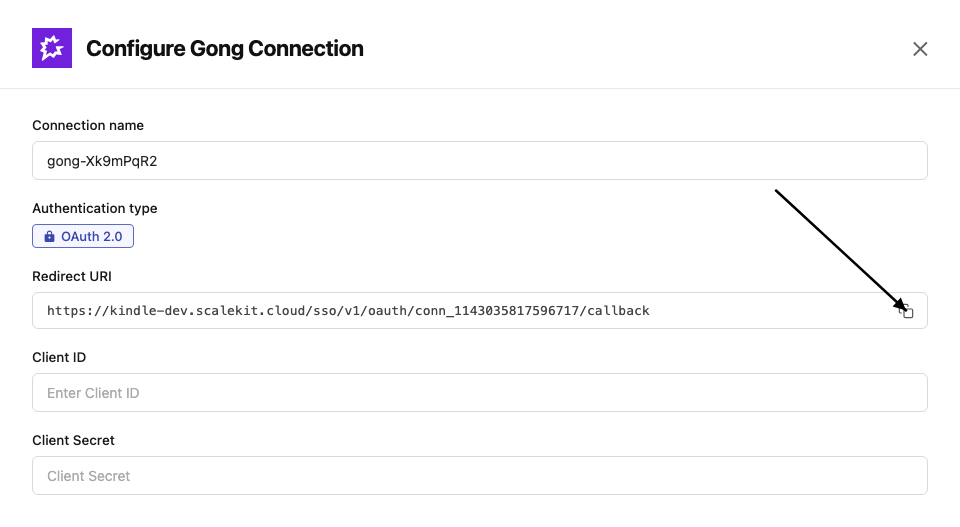
-
In the Gong Developer Portal, open your app.
-
Paste the copied URI into the Redirect URL field and click Save.
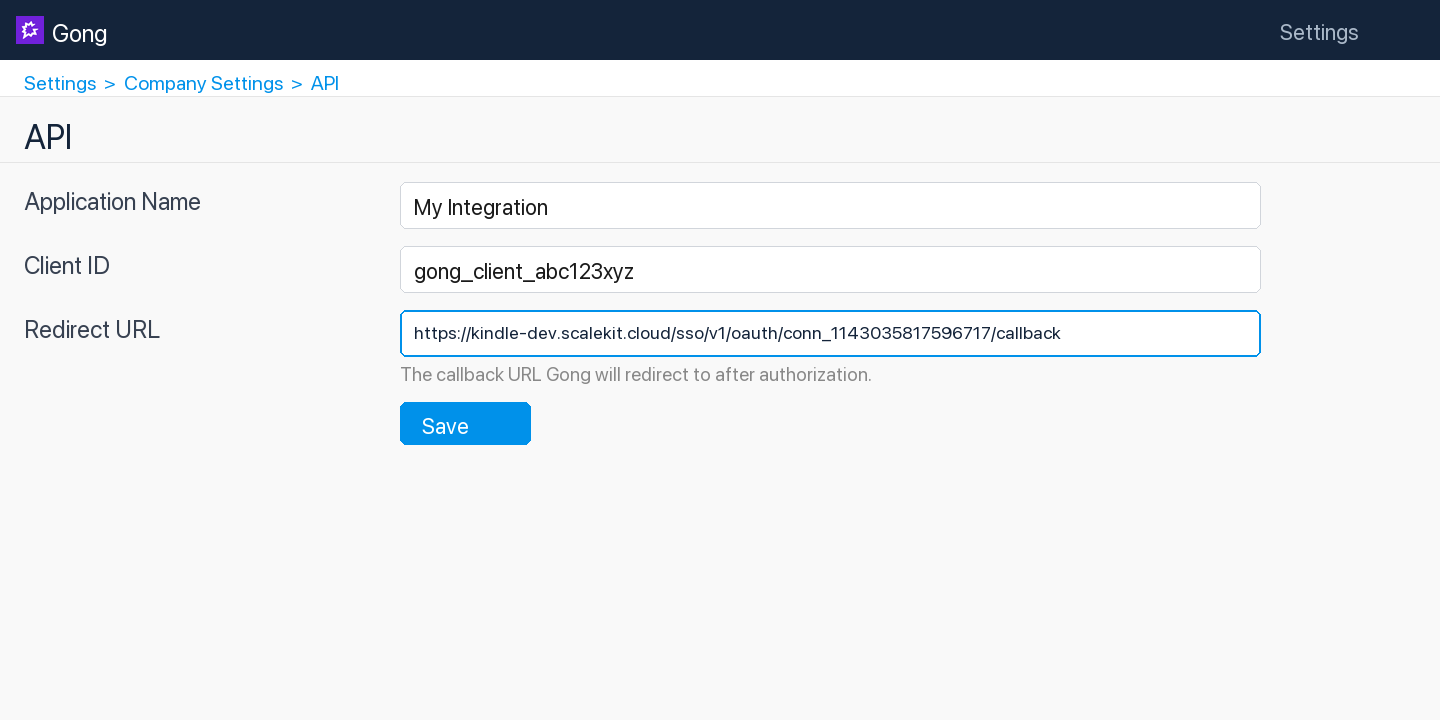
-
-
Get client credentials
- In the Gong Developer Portal, open your app:
- Client ID — listed under Client ID
- Client Secret — listed under Client Secret
- In the Gong Developer Portal, open your app:
-
Add credentials in Scalekit
-
In Scalekit dashboard, go to AgentKit > Connections and open the connection you created.
-
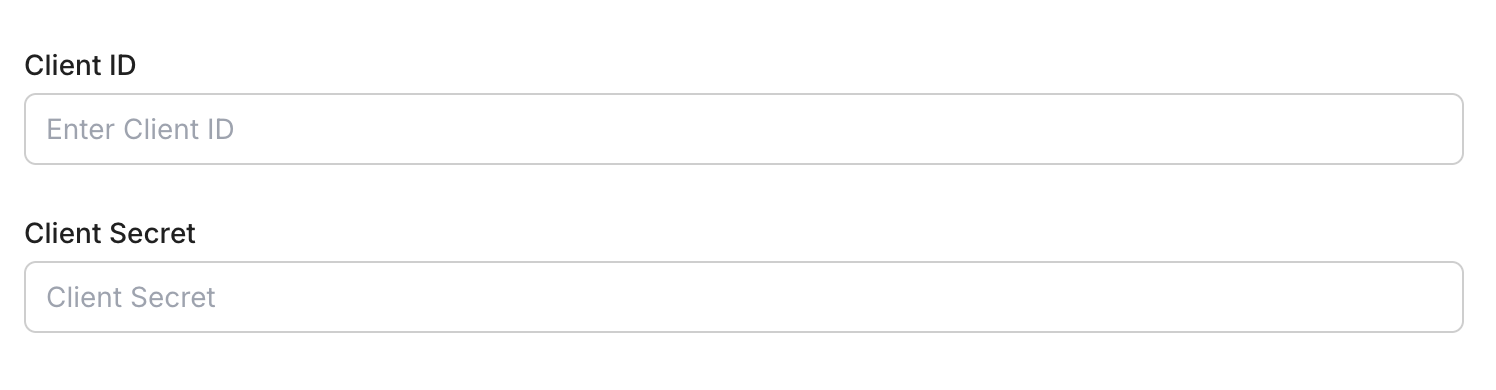
Enter your credentials:
- Client ID (from your Gong app)
- Client Secret (from your Gong app)
- Permissions — select the scopes your app needs
-
Click Save.
-
-
-
Authorize and make your first call
Section titled “Authorize and make your first call”quickstart.ts import { ScalekitClient } from '@scalekit-sdk/node'import 'dotenv/config'const scalekit = new ScalekitClient(process.env.SCALEKIT_ENV_URL,process.env.SCALEKIT_CLIENT_ID,process.env.SCALEKIT_CLIENT_SECRET,)const actions = scalekit.actionsconst connector = 'gong'const identifier = 'user_123'// Generate an authorization link for the userconst { link } = await actions.getAuthorizationLink({ connectionName: connector, identifier })console.log('Authorize Gong:', link)process.stdout.write('Press Enter after authorizing...')await new Promise(r => process.stdin.once('data', r))// Make your first callconst result = await actions.executeTool({connector,identifier,toolName: 'gong_call_outcomes_list',toolInput: {},})console.log(result)quickstart.py import osfrom scalekit.client import ScalekitClientfrom dotenv import load_dotenvload_dotenv()scalekit_client = ScalekitClient(env_url=os.getenv("SCALEKIT_ENV_URL"),client_id=os.getenv("SCALEKIT_CLIENT_ID"),client_secret=os.getenv("SCALEKIT_CLIENT_SECRET"),)actions = scalekit_client.actionsconnection_name = "gong"identifier = "user_123"# Generate an authorization link for the userlink_response = actions.get_authorization_link(connection_name=connection_name,identifier=identifier,)print("Authorize Gong:", link_response.link)input("Press Enter after authorizing...")# Make your first callresult = actions.execute_tool(tool_input={},tool_name="gong_call_outcomes_list",connection_name=connection_name,identifier=identifier,)print(result)
What you can do
Section titled “What you can do”Connect this agent connector to let your agent:
- Get user settings history, user, calls ai content — Retrieve the history of settings changes for a single Gong user, such as changes to their role, team, or permission profile over time
- Day stats activity — Retrieve day-by-day activity statistics for one or more Gong users across a date range, with one record per user per day that had activity
- Period stats activity aggregate by — Retrieve aggregated activity statistics for one or more Gong users, grouped into calendar time periods (e.g
- Aggregate stats activity — Retrieve aggregated activity statistics (calls, emails, meetings and similar counts) for one or more Gong users over a date range, with one summary record returned per user with any activity in the range
- Status meetings integration, engage prospects bulk assign — Check whether Gong’s meeting recording integration is properly set up for a list of users, by email
- Delete meeting — Delete a scheduled Gong meeting by its meeting ID, so Gong no longer joins or records it
Common workflows
Section titled “Common workflows”Proxy API call
const result = await actions.request({ connectionName: 'gong', identifier: 'user_123', path: '/v2/users', method: 'GET',});console.log(result);result = actions.request( connection_name='gong', identifier='user_123', path="/v2/users", method="GET")print(result)Execute a tool
const result = await actions.executeTool({ connector: 'gong', identifier: 'user_123', toolName: 'gong_call_outcomes_list', toolInput: {},});console.log(result);result = actions.execute_tool( connection_name='gong', identifier='user_123', tool_name='gong_call_outcomes_list', tool_input={},)print(result)Tool list
Section titled “Tool list”Use the exact tool names from the Tool list below when you call execute_tool. If you’re not sure which name to use, list the tools available for the current user first.
gong_call_get#Retrieve basic data for a single Gong call by its ID: title, timing, direction, parties, and system/media info. For richer data (trackers, topics, CRM associations, interaction stats) with filtering across many calls at once, use Get Calls (Extensive) instead.1 param
Retrieve basic data for a single Gong call by its ID: title, timing, direction, parties, and system/media info. For richer data (trackers, topics, CRM associations, interaction stats) with filtering across many calls at once, use Get Calls (Extensive) instead.
idstringrequiredGong's unique numeric identifier for the call (up to 20 digits).gong_call_outcomes_list#List all call outcome options configured in the Gong account. Returns outcome definitions such as name and ID that can be applied to calls to indicate the result of a conversation.0 params
List all call outcome options configured in the Gong account. Returns outcome definitions such as name and ID that can be applied to calls to indicate the result of a conversation.
gong_call_users_access_add#Grant individual Gong users access to specific calls, beyond whatever access they already have via sharing, permission profiles, or team membership. Accepts a batch of call-to-users mappings in a single request.1 param
Grant individual Gong users access to specific calls, beyond whatever access they already have via sharing, permission profiles, or team membership. Accepts a batch of call-to-users mappings in a single request.
call_access_listarrayrequiredArray of objects, each specifying a call ID and the list of user IDs to grant access to that call. Each item shape: {"call_id": "...", "user_ids": ["..."]}.gong_call_users_access_get#Retrieve the users who have been given individual access to specific calls through the Gong API (via Add Call Users Access). Does not report access granted through other means such as sharing, permission profiles, or team membership. Note: Gong implements this as a POST with a filter body even though it is a read-only lookup.1 param
Retrieve the users who have been given individual access to specific calls through the Gong API (via Add Call Users Access). Does not report access granted through other means such as sharing, permission profiles, or team membership. Note: Gong implements this as a POST with a filter body even though it is a read-only lookup.
call_idsarrayrequiredArray of Gong's unique numeric call IDs to look up access for.gong_calls_ai_content_get#Retrieve Gong's AI-generated content for one or more calls, such as the call brief, key points, highlights, and outline. This is a separate, more focused endpoint than Get Calls (Extensive) for callers that only need the AI-generated summary content rather than full call metadata, parties, and interaction stats.3 params
Retrieve Gong's AI-generated content for one or more calls, such as the call brief, key points, highlights, and outline. This is a separate, more focused endpoint than Get Calls (Extensive) for callers that only need the AI-generated summary content rather than full call metadata, parties, and interaction stats.
call_idsarrayrequiredArray of Gong call IDs to retrieve AI-generated content for.content_selectorarrayoptionalWhich AI-generated content types to include. Valid values: brief, outline, highlights, keyPoints, callSummary. Leave empty to return all available types.cursorstringoptionalCursor value from a previous API response for paginating to the next page of results.gong_calls_create#Create (register) a new call in Gong. This adds a call record with metadata such as title, scheduled start time, participants, and direction. After creation, Gong returns a media upload URL that can be used to upload the call recording separately.13 params
Create (register) a new call in Gong. This adds a call record with metadata such as title, scheduled start time, participants, and direction. After creation, Gong returns a media upload URL that can be used to upload the call recording separately.
actual_startstringrequiredThe actual date and time the call started (ISO 8601 format, e.g., 2024-06-15T14:00:00Z).call_provider_codestringoptionalThe telephony or conferencing system used (e.g., 'zoom', 'webex', 'ringcentral').client_unique_idstringoptionalA unique identifier for this call in your system, used to prevent duplicate uploads.directionstringoptionalDirection of the call: 'Inbound' or 'Outbound'.dispositionstringoptionalOutcome of the call (e.g., 'Connected', 'No Answer', 'Left Voicemail').durationintegeroptionalDuration of the call in seconds.languagestringoptionalPrimary language spoken on the call as a BCP-47 language tag (e.g., 'en-US', 'es-ES').partiesarrayoptionalArray of participant objects. Each participant should include emailAddress, name, speakerId, and userId fields.purposestringoptionalPurpose or topic of the call (e.g., 'Discovery', 'Demo', 'QBR').scheduled_endstringoptionalScheduled end time for the call (ISO 8601 format).scheduled_startstringoptionalScheduled start time for the call (ISO 8601 format).titlestringoptionalTitle or subject of the call.workspace_idstringoptionalWorkspace ID to associate this call with a specific Gong workspace.gong_calls_get#Retrieve extensive details for one or more Gong calls by their IDs. Returns enriched call data including participants, interaction stats, topics discussed, and CRM associations.5 params
Retrieve extensive details for one or more Gong calls by their IDs. Returns enriched call data including participants, interaction stats, topics discussed, and CRM associations.
call_idsarrayrequiredArray of Gong call IDs to retrieve extensive details for.cursorstringoptionalCursor value from a previous API response for paginating to the next page of results.from_date_timestringoptionalStart of the date-time range to filter calls (ISO 8601 format).to_date_timestringoptionalEnd of the date-time range to filter calls (ISO 8601 format).workspace_idstringoptionalOptional workspace ID to restrict the results to a specific Gong workspace.gong_calls_list#List Gong calls with optional filters for date range, workspace, and specific call IDs. Returns a page of calls with metadata such as title, duration, participants, and direction.5 params
List Gong calls with optional filters for date range, workspace, and specific call IDs. Returns a page of calls with metadata such as title, duration, participants, and direction.
call_idsstringoptionalComma-separated list of specific call IDs to retrieve.cursorstringoptionalCursor value from a previous API response for paginating to the next page of results.from_date_timestringoptionalStart of the date-time range for filtering calls (ISO 8601 format, e.g., 2024-01-01T00:00:00Z).to_date_timestringoptionalEnd of the date-time range for filtering calls (ISO 8601 format, e.g., 2024-12-31T23:59:59Z).workspace_idstringoptionalOptional workspace ID to restrict results to a specific Gong workspace.gong_calls_transcript_get#Retrieve transcripts for one or more Gong calls by their IDs. Returns speaker-attributed, sentence-level transcript segments with timing offsets for each call.5 params
Retrieve transcripts for one or more Gong calls by their IDs. Returns speaker-attributed, sentence-level transcript segments with timing offsets for each call.
call_idsarrayrequiredArray of Gong call IDs whose transcripts to retrieve.cursorstringoptionalCursor value from a previous API response for paginating to the next page of results.from_date_timestringoptionalStart of the date-time range to filter calls (ISO 8601 format).to_date_timestringoptionalEnd of the date-time range to filter calls (ISO 8601 format).workspace_idstringoptionalOptional workspace ID to restrict the results to a specific Gong workspace.gong_coaching_get#Get coaching data from Gong, including coaching sessions and feedback provided by managers to their team members. Supports cursor-based pagination for large result sets.1 param
Get coaching data from Gong, including coaching sessions and feedback provided by managers to their team members. Supports cursor-based pagination for large result sets.
cursorstringoptionalCursor value from a previous response for paginating to the next page of results.gong_crm_integrations_list#Retrieve the Generic CRM integration currently registered with Gong (via Register CRM Integration). Gong supports only one active Generic CRM integration at a time; this returns its integrationId and details, or an empty result if none is registered.0 params
Retrieve the Generic CRM integration currently registered with Gong (via Register CRM Integration). Gong supports only one active Generic CRM integration at a time; this returns its integrationId and details, or an empty result if none is registered.
gong_crm_objects_list#Fetch specific CRM objects (accounts, contacts, deals, or leads) that were uploaded to Gong's Generic CRM integration, by their CRM IDs. Intended for development-phase verification that objects were uploaded and processed correctly in Gong — returns a map keyed by CRM ID, with null for any ID not found. Limited to 100 object IDs per request. Note: this call sends the requested object IDs as a JSON array in the request body even though the HTTP method is GET, matching Gong's documented API contract for this endpoint.3 params
Fetch specific CRM objects (accounts, contacts, deals, or leads) that were uploaded to Gong's Generic CRM integration, by their CRM IDs. Intended for development-phase verification that objects were uploaded and processed correctly in Gong — returns a map keyed by CRM ID, with null for any ID not found. Limited to 100 object IDs per request. Note: this call sends the requested object IDs as a JSON array in the request body even though the HTTP method is GET, matching Gong's documented API contract for this endpoint.
integration_idintegerrequiredThe integrationId generated when the CRM integration was registered (see List CRM Integrations).object_idsarrayrequiredArray of CRM object IDs to fetch, up to 100 per request.object_typestringrequiredThe type of CRM object to retrieve.gong_crm_schema_fields_list#Retrieve the object schema fields (name, label, type, picklist values) configured for a CRM object type in Gong's Generic CRM integration. Use this to see what fields were registered via Upload Object Schema before uploading or reading CRM object data.2 params
Retrieve the object schema fields (name, label, type, picklist values) configured for a CRM object type in Gong's Generic CRM integration. Use this to see what fields were registered via Upload Object Schema before uploading or reading CRM object data.
integration_idintegerrequiredThe integrationId generated when the CRM integration was registered (see List CRM Integrations).object_typestringrequiredThe CRM object type to retrieve schema fields for (case-sensitive).gong_data_privacy_email_erase#Permanently delete from Gong any calls or email messages that reference the given email address, plus any leads or contacts with that email address. Deletion is asynchronous and may take several hours to complete. Gong protects against deleting an abnormal number of objects — if the deletion fails, contact help@gong.io. Delete the data from your CRM and email system first, or it may be re-imported into Gong. Use Look Up Data for Email Address first to preview what will be removed.1 param
Permanently delete from Gong any calls or email messages that reference the given email address, plus any leads or contacts with that email address. Deletion is asynchronous and may take several hours to complete. Gong protects against deleting an abnormal number of objects — if the deletion fails, contact help@gong.io. Delete the data from your CRM and email system first, or it may be re-imported into Gong. Use Look Up Data for Email Address first to preview what will be removed.
email_addressstringrequiredThe email address whose referencing calls, email messages, leads, and contacts should be permanently deleted.gong_data_privacy_email_lookup#Show the elements in the Gong system that reference a given email address: calls and email messages that mention it, and any leads or contacts with that email address. Use this before Erase Data for Email Address to see what would be deleted.1 param
Show the elements in the Gong system that reference a given email address: calls and email messages that mention it, and any leads or contacts with that email address. Use this before Erase Data for Email Address to see what would be deleted.
email_addressstringrequiredThe email address to search for across calls, email messages, leads, and contacts.gong_engage_digital_interactions_create#Add a digital interaction event (such as a web visit, content engagement, or other digital touchpoint) to a Gong Engage prospect's activity timeline.6 params
Add a digital interaction event (such as a web visit, content engagement, or other digital touchpoint) to a Gong Engage prospect's activity timeline.
event_namestringrequiredName of the digital interaction event (e.g., 'Visited Pricing Page', 'Downloaded Whitepaper').event_timestampstringrequiredTimestamp when the digital interaction occurred (ISO 8601 format).crm_account_idstringoptionalThe CRM account ID associated with this interaction.crm_contact_idstringoptionalThe CRM contact ID associated with this interaction.prospect_emailstringoptionalEmail address of the prospect who performed this digital interaction.urlstringoptionalURL associated with the digital interaction (e.g., the page visited or content accessed).gong_engage_email_activity_report#Report email engagement events (opens, clicks, bounces, unsubscribes) to Gong Engage so they appear in the activity timeline for a prospect.5 params
Report email engagement events (opens, clicks, bounces, unsubscribes) to Gong Engage so they appear in the activity timeline for a prospect.
email_idstringrequiredExternal identifier for the email message that was engaged with.event_timestampstringrequiredTimestamp when the engagement event occurred (ISO 8601 format).event_typestringrequiredThe type of email engagement event to report.prospect_emailstringrequiredEmail address of the prospect who triggered this engagement event.link_urlstringoptionalFor EMAIL_LINK_CLICKED events, the URL of the link that was clicked.gong_engage_flow_content_override#Override field placeholder values in a Gong Engage flow for specific prospects, allowing personalized content without modifying the base flow template.2 params
Override field placeholder values in a Gong Engage flow for specific prospects, allowing personalized content without modifying the base flow template.
field_valuesobjectrequiredKey-value pairs of field placeholder names and their override values to substitute into the flow content.flow_instance_idstringrequiredThe unique ID of the flow instance to override content for. Retrieve from the Get Flows for Prospects endpoint.gong_engage_flow_folders_list#List all Gong Engage flow folders available to a user, including company folders, personal folders, and folders shared with the specified user.3 params
List all Gong Engage flow folders available to a user, including company folders, personal folders, and folders shared with the specified user.
flow_owner_emailstringrequiredEmail address of the Gong user whose flow folders to retrieve. Returns company folders plus personal and shared folders for this user.cursorstringoptionalCursor value from a previous API response for paginating to the next page of results.workspace_idstringoptionalOptional workspace ID to filter flow folders by a specific workspace.gong_engage_flows_list#List all Gong Engage flows available to a user, including company flows, personal flows, and flows shared with the specified user.3 params
List all Gong Engage flows available to a user, including company flows, personal flows, and flows shared with the specified user.
flow_owner_emailstringrequiredEmail address of the Gong user whose flows to retrieve. Returns company flows plus personal and shared flows for this user.cursorstringoptionalCursor value from a previous API response for paginating to the next page of results.workspace_idstringoptionalOptional workspace ID to filter flows by a specific workspace.gong_engage_prospects_assign#Assign up to 200 CRM prospects (contacts or leads) to a specific Gong Engage flow.4 params
Assign up to 200 CRM prospects (contacts or leads) to a specific Gong Engage flow.
crm_prospect_idsarrayrequiredArray of CRM prospect IDs (contacts or leads) to assign to the flow. Maximum 200 per request.flow_idstringrequiredThe unique ID of the Gong Engage flow to assign the prospects to.flow_instance_owner_emailstringrequiredEmail address of the Gong user who will own the flow to-dos and be responsible for this flow instance.overridesobjectoptionalOptional overrides for specific steps and variables in the flow (Beta). Example: {"coolOffOverride": true, "steps": [{"number": 1, "subject": "Hi {{recipient.first_name}}", "body": "<div>Reaching out...</div>"}], "flowInstanceVariables": [{"name": "recipient.first_name", "value": "Mike"}]}gong_engage_prospects_assign_cool_off_override#Assign CRM prospects to a Gong Engage flow while overriding the cool-off period restriction that would normally prevent re-enrollment.3 params
Assign CRM prospects to a Gong Engage flow while overriding the cool-off period restriction that would normally prevent re-enrollment.
crm_prospect_idsarrayrequiredArray of CRM prospect IDs (contacts or leads) to assign to the flow, bypassing the cool-off period. Maximum 200 per request.flow_idstringrequiredThe unique ID of the Gong Engage flow to assign the prospects to.flow_instance_owner_emailstringoptionalEmail address of the Gong user who will own the flow to-dos and be responsible for this flow instance.gong_engage_prospects_bulk_assign#Asynchronously bulk assign CRM prospects to a Gong Engage flow; returns an assignment ID that can be used to poll the operation status.3 params
Asynchronously bulk assign CRM prospects to a Gong Engage flow; returns an assignment ID that can be used to poll the operation status.
crm_prospect_idsarrayrequiredArray of CRM prospect IDs (contacts or leads) to bulk assign to the flow.flow_idstringrequiredThe unique ID of the Gong Engage flow to assign the prospects to.flow_instance_owner_emailstringoptionalEmail address of the Gong user who will own the flow to-dos and be responsible for this flow instance.gong_engage_prospects_bulk_assign_status#Retrieve the status and result of a previously submitted bulk prospect-to-flow assignment operation using its assignment ID.1 param
Retrieve the status and result of a previously submitted bulk prospect-to-flow assignment operation using its assignment ID.
assignment_idstringrequiredThe unique ID of the bulk assignment operation to check, returned from the Bulk Assign Prospects to Flow request.gong_engage_prospects_flows_list#List all Gong Engage flows currently assigned to a given set of CRM prospects (contacts or leads).1 param
List all Gong Engage flows currently assigned to a given set of CRM prospects (contacts or leads).
crm_prospect_idsarrayrequiredArray of CRM prospect IDs (contacts or leads) to look up flow assignments for. Maximum 200 prospects per request.gong_engage_prospects_unassign#Unassign CRM prospects (contacts or leads) from a specific Gong Engage flow using their CRM IDs, removing them from the flow sequence.2 params
Unassign CRM prospects (contacts or leads) from a specific Gong Engage flow using their CRM IDs, removing them from the flow sequence.
crm_prospect_idsarrayrequiredArray of CRM prospect IDs (contacts or leads) to remove from the flow.flow_idstringrequiredThe unique ID of the Gong Engage flow to unassign the prospects from.gong_engage_prospects_unassign_by_instance#Unassign prospects from a Gong Engage flow using flow instance IDs rather than CRM prospect IDs.1 param
Unassign prospects from a Gong Engage flow using flow instance IDs rather than CRM prospect IDs.
flow_instance_idsarrayrequiredArray of flow instance IDs identifying the specific prospect-flow enrollments to remove.gong_engage_task_complete#Mark a specific Gong Engage task as completed.2 params
Mark a specific Gong Engage task as completed.
task_idstringrequiredThe unique ID of the Gong Engage task to mark as completed.completion_notesstringoptionalOptional notes about how the task was completed.gong_engage_task_skip#Skip a specific Gong Engage task, indicating it should not be performed for this prospect.2 params
Skip a specific Gong Engage task, indicating it should not be performed for this prospect.
task_idstringrequiredThe unique ID of the Gong Engage task to skip.skip_reasonstringoptionalOptional reason for skipping this task.gong_engage_tasks_list#List Gong Engage tasks for a specified user, such as call tasks, email tasks, LinkedIn tasks, and other follow-up actions.5 params
List Gong Engage tasks for a specified user, such as call tasks, email tasks, LinkedIn tasks, and other follow-up actions.
assignee_emailstringrequiredEmail address of the Gong user whose tasks to retrieve.cursorstringoptionalCursor value from a previous response for paginating to the next page of results.from_datestringoptionalStart date for filtering tasks (ISO 8601 format, e.g., 2024-01-01T00:00:00Z).to_datestringoptionalEnd date for filtering tasks (ISO 8601 format, e.g., 2024-12-31T23:59:59Z).workspace_idstringoptionalOptional workspace ID to filter tasks by a specific workspace.gong_engage_users_list#List all active Gong users in the organization, useful for finding user emails to use as flow owners or assignees in Gong Engage.2 params
List all active Gong users in the organization, useful for finding user emails to use as flow owners or assignees in Gong Engage.
cursorstringoptionalCursor value from a previous API response for paginating to the next page of results.include_avatarsbooleanoptionalWhether to include avatar URLs in the response.gong_engage_workspaces_list#List all company workspaces in Gong, which can be used to scope Gong Engage flows and tasks to specific business units or teams.0 params
List all company workspaces in Gong, which can be used to scope Gong Engage flows and tasks to specific business units or teams.
gong_library_folder_content_get#Get the content of a specific Gong library folder by its folder ID. Returns calls, clips, and other media items stored inside the folder.1 param
Get the content of a specific Gong library folder by its folder ID. Returns calls, clips, and other media items stored inside the folder.
folder_idstringrequiredThe unique identifier of the library folder whose content should be retrieved.gong_library_folders_list#List all library folders in the Gong account. Returns folder names, IDs, and hierarchy information. Optionally filter by workspace to retrieve folders scoped to a specific business unit.1 param
List all library folders in the Gong account. Returns folder names, IDs, and hierarchy information. Optionally filter by workspace to retrieve folders scoped to a specific business unit.
workspace_idstringoptionalOptional workspace ID to filter library folders belonging to a specific Gong workspace.gong_logs_list#Retrieve Gong audit/activity log entries within a time range, filtered by log type. AccessLog records every endpoint/URL call with the user and IP; UserActivityLog records sensitive operations such as sharing a call, editing user settings, impersonating a user, deleting a call, requesting an API key, or changing permissions; UserCallPlay, ExternallySharedCallAccess, and ExternallySharedCallPlay track call playback and external sharing activity.4 params
Retrieve Gong audit/activity log entries within a time range, filtered by log type. AccessLog records every endpoint/URL call with the user and IP; UserActivityLog records sensitive operations such as sharing a call, editing user settings, impersonating a user, deleting a call, requesting an API key, or changing permissions; UserCallPlay, ExternallySharedCallAccess, and ExternallySharedCallPlay track call playback and external sharing activity.
from_date_timestringrequiredStart of the time range to retrieve logs for, in ISO-8601 format.log_typestringrequiredThe category of logs to retrieve.cursorstringoptionalCursor value from a previous response, used to fetch the next page of log records.to_date_timestringoptionalEnd of the time range to retrieve logs for, in ISO-8601 format. If omitted, logs end with the latest recorded entry.gong_meeting_create#Schedule a new Gong meeting so Gong can join and record it. Requires a start time, end time, organizer email, and at least one invitee; the Gong consent page shown to invitees follows the organizer's settings.6 params
Schedule a new Gong meeting so Gong can join and record it. Requires a start time, end time, organizer email, and at least one invitee; the Gong consent page shown to invitees follows the organizer's settings.
end_timestringrequiredThe meeting end time in ISO-8601 format, e.g. 2024-06-15T15:30:00-07:00 or 2024-06-15T22:30:00Z.inviteesarrayrequiredList of invitees to the meeting (not including the organizer). Each item shape: {"email": "...", "display_name": "...", "first_name": "...", "last_name": "..."} — only email is commonly needed.organizer_emailstringrequiredEmail address of the Gong user creating the meeting. The Gong consent page link shown to invitees follows this user's settings.start_timestringrequiredThe meeting start time in ISO-8601 format, e.g. 2024-06-15T14:00:00-07:00 or 2024-06-15T21:00:00Z.external_idstringoptionalThe ID of this meeting as it is formed on the external system that created it.titlestringoptionalTitle of the meeting event.gong_meeting_delete#Delete a scheduled Gong meeting by its meeting ID, so Gong no longer joins or records it. This is for meetings created through Gong's Meetings API (Create Meeting) — not for calls already recorded, which use the Calls API instead.2 params
Delete a scheduled Gong meeting by its meeting ID, so Gong no longer joins or records it. This is for meetings created through Gong's Meetings API (Create Meeting) — not for calls already recorded, which use the Calls API instead.
meeting_idstringrequiredGong's unique identifier for the meeting (up to 20 digits), as returned by Create Meeting.organizer_emailstringoptionalEmail address of the user who created the meeting.gong_meetings_integration_status#Check whether Gong's meeting recording integration is properly set up for a list of users, by email. Useful for diagnosing why Gong isn't joining or recording a given user's meetings.1 param
Check whether Gong's meeting recording integration is properly set up for a list of users, by email. Useful for diagnosing why Gong isn't joining or recording a given user's meetings.
emailsarrayrequiredArray of user email addresses to check meeting-integration status for. Maximum 100 per request.gong_scorecards_list#List all scorecard settings configured in the Gong account. Returns scorecard definitions including name, questions, and associated criteria used for call review and coaching.0 params
List all scorecard settings configured in the Gong account. Returns scorecard definitions including name, questions, and associated criteria used for call review and coaching.
gong_stats_activity_aggregate#Retrieve aggregated activity statistics (calls, emails, meetings and similar counts) for one or more Gong users over a date range, with one summary record returned per user with any activity in the range.4 params
Retrieve aggregated activity statistics (calls, emails, meetings and similar counts) for one or more Gong users over a date range, with one summary record returned per user with any activity in the range.
from_datestringrequiredStart date (inclusive) for the activity range, in the company's time zone. Format: YYYY-MM-DD.to_datestringrequiredEnd date (exclusive) for the activity range, in the company's time zone. Must not exceed the current day. Format: YYYY-MM-DD.cursorstringoptionalCursor value from a previous response for paginating to the next page of results.user_idsarrayoptionalGong user IDs to restrict the results to. Leave empty to include all users with activity in the range.gong_stats_activity_aggregate_by_period#Retrieve aggregated activity statistics for one or more Gong users, grouped into calendar time periods (e.g. week by week) across a date range, instead of one single total per user. The first day of any week period is Monday.5 params
Retrieve aggregated activity statistics for one or more Gong users, grouped into calendar time periods (e.g. week by week) across a date range, instead of one single total per user. The first day of any week period is Monday.
aggregation_periodstringrequiredThe calendar period each activity total is grouped by. Commonly used values are DAY, WEEK, MONTH, and QUARTER; the first day of any week period is Monday.from_datestringrequiredStart date (inclusive) for the activity range, in the company's time zone. Format: YYYY-MM-DD.to_datestringrequiredEnd date (exclusive) for the activity range, in the company's time zone. Must not exceed the current day. Format: YYYY-MM-DD.cursorstringoptionalCursor value from a previous response for paginating to the next page of results.user_idsarrayoptionalGong user IDs to restrict the results to. Leave empty to include all users with activity in the range.gong_stats_activity_day_by_day#Retrieve day-by-day activity statistics for one or more Gong users across a date range, with one record per user per day that had activity. More granular than Get Aggregated User Activity, which returns a single total per user for the whole range.4 params
Retrieve day-by-day activity statistics for one or more Gong users across a date range, with one record per user per day that had activity. More granular than Get Aggregated User Activity, which returns a single total per user for the whole range.
from_datestringrequiredStart date (inclusive) for the activity range, in the company's time zone. Format: YYYY-MM-DD.to_datestringrequiredEnd date (exclusive) for the activity range, in the company's time zone. Must not exceed the current day. Format: YYYY-MM-DD.cursorstringoptionalCursor value from a previous response for paginating to the next page of results.user_idsarrayoptionalGong user IDs to restrict the results to. Leave empty to include all users with activity in the range.gong_stats_interaction#Get aggregated interaction statistics for Gong calls within a date range. Returns metrics such as talk ratio, longest monologue, patience, question rate, and interactivity for each participant. Optionally filter by specific call IDs.4 params
Get aggregated interaction statistics for Gong calls within a date range. Returns metrics such as talk ratio, longest monologue, patience, question rate, and interactivity for each participant. Optionally filter by specific call IDs.
from_date_timestringrequiredStart of the date range for retrieving interaction statistics (ISO 8601 format, e.g., 2024-01-01T00:00:00Z).to_date_timestringrequiredEnd of the date range for retrieving interaction statistics (ISO 8601 format, e.g., 2024-12-31T23:59:59Z).call_idsarrayoptionalOptional array of specific Gong call IDs to filter the statistics.cursorstringoptionalCursor value from a previous response for paginating to the next page of results.gong_stats_user_actions#Get user activity and scorecard statistics for Gong calls within a date range. Returns aggregated scorecard metrics and activity data per user. Optionally filter by specific user IDs.4 params
Get user activity and scorecard statistics for Gong calls within a date range. Returns aggregated scorecard metrics and activity data per user. Optionally filter by specific user IDs.
from_date_timestringrequiredStart of the date range for retrieving scorecard statistics (ISO 8601 format, e.g., 2024-01-01T00:00:00Z).to_date_timestringrequiredEnd of the date range for retrieving scorecard statistics (ISO 8601 format, e.g., 2024-12-31T23:59:59Z).cursorstringoptionalCursor value from a previous response for paginating to the next page of results.user_idsarrayoptionalOptional array of Gong user IDs to filter scorecard statistics for specific users.gong_trackers_list#List all tracker (keyword tracker) settings configured in the Gong account. Returns tracker definitions including name, tracked phrases, and associated categories used for monitoring conversation topics.0 params
List all tracker (keyword tracker) settings configured in the Gong account. Returns tracker definitions including name, tracked phrases, and associated categories used for monitoring conversation topics.
gong_user_get#Retrieve a single Gong user by their user ID. For filtering many users at once by ID list or creation date range, use Get Users (Extensive) instead.1 param
Retrieve a single Gong user by their user ID. For filtering many users at once by ID list or creation date range, use Get Users (Extensive) instead.
idstringrequiredGong's unique numeric identifier for the user (up to 20 digits).gong_user_settings_history_get#Retrieve the history of settings changes for a single Gong user, such as changes to their role, team, or permission profile over time. Useful for auditing account administration changes.1 param
Retrieve the history of settings changes for a single Gong user, such as changes to their role, team, or permission profile over time. Useful for auditing account administration changes.
idstringrequiredGong's unique numeric identifier for the user (up to 20 digits).gong_users_get#Get detailed user information for specific Gong users using an extensive filter. Filter by user IDs or by a creation date range. Returns full user profiles including settings, roles, and manager details.4 params
Get detailed user information for specific Gong users using an extensive filter. Filter by user IDs or by a creation date range. Returns full user profiles including settings, roles, and manager details.
created_from_date_timestringoptionalReturn users created on or after this date-time (ISO 8601 format, e.g., 2024-01-01T00:00:00Z).created_to_date_timestringoptionalReturn users created on or before this date-time (ISO 8601 format, e.g., 2024-12-31T23:59:59Z).cursorstringoptionalCursor value from a previous response for paginating to the next page of results.user_idsarrayoptionalArray of Gong user IDs to retrieve detailed information for.gong_users_list#List all users in the Gong account. Returns user profiles including name, email, title, and manager information. Supports cursor-based pagination and optionally includes avatar URLs.2 params
List all users in the Gong account. Returns user profiles including name, email, title, and manager information. Supports cursor-based pagination and optionally includes avatar URLs.
cursorstringoptionalCursor value from a previous response for paginating to the next page of results.include_avatarsbooleanoptionalWhether to include avatar image URLs in the response.