


Microsoft Word connector
OAuth 2.0Files & DocumentsConnect to Microsoft Word. Authenticate with your Microsoft account to create, read, and edit Word documents stored in OneDrive or SharePoint through...
Microsoft Word connector
-
Install the SDK
Section titled “Install the SDK”Terminal window npm install @scalekit-sdk/nodeTerminal window pip install scalekit -
Set your credentials
Section titled “Set your credentials”Add your Scalekit credentials to your
.envfile. Find values in app.scalekit.com > Developers > API Credentials..env SCALEKIT_ENVIRONMENT_URL=<your-environment-url>SCALEKIT_CLIENT_ID=<your-client-id>SCALEKIT_CLIENT_SECRET=<your-client-secret> -
Set up the connector
Section titled “Set up the connector”Register your Microsoft Word credentials with Scalekit so it handles the token lifecycle. You do this once per environment.
Dashboard setup steps
Register your Scalekit environment with the Microsoft Word connector so Scalekit handles the authentication flow and token lifecycle for you. The connection name you create will be used to identify and invoke the connection programmatically. Then complete the configuration in your application as follows:
-
Set up auth redirects
-
In Scalekit dashboard, go to AgentKit > Connections > Create Connection. Find Word and click Create. Copy the redirect URI. It will look like
https://<SCALEKIT_ENVIRONMENT_URL>/sso/v1/oauth/<CONNECTION_ID>/callback.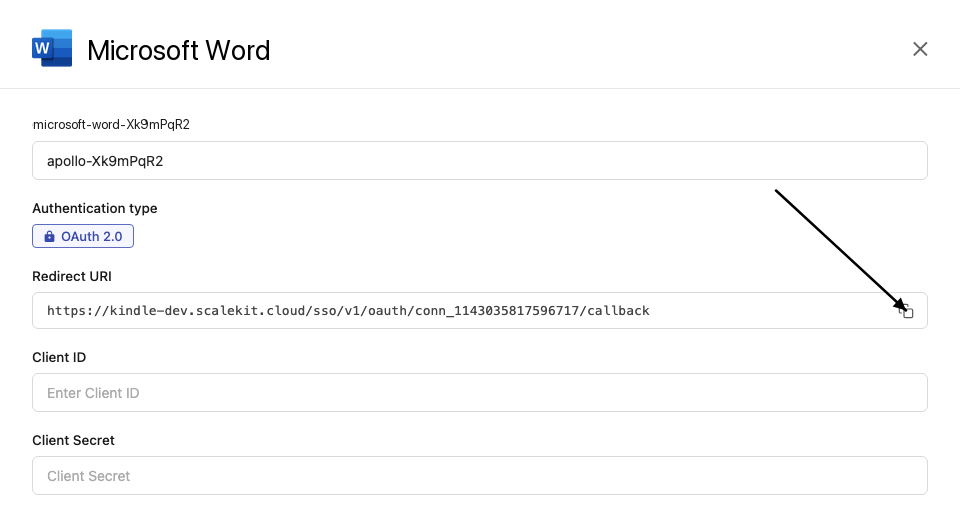
-
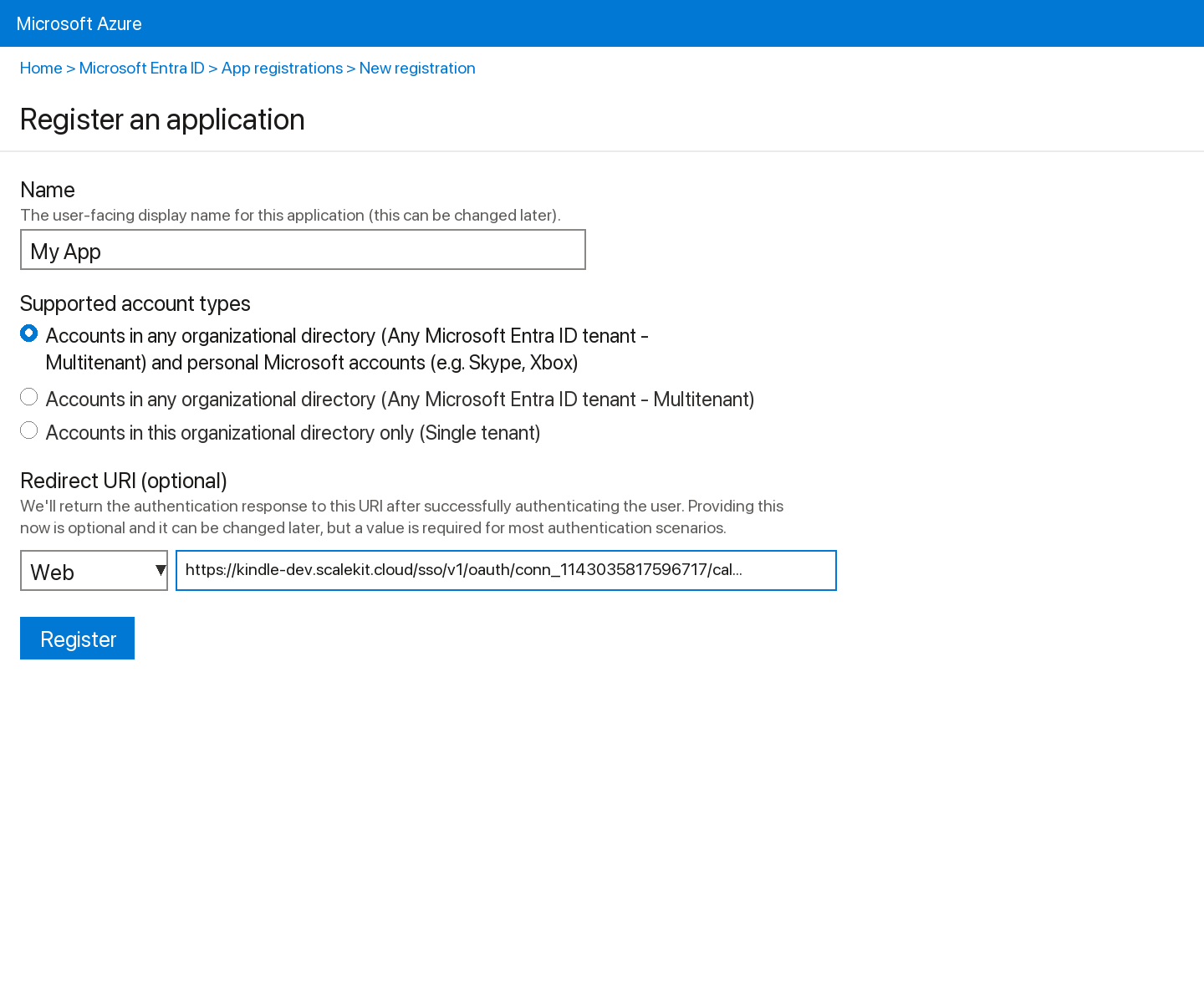
Sign into portal.azure.com and go to Microsoft Entra ID → App registrations → New registration.
-
Enter a name for your app.
-
Under Supported account types, select Accounts in any organizational directory (Any Azure AD directory - Multitenant) and personal Microsoft accounts.
-
Under Redirect URI, select Web and paste the redirect URI from step 1. Click Register.
-
-
Get your client credentials
-
Go to Certificates & secrets → New client secret, set an expiry, and click Add. Copy the Value immediately.
-
From the Overview page, copy the Application (client) ID.
-
-
Add credentials in Scalekit
-
In Scalekit dashboard, go to AgentKit > Connections and open the connection you created.
-
Enter your credentials:
- Client ID (Application (client) ID from Azure)
- Client Secret (from Certificates & secrets)
- Permissions (scopes — see Microsoft Graph permissions reference)

-
Click Save.
-
-
-
Authorize and make your first call
Section titled “Authorize and make your first call”quickstart.ts import { ScalekitClient } from '@scalekit-sdk/node'import 'dotenv/config'const scalekit = new ScalekitClient(process.env.SCALEKIT_ENV_URL,process.env.SCALEKIT_CLIENT_ID,process.env.SCALEKIT_CLIENT_SECRET,)const actions = scalekit.actionsconst connector = 'microsoftword'const identifier = 'user_123'// Generate an authorization link for the userconst { link } = await actions.getAuthorizationLink({ connectionName: connector, identifier })console.log('Authorize Microsoft Word:', link)process.stdout.write('Press Enter after authorizing...')await new Promise(r => process.stdin.once('data', r))// Make your first callconst result = await actions.executeTool({connector,identifier,toolName: 'microsoftword_get_document',toolInput: { item_id: 'YOUR_ITEM_ID' },})console.log(result)quickstart.py import osfrom scalekit.client import ScalekitClientfrom dotenv import load_dotenvload_dotenv()scalekit_client = ScalekitClient(env_url=os.getenv("SCALEKIT_ENV_URL"),client_id=os.getenv("SCALEKIT_CLIENT_ID"),client_secret=os.getenv("SCALEKIT_CLIENT_SECRET"),)actions = scalekit_client.actionsconnection_name = "microsoftword"identifier = "user_123"# Generate an authorization link for the userlink_response = actions.get_authorization_link(connection_name=connection_name,identifier=identifier,)print("Authorize Microsoft Word:", link_response.link)input("Press Enter after authorizing...")# Make your first callresult = actions.execute_tool(tool_input={"item_id":"YOUR_ITEM_ID"},tool_name="microsoftword_get_document",connection_name=connection_name,identifier=identifier,)print(result)
What you can do
Section titled “What you can do”Connect this agent connector to let your agent:
- Update document content — Overwrite the content of an existing Word document (.docx) in OneDrive by initiating an upload session against its item ID
- Search documents — Search the signed-in user’s personal OneDrive for items matching a query string, searching across file names and content
- Document move, copy — Move a Word document (.docx) to a different OneDrive folder, rename it, or both, by PATCHing its parentReference and/or name
- List documents, document versions — List the children of a OneDrive folder, intended for finding Word (.docx) files
- Get document — Retrieve metadata for a Word document (.docx) in OneDrive by item ID
- Delete document — Delete a Word document (.docx) from OneDrive by item ID
Common workflows
Section titled “Common workflows”Proxy API call
const result = await actions.request({ connectionName: 'microsoftword', identifier: 'user_123', path: '/v1.0/me', method: 'GET',});console.log(result);result = actions.request( connection_name='microsoftword', identifier='user_123', path="/v1.0/me", method="GET")print(result)Execute a tool
const result = await actions.executeTool({ connector: 'microsoftword', identifier: 'user_123', toolName: 'microsoftword_list', toolInput: {},});console.log(result);result = actions.execute_tool( connection_name='microsoftword', identifier='user_123', tool_name='microsoftword_list', tool_input={},)print(result)Tool list
Section titled “Tool list”Use the exact tool names from the Tool list below when you call execute_tool. If you’re not sure which name to use, list the tools available for the current user first.
microsoftword_copy_document#Copy a Word document (.docx) in OneDrive to a new parent folder asynchronously. Returns HTTP 202 Accepted with a Location header pointing to a monitor URL; the copy itself completes in the background. Optionally provide a new name for the copy. Requires Files.ReadWrite or Files.ReadWrite.All scope.3 params
Copy a Word document (.docx) in OneDrive to a new parent folder asynchronously. Returns HTTP 202 Accepted with a Location header pointing to a monitor URL; the copy itself completes in the background. Optionally provide a new name for the copy. Requires Files.ReadWrite or Files.ReadWrite.All scope.
item_idstringrequiredThe unique OneDrive item ID of the Word document to copy. Obtain item IDs from microsoftword_list_documents, microsoftword_search_documents, or microsoftword_create_document.new_parent_idstringrequiredThe OneDrive item ID of the destination folder for the copy. Use "root" to copy to the top level of OneDrive.new_namestringoptionalOptional name for the copied document, including the .docx extension. If omitted, the copy keeps the original name.microsoftword_create_document#Create a new Word document (.docx) in OneDrive by initiating a resumable upload session. Returns an uploadUrl that the caller must use to upload the .docx file bytes via one or more PUT requests. The document is placed under the specified parent folder with the given filename. Requires Files.ReadWrite or Files.ReadWrite.All scope.3 params
Create a new Word document (.docx) in OneDrive by initiating a resumable upload session. Returns an uploadUrl that the caller must use to upload the .docx file bytes via one or more PUT requests. The document is placed under the specified parent folder with the given filename. Requires Files.ReadWrite or Files.ReadWrite.All scope.
filenamestringrequiredThe base name of the Word document to create, without the .docx extension. The extension is appended automatically. Example: "Project Proposal" creates "Project Proposal.docx".parent_idstringrequiredThe OneDrive item ID of the parent folder where the document will be created. Use "root" to create the document at the top level of OneDrive. Obtain folder IDs from list or get drive item operations.conflict_behaviorstringoptionalBehavior when a file with the same name already exists in the target folder. "fail" aborts and returns an error, "replace" overwrites the existing file, "rename" saves the new document with a different auto-generated name. Default: replace.microsoftword_delete_document#Delete a Word document (.docx) from OneDrive by item ID. The item is moved to the recycle bin, not permanently purged. On success, returns 204 No Content. Requires Files.ReadWrite or Files.ReadWrite.All scope.1 param
Delete a Word document (.docx) from OneDrive by item ID. The item is moved to the recycle bin, not permanently purged. On success, returns 204 No Content. Requires Files.ReadWrite or Files.ReadWrite.All scope.
item_idstringrequiredThe unique OneDrive item ID of the Word document to delete. Obtain item IDs from microsoftword_list_documents, microsoftword_search_documents, or microsoftword_create_document.microsoftword_get_document#Retrieve metadata for a Word document (.docx) in OneDrive by item ID. Returns name, size, createdDateTime, lastModifiedDateTime, file hashes/MIME type, parentReference, webUrl, and eTag/cTag. Does not return the document's content — use microsoftword_read_document to export the content as PDF. Requires Files.ReadWrite or Files.ReadWrite.All scope.1 param
Retrieve metadata for a Word document (.docx) in OneDrive by item ID. Returns name, size, createdDateTime, lastModifiedDateTime, file hashes/MIME type, parentReference, webUrl, and eTag/cTag. Does not return the document's content — use microsoftword_read_document to export the content as PDF. Requires Files.ReadWrite or Files.ReadWrite.All scope.
item_idstringrequiredThe unique OneDrive item ID of the Word document. Obtain item IDs from microsoftword_list_documents, microsoftword_search_documents, or microsoftword_create_document.microsoftword_list_document_versions#List the version history of a Word document (.docx) stored in OneDrive. Returns each version's ID, last-modified time, last-modified-by user, and size. Does not return version content — Microsoft Graph does not expose a way to download historical version bytes for this resource type via this API. Requires Files.ReadWrite or Files.ReadWrite.All scope.1 param
List the version history of a Word document (.docx) stored in OneDrive. Returns each version's ID, last-modified time, last-modified-by user, and size. Does not return version content — Microsoft Graph does not expose a way to download historical version bytes for this resource type via this API. Requires Files.ReadWrite or Files.ReadWrite.All scope.
item_idstringrequiredThe unique OneDrive item ID of the Word document whose version history to list. Obtain item IDs from microsoftword_list_documents, microsoftword_search_documents, or microsoftword_create_document.microsoftword_list_documents#List the children of a OneDrive folder, intended for finding Word (.docx) files. Use "root" as parent_id to list the top level of the signed-in user's OneDrive. The Graph API returns all item types (files and folders); pass filter with "endswith(name,'.docx')" to narrow results to Word documents only. Requires Files.ReadWrite or Files.ReadWrite.All scope.5 params
List the children of a OneDrive folder, intended for finding Word (.docx) files. Use "root" as parent_id to list the top level of the signed-in user's OneDrive. The Graph API returns all item types (files and folders); pass filter with "endswith(name,'.docx')" to narrow results to Word documents only. Requires Files.ReadWrite or Files.ReadWrite.All scope.
parent_idstringrequiredThe OneDrive item ID of the folder to list. Use "root" to list the top level of OneDrive. Obtain folder IDs from microsoftword_get_document or other list operations.filterstringoptionalValue for the OData $filter query parameter — an expression to narrow results. Example: "endswith(name,'.docx')" returns only Word documents.orderbystringoptionalValue for the OData $orderby query parameter — the property to sort results by. Example: "name asc" or "lastModifiedDateTime desc".selectstringoptionalValue for the OData $select query parameter — a comma-separated list of properties to return. Example: "id,name,size,lastModifiedDateTime" reduces response payload.topintegeroptionalValue for the OData $top query parameter — the maximum number of items to return per page (default: 25).microsoftword_move_document#Move a Word document (.docx) to a different OneDrive folder, rename it, or both, by PATCHing its parentReference and/or name. Provide new_parent_id to move the document, new_name to rename it (include the .docx extension), or both at once. At least one of new_parent_id or new_name must be provided. Requires Files.ReadWrite or Files.ReadWrite.All scope.3 params
Move a Word document (.docx) to a different OneDrive folder, rename it, or both, by PATCHing its parentReference and/or name. Provide new_parent_id to move the document, new_name to rename it (include the .docx extension), or both at once. At least one of new_parent_id or new_name must be provided. Requires Files.ReadWrite or Files.ReadWrite.All scope.
item_idstringrequiredThe unique OneDrive item ID of the Word document to move or rename. Obtain item IDs from microsoftword_list_documents, microsoftword_search_documents, or microsoftword_create_document.new_namestringoptionalNew name for the document, including the .docx extension. Omit to keep the current name while only moving the document.new_parent_idstringoptionalThe OneDrive item ID of the destination folder. Use "root" to move the document to the top level of OneDrive. Omit to keep the document in its current folder while only renaming it.microsoftword_read_document#Export a Word document (.docx) from OneDrive as a PDF by requesting the file content with the format=pdf conversion parameter. Returns the PDF binary of the document. Note: Microsoft Graph converts the document server-side to PDF; it does not return Markdown or plain text. Client-side parsing is required to extract text from the returned PDF. Requires Files.Read or Files.ReadWrite scope.1 param
Export a Word document (.docx) from OneDrive as a PDF by requesting the file content with the format=pdf conversion parameter. Returns the PDF binary of the document. Note: Microsoft Graph converts the document server-side to PDF; it does not return Markdown or plain text. Client-side parsing is required to extract text from the returned PDF. Requires Files.Read or Files.ReadWrite scope.
item_idstringrequiredThe unique OneDrive item ID of the Word document (.docx) to export as PDF. Obtain item IDs from list drive items, search drive items, or get drive item operations. Example: "01BYE5RZ6QN3ZWBTUFOFD3GSPGOHDJD36K".microsoftword_search_documents#Search the signed-in user's personal OneDrive for items matching a query string, searching across file names and content. Include "docx" in the query or filter the returned array client-side by name to isolate Word documents, since this endpoint searches all OneDrive item types. Requires Files.ReadWrite or Files.ReadWrite.All scope.3 params
Search the signed-in user's personal OneDrive for items matching a query string, searching across file names and content. Include "docx" in the query or filter the returned array client-side by name to isolate Word documents, since this endpoint searches all OneDrive item types. Requires Files.ReadWrite or Files.ReadWrite.All scope.
querystringrequiredSearch query string to find Word documents by name or content. Example: "quarterly report docx".selectstringoptionalValue for the OData $select query parameter — a comma-separated list of properties to return. Example: "id,name,size,webUrl" reduces response payload.topintegeroptionalValue for the OData $top query parameter — the maximum number of results to return. Accepts values 1–999.microsoftword_update_document_content#Overwrite the content of an existing Word document (.docx) in OneDrive by initiating an upload session against its item ID. Returns an uploadUrl that the caller must use to PUT the replacement .docx file bytes (as one request for files under ~60 MiB, or as sequential byte-range PUTs for larger files) — mirrors microsoftword_create_document but targets an existing item's content instead of creating a new file by name. No request body is required to start the session. Requires Files.ReadWrite or Files.ReadWrite.All scope.1 param
Overwrite the content of an existing Word document (.docx) in OneDrive by initiating an upload session against its item ID. Returns an uploadUrl that the caller must use to PUT the replacement .docx file bytes (as one request for files under ~60 MiB, or as sequential byte-range PUTs for larger files) — mirrors microsoftword_create_document but targets an existing item's content instead of creating a new file by name. No request body is required to start the session. Requires Files.ReadWrite or Files.ReadWrite.All scope.
item_idstringrequiredThe unique OneDrive item ID of the existing Word document whose content will be replaced. Obtain item IDs from microsoftword_list_documents, microsoftword_search_documents, or microsoftword_create_document.