


Close connector
OAuth 2.0CRM & SalesCommunicationConnect to Close CRM. Manage leads, contacts, opportunities, tasks, activities, and sales workflows
Close connector
-
Install the SDK
Section titled “Install the SDK”Terminal window npm install @scalekit-sdk/nodeTerminal window pip install scalekit -
Set your credentials
Section titled “Set your credentials”Add your Scalekit credentials to your
.envfile. Find values in app.scalekit.com > Developers > API Credentials..env SCALEKIT_ENVIRONMENT_URL=<your-environment-url>SCALEKIT_CLIENT_ID=<your-client-id>SCALEKIT_CLIENT_SECRET=<your-client-secret> -
Set up the connector
Section titled “Set up the connector”Register your Close credentials with Scalekit so it handles the token lifecycle. You do this once per environment.
Dashboard setup steps
Register your Scalekit environment with the Close connector so Scalekit handles the OAuth flow and token lifecycle for you. The connection name you create will be used to identify and invoke the connection programmatically.
-
Create a Close OAuth app
- Sign in to Close and go to Settings → Developer → OAuth Apps.
- Click Create New OAuth App.
- Enter an app name and description.
- In the Redirect URIs field, paste the redirect URI from Scalekit (see next step — you can come back to add it).
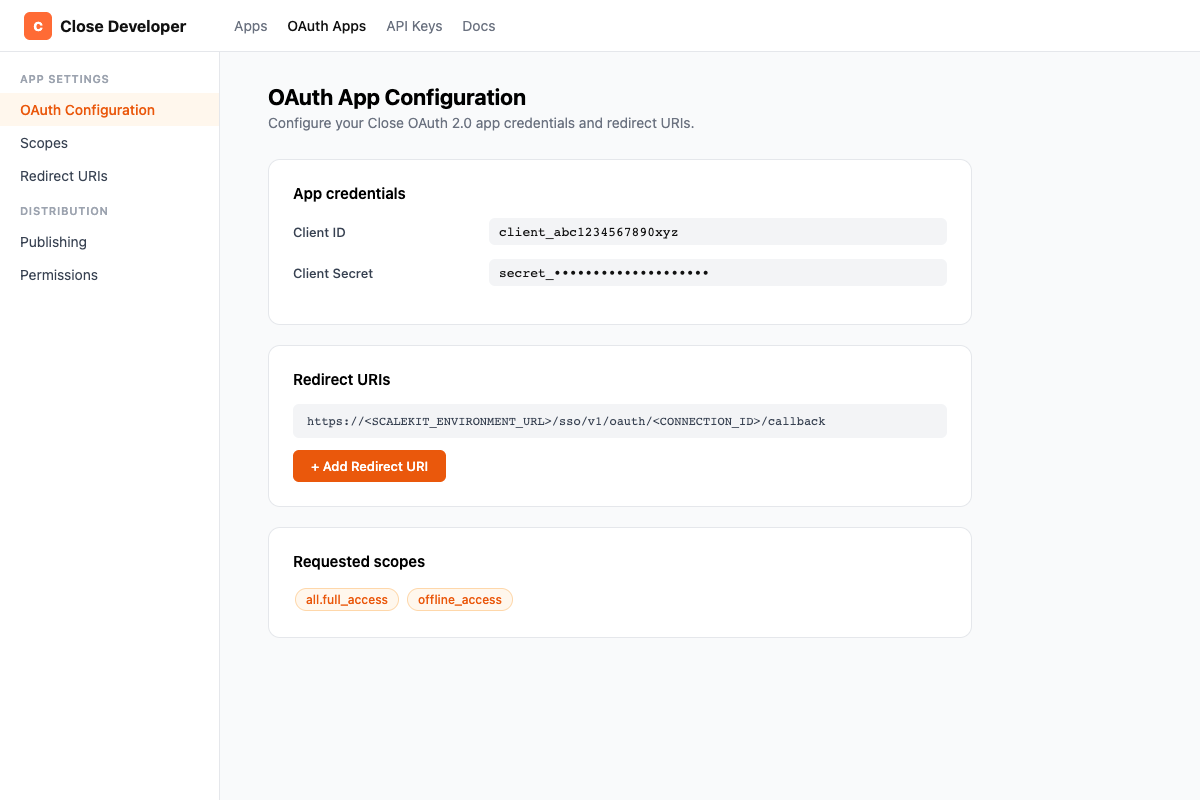
- Copy your Client ID and Client Secret from the app detail page.
-
Set up the connection in Scalekit
- In Scalekit dashboard, go to AgentKit > Connections > Create Connection.
- Find Close and click Create.
- Copy the Redirect URI shown — it looks like:
https://<SCALEKIT_ENVIRONMENT_URL>/sso/v1/oauth/<CONNECTION_ID>/callback - Note the Connection name (e.g.,
close) — use this asconnection_namein your code.
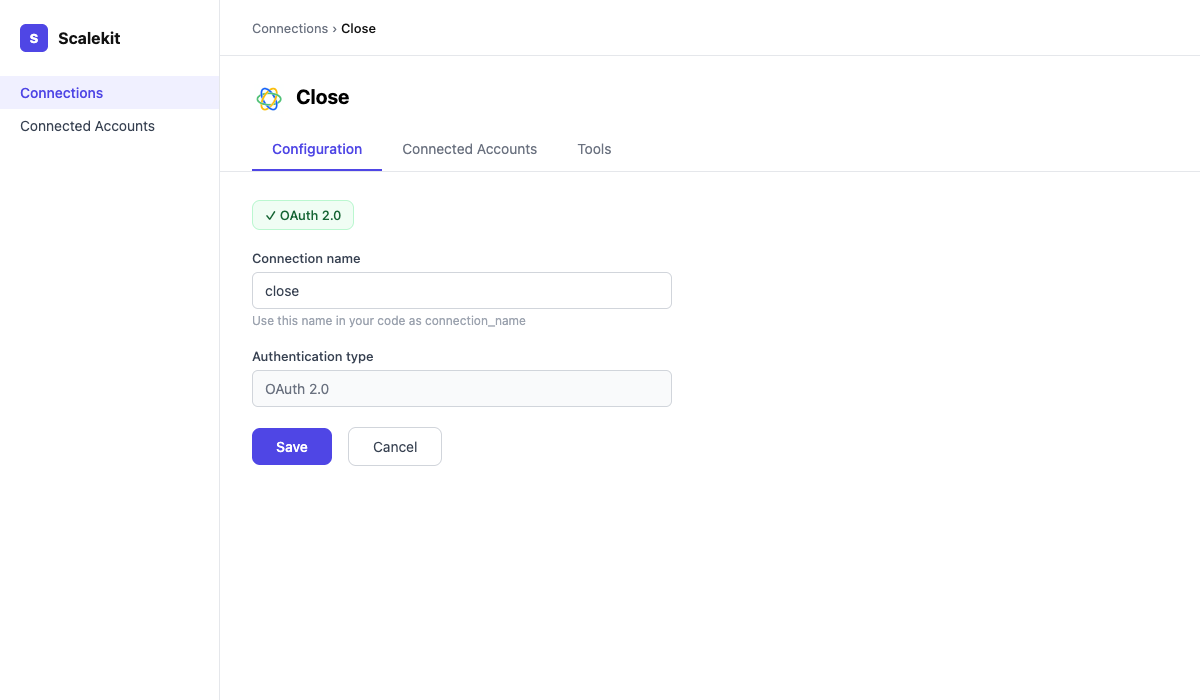
- Return to your Close OAuth app and add the redirect URI you copied.
- Back in Scalekit, enter your Client ID and Client Secret. Scopes are granted automatically by Close — no additional scope configuration is needed.
- Click Save.
-
Add a connected account
Via dashboard (for testing)
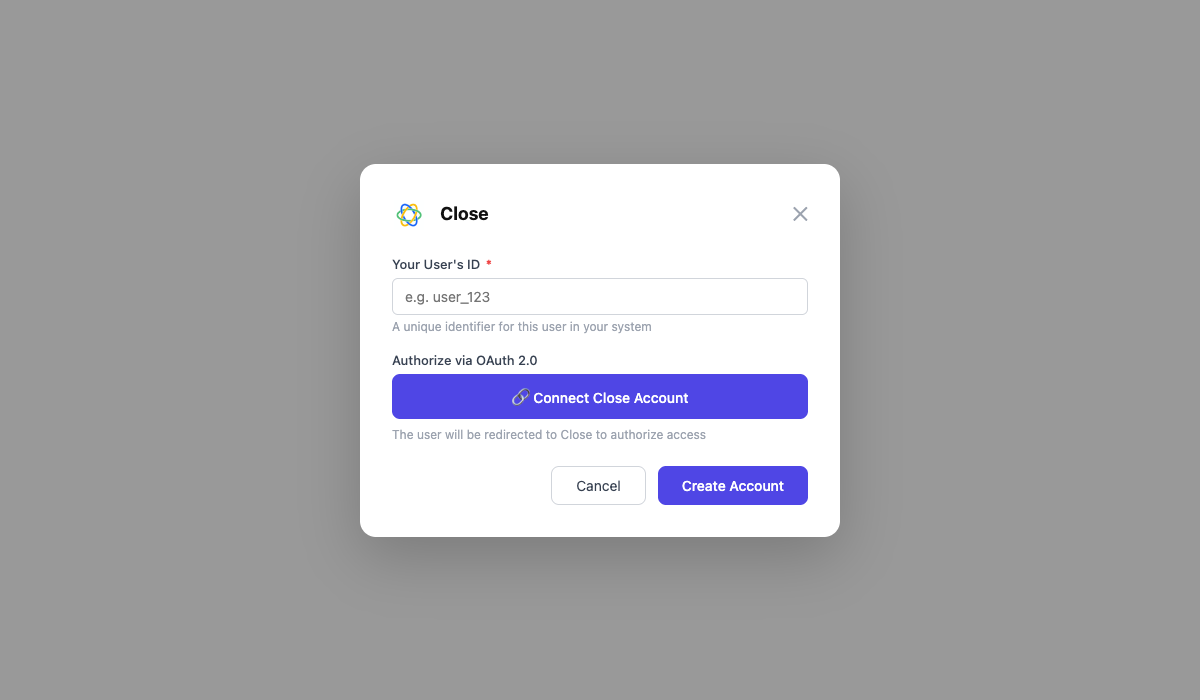
- In the connection page, click the Connected Accounts tab → Add account.
- Enter a User ID and click Save. You will be redirected to Close to authorize access.
Via API (for production)
const { link } = await scalekit.actions.getAuthorizationLink({connectionName: 'close',identifier: 'user_123',});// Redirect your user to `link` to authorize accessconsole.log('Authorize at:', link);response = scalekit_client.actions.get_authorization_link(connection_name="close",identifier="user_123")# Redirect your user to response.link to authorize accessprint("Authorize at:", response.link)
-
-
Authorize and make your first call
Section titled “Authorize and make your first call”quickstart.ts import { ScalekitClient } from '@scalekit-sdk/node'import 'dotenv/config'const scalekit = new ScalekitClient(process.env.SCALEKIT_ENV_URL,process.env.SCALEKIT_CLIENT_ID,process.env.SCALEKIT_CLIENT_SECRET,)const actions = scalekit.actionsconst connector = 'close'const identifier = 'user_123'// Generate an authorization link for the userconst { link } = await actions.getAuthorizationLink({ connectionName: connector, identifier })console.log('Authorize Close:', link)process.stdout.write('Press Enter after authorizing...')await new Promise(r => process.stdin.once('data', r))// Make your first callconst result = await actions.executeTool({connector,identifier,toolName: 'close_activities_list',toolInput: {},})console.log(result)quickstart.py import osfrom scalekit.client import ScalekitClientfrom dotenv import load_dotenvload_dotenv()scalekit_client = ScalekitClient(env_url=os.getenv("SCALEKIT_ENV_URL"),client_id=os.getenv("SCALEKIT_CLIENT_ID"),client_secret=os.getenv("SCALEKIT_CLIENT_SECRET"),)actions = scalekit_client.actionsconnection_name = "close"identifier = "user_123"# Generate an authorization link for the userlink_response = actions.get_authorization_link(connection_name=connection_name,identifier=identifier,)print("Authorize Close:", link_response.link)input("Press Enter after authorizing...")# Make your first callresult = actions.execute_tool(tool_input={},tool_name="close_activities_list",connection_name=connection_name,identifier=identifier,)print(result)
What you can do
Section titled “What you can do”Connect this agent connector to let your agent:
- Update tasks bulk, smart view, sequence — Bulk-update assigned_to, date, or is_complete across every task matching the given filters
- List smart views, opportunity statuses, lead statuses — List Smart Views (saved searches) in Close
- Get smart view, report activity, webhook — Retrieve a single Smart View (saved search) by ID from Close, including its stored query definition and sharing settings
- Delete smart view, sequence subscription, sequence — Permanently delete a Smart View (saved search) from Close
- Create smart view, sequence, field enrichment — Create a new Smart View (saved search) in Close
- Merge lead — Merge two leads into one
Common workflows
Section titled “Common workflows”Proxy API call
// Fetch the authenticated user's profileconst me = await actions.request({ connectionName: 'close', identifier: 'user_123', path: '/api/v1/me/', method: 'GET',});console.log(me);# Fetch the authenticated user's profileme = actions.request( connection_name="close", identifier="user_123", path="/api/v1/me/", method="GET")print(me)Basic example — get the current user
const me = await actions.executeTool({ toolName: 'close_me_get', connector: 'close', identifier: 'user_123', toolInput: {},});console.log(me);me = actions.execute_tool( tool_name="close_me_get", connection_name="close", identifier="user_123", tool_input={})print(me)Advanced enrichment workflow
This example shows a complete lead enrichment pipeline: find a lead, attach activities, enroll in a sequence, and track progress — all in one automated flow.
const opts = { connector: 'close', identifier: 'user_123' };
async function enrichAndEnrollLead(companyName: string, contactEmail: string) { // 1. Find or create the lead const searchResult = await actions.executeTool({ toolName: 'close_leads_list', ...opts, toolInput: { query: companyName, _limit: 1 }, });
let leadId: string; if (searchResult.data.length > 0) { leadId = searchResult.data[0].id; console.log(`Found existing lead: ${leadId}`); } else { const newLead = await actions.executeTool({ toolName: 'close_lead_create', ...opts, toolInput: { name: companyName }, }); leadId = newLead.id; console.log(`Created lead: ${leadId}`); }
// 2. Create a contact on the lead const contact = await actions.executeTool({ toolName: 'close_contact_create', ...opts, toolInput: { lead_id: leadId, name: contactEmail.split('@')[0], emails: JSON.stringify([{ email: contactEmail, type: 'office' }]), }, }); console.log(`Created contact: ${contact.id}`);
// 3. Create an opportunity on the lead const pipelines = await actions.executeTool({ toolName: 'close_pipelines_list', ...opts, toolInput: {}, }); const pipeline = pipelines.data[0]; const activeStatus = pipeline.statuses.find((s: any) => s.type === 'active'); if (!activeStatus) throw new Error('No active status found in pipeline');
const opportunity = await actions.executeTool({ toolName: 'close_opportunity_create', ...opts, toolInput: { lead_id: leadId, status_id: activeStatus.id, value: 500000, // $5,000.00 in cents value_currency: 'USD', value_period: 'one_time', confidence: 30, }, }); console.log(`Created opportunity: ${opportunity.id} — $${opportunity.value / 100}`);
// 4. Log a note summarizing the enrichment await actions.executeTool({ toolName: 'close_note_create', ...opts, toolInput: { lead_id: leadId, note: `Lead enriched automatically. Contact ${contactEmail} created. Opportunity ${opportunity.id} opened.`, }, });
// 5. Create a follow-up task const tomorrow = new Date(); tomorrow.setDate(tomorrow.getDate() + 1); await actions.executeTool({ toolName: 'close_task_create', ...opts, toolInput: { lead_id: leadId, text: `Follow up with ${contactEmail}`, date: tomorrow.toISOString().split('T')[0], }, });
// 6. Enroll the contact in a sequence (if sequences exist) const sequences = await actions.executeTool({ toolName: 'close_sequences_list', ...opts, toolInput: { _limit: 1 }, });
if (sequences.data.length > 0) { const subscription = await actions.executeTool({ toolName: 'close_sequence_subscription_create', ...opts, toolInput: { contact_id: contact.id, sequence_id: sequences.data[0].id, }, }); console.log(`Enrolled contact in sequence. Subscription: ${subscription.id}`); }
return { leadId, contactId: contact.id, opportunityId: opportunity.id };}
// Run the enrichmentenrichAndEnrollLead('Acme Corp', 'jane@acme.com').then(console.log);from datetime import date, timedelta
def execute(tool_name, tool_input): return actions.execute_tool( tool_name=tool_name, connection_name="close", identifier="user_123", tool_input=tool_input )
def enrich_and_enroll_lead(company_name: str, contact_email: str): # 1. Find or create the lead search = execute("close_leads_list", {"query": company_name, "_limit": 1}) if search["data"]: lead_id = search["data"][0]["id"] print(f"Found existing lead: {lead_id}") else: lead = execute("close_lead_create", {"name": company_name}) lead_id = lead["id"] print(f"Created lead: {lead_id}")
# 2. Create a contact on the lead contact = execute("close_contact_create", { "lead_id": lead_id, "name": contact_email.split("@")[0], "emails": json.dumps([{"email": contact_email, "type": "office"}]), }) print(f"Created contact: {contact['id']}")
# 3. Create an opportunity pipelines = execute("close_pipelines_list", {}) pipeline = pipelines["data"][0] active_status = next(s for s in pipeline["statuses"] if s["type"] == "active")
opp = execute("close_opportunity_create", { "lead_id": lead_id, "status_id": active_status["id"], "value": 500000, # $5,000.00 in cents "value_currency": "USD", "value_period": "one_time", "confidence": 30, }) print(f"Created opportunity: {opp['id']} — ${opp['value'] / 100:.2f}")
# 4. Log a note execute("close_note_create", { "lead_id": lead_id, "note": ( f"Lead enriched automatically. " f"Contact {contact_email} created. " f"Opportunity {opp['id']} opened." ), })
# 5. Create a follow-up task tomorrow = (date.today() + timedelta(days=1)).isoformat() execute("close_task_create", { "lead_id": lead_id, "text": f"Follow up with {contact_email}", "date": tomorrow, })
# 6. Enroll in a sequence if one exists sequences = execute("close_sequences_list", {"_limit": 1}) if sequences["data"]: sub = execute("close_sequence_subscription_create", { "contact_id": contact["id"], "sequence_id": sequences["data"][0]["id"], }) print(f"Enrolled contact in sequence. Subscription: {sub['id']}")
return { "lead_id": lead_id, "contact_id": contact["id"], "opportunity_id": opp["id"] }
result = enrich_and_enroll_lead("Acme Corp", "jane@acme.com")print(result)Required scopes
Close OAuth apps automatically include both required scopes — no manual scope selection is needed.
| Scope | Required for |
|---|---|
all.full_access | All 81 tools (leads, contacts, opportunities, tasks, notes, calls, emails, SMS, pipelines, sequences, webhooks, users, custom fields) |
offline_access | All tools — enables the refresh token so sessions persist beyond 1 hour |
Tool list
Section titled “Tool list”Use the exact tool names from the Tool list below when you call execute_tool. If you’re not sure which name to use, list the tools available for the current user first.
close_activities_list#List all activity types for a lead in Close (calls, emails, notes, SMS, etc.).8 params
List all activity types for a lead in Close (calls, emails, notes, SMS, etc.).
_fieldsstringoptionalComma-separated list of fields to return._limitintegeroptionalMaximum number of results to return._order_bystringoptionalSort field. Default: date_created._skipintegeroptionalNumber of results to skip (offset)._typestringoptionalActivity type: Note, Call, Email, Sms, etc.contact_idstringoptionalFilter by contact ID.lead_idstringoptionalFilter by lead ID.user_idstringoptionalFilter by user ID.close_bulk_delete_create#Initiate a bulk delete action across all leads matching a search query or Smart View. This permanently deletes every matching lead — scope s_query carefully, ideally with results_limit set, before running.4 params
Initiate a bulk delete action across all leads matching a search query or Smart View. This permanently deletes every matching lead — scope s_query carefully, ideally with results_limit set, before running.
s_queryobjectrequiredStructured search-query object selecting which leads to delete, e.g. {"type": "and", "queries": [{"type": "object_type", "object_type": "lead"}]}.results_limitintegeroptionalMaximum number of matching leads to delete.send_done_emailbooleanoptionalWhether to send a confirmation email when the bulk delete completes. Defaults to true.sortarrayoptionalSort order applied to matching leads before the results_limit cutoff is applied.close_bulk_edit_create#Initiate a bulk edit action across all leads matching a search query. The 'type' field selects the edit (e.g. set_lead_status, set_custom_field, clear_custom_field); depending on 'type', lead_status_id or custom_field_id/custom_field_value become required. See Close's Bulk Actions documentation for the full type-to-field mapping.9 params
Initiate a bulk edit action across all leads matching a search query. The 'type' field selects the edit (e.g. set_lead_status, set_custom_field, clear_custom_field); depending on 'type', lead_status_id or custom_field_id/custom_field_value become required. See Close's Bulk Actions documentation for the full type-to-field mapping.
s_queryobjectrequiredStructured search-query object selecting which leads to edit, e.g. {"type": "and", "queries": [{"type": "object_type", "object_type": "lead"}]}.typestringrequiredBulk edit action to perform.custom_field_idstringoptionalID of the custom field to set or clear. Required when type is set_custom_field or clear_custom_field.custom_field_operationstringoptionalHow to apply custom_field_value: replace the existing value, add to it, or remove it. Defaults to replace.custom_field_valuestringoptionalNew value for the custom field, as a string. Required when type is set_custom_field.lead_status_idstringoptionalID of the lead status to apply. Required when type is set_lead_status.results_limitintegeroptionalMaximum number of matching leads to edit.send_done_emailbooleanoptionalWhether to send a confirmation email when the bulk edit completes. Defaults to true.sortarrayoptionalSort order applied to matching leads before the results_limit cutoff is applied.close_call_create#Log an external call activity on a lead in Close.8 params
Log an external call activity on a lead in Close.
lead_idstringrequiredID of the lead for this call.statusstringrequiredCall outcome: completed, no_answer, wrong_number, left_voicemail, etc.contact_idstringoptionalID of the contact called.directionstringoptionalCall direction: inbound or outbound.durationintegeroptionalCall duration in seconds.notestringoptionalNotes about the call.phonestringoptionalPhone number called.recording_urlstringoptionalHTTPS URL of the call recording.close_call_delete#Delete a call activity from Close.1 param
Delete a call activity from Close.
call_idstringrequiredID of the call to delete.close_call_get#Retrieve a single call activity by ID.1 param
Retrieve a single call activity by ID.
call_idstringrequiredID of the call activity.close_call_update#Update a call activity's note, status, or duration.4 params
Update a call activity's note, status, or duration.
call_idstringrequiredID of the call to update.durationintegeroptionalUpdated call duration in seconds.notestringoptionalUpdated call notes.statusstringoptionalUpdated call status.close_calls_list#List call activities in Close, optionally filtered by lead, contact, or user.6 params
List call activities in Close, optionally filtered by lead, contact, or user.
_fieldsstringoptionalComma-separated list of fields to return._limitintegeroptionalMaximum number of results to return._skipintegeroptionalNumber of results to skip (offset).contact_idstringoptionalFilter by contact ID.lead_idstringoptionalFilter by lead ID.user_idstringoptionalFilter by user ID.close_comment_create#Post a comment on a Close object (lead, opportunity, etc.).2 params
Post a comment on a Close object (lead, opportunity, etc.).
bodystringrequiredComment text body.object_idstringrequiredID of the object to comment on.close_comment_delete#Delete a comment from Close.1 param
Delete a comment from Close.
comment_idstringrequiredID of the comment to delete.close_comment_get#Retrieve a single comment by ID.1 param
Retrieve a single comment by ID.
comment_idstringrequiredID of the comment.close_comment_threads_list#List comment threads in Close, optionally filtered by thread ID or the object the thread is attached to.4 params
List comment threads in Close, optionally filtered by thread ID or the object the thread is attached to.
_limitintegeroptionalMaximum number of results to return. Defaults to 100._skipintegeroptionalNumber of results to skip (offset). Defaults to 0.idsstringoptionalOnly return threads with these IDs (comma-separated).object_idsstringoptionalOnly return threads attached to these object IDs (comma-separated), e.g. activity or note IDs.close_comment_update#Update the text of an existing comment.2 params
Update the text of an existing comment.
commentstringrequiredUpdated comment text.comment_idstringrequiredID of the comment to update.close_comments_list#List comments on an object. Provide either object_id or thread_id to filter results.5 params
List comments on an object. Provide either object_id or thread_id to filter results.
_fieldsstringoptionalComma-separated list of fields to return._limitintegeroptionalMaximum number of results to return._skipintegeroptionalNumber of results to skip (offset).object_idstringoptionalID of the object to fetch comments for.thread_idstringoptionalID of the comment thread.close_contact_create#Create a new contact in Close and associate it with a lead.5 params
Create a new contact in Close and associate it with a lead.
lead_idstringrequiredID of the lead to associate this contact with.emailsstringoptionalJSON array of email objects, e.g. [{"email": "jane@acme.com", "type": "office"}].namestringoptionalFull name of the contact.phonesstringoptionalJSON array of phone objects, e.g. [{"phone": "+1234567890", "type": "office"}].titlestringoptionalJob title of the contact.close_contact_delete#Delete a contact from Close.1 param
Delete a contact from Close.
contact_idstringrequiredID of the contact to delete.close_contact_get#Retrieve a single contact by ID from Close.2 params
Retrieve a single contact by ID from Close.
contact_idstringrequiredID of the contact._fieldsstringoptionalComma-separated list of fields to return.close_contact_update#Update a contact's name, title, phone numbers, or email addresses.5 params
Update a contact's name, title, phone numbers, or email addresses.
contact_idstringrequiredID of the contact to update.emailsstringoptionalJSON array of email objects.namestringoptionalNew full name.phonesstringoptionalJSON array of phone objects.titlestringoptionalNew job title.close_contacts_list#List contacts in Close, optionally filtered by lead.4 params
List contacts in Close, optionally filtered by lead.
_fieldsstringoptionalComma-separated list of fields to return._limitintegeroptionalMaximum number of results to return._skipintegeroptionalNumber of results to skip (offset).lead_idstringoptionalFilter contacts by lead ID.close_custom_activities_list#List or filter Custom Activity instances (user-defined activity types) in Close.9 params
List or filter Custom Activity instances (user-defined activity types) in Close.
_fieldsstringoptionalComma-separated list of fields to return._limitintegeroptionalMaximum number of results to return._skipintegeroptionalNumber of results to skip (offset).contact_idstringoptionalFilter by contact ID.custom_activity_type_idstringoptionalFilter by Custom Activity Type ID.date_created__gtestringoptionalOnly include activities created on or after this date/time (ISO 8601).date_created__ltestringoptionalOnly include activities created on or before this date/time (ISO 8601).lead_idstringoptionalFilter by lead ID.user_idstringoptionalFilter by the user who created the activity.close_custom_field_contact_create#Create a new custom field for contacts in Close.2 params
Create a new custom field for contacts in Close.
namestringrequiredName of the custom field.typestringrequiredField type: text, number, date, url, choices, etc.close_custom_field_contact_delete#Delete a contact custom field from Close.1 param
Delete a contact custom field from Close.
custom_field_idstringrequiredID of the custom field to delete.close_custom_field_contact_get#Retrieve a single contact custom field by ID.1 param
Retrieve a single contact custom field by ID.
custom_field_idstringrequiredID of the custom field.close_custom_field_contact_update#Update a contact custom field's name or choices.2 params
Update a contact custom field's name or choices.
custom_field_idstringrequiredID of the custom field to update.namestringoptionalNew name for the custom field.close_custom_field_lead_create#Create a new custom field for leads in Close.2 params
Create a new custom field for leads in Close.
namestringrequiredName of the custom field.typestringrequiredField type: text, number, date, url, choices, etc.close_custom_field_lead_delete#Delete a lead custom field from Close.1 param
Delete a lead custom field from Close.
custom_field_idstringrequiredID of the custom field to delete.close_custom_field_lead_get#Retrieve a single lead custom field by ID.1 param
Retrieve a single lead custom field by ID.
custom_field_idstringrequiredID of the custom field.close_custom_field_lead_update#Update a lead custom field's name or choices.2 params
Update a lead custom field's name or choices.
custom_field_idstringrequiredID of the custom field to update.namestringoptionalNew name for the custom field.close_custom_field_opportunity_create#Create a new custom field for opportunitys in Close.2 params
Create a new custom field for opportunitys in Close.
namestringrequiredName of the custom field.typestringrequiredField type: text, number, date, url, choices, etc.close_custom_field_opportunity_delete#Delete a opportunity custom field from Close.1 param
Delete a opportunity custom field from Close.
custom_field_idstringrequiredID of the custom field to delete.close_custom_field_opportunity_get#Retrieve a single opportunity custom field by ID.1 param
Retrieve a single opportunity custom field by ID.
custom_field_idstringrequiredID of the custom field.close_custom_field_opportunity_update#Update a opportunity custom field's name or choices.2 params
Update a opportunity custom field's name or choices.
custom_field_idstringrequiredID of the custom field to update.namestringoptionalNew name for the custom field.close_custom_fields_contact_list#List all custom fields defined for contacts in Close.3 params
List all custom fields defined for contacts in Close.
_fieldsstringoptionalComma-separated list of fields to return._limitintegeroptionalMaximum number of results to return._skipintegeroptionalNumber of results to skip (offset).close_custom_fields_lead_list#List all custom fields defined for leads in Close.3 params
List all custom fields defined for leads in Close.
_fieldsstringoptionalComma-separated list of fields to return._limitintegeroptionalMaximum number of results to return._skipintegeroptionalNumber of results to skip (offset).close_custom_fields_opportunity_list#List all custom fields defined for opportunitys in Close.3 params
List all custom fields defined for opportunitys in Close.
_fieldsstringoptionalComma-separated list of fields to return._limitintegeroptionalMaximum number of results to return._skipintegeroptionalNumber of results to skip (offset).close_custom_object_types_list#List the Custom Object Types (schemas) defined for the organization in Close.3 params
List the Custom Object Types (schemas) defined for the organization in Close.
_fieldsstringoptionalComma-separated list of fields to return._limitintegeroptionalMaximum number of results to return._skipintegeroptionalNumber of results to skip (offset).close_custom_objects_list#List Custom Object instances attached to a lead in Close.5 params
List Custom Object instances attached to a lead in Close.
lead_idstringrequiredID of the lead whose Custom Object instances to list._fieldsstringoptionalComma-separated list of fields to return._limitintegeroptionalMaximum number of results to return._skipintegeroptionalNumber of results to skip (offset).custom_object_type_idstringoptionalFilter by Custom Object Type ID.close_email_create#Log or send an email activity on a lead in Close.8 params
Log or send an email activity on a lead in Close.
lead_idstringrequiredID of the lead for this email.statusstringrequiredEmail status: inbox, draft, scheduled, outbox, sent.body_htmlstringoptionalHTML email body.body_textstringoptionalPlain text email body.contact_idstringoptionalID of the contact this email is for.senderstringoptionalSender email address.subjectstringoptionalEmail subject line.tostringoptionalJSON array of recipient emails, e.g. [{"email": "jane@acme.com"}].close_email_delete#Delete an email activity from Close.1 param
Delete an email activity from Close.
email_idstringrequiredID of the email to delete.close_email_get#Retrieve a single email activity by ID.1 param
Retrieve a single email activity by ID.
email_idstringrequiredID of the email activity.close_email_update#Update an email activity's status, subject, or body.5 params
Update an email activity's status, subject, or body.
email_idstringrequiredID of the email to update.body_htmlstringoptionalNew HTML body.body_textstringoptionalNew plain text body.statusstringoptionalNew email status: draft, scheduled, outbox, sent.subjectstringoptionalNew subject line.close_emails_list#List email activities in Close, optionally filtered by lead or user.6 params
List email activities in Close, optionally filtered by lead or user.
_fieldsstringoptionalComma-separated list of fields to return._limitintegeroptionalMaximum number of results to return._skipintegeroptionalNumber of results to skip (offset).contact_idstringoptionalFilter by contact ID.lead_idstringoptionalFilter by lead ID.user_idstringoptionalFilter by user ID.close_events_list#List the organization's event log in Close (create/update/delete actions across objects), available up to 30 days back.9 params
List the organization's event log in Close (create/update/delete actions across objects), available up to 30 days back.
_limitintegeroptionalMaximum number of results to return. Defaults to 100._skipintegeroptionalNumber of results to skip (offset). Defaults to 0.actionstringoptionalFilter by event action, e.g. created, updated, deleted.date_updated__gtestringoptionalOnly include events at or after this date/time (ISO 8601).date_updated__ltestringoptionalOnly include events at or before this date/time (ISO 8601).lead_idstringoptionalEvents for the given lead, including any of its related objects.object_idstringoptionalFilter by a specific object's ID.object_typestringoptionalFilter by object type, e.g. lead, contact, opportunity.user_idstringoptionalOnly return events performed by this user.close_export_lead_create#Kick off an asynchronous export of leads matching a search query, delivered as a downloadable CSV or JSON file. Poll the returned export's status via a get-export call until status is 'done'.9 params
Kick off an asynchronous export of leads matching a search query, delivered as a downloadable CSV or JSON file. Poll the returned export's status via a get-export call until status is 'done'.
formatstringrequiredFile format for the export.date_formatstringoptionalHow dates are formatted in the export. Defaults to original.fieldsarrayoptionalSpecific fields to include in the export. Omit to include the default field set.include_activitiesbooleanoptionalWhether to include activity data in the export (JSON format only).include_smart_fieldsbooleanoptionalWhether to include calculated (smart) fields in the export.results_limitintegeroptionalMaximum number of matching leads to export.s_queryobjectoptionalStructured search-query object narrowing which leads are exported, e.g. {"type": "and", "queries": [{"type": "object_type", "object_type": "lead"}]}. Omit to export all leads.send_done_emailbooleanoptionalWhether to send a confirmation email with the download link when the export completes. Defaults to true.sortarrayoptionalSort order applied to matching leads before the results_limit cutoff is applied.close_field_enrichment_create#Use Close's AI field enrichment to populate a custom field on a lead or contact. By default the enriched value is written back onto the record (set_new_value defaults to true).6 params
Use Close's AI field enrichment to populate a custom field on a lead or contact. By default the enriched value is written back onto the record (set_new_value defaults to true).
field_idstringrequiredID of the custom field to enrich.object_idstringrequiredID of the lead or contact to enrich.object_typestringrequiredType of the object being enriched.organization_idstringrequiredID of the Close organization the object belongs to.overwrite_existing_valuebooleanoptionalWhether to overwrite the field if it already has a value. Defaults to false.set_new_valuebooleanoptionalWhether to write the enriched value back onto the field. Defaults to true.close_lead_create#Create a new lead in Close with name, contacts, addresses, and custom fields.4 params
Create a new lead in Close with name, contacts, addresses, and custom fields.
namestringrequiredName of the lead / company.descriptionstringoptionalDescription or notes about the lead.status_idstringoptionalLead status ID.urlstringoptionalWebsite URL of the lead.close_lead_delete#Permanently delete a lead and all its associated data from Close.1 param
Permanently delete a lead and all its associated data from Close.
lead_idstringrequiredID of the lead to delete.close_lead_get#Retrieve a single lead by ID from Close.2 params
Retrieve a single lead by ID from Close.
lead_idstringrequiredID of the lead to retrieve._fieldsstringoptionalComma-separated list of fields to return.close_lead_merge#Merge two leads into one. The source lead is merged into the destination lead.2 params
Merge two leads into one. The source lead is merged into the destination lead.
destinationstringrequiredID of the lead to merge into (will be kept).sourcestringrequiredID of the lead to merge from (will be deleted).close_lead_statuses_list#List the lead statuses configured for the organization in Close.0 params
List the lead statuses configured for the organization in Close.
close_lead_update#Update an existing lead's name, status, description, or custom fields.5 params
Update an existing lead's name, status, description, or custom fields.
lead_idstringrequiredID of the lead to update.descriptionstringoptionalUpdated description.namestringoptionalNew name for the lead.status_idstringoptionalNew lead status ID.urlstringoptionalNew website URL.close_leads_list#List and search leads in Close. Supports full-text search and sorting.5 params
List and search leads in Close. Supports full-text search and sorting.
_fieldsstringoptionalComma-separated list of fields to return._limitintegeroptionalMaximum number of results to return._order_bystringoptionalField to sort by. Prefix with - for descending._skipintegeroptionalNumber of results to skip (offset).querystringoptionalFull-text search query to filter leads.close_me_get#Retrieve information about the authenticated Close user.0 params
Retrieve information about the authenticated Close user.
close_note_create#Create a note activity on a lead in Close.3 params
Create a note activity on a lead in Close.
lead_idstringrequiredID of the lead to attach this note to.notestringrequiredNote body text (plain text).contact_idstringoptionalID of the contact this note relates to.close_note_delete#Delete a note activity from Close.1 param
Delete a note activity from Close.
note_idstringrequiredID of the note to delete.close_note_get#Retrieve a single note activity by ID.1 param
Retrieve a single note activity by ID.
note_idstringrequiredID of the note activity.close_note_update#Update the body text of a note activity.2 params
Update the body text of a note activity.
notestringrequiredUpdated note body text.note_idstringrequiredID of the note to update.close_notes_list#List note activities in Close, optionally filtered by lead or user.6 params
List note activities in Close, optionally filtered by lead or user.
_fieldsstringoptionalComma-separated list of fields to return._limitintegeroptionalMaximum number of results to return._skipintegeroptionalNumber of results to skip (offset).contact_idstringoptionalFilter by contact ID.lead_idstringoptionalFilter by lead ID.user_idstringoptionalFilter by user ID.close_opportunities_list#List opportunities in Close, with optional filters by lead, user, or status.8 params
List opportunities in Close, with optional filters by lead, user, or status.
_fieldsstringoptionalComma-separated list of fields to return._limitintegeroptionalMaximum number of results to return._order_bystringoptionalField to sort by. Prefix with - for descending._skipintegeroptionalNumber of results to skip (offset).lead_idstringoptionalFilter by lead ID.status_idstringoptionalFilter by opportunity status ID.status_typestringoptionalFilter by status type: active, won, or lost.user_idstringoptionalFilter by assigned user ID.close_opportunity_create#Create a new opportunity (deal) in Close and associate it with a lead.9 params
Create a new opportunity (deal) in Close and associate it with a lead.
lead_idstringrequiredID of the lead for this opportunity.status_idstringrequiredID of the opportunity status.confidenceintegeroptionalWin probability percentage (0-100).date_wonstringoptionalDate won (YYYY-MM-DD), set when status is won.expected_datestringoptionalExpected close date (YYYY-MM-DD).notestringoptionalNote about this opportunity.valueintegeroptionalMonetary value of the opportunity in cents.value_currencystringoptionalCurrency code, e.g. USD.value_periodstringoptionalBilling period: one_time, monthly, or annual.close_opportunity_delete#Delete an opportunity from Close.1 param
Delete an opportunity from Close.
opportunity_idstringrequiredID of the opportunity to delete.close_opportunity_get#Retrieve a single opportunity by ID from Close.2 params
Retrieve a single opportunity by ID from Close.
opportunity_idstringrequiredID of the opportunity._fieldsstringoptionalComma-separated list of fields to return.close_opportunity_statuses_list#List the opportunity statuses (stages) configured for the organization in Close, across all pipelines.1 param
List the opportunity statuses (stages) configured for the organization in Close, across all pipelines.
_fieldsstringoptionalComma-separated list of fields to return.close_opportunity_update#Update an opportunity's status, value, note, or confidence.9 params
Update an opportunity's status, value, note, or confidence.
opportunity_idstringrequiredID of the opportunity to update.confidenceintegeroptionalWin probability (0-100).date_wonstringoptionalDate won (YYYY-MM-DD).expected_datestringoptionalExpected close date (YYYY-MM-DD).notestringoptionalUpdated note.status_idstringoptionalNew status ID.valueintegeroptionalUpdated monetary value in cents.value_currencystringoptionalCurrency code, e.g. USD.value_periodstringoptionalBilling period: one_time, monthly, or annual.close_pipeline_create#Create a new opportunity pipeline in Close.1 param
Create a new opportunity pipeline in Close.
namestringrequiredName of the pipeline.close_pipeline_delete#Delete a pipeline from Close.1 param
Delete a pipeline from Close.
pipeline_idstringrequiredID of the pipeline to delete.close_pipeline_get#Retrieve a single pipeline by ID.1 param
Retrieve a single pipeline by ID.
pipeline_idstringrequiredID of the pipeline.close_pipeline_update#Update an existing pipeline's name or statuses.2 params
Update an existing pipeline's name or statuses.
pipeline_idstringrequiredID of the pipeline to update.namestringoptionalNew pipeline name.close_pipelines_list#List all opportunity pipelines in the Close organization.3 params
List all opportunity pipelines in the Close organization.
_fieldsstringoptionalComma-separated list of fields to return._limitintegeroptionalMaximum number of results to return._skipintegeroptionalNumber of results to skip (offset).close_report_activity_get#Get an aggregated activity report (calls, emails, etc. sent/received per user or time period) from Close's Reporting API. Provide either datetime_range or relative_range for the time window.6 params
Get an aggregated activity report (calls, emails, etc. sent/received per user or time period) from Close's Reporting API. Provide either datetime_range or relative_range for the time window.
metricsarrayrequiredList of metric keys to retrieve, e.g. calls.outbound.all.count, emails.sent.all.count.typestringrequiredReport type.datetime_rangeobjectoptionalExplicit time range as an object with ISO 8601 'start' and 'end'. Use this or relative_range, not both.queryobjectoptionalOptional filter restricting the report to a saved search, e.g. {"type": "saved_search", "saved_search_id": "save_abc123"}.relative_rangestringoptionalRelative time period. One of: today, yesterday, this-week, last-week, this-month, last-month, this-quarter, last-quarter, this-year, last-year, all-time. Use this or datetime_range, not both.usersarrayoptionalRestrict the report to these user IDs.close_sequence_create#Create a new sequence (a series of automated call/email steps sent on a schedule) in Close.4 params
Create a new sequence (a series of automated call/email steps sent on a schedule) in Close.
namestringrequiredName of the sequence.scheduleobjectoptionalSending schedule as an object with a 'ranges' array of {weekday, start, end} time windows (weekday: 1=Monday .. 7=Sunday, start/end as HH:MM).stepsarrayoptionalInitial list of sequence steps. Each step is an object with step_type (call or email), delay (seconds after the previous step), and for email steps an email_template_id.timezonestringoptionalIANA timezone the schedule ranges are evaluated in.close_sequence_delete#Delete a sequence from Close.1 param
Delete a sequence from Close.
sequence_idstringrequiredID of the sequence to delete.close_sequence_get#Retrieve a single sequence by ID.1 param
Retrieve a single sequence by ID.
sequence_idstringrequiredID of the sequence.close_sequence_subscription_create#Enroll a contact in a Close sequence.3 params
Enroll a contact in a Close sequence.
contact_idstringrequiredID of the contact to enroll.sequence_idstringrequiredID of the sequence to enroll in.sender_account_idstringoptionalID of the sender email account.close_sequence_subscription_delete#Remove a contact's sequence subscription from Close, stopping any further steps from being sent to them.1 param
Remove a contact's sequence subscription from Close, stopping any further steps from being sent to them.
subscription_idstringrequiredID of the sequence subscription to delete.close_sequence_subscription_get#Retrieve a single sequence subscription by ID.1 param
Retrieve a single sequence subscription by ID.
subscription_idstringrequiredID of the subscription.close_sequence_subscription_update#Pause or resume a contact's sequence subscription.2 params
Pause or resume a contact's sequence subscription.
subscription_idstringrequiredID of the subscription to update.pausebooleanoptionalSet to true to pause the subscription, false to resume.close_sequence_subscriptions_list#List sequence subscriptions. Provide one of lead_id, contact_id, or sequence_id to filter results.6 params
List sequence subscriptions. Provide one of lead_id, contact_id, or sequence_id to filter results.
_fieldsstringoptionalComma-separated list of fields to return._limitintegeroptionalMaximum number of results to return._skipintegeroptionalNumber of results to skip (offset).contact_idstringoptionalFilter by contact ID.lead_idstringoptionalFilter by lead ID.sequence_idstringoptionalFilter by sequence ID.close_sequence_update#Update a sequence's name or steps. Warning: if 'steps' is included, any existing step not present in the list is removed from the sequence entirely.3 params
Update a sequence's name or steps. Warning: if 'steps' is included, any existing step not present in the list is removed from the sequence entirely.
sequence_idstringrequiredID of the sequence to update.namestringoptionalNew name for the sequence.stepsarrayoptionalFull replacement list of steps to keep on the sequence, each referencing an existing step by id (e.g. [{"id": "seqstep_abc123"}]). Any existing step omitted from this list is removed from the sequence.close_sequences_list#List email/activity sequences in Close.3 params
List email/activity sequences in Close.
_fieldsstringoptionalComma-separated list of fields to return._limitintegeroptionalMaximum number of results to return._skipintegeroptionalNumber of results to skip (offset).close_smart_view_create#Create a new Smart View (saved search) in Close. Provide the object type to search over and an s_query search-query object describing the filter conditions. Set is_shared to true to make it visible to the whole organization instead of just the creator.5 params
Create a new Smart View (saved search) in Close. Provide the object type to search over and an s_query search-query object describing the filter conditions. Set is_shared to true to make it visible to the whole organization instead of just the creator.
namestringrequiredDisplay name of the Smart View.s_queryobjectrequiredStructured search-query object defining the filter conditions, e.g. {"query": {"type": "and", "queries": [{"type": "object_type", "object_type": "lead"}]}}.descriptionstringoptionalOptional description of what this Smart View filters for.is_sharedbooleanoptionalWhether this Smart View is shared with the whole organization. Defaults to false (private to the creator).typestringoptionalObject type this Smart View searches over. Defaults to lead.close_smart_view_delete#Permanently delete a Smart View (saved search) from Close.1 param
Permanently delete a Smart View (saved search) from Close.
smart_view_idstringrequiredID of the Smart View to delete.close_smart_view_get#Retrieve a single Smart View (saved search) by ID from Close, including its stored query definition and sharing settings.1 param
Retrieve a single Smart View (saved search) by ID from Close, including its stored query definition and sharing settings.
smart_view_idstringrequiredID of the Smart View to retrieve.close_smart_view_update#Update an existing Smart View's name, description, sharing setting, or search-query definition in Close.5 params
Update an existing Smart View's name, description, sharing setting, or search-query definition in Close.
smart_view_idstringrequiredID of the Smart View to update.descriptionstringoptionalUpdated description of what this Smart View filters for.is_sharedbooleanoptionalWhether this Smart View is shared with the whole organization.namestringoptionalUpdated display name of the Smart View.s_queryobjectoptionalUpdated structured search-query object defining the filter conditions.close_smart_views_list#List Smart Views (saved searches) in Close. Smart Views are reusable, optionally-shared search filters over leads, contacts, opportunities, or activities. Filter by object type and paginate with limit/skip.3 params
List Smart Views (saved searches) in Close. Smart Views are reusable, optionally-shared search filters over leads, contacts, opportunities, or activities. Filter by object type and paginate with limit/skip.
_limitintegeroptionalMaximum number of results to return._skipintegeroptionalNumber of results to skip (offset).typestringoptionalFilter Smart Views by the object type they search over.close_sms_create#Log or send an SMS activity on a lead in Close.6 params
Log or send an SMS activity on a lead in Close.
lead_idstringrequiredID of the lead for this SMS.statusstringrequiredSMS status: inbox, draft, scheduled, outbox, sent.contact_idstringoptionalID of the contact for this SMS.local_phonestringoptionalYour local phone number to send from.remote_phonestringoptionalRecipient phone number.textstringoptionalBody text of the SMS message.close_sms_delete#Delete an SMS activity from Close.1 param
Delete an SMS activity from Close.
sms_idstringrequiredID of the SMS to delete.close_sms_get#Retrieve a single SMS activity by ID.1 param
Retrieve a single SMS activity by ID.
sms_idstringrequiredID of the SMS activity.close_sms_list#List SMS activities in Close, optionally filtered by lead or user.6 params
List SMS activities in Close, optionally filtered by lead or user.
_fieldsstringoptionalComma-separated list of fields to return._limitintegeroptionalMaximum number of results to return._skipintegeroptionalNumber of results to skip (offset).contact_idstringoptionalFilter by contact ID.lead_idstringoptionalFilter by lead ID.user_idstringoptionalFilter by user ID.close_sms_update#Update an SMS activity's text or status.3 params
Update an SMS activity's text or status.
sms_idstringrequiredID of the SMS to update.statusstringoptionalNew SMS status.textstringoptionalUpdated message text.close_task_create#Create a new task in Close and assign it to a lead and user.6 params
Create a new task in Close and assign it to a lead and user.
lead_idstringrequiredID of the lead to associate this task with._typestringoptionalTask type, default is lead.assigned_tostringoptionalUser ID to assign the task to.datestringoptionalTask due date (YYYY-MM-DD or ISO 8601).is_completebooleanoptionalWhether the task is already complete.textstringoptionalTask description / title.close_task_delete#Delete a task from Close.1 param
Delete a task from Close.
task_idstringrequiredID of the task to delete.close_task_get#Retrieve a single task by ID from Close.2 params
Retrieve a single task by ID from Close.
task_idstringrequiredID of the task._fieldsstringoptionalComma-separated list of fields to return.close_task_update#Update a task's text, assigned user, due date, or completion status.5 params
Update a task's text, assigned user, due date, or completion status.
task_idstringrequiredID of the task to update.assigned_tostringoptionalNew assigned user ID.datestringoptionalNew due date (YYYY-MM-DD).is_completebooleanoptionalMark task as complete or incomplete.textstringoptionalNew task description.close_tasks_bulk_update#Bulk-update assigned_to, date, or is_complete across every task matching the given filters. This is distinct from close_task_update, which updates a single task by ID. Provide at least one filter_* field to scope the update — omitting all filters updates every task in the organization.8 params
Bulk-update assigned_to, date, or is_complete across every task matching the given filters. This is distinct from close_task_update, which updates a single task by ID. Provide at least one filter_* field to scope the update — omitting all filters updates every task in the organization.
assigned_tostringoptionalNew assigned user ID to set on matching tasks.datestringoptionalNew due date (YYYY-MM-DD) to set on matching tasks.filter_assigned_tostringoptionalOnly update tasks currently assigned to this user ID.filter_id_instringoptionalOnly update tasks with one of these IDs (comma-separated).filter_is_completebooleanoptionalOnly update tasks currently in this completion state.filter_lead_idstringoptionalOnly update tasks belonging to this lead ID.filter_typestringoptionalOnly update tasks of this type.is_completebooleanoptionalNew completion state to set on matching tasks.close_tasks_list#List tasks in Close. Filter by lead, assigned user, type, or completion status.9 params
List tasks in Close. Filter by lead, assigned user, type, or completion status.
_fieldsstringoptionalComma-separated list of fields to return._limitintegeroptionalMaximum number of results to return._order_bystringoptionalSort field. Prefix with - for descending._skipintegeroptionalNumber of results to skip (offset)._typestringoptionalTask type: lead, incoming_email, email, automated_email, outgoing_call.assigned_tostringoptionalFilter by assigned user ID.is_completebooleanoptionalFilter by completion: true or false.lead_idstringoptionalFilter by lead ID.viewstringoptionalPredefined view: inbox, future, or archive.close_user_get#Retrieve a single user by ID from Close.2 params
Retrieve a single user by ID from Close.
user_idstringrequiredID of the user._fieldsstringoptionalComma-separated list of fields to return.close_users_list#List all users in the Close organization.3 params
List all users in the Close organization.
_fieldsstringoptionalComma-separated list of fields to return._limitintegeroptionalMaximum number of results to return._skipintegeroptionalNumber of results to skip (offset).close_webhook_create#Create a new webhook subscription to receive Close event notifications.3 params
Create a new webhook subscription to receive Close event notifications.
eventsstringrequiredJSON array of event objects to subscribe to, e.g. [{"object_type":"lead","action":"created"}].urlstringrequiredHTTPS endpoint URL to receive webhook events.verify_sslbooleanoptionalWhether to verify SSL certificates.close_webhook_delete#Delete a webhook subscription from Close.1 param
Delete a webhook subscription from Close.
webhook_idstringrequiredID of the webhook to delete.close_webhook_get#Retrieve a single webhook subscription by ID.1 param
Retrieve a single webhook subscription by ID.
webhook_idstringrequiredID of the webhook.close_webhook_update#Update a webhook subscription's URL or event subscriptions.4 params
Update a webhook subscription's URL or event subscriptions.
webhook_idstringrequiredID of the webhook to update.eventsstringoptionalNew JSON array of event objects.urlstringoptionalNew HTTPS endpoint URL.verify_sslbooleanoptionalWhether to verify SSL certificates.close_webhooks_list#List all webhook subscriptions in Close.3 params
List all webhook subscriptions in Close.
_fieldsstringoptionalComma-separated list of fields to return._limitintegeroptionalMaximum number of results to return._skipintegeroptionalNumber of results to skip (offset).