


Mailchimp connector
OAuth 2.0MarketingAutomationAnalyticsConnect to Mailchimp to manage audiences, campaigns, templates, automations, and reports.
Mailchimp connector
-
Install the SDK
Section titled “Install the SDK”Terminal window npm install @scalekit-sdk/nodeTerminal window pip install scalekit -
Set your credentials
Section titled “Set your credentials”Add your Scalekit credentials to your
.envfile. Find values in app.scalekit.com > Developers > API Credentials..env SCALEKIT_ENVIRONMENT_URL=<your-environment-url>SCALEKIT_CLIENT_ID=<your-client-id>SCALEKIT_CLIENT_SECRET=<your-client-secret> -
Set up the connector
Section titled “Set up the connector”Register your Mailchimp credentials with Scalekit so it handles the token lifecycle. You do this once per environment.
Dashboard setup steps
Register your Mailchimp account with Scalekit so Scalekit handles the OAuth flow and token refresh automatically. The connection name you create is used to identify and invoke the connection in your code.
-
Set up auth redirects
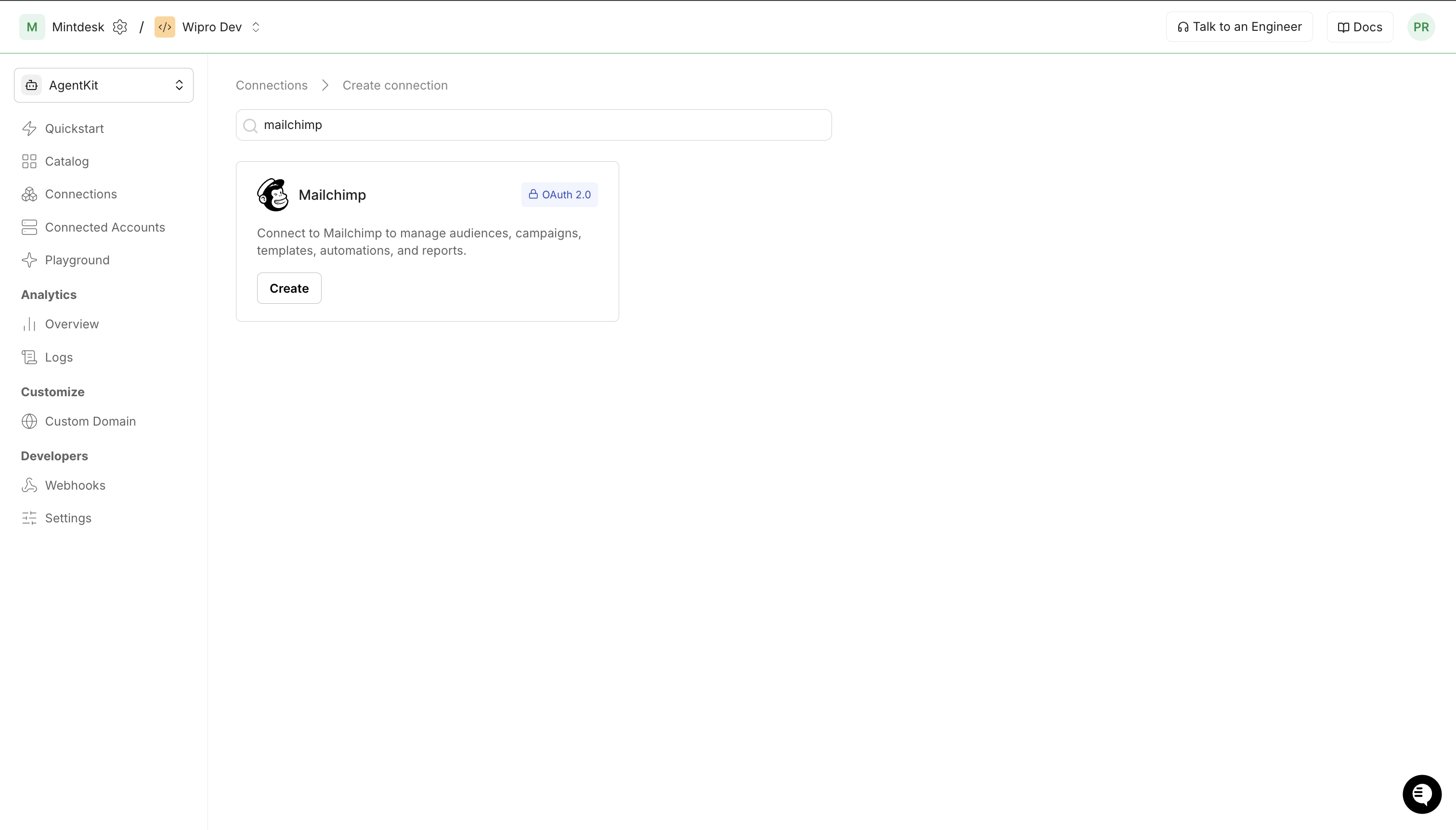
- In Scalekit dashboard, go to AgentKit > Connections > Create Connection. Find Mailchimp and click Create. Copy the redirect URI — it looks like
https://<SCALEKIT_ENV_URL>/sso/v1/oauth/<CONNECTION_ID>/callback.
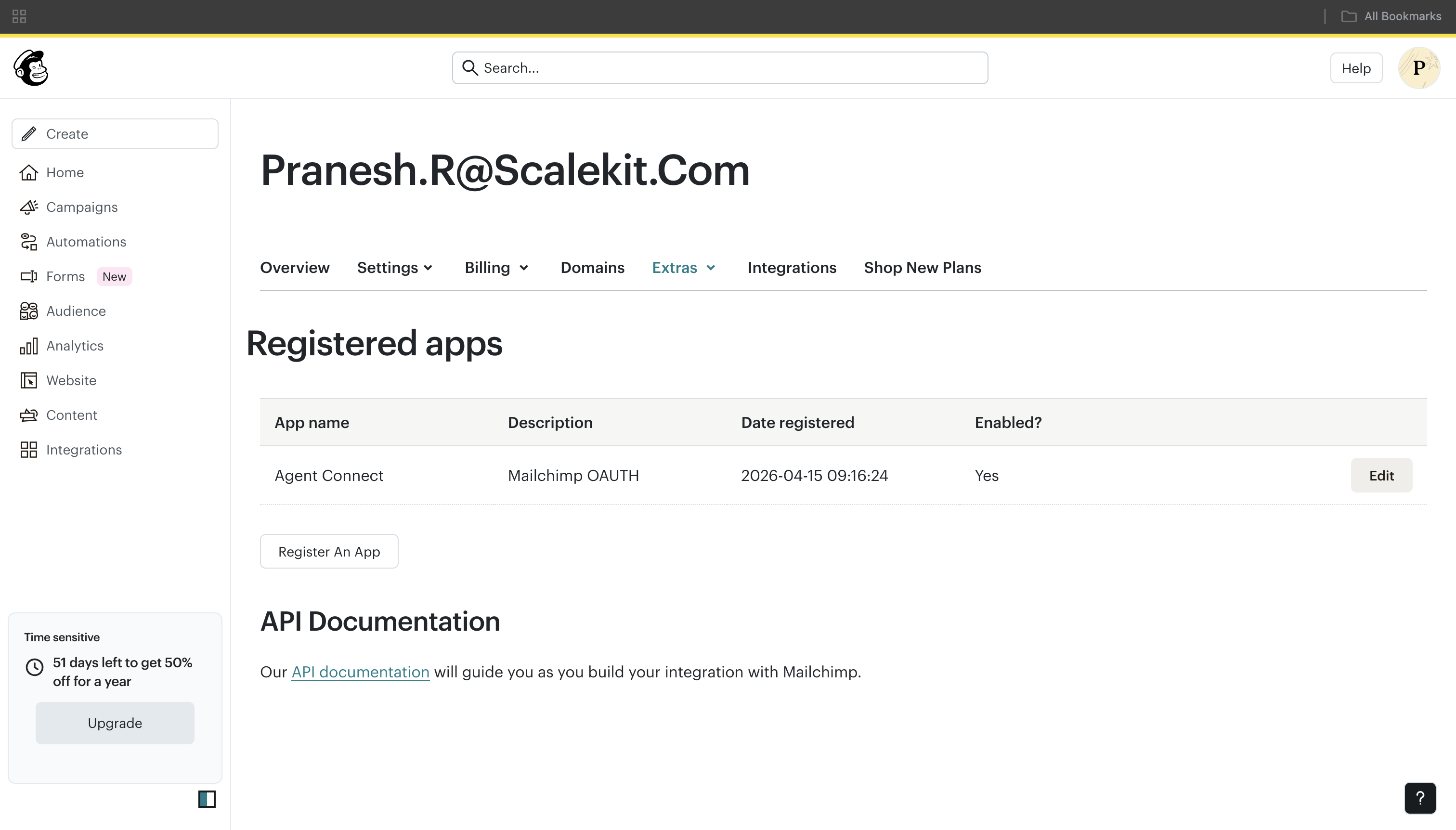
- Log in to your Mailchimp account and go to Account & Billing > Extras > API keys > OAuth apps.
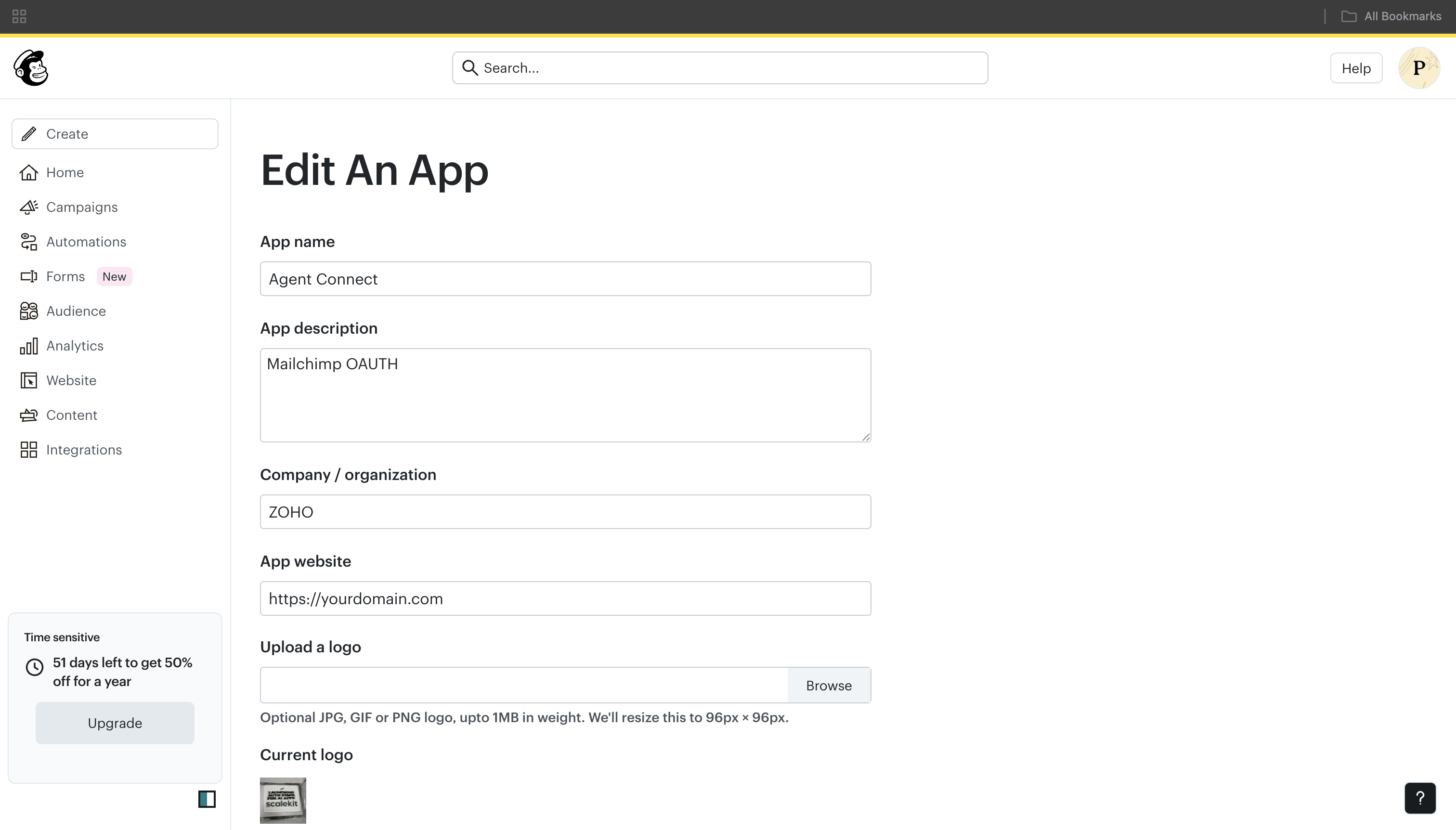
- Click Register An App, fill in the app details, and paste the redirect URI from Scalekit into the redirect URI field.
- In Scalekit dashboard, go to AgentKit > Connections > Create Connection. Find Mailchimp and click Create. Copy the redirect URI — it looks like
-
Get client credentials
- In your Mailchimp OAuth app, copy the Client ID and Client Secret.
-
Add credentials in Scalekit
- In Scalekit dashboard, open the Mailchimp connection you created and enter:
- Client ID
- Client Secret
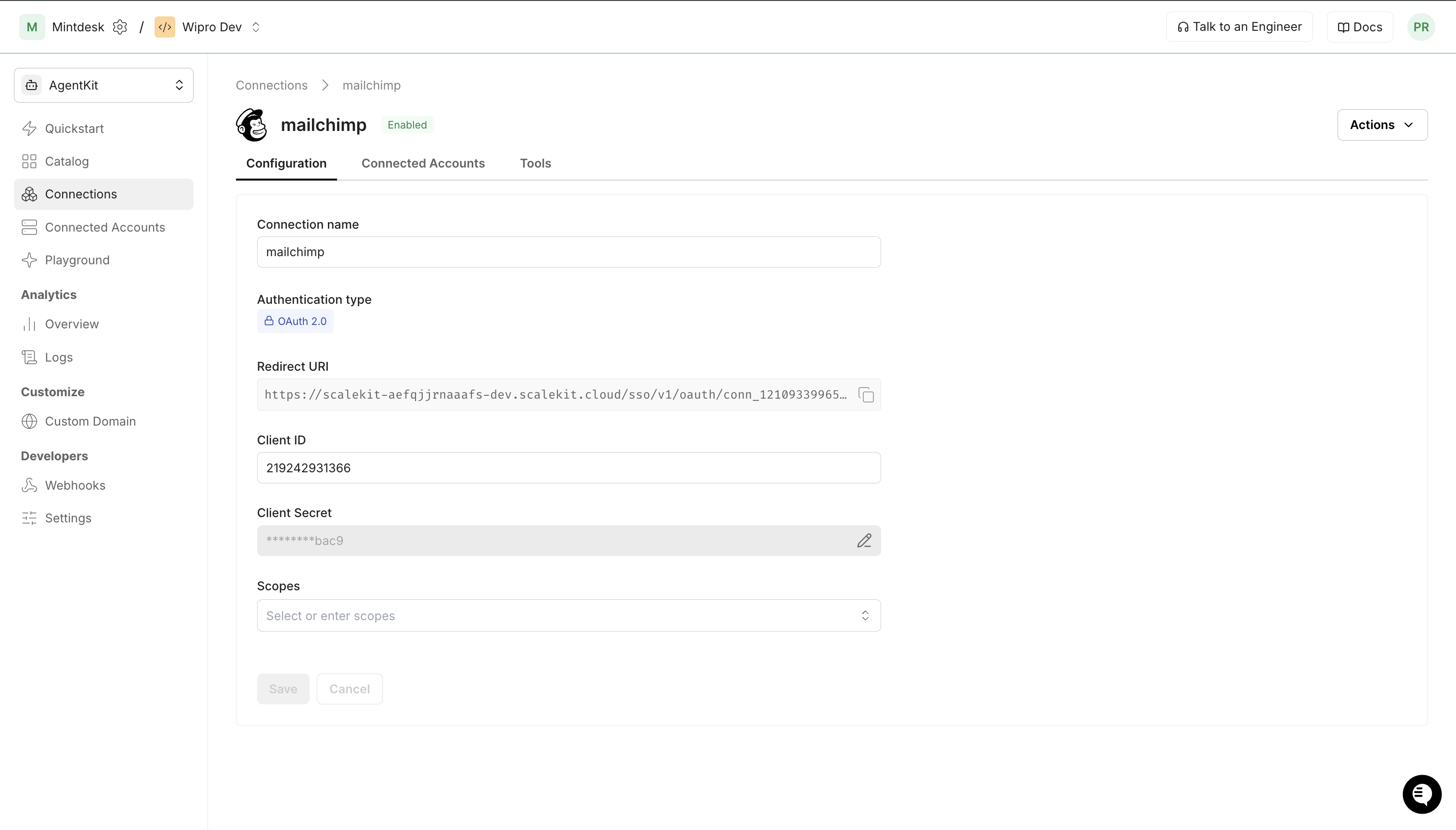
- Click Save.
- In Scalekit dashboard, open the Mailchimp connection you created and enter:
-
Connect a user account
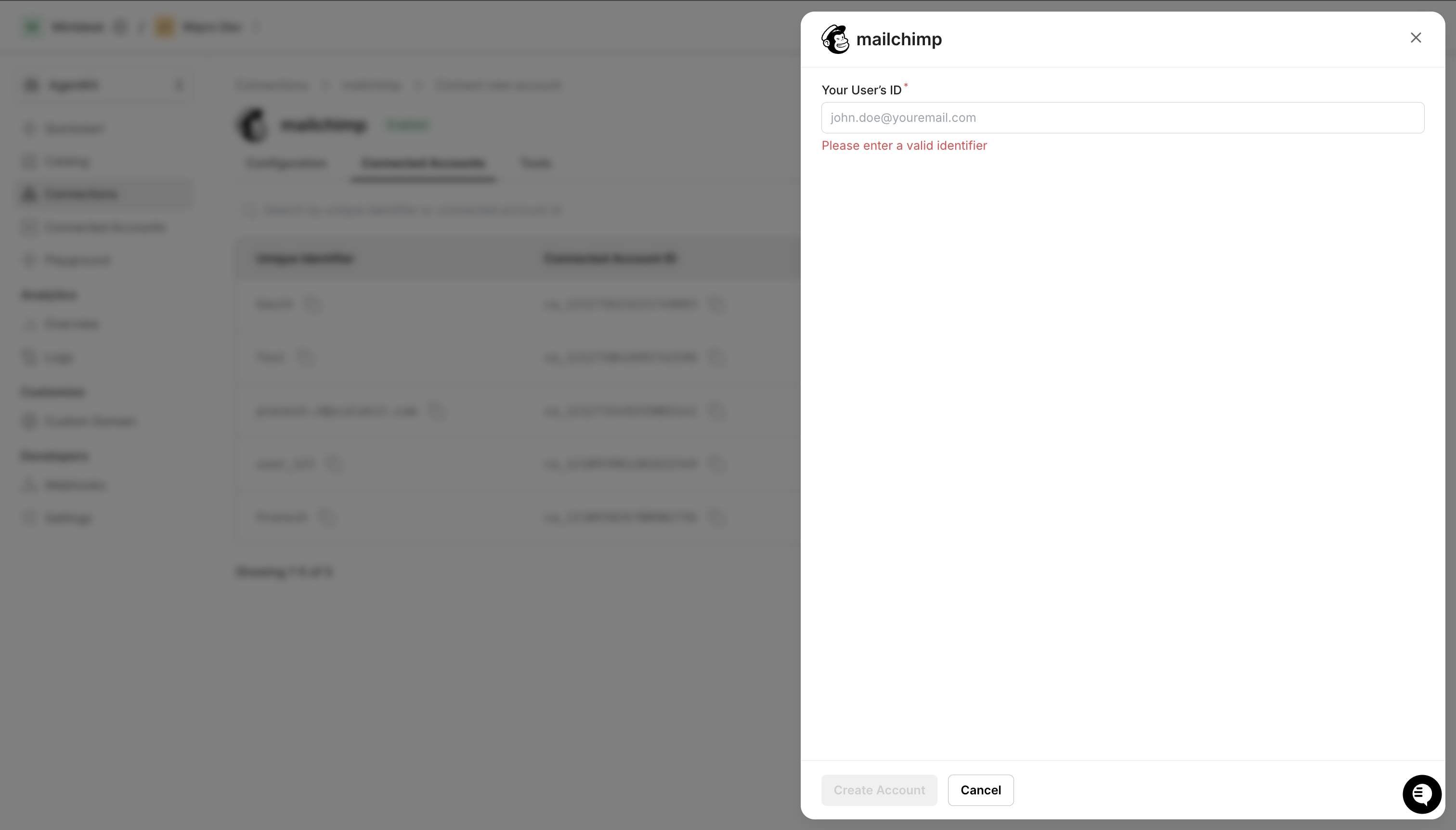
- Click the Connected Accounts tab, then Add Account.
- Enter your user’s ID and click Create Account — you’ll be redirected to Mailchimp to authorize access.
-
-
Authorize and make your first call
Section titled “Authorize and make your first call”quickstart.ts import { ScalekitClient } from '@scalekit-sdk/node'import 'dotenv/config'const scalekit = new ScalekitClient(process.env.SCALEKIT_ENV_URL,process.env.SCALEKIT_CLIENT_ID,process.env.SCALEKIT_CLIENT_SECRET,)const actions = scalekit.actionsconst connector = 'mailchimp'const identifier = 'user_123'// Generate an authorization link for the userconst { link } = await actions.getAuthorizationLink({ connectionName: connector, identifier })console.log('Authorize Mailchimp:', link)process.stdout.write('Press Enter after authorizing...')await new Promise(r => process.stdin.once('data', r))// Make your first callconst result = await actions.executeTool({connector,identifier,toolName: 'mailchimp_account_info',toolInput: {},})console.log(result)quickstart.py import osfrom scalekit.client import ScalekitClientfrom dotenv import load_dotenvload_dotenv()scalekit_client = ScalekitClient(env_url=os.getenv("SCALEKIT_ENV_URL"),client_id=os.getenv("SCALEKIT_CLIENT_ID"),client_secret=os.getenv("SCALEKIT_CLIENT_SECRET"),)actions = scalekit_client.actionsconnection_name = "mailchimp"identifier = "user_123"# Generate an authorization link for the userlink_response = actions.get_authorization_link(connection_name=connection_name,identifier=identifier,)print("Authorize Mailchimp:", link_response.link)input("Press Enter after authorizing...")# Make your first callresult = actions.execute_tool(tool_input={},tool_name="mailchimp_account_info",connection_name=connection_name,identifier=identifier,)print(result)
What you can do
Section titled “What you can do”Connect this agent connector to let your agent:
- Search member — Search for members by email or name fragment across every audience in the account, or restrict the search to one audience
- List webhooks list, webhook create, tag search — List webhooks configured on a Mailchimp audience (list)
- Create landing page, ecommerce store, ecommerce product — Create a new unpublished, contentless Mailchimp landing page
- Update ecommerce store, template, segment — Update an existing ecommerce store’s details
- Get ecommerce store, ecommerce product, template — Get information about a specific ecommerce store
- Delete ecommerce store, template, segment — Permanently delete an ecommerce store, including all of its products, orders, and customers
Common workflows
Section titled “Common workflows”Proxy API call
const result = await actions.request({ connectionName: 'mailchimp', identifier: 'user_123', path: '/ping', method: 'GET',});console.log(result);result = actions.request( connection_name='mailchimp', identifier='user_123', path="/ping", method="GET")print(result)Add a subscriber
const member = await actions.executeTool({ connector: 'mailchimp', identifier: 'user_123', toolName: 'mailchimp_list_member_add', toolInput: { list_id: 'abc123def', email_address: 'jane.smith@example.com', status: 'subscribed', first_name: 'Jane', last_name: 'Smith', },});console.log('Added member:', member.id);member = actions.execute_tool( connection_name='mailchimp', identifier='user_123', tool_name="mailchimp_list_member_add", tool_input={ "list_id": "abc123def", "email_address": "jane.smith@example.com", "status": "subscribed", "first_name": "Jane", "last_name": "Smith", },)print("Added member:", member["id"])Create and send a campaign
const campaign = await actions.executeTool({ connector: 'mailchimp', identifier: 'user_123', toolName: 'mailchimp_campaign_create', toolInput: { type: 'regular', list_id: 'abc123def', subject_line: 'Your April newsletter', from_name: 'Acme Corp', reply_to: 'hello@acme.com', },});
await actions.executeTool({ connector: 'mailchimp', identifier: 'user_123', toolName: 'mailchimp_campaign_content_set', toolInput: { campaign_id: campaign.id, html: '<h1>Hello!</h1><p>Here is your monthly update.</p>', },});
await actions.executeTool({ connector: 'mailchimp', identifier: 'user_123', toolName: 'mailchimp_campaign_send', toolInput: { campaign_id: campaign.id },});console.log('Campaign sent:', campaign.id);campaign = actions.execute_tool( connection_name='mailchimp', identifier='user_123', tool_name="mailchimp_campaign_create", tool_input={ "type": "regular", "list_id": "abc123def", "subject_line": "Your April newsletter", "from_name": "Acme Corp", "reply_to": "hello@acme.com", },)
actions.execute_tool( connection_name='mailchimp', identifier='user_123', tool_name="mailchimp_campaign_content_set", tool_input={ "campaign_id": campaign["id"], "html": "<h1>Hello!</h1><p>Here is your monthly update.</p>", },)
actions.execute_tool( connection_name='mailchimp', identifier='user_123', tool_name="mailchimp_campaign_send", tool_input={"campaign_id": campaign["id"]},)print("Campaign sent:", campaign["id"])Get campaign report
const report = await actions.executeTool({ connector: 'mailchimp', identifier: 'user_123', toolName: 'mailchimp_report_get', toolInput: { campaign_id: 'abc123' },});console.log(`Opens: ${report.opens.open_rate}, Clicks: ${report.clicks.click_rate}`);report = actions.execute_tool( connection_name='mailchimp', identifier='user_123', tool_name="mailchimp_report_get", tool_input={"campaign_id": "abc123"},)print(f"Opens: {report['opens']['open_rate']}, Clicks: {report['clicks']['click_rate']}")Tool list
Section titled “Tool list”Use the exact tool names from the Tool list below when you call execute_tool. If you’re not sure which name to use, list the tools available for the current user first.
mailchimp_account_info#Retrieve details about the connected Mailchimp account, including username, contact info, and plan details.1 param
Retrieve details about the connected Mailchimp account, including username, contact info, and plan details.
fieldsstringoptionalComma-separated list of fields to return.mailchimp_automation_archive#Archive a Mailchimp classic automation. Archived automations cannot be edited or resumed via the API.1 param
Archive a Mailchimp classic automation. Archived automations cannot be edited or resumed via the API.
workflow_idstringrequiredThe ID of the automation to archive. Get it from `mailchimp_automations_list`.mailchimp_automation_emails_list#Get a list of the individual emails (workflow emails) within a Mailchimp classic automation.1 param
Get a list of the individual emails (workflow emails) within a Mailchimp classic automation.
workflow_idstringrequiredThe ID of the automation. Get it from `mailchimp_automations_list`.mailchimp_automation_get#Retrieve details about a specific classic automation in Mailchimp.1 param
Retrieve details about a specific classic automation in Mailchimp.
workflow_idstringrequiredThe ID of the automation. Get it from `mailchimp_automations_list`.mailchimp_automation_pause#Pause all emails in a Mailchimp classic automation.1 param
Pause all emails in a Mailchimp classic automation.
workflow_idstringrequiredThe ID of the automation. Get it from `mailchimp_automations_list`.mailchimp_automation_start#Start all emails in a Mailchimp classic automation.1 param
Start all emails in a Mailchimp classic automation.
workflow_idstringrequiredThe ID of the automation. Get it from `mailchimp_automations_list`.mailchimp_automations_list#Return a summary of all classic automations (Email Series) in the Mailchimp account.4 params
Return a summary of all classic automations (Email Series) in the Mailchimp account.
countintegeroptionalNumber of records per page.fieldsstringoptionalComma-separated fields to return.offsetintegeroptionalNumber of records to skip.statusstringoptionalFilter by automation status: `save`, `paused`, `sending`.mailchimp_batch_create#Submit a batch of up to 500 API operations to run asynchronously in a single call. Poll the result with `mailchimp_batch_status_get` using the returned batch id.1 param
Submit a batch of up to 500 API operations to run asynchronously in a single call. Poll the result with `mailchimp_batch_status_get` using the returned batch id.
operations_jsonstringrequiredJSON array of operation objects, each with method, path, and optionally params/body/operation_id. body must be a JSON-encoded string.mailchimp_batch_status_get#Check the status of a Mailchimp batch operation. Use this to poll the result of a previously submitted batch request.1 param
Check the status of a Mailchimp batch operation. Use this to poll the result of a previously submitted batch request.
batch_idstringrequiredThe ID of the batch operation. Returned when a batch is created via the Mailchimp API.mailchimp_campaign_content_get#Retrieve the content (HTML, plain text, or template) of a Mailchimp campaign.2 params
Retrieve the content (HTML, plain text, or template) of a Mailchimp campaign.
campaign_idstringrequiredThe ID of the campaign. Get it from `mailchimp_campaigns_list`.fieldsstringoptionalComma-separated fields to return.mailchimp_campaign_content_set#Set the HTML or plain text content of a Mailchimp campaign.4 params
Set the HTML or plain text content of a Mailchimp campaign.
campaign_idstringrequiredThe ID of the campaign. Get it from `mailchimp_campaigns_list`.htmlstringoptionalFull HTML content for the campaign.plain_textstringoptionalPlain text version of the campaign content.template_idstringoptionalID of a saved Mailchimp template to use. Get it from `mailchimp_templates_list`.mailchimp_campaign_create#Create a new Mailchimp campaign (regular, plaintext, A/B split, RSS, or variate).8 params
Create a new Mailchimp campaign (regular, plaintext, A/B split, RSS, or variate).
list_idstringrequiredThe ID of the audience to send to. Get it from `mailchimp_lists_list`.typestringrequiredCampaign type: `regular`, `plaintext`, `absplit`, `rss`, `variate`.from_namestringoptionalThe 'from' name for the campaign.preview_textstringoptionalPreview text displayed in the inbox.reply_tostringoptionalThe reply-to email address.segment_idstringoptionalID of a segment to send to (optional). Get it from `mailchimp_segments_list`.subject_linestringoptionalThe subject line for the campaign.titlestringoptionalThe internal title for this campaign (not shown to subscribers).mailchimp_campaign_delete#Remove a campaign from a Mailchimp account. Only campaigns in draft or removed status can be deleted.1 param
Remove a campaign from a Mailchimp account. Only campaigns in draft or removed status can be deleted.
campaign_idstringrequiredThe ID of the campaign to delete. Get it from `mailchimp_campaigns_list`.mailchimp_campaign_get#Retrieve details about a specific Mailchimp campaign.2 params
Retrieve details about a specific Mailchimp campaign.
campaign_idstringrequiredThe ID of the campaign. Get it from `mailchimp_campaigns_list`.fieldsstringoptionalComma-separated fields to return.mailchimp_campaign_schedule#Schedule a Mailchimp campaign to be sent at a specific time.2 params
Schedule a Mailchimp campaign to be sent at a specific time.
campaign_idstringrequiredThe ID of the campaign to schedule. Get it from `mailchimp_campaigns_list`.schedule_timestringrequiredUTC datetime to send the campaign in ISO 8601 format (e.g., `2026-05-01T14:00:00+00:00`).mailchimp_campaign_send#Send a Mailchimp campaign immediately. The campaign must be in `save` status with valid content and recipients.1 param
Send a Mailchimp campaign immediately. The campaign must be in `save` status with valid content and recipients.
campaign_idstringrequiredThe ID of the campaign to send. Get it from `mailchimp_campaigns_list`.mailchimp_campaign_test#Send a test email for a Mailchimp campaign to one or more email addresses.3 params
Send a test email for a Mailchimp campaign to one or more email addresses.
campaign_idstringrequiredThe ID of the campaign. Get it from `mailchimp_campaigns_list`.test_emailsstringrequiredJSON array of email addresses to send the test to.send_typestringoptionalEmail format for the test: `html` or `plaintext`.mailchimp_campaign_unschedule#Cancel a scheduled Mailchimp campaign and return it to draft status.1 param
Cancel a scheduled Mailchimp campaign and return it to draft status.
campaign_idstringrequiredThe ID of the scheduled campaign. Get it from `mailchimp_campaigns_list`.mailchimp_campaign_update#Update the settings of a Mailchimp campaign that has not yet been sent.7 params
Update the settings of a Mailchimp campaign that has not yet been sent.
campaign_idstringrequiredThe ID of the campaign. Get it from `mailchimp_campaigns_list`.from_namestringoptionalUpdated 'from' name.list_idstringoptionalUpdated audience ID.preview_textstringoptionalNew preview text.reply_tostringoptionalUpdated reply-to email address.subject_linestringoptionalNew subject line.titlestringoptionalNew internal campaign title.mailchimp_campaigns_list#Return a list of all campaigns in the Mailchimp account, with optional filters.8 params
Return a list of all campaigns in the Mailchimp account, with optional filters.
countintegeroptionalNumber of records per page.fieldsstringoptionalComma-separated fields to return.list_idstringoptionalFilter by audience ID.offsetintegeroptionalNumber of records to skip.sort_dirstringoptionalSort direction: `ASC` or `DESC`.sort_fieldstringoptionalSort field: `create_time` or `send_time`.statusstringoptionalFilter by status: `save`, `paused`, `schedule`, `sending`, `sent`.typestringoptionalFilter by campaign type: `regular`, `plaintext`, `absplit`, `rss`, `variate`.mailchimp_ecommerce_customer_upsert#Add a new customer or update an existing customer in a Mailchimp ecommerce store (idempotent upsert).7 params
Add a new customer or update an existing customer in a Mailchimp ecommerce store (idempotent upsert).
customer_idstringrequiredA unique identifier for the customer, chosen by you.email_addressstringrequiredThe customer's email address.opt_in_statusbooleanrequiredWhether the customer is opted in to marketing (true/false).store_idstringrequiredThe ID of the store. Get it from `mailchimp_ecommerce_stores_list`.companystringoptionalThe customer's company.first_namestringoptionalThe customer's first name.last_namestringoptionalThe customer's last name.mailchimp_ecommerce_order_create#Add an order to a Mailchimp ecommerce store, to drive purchase-based automations and reporting.10 params
Add an order to a Mailchimp ecommerce store, to drive purchase-based automations and reporting.
currency_codestringrequiredThree-letter ISO 4217 currency code for the order.customer_jsonstringrequiredJSON object describing the customer who placed the order, e.g. '{"id":"cust-1","email_address":"jane@example.com"}'.lines_jsonstringrequiredJSON array of the order's line items, e.g. '[{"id":"line-1","product_id":"prod-001","product_variant_id":"v1","quantity":2,"price":19.99}]'.order_idstringrequiredA unique identifier for the order, chosen by you.order_totalnumberrequiredThe total amount for the order.store_idstringrequiredThe ID of the store to add the order to. Get it from `mailchimp_ecommerce_stores_list`.campaign_idstringoptionalThe ID of the Mailchimp campaign that drove this order, if any.financial_statusstringoptionalThe order's financial status, e.g. 'paid', 'pending', 'refunded'.fulfillment_statusstringoptionalThe order's fulfillment status, e.g. 'partial', 'fulfilled'.order_urlstringoptionalThe URL for the order.mailchimp_ecommerce_orders_list#Get a list of orders for a Mailchimp ecommerce store.4 params
Get a list of orders for a Mailchimp ecommerce store.
store_idstringrequiredThe ID of the store. Get it from `mailchimp_ecommerce_stores_list`.countintegeroptionalNumber of records to return per page (max 1000).customer_idstringoptionalFilter orders by customer ID.offsetintegeroptionalNumber of records to skip.mailchimp_ecommerce_product_create#Add a product to a Mailchimp ecommerce store. At least one variant is required.8 params
Add a product to a Mailchimp ecommerce store. At least one variant is required.
product_idstringrequiredA unique identifier for the product, chosen by you.store_idstringrequiredThe ID of the store to add the product to. Get it from `mailchimp_ecommerce_stores_list`.titlestringrequiredThe title of the product.variants_jsonstringrequiredJSON array of variant objects. At least one variant is required, e.g. '[{"id":"v1","title":"Small","price":19.99}]'.descriptionstringoptionalThe description of the product.image_urlstringoptionalThe primary image URL for the product.urlstringoptionalThe URL for the product page.vendorstringoptionalThe vendor for the product.mailchimp_ecommerce_product_get#Get information about a specific product in a Mailchimp ecommerce store.2 params
Get information about a specific product in a Mailchimp ecommerce store.
product_idstringrequiredThe ID of the product to retrieve.store_idstringrequiredThe ID of the store. Get it from `mailchimp_ecommerce_stores_list`.mailchimp_ecommerce_products_list#Get a list of products for a Mailchimp ecommerce store.3 params
Get a list of products for a Mailchimp ecommerce store.
store_idstringrequiredThe ID of the store. Get it from `mailchimp_ecommerce_stores_list`.countintegeroptionalNumber of records to return per page (max 1000).offsetintegeroptionalNumber of records to skip.mailchimp_ecommerce_store_create#Add a new ecommerce store to the Mailchimp account, linked to an audience.7 params
Add a new ecommerce store to the Mailchimp account, linked to an audience.
currency_codestringrequiredThree-letter ISO 4217 currency code the store accepts, e.g. USD.list_idstringrequiredThe ID of the audience associated with the store. Get it from `mailchimp_lists_list`.namestringrequiredThe name of the store.store_idstringrequiredA unique identifier for the store, chosen by you (e.g. your platform's store ID).domainstringoptionalThe store's domain.email_addressstringoptionalThe email address for the store.platformstringoptionalThe ecommerce platform of the store, e.g. Shopify, WooCommerce, Magento.mailchimp_ecommerce_store_delete#Permanently delete an ecommerce store, including all of its products, orders, and customers. This action cannot be undone.1 param
Permanently delete an ecommerce store, including all of its products, orders, and customers. This action cannot be undone.
store_idstringrequiredThe ID of the store to delete.mailchimp_ecommerce_store_get#Get information about a specific ecommerce store.1 param
Get information about a specific ecommerce store.
store_idstringrequiredThe ID of the store. Get it from `mailchimp_ecommerce_stores_list`.mailchimp_ecommerce_store_update#Update an existing ecommerce store's details.5 params
Update an existing ecommerce store's details.
store_idstringrequiredThe ID of the store to update.currency_codestringoptionalNew three-letter ISO 4217 currency code the store accepts.domainstringoptionalThe new store domain.email_addressstringoptionalThe new email address for the store.namestringoptionalThe new name of the store.mailchimp_ecommerce_stores_list#Get information about all ecommerce stores connected to the Mailchimp account.2 params
Get information about all ecommerce stores connected to the Mailchimp account.
countintegeroptionalNumber of records to return per page (max 1000).offsetintegeroptionalNumber of records to skip.mailchimp_landing_page_create#Create a new unpublished, contentless Mailchimp landing page. Connect it to an audience via list_id, or set use_default_list to use the account's default audience instead. Add content and publish it separately afterward.4 params
Create a new unpublished, contentless Mailchimp landing page. Connect it to an audience via list_id, or set use_default_list to use the account's default audience instead. Add content and publish it separately afterward.
namestringrequiredInternal name for the landing page, shown in the Mailchimp UI.list_idstringoptionalThe ID of the audience to connect this landing page to. Required unless use_default_list is true.titlestringoptionalPublic-facing title of the landing page, shown to visitors.use_default_listbooleanoptionalCreate the landing page using the account's default audience instead of specifying list_id.mailchimp_landing_pages_list#List landing pages in the Mailchimp account.5 params
List landing pages in the Mailchimp account.
countintegeroptionalNumber of records to return per page (max 1000).fieldsstringoptionalComma-separated fields to return.offsetintegeroptionalNumber of records to skip.sort_dirstringoptionalSort direction: `ASC` or `DESC`.sort_fieldstringoptionalField to sort results by: `created_at` or `updated_at`.mailchimp_list_create#Create a new Mailchimp audience (list). Requires a contact address and campaign defaults.13 params
Create a new Mailchimp audience (list). Requires a contact address and campaign defaults.
contact_addressstringrequiredThe street address for the contact address.contact_citystringrequiredThe city for the contact address.contact_companystringrequiredThe company name for the contact address (required by Mailchimp).contact_countrystringrequiredThe two-letter ISO country code for the contact address (e.g. `US`).contact_statestringrequiredThe state or province for the contact address.contact_zipstringrequiredThe postal/ZIP code for the contact address.email_type_optionbooleanrequiredWhether to allow subscribers to choose email format (HTML or plain text).from_emailstringrequiredThe default sender email address for campaigns.from_namestringrequiredThe default display name for the campaign sender.namestringrequiredThe name of the audience.permission_reminderstringrequiredA reminder for subscribers about why they were added.languagestringoptionalThe default language for the audience (e.g. `en`, `fr`).subjectstringoptionalThe default subject line for campaigns.mailchimp_list_delete#Permanently delete a Mailchimp audience and all its members.1 param
Permanently delete a Mailchimp audience and all its members.
list_idstringrequiredThe ID of the audience to delete. Get it from `mailchimp_lists_list`.mailchimp_list_get#Retrieve information about a specific Mailchimp audience (list) by its ID.2 params
Retrieve information about a specific Mailchimp audience (list) by its ID.
list_idstringrequiredThe ID of the audience. Get it from `mailchimp_lists_list`.fieldsstringoptionalComma-separated fields to return.mailchimp_list_interest_categories_list#Get a list of interest categories (groups) for a Mailchimp audience, used for subscriber segmentation and signup form preferences.3 params
Get a list of interest categories (groups) for a Mailchimp audience, used for subscriber segmentation and signup form preferences.
list_idstringrequiredThe ID of the audience. Get it from `mailchimp_lists_list`.countintegeroptionalNumber of records to return per page (max 1000).offsetintegeroptionalNumber of records to skip.mailchimp_list_interest_category_create#Add a new interest category (group) to a Mailchimp audience for subscriber segmentation.4 params
Add a new interest category (group) to a Mailchimp audience for subscriber segmentation.
list_idstringrequiredThe ID of the audience. Get it from `mailchimp_lists_list`.titlestringrequiredThe name of the interest category, shown on signup forms.typestringrequiredHow the interests in this category appear on signup forms: checkboxes, dropdown, radio, or hidden.display_orderintegeroptionalThe display order of this category relative to others. Lower numbers display first.mailchimp_list_member_add#Add a new member to a Mailchimp audience.6 params
Add a new member to a Mailchimp audience.
email_addressstringrequiredThe member's email address.list_idstringrequiredThe ID of the audience. Get it from `mailchimp_lists_list`.statusstringrequiredSubscription status: `subscribed`, `unsubscribed`, `cleaned`, `pending`.first_namestringoptionalMember's first name (stored in FNAME merge field).last_namestringoptionalMember's last name (stored in LNAME merge field).tagsstringoptionalJSON array of tag names to apply to the member.mailchimp_list_member_archive#Archive a member in a Mailchimp audience (soft delete). The member's data is preserved but they will not receive campaigns. The `subscriber_hash` is the MD5 hash of the lowercase email.2 params
Archive a member in a Mailchimp audience (soft delete). The member's data is preserved but they will not receive campaigns. The `subscriber_hash` is the MD5 hash of the lowercase email.
list_idstringrequiredThe ID of the audience. Get it from `mailchimp_lists_list`.subscriber_hashstringrequiredMD5 hash of the member's lowercase email address.mailchimp_list_member_delete_permanent#Permanently delete a member from a Mailchimp audience. This removes all of their data and cannot be undone. Use `mailchimp_list_member_archive` for a reversible soft delete.2 params
Permanently delete a member from a Mailchimp audience. This removes all of their data and cannot be undone. Use `mailchimp_list_member_archive` for a reversible soft delete.
list_idstringrequiredThe ID of the audience. Get it from `mailchimp_lists_list`.subscriber_hashstringrequiredMD5 hash of the member's lowercase email address.mailchimp_list_member_get#Retrieve information about a specific member in a Mailchimp audience. The `subscriber_hash` is the MD5 hash of the member's lowercase email address.3 params
Retrieve information about a specific member in a Mailchimp audience. The `subscriber_hash` is the MD5 hash of the member's lowercase email address.
list_idstringrequiredThe ID of the audience. Get it from `mailchimp_lists_list`.subscriber_hashstringrequiredMD5 hash of the member's lowercase email address.fieldsstringoptionalComma-separated fields to return.mailchimp_list_member_tags_get#Retrieve the tags assigned to a specific member in a Mailchimp audience.2 params
Retrieve the tags assigned to a specific member in a Mailchimp audience.
list_idstringrequiredThe ID of the audience. Get it from `mailchimp_lists_list`.subscriber_hashstringrequiredMD5 hash of the member's lowercase email address.mailchimp_list_member_tags_update#Add or remove tags for a specific member in a Mailchimp audience. Provide a JSON array of tag objects with `name` and `status` (`active` to add, `inactive` to remove).3 params
Add or remove tags for a specific member in a Mailchimp audience. Provide a JSON array of tag objects with `name` and `status` (`active` to add, `inactive` to remove).
list_idstringrequiredThe ID of the audience. Get it from `mailchimp_lists_list`.subscriber_hashstringrequiredMD5 hash of the member's lowercase email address.tagsstringrequiredJSON array of tag objects. Each has `name` (string) and `status` (`active` to add, `inactive` to remove).mailchimp_list_member_update#Update an existing member's data in a Mailchimp audience. The `subscriber_hash` is the MD5 hash of the member's lowercase email address.6 params
Update an existing member's data in a Mailchimp audience. The `subscriber_hash` is the MD5 hash of the member's lowercase email address.
list_idstringrequiredThe ID of the audience. Get it from `mailchimp_lists_list`.subscriber_hashstringrequiredMD5 hash of the member's lowercase email address.email_addressstringoptionalUpdated email address.first_namestringoptionalUpdated first name (FNAME merge field).last_namestringoptionalUpdated last name (LNAME merge field).statusstringoptionalNew subscription status: `subscribed`, `unsubscribed`, `cleaned`, `pending`.mailchimp_list_member_upsert#Add a new member or update an existing member in a Mailchimp audience (idempotent). The `subscriber_hash` is the MD5 hash of the lowercase email address.7 params
Add a new member or update an existing member in a Mailchimp audience (idempotent). The `subscriber_hash` is the MD5 hash of the lowercase email address.
email_addressstringrequiredThe member's email address.list_idstringrequiredThe ID of the audience. Get it from `mailchimp_lists_list`.status_if_newstringrequiredStatus for new members: `subscribed`, `unsubscribed`, `cleaned`, `pending`.subscriber_hashstringrequiredMD5 hash of the member's lowercase email address.first_namestringoptionalFirst name (FNAME merge field).last_namestringoptionalLast name (LNAME merge field).statusstringoptionalStatus for existing members.mailchimp_list_members_list#Return a list of members in a Mailchimp audience, with optional filters by status.7 params
Return a list of members in a Mailchimp audience, with optional filters by status.
list_idstringrequiredThe ID of the audience. Get it from `mailchimp_lists_list`.countintegeroptionalNumber of records per page (max 1000).fieldsstringoptionalComma-separated fields to return.offsetintegeroptionalNumber of records to skip.sort_dirstringoptionalSort direction: `ASC` or `DESC`.sort_fieldstringoptionalField to sort by: `last_changed` or `timestamp_opt`.statusstringoptionalFilter by member status: `subscribed`, `unsubscribed`, `cleaned`, `pending`, `transactional`, `archived`.mailchimp_list_merge_field_create#Add a new merge field (custom audience field, e.g. PHONE, BIRTHDAY) to a Mailchimp audience.8 params
Add a new merge field (custom audience field, e.g. PHONE, BIRTHDAY) to a Mailchimp audience.
list_idstringrequiredThe ID of the audience. Get it from `mailchimp_lists_list`.namestringrequiredThe name of the merge field, shown in the Mailchimp UI.typestringrequiredThe field type: text, number, address, phone, date, url, imageurl, radio, dropdown, birthday, zip.default_valuestringoptionalThe default value for the merge field if left blank.help_textstringoptionalExtra text shown to help the subscriber fill out the field on a signup form.publicbooleanoptionalWhether the merge field is displayed on the signup form.requiredbooleanoptionalWhether the merge field is required to import a contact.tagstringoptionalThe merge tag used in campaigns, e.g. PHONE. Auto-generated if omitted.mailchimp_list_merge_fields_list#Get a list of merge fields (audience fields, e.g. FNAME, PHONE) for a Mailchimp audience.3 params
Get a list of merge fields (audience fields, e.g. FNAME, PHONE) for a Mailchimp audience.
list_idstringrequiredThe ID of the audience. Get it from `mailchimp_lists_list`.countintegeroptionalNumber of records to return per page (max 1000).offsetintegeroptionalNumber of records to skip.mailchimp_list_tag_search#Search for tags used in a Mailchimp audience by name prefix. Returns all tags whose name starts with the given search string.2 params
Search for tags used in a Mailchimp audience by name prefix. Returns all tags whose name starts with the given search string.
list_idstringrequiredThe ID of the audience. Get it from `mailchimp_lists_list`.namestringoptionalThe search prefix used to filter tags by name.mailchimp_list_update#Update an existing Mailchimp audience's name or settings.5 params
Update an existing Mailchimp audience's name or settings.
list_idstringrequiredThe ID of the audience. Get it from `mailchimp_lists_list`.from_emailstringoptionalUpdated sender email address.from_namestringoptionalUpdated sender display name.namestringoptionalNew name for the audience.permission_reminderstringoptionalUpdated permission reminder.mailchimp_list_webhook_create#Create a webhook on a Mailchimp audience for subscribe/unsubscribe/profile-update/cleaned/email-change/campaign-sent events.11 params
Create a webhook on a Mailchimp audience for subscribe/unsubscribe/profile-update/cleaned/email-change/campaign-sent events.
list_idstringrequiredThe ID of the audience. Get it from `mailchimp_lists_list`.urlstringrequiredThe URL that Mailchimp will send webhook events to.event_campaignbooleanoptionalTrigger this webhook when a campaign is sent or cancelled.event_cleanedbooleanoptionalTrigger this webhook when a member is cleaned (removed for bouncing).event_profilebooleanoptionalTrigger this webhook when a member updates their profile.event_subscribebooleanoptionalTrigger this webhook when a new subscriber is added.event_unsubscribebooleanoptionalTrigger this webhook when a member unsubscribes.event_upemailbooleanoptionalTrigger this webhook when a member changes their email address.source_adminbooleanoptionalFire the webhook for changes made by an admin in the Mailchimp dashboard.source_apibooleanoptionalFire the webhook for changes made via the API.source_userbooleanoptionalFire the webhook for changes made by the subscriber themselves.mailchimp_list_webhooks_list#List webhooks configured on a Mailchimp audience (list).2 params
List webhooks configured on a Mailchimp audience (list).
list_idstringrequiredThe ID of the audience. Get it from `mailchimp_lists_list`.fieldsstringoptionalComma-separated fields to return.mailchimp_lists_list#Return a list of all Mailchimp audiences (lists) in the account.5 params
Return a list of all Mailchimp audiences (lists) in the account.
countintegeroptionalNumber of records to return per page (max 1000).fieldsstringoptionalComma-separated fields to return.offsetintegeroptionalNumber of records to skip.sort_dirstringoptionalSort direction: `ASC` or `DESC`.sort_fieldstringoptionalField to sort results by: `date_created` or `campaign_last_sent`.mailchimp_member_search#Search for members by email or name fragment across every audience in the account, or restrict the search to one audience. Use this when you don't already know the list_id and subscriber_hash that the other member tools require.4 params
Search for members by email or name fragment across every audience in the account, or restrict the search to one audience. Use this when you don't already know the list_id and subscriber_hash that the other member tools require.
querystringrequiredSearch term to match against member email addresses and names.exclude_fieldsstringoptionalComma-separated fields to exclude from the response.fieldsstringoptionalComma-separated fields to return.list_idstringoptionalRestrict the search to a single audience. Omit to search across all audiences.mailchimp_ping#Check the health of the Mailchimp API. Returns a health status string.0 params
Check the health of the Mailchimp API. Returns a health status string.
mailchimp_report_click_details#Return click details and statistics for links in a Mailchimp campaign.3 params
Return click details and statistics for links in a Mailchimp campaign.
campaign_idstringrequiredThe ID of the campaign. Get it from `mailchimp_campaigns_list`.countintegeroptionalNumber of records per page.offsetintegeroptionalNumber of records to skip.mailchimp_report_email_activity#Return per-subscriber email activity for a specific Mailchimp campaign, including opens, clicks, and bounces.4 params
Return per-subscriber email activity for a specific Mailchimp campaign, including opens, clicks, and bounces.
campaign_idstringrequiredThe ID of the campaign. Get it from `mailchimp_campaigns_list`.countintegeroptionalNumber of records per page.fieldsstringoptionalComma-separated fields to return.offsetintegeroptionalNumber of records to skip.mailchimp_report_get#Retrieve the report summary for a specific Mailchimp campaign, including opens, clicks, bounces, and unsubscribes.2 params
Retrieve the report summary for a specific Mailchimp campaign, including opens, clicks, bounces, and unsubscribes.
campaign_idstringrequiredThe ID of the campaign. Get it from `mailchimp_campaigns_list`.fieldsstringoptionalComma-separated fields to return.mailchimp_report_open_details#Return a list of members who opened a specific Mailchimp campaign.3 params
Return a list of members who opened a specific Mailchimp campaign.
campaign_idstringrequiredThe ID of the campaign. Get it from `mailchimp_campaigns_list`.countintegeroptionalNumber of records per page.offsetintegeroptionalNumber of records to skip.mailchimp_report_unsubscribes#Return a list of members who unsubscribed from a specific Mailchimp campaign.3 params
Return a list of members who unsubscribed from a specific Mailchimp campaign.
campaign_idstringrequiredThe ID of the campaign. Get it from `mailchimp_campaigns_list`.countintegeroptionalNumber of records per page.offsetintegeroptionalNumber of records to skip.mailchimp_reports_list#Return a list of campaign reports in the Mailchimp account.4 params
Return a list of campaign reports in the Mailchimp account.
countintegeroptionalNumber of records per page.fieldsstringoptionalComma-separated fields to return.offsetintegeroptionalNumber of records to skip.typestringoptionalFilter by campaign type: `regular`, `absplit`, `variate`, `rss`, `plaintext`.mailchimp_segment_create#Create a new static or saved segment in a Mailchimp audience.4 params
Create a new static or saved segment in a Mailchimp audience.
list_idstringrequiredThe ID of the audience. Get it from `mailchimp_lists_list`.namestringrequiredName of the segment.optionsstringoptionalJSON object defining conditions for a saved segment. See Mailchimp docs for condition format.static_segmentstringoptionalJSON array of email addresses to add to a static segment.mailchimp_segment_delete#Delete a segment from a Mailchimp audience.2 params
Delete a segment from a Mailchimp audience.
list_idstringrequiredThe ID of the audience. Get it from `mailchimp_lists_list`.segment_idstringrequiredThe ID of the segment to delete. Get it from `mailchimp_segments_list`.mailchimp_segment_get#Retrieve details about a specific segment in a Mailchimp audience.2 params
Retrieve details about a specific segment in a Mailchimp audience.
list_idstringrequiredThe ID of the audience. Get it from `mailchimp_lists_list`.segment_idstringrequiredThe ID of the segment. Get it from `mailchimp_segments_list`.mailchimp_segment_members_list#Return a list of members in a specific segment of a Mailchimp audience.4 params
Return a list of members in a specific segment of a Mailchimp audience.
list_idstringrequiredThe ID of the audience. Get it from `mailchimp_lists_list`.segment_idstringrequiredThe ID of the segment. Get it from `mailchimp_segments_list`.countintegeroptionalNumber of records per page.offsetintegeroptionalNumber of records to skip.mailchimp_segment_update#Update the name or conditions of a segment in a Mailchimp audience.4 params
Update the name or conditions of a segment in a Mailchimp audience.
list_idstringrequiredThe ID of the audience. Get it from `mailchimp_lists_list`.segment_idstringrequiredThe ID of the segment. Get it from `mailchimp_segments_list`.namestringoptionalNew name for the segment.static_segmentstringoptionalUpdated JSON array of emails for a static segment.mailchimp_segments_list#Return a list of segments for a specific Mailchimp audience.5 params
Return a list of segments for a specific Mailchimp audience.
list_idstringrequiredThe ID of the audience. Get it from `mailchimp_lists_list`.countintegeroptionalNumber of records per page.fieldsstringoptionalComma-separated fields to return.offsetintegeroptionalNumber of records to skip.typestringoptionalFilter by segment type: `static` or `saved`.mailchimp_template_create#Create a new user-defined HTML template in Mailchimp.3 params
Create a new user-defined HTML template in Mailchimp.
htmlstringrequiredThe HTML content for the template.namestringrequiredA name for the template.folder_idstringoptionalID of a folder to place the template in.mailchimp_template_delete#Permanently delete a user-defined template from Mailchimp.1 param
Permanently delete a user-defined template from Mailchimp.
template_idstringrequiredThe ID of the template to delete. Get it from `mailchimp_templates_list`.mailchimp_template_get#Retrieve information about a specific template in the Mailchimp account.2 params
Retrieve information about a specific template in the Mailchimp account.
template_idstringrequiredThe ID of the template. Get it from `mailchimp_templates_list`.fieldsstringoptionalComma-separated fields to return.mailchimp_template_update#Update a user-defined template's name or HTML content in Mailchimp.3 params
Update a user-defined template's name or HTML content in Mailchimp.
template_idstringrequiredThe ID of the template. Get it from `mailchimp_templates_list`.htmlstringoptionalNew HTML content for the template.namestringoptionalNew name for the template.mailchimp_templates_list#Return a list of templates in the Mailchimp account, including user-created and Mailchimp base templates.6 params
Return a list of templates in the Mailchimp account, including user-created and Mailchimp base templates.
countintegeroptionalNumber of records per page.fieldsstringoptionalComma-separated fields to return.offsetintegeroptionalNumber of records to skip.sort_dirstringoptionalSort direction: `ASC` or `DESC`.sort_fieldstringoptionalSort field: `date_created`.typestringoptionalFilter by template type: `user`, `base`, `gallery`.