


Tableau connector
API KeyAnalyticsProductivityConnect to Tableau Cloud or Tableau Server to browse workbooks, views, and data sources, export visualizations, and query underlying data.
Tableau connector
-
Install the SDK
Section titled “Install the SDK”Terminal window npm install @scalekit-sdk/nodeTerminal window pip install scalekit -
Set your credentials
Section titled “Set your credentials”Add your Scalekit credentials to your
.envfile. Find values in app.scalekit.com > Developers > API Credentials..env SCALEKIT_ENVIRONMENT_URL=<your-environment-url>SCALEKIT_CLIENT_ID=<your-client-id>SCALEKIT_CLIENT_SECRET=<your-client-secret> -
Set up the connector
Section titled “Set up the connector”Register your Tableau credentials with Scalekit so it can authenticate requests on your behalf. You do this once per environment.
Dashboard setup steps
Connect your Tableau Cloud or Tableau Server site to Scalekit so your agent can browse workbooks, query views, export dashboards, and manage users.
Scalekit handles session token management automatically. You store your Personal Access Token (PAT) credentials once, and Scalekit signs in and refreshes the session token before it expires — your code never calls the sign-in endpoint directly.
-
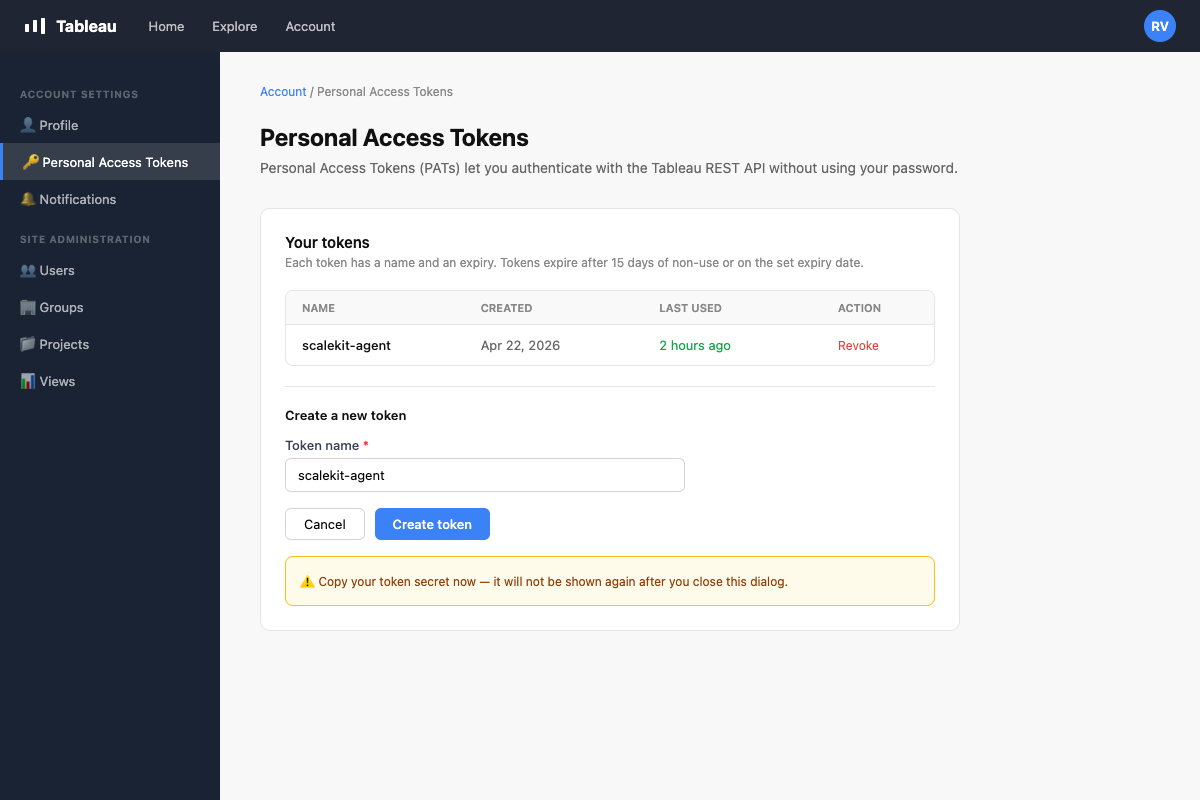
Create a Personal Access Token in Tableau
A Personal Access Token (PAT) is used by Scalekit to sign in on your behalf and keep the session alive automatically.
- Sign in to your Tableau site.
- Click your avatar in the top-right corner → My Account Settings.
- Scroll to the Personal Access Tokens section.
- Click + Create new token, give it a name (e.g.,
scalekit-agent), and click Create. - Copy both the Token Name and Token Secret — the secret is shown only once.
-
Create a connection in Scalekit
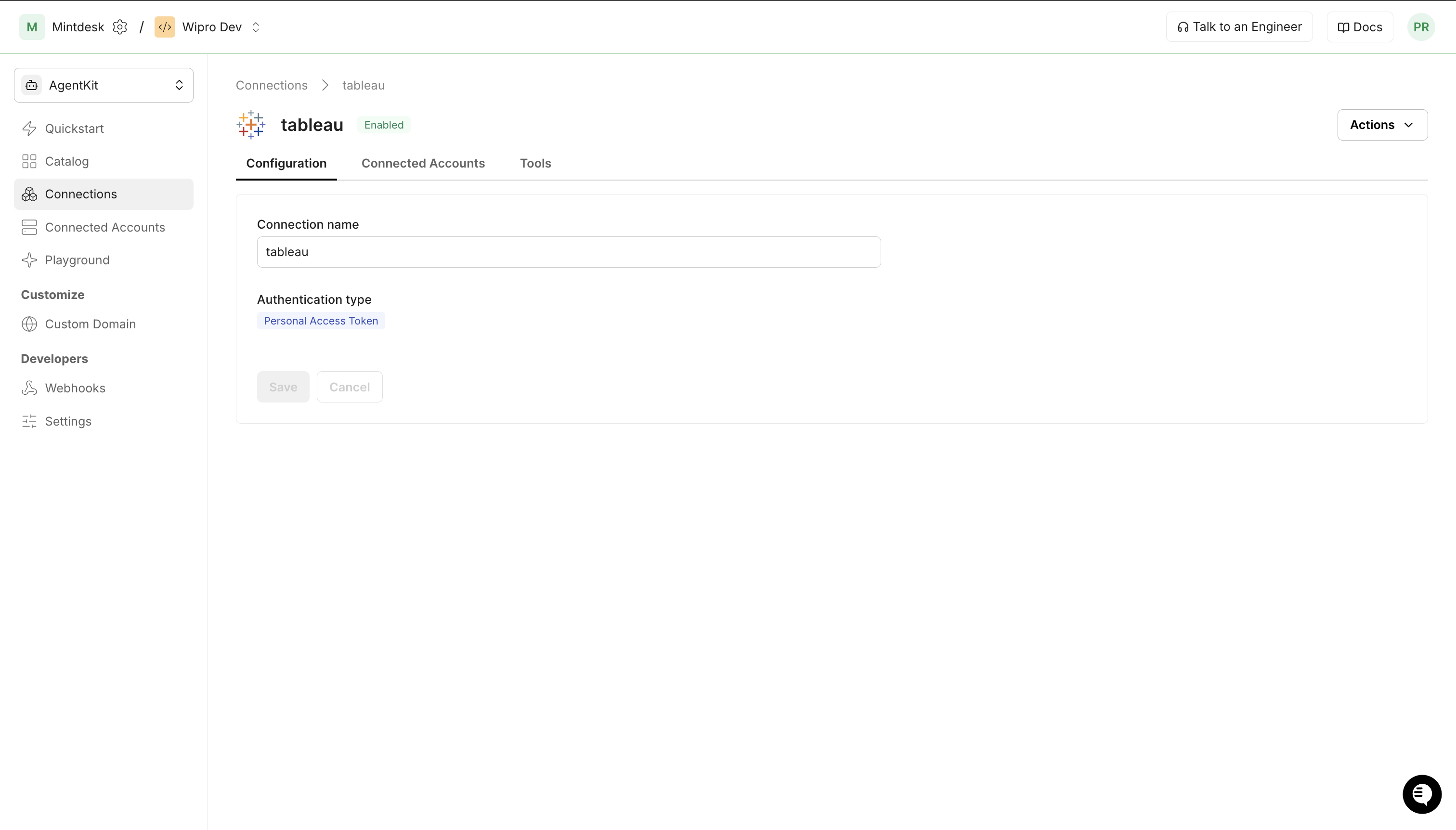
- In Scalekit dashboard, go to Agent Auth → Create Connection.
- Search for Tableau and click Create.
- Note the Connection name — use this as
connection_namein your code (e.g.,tableau). - Click Save.
-
Add a connected account
A connected account links a user in your system to their Tableau PAT credentials. Scalekit uses these to sign in and refresh the session automatically.
Via dashboard (for testing)
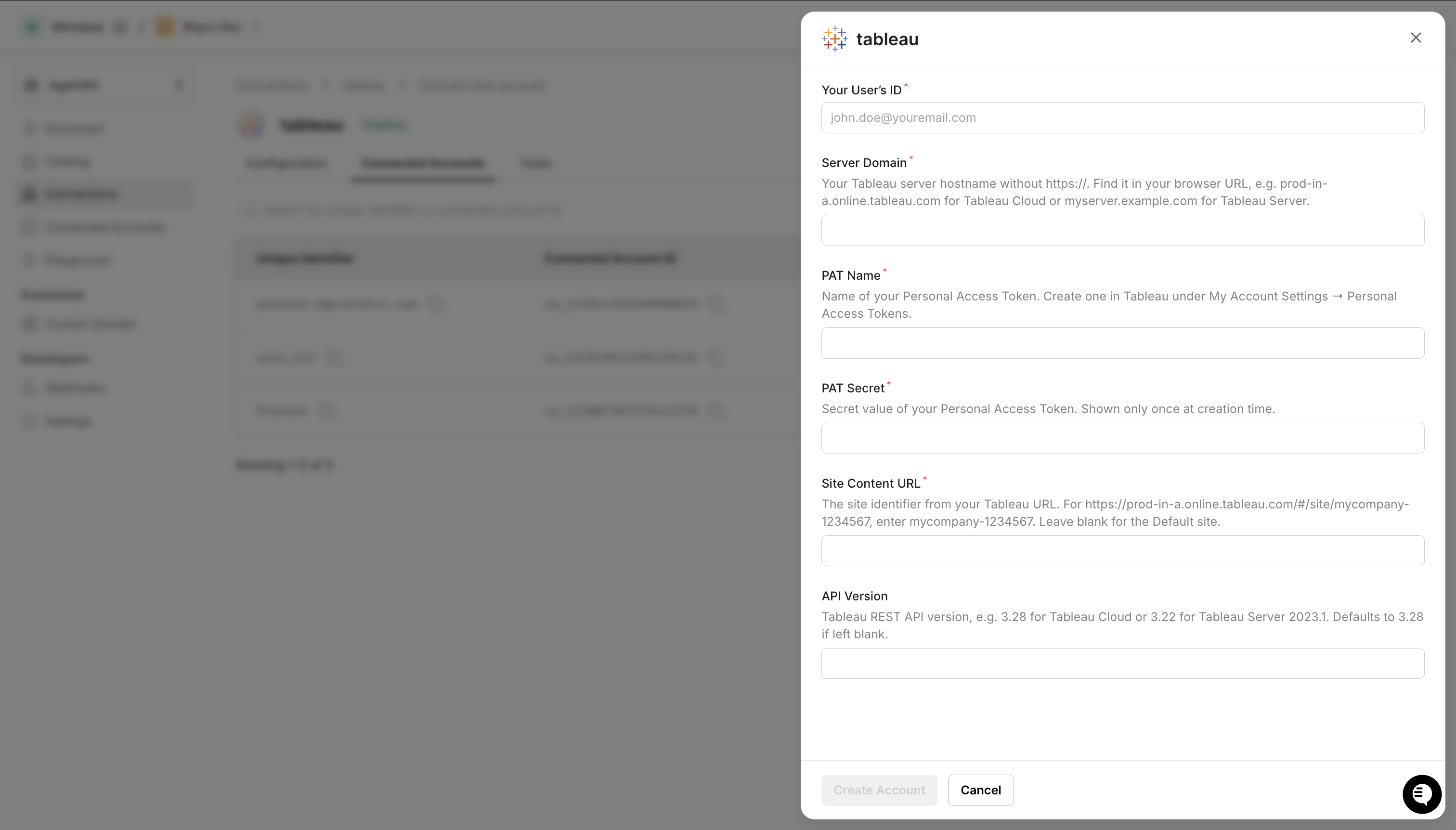
- Open the connection → Connected Accounts tab → Add account.
- Fill in:
- Your User’s ID — any identifier for this user (e.g.,
user_123) - Server Domain — your Tableau hostname without
https://(e.g.,prod-in-a.online.tableau.com) - PAT Name — the token name from step 1
- PAT Secret — the token secret from step 1
- Site Content URL — the site identifier from your Tableau URL (leave blank for the Default site)
- Your User’s ID — any identifier for this user (e.g.,
- Click Save.
Via API (for production)
await scalekit.actions.upsertConnectedAccount({connectionName: 'tableau',identifier: 'user_123',credentials: {domain: 'prod-in-a.online.tableau.com',pat_name: 'scalekit-agent',pat_secret: process.env.TABLEAU_PAT_SECRET,site_content_url: 'mycompany-1234567', // omit for Default site},});scalekit_client.actions.upsert_connected_account(connection_name="tableau",identifier="user_123",credentials={"domain": "prod-in-a.online.tableau.com","pat_name": "scalekit-agent","pat_secret": os.getenv("TABLEAU_PAT_SECRET"),"site_content_url": "mycompany-1234567", # omit for Default site},)
-
-
Make your first call
Section titled “Make your first call”quickstart.ts import { ScalekitClient } from '@scalekit-sdk/node'import 'dotenv/config'const scalekit = new ScalekitClient(process.env.SCALEKIT_ENV_URL,process.env.SCALEKIT_CLIENT_ID,process.env.SCALEKIT_CLIENT_SECRET,)const actions = scalekit.actionsconst connector = 'tableau'const identifier = 'user_123'// Make your first callconst result = await actions.executeTool({connector,identifier,toolName: 'tableau_datasources_list',toolInput: {},})console.log(result)quickstart.py import osfrom scalekit.client import ScalekitClientfrom dotenv import load_dotenvload_dotenv()scalekit_client = ScalekitClient(env_url=os.getenv("SCALEKIT_ENV_URL"),client_id=os.getenv("SCALEKIT_CLIENT_ID"),client_secret=os.getenv("SCALEKIT_CLIENT_SECRET"),)actions = scalekit_client.actionsconnection_name = "tableau"identifier = "user_123"# Make your first callresult = actions.execute_tool(tool_input={},tool_name="tableau_datasources_list",connection_name=connection_name,identifier=identifier,)print(result)
What you can do
Section titled “What you can do”Connect this agent connector to let your agent:
- Update workbook, user, schedule — Update a Tableau workbook’s name, description, owner, project (move it), tab visibility, or certification status
- List workbook permissions, sites, schedules — Retrieve the capability grants (permissions) defined for a specific Tableau workbook, showing which users and groups can view, edit, or manage it
- Add workbook permissions, project permissions — Grant a user or group specific capabilities (permissions) on a Tableau workbook, such as Read, Write, or ExportData
- Delete workbook permission, schedule, workbook — Revoke a single capability grant for a user or group on a Tableau workbook
- Get view pdf, view image, view data — Render a Tableau view as a PDF document
- Create schedule, project, group — Create a new server schedule for running extract refreshes, subscriptions, or flow tasks on a recurring basis
Common workflows
Section titled “Common workflows”The site ID (site LUID) is resolved automatically from the connected account after sign-in. You do not pass site_id to tool calls. For proxy API calls that require a site ID in the URL path, call tableau_session_get once to retrieve it.
Proxy API call
Use the Scalekit proxy to call any Tableau REST API endpoint directly. Binary downloads (PNG, PDF, Excel, .twbx, .tdsx) must use the proxy — use tableau_session_get to retrieve the site ID for the URL path:
// Get site ID once (needed for proxy URL construction)const session = await actions.executeTool({ toolName: 'tableau_session_get', connector: 'tableau', identifier: 'user_123', toolInput: {},});const siteId = session.session.site.id;
// Export a view as PNGconst imageBytes = await actions.request({ connectionName: 'tableau', identifier: 'user_123', path: `/api/3.28/sites/${siteId}/views/${viewId}/image`, method: 'GET', queryParams: { resolution: 'high' },});
// Export a view as PDFconst pdfBytes = await actions.request({ connectionName: 'tableau', identifier: 'user_123', path: `/api/3.28/sites/${siteId}/views/${viewId}/pdf`, method: 'GET', queryParams: { type: 'a4', orientation: 'landscape' },});
// Download a workbook (.twbx)const workbookBytes = await actions.request({ connectionName: 'tableau', identifier: 'user_123', path: `/api/3.28/sites/${siteId}/workbooks/${workbookId}/content`, method: 'GET',});
// Download a data source (.tdsx)const datasourceBytes = await actions.request({ connectionName: 'tableau', identifier: 'user_123', path: `/api/3.28/sites/${siteId}/datasources/${datasourceId}/content`, method: 'GET',});# Get site ID once (needed for proxy URL construction)session = actions.execute_tool( tool_name="tableau_session_get", connection_name='tableau', identifier='user_123', tool_input={},)site_id = session.data["session"]["site"]["id"]
# Export a view as PNGimage_response = actions.request( connection_name='tableau', identifier='user_123', path=f"/api/3.28/sites/{site_id}/views/{view_id}/image", method="GET", query_params={"resolution": "high"},)with open("dashboard.png", "wb") as f: f.write(image_response.content)
# Export a view as PDFpdf_response = actions.request( connection_name='tableau', identifier='user_123', path=f"/api/3.28/sites/{site_id}/views/{view_id}/pdf", method="GET", query_params={"type": "a4", "orientation": "landscape"},)with open("dashboard.pdf", "wb") as f: f.write(pdf_response.content)
# Download a workbook (.twbx)workbook_response = actions.request( connection_name='tableau', identifier='user_123', path=f"/api/3.28/sites/{site_id}/workbooks/{workbook_id}/content", method="GET",)with open("workbook.twbx", "wb") as f: f.write(workbook_response.content)
# Download a data source (.tdsx)datasource_response = actions.request( connection_name='tableau', identifier='user_123', path=f"/api/3.28/sites/{site_id}/datasources/{datasource_id}/content", method="GET",)with open("datasource.tdsx", "wb") as f: f.write(datasource_response.content)Browse workbooks and views
// List all workbooks on the siteconst workbooks = await actions.executeTool({ toolName: 'tableau_workbooks_list', connector: 'tableau', identifier: 'user_123', toolInput: {},});// workbooks.workbooks.workbook[] — each has id, name, contentUrl, project
// Search for a workbook by nameconst found = await actions.executeTool({ toolName: 'tableau_workbook_search', connector: 'tableau', identifier: 'user_123', toolInput: { name: 'SalesReport' },});
// List all views within a workbookconst workbookId = workbooks.workbooks.workbook[0].id;const views = await actions.executeTool({ toolName: 'tableau_workbook_views_list', connector: 'tableau', identifier: 'user_123', toolInput: { workbook_id: workbookId },});// views.views.view[] — each has id, name, contentUrl# List all workbooks on the siteworkbooks = actions.execute_tool( tool_name="tableau_workbooks_list", connection_name='tableau', identifier='user_123', tool_input={},)# workbooks["workbooks"]["workbook"] — each has id, name, contentUrl, project
# Search for a workbook by namefound = actions.execute_tool( tool_name="tableau_workbook_search", connection_name='tableau', identifier='user_123', tool_input={"name": "SalesReport"},)
# List all views within a workbookworkbook_id = workbooks["workbooks"]["workbook"][0]["id"]views = actions.execute_tool( tool_name="tableau_workbook_views_list", connection_name='tableau', identifier='user_123', tool_input={"workbook_id": workbook_id},)# views["views"]["view"] — each has id, name, contentUrlSign out
Call tableau_auth_signout to invalidate the session token when the agent session ends:
await actions.executeTool({ toolName: 'tableau_auth_signout', connector: 'tableau', identifier: 'user_123', toolInput: {},});// The stored session token is now invalid — Scalekit will refresh on next callactions.execute_tool( tool_name="tableau_auth_signout", connection_name='tableau', identifier='user_123', tool_input={},)# The stored session token is now invalid — Scalekit will refresh on next callGetting resource IDs
Section titled “Getting resource IDs”Most Tableau tools require one or more resource LUIDs. The site ID is resolved automatically by Scalekit after sign-in — you do not pass it to tool calls. Always fetch other IDs from the API — never guess or hard-code them.
| Resource | Tool to get ID | Field in response |
|---|---|---|
| Workbook ID | tableau_workbooks_list or tableau_workbook_search | workbooks.workbook[].id |
| View ID | tableau_views_list or tableau_workbook_views_list | views.view[].id |
| Data Source ID | tableau_datasources_list | datasources.datasource[].id |
| Project ID | tableau_projects_list | projects.project[].id |
| User ID | tableau_users_list | users.user[].id |
| Group ID | tableau_groups_list | groups.group[].id |
| Job ID | tableau_job_get (from background job operations) | job.id |
| Site ID (proxy only) | tableau_session_get | session.site.id |
Recommended start sequence for any agent session:
1. tableau_workbooks_list → discover workbooks2. tableau_workbook_views_list → discover views within a workbook3. tableau_datasources_list → discover data sourcesTool list
Section titled “Tool list”Use the exact tool names from the Tool list below when you call execute_tool. If you’re not sure which name to use, list the tools available for the current user first.
tableau_auth_signout#Sign out of Tableau Server or Tableau Cloud, invalidating the current authentication token.0 params
Sign out of Tableau Server or Tableau Cloud, invalidating the current authentication token.
tableau_datasource_delete#Delete a published data source from a Tableau site. This action is permanent and also removes the associated data connection.1 param
Delete a published data source from a Tableau site. This action is permanent and also removes the associated data connection.
datasource_idstringrequiredThe LUID of the data source to deletetableau_datasource_get#Retrieve detailed information about a specific Tableau data source by its ID, including metadata, connections, project, and owner.1 param
Retrieve detailed information about a specific Tableau data source by its ID, including metadata, connections, project, and owner.
datasource_idstringrequiredThe LUID of the data source to retrievetableau_datasource_permissions_list#Retrieve the capability grants (permissions) defined for a specific Tableau data source, showing which users and groups can view, edit, or manage it.1 param
Retrieve the capability grants (permissions) defined for a specific Tableau data source, showing which users and groups can view, edit, or manage it.
datasource_idstringrequiredThe LUID of the data source to list permissions fortableau_datasource_update#Update a Tableau published data source's name, owner, project (move it), or certification status. Only the fields you provide are changed.6 params
Update a Tableau published data source's name, owner, project (move it), or certification status. Only the fields you provide are changed.
datasource_idstringrequiredThe LUID of the data source to updatecertification_notestringoptionalNote explaining the certification status, shown to usersis_certifiedbooleanoptionalWhether the data source is marked as certifiednamestringoptionalNew name for the data sourcenew_owner_idstringoptionalLUID of the user to set as the new ownernew_project_idstringoptionalLUID of the project to move the data source intotableau_datasources_list#Retrieve a filtered, sorted list of published data sources on a Tableau site. Supports pagination and filtering by name, type, project, and owner.4 params
Retrieve a filtered, sorted list of published data sources on a Tableau site. Supports pagination and filtering by name, type, project, and owner.
filterstringoptionalFilter expression to narrow results, e.g. name:eq:SalesDatapage_numberintegeroptionalPage number for pagination (1-based)page_sizeintegeroptionalNumber of data sources to return per page (max 1000)sortstringoptionalSort expression, e.g. name:asc or updatedAt:desctableau_extract_refresh_task_run#Trigger a scheduled extract refresh task to run immediately instead of waiting for its next scheduled time. Returns the asynchronous job created to perform the refresh.1 param
Trigger a scheduled extract refresh task to run immediately instead of waiting for its next scheduled time. Returns the asynchronous job created to perform the refresh.
task_idstringrequiredThe LUID of the extract refresh task to run nowtableau_extract_refresh_tasks_list#List the scheduled extract refresh tasks on a Tableau site, including their schedule and the workbook or data source each task refreshes. Use tableau_extract_refresh_task_run to trigger one immediately.4 params
List the scheduled extract refresh tasks on a Tableau site, including their schedule and the workbook or data source each task refreshes. Use tableau_extract_refresh_task_run to trigger one immediately.
filterstringoptionalFilter expression to narrow results, e.g. type:eq:RefreshExtractTaskpage_numberintegeroptionalPage number for pagination (1-based)page_sizeintegeroptionalNumber of tasks to return per page (max 1000)sortstringoptionalSort expression, e.g. priority:asctableau_group_add_user#Add an existing Tableau site user to a group. The user must already be a member of the site before being added to a group.2 params
Add an existing Tableau site user to a group. The user must already be a member of the site before being added to a group.
group_idstringrequiredThe LUID of the group to add the user touser_idstringrequiredThe LUID of the user to add to the grouptableau_group_create#Create a new local group on a Tableau site. Groups simplify permission management by allowing you to assign permissions to multiple users simultaneously.2 params
Create a new local group on a Tableau site. Groups simplify permission management by allowing you to assign permissions to multiple users simultaneously.
namestringrequiredName of the group to createminimum_site_rolestringoptionalMinimum site role for users added to this grouptableau_group_remove_user#Remove a user from a Tableau site group. The user remains a member of the site but loses any permissions inherited from this group.2 params
Remove a user from a Tableau site group. The user remains a member of the site but loses any permissions inherited from this group.
group_idstringrequiredThe LUID of the group to remove the user fromuser_idstringrequiredThe LUID of the user to remove from the grouptableau_groups_list#Retrieve a filtered, sorted list of groups on a Tableau site. Groups are used to manage permissions for multiple users at once.4 params
Retrieve a filtered, sorted list of groups on a Tableau site. Groups are used to manage permissions for multiple users at once.
filterstringoptionalFilter expression to narrow results, e.g. name:eq:Salespage_numberintegeroptionalPage number for pagination (1-based)page_sizeintegeroptionalNumber of groups to return per page (max 1000)sortstringoptionalSort expression, e.g. name:asctableau_job_cancel#Cancel an asynchronous Tableau job that is currently queued or in progress, such as an extract refresh or flow run.1 param
Cancel an asynchronous Tableau job that is currently queued or in progress, such as an extract refresh or flow run.
job_idstringrequiredThe LUID of the job to canceltableau_job_get#Retrieve the status and details of an asynchronous Tableau job, such as an extract refresh, workbook publish, or flow run. Use this to monitor long-running operations.1 param
Retrieve the status and details of an asynchronous Tableau job, such as an extract refresh, workbook publish, or flow run. Use this to monitor long-running operations.
job_idstringrequiredThe LUID of the job to retrievetableau_jobs_list#Retrieve a filtered, sorted list of asynchronous jobs on a Tableau site. Jobs include extract refreshes, workbook publishes, data-driven alerts, and flow runs.4 params
Retrieve a filtered, sorted list of asynchronous jobs on a Tableau site. Jobs include extract refreshes, workbook publishes, data-driven alerts, and flow runs.
filterstringoptionalFilter expression to narrow results, e.g. status:eq:InProgresspage_numberintegeroptionalPage number for pagination (1-based)page_sizeintegeroptionalNumber of jobs to return per page (max 1000)sortstringoptionalSort expression, e.g. createdAt:desctableau_list_views#List views (individual sheets and dashboards) within a specific workbook, or all views across an entire Tableau site. Supports filtering by name or owner and pagination.5 params
List views (individual sheets and dashboards) within a specific workbook, or all views across an entire Tableau site. Supports filtering by name or owner and pagination.
workbook_idstringrequiredThe LUID of the workbook to list views from. If omitted, lists all views on the site.filterstringoptionalFilter expression using Tableau REST API filter syntax (e.g., name:eq:Sales Dashboard)include_usage_statisticsbooleanoptionalInclude view usage statistics (total views count) in the responsepage_numberintegeroptionalPage number to retrieve (1-based)page_sizeintegeroptionalNumber of views to return per page (max 1000)tableau_project_create#Create a new project on a Tableau site to organize workbooks, data sources, and flows. Optionally specify a parent project to create a nested project hierarchy.4 params
Create a new project on a Tableau site to organize workbooks, data sources, and flows. Optionally specify a parent project to create a nested project hierarchy.
namestringrequiredName of the project to createcontent_permissionsstringoptionalContent permission mode: ManagedByOwner or LockedToProjectdescriptionstringoptionalDescription of the projectparent_project_idstringoptionalLUID of the parent project to create a nested projecttableau_project_delete#Delete a project from a Tableau site. This action is permanent. Content within the project may be moved to the Default project or deleted depending on server settings.1 param
Delete a project from a Tableau site. This action is permanent. Content within the project may be moved to the Default project or deleted depending on server settings.
project_idstringrequiredThe LUID of the project to deletetableau_project_permissions_add#Grant a user or group specific capabilities (permissions) on a Tableau project, such as Read, Write, or ProjectLeader. Capabilities are additive to any existing grants for that grantee.4 params
Grant a user or group specific capabilities (permissions) on a Tableau project, such as Read, Write, or ProjectLeader. Capabilities are additive to any existing grants for that grantee.
capabilitiesarrayrequiredJSON array of capability grants to apply. Each item has a 'name' (e.g. Read, Write, ProjectLeader) and a 'mode' of Allow or Deny.grantee_idstringrequiredThe LUID of the user or group to grant capabilities tograntee_typestringrequiredWhether the grantee is a user or a groupproject_idstringrequiredThe LUID of the project to grant permissions ontableau_project_permissions_list#Retrieve the capability grants (permissions) defined for a specific Tableau project, showing which users and groups can view, publish to, or manage its contents.1 param
Retrieve the capability grants (permissions) defined for a specific Tableau project, showing which users and groups can view, publish to, or manage its contents.
project_idstringrequiredThe LUID of the project to list permissions fortableau_project_update#Update an existing project on a Tableau site. You can rename the project, change its description, content permissions, or move it to a different parent project.5 params
Update an existing project on a Tableau site. You can rename the project, change its description, content permissions, or move it to a different parent project.
project_idstringrequiredThe LUID of the project to updatecontent_permissionsstringoptionalContent permission mode: ManagedByOwner or LockedToProjectdescriptionstringoptionalNew description for the projectnamestringoptionalNew name for the projectparent_project_idstringoptionalLUID of the parent project (set to move this project under a different parent)tableau_projects_list#Retrieve a filtered, sorted list of projects on a Tableau site. Projects are used to organize workbooks, views, and data sources.4 params
Retrieve a filtered, sorted list of projects on a Tableau site. Projects are used to organize workbooks, views, and data sources.
filterstringoptionalFilter expression to narrow results, e.g. name:eq:Marketingpage_numberintegeroptionalPage number for pagination (1-based)page_sizeintegeroptionalNumber of projects to return per page (max 1000)sortstringoptionalSort expression, e.g. name:asctableau_query_view#Run a structured query against a published Tableau data source using the VizQL Data Service API. Supports selecting fields, applying filters, sorting, and limiting rows. Returns JSON data. Available on Tableau Cloud and Tableau Server 2023.1+.5 params
Run a structured query against a published Tableau data source using the VizQL Data Service API. Supports selecting fields, applying filters, sorting, and limiting rows. Returns JSON data. Available on Tableau Cloud and Tableau Server 2023.1+.
datasource_luidstringrequiredThe LUID of the published data source to queryfieldsstringrequiredJSON array of field objects to select, each with a fieldCaption propertyfiltersstringoptionalJSON array of filter conditions to apply to the querymax_rowsintegeroptionalMaximum number of rows to return from the querysortstringoptionalJSON array of sort criteria applied to query resultstableau_schedule_create#Create a new server schedule for running extract refreshes, subscriptions, or flow tasks on a recurring basis. Requires server administrator privileges.6 params
Create a new server schedule for running extract refreshes, subscriptions, or flow tasks on a recurring basis. Requires server administrator privileges.
frequencystringrequiredHow often the schedule runsfrequency_detailsobjectrequiredJSON object describing the recurrence details for the chosen frequency, matching Tableau's frequencyDetails shape. Example for Daily: {"start": "23:00:00"}. Example for Hourly: {"start": "07:00:00", "end": "23:00:00", "intervals": {"interval": [{"hours": "4"}]}}. Example for Weekly: {"start": "23:00:00", "intervals": {"interval": [{"weekDay": "Monday"}]}}.namestringrequiredName of the schedule to createexecution_orderstringoptionalWhether tasks on this schedule run in parallel or one after anotherpriorityintegeroptionalPriority of the schedule relative to others (1-100). Lower numbers run first when resources are constrained.schedule_typestringoptionalType of tasks this schedule can runtableau_schedule_delete#Permanently delete a server schedule. Any extract refresh, subscription, or flow tasks tied to this schedule are removed. This action is irreversible and requires server administrator privileges.1 param
Permanently delete a server schedule. Any extract refresh, subscription, or flow tasks tied to this schedule are removed. This action is irreversible and requires server administrator privileges.
schedule_idstringrequiredThe ID of the schedule to deletetableau_schedule_update#Update an existing server schedule's name, priority, execution order, state, or recurrence details. Only the fields you provide are changed. Requires server administrator privileges.7 params
Update an existing server schedule's name, priority, execution order, state, or recurrence details. Only the fields you provide are changed. Requires server administrator privileges.
schedule_idstringrequiredThe ID of the schedule to updateexecution_orderstringoptionalWhether tasks on this schedule run in parallel or one after anotherfrequencystringoptionalHow often the schedule runsfrequency_detailsobjectoptionalJSON object describing the recurrence details for the chosen frequency, matching Tableau's frequencyDetails shape. Example: {"start": "23:00:00"}.namestringoptionalNew name for the schedulepriorityintegeroptionalNew priority for the schedule relative to others (1-100)statestringoptionalWhether the schedule is active or suspendedtableau_schedules_list#Retrieve a list of server schedules used to run extract refreshes, subscriptions, and flow tasks on a recurring basis. Requires server administrator privileges.2 params
Retrieve a list of server schedules used to run extract refreshes, subscriptions, and flow tasks on a recurring basis. Requires server administrator privileges.
page_numberintegeroptionalPage number for pagination (1-based)page_sizeintegeroptionalNumber of schedules to return per page (max 1000)tableau_session_get#Returns information about the current authenticated session, including the site LUID, site name, and authenticated user details. Call this after tableau_auth_signin to retrieve the site_id needed for the connected account configuration.0 params
Returns information about the current authenticated session, including the site LUID, site name, and authenticated user details. Call this after tableau_auth_signin to retrieve the site_id needed for the connected account configuration.
tableau_site_get#Retrieve information about a specific Tableau site, including its name, content URL, status, storage quota, and user quota settings.1 param
Retrieve information about a specific Tableau site, including its name, content URL, status, storage quota, and user quota settings.
include_usage_statisticsbooleanoptionalIf true, include view count and storage usage statisticstableau_sites_list#Retrieve a list of all sites on a Tableau Server or Tableau Cloud pod. Requires server administrator privileges. Supports pagination and filtering.3 params
Retrieve a list of all sites on a Tableau Server or Tableau Cloud pod. Requires server administrator privileges. Supports pagination and filtering.
filterstringoptionalFilter expression to narrow results, e.g. name:eq:Marketingpage_numberintegeroptionalPage number for pagination (1-based)page_sizeintegeroptionalNumber of sites to return per page (max 1000)tableau_user_add_to_site#Add a user to a Tableau site with a specified site role. If the user does not exist in the server, a new user account will be created.3 params
Add a user to a Tableau site with a specified site role. If the user does not exist in the server, a new user account will be created.
namestringrequiredUsername of the user to add (e.g. john.doe or john.doe@example.com)site_rolestringrequiredThe role to assign to the user on the siteauth_settingstringoptionalAuthentication type for the user, e.g. SAML or ServerDefaulttableau_user_get#Retrieve information about a specific user on a Tableau site, including their name, email, site role, and authentication settings.1 param
Retrieve information about a specific user on a Tableau site, including their name, email, site role, and authentication settings.
user_idstringrequiredThe LUID of the user to retrievetableau_user_remove_from_site#Remove a user from a Tableau site. The user's content (workbooks, data sources) is reassigned to the site administrator.1 param
Remove a user from a Tableau site. The user's content (workbooks, data sources) is reassigned to the site administrator.
user_idstringrequiredThe LUID of the user to remove from the sitetableau_user_update#Update a Tableau user's site role, full name, email, or authentication setting. Only the fields you provide are changed. Requires site or server administrator privileges.4 params
Update a Tableau user's site role, full name, email, or authentication setting. Only the fields you provide are changed. Requires site or server administrator privileges.
user_idstringrequiredThe LUID of the user to updateemailstringoptionalNew email address for the userfull_namestringoptionalNew full name for the usersite_rolestringoptionalNew site role controlling the user's permission level on the sitetableau_users_list#Retrieve a filtered, sorted list of users added to a Tableau site. Supports pagination and filtering by name, site role, and other attributes.4 params
Retrieve a filtered, sorted list of users added to a Tableau site. Supports pagination and filtering by name, site role, and other attributes.
filterstringoptionalFilter expression to narrow results, e.g. name:eq:john.doepage_numberintegeroptionalPage number for pagination (1-based)page_sizeintegeroptionalNumber of users to return per page (max 1000)sortstringoptionalSort expression, e.g. name:asctableau_view_data_get#Retrieve the underlying summary data of a Tableau view as CSV, exactly as rendered by the view's current fields and filters. For flexible field selection and filtering against a published data source directly, use tableau_query_view instead.2 params
Retrieve the underlying summary data of a Tableau view as CSV, exactly as rendered by the view's current fields and filters. For flexible field selection and filtering against a published data source directly, use tableau_query_view instead.
view_idstringrequiredThe LUID of the view to retrieve underlying data formax_ageintegeroptionalMaximum age in minutes of cached data to accept before forcing a refresh. Minimum 1.tableau_view_get#Retrieve detailed information about a specific Tableau view by its ID, including name, content URL, owner, workbook, project, and optional usage statistics.2 params
Retrieve detailed information about a specific Tableau view by its ID, including name, content URL, owner, workbook, project, and optional usage statistics.
view_idstringrequiredThe LUID of the view to retrieveinclude_usage_statisticsbooleanoptionalIf true, include view count and high-water-mark usage statisticstableau_view_image_get#Render a Tableau view as an image (PNG or SVG). No existing tool can produce a visual snapshot of a view.4 params
Render a Tableau view as an image (PNG or SVG). No existing tool can produce a visual snapshot of a view.
view_idstringrequiredThe LUID of the view to render as an imageformatstringoptionalImage format to render. 'svg' requires API version 3.29+.max_ageintegeroptionalMaximum age in minutes of a cached image to accept before forcing a refresh. Minimum 1.resolutionstringoptionalPixel density of the rendered image. Set to 'high' for a higher-resolution image.tableau_view_pdf_get#Render a Tableau view as a PDF document. No existing tool can produce a print-ready export of a view.6 params
Render a Tableau view as a PDF document. No existing tool can produce a print-ready export of a view.
view_idstringrequiredThe LUID of the view to render as a PDFmax_ageintegeroptionalMaximum age in minutes of a cached render to accept before forcing a refresh. Minimum 1.orientationstringoptionalPage orientation for the PDF.typestringoptionalPage size for the PDF.viz_heightintegeroptionalHeight in pixels used to render the view before converting to PDF.viz_widthintegeroptionalWidth in pixels used to render the view before converting to PDF.tableau_views_list#Retrieve a filtered, sorted list of all views on a Tableau site. Supports pagination, filtering by name or owner, and sorting.5 params
Retrieve a filtered, sorted list of all views on a Tableau site. Supports pagination, filtering by name or owner, and sorting.
filterstringoptionalFilter expression to narrow results, e.g. name:eq:SalesViewinclude_usage_statisticsbooleanoptionalIf true, include view count and high-water-mark usage statisticspage_numberintegeroptionalPage number for pagination (1-based)page_sizeintegeroptionalNumber of views to return per page (max 1000)sortstringoptionalSort expression, e.g. name:asc or viewCount:desctableau_workbook_connections_list#Returns the data connections for a published workbook, including connection type, server address, port, username, and whether embedded credentials are used.1 param
Returns the data connections for a published workbook, including connection type, server address, port, username, and whether embedded credentials are used.
workbook_idstringrequiredThe LUID of the workbook whose connections to listtableau_workbook_delete#Delete a workbook from a Tableau site. This action is permanent and also removes all views and associated data connections.1 param
Delete a workbook from a Tableau site. This action is permanent and also removes all views and associated data connections.
workbook_idstringrequiredThe LUID of the workbook to deletetableau_workbook_get#Retrieve detailed information about a specific Tableau workbook by its ID, including metadata, project, owner, tags, and optional usage statistics.2 params
Retrieve detailed information about a specific Tableau workbook by its ID, including metadata, project, owner, tags, and optional usage statistics.
workbook_idstringrequiredThe LUID of the workbook to retrieveinclude_usage_statisticsbooleanoptionalIf true, include view and high-water-mark usage statistics in the responsetableau_workbook_permission_delete#Revoke a single capability grant for a user or group on a Tableau workbook. Requires the grantee type, grantee ID, capability name, and its mode as currently granted.5 params
Revoke a single capability grant for a user or group on a Tableau workbook. Requires the grantee type, grantee ID, capability name, and its mode as currently granted.
capability_modestringrequiredThe mode of the capability grant to revoke, as currently set (Allow or Deny)capability_namestringrequiredThe name of the capability to revoke, e.g. Read, Write, ExportDatagrantee_idstringrequiredThe LUID of the user or group whose capability is being revokedgrantee_typestringrequiredWhether the grantee is a user or a groupworkbook_idstringrequiredThe LUID of the workbook to revoke the permission fromtableau_workbook_permissions_add#Grant a user or group specific capabilities (permissions) on a Tableau workbook, such as Read, Write, or ExportData. Capabilities are additive to any existing grants for that grantee.4 params
Grant a user or group specific capabilities (permissions) on a Tableau workbook, such as Read, Write, or ExportData. Capabilities are additive to any existing grants for that grantee.
capabilitiesarrayrequiredJSON array of capability grants to apply. Each item has a 'name' (e.g. Read, Write, Delete, ExportData, ChangePermissions, ExportXml, ViewComments, AddComment, Filter, ViewUnderlyingData, ShareView, WebAuthoring, RunExplainData) and a 'mode' of Allow or Deny.grantee_idstringrequiredThe LUID of the user or group to grant capabilities tograntee_typestringrequiredWhether the grantee is a user or a groupworkbook_idstringrequiredThe LUID of the workbook to grant permissions ontableau_workbook_permissions_list#Retrieve the capability grants (permissions) defined for a specific Tableau workbook, showing which users and groups can view, edit, or manage it.1 param
Retrieve the capability grants (permissions) defined for a specific Tableau workbook, showing which users and groups can view, edit, or manage it.
workbook_idstringrequiredThe LUID of the workbook to list permissions fortableau_workbook_search#Search for workbooks on a Tableau site by name. Returns workbooks whose name matches the search term.3 params
Search for workbooks on a Tableau site by name. Returns workbooks whose name matches the search term.
namestringrequiredThe workbook name to search for (exact match)page_numberintegeroptionalPage number for pagination (1-based)page_sizeintegeroptionalNumber of workbooks to return per page (max 1000)tableau_workbook_update#Update a Tableau workbook's name, description, owner, project (move it), tab visibility, or certification status. Only the fields you provide are changed.6 params
Update a Tableau workbook's name, description, owner, project (move it), tab visibility, or certification status. Only the fields you provide are changed.
workbook_idstringrequiredThe LUID of the workbook to updatedescriptionstringoptionalNew description for the workbooknamestringoptionalNew name for the workbooknew_owner_idstringoptionalLUID of the user to set as the new ownernew_project_idstringoptionalLUID of the project to move the workbook intoshow_tabsbooleanoptionalWhether sheet tabs are visible when viewing the workbooktableau_workbooks_list#Retrieve a filtered, sorted list of workbooks on a specified Tableau site. Supports pagination and filtering by name, owner, project, and more.4 params
Retrieve a filtered, sorted list of workbooks on a specified Tableau site. Supports pagination and filtering by name, owner, project, and more.
filterstringoptionalFilter expression to narrow results, e.g. name:eq:SalesReportpage_numberintegeroptionalPage number for pagination (1-based)page_sizeintegeroptionalNumber of workbooks to return per page (max 1000)sortstringoptionalSort expression, e.g. name:asc or updatedAt:desc