


SharePoint connector
OAuth 2.0Files & DocumentsConnect to SharePoint. Manage sites, documents, lists, and collaborative content
SharePoint connector
-
Install the SDK
Section titled “Install the SDK”Terminal window 1npm install @scalekit-sdk/nodeTerminal window 1pip install scalekit -
Set your credentials
Section titled “Set your credentials”Add your Scalekit credentials to your
.envfile. Find values in app.scalekit.com > Developers > API Credentials..env SCALEKIT_ENVIRONMENT_URL=<your-environment-url>SCALEKIT_CLIENT_ID=<your-client-id>SCALEKIT_CLIENT_SECRET=<your-client-secret> -
Set up the connector
Section titled “Set up the connector”Register your SharePoint credentials with Scalekit so it handles the token lifecycle. You do this once per environment.
Dashboard setup steps
Register your Scalekit environment with the SharePoint connector so Scalekit handles the authentication flow and token lifecycle for you. The connection name you create will be used to identify and invoke the connection programmatically. Then complete the configuration in your application as follows:
-
Set up auth redirects
-
In Scalekit dashboard, go to AgentKit > Connections > Create Connection. Find SharePoint and click Create. Copy the redirect URI. It will look like
https://<SCALEKIT_ENVIRONMENT_URL>/sso/v1/oauth/<CONNECTION_ID>/callback.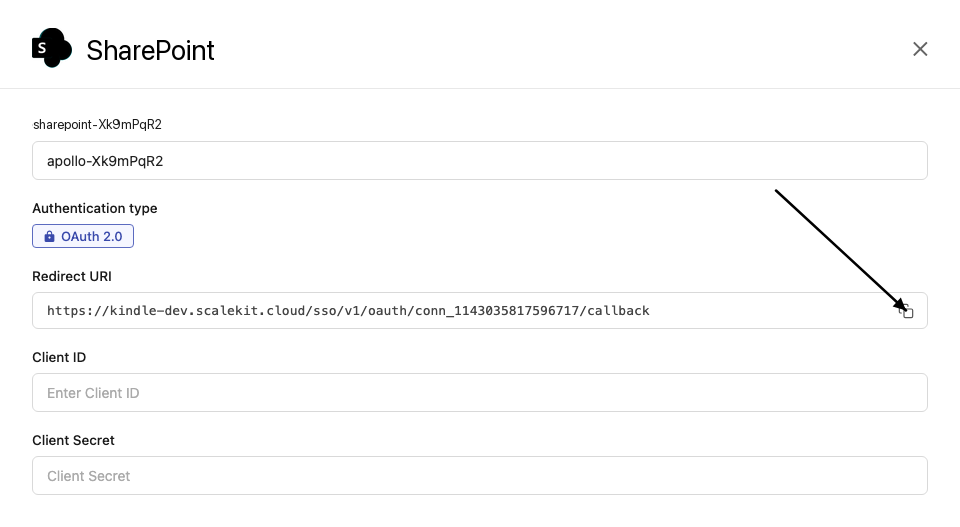
-
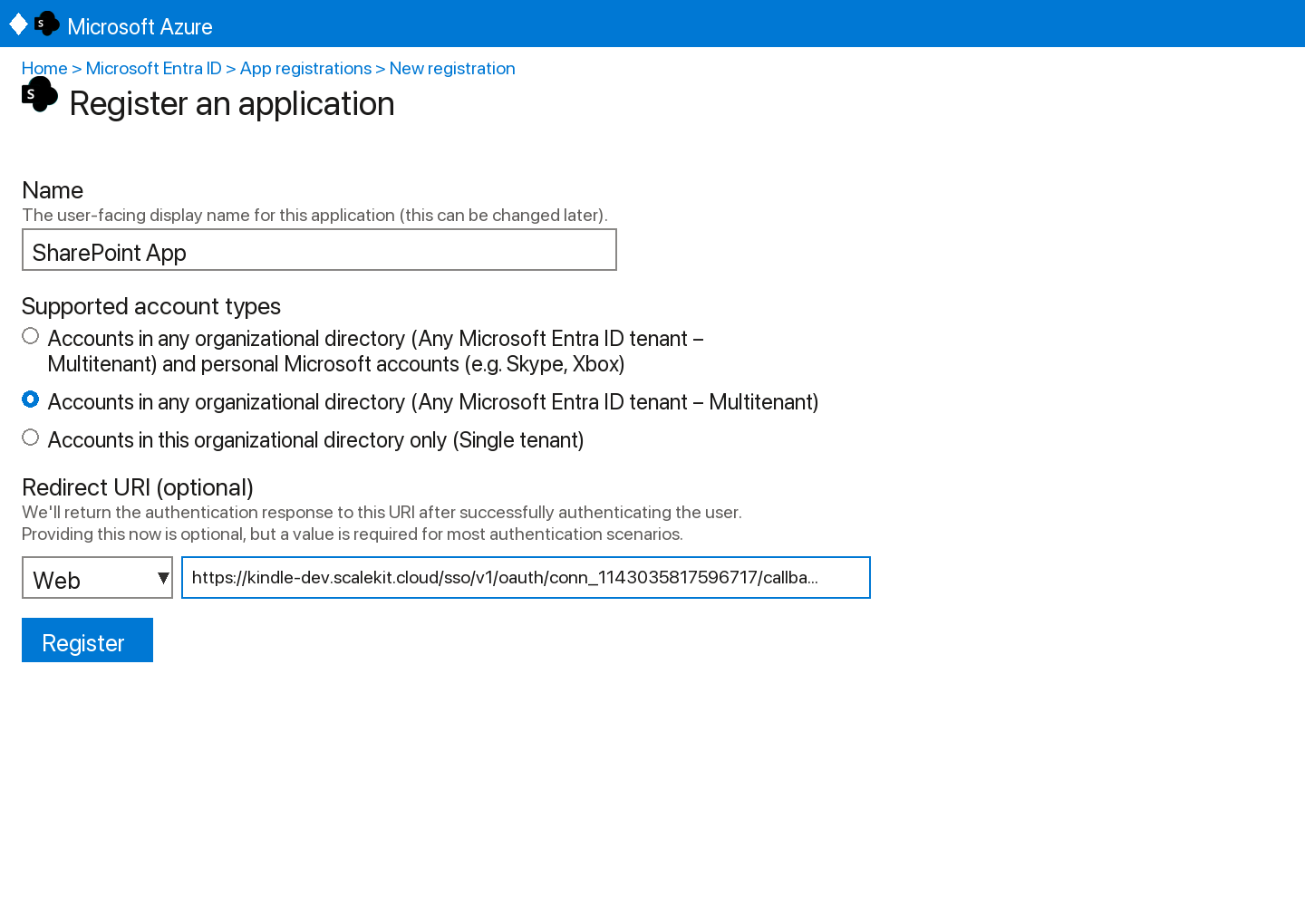
Sign into https://entra.microsoft.com and go to Microsoft Entra ID → App registrations → New registration.
-
Enter a name for your app.
-
Under Supported account types, select Accounts in any organizational directory (Any Azure AD directory - Multitenant).
-
Under Redirect URI, select Web and paste the redirect URI from step 1. Click Register.
-
-
Get your client credentials
-
Go to Certificates & secrets → New client secret, set an expiry, and click Add. Copy the Value immediately.
-
From the Overview page, copy the Application (client) ID.
-
-
Add credentials in Scalekit
-
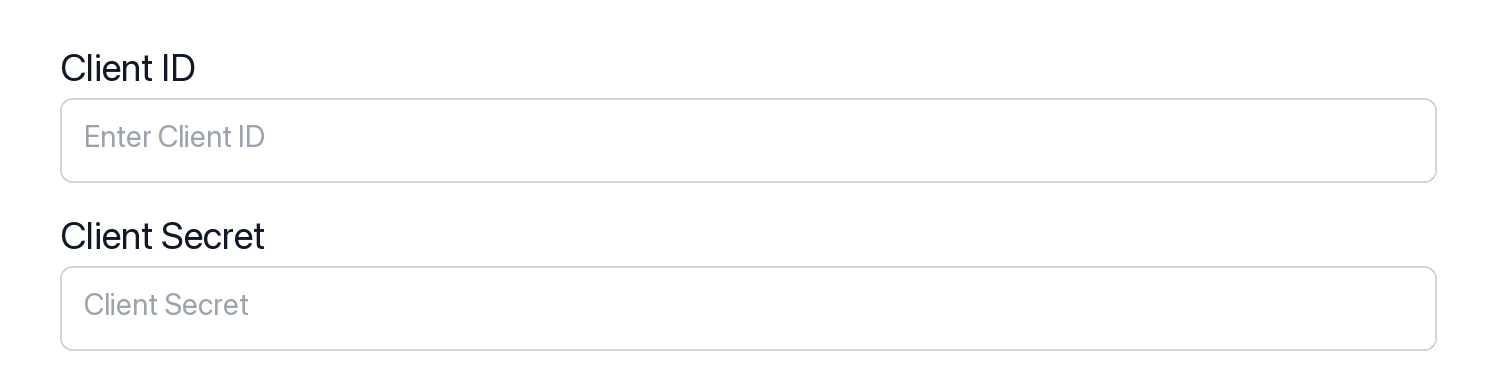
In Scalekit dashboard, go to AgentKit > Connections and open the connection you created.
-
Enter your credentials:
- Client ID (Application (client) ID from Azure)
- Client Secret (from Certificates & secrets)
- Permissions (scopes — see Microsoft Graph permissions reference)
-
Click Save.
-
-
-
Authorize and make your first call
Section titled “Authorize and make your first call”quickstart.ts 1import { ScalekitClient } from '@scalekit-sdk/node'2import 'dotenv/config'34const scalekit = new ScalekitClient(5process.env.SCALEKIT_ENV_URL,6process.env.SCALEKIT_CLIENT_ID,7process.env.SCALEKIT_CLIENT_SECRET,8)9const actions = scalekit.actions1011const connector = 'sharepoint'12const identifier = 'user_123'1314// Generate an authorization link for the user15const { link } = await actions.getAuthorizationLink({ connectionName: connector, identifier })16console.log('Authorize SharePoint:', link)17process.stdout.write('Press Enter after authorizing...')18await new Promise(r => process.stdin.once('data', r))1920// Make your first call21const result = await actions.executeTool({22connector,23identifier,24toolName: 'sharepoint_list_followed_sites',25toolInput: {},26})27console.log(result)quickstart.py 1import os2from scalekit.client import ScalekitClient3from dotenv import load_dotenv4load_dotenv()56scalekit_client = ScalekitClient(7env_url=os.getenv("SCALEKIT_ENV_URL"),8client_id=os.getenv("SCALEKIT_CLIENT_ID"),9client_secret=os.getenv("SCALEKIT_CLIENT_SECRET"),10)11actions = scalekit_client.actions1213connection_name = "sharepoint"14identifier = "user_123"1516# Generate an authorization link for the user17link_response = actions.get_authorization_link(18connection_name=connection_name,19identifier=identifier,20)21print("Authorize SharePoint:", link_response.link)22input("Press Enter after authorizing...")2324# Make your first call25result = actions.execute_tool(26tool_input={},27tool_name="sharepoint_list_followed_sites",28connection_name=connection_name,29identifier=identifier,30)31print(result)
What you can do
Section titled “What you can do”Connect this agent connector to let your agent:
- Page publish site — Publish a draft or checked-out modern site page in a SharePoint site, making its latest changes visible to other users
- Item move drive, copy drive, restore recycled — Move a file or folder to a new parent folder in a SharePoint document library, by updating its parentReference
- List site permissions, site pages, drive item children — List the permission entries (role assignments) granted on a SharePoint site, showing which users, groups, or applications have read, write, or owner access
- Get site permission, site page, drive item — Retrieve a single permission entry (role assignment) on a SharePoint site by its permission ID, showing the granted roles and the identity they were granted to
- Create site page, folder, subsite — Create a new modern site page (sitePage) in a SharePoint site’s Site Pages library
- File upload, download, checkout — Create an upload session for uploading a file to a SharePoint document library
Common workflows
Section titled “Common workflows”Proxy API call
1const result = await actions.request({2 connectionName: 'sharepoint',3 identifier: 'user_123',4 path: '/v1.0/me/sites',5 method: 'GET',6});7console.log(result);1result = actions.request(2 connection_name='sharepoint',3 identifier='user_123',4 path="/v1.0/me/sites",5 method="GET"6)7print(result)Download a file
Fetch file metadata via the Scalekit proxy to get a pre-authenticated download URL, then stream the file directly from Microsoft’s CDN. This avoids buffering large files through the proxy and is significantly faster.
1import os2import requests3
4site_id = "<YOUR_SITE_ID>"      # call GET /v1.0/sites/root to get your site ID5
6filename = "report.pdf"7
8response = actions.request(9    connection_name='sharepoint',10    identifier='user_123',11    path=f"/v1.0/sites/{site_id}/drive/root:/{filename}",12    method="GET",13    query_params={},14)15meta = response.json()16
17# Step 2: Stream directly from Microsoft CDN using the pre-authenticated URL18# No auth headers needed — the URL is cryptographically signed and expires in ~1 hour19download_url = meta["@microsoft.graph.downloadUrl"]20
21with requests.get(download_url, stream=True) as r:22    r.raise_for_status()23    with open(filename, "wb") as f:24        for chunk in r.iter_content(chunk_size=8 * 1024 * 1024):  # 8 MB chunks25            f.write(chunk)26
27print(f"Downloaded: {filename} ({os.path.getsize(filename):,} bytes)")
Upload a file
Upload a file to SharePoint’s Shared Documents folder. Scalekit injects the OAuth token automatically — your app never handles credentials directly.
1import mimetypes2
3site_id = "<YOUR_SITE_ID>"      # call GET /v1.0/sites/root to get your site ID4
5filename = "report.pdf"6with open(filename, "rb") as f:7    file_bytes = f.read()8
9mime_type = mimetypes.guess_type(filename)[0] or "application/octet-stream"10
11response = actions.request(12    connection_name='sharepoint',13    identifier='user_123',14    path=f"/v1.0/sites/{site_id}/drive/root:/{filename}:/content",15    method="PUT",16    query_params={},17    form_data=file_bytes,18    headers={"Content-Type": mime_type},19)20
21meta = response.json()22print(f"Uploaded: {meta['name']} → {meta['webUrl']}")
Execute a tool
1const result = await actions.executeTool({2 connector: 'sharepoint',3 identifier: 'user_123',4 toolName: 'sharepoint_list',5 toolInput: {},6});7console.log(result);1result = actions.execute_tool(2 tool_input={},3 tool_name='sharepoint_list',4 connection_name='sharepoint',5 identifier='user_123',6)7print(result)Tool list
Section titled “Tool list”Use the exact tool names from the Tool list below when you call execute_tool. If you’re not sure which name to use, list the tools available for the current user first.
sharepoint_add_group_member#Add an Azure AD user to a Microsoft 365 group (including SharePoint site groups) by providing the group ID and the user's object ID. This uses the Graph API directoryObjects reference endpoint to create the membership link.2 params▾
Add an Azure AD user to a Microsoft 365 group (including SharePoint site groups) by providing the group ID and the user's object ID. This uses the Graph API directoryObjects reference endpoint to create the membership link.
group_idstringrequiredThe Azure AD object ID of the group to add the member to. Example: '7d8a5b3c-1234-5678-abcd-ef0123456789'.user_idstringrequiredThe Azure AD object ID of the user to add to the group. Use the find_user_by_email tool to resolve an email to an object ID. Example: 'aaaabbbb-1234-5678-abcd-ef0123456789'.sharepoint_add_role_assignment#Grant a user or group a role (read, write, or owner) on a SharePoint site by adding a permission entry. Provide either user_id or group_id (not both). The roles array should contain one or more of: 'read', 'write', 'owner'.4 params▾
Grant a user or group a role (read, write, or owner) on a SharePoint site by adding a permission entry. Provide either user_id or group_id (not both). The roles array should contain one or more of: 'read', 'write', 'owner'.
rolesarrayrequiredArray of roles to grant. Valid values are 'read', 'write', and 'owner'. Example: ["write"] grants write (contribute) permission.site_idstringrequiredID of the SharePoint site on which to add the permission. Use a site GUID, 'root', or the format '<hostname>:/sites/<path>'.group_idstringoptionalAzure AD group object ID to grant the role to. Provide either user_id or group_id — not both. Example: '7d8a5b3c-1234-5678-abcd-ef0123456789'.user_idstringoptionalAzure AD user object ID to grant the role to. Provide either user_id or group_id — not both. Example: 'aaaabbbb-1234-5678-abcd-ef0123456789'.sharepoint_checkin_file#Check in a checked-out file in a SharePoint document library to make the version available to others. Optionally provide a comment describing the changes and specify the check-in type. Requires the file to be checked out first.4 params▾
Check in a checked-out file in a SharePoint document library to make the version available to others. Optionally provide a comment describing the changes and specify the check-in type. Requires the file to be checked out first.
item_idstringrequiredThe unique drive item ID of the file to check in. The file must currently be checked out. Obtain item IDs from list drive items or get drive item operations.site_idstringrequiredID of the SharePoint site that contains the file. Use a site GUID, 'root', or the format '<hostname>:/sites/<path>'.check_in_asstringoptionalThe type of check-in to perform. 'published' makes the version visible to all users. 'unspecified' (default) lets the server decide based on document library configuration.commentstringoptionalAn optional comment to associate with the checked-in version, describing the changes made.sharepoint_checkout_file#Check out a file in a SharePoint document library to prevent others from editing it while you make changes. The file must be checked back in using the check-in operation when editing is complete.2 params▾
Check out a file in a SharePoint document library to prevent others from editing it while you make changes. The file must be checked back in using the check-in operation when editing is complete.
item_idstringrequiredThe unique drive item ID of the file to check out. Obtain item IDs from list drive items or get drive item operations.site_idstringrequiredID of the SharePoint site that contains the file. Use a site GUID, 'root', or the format '<hostname>:/sites/<path>'.sharepoint_copy_drive_item#Create a copy of a file or folder (including its children) in a SharePoint document library. This is an asynchronous operation: Microsoft Graph returns 202 Accepted immediately with a monitor URL in the Location response header, and the copy completes in the background.4 params▾
Create a copy of a file or folder (including its children) in a SharePoint document library. This is an asynchronous operation: Microsoft Graph returns 202 Accepted immediately with a monitor URL in the Location response header, and the copy completes in the background.
item_idstringrequiredThe unique drive item ID of the file or folder to copy. Obtain item IDs from list drive item children or search drive items operations.new_parent_idstringrequiredDrive item ID of the destination parent folder for the copy. Use 'root' to copy into the document library's root.site_idstringrequiredID of the SharePoint site that contains the item to copy. Use a site GUID, 'root', or the format '<hostname>:/sites/<path>'.new_namestringoptionalOptional name to give the copy. If omitted, the copy keeps the source item's name.sharepoint_create_folder#Create a new folder inside a SharePoint document library folder. Use parent_id 'root' to create the folder at the document library's root.4 params▾
Create a new folder inside a SharePoint document library folder. Use parent_id 'root' to create the folder at the document library's root.
namestringrequiredName of the folder to create.parent_idstringrequiredDrive item ID of the parent folder in the SharePoint document library where the new folder will be created. Use 'root' to create it at the library root.site_idstringrequiredID of the SharePoint site that contains the document library. Use a site GUID, 'root', or the format '<hostname>:/sites/<path>'.conflict_behaviorstringoptionalBehavior when a folder with the same name already exists at the destination. 'fail' returns an error, 'replace' overwrites the existing item, 'rename' creates a new folder with an incremented name.sharepoint_create_list#Create a new list in a SharePoint site. Specify a display name and optionally a template type (e.g., genericList, documentLibrary, events) and description. Returns the newly created list.4 params▾
Create a new list in a SharePoint site. Specify a display name and optionally a template type (e.g., genericList, documentLibrary, events) and description. Returns the newly created list.
display_namestringrequiredDisplay name for the new list. Example: 'Project Tasks'.site_idstringrequiredID of the SharePoint site in which to create the list. Use a site GUID, 'root', or the format '<hostname>:/sites/<path>'.descriptionstringoptionalOptional description for the new list. Example: 'Tracks project tasks and assignments.'templatestringoptionalSharePoint list template to use. Valid values: genericList (default), documentLibrary, survey, links, announcements, contacts, events, tasks.sharepoint_create_list_field#Add a new column (field) to a SharePoint list. Specify the internal column name, column type (text, number, boolean, dateTime, choice, hyperlinkOrPicture, personOrGroup), and optionally a display name and description. The tool emits the appropriate Microsoft Graph column definition block for the chosen type.6 params▾
Add a new column (field) to a SharePoint list. Specify the internal column name, column type (text, number, boolean, dateTime, choice, hyperlinkOrPicture, personOrGroup), and optionally a display name and description. The tool emits the appropriate Microsoft Graph column definition block for the chosen type.
list_idstringrequiredID of the SharePoint list to which the column will be added. Use the list GUID or display name.namestringrequiredInternal name for the new column. Used as the key in item fields objects. Must be unique within the list and contain no spaces (use camelCase or underscores). Example: 'taskStatus'.site_idstringrequiredID of the SharePoint site that contains the list. Use a site GUID, 'root', or the format '<hostname>:/sites/<path>'.column_typestringoptionalType of column to create. Determines which Microsoft Graph column configuration block is used. Valid values: text (single or multi-line text), number (numeric values), boolean (yes/no checkbox), dateTime (date and/or time), choice (dropdown or radio from a fixed list), hyperlinkOrPicture (URL or image), personOrGroup (people picker). Default: text.descriptionstringoptionalOptional description for the new column. Appears as a tooltip or hint in the SharePoint list UI.display_namestringoptionalHuman-readable display name for the column as shown in the SharePoint list UI. If omitted, the internal name is used.sharepoint_create_list_item#Create a new item in a SharePoint list. Provide a 'fields' object whose keys are the internal column names and whose values are the field data. The required 'Title' field sets the item's primary display name.3 params▾
Create a new item in a SharePoint list. Provide a 'fields' object whose keys are the internal column names and whose values are the field data. The required 'Title' field sets the item's primary display name.
fieldsobjectrequiredObject containing the field values for the new item. Keys are internal column names (e.g., 'Title', 'Status', 'DueDate'). Example: {"Title": "New Task", "Status": "In Progress"}.list_idstringrequiredID of the SharePoint list in which to create the item. Use the list GUID or display name.site_idstringrequiredID of the SharePoint site that contains the list. Use a site GUID, 'root', or the format '<hostname>:/sites/<path>'.sharepoint_create_site_page#Create a new modern site page (sitePage) in a SharePoint site's Site Pages library. The page is created as a draft; use the Publish Site Page tool to make it visible to other users.4 params▾
Create a new modern site page (sitePage) in a SharePoint site's Site Pages library. The page is created as a draft; use the Publish Site Page tool to make it visible to other users.
namestringrequiredFile name for the new page, including the .aspx extension. Example: 'project-update.aspx'.site_idstringrequiredID of the SharePoint site in which to create the page. Use a site GUID, 'root', or the format '<hostname>:/sites/<path>'.page_layoutstringoptionalLayout of the new page. 'article' is a standard content page; 'home' designates it as the site's home page.titlestringoptionalDisplay title shown at the top of the page. Defaults to the name without its extension if omitted.sharepoint_create_subsite#Create a new subsite under an existing SharePoint site using the Microsoft Graph beta API. Requires the parent site ID and display name. Optionally specify a description and web template (e.g., 'STS#0' for a team site).4 params▾
Create a new subsite under an existing SharePoint site using the Microsoft Graph beta API. Requires the parent site ID and display name. Optionally specify a description and web template (e.g., 'STS#0' for a team site).
display_namestringrequiredDisplay name of the new subsite. Example: 'Marketing Q3 Campaign'.parent_site_idstringrequiredID of the parent SharePoint site under which the subsite will be created. Use a site GUID or 'root' for the tenant root site.descriptionstringoptionalOptional description for the new subsite. Example: 'Site for the Q3 marketing campaign team.'web_templatestringoptionalSharePoint web template to use when creating the subsite. Common values: 'STS#0' (Team Site), 'BLOG#0' (Blog Site), 'BDR#0' (Document Center). Defaults to the API default if not specified.sharepoint_delete_list#Permanently delete a SharePoint list from a site. This action is irreversible and removes the list along with all its items and metadata.2 params▾
Permanently delete a SharePoint list from a site. This action is irreversible and removes the list along with all its items and metadata.
list_idstringrequiredID of the SharePoint list to delete. Use the list GUID or the list's display name.site_idstringrequiredID of the SharePoint site that contains the list. Use a site GUID, 'root', or the format '<hostname>:/sites/<path>'.sharepoint_delete_list_field#Permanently delete a column (field) from a SharePoint list. This action is irreversible and removes the column definition and all data stored in that column for every list item.3 params▾
Permanently delete a column (field) from a SharePoint list. This action is irreversible and removes the column definition and all data stored in that column for every list item.
column_idstringrequiredID of the column to delete. Use the column GUID returned by the list fields endpoint.list_idstringrequiredID of the SharePoint list that contains the column. Use the list GUID or display name.site_idstringrequiredID of the SharePoint site that contains the list. Use a site GUID, 'root', or the format '<hostname>:/sites/<path>'.sharepoint_delete_list_item#Permanently delete an item from a SharePoint list. This action is irreversible and removes the item and all its field data.3 params▾
Permanently delete an item from a SharePoint list. This action is irreversible and removes the item and all its field data.
item_idstringrequiredID of the list item to delete. This is the numeric or string identifier of the item within the list.list_idstringrequiredID of the SharePoint list that contains the item. Use the list GUID or display name.site_idstringrequiredID of the SharePoint site that contains the list. Use a site GUID, 'root', or the format '<hostname>:/sites/<path>'.sharepoint_delete_role_assignment#Remove a specific permission entry from a SharePoint site by deleting its permission ID. This permanently removes the granted access for the user or group associated with that permission.2 params▾
Remove a specific permission entry from a SharePoint site by deleting its permission ID. This permanently removes the granted access for the user or group associated with that permission.
permission_idstringrequiredThe ID of the permission entry to delete. Obtain this from the list permissions endpoint. Example: 'aGVyZUlzVGhlV2F5VGhlUG93ZXJJcw'.site_idstringrequiredID of the SharePoint site from which to remove the permission. Use a site GUID, 'root', or the format '<hostname>:/sites/<path>'.sharepoint_delete_webhook#Delete a Microsoft Graph change notification subscription (webhook) by its subscription ID. After deletion, no further notifications will be sent to the registered notification URL for this subscription.1 param▾
Delete a Microsoft Graph change notification subscription (webhook) by its subscription ID. After deletion, no further notifications will be sent to the registered notification URL for this subscription.
subscription_idstringrequiredThe ID of the subscription to delete. Obtain this from the create subscription response or by listing subscriptions. Example: 'abc123de-4567-89ab-cdef-0123456789ab'.sharepoint_download_file#Download the binary content of a file from a SharePoint document library by its item ID. The response is the raw file bytes (not JSON). For text files this will be readable text; for binary files (images, Office documents) it will be binary data. Use the item ID from list or get drive item operations.2 params▾
Download the binary content of a file from a SharePoint document library by its item ID. The response is the raw file bytes (not JSON). For text files this will be readable text; for binary files (images, Office documents) it will be binary data. Use the item ID from list or get drive item operations.
item_idstringrequiredThe unique drive item ID of the file to download from the SharePoint site's document library. Obtain item IDs from list drive items or search drive items operations.site_idstringrequiredID of the SharePoint site that contains the file. Use a site GUID, 'root', or the format '<hostname>:/sites/<path>'.sharepoint_find_user_by_email#Look up an Azure Active Directory user by their email address (UPN). Returns the user's object ID, display name, and other profile properties. This is useful for resolving a user email to an object ID before adding them to a SharePoint site or group.1 param▾
Look up an Azure Active Directory user by their email address (UPN). Returns the user's object ID, display name, and other profile properties. This is useful for resolving a user email to an object ID before adding them to a SharePoint site or group.
emailstringrequiredThe email address (user principal name) of the Azure AD user to look up. Example: 'john.doe@contoso.com'.sharepoint_follow_document#Follow a SharePoint document or OneDrive file so it appears in the signed-in user's followed documents list. Provide the drive item ID of the document to follow.1 param▾
Follow a SharePoint document or OneDrive file so it appears in the signed-in user's followed documents list. Provide the drive item ID of the document to follow.
item_idstringrequiredThe ID of the drive item (document) to follow. Example: '01BYE5RZ6QN3ZWBTUFOFD3GSPGOHDJD36K'.sharepoint_get_content_type#Retrieve a single content type defined in a SharePoint site by its ID, including its name, description, group, and whether it is a built-in type.3 params▾
Retrieve a single content type defined in a SharePoint site by its ID, including its name, description, group, and whether it is a built-in type.
content_type_idstringrequiredID of the content type to retrieve.site_idstringrequiredID of the SharePoint site that contains the content type. Use a site GUID, 'root', or the format '<hostname>:/sites/<path>'.$selectstringoptionalComma-separated list of properties to return. Example: 'id,name,description,isBuiltIn'.sharepoint_get_drive_item#Get metadata for a file or folder in a SharePoint document library — name, size, the file/folder facet, webUrl, timestamps, and more. Use this for a quick metadata lookup without downloading file content.3 params▾
Get metadata for a file or folder in a SharePoint document library — name, size, the file/folder facet, webUrl, timestamps, and more. Use this for a quick metadata lookup without downloading file content.
item_idstringrequiredThe unique drive item ID of the file or folder to retrieve. Obtain item IDs from list drive item children or search drive items operations.site_idstringrequiredID of the SharePoint site that contains the item. Use a site GUID, 'root', or the format '<hostname>:/sites/<path>'.$selectstringoptionalComma-separated list of drive item properties to return. Example: "id,name,size,webUrl" reduces response payload.sharepoint_get_list#Retrieve a specific SharePoint list by its ID within a site. Optionally expand related resources such as columns and items to retrieve list metadata in a single call.3 params▾
Retrieve a specific SharePoint list by its ID within a site. Optionally expand related resources such as columns and items to retrieve list metadata in a single call.
list_idstringrequiredID or name of the SharePoint list to retrieve. Can be the list GUID or the list's display name (URL-encoded).site_idstringrequiredID of the SharePoint site containing the list. Use a site GUID, 'root', or the format '<hostname>:/sites/<path>'.$expandstringoptionalComma-separated list of related resources to expand. Example: 'columns,items' to include column definitions and list items in the response.sharepoint_get_list_item#Retrieve a single item from a SharePoint list by its item ID. Use '$expand=fields' to include the column values in the response.5 params▾
Retrieve a single item from a SharePoint list by its item ID. Use '$expand=fields' to include the column values in the response.
item_idstringrequiredID of the list item to retrieve. This is the numeric or GUID identifier of the item within the list.list_idstringrequiredID of the SharePoint list that contains the item. Use the list GUID or display name.site_idstringrequiredID of the SharePoint site that contains the list. Use a site GUID, 'root', or the format '<hostname>:/sites/<path>'.$expandstringoptionalComma-separated list of related resources to expand. Default is 'fields' to include column values. Example: 'fields'.$selectstringoptionalComma-separated list of properties to return. Example: 'id,createdDateTime,fields'.sharepoint_get_search_suggestions#Get search query suggestions for SharePoint content using the Microsoft Search beta API. Returns autocomplete suggestions based on the provided search text to help users refine their queries.1 param▾
Get search query suggestions for SharePoint content using the Microsoft Search beta API. Returns autocomplete suggestions based on the provided search text to help users refine their queries.
textstringrequiredThe partial search term for which to retrieve suggestions. Example: 'proj' returns suggestions like 'project plan', 'project budget'.sharepoint_get_site#Retrieve properties of a SharePoint site by its ID. Use 'root' for the tenant root site, a GUID for a specific site, or the format '<hostname>:/sites/<path>' (e.g., 'contoso.sharepoint.com:/sites/Marketing').1 param▾
Retrieve properties of a SharePoint site by its ID. Use 'root' for the tenant root site, a GUID for a specific site, or the format '<hostname>:/sites/<path>' (e.g., 'contoso.sharepoint.com:/sites/Marketing').
site_idstringrequiredID of the SharePoint site to retrieve. Use 'root' for the tenant root site, a site GUID, or the format '<hostname>:/sites/<path>' (e.g., 'contoso.sharepoint.com:/sites/Marketing').sharepoint_get_site_page#Retrieve a single modern site page (sitePage) from a SharePoint site by its ID, including its title, layout, and publishing state. Use $expand=canvasLayout to also retrieve its web part content.3 params▾
Retrieve a single modern site page (sitePage) from a SharePoint site by its ID, including its title, layout, and publishing state. Use $expand=canvasLayout to also retrieve its web part content.
page_idstringrequiredID of the site page to retrieve.site_idstringrequiredID of the SharePoint site that contains the page. Use a site GUID, 'root', or the format '<hostname>:/sites/<path>'.$expandstringoptionalComma-separated list of relationships to expand inline, e.g. 'canvasLayout' to include the page's web part layout.sharepoint_get_site_permission#Retrieve a single permission entry (role assignment) on a SharePoint site by its permission ID, showing the granted roles and the identity they were granted to.2 params▾
Retrieve a single permission entry (role assignment) on a SharePoint site by its permission ID, showing the granted roles and the identity they were granted to.
permission_idstringrequiredThe ID of the permission entry to retrieve. Obtain this from the list permissions tool.site_idstringrequiredID of the SharePoint site that the permission belongs to. Use a site GUID, 'root', or the format '<hostname>:/sites/<path>'.sharepoint_list_content_types#List all content types defined in a SharePoint site. Supports OData filtering, field selection, and pagination via $top. Content types define the metadata schema for lists and libraries.4 params▾
List all content types defined in a SharePoint site. Supports OData filtering, field selection, and pagination via $top. Content types define the metadata schema for lists and libraries.
site_idstringrequiredID of the SharePoint site whose content types to retrieve. Use a site GUID, 'root', or the format '<hostname>:/sites/<path>'.$filterstringoptionalOData filter expression to narrow results. Example: "isBuiltIn eq false" to return only custom content types.$selectstringoptionalComma-separated list of properties to return for each content type. Example: 'id,name,description,isBuiltIn'.$topintegeroptionalMaximum number of content types to return per page. Default is determined by the API.sharepoint_list_drive_item_children#List the immediate children (files and folders) of a folder in a SharePoint document library. Use item_id 'root' to browse the document library's root folder.4 params▾
List the immediate children (files and folders) of a folder in a SharePoint document library. Use item_id 'root' to browse the document library's root folder.
item_idstringrequiredThe unique drive item ID of the folder to list. Use 'root' to list the document library's root folder.site_idstringrequiredID of the SharePoint site that contains the folder. Use a site GUID, 'root', or the format '<hostname>:/sites/<path>'.$selectstringoptionalComma-separated list of drive item properties to return per child. Example: "id,name,size,webUrl" reduces response payload.$topintegeroptionalMaximum number of children to return per page. Default is determined by the API.sharepoint_list_drives#List all drives (document libraries) within a specific SharePoint site. Returns drive IDs, names, and types. Use the returned drive IDs with other drive item tools to access files within that library. To list all drives accessible to the signed-in user across all sites, use onedrive_list_drives instead.2 params▾
List all drives (document libraries) within a specific SharePoint site. Returns drive IDs, names, and types. Use the returned drive IDs with other drive item tools to access files within that library. To list all drives accessible to the signed-in user across all sites, use onedrive_list_drives instead.
site_idstringrequiredThe unique ID of the SharePoint site whose drives to list. Obtain site IDs from sharepoint_get_site or sharepoint_list_sites.$selectstringoptionalComma-separated list of drive properties to return. Example: "id,name,driveType" reduces response payload.sharepoint_list_file_versions#List all versions of a file in a SharePoint document library. Returns version metadata including version number, last modified time, size, and the user who made each change.3 params▾
List all versions of a file in a SharePoint document library. Returns version metadata including version number, last modified time, size, and the user who made each change.
item_idstringrequiredThe unique drive item ID of the file whose version history to retrieve. Obtain item IDs from list drive items or get drive item operations.site_idstringrequiredID of the SharePoint site that contains the file. Use a site GUID, 'root', or the format '<hostname>:/sites/<path>'.$topintegeroptionalMaximum number of versions to return per page. Default is determined by the API.sharepoint_list_followed_sites#List all SharePoint sites that the signed-in user is following. Returns site IDs, names, URLs, and descriptions. Use the returned site IDs with sharepoint_get_site or sharepoint_list_drives to explore the site's content.0 params▾
List all SharePoint sites that the signed-in user is following. Returns site IDs, names, URLs, and descriptions. Use the returned site IDs with sharepoint_get_site or sharepoint_list_drives to explore the site's content.
sharepoint_list_list_fields#List all column definitions (fields) for a SharePoint list. Returns metadata for each column including its name, type, and configuration. Supports OData filtering, field selection, and pagination.5 params▾
List all column definitions (fields) for a SharePoint list. Returns metadata for each column including its name, type, and configuration. Supports OData filtering, field selection, and pagination.
list_idstringrequiredID of the SharePoint list whose column definitions to retrieve. Use the list GUID or display name.site_idstringrequiredID of the SharePoint site that contains the list. Use a site GUID, 'root', or the format '<hostname>:/sites/<path>'.$filterstringoptionalOData filter expression to narrow results. Example: "hidden eq false" to return only visible columns.$selectstringoptionalComma-separated list of properties to return for each column. Example: 'id,name,displayName,columnGroup,hidden'.$topintegeroptionalMaximum number of columns to return per page. Default is determined by the API.sharepoint_list_list_items#Retrieve items from a SharePoint list. Supports OData filtering, field selection, ordering, pagination, and expanding related resources such as fields (column values).8 params▾
Retrieve items from a SharePoint list. Supports OData filtering, field selection, ordering, pagination, and expanding related resources such as fields (column values).
list_idstringrequiredID of the SharePoint list whose items to retrieve. Use the list GUID or display name.site_idstringrequiredID of the SharePoint site that contains the list. Use a site GUID, 'root', or the format '<hostname>:/sites/<path>'.$expandstringoptionalComma-separated list of related resources to expand. Use 'fields' to include the column values for each item. Example: 'fields'.$filterstringoptionalOData filter expression to narrow results. Example: "fields/Status eq 'Active'" to return only active items.$orderbystringoptionalOData orderby expression to sort results. Example: 'fields/Title asc' or 'createdDateTime desc'.$selectstringoptionalComma-separated list of properties to return for each item. Example: 'id,createdDateTime,fields'.$skipintegeroptionalNumber of items to skip for pagination. Use with $top to page through results.$topintegeroptionalMaximum number of items to return per page. Default is determined by the API.sharepoint_list_lists#List all lists in a SharePoint site. Supports OData filtering, field selection, pagination, and expansion of related resources such as columns and items.5 params▾
List all lists in a SharePoint site. Supports OData filtering, field selection, pagination, and expansion of related resources such as columns and items.
site_idstringrequiredID of the SharePoint site whose lists to retrieve. Use a site GUID, 'root', or the format '<hostname>:/sites/<path>'.$expandstringoptionalComma-separated list of related resources to expand. Example: 'columns,items' to include column definitions and list items.$filterstringoptionalOData filter expression to narrow results. Example: "list/template eq 'documentLibrary'" to return only document libraries.$selectstringoptionalComma-separated list of properties to return for each list. Example: 'id,displayName,description,webUrl'.$topintegeroptionalMaximum number of lists to return per page. Default is determined by the API.sharepoint_list_site_members#List all permission entries (members) for a SharePoint site. Returns users and groups with their assigned roles. Supports OData pagination and expansion of related identity resources.3 params▾
List all permission entries (members) for a SharePoint site. Returns users and groups with their assigned roles. Supports OData pagination and expansion of related identity resources.
site_idstringrequiredID of the SharePoint site whose members (permissions) to retrieve. Use a site GUID, 'root', or the format '<hostname>:/sites/<path>'.$expandstringoptionalComma-separated list of related resources to expand. Example: 'grantedToIdentities' to include the full identity objects for each permission entry.$topintegeroptionalMaximum number of permission entries to return per page. Default is determined by the API.sharepoint_list_site_pages#List the modern site pages (sitePage objects) in a SharePoint site's Site Pages library, sorted alphabetically by name. Supports OData query options for field selection, expansion, and pagination.4 params▾
List the modern site pages (sitePage objects) in a SharePoint site's Site Pages library, sorted alphabetically by name. Supports OData query options for field selection, expansion, and pagination.
site_idstringrequiredID of the SharePoint site whose pages to list. Use a site GUID, 'root', or the format '<hostname>:/sites/<path>'.$expandstringoptionalComma-separated list of relationships to expand inline, e.g. 'canvasLayout' to include the page's web part layout.$selectstringoptionalComma-separated list of properties to return for each page. Example: 'id,name,title,webUrl'.$topintegeroptionalMaximum number of pages to return per page of results.sharepoint_list_site_permissions#List the permission entries (role assignments) granted on a SharePoint site, showing which users, groups, or applications have read, write, or owner access.1 param▾
List the permission entries (role assignments) granted on a SharePoint site, showing which users, groups, or applications have read, write, or owner access.
site_idstringrequiredID of the SharePoint site whose permissions to list. Use a site GUID, 'root', or the format '<hostname>:/sites/<path>'.sharepoint_list_sites#List SharePoint sites accessible to the signed-in user. Use the search parameter to find sites by name or keyword. Defaults to returning all sites (search=*). Supports OData query options for pagination and field selection.3 params▾
List SharePoint sites accessible to the signed-in user. Use the search parameter to find sites by name or keyword. Defaults to returning all sites (search=*). Supports OData query options for pagination and field selection.
$selectstringoptionalComma-separated list of properties to return for each site. Example: 'id,displayName,webUrl,description'.$topintegeroptionalMaximum number of sites to return per page (1-999). Default is determined by the API.searchstringoptionalSearch keyword to filter sites by name or description. Use '*' to return all accessible sites. Example: 'Marketing' or 'project'.sharepoint_move_drive_item#Move a file or folder to a new parent folder in a SharePoint document library, by updating its parentReference. Optionally rename the item in the same call.4 params▾
Move a file or folder to a new parent folder in a SharePoint document library, by updating its parentReference. Optionally rename the item in the same call.
item_idstringrequiredThe unique drive item ID of the file or folder to move. Obtain item IDs from list drive item children or search drive items operations.new_parent_idstringrequiredDrive item ID of the destination parent folder. Use 'root' to move the item to the document library's root.site_idstringrequiredID of the SharePoint site that contains the item. Use a site GUID, 'root', or the format '<hostname>:/sites/<path>'.new_namestringoptionalOptional new name to give the item as part of the move. If omitted, the item keeps its current name.sharepoint_publish_site_page#Publish a draft or checked-out modern site page in a SharePoint site, making its latest changes visible to other users.2 params▾
Publish a draft or checked-out modern site page in a SharePoint site, making its latest changes visible to other users.
page_idstringrequiredID of the site page to publish.site_idstringrequiredID of the SharePoint site that contains the page. Use a site GUID, 'root', or the format '<hostname>:/sites/<path>'.sharepoint_recycle_item#Move a file or folder in a SharePoint document library to the site recycle bin. This is a soft-delete — the item can be restored from the recycle bin. Permanent deletion requires a separate operation on the recycle bin itself.2 params▾
Move a file or folder in a SharePoint document library to the site recycle bin. This is a soft-delete — the item can be restored from the recycle bin. Permanent deletion requires a separate operation on the recycle bin itself.
item_idstringrequiredThe unique drive item ID of the file or folder to move to the recycle bin. Obtain item IDs from list drive items or search drive items operations.site_idstringrequiredID of the SharePoint site that contains the item to recycle. Use a site GUID, 'root', or the format '<hostname>:/sites/<path>'.sharepoint_remove_group_member#Remove a user from an Azure AD group (including Microsoft 365 and SharePoint site groups) by providing the group ID and user object ID. This permanently removes the membership.2 params▾
Remove a user from an Azure AD group (including Microsoft 365 and SharePoint site groups) by providing the group ID and user object ID. This permanently removes the membership.
group_idstringrequiredThe Azure AD object ID of the group to remove the member from. Example: '7d8a5b3c-1234-5678-abcd-ef0123456789'.user_idstringrequiredThe Azure AD object ID of the user to remove from the group. Example: 'aaaabbbb-1234-5678-abcd-ef0123456789'.sharepoint_restore_recycled_item#Restore a previously recycled (soft-deleted) item in a SharePoint document library. Optionally specify a new parent folder and/or new name for the restored item. If neither is provided, the item is restored to its original location.4 params▾
Restore a previously recycled (soft-deleted) item in a SharePoint document library. Optionally specify a new parent folder and/or new name for the restored item. If neither is provided, the item is restored to its original location.
item_idstringrequiredThe unique drive item ID of the recycled item to restore. Obtain item IDs from list drive items or search recycled items operations.site_idstringrequiredID of the SharePoint site that contains the recycled item. Use a site GUID, 'root', or the format '<hostname>:/sites/<path>'.new_namestringoptionalOptional new filename to give the restored item. If omitted, the item retains its original name.new_parent_idstringoptionalOptional drive item ID of the parent folder to restore the item into. If omitted, the item is restored to its original parent location.sharepoint_search#Search across SharePoint sites, lists, drive items, and list items using the Microsoft Search API. Supports full-text keyword search and KQL (Keyword Query Language). Returns up to 25 results by default.4 params▾
Search across SharePoint sites, lists, drive items, and list items using the Microsoft Search API. Supports full-text keyword search and KQL (Keyword Query Language). Returns up to 25 results by default.
querystringrequiredThe search query string to find matching SharePoint content. Supports keyword search and KQL (Keyword Query Language). Example: 'project plan' or 'site:https://contoso.sharepoint.com/sites/Marketing'.entity_typesarrayoptionalArray of entity types to search across. Valid values: driveItem, listItem, site, list, drive, externalItem. Default is ['driveItem', 'listItem'].fromintegeroptionalZero-based index of the first result to return, used for pagination. Default is 0 (start from the first result).sizeintegeroptionalNumber of results to return per page. Default is 25, maximum is 200.sharepoint_subscribe_webhook#Create a webhook subscription to receive change notifications for a SharePoint list or site resource. When changes matching the specified change type occur, Graph will POST a notification to your notification URL. Note: the notification URL must be HTTPS and must be pre-approved/allowlisted in the backend. Subscriptions expire within 3 days and must be renewed before expiry.5 params▾
Create a webhook subscription to receive change notifications for a SharePoint list or site resource. When changes matching the specified change type occur, Graph will POST a notification to your notification URL. Note: the notification URL must be HTTPS and must be pre-approved/allowlisted in the backend. Subscriptions expire within 3 days and must be renewed before expiry.
expiration_date_timestringrequiredThe ISO 8601 datetime when the subscription expires. Maximum is 3 days from now for SharePoint resources. Example: '2026-06-20T12:00:00Z'.notification_urlstringrequiredThe HTTPS URL that will receive notifications when changes occur. Must be publicly accessible and pre-approved by the backend. Example: 'https://webhook.example.com/notifications'.resourcestringrequiredThe Graph API resource path to monitor for changes. For SharePoint lists use: 'sites/{site_id}/lists/{list_id}'. For an entire site drive: 'sites/{site_id}/drive/root'. Example: 'sites/contoso.sharepoint.com,abc123,def456/lists/list-guid-here'.change_typestringoptionalThe type of change to subscribe to. Valid values: 'created', 'updated', 'deleted', 'all'. Default is 'updated'.client_statestringoptionalOptional secret string included in the notification payload so you can verify it came from Microsoft Graph. Max 128 characters. Example: 'my-secret-key-12345'.sharepoint_unfollow_document#Stop following a SharePoint document or OneDrive file. The document will be removed from the signed-in user's followed documents list. Provide the drive item ID of the document to unfollow.1 param▾
Stop following a SharePoint document or OneDrive file. The document will be removed from the signed-in user's followed documents list. Provide the drive item ID of the document to unfollow.
item_idstringrequiredThe ID of the drive item (document) to unfollow. Example: '01BYE5RZ6QN3ZWBTUFOFD3GSPGOHDJD36K'.sharepoint_update_list#Update the display name or description of an existing SharePoint list. Provide the site ID, list ID, and at least one of display_name or description to update.4 params▾
Update the display name or description of an existing SharePoint list. Provide the site ID, list ID, and at least one of display_name or description to update.
list_idstringrequiredID or name of the SharePoint list to update. Can be the list GUID or the list's display name.site_idstringrequiredID of the SharePoint site containing the list. Use a site GUID, 'root', or the format '<hostname>:/sites/<path>'.descriptionstringoptionalNew description for the SharePoint list. Example: 'Updated task list for Q3 project.'display_namestringoptionalNew display name for the SharePoint list. Example: 'Q3 Project Tasks'.sharepoint_update_list_field#Update the metadata of an existing SharePoint list column (field). Supports updating the display name, description, hidden visibility, and read-only status. Only provided fields are modified.7 params▾
Update the metadata of an existing SharePoint list column (field). Supports updating the display name, description, hidden visibility, and read-only status. Only provided fields are modified.
column_idstringrequiredID of the column to update. Use the column GUID returned by the list fields endpoint.list_idstringrequiredID of the SharePoint list that contains the column. Use the list GUID or display name.site_idstringrequiredID of the SharePoint site that contains the list. Use a site GUID, 'root', or the format '<hostname>:/sites/<path>'.descriptionstringoptionalNew description for the column. Appears as a tooltip or hint in the SharePoint list UI.display_namestringoptionalNew display name for the column as shown in the SharePoint list UI.hiddenbooleanoptionalWhether the column should be hidden from the default list view. Set to true to hide or false to show.read_onlybooleanoptionalWhether the column should be read-only. Set to true to prevent users from editing the column value.sharepoint_update_list_item#Update the field values of an existing SharePoint list item. PATCH the /fields subpath with a flat object of column name-value pairs. Only the fields provided are updated; omitted fields remain unchanged.4 params▾
Update the field values of an existing SharePoint list item. PATCH the /fields subpath with a flat object of column name-value pairs. Only the fields provided are updated; omitted fields remain unchanged.
fieldsobjectrequiredObject containing the field values to update. Keys are internal column names. Only provided fields are changed. Example: {"Title": "Updated Title", "Status": "Done"}.item_idstringrequiredID of the list item to update. This is the numeric or string identifier of the item within the list.list_idstringrequiredID of the SharePoint list that contains the item. Use the list GUID or display name.site_idstringrequiredID of the SharePoint site that contains the list. Use a site GUID, 'root', or the format '<hostname>:/sites/<path>'.sharepoint_update_site#Update the display name or description of an existing SharePoint site. Provide the site ID and at least one of display_name or description to update.3 params▾
Update the display name or description of an existing SharePoint site. Provide the site ID and at least one of display_name or description to update.
site_idstringrequiredID of the SharePoint site to update. Use a site GUID, 'root', or the format '<hostname>:/sites/<path>'.descriptionstringoptionalNew description for the SharePoint site. Example: 'Official site for the Marketing department.'display_namestringoptionalNew display name for the SharePoint site. Example: 'Marketing Hub 2024'.sharepoint_upload_file#Create an upload session for uploading a file to a SharePoint document library. Returns an upload URL that the caller uses to upload the file content in subsequent PUT requests. This session-based approach supports files of any size. Required: site_id, parent_id (use 'root' for the library root folder), and filename.4 params▾
Create an upload session for uploading a file to a SharePoint document library. Returns an upload URL that the caller uses to upload the file content in subsequent PUT requests. This session-based approach supports files of any size. Required: site_id, parent_id (use 'root' for the library root folder), and filename.
filenamestringrequiredName of the file to upload including its extension. Example: 'report-Q4.xlsx'. This will be the filename in SharePoint.parent_idstringrequiredDrive item ID of the parent folder in the SharePoint document library where the file will be uploaded. Use 'root' to upload to the library root folder, or a folder item ID from a list drive items operation.site_idstringrequiredID of the SharePoint site that contains the document library. Use a site GUID, 'root', or the format '<hostname>:/sites/<path>'.conflict_behaviorstringoptionalBehavior when a file with the same name already exists at the destination. 'fail' returns an error, 'replace' overwrites the existing file, 'rename' creates a new file with an incremented name.