


Zendesk connector
API KEYCustomer SupportCommunicationConnect to Zendesk. Manage customer support tickets, users, organizations, and help desk operations
Zendesk connector
-
Install the SDK
Section titled “Install the SDK”Terminal window npm install @scalekit-sdk/nodeTerminal window pip install scalekit -
Set your credentials
Section titled “Set your credentials”Add your Scalekit credentials to your
.envfile. Find values in app.scalekit.com > Developers > API Credentials..env SCALEKIT_ENVIRONMENT_URL=<your-environment-url>SCALEKIT_CLIENT_ID=<your-client-id>SCALEKIT_CLIENT_SECRET=<your-client-secret> -
Set up the connector
Section titled “Set up the connector”Register your Zendesk credentials with Scalekit so it can authenticate requests on your behalf. You do this once per environment.
Dashboard setup steps
Register your Zendesk API credentials with Scalekit so it can authenticate requests on your behalf. You’ll need your Zendesk subdomain, email address, and an API token from your Zendesk Admin Center.
-
Generate an API token
-
In your Zendesk Admin Center, go to Apps and integrations → APIs → Zendesk API.
-
Under Settings, enable Token access.
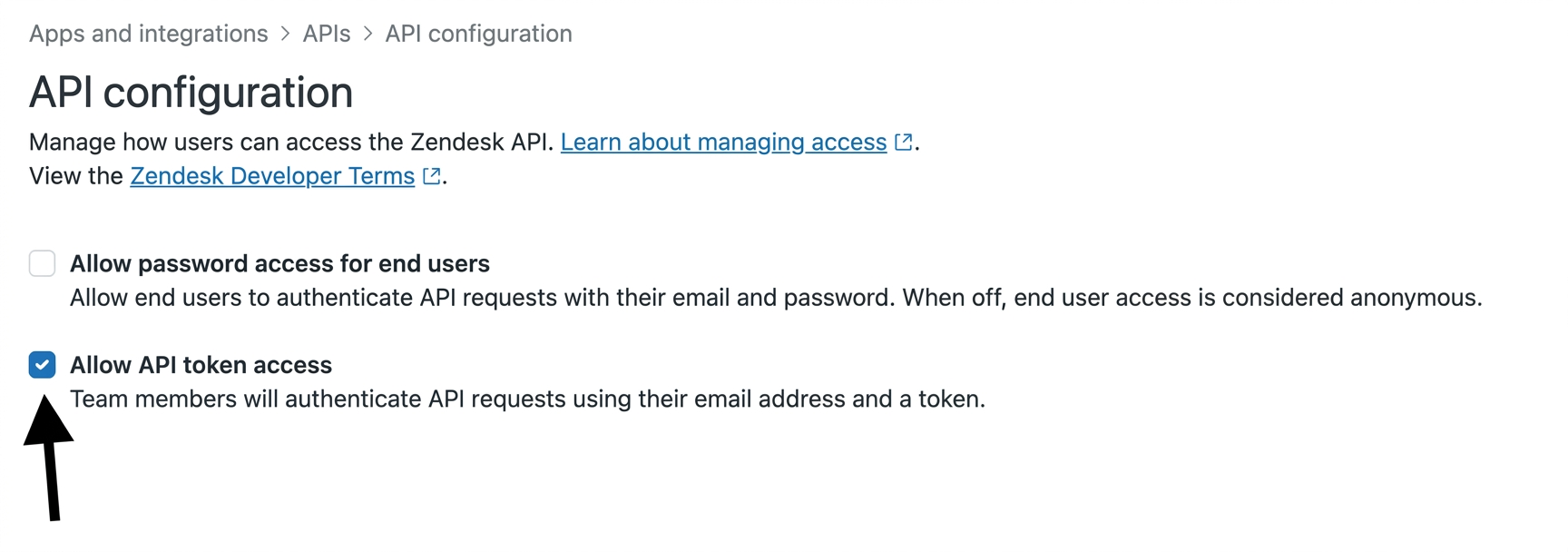
-
Click Add API token, enter a description, and click Create.
-
Copy the token — it is only shown once.
-
-
Create a connection
In Scalekit dashboard, go to AgentKit > Connections > Create Connection. Find Zendesk and click Create.
-
Create a connected account
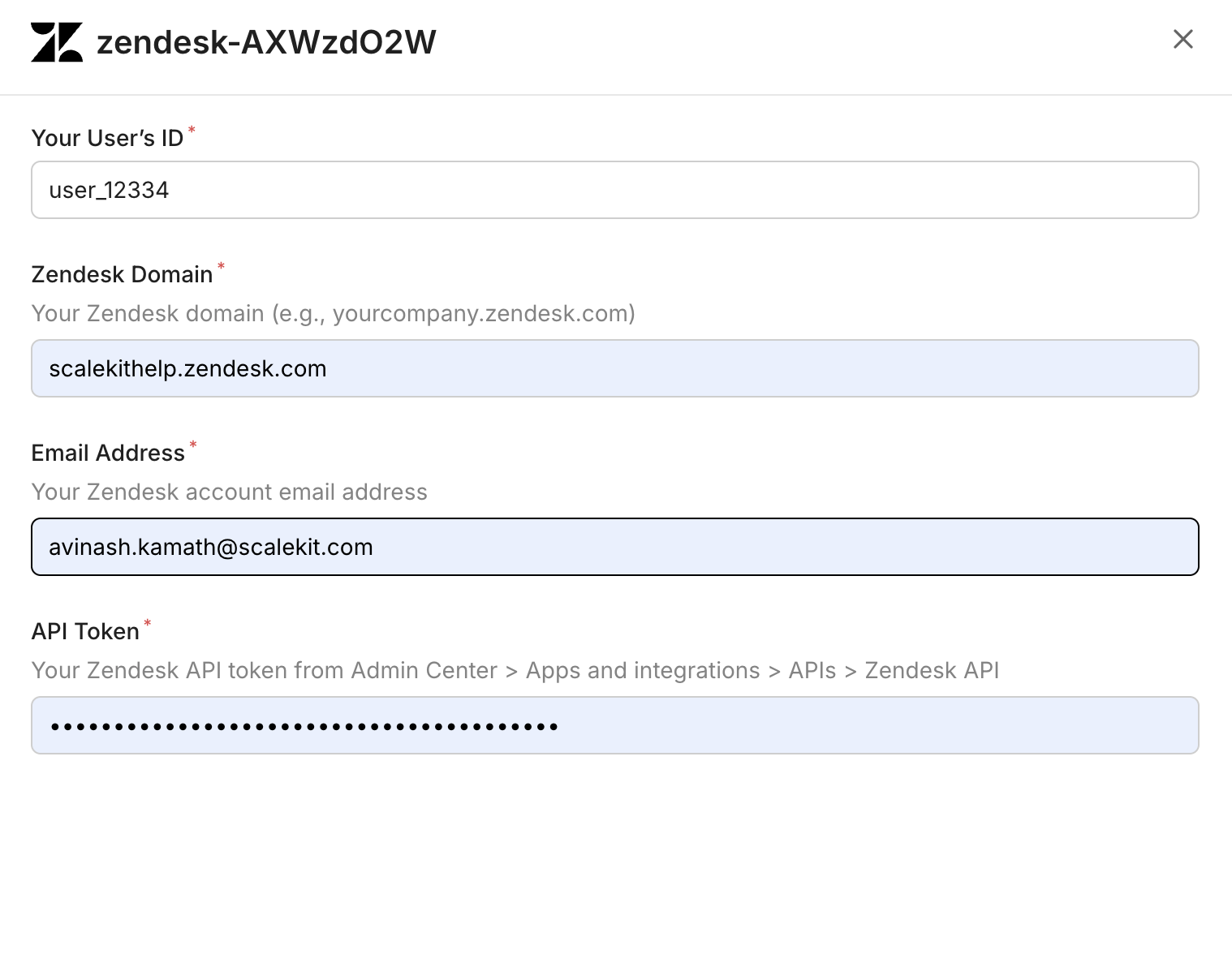
Go to Connected Accounts for your Zendesk connection and click Add account. Fill in the required fields:
-
Your User’s ID — a unique identifier for the user in your system
-
Zendesk Domain — your full Zendesk domain (e.g.,
yourcompany.zendesk.com) -
Email Address — the Zendesk account email address
-
API Token — the token you copied in step 1
-
Click Save.
-
-
What you can do
Section titled “What you can do”Connect this agent connector to let your agent:
- List webhooks, view tickets, user identities — List all webhooks configured for the Zendesk account
- Update webhook, view, user — Update an existing webhook’s configuration
- Get webhook, view, view count — Retrieve a single webhook by ID, including its endpoint, HTTP method, request format, and status
- Delete webhook, view, user — Permanently delete a webhook
- Create webhook, view, user identity — Create a new webhook to receive Zendesk event notifications at a callback URL
- Execute view — Execute a view and return its column titles and ticket rows, as they would render in the Zendesk agent UI
Common workflows
Section titled “Common workflows”Proxy API call
Don’t worry about your Zendesk domain in the path. Scalekit automatically resolves {{domain}} from the connected account’s configuration. For example, a request with path="/v2/users/me" will be sent to https://mycompany.zendesk.com/api/v2/users/me automatically.
const result = await actions.request({ connectionName: 'zendesk', identifier: 'user_123', path: '/v2/users/me', method: 'GET',});console.log(result);result = actions.request( connection_name='zendesk', identifier='user_123', path="/v2/users/me", method="GET")print(result)Execute a tool
const result = await actions.executeTool({ connector: 'zendesk', identifier: 'user_123', toolName: 'zendesk_groups_list', toolInput: {},});console.log(result);result = actions.execute_tool( tool_input={}, tool_name='zendesk_groups_list', connection_name='zendesk', identifier='user_123',)print(result)Tool list
Section titled “Tool list”Use the exact tool names from the Tool list below when you call execute_tool. If you’re not sure which name to use, list the tools available for the current user first.
zendesk_attachment_delete#Permanently delete an attachment.1 param
Permanently delete an attachment.
attachment_idnumberrequiredThe unique numeric identifier of the attachmentzendesk_attachment_get#Retrieve attachment details by ID. Obtain the attachment_id from a ticket comment's attachments list.1 param
Retrieve attachment details by ID. Obtain the attachment_id from a ticket comment's attachments list.
attachment_idnumberrequiredThe unique numeric identifier of the attachmentzendesk_automation_create#Create a new automation (time-based business rule). Automations run once per day against tickets matching their conditions, which must include at least one time-based condition.4 params
Create a new automation (time-based business rule). Automations run once per day against tickets matching their conditions, which must include at least one time-based condition.
actionsarrayrequiredActions this automation performs when its conditions are met, as a JSON array of {field, value} action objects.conditionsobjectrequiredConditions that determine when this automation runs, as a JSON object with 'all' and/or 'any' arrays of {field, operator, value} condition objects. Automations require at least one time-based condition (e.g. hours_since_created_at).titlestringrequiredThe title of the automationactivebooleanoptionalWhether the automation is activezendesk_automation_delete#Delete an automation.1 param
Delete an automation.
automation_idnumberrequiredThe unique numeric identifier of the automation to deletezendesk_automation_get#Retrieve a single automation by ID, including its conditions and actions.1 param
Retrieve a single automation by ID, including its conditions and actions.
automation_idnumberrequiredThe unique numeric identifier of the automationzendesk_automation_update#Update an existing automation's conditions and actions. Only the fields provided are changed.5 params
Update an existing automation's conditions and actions. Only the fields provided are changed.
automation_idnumberrequiredThe unique numeric identifier of the automation to updateactionsarrayoptionalActions this automation performs when its conditions are met, as a JSON array of {field, value} action objects.activebooleanoptionalWhether the automation is activeconditionsobjectoptionalConditions that determine when this automation runs, as a JSON object with 'all' and/or 'any' arrays of {field, operator, value} condition objects. Automations require at least one time-based condition (e.g. hours_since_created_at).titlestringoptionalThe title of the automationzendesk_automations_list#List the automations configured for the account. Automations run business rules on a recurring schedule based on time-based conditions.3 params
List the automations configured for the account. Automations run business rules on a recurring schedule based on time-based conditions.
activebooleanoptionalFilter by active (true) or inactive (false) automationspagenumberoptionalPage number to retrieveper_pagenumberoptionalResults per page (max 100)zendesk_brand_get#Retrieve a single brand by ID.1 param
Retrieve a single brand by ID.
brand_idnumberrequiredThe unique numeric identifier of the brandzendesk_brands_list#List the brands configured for the account, sorted by name.1 param
List the brands configured for the account, sorted by name.
include_deletedbooleanoptionalWhen true, includes soft-deleted brands in the responsezendesk_business_hours_schedules_list#List all business hours schedules defined in Zendesk. Each schedule includes the configured shift windows (days and hours) your support team operates. Use this to retrieve 24/7 coverage windows and shift data without requiring a Zendesk WFM (Tymeshift) subscription.0 params
List all business hours schedules defined in Zendesk. Each schedule includes the configured shift windows (days and hours) your support team operates. Use this to retrieve 24/7 coverage windows and shift data without requiring a Zendesk WFM (Tymeshift) subscription.
zendesk_group_create#Create a new agent group used to organize agents and route tickets.3 params
Create a new agent group used to organize agents and route tickets.
namestringrequiredThe name of the groupdescriptionstringoptionalThe description of the groupis_publicbooleanoptionalIf true the group is public; if false it is private. Cannot change a private group to public later.zendesk_group_delete#Permanently delete an agent group.1 param
Permanently delete an agent group.
group_idnumberrequiredThe unique numeric identifier of the groupzendesk_group_get#Retrieve a single group by ID.2 params
Retrieve a single group by ID.
group_idnumberrequiredThe unique numeric identifier of the groupincludestringoptionalComma-separated sideloads to include, e.g. userszendesk_group_membership_create#Assign an agent to a group. Fails with a 422 error if the agent is already a member of the group.3 params
Assign an agent to a group. Fails with a 422 error if the agent is already a member of the group.
group_idnumberrequiredThe ID of the group to assign the agent touser_idnumberrequiredThe ID of the agent to assigndefaultbooleanoptionalIf true, tickets assigned directly to the agent assume this membership's groupzendesk_group_membership_delete#Remove an agent from a group. Also schedules a background job to unassign the agent's open tickets in that group.1 param
Remove an agent from a group. Also schedules a background job to unassign the agent's open tickets in that group.
group_membership_idnumberrequiredThe unique numeric identifier of the group membershipzendesk_group_memberships_list#List agent-to-group membership assignments across the account.3 params
List agent-to-group membership assignments across the account.
includestringoptionalComma-separated sideloads: users, groupspagenumberoptionalPage number to retrieveper_pagenumberoptionalResults per page (max 100)zendesk_group_update#Update an existing group's name, description, or visibility.4 params
Update an existing group's name, description, or visibility.
group_idnumberrequiredThe unique numeric identifier of the groupdescriptionstringoptionalThe description of the groupis_publicbooleanoptionalIf true the group is public; if false it is privatenamestringoptionalThe name of the groupzendesk_groups_list#List all groups in Zendesk. Groups are used to organize agents and route tickets.2 params
List all groups in Zendesk. Groups are used to organize agents and route tickets.
pagenumberoptionalPage number for paginationper_pagenumberoptionalNumber of groups per page (max 100)zendesk_guide_search#Search across Help Center articles, community posts, and external records in a single query. Requires authentication. The filter[locales] parameter is mandatory.10 params
Search across Help Center articles, community posts, and external records in a single query. Requires authentication. The filter[locales] parameter is mandatory.
filter_localesstringrequiredComma-separated locales to scope the search. At least one valid locale is required.filter_brand_idsstringoptionalComma-separated brand IDs to limit search scope. Returns results across all brands if omitted.filter_category_idsstringoptionalComma-separated category IDs to limit search to specific Help Center categories.filter_content_typesstringoptionalComma-separated content types to limit results to: ARTICLE or POST. External records cannot be specified here; use filter_external_source_ids instead.filter_external_source_idsstringoptionalComma-separated external source IDs to scope results to specific external sources.filter_section_idsstringoptionalComma-separated section IDs to limit search to specific Help Center sections.filter_topic_idsstringoptionalComma-separated topic IDs to limit search to specific community topics.page_afterstringoptionalCursor string from the previous response to fetch the next page.page_sizeintegeroptionalMaximum number of results per page. Default is 10, maximum is 50.querystringoptionalThe search text to match. If omitted, results are sorted by internal ordering instead of relevance.zendesk_help_center_article_archive#Archive (delete) a Help Center article by ID. The article can be restored from the Zendesk Help Center UI.1 param
Archive (delete) a Help Center article by ID. The article can be restored from the Zendesk Help Center UI.
article_idnumberrequiredThe ID of the article to archive.zendesk_help_center_article_comment_create#Add a comment to a Help Center article. Requires article ID, comment body, and locale.5 params
Add a comment to a Help Center article. Requires article ID, comment body, and locale.
article_idnumberrequiredThe ID of the article to comment on.bodystringrequiredHTML body of the comment.localestringrequiredLocale for the comment (e.g., en-us).author_idnumberoptionalUser ID of the comment author (Help Center managers only).notify_subscribersbooleanoptionalWhether to notify article subscribers of the new comment. Default: true.zendesk_help_center_article_comments_list#List all comments on a Help Center article.5 params
List all comments on a Help Center article.
article_idnumberrequiredThe ID of the article whose comments to list.includestringoptionalComma-separated sideloads: users (authors), articles.pageintegeroptionalPage number for offset pagination.per_pageintegeroptionalNumber of results per page (max 100).sort_orderstringoptionalSort direction: asc or desc. Default: desc.zendesk_help_center_article_create#Create a new Help Center article in a section. Requires a title, locale, and section ID.12 params
Create a new Help Center article in a section. Requires a title, locale, and section ID.
localestringrequiredLocale for the article (e.g., en-us).section_idnumberrequiredThe ID of the section to create the article in.titlestringrequiredThe title of the article.author_idnumberoptionalUser ID of the article author.bodystringoptionalHTML body content of the article.comments_disabledbooleanoptionalWhether to disable comments on this article.content_tag_idsarrayoptionalIDs of existing content tags to attach to the article.draftbooleanoptionalIf true, the article is saved as a draft and not published.notify_subscribersbooleanoptionalSet to false to suppress email notifications to article subscribers on creation. Default: true.permission_group_idnumberoptionalThe permission group that determines who can view this article.promotedbooleanoptionalWhether to pin this article to the top of its section.user_segment_idnumberoptionalThe user segment that can view this article. Omit for a public article.zendesk_help_center_article_get#Retrieve a single Help Center article by its ID.2 params
Retrieve a single Help Center article by its ID.
article_idnumberrequiredThe ID of the article to retrieve.includestringoptionalComma-separated sideloads: users, sections, categories, translations.zendesk_help_center_article_labels_list#List all labels attached to a specific Help Center article.3 params
List all labels attached to a specific Help Center article.
article_idstringrequiredThe ID of the article to retrieve labels for.pageintegeroptionalPage number for offset pagination.per_pageintegeroptionalNumber of results per page (max 100).zendesk_help_center_article_translation_update#Update a Help Center article translation's title, body, draft status, or outdated flag for a given locale. This is the only way to edit article content — the article-level update endpoint does not accept title or body.6 params
Update a Help Center article translation's title, body, draft status, or outdated flag for a given locale. This is the only way to edit article content — the article-level update endpoint does not accept title or body.
article_idnumberrequiredThe unique ID of the article whose translation to update.localestringrequiredThe locale of the translation to update.bodystringoptionalNew HTML body content for the translation.draftbooleanoptionalIf true, saves the translation as a draft and unpublishes it.outdatedbooleanoptionalIf true, marks the translation as outdated.titlestringoptionalNew title for the translation.zendesk_help_center_article_update#Update article-level metadata: promoted status, position, comments setting, labels, and content tags. Does not update title or body — use the Translations API for those.6 params
Update article-level metadata: promoted status, position, comments setting, labels, and content tags. Does not update title or body — use the Translations API for those.
article_idnumberrequiredThe ID of the article to update.comments_disabledbooleanoptionalWhether to disable comments on this article.content_tag_idsarrayoptionalIDs of content tags to attach to the article.label_namesarrayoptionalLabels to assign to the article.positionintegeroptionalPosition of the article within its section.promotedbooleanoptionalWhether to pin this article to the top of its section.zendesk_help_center_articles_list#List Help Center articles. Filter by section or category, sort, and paginate results.7 params
List Help Center articles. Filter by section or category, sort, and paginate results.
includestringoptionalComma-separated sideloads: users, sections, categories, translations.label_namesstringoptionalComma-separated list of labels to filter articles by.pageintegeroptionalPage number for offset pagination.per_pageintegeroptionalNumber of results per page (max 100).sort_bystringoptionalField to sort by: position, title, created_at, updated_at, or edited_at.sort_orderstringoptionalSort direction: asc or desc.start_timeintegeroptionalUnix epoch timestamp to fetch only articles updated after this time (for incremental sync).zendesk_help_center_articles_search#Search Help Center articles by keyword. Filter by category, section, locale, labels, and date range.17 params
Search Help Center articles by keyword. Filter by category, section, locale, labels, and date range.
brand_idintegeroptionalScope the search to a specific brand ID.categorynumberoptionalFilter results to a specific category ID.created_afterstringoptionalLimit results to articles created after this date (YYYY-MM-DD).created_atstringoptionalLimit results to articles created on this date (YYYY-MM-DD).created_beforestringoptionalLimit results to articles created before this date (YYYY-MM-DD).label_namesstringoptionalComma-separated list of labels to filter by.localestringoptionalFilter results to a specific locale.multibrandbooleanoptionalSearch across all brands when true. Defaults to false.pageintegeroptionalPage number for offset pagination.per_pageintegeroptionalNumber of results per page (max 100).querystringoptionalFull-text search query.sectionnumberoptionalFilter results to a specific section ID.sort_bystringoptionalSort by relevance, created_at, or updated_at.sort_orderstringoptionalSort direction: asc or desc.updated_afterstringoptionalLimit results to articles updated after this date (YYYY-MM-DD).updated_atstringoptionalLimit results to articles updated on this date (YYYY-MM-DD).updated_beforestringoptionalLimit results to articles updated before this date (YYYY-MM-DD).zendesk_help_center_categories_list#List all Help Center categories in your Zendesk account. Returns categories with IDs, names, and positions.5 params
List all Help Center categories in your Zendesk account. Returns categories with IDs, names, and positions.
includestringoptionalSideload related data. Use 'translations' to include category translations.pageintegeroptionalPage number for offset pagination.per_pageintegeroptionalNumber of results per page (max 100).sort_bystringoptionalField to sort by: position, created_at, or updated_at.sort_orderstringoptionalSort direction: asc or desc.zendesk_help_center_category_get#Retrieve a single Help Center category by its ID.2 params
Retrieve a single Help Center category by its ID.
category_idnumberrequiredThe ID of the category to retrieve.includestringoptionalSideload related data. Use 'translations' to include category translations.zendesk_help_center_labels_list#List all Help Center labels in the account. Returns label names and article counts. Supports pagination.2 params
List all Help Center labels in the account. Returns label names and article counts. Supports pagination.
pageintegeroptionalPage number for offset pagination.per_pageintegeroptionalNumber of results per page (max 100).zendesk_help_center_section_create#Create a section under a Help Center category. Supply name and locale for a single-locale section, or a translations array for multi-locale (the two patterns are mutually exclusive). Nesting under parent_section_id requires a Guide plan that supports nested sections.11 params
Create a section under a Help Center category. Supply name and locale for a single-locale section, or a translations array for multi-locale (the two patterns are mutually exclusive). Nesting under parent_section_id requires a Guide plan that supports nested sections.
category_idnumberrequiredThe unique ID of the category to create the section in.descriptionstringoptionalAn optional description of the section.localestringoptionalThe locale for the section. Required when not using translations.manageable_bystringoptionalWho can manage this section.namestringoptionalThe name of the section. Required when not using translations.parent_section_idnumberoptionalID of a parent section to nest this section under. Requires a Guide plan that supports nested sections.positionintegeroptionalPosition of the section within its category for manual ordering.sortingstringoptionalSort order for articles within this section.theme_templatestringoptionalThe template this section uses in the Help Center theme.translationsarrayoptionalAdditional locale translations for the section. Each item must have a locale, title, and optional body.user_segment_idnumberoptionalThe user segment that can view this section. Omit for a public section.zendesk_help_center_section_get#Retrieve a single Help Center section by its ID.2 params
Retrieve a single Help Center section by its ID.
section_idnumberrequiredThe ID of the section to retrieve.includestringoptionalComma-separated sideloads: 'categories' to include the parent category, 'translations' to include translations.zendesk_help_center_sections_list#List all Help Center sections. Filter by category to narrow results.5 params
List all Help Center sections. Filter by category to narrow results.
includestringoptionalComma-separated sideloads: 'categories' to include the parent category, 'translations' to include translations.pageintegeroptionalPage number for offset pagination.per_pageintegeroptionalNumber of results per page (max 100).sort_bystringoptionalField to sort by: position, created_at, or updated_at.sort_orderstringoptionalSort direction: asc or desc.zendesk_macro_apply#Preview the changes a macro would make without actually applying them. Optionally apply to a specific ticket to preview against its current state.2 params
Preview the changes a macro would make without actually applying them. Optionally apply to a specific ticket to preview against its current state.
macro_idnumberrequiredThe unique numeric identifier of the macronormalize_commentbooleanoptionalIf true, normalizes the macro comment's newline formatting to match the ticket comment editorzendesk_macro_create#Create a new macro. Actions is a JSON array of {field, value} objects describing what the macro changes on a ticket, e.g. [{"field":"status","value":"solved"},{"field":"comment_value","value":"Thanks for reaching out!"}].4 params
Create a new macro. Actions is a JSON array of {field, value} objects describing what the macro changes on a ticket, e.g. [{"field":"status","value":"solved"},{"field":"comment_value","value":"Thanks for reaching out!"}].
actionsstringrequiredJSON array of {field, value} action objects the macro applies to a tickettitlestringrequiredThe title of the macroactivebooleanoptionalWhether the macro is available for usedescriptionstringoptionalA description of what the macro doeszendesk_macro_delete#Permanently delete a macro.1 param
Permanently delete a macro.
macro_idnumberrequiredThe unique numeric identifier of the macrozendesk_macro_get#Retrieve a single macro by ID, including its list of actions.1 param
Retrieve a single macro by ID, including its list of actions.
macro_idnumberrequiredThe unique numeric identifier of the macrozendesk_macro_update#Update an existing macro's title, description, active state, or actions.5 params
Update an existing macro's title, description, active state, or actions.
macro_idnumberrequiredThe unique numeric identifier of the macroactionsstringoptionalJSON array of {field, value} action objects the macro applies to a ticketactivebooleanoptionalWhether the macro is available for usedescriptionstringoptionalA description of what the macro doestitlestringoptionalThe title of the macrozendesk_macros_list#List the shared and personal macros (canned response/action templates) available to the current user.9 params
List the shared and personal macros (canned response/action templates) available to the current user.
accessstringoptionalFilter by access levelactivebooleanoptionalFilter by active (true) or inactive (false) macroscategorynumberoptionalFilter macros by category IDgroup_idnumberoptionalFilter macros by group IDonly_viewablebooleanoptionalIf true, returns only macros that can be applied to ticketspagenumberoptionalPage number to retrieveper_pagenumberoptionalResults per page (max 100)sort_bystringoptionalField to sort bysort_orderstringoptionalasc or desczendesk_omnichannel_agent_statuses_list#Get the current Talk availability status for a specific agent. Returns agent state (online, away, offline, transfers_only), call status (on_call, wrap_up), and channel (client or phone). Useful for monitoring individual agent occupancy.1 param
Get the current Talk availability status for a specific agent. Returns agent state (online, away, offline, transfers_only), call status (on_call, wrap_up), and channel (client or phone). Useful for monitoring individual agent occupancy.
agent_idnumberrequiredThe ID of the agent whose availability to retrievezendesk_omnichannel_agents_list#List the current availability status for all agents across all channels (voice, chat, email, messaging). Returns each agent's channel capacity, remaining capacity, and current status. Supports filtering by group, skill, channel status (e.g. voice:online), and remaining capacity.7 params
List the current availability status for all agents across all channels (voice, chat, email, messaging). Returns each agent's channel capacity, remaining capacity, and current status. Supports filtering by group, skill, channel status (e.g. voice:online), and remaining capacity.
filter_agent_idstringoptionalComma-separated agent IDs to filter byfilter_agent_status_namestringoptionalFilter agents by their unified status name (e.g. Online, Offline, Away)filter_channel_statusstringoptionalFilter agents by their status on a specific channel. Format: channel:status (e.g. voice:online, messaging:away)filter_group_idstringoptionalComma-separated group IDs to filter agents bypage_afterstringoptionalCursor for fetching the next page of resultspage_sizenumberoptionalMaximum number of agents to return per pageselect_channelstringoptionalLimit availability data to a single channel (e.g. voice, messaging, email)zendesk_organization_create#Create a new organization. Names must be unique within the account.8 params
Create a new organization. Names must be unique within the account.
namestringrequiredA unique name for the organizationdetailsstringoptionalAny details about the organization, such as its addressdomain_namesarrayoptionalDomain names associated with this organization; users signing up with a matching email domain are auto-addedgroup_idnumberoptionalNew tickets from users in this organization are automatically put in this groupnotesstringoptionalAny notes you have about the organizationshared_commentsbooleanoptionalIf true, end users in the organization can comment on each other's ticketsshared_ticketsbooleanoptionalIf true, end users in the organization can see each other's ticketstagsarrayoptionalTags applied to the organizationzendesk_organization_delete#Permanently delete an organization.1 param
Permanently delete an organization.
organization_idnumberrequiredThe unique numeric identifier of the organizationzendesk_organization_get#Retrieve details of a specific Zendesk organization by ID. Returns organization name, domain names, tags, notes, shared ticket settings, and custom fields.2 params
Retrieve details of a specific Zendesk organization by ID. Returns organization name, domain names, tags, notes, shared ticket settings, and custom fields.
organization_idnumberrequiredThe ID of the organization to retrieveincludestringoptionalAdditional related data to include (e.g., lookup_relationship_fields)zendesk_organization_membership_create#Assign a user to an organization. Fails with a 422 error if the user is already assigned to the organization.3 params
Assign a user to an organization. Fails with a 422 error if the user is already assigned to the organization.
organization_idnumberrequiredThe ID of the organization to assign the user touser_idnumberrequiredThe ID of the user to assigndefaultbooleanoptionalIf true, this becomes the user's default organizationzendesk_organization_membership_delete#Remove a user from an organization. Schedules a background job to clear the organization_id on the user's currently assigned tickets.1 param
Remove a user from an organization. Schedules a background job to clear the organization_id on the user's currently assigned tickets.
organization_membership_idnumberrequiredThe unique numeric identifier of the organization membershipzendesk_organization_memberships_list#List user-to-organization membership assignments across the account.3 params
List user-to-organization membership assignments across the account.
includestringoptionalComma-separated sideloads: users, organizationspagenumberoptionalPage number to retrieveper_pagenumberoptionalResults per page (max 100)zendesk_organization_tickets_list#List the tickets belonging to a specific Zendesk organization.3 params
List the tickets belonging to a specific Zendesk organization.
organization_idnumberrequiredThe unique numeric identifier of the organizationpagenumberoptionalPage number to retrieveper_pagenumberoptionalResults per page (default: 100, max: 100)zendesk_organization_update#Update an existing organization. Agents without unrestricted permissions can only update the notes field.7 params
Update an existing organization. Agents without unrestricted permissions can only update the notes field.
organization_idnumberrequiredThe unique numeric identifier of the organizationdetailsstringoptionalAny details about the organization, such as its addressdomain_namesarrayoptionalDomain names for this organization. Overwrites all existing values -- submit the complete list.group_idnumberoptionalNew tickets from users in this organization are automatically put in this groupnamestringoptionalA unique name for the organizationnotesstringoptionalAny notes you have about the organizationtagsarrayoptionalTags applied to the organizationzendesk_organizations_autocomplete#Return organizations whose name starts with the given substring.1 param
Return organizations whose name starts with the given substring.
namestringrequiredSubstring to match against the start of an organization's namezendesk_organizations_list#List all organizations in Zendesk with pagination support.2 params
List all organizations in Zendesk with pagination support.
pagenumberoptionalPage number for paginationper_pagenumberoptionalNumber of organizations per page (max 100)zendesk_organizations_search#Search for an organization by its exact external_id or name (not both at once).2 params
Search for an organization by its exact external_id or name (not both at once).
external_idstringoptionalThe external_id of the organization to findnamestringoptionalThe exact name of the organization to findzendesk_problems_list#List tickets of type 'problem'. Problem tickets group together incident tickets that share the same root cause.0 params
List tickets of type 'problem'. Problem tickets group together incident tickets that share the same root cause.
zendesk_request_create#Create a new request (ticket) from the requester's point of view. Requires a subject and an initial comment describing the issue.6 params
Create a new request (ticket) from the requester's point of view. Requires a subject and an initial comment describing the issue.
comment_bodystringrequiredDescribes the problem, incident, question, or tasksubjectstringrequiredThe subject/title of the requestcollaboratorsarrayoptionalEmail addresses to CC on the requestprioritystringoptionalurgent, high, normal, or lowticket_form_idnumberoptionalID of the ticket form to use (Enterprise accounts only)typestringoptionalquestion, incident, problem, or taskzendesk_request_get#Retrieve a single request (the customer-facing view of a ticket) by ID.1 param
Retrieve a single request (the customer-facing view of a ticket) by ID.
request_idnumberrequiredThe unique numeric identifier of the request (same as the underlying ticket ID)zendesk_request_update#Add a comment to a request, mark it solved, or add collaborators. This endpoint cannot change other request attributes such as subject or priority.4 params
Add a comment to a request, mark it solved, or add collaborators. This endpoint cannot change other request attributes such as subject or priority.
request_idnumberrequiredThe unique numeric identifier of the requestadditional_collaboratorsarrayoptionalEmail addresses to add as collaborators on the requestcomment_bodystringoptionalA comment/reply to add to the requestsolvedbooleanoptionalMark the request as solved. Only allowed when the request's can_be_solved_by_me property is true.zendesk_requests_list#List the requester's own tickets (requests). End users see only their own requests; agents/admins can use this to review the customer-facing view of a ticket.4 params
List the requester's own tickets (requests). End users see only their own requests; agents/admins can use this to review the customer-facing view of a ticket.
pagenumberoptionalPage number to retrieveper_pagenumberoptionalResults per page (max 100)sort_bystringoptionalupdated_at or created_atsort_orderstringoptionalasc or desczendesk_requests_search#Search requests by keyword and filters such as organization or status. Example: query=printer&status=hold,open.3 params
Search requests by keyword and filters such as organization or status. Example: query=printer&status=hold,open.
organization_idnumberoptionalRestrict results to requests from this organizationquerystringoptionalSearch text; combine with other filters as query string valuesstatusstringoptionalComma-separated list of statuses to filter by, e.g. hold,openzendesk_satisfaction_ratings_list#List CSAT satisfaction ratings with optional filters. Returns score (good/bad), comment, reason, ticket ID, and timestamps for each rating.7 params
List CSAT satisfaction ratings with optional filters. Returns score (good/bad), comment, reason, ticket ID, and timestamps for each rating.
end_timenumberoptionalUnix timestamp to filter ratings created before this timepagenumberoptionalPage number for paginationper_pagenumberoptionalNumber of results per pageschema_versionstringoptionalVersion of the tool schemascorestringoptionalFilter by satisfaction scorestart_timenumberoptionalUnix timestamp to filter ratings created after this timetool_versionstringoptionalVersion of the toolzendesk_satisfaction_reasons_list#List all satisfaction reasons configured for negative (bad) CSAT ratings. Used to analyze why customers rate support interactions poorly.2 params
List all satisfaction reasons configured for negative (bad) CSAT ratings. Used to analyze why customers rate support interactions poorly.
schema_versionstringoptionalVersion of the tool schematool_versionstringoptionalVersion of the toolzendesk_search_tickets#Search Zendesk tickets using a query string. Supports Zendesk's search syntax (e.g., 'type:ticket status:open'). per_page has a hard ceiling of 100 — setting it higher to try to fetch more results per call fails with 'Requested response size was greater than Search Response Limits'. Separately, Zendesk limits total search results to 1,000 — the maximum valid page is floor(1000 / per_page) (e.g., per_page=100 → max page 10, per_page=25 → max page 40). Stop paginating when next_page is null or you reach the max page; requesting beyond either limit returns a 400 error.6 params
Search Zendesk tickets using a query string. Supports Zendesk's search syntax (e.g., 'type:ticket status:open'). per_page has a hard ceiling of 100 — setting it higher to try to fetch more results per call fails with 'Requested response size was greater than Search Response Limits'. Separately, Zendesk limits total search results to 1,000 — the maximum valid page is floor(1000 / per_page) (e.g., per_page=100 → max page 10, per_page=25 → max page 40). Stop paginating when next_page is null or you reach the max page; requesting beyond either limit returns a 400 error.
querystringrequiredSearch query string using Zendesk search syntax (e.g., 'type:ticket status:open assignee:me')includestringoptionalComma-separated list of additional data to sideload with results. Supported values: users, groups, organizations, tickets.pagenumberoptionalPage number for pagination. Max valid page = floor(1000 / per_page). Do not exceed this — Zendesk returns a 400 error beyond the 1,000 result limit.per_pagenumberoptionalNumber of results per page (max 100). Determines the max page ceiling: floor(1000 / per_page). Higher values mean fewer pages but a lower max page number.sort_bystringoptionalField to sort results by (updated_at, created_at, priority, status, ticket_type)sort_orderstringoptionalSort direction: asc or desc (default: desc)zendesk_side_conversation_get#Retrieve a specific side conversation on a Zendesk ticket by its ID. Returns the side conversation's state, subject, participants, preview text, and timestamps. Requires the Collaboration add-on.3 params
Retrieve a specific side conversation on a Zendesk ticket by its ID. Returns the side conversation's state, subject, participants, preview text, and timestamps. Requires the Collaboration add-on.
side_conversation_idstringrequiredThe ID of the side conversation to retrieveticket_idnumberrequiredThe ID of the parent ticketincludestringoptionalSideloads to include alongside the response. Use 'side_conversation_events' to include the full event history of the side conversation.zendesk_side_conversations_list#List all side conversations on a Zendesk ticket. Returns side conversations including their state, subject, participants, and preview text. Requires the Collaboration add-on.2 params
List all side conversations on a Zendesk ticket. Returns side conversations including their state, subject, participants, and preview text. Requires the Collaboration add-on.
ticket_idnumberrequiredThe ID of the ticket whose side conversations to listincludestringoptionalSideloads to include alongside the response. Use 'side_conversation_events' to include the full event history for each side conversation.zendesk_sla_policies_list#List all SLA policy definitions including policy name, conditions, and filter criteria. Requires Professional or Enterprise plan.2 params
List all SLA policy definitions including policy name, conditions, and filter criteria. Requires Professional or Enterprise plan.
schema_versionstringoptionalVersion of the tool schematool_versionstringoptionalVersion of the toolzendesk_sla_policy_get#Retrieve a single SLA policy by ID, including its filter conditions and per-metric targets. Requires Professional or Enterprise plan.1 param
Retrieve a single SLA policy by ID, including its filter conditions and per-metric targets. Requires Professional or Enterprise plan.
sla_policy_idnumberrequiredThe unique numeric identifier of the SLA policyzendesk_support_addresses_list#List the support (recipient) email addresses configured for the account.2 params
List the support (recipient) email addresses configured for the account.
pagenumberoptionalPage number to retrieveper_pagenumberoptionalResults per page (max 100)zendesk_suspended_ticket_recover#Recover a suspended ticket into a real ticket. The requester is set to the authenticated agent rather than the original requester.1 param
Recover a suspended ticket into a real ticket. The requester is set to the authenticated agent rather than the original requester.
idnumberrequiredThe unique numeric identifier of the suspended ticketzendesk_suspended_tickets_list#List tickets that Zendesk has flagged as spam or otherwise suspended before they became real tickets.4 params
List tickets that Zendesk has flagged as spam or otherwise suspended before they became real tickets.
pagenumberoptionalPage number to retrieveper_pagenumberoptionalResults per page (max 100)sort_bystringoptionalauthor_email, cause, created_at, or subjectsort_orderstringoptionalasc or desczendesk_tags_list#List up to the 20,000 most popular tags used across the Zendesk account in the last 60 days, ordered by decreasing popularity.2 params
List up to the 20,000 most popular tags used across the Zendesk account in the last 60 days, ordered by decreasing popularity.
pagenumberoptionalPage number to retrieveper_pagenumberoptionalResults per page (max 100)zendesk_talk_account_overview#Get a high-level overview of Talk voice call activity for the current day. Returns total inbound calls, total outbound calls, and other account-wide call metrics. Data covers midnight to now in your account's timezone. Filter by phone number IDs to scope to specific lines.1 param
Get a high-level overview of Talk voice call activity for the current day. Returns total inbound calls, total outbound calls, and other account-wide call metrics. Data covers midnight to now in your account's timezone. Filter by phone number IDs to scope to specific lines.
phone_number_idsstringoptionalComma-separated list of phone number IDs to filter results by (up to 100 IDs)zendesk_talk_agents_activity#Get current-day Talk voice call activity broken down per agent. Returns calls accepted, calls missed, calls denied, talk time, and other live metrics for each agent. Data reflects the current day from midnight in your account timezone. Filter by group to narrow results.1 param
Get current-day Talk voice call activity broken down per agent. Returns calls accepted, calls missed, calls denied, talk time, and other live metrics for each agent. Data reflects the current day from midnight in your account timezone. Filter by group to narrow results.
group_idsstringoptionalComma-separated list of group IDs to filter agents by (up to 100 IDs)zendesk_talk_agents_overview#Get aggregated Talk performance metrics for all agents for the current day. Returns per-agent counts of accepted, missed, and declined calls, average handle time, and talk time. Data covers midnight to now in the account timezone. Use this to assess agent-level call performance without requiring Talk Professional/Enterprise.0 params
Get aggregated Talk performance metrics for all agents for the current day. Returns per-agent counts of accepted, missed, and declined calls, average handle time, and talk time. Data covers midnight to now in the account timezone. Use this to assess agent-level call performance without requiring Talk Professional/Enterprise.
zendesk_talk_call_legs_list#List individual call legs from Zendesk Talk. Each call can have multiple legs (e.g., the customer leg and the agent leg). Returns leg status (accepted, missed, declined), duration, agent, and timestamps.6 params
List individual call legs from Zendesk Talk. Each call can have multiple legs (e.g., the customer leg and the agent leg). Returns leg status (accepted, missed, declined), duration, agent, and timestamps.
start_timenumberrequiredUnix timestamp (seconds since epoch) to start the incremental query from. Required by Zendesk — the incremental legs endpoint will reject requests without this field.agent_idnumberoptionalFilter call legs by a specific agent IDend_timenumberoptionalUnix timestamp (seconds since epoch) to end the incremental query at.pagenumberoptionalPage number for paginationper_pagenumberoptionalNumber of call legs to return per page (max 100)statusstringoptionalFilter by leg status: accepted, missed, or declinedzendesk_talk_calls_list#List voice calls from Zendesk Talk. Returns inbound and outbound call records with details such as duration, status, agent, phone number, and timestamps. Use filters to narrow by direction, date range, or agent.6 params
List voice calls from Zendesk Talk. Returns inbound and outbound call records with details such as duration, status, agent, phone number, and timestamps. Use filters to narrow by direction, date range, or agent.
agent_idnumberoptionalFilter calls by a specific agent IDdirectionstringoptionalFilter by call direction: inbound or outboundend_timestringoptionalFilter calls that ended before this ISO 8601 timestamppagenumberoptionalPage number for paginationper_pagenumberoptionalNumber of calls to return per page (max 100)start_timestringoptionalFilter calls that started after this ISO 8601 timestampzendesk_ticket_audits_get#Retrieve the full audit trail for a specific ticket including all field changes, status transitions, comments, and timestamps.6 params
Retrieve the full audit trail for a specific ticket including all field changes, status transitions, comments, and timestamps.
ticket_idnumberrequiredThe ID of the ticket to retrieve audits forpage_afterstringoptionalCursor for next page.page_sizeintegeroptionalNumber of records per page. Maximum 100.schema_versionstringoptionalVersion of the tool schemasort_orderstringoptionalSort order for audit events.tool_versionstringoptionalVersion of the toolzendesk_ticket_audits_list#List audit trail events across all tickets including field changes, status transitions, assignment changes, and timestamps. Useful for tracking time-in-status and escalation paths.5 params
List audit trail events across all tickets including field changes, status transitions, assignment changes, and timestamps. Useful for tracking time-in-status and escalation paths.
page_afterstringoptionalCursor for next page (cursor-based pagination).page_beforestringoptionalCursor for previous page (cursor-based pagination).page_sizeintegeroptionalNumber of records per page. Maximum 100.schema_versionstringoptionalVersion of the tool schematool_versionstringoptionalVersion of the toolzendesk_ticket_collaborators_list#List the users who are CC'd as collaborators on a Zendesk ticket. Requires the CCs and Followers feature to be enabled.1 param
List the users who are CC'd as collaborators on a Zendesk ticket. Requires the CCs and Followers feature to be enabled.
ticket_idnumberrequiredThe unique numeric identifier of the ticketzendesk_ticket_comments_list#Retrieve all comments (public replies and internal notes) for a specific Zendesk ticket. Returns comment body, author, timestamps, and attachments.4 params
Retrieve all comments (public replies and internal notes) for a specific Zendesk ticket. Returns comment body, author, timestamps, and attachments.
ticket_idnumberrequiredThe ID of the ticket whose comments to listincludestringoptionalSideloads to include. Accepts 'users' to list email CCs.include_inline_imagesbooleanoptionalWhen true, inline images are listed as attachments (default: false)sort_orderstringoptionalSort direction for comments: asc or desc (default: asc)zendesk_ticket_create#Create a new support ticket in Zendesk. Requires a comment/description and optionally a subject, priority, assignee, and tags.7 params
Create a new support ticket in Zendesk. Requires a comment/description and optionally a subject, priority, assignee, and tags.
comment_bodystringrequiredThe description or first comment of the ticketassignee_emailstringoptionalEmail of the agent to assign the ticket toprioritystringoptionalTicket priority: urgent, high, normal, or lowstatusstringoptionalTicket status: new, open, pending, hold, solved, or closedsubjectstringoptionalThe subject/title of the tickettagsarrayoptionalList of tags to apply to the tickettypestringoptionalTicket type: problem, incident, question, or taskzendesk_ticket_delete#Permanently delete a Zendesk ticket. This moves the ticket to the deleted tickets queue; agents with permission can restore it before it is purged. This action cannot be undone through this tool.1 param
Permanently delete a Zendesk ticket. This moves the ticket to the deleted tickets queue; agents with permission can restore it before it is purged. This action cannot be undone through this tool.
ticket_idnumberrequiredThe unique numeric identifier of the ticketzendesk_ticket_field_create#Create a new custom ticket field. For 'multiselect' or 'tagger' fields, supply custom_field_options as a JSON array of {name, value} objects.9 params
Create a new custom ticket field. For 'multiselect' or 'tagger' fields, supply custom_field_options as a JSON array of {name, value} objects.
titlestringrequiredThe title of the ticket fieldactivebooleanoptionalWhether this field is availablecustom_field_optionsstringoptionalJSON array of options for 'tagger'/'multiselect' fields, e.g. [{"name":"Small","value":"small"}]descriptionstringoptionalDescribes the purpose of the field to end userspositionnumberoptionalThe relative position of the field among other ticket fieldsrequiredbooleanoptionalWhether agents must enter a value for this field to change a ticket's status to solvedtagstringoptionalFor checkbox fields, the tag applied to tickets when the checkbox is checkedtypestringoptionalThe type of ticket field. Defaults to text when not specified.visible_in_portalbooleanoptionalWhether this field is visible to end users in the help centerzendesk_ticket_field_get#Retrieve a single ticket field by ID, including its type, title, and (for dropdown/multiselect fields) its options.2 params
Retrieve a single ticket field by ID, including its type, title, and (for dropdown/multiselect fields) its options.
ticket_field_idnumberrequiredThe unique numeric identifier of the ticket fieldcreatorbooleanoptionalIf true, includes creator_user_id and creator_app_name on app-created fieldszendesk_ticket_field_update#Update an existing custom ticket field. The field's type cannot be changed after creation. For dropdown/multiselect fields, custom_field_options must list every option you want to keep -- omitted options are removed.8 params
Update an existing custom ticket field. The field's type cannot be changed after creation. For dropdown/multiselect fields, custom_field_options must list every option you want to keep -- omitted options are removed.
ticket_field_idnumberrequiredThe unique numeric identifier of the ticket fieldactivebooleanoptionalWhether this field is availablecustom_field_optionsstringoptionalJSON array of every option to keep for 'tagger'/'multiselect' fields, e.g. [{"id":123,"name":"Small","value":"small"}]descriptionstringoptionalDescribes the purpose of the field to end userspositionnumberoptionalThe relative position of the field among other ticket fieldsrequiredbooleanoptionalWhether agents must enter a value for this field to change a ticket's status to solvedtitlestringoptionalThe title of the ticket fieldvisible_in_portalbooleanoptionalWhether this field is visible to end users in the help centerzendesk_ticket_fields_list#List all system and custom ticket fields defined in the Zendesk account.2 params
List all system and custom ticket fields defined in the Zendesk account.
creatorbooleanoptionalIf true, includes creator_user_id and creator_app_name on app-created fieldslocalestringoptionalReturn title_in_portal as a dynamic content variant for this localezendesk_ticket_followers_list#List the agents who follow a Zendesk ticket and receive updates about it. Requires the CCs and Followers feature to be enabled.1 param
List the agents who follow a Zendesk ticket and receive updates about it. Requires the CCs and Followers feature to be enabled.
ticket_idnumberrequiredThe unique numeric identifier of the ticketzendesk_ticket_form_create#Create a new ticket form made up of an ordered set of ticket fields.6 params
Create a new ticket form made up of an ordered set of ticket fields.
namestringrequiredThe internal name of the ticket formactivebooleanoptionalWhether the form is activedisplay_namestringoptionalThe name shown to end users. Defaults to name if omitted.end_user_visiblebooleanoptionalWhether the form is visible to end userspositionnumberoptionalThe position of this form relative to other formsticket_field_idsarrayoptionalOrdered array of ticket field IDs to include on this formzendesk_ticket_form_get#Retrieve a single ticket form by ID, including the ordered list of ticket field IDs it contains.1 param
Retrieve a single ticket form by ID, including the ordered list of ticket field IDs it contains.
ticket_form_idnumberrequiredThe unique numeric identifier of the ticket formzendesk_ticket_form_update#Update an existing ticket form's name, visibility, or the ticket fields it contains.7 params
Update an existing ticket form's name, visibility, or the ticket fields it contains.
ticket_form_idnumberrequiredThe unique numeric identifier of the ticket formactivebooleanoptionalWhether the form is activedisplay_namestringoptionalThe name shown to end usersend_user_visiblebooleanoptionalWhether the form is visible to end usersnamestringoptionalThe internal name of the ticket formpositionnumberoptionalThe position of this form relative to other formsticket_field_idsarrayoptionalOrdered array of ticket field IDs to include on this formzendesk_ticket_forms_list#List the ticket forms configured for the Zendesk account. End users only see forms with end_user_visible set to true.4 params
List the ticket forms configured for the Zendesk account. End users only see forms with end_user_visible set to true.
activebooleanoptionaltrue returns only active forms, false returns only inactive formsend_user_visiblebooleanoptionaltrue returns only end-user-visible forms, false returns only hidden formspagenumberoptionalPage number to retrieveper_pagenumberoptionalResults per pagezendesk_ticket_get#Retrieve details of a specific Zendesk ticket by ID. Returns ticket properties including status, priority, subject, requester, assignee, and timestamps.2 params
Retrieve details of a specific Zendesk ticket by ID. Returns ticket properties including status, priority, subject, requester, assignee, and timestamps.
ticket_idnumberrequiredThe ID of the ticket to retrieveincludestringoptionalComma-separated list of sideloads to include (e.g., users, groups, organizations)zendesk_ticket_merge#Merge one or more source tickets into a target ticket. Comments from the source tickets are copied into the target ticket and any attachments are copied over. Queues a background job; poll the returned job_status URL to confirm completion.6 params
Merge one or more source tickets into a target ticket. Comments from the source tickets are copied into the target ticket and any attachments are copied over. Queues a background job; poll the returned job_status URL to confirm completion.
ticket_idnumberrequiredThe ID of the ticket that other tickets will be merged intoticket_idsarrayrequiredArray of ticket IDs to merge into the target ticketsource_commentstringoptionalComment added to the source ticket(s) explaining the mergesource_comment_is_publicbooleanoptionalWhether the comment on the source ticket(s) is publictarget_commentstringoptionalComment added to the target ticket explaining the mergetarget_comment_is_publicbooleanoptionalWhether the comment on the target ticket is publiczendesk_ticket_metric_events#Incrementally export ticket metric events (reply times, agent work times, requester wait times) for time-series analysis. Returns event-level granularity for SLA compliance tracking.6 params
Incrementally export ticket metric events (reply times, agent work times, requester wait times) for time-series analysis. Returns event-level granularity for SLA compliance tracking.
start_timenumberrequiredUnix timestamp to start incremental export fromexclude_deletedbooleanoptionalWhen true, removes metric events tied to deleted tickets.include_changesbooleanoptionalWhen true, includes additional change data for more accurate incremental results.per_pagenumberoptionalNumber of results per pageschema_versionstringoptionalVersion of the tool schematool_versionstringoptionalVersion of the toolzendesk_ticket_metrics_get#Retrieve ticket metrics for a specific ticket including reply time, resolution time, wait times, reopen count, and assignee/group station counts.3 params
Retrieve ticket metrics for a specific ticket including reply time, resolution time, wait times, reopen count, and assignee/group station counts.
ticket_idnumberrequiredThe ID of the ticket to retrieve metrics forschema_versionstringoptionalVersion of the tool schematool_versionstringoptionalVersion of the toolzendesk_ticket_metrics_list#List ticket metrics for all tickets in the Zendesk account. Returns first reply time, resolution time, agent wait time, requester wait time, reply count, and reopen count.4 params
List ticket metrics for all tickets in the Zendesk account. Returns first reply time, resolution time, agent wait time, requester wait time, reply count, and reopen count.
pagenumberoptionalPage number for paginationper_pagenumberoptionalNumber of results per pageschema_versionstringoptionalVersion of the tool schematool_versionstringoptionalVersion of the toolzendesk_ticket_reply#Add a public reply or internal note to a Zendesk ticket. Set public to false for internal notes visible only to agents.3 params
Add a public reply or internal note to a Zendesk ticket. Set public to false for internal notes visible only to agents.
bodystringrequiredThe reply message content (plain text, markdown supported)ticket_idnumberrequiredThe ID of the ticket to reply topublicbooleanoptionalWhether the comment is public (true) or an internal note (false). Defaults to true.zendesk_ticket_tags_add#Add one or more tags to a ticket without removing its existing tags.2 params
Add one or more tags to a ticket without removing its existing tags.
tagsarrayrequiredTags to add to the ticket's existing tagsticket_idnumberrequiredThe unique numeric identifier of the ticketzendesk_ticket_tags_delete#Remove specific tags from a ticket, leaving any other tags untouched.2 params
Remove specific tags from a ticket, leaving any other tags untouched.
tagsstringrequiredComma-separated list of tags to remove from the ticketticket_idnumberrequiredThe unique numeric identifier of the ticketzendesk_ticket_tags_list#List the tags currently applied to a Zendesk ticket.1 param
List the tags currently applied to a Zendesk ticket.
ticket_idnumberrequiredThe unique numeric identifier of the ticketzendesk_ticket_tags_set#Replace all tags on a ticket with the given set of tags. Any tags not included in the list are removed from the ticket.2 params
Replace all tags on a ticket with the given set of tags. Any tags not included in the list are removed from the ticket.
tagsarrayrequiredThe full list of tags the ticket should have after this callticket_idnumberrequiredThe unique numeric identifier of the ticketzendesk_ticket_update#Update an existing Zendesk ticket. Change status, priority, assignee, subject, tags, or any other writable ticket field.9 params
Update an existing Zendesk ticket. Change status, priority, assignee, subject, tags, or any other writable ticket field.
ticket_idnumberrequiredThe ID of the ticket to updateassignee_emailstringoptionalEmail of the agent to assign the ticket toassignee_idnumberoptionalID of the agent to assign the ticket togroup_idnumberoptionalID of the group to assign the ticket toprioritystringoptionalTicket priority: urgent, high, normal, or lowstatusstringoptionalTicket status: new, open, pending, hold, solved, or closedsubjectstringoptionalNew subject/title for the tickettagsarrayoptionalList of tags to set on the ticket (replaces existing tags)typestringoptionalTicket type: problem, incident, question, or taskzendesk_tickets_count#Return an approximate count of tickets in the account. If the count exceeds 100,000 it refreshes only once every 24 hours.0 params
Return an approximate count of tickets in the account. If the count exceeds 100,000 it refreshes only once every 24 hours.
zendesk_tickets_list#List tickets in Zendesk with sorting and pagination. Returns tickets for the authenticated agent's account.4 params
List tickets in Zendesk with sorting and pagination. Returns tickets for the authenticated agent's account.
pagenumberoptionalPage number for paginationper_pagenumberoptionalNumber of tickets per page (max 100)sort_bystringoptionalField to sort by: created_at, updated_at, priority, status, ticket_typesort_orderstringoptionalSort direction: asc or desc (default: desc)zendesk_trigger_create#Create a new ticket trigger (event-based business rule) with conditions and actions. Triggers run immediately when a ticket is created or updated and its conditions match.6 params
Create a new ticket trigger (event-based business rule) with conditions and actions. Triggers run immediately when a ticket is created or updated and its conditions match.
actionsarrayrequiredActions this trigger performs when its conditions are met, as a JSON array of {field, value} action objects.conditionsobjectrequiredConditions that determine when this trigger fires, as a JSON object with 'all' and/or 'any' arrays of {field, operator, value} condition objects.titlestringrequiredThe title of the triggeractivebooleanoptionalWhether the trigger is activecategory_idstringoptionalID of the trigger category to group this trigger underdescriptionstringoptionalA description of what the trigger doeszendesk_trigger_delete#Delete a ticket trigger.1 param
Delete a ticket trigger.
trigger_idnumberrequiredThe unique numeric identifier of the trigger to deletezendesk_trigger_get#Retrieve a single ticket trigger by ID, including its conditions and actions.1 param
Retrieve a single ticket trigger by ID, including its conditions and actions.
trigger_idnumberrequiredThe unique numeric identifier of the triggerzendesk_trigger_update#Update an existing ticket trigger's conditions and actions. Only the fields provided are changed.7 params
Update an existing ticket trigger's conditions and actions. Only the fields provided are changed.
trigger_idnumberrequiredThe unique numeric identifier of the trigger to updateactionsarrayoptionalActions this trigger performs when its conditions are met, as a JSON array of {field, value} action objects.activebooleanoptionalWhether the trigger is activecategory_idstringoptionalID of the trigger category to group this trigger underconditionsobjectoptionalConditions that determine when this trigger fires, as a JSON object with 'all' and/or 'any' arrays of {field, operator, value} condition objects.descriptionstringoptionalA description of what the trigger doestitlestringoptionalThe title of the triggerzendesk_triggers_list#List the ticket triggers configured for the account. Triggers run business rules automatically when a ticket is created or updated.6 params
List the ticket triggers configured for the account. Triggers run business rules automatically when a ticket is created or updated.
activebooleanoptionalFilter by active (true) or inactive (false) triggerscategory_idstringoptionalFilter triggers by category IDpagenumberoptionalPage number to retrieveper_pagenumberoptionalResults per page (max 100)sort_bystringoptionalalphabetical, created_at, updated_at, usage_1h, usage_24h, or usage_7dsort_orderstringoptionalasc or desczendesk_user_create#Create a new user in Zendesk. Can create end-users (customers), agents, or admins. Email is required for end-users.6 params
Create a new user in Zendesk. Can create end-users (customers), agents, or admins. Email is required for end-users.
namestringrequiredFull name of the useremailstringoptionalPrimary email address of the userorganization_idnumberoptionalID of the organization to associate the user withphonestringoptionalPrimary phone number (E.164 format, e.g. +15551234567)rolestringoptionalUser role: end-user, agent, or admin. Defaults to end-user.verifiedbooleanoptionalWhether the user's identity is verified. Defaults to false.zendesk_user_delete#Soft-delete a user and their associated records. Deleted users are not recoverable through the API; a further permanent-delete step is needed for GDPR compliance.1 param
Soft-delete a user and their associated records. Deleted users are not recoverable through the API; a further permanent-delete step is needed for GDPR compliance.
user_idnumberrequiredThe unique numeric identifier of the userzendesk_user_get#Retrieve details of a specific Zendesk user by ID. Returns user profile including name, email, role, organization, and account status.2 params
Retrieve details of a specific Zendesk user by ID. Returns user profile including name, email, role, organization, and account status.
user_idnumberrequiredThe ID of the user to retrieveincludestringoptionalComma-separated list of sideloads to includezendesk_user_identities_list#List the identities (email addresses, phone numbers, social logins) associated with a user.1 param
List the identities (email addresses, phone numbers, social logins) associated with a user.
user_idnumberrequiredThe unique numeric identifier of the userzendesk_user_identity_create#Add a new identity (email, phone number, or social login) to a user's profile.4 params
Add a new identity (email, phone number, or social login) to a user's profile.
typestringrequiredThe kind of identity to adduser_idnumberrequiredThe unique numeric identifier of the uservaluestringrequiredThe identity value, e.g. an email address or phone numberskip_verify_emailbooleanoptionalIf true, does not send a verification email for the new identityzendesk_user_update#Update an existing Zendesk user's profile, role, or moderation state.11 params
Update an existing Zendesk user's profile, role, or moderation state.
user_idnumberrequiredThe unique numeric identifier of the useremailstringoptionalThe user's primary email addressexternal_idstringoptionalA unique identifier from another systemnamestringoptionalThe user's full namenotesstringoptionalAny notes you want to store about the userorganization_idnumberoptionalID of the organization to associate the user withphonestringoptionalThe user's primary phone number in E.164 formatrolestringoptionalend-user, agent, or adminsuspendedbooleanoptionalIf true, the user is suspended and cannot sign in or submit ticketstagsarrayoptionalThe user's tagsverifiedbooleanoptionalWhether the user's identity is verifiedzendesk_users_autocomplete#Return users whose name starts with the given substring, or that match a phone number. Only returns users with no foreign identities.4 params
Return users whose name starts with the given substring, or that match a phone number. Only returns users with no foreign identities.
filterstringoptionalRestrict results to assignable or requester usersnamestringoptionalName substring to search for. Specify name or phone.per_pagenumberoptionalNumber of results to returnphonestringoptionalPhone number to search for. Specify name or phone.zendesk_users_list#List users in Zendesk. Filter by role (end-user, agent, admin) with pagination support.4 params
List users in Zendesk. Filter by role (end-user, agent, admin) with pagination support.
pagenumberoptionalPage number for paginationper_pagenumberoptionalNumber of users per page (max 100)rolestringoptionalFilter by role: end-user, agent, or adminsortstringoptionalField to sort by. Prefix with - for descending (e.g. -created_at)zendesk_users_search#Search for users matching a query string or an exact external_id.4 params
Search for users matching a query string or an exact external_id.
external_idstringoptionalExact external_id to match (does not support search syntax)pagenumberoptionalPage number to retrieveper_pagenumberoptionalResults per page (max 100)querystringoptionalZendesk search syntax; can match a partial or full value of any user propertyzendesk_view_count_get#Return the approximate ticket count for a single view. Rate limited to 5 requests per minute per view per agent.1 param
Return the approximate ticket count for a single view. Rate limited to 5 requests per minute per view per agent.
view_idstringrequiredThe numeric view ID, or one of the aliases 'incoming', 'my', 'my_groups'zendesk_view_create#Create a new ticket view (saved filter).4 params
Create a new ticket view (saved filter).
conditionsobjectrequiredConditions that determine which tickets appear in this view, as a JSON object with 'all' and/or 'any' arrays of {field, operator, value} condition objects.titlestringrequiredThe title of the viewactivebooleanoptionalWhether the view is activeexecutionobjectoptionalOptional display configuration for the view's results: columns, grouping, and sorting.zendesk_view_delete#Delete a view.1 param
Delete a view.
view_idstringrequiredThe unique numeric identifier of the view to deletezendesk_view_execute#Execute a view and return its column titles and ticket rows, as they would render in the Zendesk agent UI.4 params
Execute a view and return its column titles and ticket rows, as they would render in the Zendesk agent UI.
view_idstringrequiredThe numeric view ID, or one of the aliases 'incoming', 'my', 'my_groups'group_bystringoptionalThe ticket field title or custom field ID used for groupingsort_bystringoptionalThe ticket field title or custom field ID used for sortingsort_orderstringoptionalasc or desczendesk_view_get#Retrieve a single view by ID. Also accepts the string aliases 'incoming', 'my', or 'my_groups' for built-in views.1 param
Retrieve a single view by ID. Also accepts the string aliases 'incoming', 'my', or 'my_groups' for built-in views.
view_idstringrequiredThe numeric view ID, or one of the aliases 'incoming', 'my', 'my_groups'zendesk_view_tickets_list#List the tickets that currently match a view's conditions.3 params
List the tickets that currently match a view's conditions.
view_idstringrequiredThe numeric view ID, or one of the aliases 'incoming', 'my', 'my_groups'sort_bystringoptionalA view column to sort or group by (subject and submitter are not supported)sort_orderstringoptionalasc or desczendesk_view_update#Update an existing view's conditions. Only the fields provided are changed.5 params
Update an existing view's conditions. Only the fields provided are changed.
view_idstringrequiredThe unique numeric identifier of the view to updateactivebooleanoptionalWhether the view is activeconditionsobjectoptionalConditions that determine which tickets appear in this view, as a JSON object with 'all' and/or 'any' arrays of {field, operator, value} condition objects.executionobjectoptionalOptional display configuration for the view's results: columns, grouping, and sorting.titlestringoptionalThe title of the viewzendesk_views_list#List ticket views in Zendesk. Views are saved filters for organizing tickets by status, assignee, tags, and more.5 params
List ticket views in Zendesk. Views are saved filters for organizing tickets by status, assignee, tags, and more.
accessstringoptionalFilter by access level: personal, shared, or accountpagenumberoptionalPage number for paginationper_pagenumberoptionalNumber of views per page (max 100)sort_bystringoptionalField to sort by: title, updated_at, created_at, or positionsort_orderstringoptionalSort direction: asc or desczendesk_webhook_create#Create a new webhook to receive Zendesk event notifications at a callback URL. The webhook can be invoked directly from a trigger/automation action, or automatically via subscriptions.9 params
Create a new webhook to receive Zendesk event notifications at a callback URL. The webhook can be invoked directly from a trigger/automation action, or automatically via subscriptions.
endpointstringrequiredThe destination URL the webhook sends requests tohttp_methodstringrequiredThe HTTP method used to call the endpointnamestringrequiredA display name for the webhookrequest_formatstringrequiredThe format of the request body sent to the endpointauthenticationobjectoptionalAuthentication Zendesk should use when calling the endpointcustom_headersobjectoptionalAdditional custom HTTP headers to send with every webhook requestdescriptionstringoptionalA description of what the webhook is forstatusstringoptionalWhether the webhook is active or inactivesubscriptionsarrayoptionalSystem event types this webhook should be automatically invoked for, if anyzendesk_webhook_delete#Permanently delete a webhook.1 param
Permanently delete a webhook.
webhook_idstringrequiredThe unique identifier of the webhook to deletezendesk_webhook_get#Retrieve a single webhook by ID, including its endpoint, HTTP method, request format, and status.1 param
Retrieve a single webhook by ID, including its endpoint, HTTP method, request format, and status.
webhook_idstringrequiredThe unique identifier of the webhookzendesk_webhook_update#Update an existing webhook's configuration. Only the fields provided are changed.10 params
Update an existing webhook's configuration. Only the fields provided are changed.
webhook_idstringrequiredThe unique identifier of the webhook to updateauthenticationobjectoptionalAuthentication Zendesk should use when calling the endpointcustom_headersobjectoptionalAdditional custom HTTP headers to send with every webhook requestdescriptionstringoptionalA description of what the webhook is forendpointstringoptionalThe destination URL the webhook sends requests tohttp_methodstringoptionalThe HTTP method used to call the endpointnamestringoptionalA display name for the webhookrequest_formatstringoptionalThe format of the request body sent to the endpointstatusstringoptionalWhether the webhook is active or inactivesubscriptionsarrayoptionalSystem event types this webhook should be automatically invoked for, if anyzendesk_webhooks_list#List all webhooks configured for the Zendesk account. Supports filtering by name or status, sorting, and cursor-based pagination.6 params
List all webhooks configured for the Zendesk account. Supports filtering by name or status, sorting, and cursor-based pagination.
name_containsstringoptionalOnly return webhooks whose name contains this substringpage_afterstringoptionalCursor for the next page of resultspage_beforestringoptionalCursor for the previous page of resultspage_sizeintegeroptionalNumber of webhooks to return per page (max 100)sortstringoptionalField and direction to sort results bystatusstringoptionalFilter webhooks by status