


Google Looker connector
OAuth 2.0AnalyticsProductivityConnect to Google Looker or self-hosted Looker Core. Browse dashboards, run Looks, query LookML models, and access BI data programmatically.
Google Looker connector
-
Install the SDK
Section titled “Install the SDK”Terminal window npm install @scalekit-sdk/nodeTerminal window pip install scalekit -
Set your credentials
Section titled “Set your credentials”Add your Scalekit credentials to your
.envfile. Find values in app.scalekit.com > Developers > API Credentials..env SCALEKIT_ENVIRONMENT_URL=<your-environment-url>SCALEKIT_CLIENT_ID=<your-client-id>SCALEKIT_CLIENT_SECRET=<your-client-secret> -
Set up the connector
Section titled “Set up the connector”Register your Google Looker credentials with Scalekit so it handles the token lifecycle. You do this once per environment.
Dashboard setup steps
Register your Scalekit environment with the Google Looker connector so Scalekit handles the OAuth flow and token lifecycle for you. The connection name you create will be used to identify and invoke the connection programmatically.
-
Create a Google Looker instance
Google Looker (Google Cloud core) runs as a managed service in your Google Cloud project. You must create an instance before setting up OAuth credentials.
-
Go to Google Cloud Console and select or create a project.
-
In the navigation menu, go to Looker (or search for “Looker” in the search bar).
-
Click Create Instance and follow the setup wizard. Note your instance hostname — it will look like
your-company.cloud.looker.com. You will need this when adding connected accounts in Scalekit.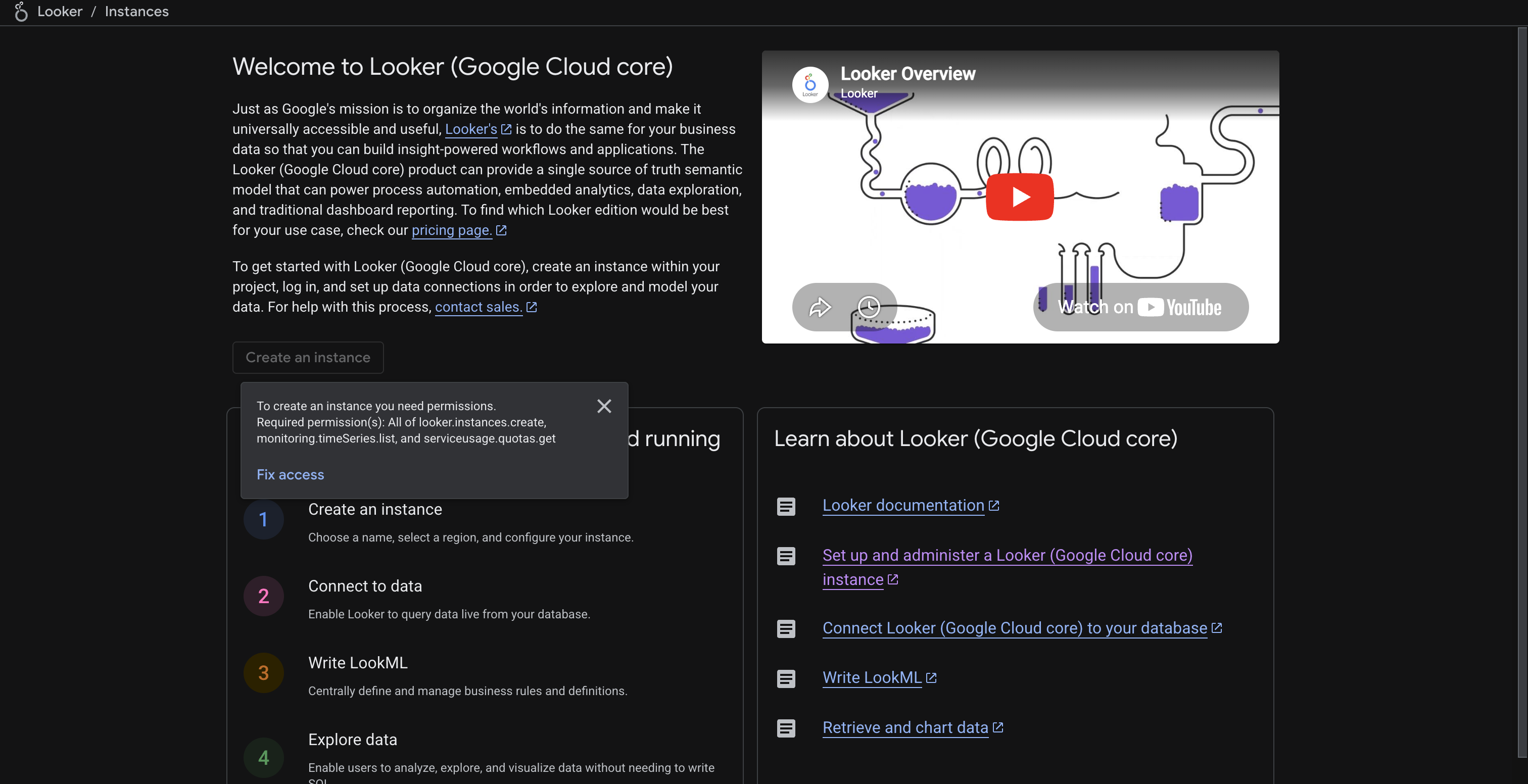
-
-
Create OAuth credentials in Google Cloud Console
Google Looker uses Google OAuth 2.0. You need OAuth client credentials from the same Google Cloud project that hosts your Looker instance.
-
In Google Cloud Console, go to APIs & Services > Credentials.
-
Click Create Credentials > OAuth client ID.
-
Select Web application as the application type.
-
Copy the redirect URI from Scalekit (see next step) and paste it under Authorized redirect URIs.
-
Click Create. Copy the Client ID and Client Secret.
-
-
Add credentials in Scalekit
-
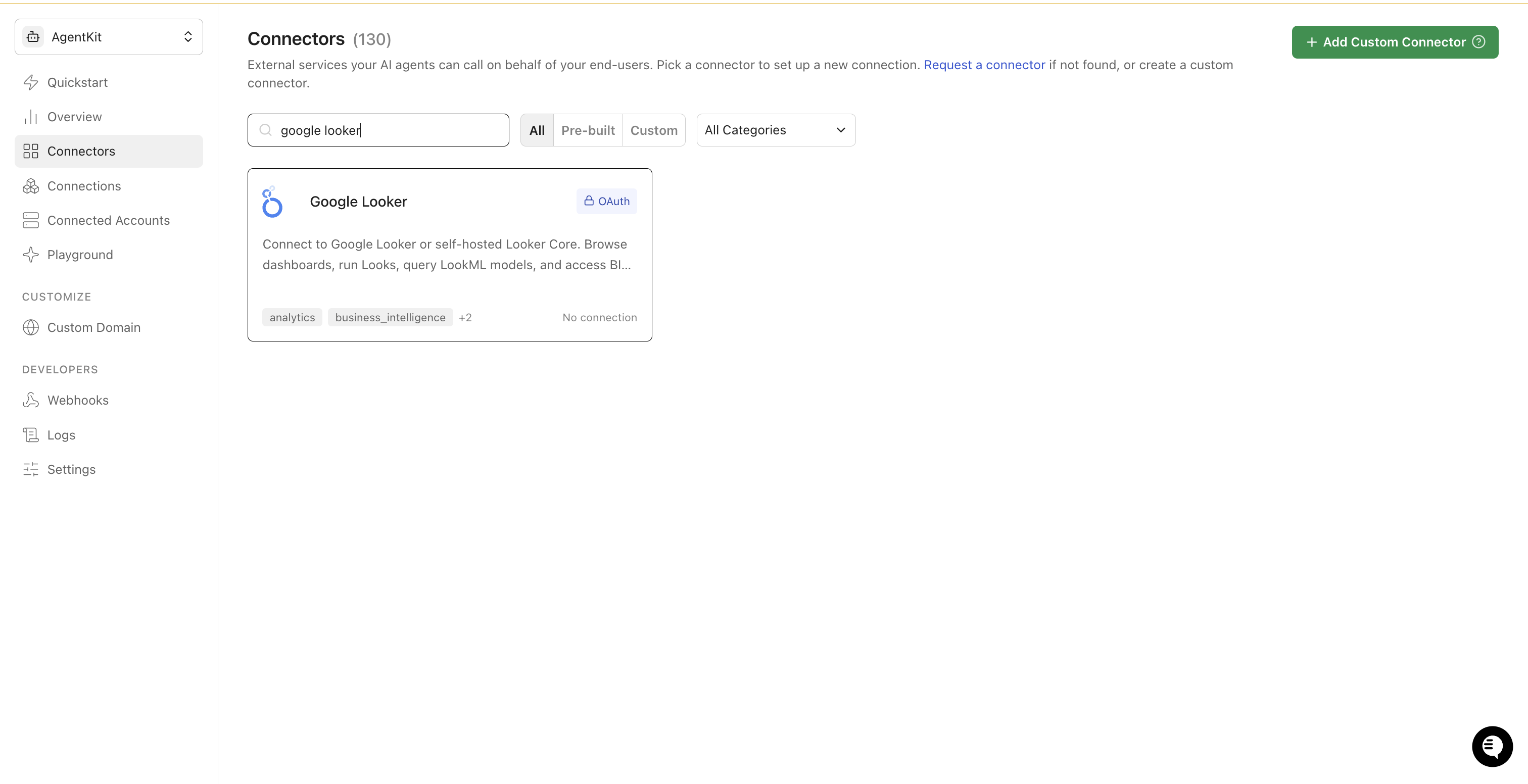
In Scalekit dashboard, go to AgentKit > Connections > Create Connection. Search for Google Looker and click Create.
-
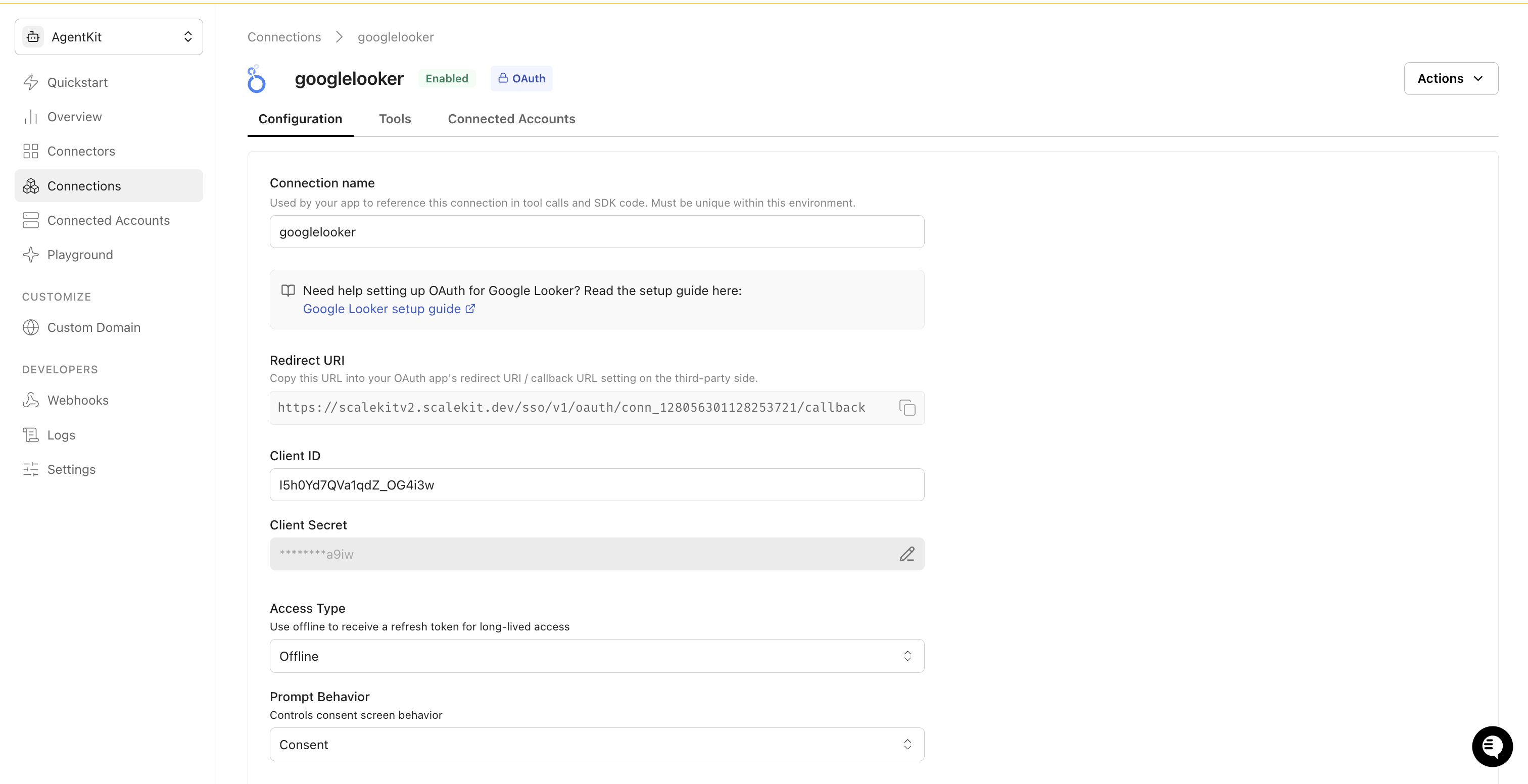
Copy the Redirect URI shown on the configuration page. Go back to Google Cloud Console and add this URI to your OAuth client’s authorized redirect URIs.
-
Return to Scalekit and enter your credentials:
- Client ID (from Google Cloud Console)
- Client Secret (from Google Cloud Console)
-
Keep Access Type set to Offline to receive a refresh token for long-lived access.
-
Click Save.
-
-
Add a connected account
Each end-user who connects their Looker instance needs a connected account. The Looker Instance Hostname is required — this is the hostname of the Looker instance the user is accessing (without
https://), for exampleyour-company.cloud.looker.com.Via the Scalekit dashboard (for testing)
- Go to Connected Accounts > Add Account.
- Enter the User ID and Looker Instance Hostname, then click Save.
- Complete the Google OAuth flow in the popup to authorize access.
Via the SDK (for production)
Generate an authorization link and redirect your user to it. After the user authorizes, Scalekit stores the token automatically.
const { link } = await scalekit.actions.getAuthorizationLink({connectionName: 'googlelooker',identifier: 'user_123',state: { instanceUrl: 'your-company.cloud.looker.com' },})// Redirect the user to `link` to complete OAuth
-
-
Authorize and make your first call
Section titled “Authorize and make your first call”quickstart.ts import { ScalekitClient } from '@scalekit-sdk/node'import 'dotenv/config'const scalekit = new ScalekitClient(process.env.SCALEKIT_ENV_URL,process.env.SCALEKIT_CLIENT_ID,process.env.SCALEKIT_CLIENT_SECRET,)const actions = scalekit.actionsconst connector = 'googlelooker'const identifier = 'user_123'// Generate an authorization link for the userconst { link } = await actions.getAuthorizationLink({ connectionName: connector, identifier })console.log('Authorize Google Looker:', link)process.stdout.write('Press Enter after authorizing...')await new Promise(r => process.stdin.once('data', r))// Make your first callconst result = await actions.executeTool({connector,identifier,toolName: 'googlelooker_get_current_user',toolInput: {},})console.log(result)quickstart.py import osfrom scalekit.client import ScalekitClientfrom dotenv import load_dotenvload_dotenv()scalekit_client = ScalekitClient(env_url=os.getenv("SCALEKIT_ENV_URL"),client_id=os.getenv("SCALEKIT_CLIENT_ID"),client_secret=os.getenv("SCALEKIT_CLIENT_SECRET"),)actions = scalekit_client.actionsconnection_name = "googlelooker"identifier = "user_123"# Generate an authorization link for the userlink_response = actions.get_authorization_link(connection_name=connection_name,identifier=identifier,)print("Authorize Google Looker:", link_response.link)input("Press Enter after authorizing...")# Make your first callresult = actions.execute_tool(tool_input={},tool_name="googlelooker_get_current_user",connection_name=connection_name,identifier=identifier,)print(result)
What you can do
Section titled “What you can do”Connect this agent connector to let your agent:
- Update look, folder, dashboard — Update one or more fields on an existing Look by ID: retitle it, move it to a different folder, point it at a different saved query, or soft-delete/restore it via the deleted flag
- Search looks, dashboards — Search Looks by title or folder instead of listing every Look in the instance
- Run scheduled plan once, query, look — Immediately run an existing, already-saved Scheduled Plan one time and deliver it to its configured destinations, without waiting for its next scheduled occurrence and without changing that schedule
- List scheduled plans, models, looks — List Scheduled Plans
- Get scheduled plan, query, look — Retrieve a single Scheduled Plan by ID: its schedule (crontab/datagroup), destinations, and the dashboard, Look, LookML dashboard, or query it delivers
- Delete scheduled plan, look, folder — Permanently delete a Scheduled Plan by ID, stopping all future scheduled deliveries
Common workflows
Section titled “Common workflows”Google OAuth consent screen verification
Before you use your own Google OAuth credentials in production, understand what end users see on Google’s consent screen when they authorize a connected account.
| Audience type | Consent screen behavior | When to use |
|---|---|---|
| Internal | Shows your App Name and logo from Branding settings | Only users in your Google Workspace or Cloud Identity organization can authorize the connector |
| External | Shows {env_name}.scalekit.dev until Google verifies your app | Any user with a Google account can authorize the connector |
Why External is required for most AgentKit connectors:
- Internal restricts authorization to users in your Google Workspace or Cloud Identity organization. Users with
@gmail.comor other Google accounts outside your organization cannot complete OAuth. - External is required when end users outside your organization authorize tool access through connected accounts.
- Organization-managed OAuth clients follow the same rules as personal or developer OAuth clients. Switching to an org-owned client does not bypass Google verification.
- Until Google completes verification of your External app, users see
scalekit.devon the consent screen. After verification, your App Name and logo appear.
During development:
- Add Test users under APIs & Services → OAuth consent screen while publishing status is Testing.
- On unverified apps, users can click Advanced → Go to app (unsafe) to proceed during testing.
- Google Workspace admins may need to allowlist your OAuth client.
For Google’s verification requirements and timeline, refer to Google’s OAuth consent screen verification guide.
Tool list
Section titled “Tool list”Use the exact tool names from the Tool list below when you call execute_tool. If you’re not sure which name to use, list the tools available for the current user first.
googlelooker_create_dashboard#Create a new, empty Looker dashboard. Requires a title and the ID of the folder it should live in; a dashboard's title must be unique within that destination folder. Add tiles afterward from the Looker UI or the dashboard element APIs.5 params
Create a new, empty Looker dashboard. Requires a title and the ID of the folder it should live in; a dashboard's title must be unique within that destination folder. Add tiles afterward from the Looker UI or the dashboard element APIs.
folder_idstringrequiredID of the folder this dashboard should be created intitlestringrequiredTitle for the new dashboardbackground_colorstringoptionalBackground color for the dashboard, as a hex stringcrossfilter_enabledbooleanoptionalEnable cross-filtering between tiles on this dashboarddescriptionstringoptionalOptional description of the dashboardgooglelooker_create_folder#Create a new folder (space) to organize dashboards and Looks. Provide a parent_id to nest it under an existing folder; omit it to create a root-level folder (permissions permitting). The folder name must be unique among its siblings.2 params
Create a new folder (space) to organize dashboards and Looks. Provide a parent_id to nest it under an existing folder; omit it to create a root-level folder (permissions permitting). The folder name must be unique among its siblings.
namestringrequiredName for the new folderparent_idstringoptionalID of the parent folder to nest this folder undergooglelooker_create_look#Save a query as a new Look so it can be revisited, shared, and run with Run Look. Create the underlying query first with Create Query, then pass its query ID here.4 params
Save a query as a new Look so it can be revisited, shared, and run with Run Look. Create the underlying query first with Create Query, then pass its query ID here.
query_idstringrequiredThe ID of the query this Look should runtitlestringrequiredTitle for the new LookdescriptionstringoptionalOptional description of the Lookfolder_idstringoptionalFolder to save the Look into. Defaults to the user's personal folder.googlelooker_create_query#Define and persist a query against a LookML model and explore, without running it. Returns a query ID (and slug) you can execute repeatedly with Run Query or attach to a new Look with Create Look, instead of resending the full query definition each time.6 params
Define and persist a query against a LookML model and explore, without running it. Returns a query ID (and slug) you can execute repeatedly with Run Query or attach to a new Look with Create Look, instead of resending the full query definition each time.
fieldsstringrequiredComma-separated list of LookML field names to include (e.g., orders.count,orders.total_revenue)modelstringrequiredThe LookML model name to query againstviewstringrequiredThe explore (view) name within the model to queryfiltersobjectoptionalFilter conditions as a JSON object (field_name: filter_value pairs)limitintegeroptionalMaximum number of rows the query returns when runsortsstringoptionalComma-separated list of sort fields with optional direction (e.g., orders.total_revenue desc)googlelooker_create_scheduled_plan#Create a recurring (or one-shot) Scheduled Plan that runs a dashboard, Look, LookML dashboard, or query and delivers the results to one or more destinations (email, webhook, S3, SFTP, etc). Set exactly one of dashboard_id, look_id, lookml_dashboard_id, or query_id as the content to deliver, and provide a crontab or datagroup to control when it runs.14 params
Create a recurring (or one-shot) Scheduled Plan that runs a dashboard, Look, LookML dashboard, or query and delivers the results to one or more destinations (email, webhook, S3, SFTP, etc). Set exactly one of dashboard_id, look_id, lookml_dashboard_id, or query_id as the content to deliver, and provide a crontab or datagroup to control when it runs.
namestringrequiredName of this scheduled planscheduled_plan_destinationarrayrequiredArray of destination objects describing where and how to deliver the resultscrontabstringoptionalVixie-style crontab specifying when this plan runsdashboard_idstringoptionalID of the dashboard this plan should run and deliverenabledbooleanoptionalWhether this scheduled plan is enabledfilters_stringstringoptionalQuery string of filter values to run the dashboard or Look withlook_idstringoptionalID of the Look this plan should run and deliverlookml_dashboard_idstringoptionalID (slug) of the LookML dashboard this plan should run and deliverquery_idstringoptionalID of the saved query this plan should run and deliverrequire_changebooleanoptionalOnly deliver when the results changed since the last runrequire_no_resultsbooleanoptionalOnly deliver when the dashboard or Look returns no resultsrequire_resultsbooleanoptionalOnly deliver when the dashboard or Look returns resultsrun_oncebooleanoptionalWhether this plan should run only once and then disable itselftimezonestringoptionalIANA timezone used to interpret the crontabgooglelooker_delete_dashboard#Permanently delete a Looker dashboard by ID. If the dashboard has not already been soft-deleted (trashed via Update Dashboard's deleted flag), your Looker instance may require that step first depending on configuration. This action cannot be undone.1 param
Permanently delete a Looker dashboard by ID. If the dashboard has not already been soft-deleted (trashed via Update Dashboard's deleted flag), your Looker instance may require that step first depending on configuration. This action cannot be undone.
dashboard_idstringrequiredThe ID of the Looker dashboard to deletegooglelooker_delete_folder#Permanently delete a folder by ID, along with all Looks and dashboards it directly contains. This action cannot be undone — make sure nothing of value remains in the folder before deleting.1 param
Permanently delete a folder by ID, along with all Looks and dashboards it directly contains. This action cannot be undone — make sure nothing of value remains in the folder before deleting.
folder_idstringrequiredThe ID of the folder to deletegooglelooker_delete_look#Permanently delete a Look by ID. This is a hard delete with no undo — unlike removing a Look from the Looker UI (which soft-deletes it), this call destroys the Look data immediately. To soft-delete instead, use Update Look with deleted set to true.1 param
Permanently delete a Look by ID. This is a hard delete with no undo — unlike removing a Look from the Looker UI (which soft-deletes it), this call destroys the Look data immediately. To soft-delete instead, use Update Look with deleted set to true.
look_idstringrequiredThe numeric ID of the Look to deletegooglelooker_delete_scheduled_plan#Permanently delete a Scheduled Plan by ID, stopping all future scheduled deliveries. This action cannot be undone.1 param
Permanently delete a Scheduled Plan by ID, stopping all future scheduled deliveries. This action cannot be undone.
scheduled_plan_idstringrequiredThe ID of the scheduled plan to deletegooglelooker_get_current_user#Retrieve the profile of the currently authenticated Looker user, including their ID, display name, email, and role IDs.1 param
Retrieve the profile of the currently authenticated Looker user, including their ID, display name, email, and role IDs.
fieldsstringoptionalComma-separated list of user fields to include in the responsegooglelooker_get_dashboard#Retrieve the full metadata of a Looker dashboard by its ID, including all tile definitions (charts, tables, text, filters), layout, linked Looks, and underlying queries.2 params
Retrieve the full metadata of a Looker dashboard by its ID, including all tile definitions (charts, tables, text, filters), layout, linked Looks, and underlying queries.
dashboard_idstringrequiredThe ID of the Looker dashboard to retrievefieldsstringoptionalComma-separated list of dashboard fields to include in the responsegooglelooker_get_folder#Retrieve a single folder by ID, including its name, parent folder, creator, and content counts. Use List Folders first to find a folder ID.2 params
Retrieve a single folder by ID, including its name, parent folder, creator, and content counts. Use List Folders first to find a folder ID.
folder_idstringrequiredThe ID of the folder to retrievefieldsstringoptionalComma-separated list of folder fields to include in the responsegooglelooker_get_look#Retrieve the metadata and definition of a saved Look by its ID: title, description, folder, owner, and underlying query ID. Use Get Look Results or Run Look to execute it and fetch data.2 params
Retrieve the metadata and definition of a saved Look by its ID: title, description, folder, owner, and underlying query ID. Use Get Look Results or Run Look to execute it and fetch data.
look_idstringrequiredThe numeric ID of the Look to retrievefieldsstringoptionalComma-separated list of Look fields to include in the responsegooglelooker_get_look_results#Run a saved Look and return results in the specified format. Executes the Look's underlying query against the connected database. Use result_format to control the output: json for structured data, csv for tabular export, xlsx for Excel.14 params
Run a saved Look and return results in the specified format. Executes the Look's underlying query against the connected database. Use result_format to control the output: json for structured data, csv for tabular export, xlsx for Excel.
look_idstringrequiredThe numeric ID of the Look to fetch results fromresult_formatstringrequiredDesired output format for results. Accepted values: json, json_detail, json_bi, csv, txt, html, md, xlsx, sql, png, jpgapply_formattingbooleanoptionalApply model-specified formatting to each result valueapply_visbooleanoptionalApply visualization options to resultscachebooleanoptionalGet results from cache if available. Set to false to force a fresh database query.cache_onlybooleanoptionalRetrieve any results from cache even if expiredforce_productionbooleanoptionalOverride development mode settings to force use of production modelsgenerate_drill_linksbooleanoptionalGenerate drill links for json_detail formatimage_heightintegeroptionalRender height for image formats (png, jpg)image_widthintegeroptionalRender width for image formats (png, jpg)limitintegeroptionalMaximum number of rows to return. May override the limit in the saved query.path_prefixstringoptionalPrefix to use for drill links (URL encoded)rebuild_pdtsbooleanoptionalRebuild Persistent Derived Tables (PDTs) used in the queryserver_table_calcsbooleanoptionalPerform table calculations on query results server-sidegooglelooker_get_query#Retrieve the definition of a previously created query by its ID: the model, explore, fields, filters, sorts, and row limit it was defined with. Use Run Query to execute it and fetch data, or Create Look to save it as a Look.2 params
Retrieve the definition of a previously created query by its ID: the model, explore, fields, filters, sorts, and row limit it was defined with. Use Run Query to execute it and fetch data, or Create Look to save it as a Look.
query_idstringrequiredThe ID of the query to retrievefieldsstringoptionalComma-separated list of query fields to include in the responsegooglelooker_get_scheduled_plan#Retrieve a single Scheduled Plan by ID: its schedule (crontab/datagroup), destinations, and the dashboard, Look, LookML dashboard, or query it delivers.2 params
Retrieve a single Scheduled Plan by ID: its schedule (crontab/datagroup), destinations, and the dashboard, Look, LookML dashboard, or query it delivers.
scheduled_plan_idstringrequiredThe ID of the scheduled plan to retrievefieldsstringoptionalComma-separated list of scheduled plan fields to include in the responsegooglelooker_list_dashboards#List all dashboards in a Looker instance that the caller has access to. Returns dashboard metadata including ID, title, folder, description, and last updated time.1 param
List all dashboards in a Looker instance that the caller has access to. Returns dashboard metadata including ID, title, folder, description, and last updated time.
fieldsstringoptionalComma-separated list of dashboard fields to include in the responsegooglelooker_list_explores#Retrieve a LookML model by name. The response includes an explores array listing all available explores in that model. Use fields=explores to limit the response to just explore metadata.2 params
Retrieve a LookML model by name. The response includes an explores array listing all available explores in that model. Use fields=explores to limit the response to just explore metadata.
model_namestringrequiredThe LookML model name to retrieve explores forfieldsstringoptionalComma-separated list of model fields to include in the responsegooglelooker_list_folders#List all folders (spaces) in the Looker instance including personal folders. Returns folder ID, name, parent folder, creator, and content counts. Use folder IDs to filter Looks and Dashboards by location.1 param
List all folders (spaces) in the Looker instance including personal folders. Returns folder ID, name, parent folder, creator, and content counts. Use folder IDs to filter Looks and Dashboards by location.
fieldsstringoptionalComma-separated list of folder fields to include in the responsegooglelooker_list_looks#List all Looks the caller has access to. Returns Look metadata including ID, title, folder, owner, and last run time. Soft-deleted Looks are excluded.4 params
List all Looks the caller has access to. Returns Look metadata including ID, title, folder, owner, and last run time. Soft-deleted Looks are excluded.
fieldsstringoptionalComma-separated list of Look fields to include in the responselimitintegeroptionalMaximum number of Looks to returnoffsetintegeroptionalNumber of results to skip before returning anysortsstringoptionalComma-separated list of fields to sort results bygooglelooker_list_models#List all available LookML models in the Looker instance. Returns each model's name, project, allowed database connections, and explore count. Use this to discover which models and explores are available before running queries.1 param
List all available LookML models in the Looker instance. Returns each model's name, project, allowed database connections, and explore count. Use this to discover which models and explores are available before running queries.
fieldsstringoptionalComma-separated list of model fields to include in the responsegooglelooker_list_scheduled_plans#List Scheduled Plans. By default returns the plans owned by the calling user; set all_users to true (requires admin permission) to list scheduled plans for every user in the instance.3 params
List Scheduled Plans. By default returns the plans owned by the calling user; set all_users to true (requires admin permission) to list scheduled plans for every user in the instance.
all_usersbooleanoptionalReturn scheduled plans for all users instead of just the callerfieldsstringoptionalComma-separated list of scheduled plan fields to include in the responseuser_idstringoptionalReturn only scheduled plans owned by this user IDgooglelooker_run_inline_query#Execute an ad-hoc query against a LookML model and explore without saving it as a Look. Specify fields, filters, sorts, and a row limit. Useful for one-off analysis and agent-driven data exploration. Complex queries may take longer; 120s timeout applied.7 params
Execute an ad-hoc query against a LookML model and explore without saving it as a Look. Specify fields, filters, sorts, and a row limit. Useful for one-off analysis and agent-driven data exploration. Complex queries may take longer; 120s timeout applied.
fieldsstringrequiredComma-separated list of LookML field names to include (e.g., orders.count,orders.total_revenue)modelstringrequiredThe LookML model name to query againstresult_formatstringrequiredOutput format for the query results. Accepted values: json, json_detail, json_bi, csv, txt, html, md, xlsx, sql, png, jpgviewstringrequiredThe explore (view) name within the model to queryfiltersobjectoptionalFilter conditions as a JSON object (field_name: filter_value pairs)limitintegeroptionalMaximum number of rows to return from the querysortsstringoptionalComma-separated list of sort fields with optional direction (e.g., orders.total_revenue desc)googlelooker_run_look#Run a saved Look and return the results in the specified format. Executes the Look's underlying query against the connected database and returns the current data.14 params
Run a saved Look and return the results in the specified format. Executes the Look's underlying query against the connected database and returns the current data.
look_idstringrequiredThe numeric ID of the Look to runresult_formatstringrequiredDesired output format for results. Accepted values: json, json_detail, csv, txt, html, md, xlsx, sql, png, jpgapply_formattingbooleanoptionalApply model-specified formatting to each result valueapply_visbooleanoptionalApply visualization options to resultscachebooleanoptionalGet results from cache if available. Set to false to force a fresh database query.cache_onlybooleanoptionalRetrieve any results from cache even if expiredforce_productionbooleanoptionalOverride development mode settings to force use of production modelsgenerate_drill_linksbooleanoptionalGenerate drill links for json_detail formatimage_heightintegeroptionalRender height for image formats (png, jpg)image_widthintegeroptionalRender width for image formats (png, jpg)limitintegeroptionalMaximum number of rows to return. May override the limit in the saved query.path_prefixstringoptionalPrefix to use for drill links (URL encoded)rebuild_pdtsbooleanoptionalRebuild Persistent Derived Tables (PDTs) used in the queryserver_table_calcsbooleanoptionalPerform table calculations on query results server-sidegooglelooker_run_query#Execute a previously saved query (created with Create Query) by its query ID and return results in the specified format. Cheaper than Run Inline Query when re-running the same query definition repeatedly.4 params
Execute a previously saved query (created with Create Query) by its query ID and return results in the specified format. Cheaper than Run Inline Query when re-running the same query definition repeatedly.
query_idstringrequiredThe ID of the saved query to runresult_formatstringrequiredDesired output format for results. Accepted values: json, json_detail, json_bi, csv, txt, html, md, xlsx, sql, png, jpgcachebooleanoptionalGet results from cache if available. Set to false to force a fresh database query.limitintegeroptionalMaximum number of rows to return. Overrides the limit baked into the saved query.googlelooker_run_scheduled_plan_once#Immediately run an existing, already-saved Scheduled Plan one time and deliver it to its configured destinations, without waiting for its next scheduled occurrence and without changing that schedule. Optionally override the query filters for just this one run.2 params
Immediately run an existing, already-saved Scheduled Plan one time and deliver it to its configured destinations, without waiting for its next scheduled occurrence and without changing that schedule. Optionally override the query filters for just this one run.
scheduled_plan_idstringrequiredThe ID of the scheduled plan to run immediatelyfilters_stringstringoptionalQuery string of filter values to use for just this one run, overriding the plan's saved filtersgooglelooker_search_dashboards#Search dashboards by title, description, or folder instead of listing every dashboard in the instance. Useful for finding a specific dashboard when there are too many to browse.5 params
Search dashboards by title, description, or folder instead of listing every dashboard in the instance. Useful for finding a specific dashboard when there are too many to browse.
fieldsstringoptionalComma-separated list of dashboard fields to include in the responsefolder_idstringoptionalRestrict the search to dashboards in this folderlimitintegeroptionalMaximum number of dashboards to returnoffsetintegeroptionalNumber of results to skip before returning anytitlestringoptionalFilter dashboards whose title matches this value. Supports wildcards with %.googlelooker_search_looks#Search Looks by title or folder instead of listing every Look in the instance. Useful for finding a specific Look when there are too many to browse.5 params
Search Looks by title or folder instead of listing every Look in the instance. Useful for finding a specific Look when there are too many to browse.
fieldsstringoptionalComma-separated list of Look fields to include in the responsefolder_idstringoptionalRestrict the search to Looks in this folderlimitintegeroptionalMaximum number of Looks to returnoffsetintegeroptionalNumber of results to skip before returning anytitlestringoptionalFilter Looks whose title matches this value. Supports wildcards with %.googlelooker_update_dashboard#Update one or more scalar fields on an existing Looker dashboard by ID (title, folder, description, colors, or soft-delete state). Only the fields provided are changed. This cannot modify nested tiles, filters, or layout components — use the dashboard element APIs for those.7 params
Update one or more scalar fields on an existing Looker dashboard by ID (title, folder, description, colors, or soft-delete state). Only the fields provided are changed. This cannot modify nested tiles, filters, or layout components — use the dashboard element APIs for those.
dashboard_idstringrequiredThe ID of the Looker dashboard to updatebackground_colorstringoptionalNew background color for the dashboard, as a hex stringcrossfilter_enabledbooleanoptionalEnable or disable cross-filtering between tiles on this dashboarddeletedbooleanoptionalSet the dashboard's soft-deleted (trashed) statedescriptionstringoptionalNew description for the dashboardfolder_idstringoptionalMove the dashboard to this folder IDtitlestringoptionalNew title for the dashboardgooglelooker_update_folder#Rename a folder or move it under a different parent folder. Only the fields provided are changed.3 params
Rename a folder or move it under a different parent folder. Only the fields provided are changed.
folder_idstringrequiredThe ID of the folder to updatenamestringoptionalNew name for the folderparent_idstringoptionalMove the folder under this parent folder IDgooglelooker_update_look#Update one or more fields on an existing Look by ID: retitle it, move it to a different folder, point it at a different saved query, or soft-delete/restore it via the deleted flag. Only the fields provided are changed.6 params
Update one or more fields on an existing Look by ID: retitle it, move it to a different folder, point it at a different saved query, or soft-delete/restore it via the deleted flag. Only the fields provided are changed.
look_idstringrequiredThe numeric ID of the Look to updatedeletedbooleanoptionalSet the Look's soft-deleted statedescriptionstringoptionalNew description for the Lookfolder_idstringoptionalMove the Look to this folder IDquery_idstringoptionalPoint this Look at a different query IDtitlestringoptionalNew title for the Look