


Dropbox connector
OAuth 2.0Files & DocumentsConnect to Dropbox. Manage files, folders, sharing, and cloud storage workflows
Dropbox connector
-
Install the SDK
Section titled “Install the SDK”Terminal window npm install @scalekit-sdk/nodeTerminal window pip install scalekit -
Set your credentials
Section titled “Set your credentials”Add your Scalekit credentials to your
.envfile. Find values in app.scalekit.com > Developers > API Credentials..env SCALEKIT_ENVIRONMENT_URL=<your-environment-url>SCALEKIT_CLIENT_ID=<your-client-id>SCALEKIT_CLIENT_SECRET=<your-client-secret> -
Set up the connector
Section titled “Set up the connector”Register your Dropbox credentials with Scalekit so it handles the token lifecycle. You do this once per environment.
Dashboard setup steps
Register your Scalekit environment with the Dropbox connector so Scalekit handles the authentication flow and token lifecycle for you. The connection name you create will be used to identify and invoke the connection programmatically. You’ll need your app credentials from the Dropbox App Console.
-
Set up auth redirects
-
In Scalekit dashboard, go to AgentKit > Connections > Create Connection.
-
Find Dropbox from the list of providers and click Create.
-
Click Use your own credentials and copy the redirect URI. It looks like
https://<SCALEKIT_ENVIRONMENT_URL>/sso/v1/oauth/<CONNECTION_ID>/callback.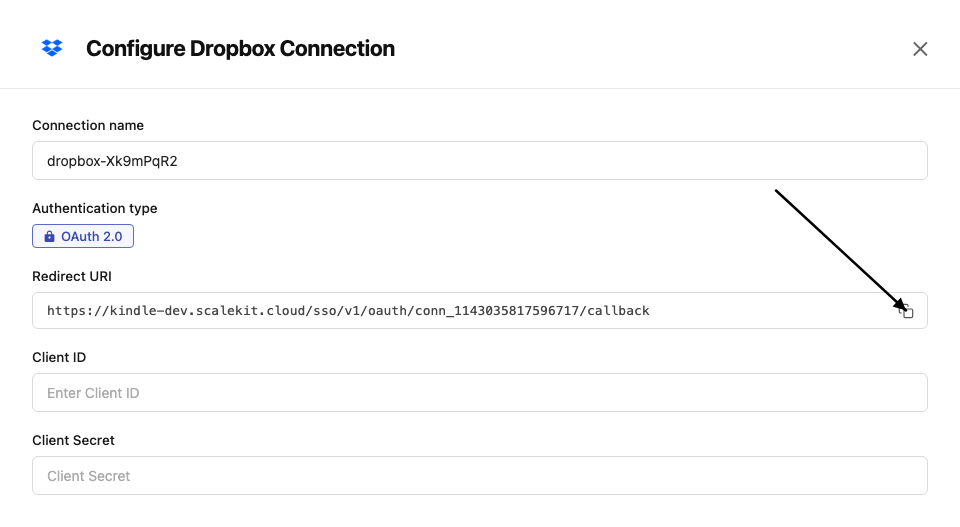
-
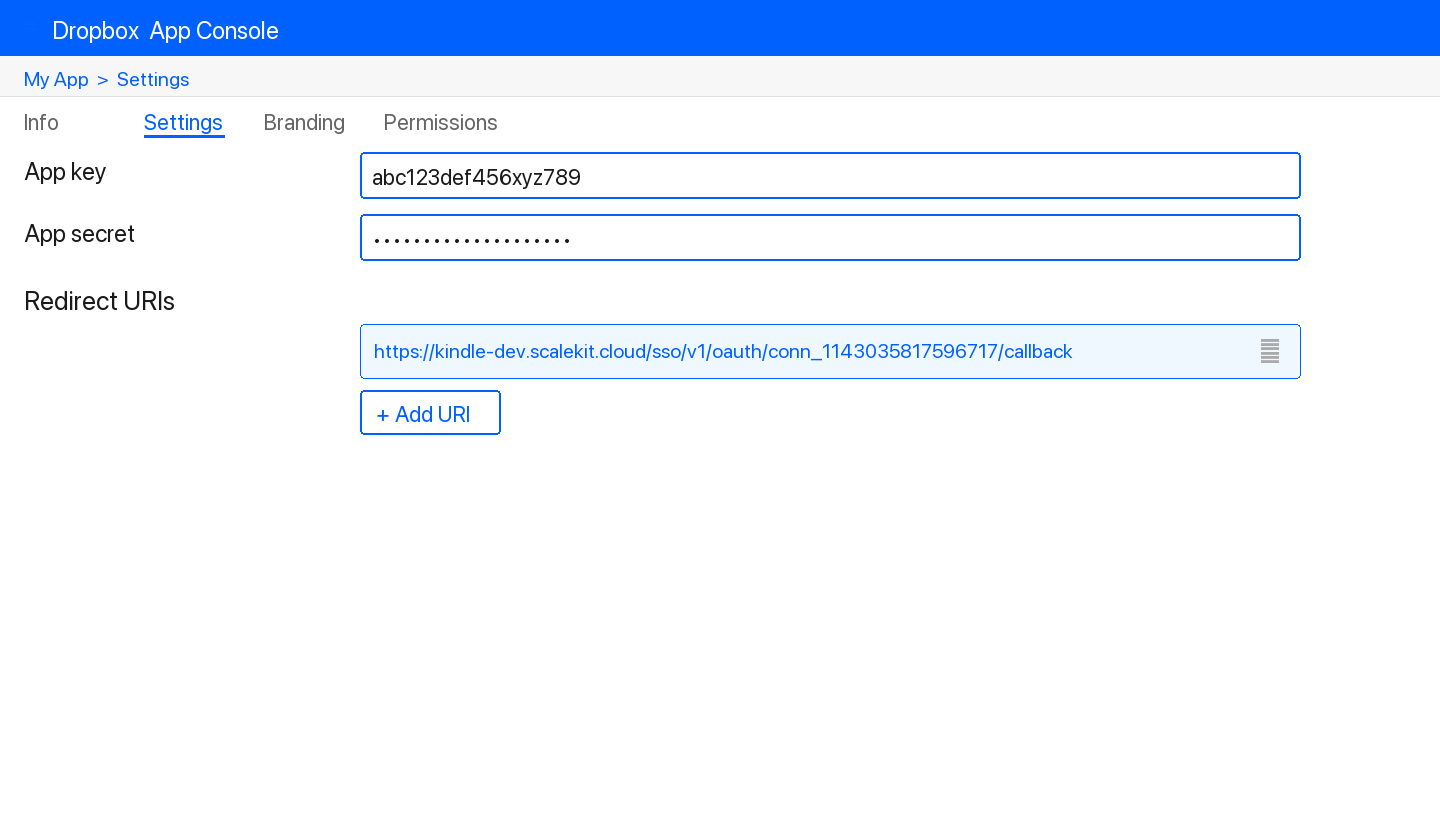
In the Dropbox App Console, open your app and go to the Settings tab.
-
Under Redirect URIs, paste the copied URI and click Add.
-
-
Get client credentials
- In the Dropbox App Console, open your app and go to the Settings tab:
- Client ID — listed under App key
- Client Secret — listed under App secret
- In the Dropbox App Console, open your app and go to the Settings tab:
-
Add credentials in Scalekit
-
In Scalekit dashboard, go to AgentKit > Connections and open the connection you created.
-
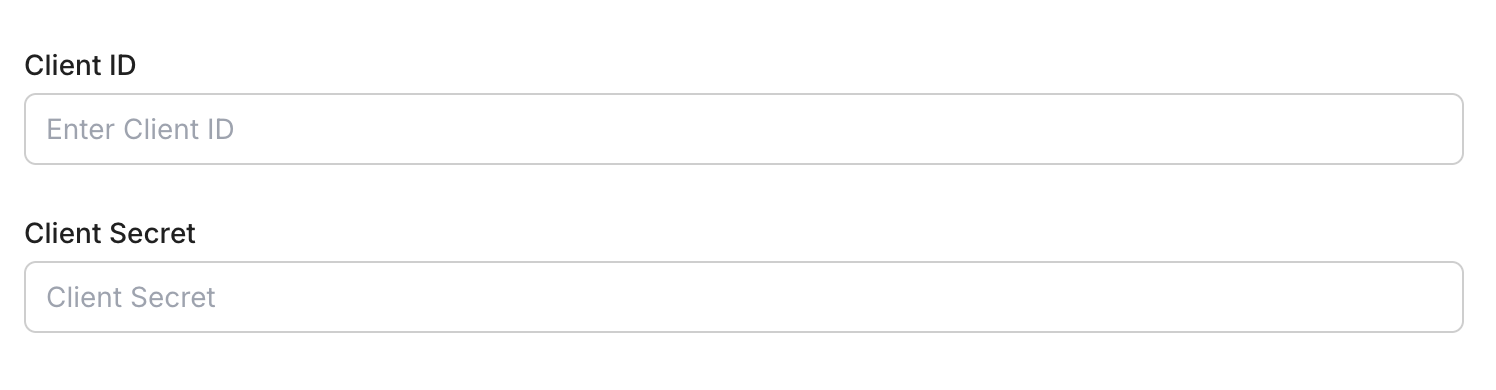
Enter your credentials:
- Client ID (App key from your Dropbox app)
- Client Secret (App secret from your Dropbox app)
- Permissions — select the scopes your app needs
-
Click Save.
-
-
-
Authorize and make your first call
Section titled “Authorize and make your first call”quickstart.ts import { ScalekitClient } from '@scalekit-sdk/node'import 'dotenv/config'const scalekit = new ScalekitClient(process.env.SCALEKIT_ENV_URL,process.env.SCALEKIT_CLIENT_ID,process.env.SCALEKIT_CLIENT_SECRET,)const actions = scalekit.actionsconst connector = 'dropbox'const identifier = 'user_123'// Generate an authorization link for the userconst { link } = await actions.getAuthorizationLink({ connectionName: connector, identifier })console.log('Authorize Dropbox:', link)process.stdout.write('Press Enter after authorizing...')await new Promise(r => process.stdin.once('data', r))// Make your first callconst result = await actions.executeTool({connector,identifier,toolName: 'dropbox_file_requests_list',toolInput: {},})console.log(result)quickstart.py import osfrom scalekit.client import ScalekitClientfrom dotenv import load_dotenvload_dotenv()scalekit_client = ScalekitClient(env_url=os.getenv("SCALEKIT_ENV_URL"),client_id=os.getenv("SCALEKIT_CLIENT_ID"),client_secret=os.getenv("SCALEKIT_CLIENT_SECRET"),)actions = scalekit_client.actionsconnection_name = "dropbox"identifier = "user_123"# Generate an authorization link for the userlink_response = actions.get_authorization_link(connection_name=connection_name,identifier=identifier,)print("Authorize Dropbox:", link_response.link)input("Press Enter after authorizing...")# Make your first callresult = actions.execute_tool(tool_input={},tool_name="dropbox_file_requests_list",connection_name=connection_name,identifier=identifier,)print(result)
What you can do
Section titled “What you can do”Connect this agent connector to let your agent:
- Get users, sharing, files — Retrieve basic account information (name, profile photo, team membership) for any Dropbox user by their account ID
- Update sharing, file requests — Change the access level of an existing member of a Dropbox shared folder, identified by email address
- Folder sharing unshare, sharing unmount, sharing mount — Stop sharing a folder that the current Dropbox user owns
- File sharing unshare — Remove all members from a Dropbox file and turn off its sharing, reverting it to a normal unshared file
- Member sharing remove folder, sharing remove file, sharing add file — Remove a member (by email) from a Dropbox shared folder, revoking their access
- Settings sharing modify shared link — Change the visibility, audience, or access settings of an existing Dropbox shared link, or remove its expiration
Common workflows
Section titled “Common workflows”Proxy API call
const result = await actions.request({ connectionName: 'dropbox', identifier: 'user_123', path: '/2/users/get_current_account', method: 'POST',});console.log(result);result = actions.request( connection_name='dropbox', identifier='user_123', path="/2/users/get_current_account", method="POST",)print(result)Execute a tool
const result = await actions.executeTool({ connector: 'dropbox', identifier: 'user_123', toolName: 'dropbox_list', toolInput: {},});console.log(result);result = actions.execute_tool( connection_name='dropbox', identifier='user_123', tool_name='dropbox_list', tool_input={},)print(result)Tool list
Section titled “Tool list”Use the exact tool names from the Tool list below when you call execute_tool. If you’re not sure which name to use, list the tools available for the current user first.
dropbox_file_requests_create#Create a Dropbox file request that allows others to upload files to a designated Dropbox folder.6 params
Create a Dropbox file request that allows others to upload files to a designated Dropbox folder.
destinationstringrequiredThe Dropbox folder path where uploaded files will be saved.titlestringrequiredThe title of the file request, shown to contributors.deadline_allow_late_uploadsstringoptionalWhether to allow uploads after the deadline has passed.deadline_deadlinestringoptionalDeadline date for submissions in ISO 8601 format (e.g., '2024-12-31T23:59:59Z').descriptionstringoptionalA description of the file request, shown to contributors.openbooleanoptionalWhether the file request is open for submissions. Defaults to true.dropbox_file_requests_delete#Delete one or more closed Dropbox file requests by ID. File requests must be closed before they can be deleted.1 param
Delete one or more closed Dropbox file requests by ID. File requests must be closed before they can be deleted.
idsarrayrequiredList of file request IDs to delete. Each request must already be closed.dropbox_file_requests_get#Retrieve details for a single Dropbox file request by its ID, including title, destination folder, deadline, and open/closed state.1 param
Retrieve details for a single Dropbox file request by its ID, including title, destination folder, deadline, and open/closed state.
idstringrequiredThe ID of the file request to retrieve.dropbox_file_requests_list#List all file requests created by the current Dropbox user.1 param
List all file requests created by the current Dropbox user.
limitintegeroptionalMaximum number of file requests to return.dropbox_file_requests_update#Update the title, destination, deadline, description, or open/closed state of an existing Dropbox file request. Only the fields you provide are changed.5 params
Update the title, destination, deadline, description, or open/closed state of an existing Dropbox file request. Only the fields you provide are changed.
idstringrequiredThe ID of the file request to update.descriptionstringoptionalNew description for the file request, shown to contributors.destinationstringoptionalNew destination folder path in the user's Dropbox for uploaded files.openbooleanoptionalWhether the file request should be open for submissions.titlestringoptionalNew title for the file request. Must not be empty if provided.dropbox_files_copy#Copy a file or folder from one path to another in Dropbox. The original file is preserved. Optionally auto-rename if a conflict exists at the destination.5 params
Copy a file or folder from one path to another in Dropbox. The original file is preserved. Optionally auto-rename if a conflict exists at the destination.
from_pathstringrequiredThe path of the file or folder to copy.to_pathstringrequiredThe destination path for the copy.allow_ownership_transferbooleanoptionalAllow copies that change the file ownership.allow_shared_folderbooleanoptionalIf true, copy is allowed even if the destination is inside a shared folder.autorenamebooleanoptionalIf true, the destination will be automatically renamed if a file/folder already exists there.dropbox_files_copy_batch#Copy up to 1000 files or folders within Dropbox in a single batch request. Each entry specifies a source and destination path.2 params
Copy up to 1000 files or folders within Dropbox in a single batch request. Each entry specifies a source and destination path.
entriesarrayrequiredArray of source/destination path pairs to copy. Example: [{"from_path": "/Homework/math", "to_path": "/Archive/math"}]autorenamebooleanoptionalIf there's a conflict at the destination for any entry, have the Dropbox server try to autorename the file to avoid it.dropbox_files_copy_batch_check#Poll the status of an asynchronous copy_batch_v2 job. When dropbox_files_copy_batch returns an in-progress async_job_id instead of completing immediately, use this to check whether the copy has finished.1 param
Poll the status of an asynchronous copy_batch_v2 job. When dropbox_files_copy_batch returns an in-progress async_job_id instead of completing immediately, use this to check whether the copy has finished.
async_job_idstringrequiredThe async job ID returned by a previous copy_batch_v2 call that reported an in-progress status.dropbox_files_create_folder#Create a new folder at the specified path in Dropbox. Optionally auto-rename if a folder with the same name already exists.2 params
Create a new folder at the specified path in Dropbox. Optionally auto-rename if a folder with the same name already exists.
pathstringrequiredThe path of the folder to create.autorenamebooleanoptionalIf true, the folder will be renamed automatically if a folder with the same name already exists.dropbox_files_delete#Delete a file or folder at the specified path in Dropbox. Deleted items are moved to the Dropbox trash and can be recovered within 30 days (or 180 days for Business accounts).2 params
Delete a file or folder at the specified path in Dropbox. Deleted items are moved to the Dropbox trash and can be recovered within 30 days (or 180 days for Business accounts).
pathstringrequiredThe path of the file or folder to delete.parent_revstringoptionalPerform delete only if the file's revision matches this value. Only applies to files, not folders.dropbox_files_delete_batch#Delete up to 1000 files or folders from Dropbox in a single batch request. Each entry is a path to move to the trash.1 param
Delete up to 1000 files or folders from Dropbox in a single batch request. Each entry is a path to move to the trash.
entriesarrayrequiredArray of paths to delete. Each item must contain a 'path' key. Example: [{"path": "/Homework/old1.txt"}, {"path": "/Homework/old2.txt"}]dropbox_files_delete_batch_check#Poll the status of an asynchronous delete_batch job. When dropbox_files_delete_batch returns an in-progress async_job_id instead of completing immediately, use this to check whether the deletion has finished.1 param
Poll the status of an asynchronous delete_batch job. When dropbox_files_delete_batch returns an in-progress async_job_id instead of completing immediately, use this to check whether the deletion has finished.
async_job_idstringrequiredThe async job ID returned by a previous delete_batch call that reported an in-progress status.dropbox_files_download#Download the raw contents of a file from Dropbox by path or file ID. Returns the file bytes directly (not wrapped in JSON) via Dropbox's content API host.1 param
Download the raw contents of a file from Dropbox by path or file ID. Returns the file bytes directly (not wrapped in JSON) via Dropbox's content API host.
pathstringrequiredThe path or ID of the file to download.dropbox_files_get_metadata#Get metadata for a file or folder at the specified Dropbox path. Returns name, path, size, modification date, and other properties.4 params
Get metadata for a file or folder at the specified Dropbox path. Returns name, path, size, modification date, and other properties.
pathstringrequiredThe path to the file or folder to get metadata for.include_deletedbooleanoptionalIf true, deleted files and folders will be included in the results.include_has_explicit_shared_membersbooleanoptionalIf true, the result will include a flag indicating whether the file has explicit shared members.include_media_infobooleanoptionalIf true, the result will include media info (e.g., dimensions, duration) for photo and video files.dropbox_files_get_temporary_link#Get a temporary link to download a file from Dropbox. The link expires after 4 hours. Use this to share a file download URL without granting permanent access.1 param
Get a temporary link to download a file from Dropbox. The link expires after 4 hours. Use this to share a file download URL without granting permanent access.
pathstringrequiredThe path of the file to get a temporary download link for.dropbox_files_get_temporary_upload_link#Get a one-time link that a third party can POST raw file bytes to directly, without needing Dropbox API credentials. The uploaded content is committed to the given Dropbox path once the link is used.3 params
Get a one-time link that a third party can POST raw file bytes to directly, without needing Dropbox API credentials. The uploaded content is committed to the given Dropbox path once the link is used.
pathstringrequiredThe Dropbox path the uploaded file will be committed to once the link is used.autorenamebooleanoptionalIf there's a conflict at the destination path, have the Dropbox server try to autorename the file to avoid it.durationintegeroptionalHow long the link should remain valid, in seconds. Defaults to 14400 (4 hours), which is also the maximum.dropbox_files_get_thumbnail#Get a rendered thumbnail image for an image, video, or document file stored in Dropbox. Returns the raw thumbnail bytes (JPEG) directly via Dropbox's content API host, not wrapped in JSON.1 param
Get a rendered thumbnail image for an image, video, or document file stored in Dropbox. Returns the raw thumbnail bytes (JPEG) directly via Dropbox's content API host, not wrapped in JSON.
pathstringrequiredThe path or ID of the file to generate a thumbnail for.dropbox_files_list_folder#List the contents of a folder in Dropbox. Returns files and subfolders at the given path. Supports recursive listing, filtering for deleted items, and pagination via cursor.6 params
List the contents of a folder in Dropbox. Returns files and subfolders at the given path. Supports recursive listing, filtering for deleted items, and pagination via cursor.
pathstringrequiredThe path to the folder to list. Use an empty string or '' to list the root of the Dropbox.include_deletedbooleanoptionalIf true, deleted files and folders will be included in the results.include_has_explicit_shared_membersbooleanoptionalIf true, the results will include a flag for each file indicating whether it has explicit shared members.include_media_infobooleanoptionalIf true, the results will include media info (e.g., dimensions, duration) for photo and video files.limitintegeroptionalThe maximum number of results to return per page. Default is determined by the server (typically 2000).recursivebooleanoptionalIf true, the listing will recurse into subfolders.dropbox_files_list_folder_continue#Continue listing folder contents using a cursor returned from a previous list_folder call. Use this to paginate through large folder listings.1 param
Continue listing folder contents using a cursor returned from a previous list_folder call. Use this to paginate through large folder listings.
cursorstringrequiredThe cursor returned by a previous list_folder or list_folder/continue call.dropbox_files_list_revisions#List all revisions of a file at the given path in Dropbox. Returns revision history including IDs, sizes, and modification dates. Useful for viewing version history and recovering older versions.3 params
List all revisions of a file at the given path in Dropbox. Returns revision history including IDs, sizes, and modification dates. Useful for viewing version history and recovering older versions.
pathstringrequiredThe path of the file to list revisions for.limitintegeroptionalThe maximum number of revisions to return (1–100). Defaults to 10.modestringoptionalDetermines how the path is interpreted. 'path' uses the file's current path; 'id' uses the file's unique ID.dropbox_files_move#Move a file or folder from one path to another in Dropbox. Optionally allow moving into shared folders or auto-rename if a conflict exists at the destination.5 params
Move a file or folder from one path to another in Dropbox. Optionally allow moving into shared folders or auto-rename if a conflict exists at the destination.
from_pathstringrequiredThe current path of the file or folder to move.to_pathstringrequiredThe destination path for the file or folder.allow_ownership_transferbooleanoptionalAllow moves that change the file ownership. Only relevant for moves from one user's Dropbox to another.allow_shared_folderbooleanoptionalIf true, move is allowed even if the destination is inside a shared folder.autorenamebooleanoptionalIf true, the destination will be automatically renamed if a file/folder already exists there.dropbox_files_move_batch#Move up to 1000 files or folders within Dropbox in a single batch request. Each entry specifies a source and destination path.3 params
Move up to 1000 files or folders within Dropbox in a single batch request. Each entry specifies a source and destination path.
entriesarrayrequiredArray of source/destination path pairs to move. Example: [{"from_path": "/Inbox/report.pdf", "to_path": "/Archive/report.pdf"}]allow_ownership_transferbooleanoptionalAllow moves by owner even if it would result in an ownership transfer for the content being moved.autorenamebooleanoptionalIf there's a conflict at the destination for any entry, have the Dropbox server try to autorename the file to avoid it.dropbox_files_move_batch_check#Poll the status of an asynchronous move_batch_v2 job. When dropbox_files_move_batch returns an in-progress async_job_id instead of completing immediately, use this to check whether the move has finished.1 param
Poll the status of an asynchronous move_batch_v2 job. When dropbox_files_move_batch returns an in-progress async_job_id instead of completing immediately, use this to check whether the move has finished.
async_job_idstringrequiredThe async job ID returned by a previous move_batch_v2 call that reported an in-progress status.dropbox_files_permanently_delete#Permanently delete a file or folder from Dropbox, bypassing the trash. The item cannot be restored afterwards. Only available for Dropbox Business team folders/files, or accounts with extended version history disabled.2 params
Permanently delete a file or folder from Dropbox, bypassing the trash. The item cannot be restored afterwards. Only available for Dropbox Business team folders/files, or accounts with extended version history disabled.
pathstringrequiredThe path in the user's Dropbox to permanently delete.parent_revstringoptionalIf provided, only delete the file if its latest revision matches this rev. Does not support deleting a folder.dropbox_files_restore#Restore a file in Dropbox to a specific revision. Requires the file path and revision identifier.2 params
Restore a file in Dropbox to a specific revision. Requires the file path and revision identifier.
pathstringrequiredThe path to the file to restore, e.g. '/Documents/notes.txt'.revstringrequiredThe revision identifier to restore the file to. Obtained from file revision history.dropbox_files_save_url#Save a file from a URL directly to a Dropbox path. The file is downloaded from the URL and saved to the specified Dropbox location.2 params
Save a file from a URL directly to a Dropbox path. The file is downloaded from the URL and saved to the specified Dropbox location.
pathstringrequiredThe Dropbox path where the file should be saved, e.g. '/Downloads/report.pdf'.urlstringrequiredThe URL of the file to download and save to Dropbox.dropbox_files_save_url_check_job_status#Poll the status of an asynchronous save_url job. Saving a file from a URL to Dropbox is asynchronous; when dropbox_files_save_url returns an in-progress async_job_id, use this to check whether the download has finished.1 param
Poll the status of an asynchronous save_url job. Saving a file from a URL to Dropbox is asynchronous; when dropbox_files_save_url returns an in-progress async_job_id, use this to check whether the download has finished.
async_job_idstringrequiredThe async job ID returned by a previous save_url call that reported an in-progress status.dropbox_files_search#Search for files and folders in Dropbox by name or content. Supports filtering by path, file status, and limiting results. Returns matching file and folder entries.5 params
Search for files and folders in Dropbox by name or content. Supports filtering by path, file status, and limiting results. Returns matching file and folder entries.
querystringrequiredThe search query string. Matches file names, extensions, and content.options_file_statusstringoptionalRestricts search to files with this status. 'active' returns non-deleted files; 'deleted' returns only deleted files.options_filename_onlybooleanoptionalIf true, the search only matches filenames and not file content.options_max_resultsintegeroptionalThe maximum number of search results to return (1–1000).options_pathstringoptionalRestricts the search to this folder path and its subfolders.dropbox_files_search_continue#Fetch the next page of results for a previous dropbox_files_search call, using the cursor returned in that call's response.1 param
Fetch the next page of results for a previous dropbox_files_search call, using the cursor returned in that call's response.
cursorstringrequiredThe cursor returned by the previous search call. Used to fetch the next page of results.dropbox_sharing_add_file_member#Share a single Dropbox file directly with one or more people by email address, without sharing the whole containing folder.5 params
Share a single Dropbox file directly with one or more people by email address, without sharing the whole containing folder.
filestringrequiredThe path or ID of the file to share.member_emailsarrayrequiredEmail addresses of the people to add as members of this file.access_levelstringoptionalAccess level to grant the new members. Defaults to the file's standard sharing access if omitted.custom_messagestringoptionalMessage to include in the invitation email sent to the new members.quietbooleanoptionalIf true, do not send email or device notifications to the added members.dropbox_sharing_add_folder_member#Add one or more members to a Dropbox shared folder. Each member is specified with an email address and access level.4 params
Add one or more members to a Dropbox shared folder. Each member is specified with an email address and access level.
membersarrayrequiredArray of members to add. Each member has an email and access level.shared_folder_idstringrequiredThe ID of the shared folder to add members to.custom_messagestringoptionalOptional custom message to include in the invitation email.quietbooleanoptionalIf true, do not send a notification email to added members.dropbox_sharing_get_folder_metadata#Retrieve metadata for a single Dropbox shared folder by its ID, including name, policies, and the current user's permissions.1 param
Retrieve metadata for a single Dropbox shared folder by its ID, including name, policies, and the current user's permissions.
shared_folder_idstringrequiredThe ID of the shared folder to look up.dropbox_sharing_list_file_members#List the users and groups that have access to a specific shared file in Dropbox, including access levels and permissions.3 params
List the users and groups that have access to a specific shared file in Dropbox, including access levels and permissions.
filestringrequiredThe path or ID of the file whose members to list.include_inheritedbooleanoptionalWhether to include members who only have access from a parent shared folder.limitintegeroptionalMaximum number of members to return per page (1-300). Defaults to 100.dropbox_sharing_list_folder_members#List all members (users and groups) of a Dropbox shared folder.2 params
List all members (users and groups) of a Dropbox shared folder.
shared_folder_idstringrequiredThe ID of the shared folder whose members to list.limitintegeroptionalMaximum number of members to return per page.dropbox_sharing_list_folders#List all shared folders the current Dropbox user is a member of, including folders they own and folders shared with them.1 param
List all shared folders the current Dropbox user is a member of, including folders they own and folders shared with them.
limitintegeroptionalThe maximum number of shared folders to return per request (1-1000). Defaults to 1000.dropbox_sharing_list_received_files#List files that other people have shared directly with the current Dropbox user. Distinct from listing the members of a specific file or folder you already know about.1 param
List files that other people have shared directly with the current Dropbox user. Distinct from listing the members of a specific file or folder you already know about.
limitintegeroptionalThe maximum number of files to return per request.dropbox_sharing_mount_folder#Mount a shared folder that has been shared with the current Dropbox user, adding it into their own Dropbox so it appears alongside their regular files.1 param
Mount a shared folder that has been shared with the current Dropbox user, adding it into their own Dropbox so it appears alongside their regular files.
shared_folder_idstringrequiredThe ID of the shared folder to mount.dropbox_sharing_remove_file_member#Remove a member's access to a Dropbox file that was directly shared with them (by email). Counterpart to dropbox_sharing_add_file_member.2 params
Remove a member's access to a Dropbox file that was directly shared with them (by email). Counterpart to dropbox_sharing_add_file_member.
filestringrequiredThe path or ID of the file to remove the member from.member_emailstringrequiredEmail address of the member to remove from this file.dropbox_sharing_remove_folder_member#Remove a member (by email) from a Dropbox shared folder, revoking their access. Counterpart to dropbox_sharing_add_folder_member.3 params
Remove a member (by email) from a Dropbox shared folder, revoking their access. Counterpart to dropbox_sharing_add_folder_member.
member_emailstringrequiredEmail address of the member to remove.shared_folder_idstringrequiredThe ID of the shared folder to remove the member from.leave_a_copybooleanoptionalIf true, the removed member keeps their own copy of the folder's contents.dropbox_sharing_unmount_folder#Unmount a shared folder from the current Dropbox user's own file tree. Membership is kept, so the folder can be mounted again later with dropbox_sharing_mount_folder; this only removes it from view.1 param
Unmount a shared folder from the current Dropbox user's own file tree. Membership is kept, so the folder can be mounted again later with dropbox_sharing_mount_folder; this only removes it from view.
shared_folder_idstringrequiredThe ID of the shared folder to unmount.dropbox_sharing_update_folder_member#Change the access level of an existing member of a Dropbox shared folder, identified by email address.3 params
Change the access level of an existing member of a Dropbox shared folder, identified by email address.
access_levelstringrequiredThe new access level to grant the member. The 'owner' level cannot be set through this tool.member_emailstringrequiredEmail address of the existing member whose access level should be changed.shared_folder_idstringrequiredThe ID of the shared folder containing the member.dropbox_users_get_account#Retrieve basic account information (name, profile photo, team membership) for any Dropbox user by their account ID. Use dropbox_users_get_current_account for the connected user's own account.1 param
Retrieve basic account information (name, profile photo, team membership) for any Dropbox user by their account ID. Use dropbox_users_get_current_account for the connected user's own account.
account_idstringrequiredThe Dropbox account ID of the user to look up.dropbox_users_get_current_account#Get information about the current Dropbox user's account, including name, email, and account type.0 params
Get information about the current Dropbox user's account, including name, email, and account type.
dropbox_users_get_space_usage#Get the current storage space usage for the authenticated Dropbox user, including used and allocated space.0 params
Get the current storage space usage for the authenticated Dropbox user, including used and allocated space.