


Jiminny connector
Bearer TokenCRM & SalesAIAutomationTranscriptionConnect with Jiminny to access call recordings, transcripts, coaching insights, and conversation intelligence data.
Jiminny connector
-
Install the SDK
Section titled “Install the SDK”Terminal window npm install @scalekit-sdk/nodeTerminal window pip install scalekit -
Set your credentials
Section titled “Set your credentials”Add your Scalekit credentials to your
.envfile. Find values in app.scalekit.com > Developers > API Credentials..env SCALEKIT_ENVIRONMENT_URL=<your-environment-url>SCALEKIT_CLIENT_ID=<your-client-id>SCALEKIT_CLIENT_SECRET=<your-client-secret> -
Set up the connector
Section titled “Set up the connector”Register your Jiminny credentials with Scalekit so it can authenticate requests on your behalf. You do this once per environment.
Dashboard setup steps
Register your Jiminny API key with Scalekit so it can authenticate requests to Jiminny’s conversation intelligence API on your behalf. You’ll need an API key from your Jiminny organisation settings.
-
Generate an API key in Jiminny
-
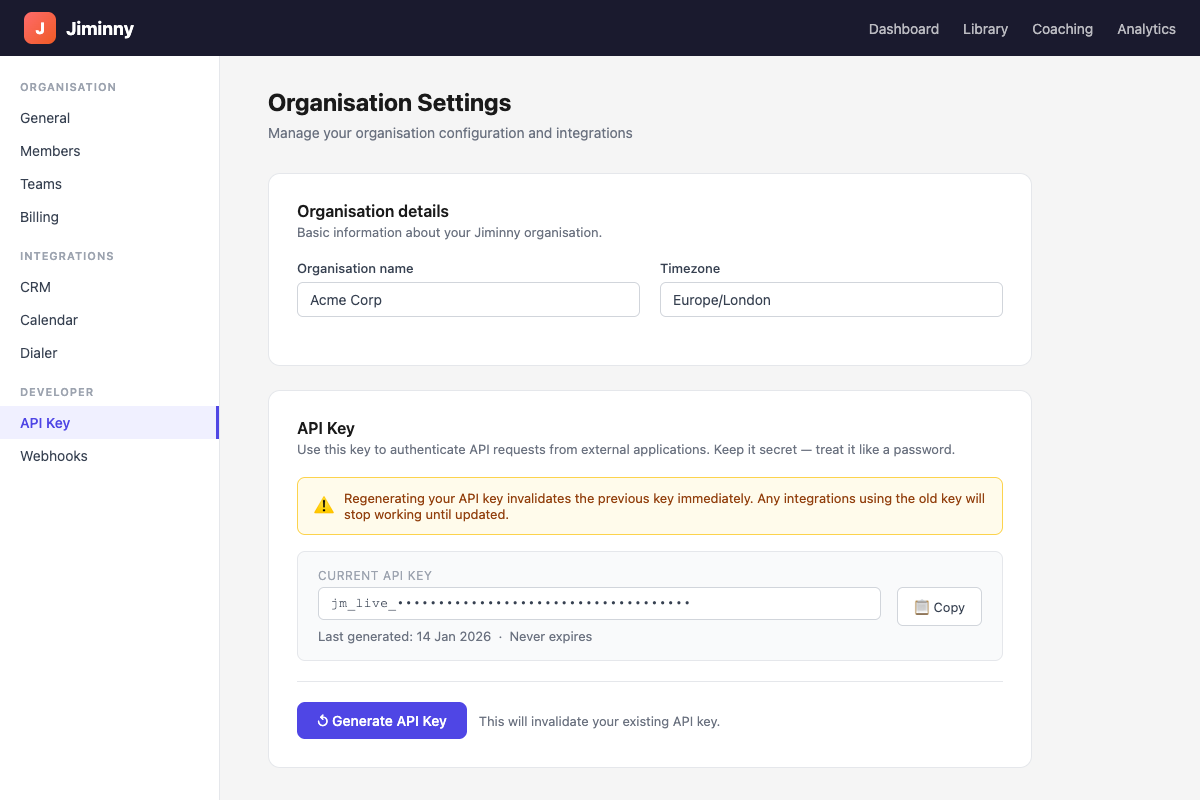
Sign in to Jiminny and navigate to Organisation Settings → General.
-
Scroll to the API Key section and click Generate API Key.
-
Click Copy to copy the key to your clipboard. Store it securely — you can regenerate it later, but doing so invalidates the previous key and breaks existing integrations.
-
-
Create a connection in Scalekit
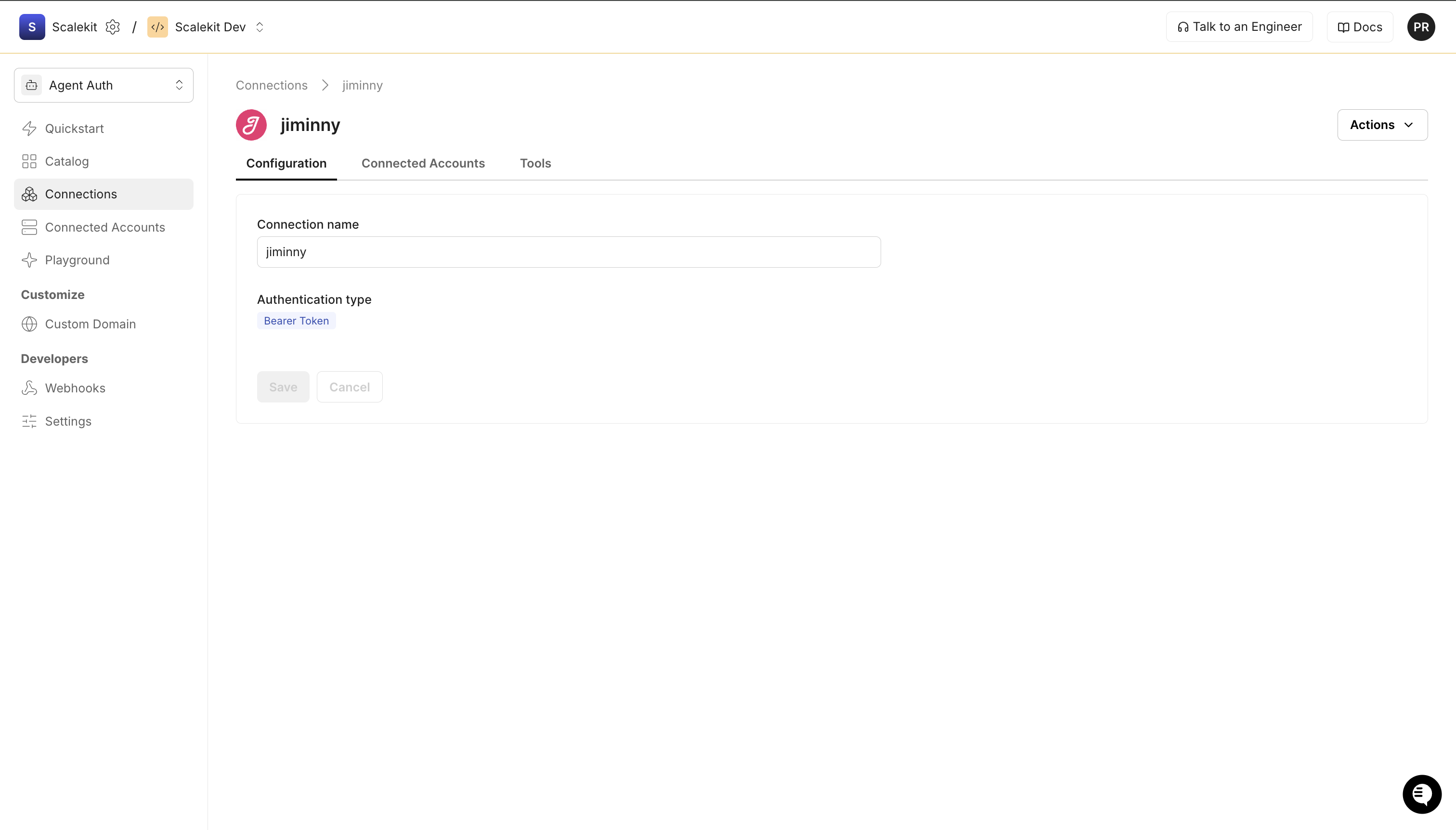
In Scalekit dashboard, go to AgentKit > Connections > Create Connection. Find Jiminny and click Create.
-
Add a connected account
Open the connection you just created and click the Connected Accounts tab → Add account. Fill in the required fields:
- Your User’s ID — a unique identifier for the user in your system
- Bearer Token — the API key you copied in step 1
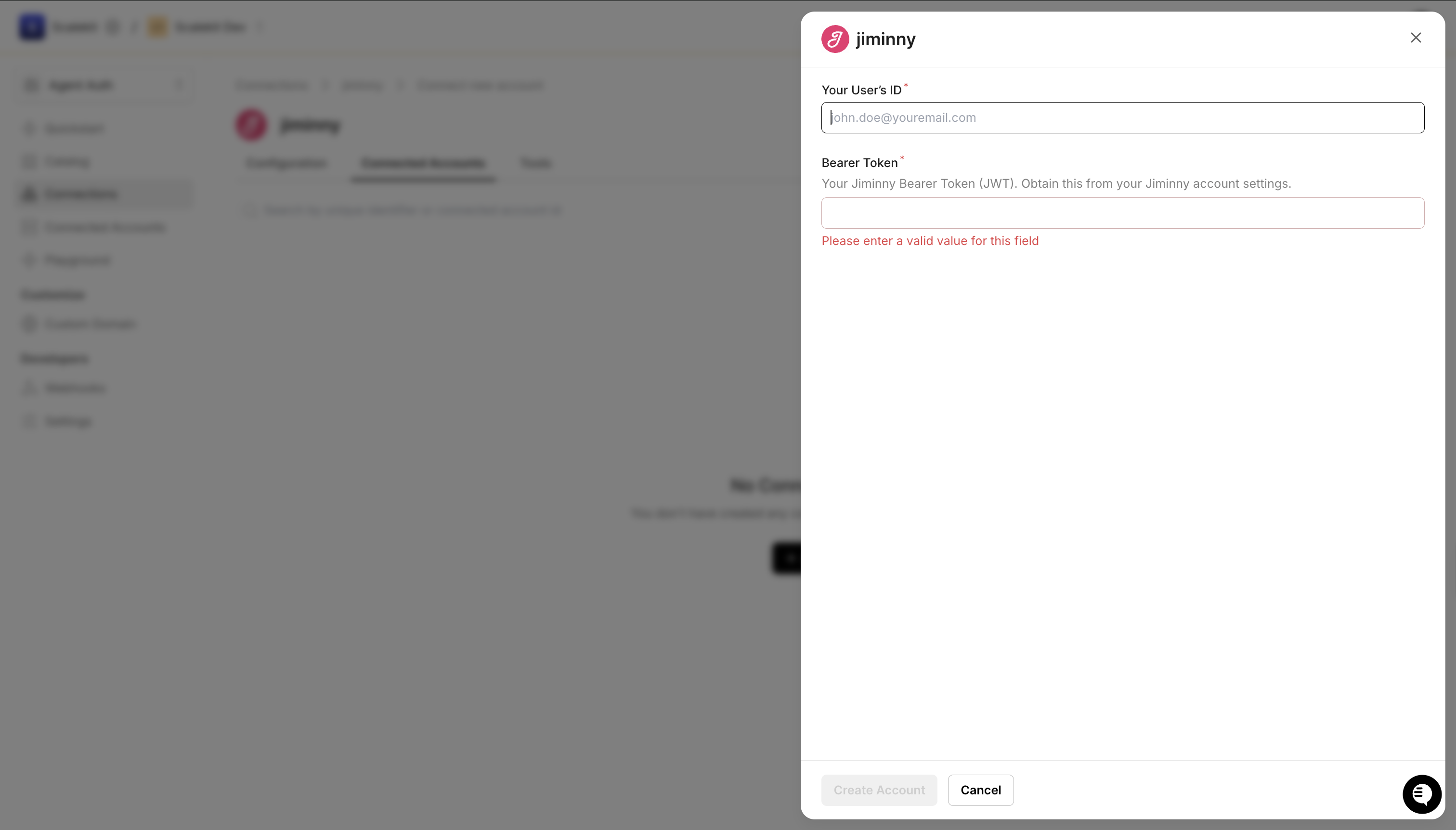
Click Save.
-
-
Make your first call
Section titled “Make your first call”quickstart.ts import { ScalekitClient } from '@scalekit-sdk/node'import 'dotenv/config'const scalekit = new ScalekitClient(process.env.SCALEKIT_ENV_URL,process.env.SCALEKIT_CLIENT_ID,process.env.SCALEKIT_CLIENT_SECRET,)const actions = scalekit.actionsconst connector = 'jiminny'const identifier = 'user_123'// Make your first callconst result = await actions.executeTool({connector,identifier,toolName: 'jiminny_activities_list',toolInput: {},})console.log(result)quickstart.py import osfrom scalekit.client import ScalekitClientfrom dotenv import load_dotenvload_dotenv()scalekit_client = ScalekitClient(env_url=os.getenv("SCALEKIT_ENV_URL"),client_id=os.getenv("SCALEKIT_CLIENT_ID"),client_secret=os.getenv("SCALEKIT_CLIENT_SECRET"),)actions = scalekit_client.actionsconnection_name = "jiminny"identifier = "user_123"# Make your first callresult = actions.execute_tool(tool_input={},tool_name="jiminny_activities_list",connection_name=connection_name,identifier=identifier,)print(result)
What you can do
Section titled “What you can do”Connect this agent connector to let your agent:
- Upload zapier activity, activity — Upload a call or meeting activity to Jiminny by providing a publicly accessible recording URL instead of a file upload, returning the new or existing activity ID
- List webhooks, automated reports, ai scorecards — Retrieve all webhook subscriptions registered for the authenticated organization, including their trigger, destination URL, and external ID
- Get automated report status, automated report, automated report download — Lightweight poll endpoint that returns the generation status of an automated report’s latest result, without the full report payload
- Xyz test tool — Test
- Create webhook — Create a webhook subscription that sends event payloads to a destination URL when a specified trigger occurs in Jiminny
- Delete webhook — Delete an existing webhook subscription by its UUID
Tool list
Section titled “Tool list”Use the exact tool names from the Tool list below when you call execute_tool. If you’re not sure which name to use, list the tools available for the current user first.
jiminny_action_items_get#Retrieve the AI-generated action items for a given activity, returning a list of follow-up tasks identified from the conversation.1 param
Retrieve the AI-generated action items for a given activity, returning a list of follow-up tasks identified from the conversation.
activityIdstringrequiredThe UUID of the activity to retrieve action items for.jiminny_activities_list#Retrieve completed and processed call and meeting activities with optional date range, update date range, status, and page filters. The time range must be less than six months and you must provide either fromDate/toDate or updatedFrom.6 params
Retrieve completed and processed call and meeting activities with optional date range, update date range, status, and page filters. The time range must be less than six months and you must provide either fromDate/toDate or updatedFrom.
fromDatestringoptionalFilter activities that occurred after this UTC date-time (e.g. 2021-10-01 00:00:00). Must be before toDate.pageintegeroptionalPage number to return (page size is 500 activities). Default is 1.statusstringoptionalFilter activities by status: in-progress, completed (for calls/meetings), received, sent, delivered (for SMS/Voice dialer).toDatestringoptionalFilter activities that occurred before this UTC date-time (e.g. 2021-11-01 00:00:00). Cannot be a future date.updatedFromstringoptionalFilter activities updated after this UTC date-time (e.g. 2021-11-01 00:00:00). Must be before updatedTo.updatedTostringoptionalFilter activities updated before this UTC date-time. Cannot be a future date. Defaults to current time.jiminny_activity_get#Retrieve a single completed and processed activity by its ID, including tracks, participants, transcription summary, topic triggers, and CRM data.1 param
Retrieve a single completed and processed activity by its ID, including tracks, participants, transcription summary, topic triggers, and CRM data.
activityIdstringrequiredThe UUID of the activity to retrieve.jiminny_activity_upload#Upload a call or meeting recording file to Jiminny for transcription and analysis, returning the new activity ID on success.10 params
Upload a call or meeting recording file to Jiminny for transcription and analysis, returning the new activity ID on success.
hostUserEmailstringrequiredThe email address of the host user. Must belong to the authenticated team.languagestringrequiredThe language locale of the activity (e.g. en_GB, en_US, fr_FR).titlestringrequiredThe title of the activity (max 250 characters).accountIdstringoptionalAn optional CRM Account ID to associate with this activity (max 100 characters).completedAtstringoptionalThe date the activity was completed (format: YYYY-MM-DD).externalIdstringoptionalAn optional external identifier for this activity (max 191 characters). Must be unique per host user.leadIdstringoptionalAn optional CRM Lead ID to associate with this activity (max 180 characters).notifyForUploadCompletionByEmailbooleanoptionalWhether to notify the host user via email when the upload and processing is complete.opportunityIdstringoptionalAn optional CRM Opportunity ID to associate with this activity (max 100 characters).skipFullAnalysisbooleanoptionalWhether to skip the full AI analysis of the uploaded activity.jiminny_ai_scorecard_get#Retrieve the AI-generated scorecard results for a given activity, returning the conversation intelligence scoring breakdown.1 param
Retrieve the AI-generated scorecard results for a given activity, returning the conversation intelligence scoring breakdown.
activityIdstringrequiredThe UUID of the activity to retrieve scorecard results for.jiminny_ai_scorecards_list#Retrieve a paginated list of AI scorecard results completed within a required date range. Filtered by the date scoring completed, not the call date.3 params
Retrieve a paginated list of AI scorecard results completed within a required date range. Filtered by the date scoring completed, not the call date.
fromDatestringrequiredReturn scorecards completed on or after this UTC date-time (e.g. 2024-10-01 00:00:00). Must be before toDate.toDatestringrequiredReturn scorecards completed on or before this UTC date-time (e.g. 2024-11-01 00:00:00). Must be after fromDate.pageintegeroptionalPage number to retrieve. Default is 1.jiminny_automated_call_scoring_list#Retrieve automated call scoring records with optional filters by user and date range, returning scores, activity types, and user details.3 params
Retrieve automated call scoring records with optional filters by user and date range, returning scores, activity types, and user details.
fromDatestringoptionalFilter scoring records created after this UTC date-time (e.g. 2021-10-01 00:00:00).toDatestringoptionalFilter scoring records created before this UTC date-time (e.g. 2021-11-01 00:00:00). Cannot be a future date.userIdstringoptionalOptional UUID of the user to filter automated call scoring results by.jiminny_automated_report_download_get#Retrieve a short-lived presigned download URL (expires after 15 minutes) for an artifact of an automated report's latest result.2 params
Retrieve a short-lived presigned download URL (expires after 15 minutes) for an artifact of an automated report's latest result.
reportIdstringrequiredThe UUID of the automated report to download.formatstringoptionalWhich artifact of the report to download.jiminny_automated_report_get#Retrieve a single automated report, including its latest result. Returns 404 for reports outside your organization, soft-deleted reports, or reports not shared with any team.1 param
Retrieve a single automated report, including its latest result. Returns 404 for reports outside your organization, soft-deleted reports, or reports not shared with any team.
reportIdstringrequiredThe UUID of the automated report to retrieve.jiminny_automated_report_status_get#Lightweight poll endpoint that returns the generation status of an automated report's latest result, without the full report payload.1 param
Lightweight poll endpoint that returns the generation status of an automated report's latest result, without the full report payload.
reportIdstringrequiredThe UUID of the automated report to check.jiminny_automated_reports_list#Retrieve a paginated list of the authenticated organization's automated (exec) reports. A report is only returned if it has been shared with at least one team; reports shared only with individuals, or not shared at all, are never returned.5 params
Retrieve a paginated list of the authenticated organization's automated (exec) reports. A report is only returned if it has been shared with at least one team; reports shared only with individuals, or not shared at all, are never returned.
frequencystringoptionalFilter by report frequency.fromDatestringoptionalOnly return reports created on or after this UTC date-time.pageintegeroptionalPage number to return (page size is 100 reports). Default is 1.reportTypearrayoptionalFilter by one or more report types.toDatestringoptionalOnly return reports created on or before this UTC date-time.jiminny_coaching_feedback_list#Retrieve bulk coaching feedback records within a required date range, optionally filtered by coach or coachee, returning scores, activity IDs, and timestamps.4 params
Retrieve bulk coaching feedback records within a required date range, optionally filtered by coach or coachee, returning scores, activity IDs, and timestamps.
fromDatestringrequiredFilter coaching feedback records created after this UTC date-time (e.g. 2021-10-01 00:00:00). Must be before toDate.toDatestringrequiredFilter coaching feedback records created before this UTC date-time (e.g. 2021-11-01 00:00:00). Cannot be a future date.coacheeIdstringoptionalOptional UUID of the coachee (sales rep) to filter coaching feedback by.coachIdstringoptionalOptional UUID of the coach (manager) to filter coaching feedback by.jiminny_comments_list#Retrieve activity comment records with optional filters by user and date range, returning comment IDs, activity IDs, user IDs, and creation timestamps.3 params
Retrieve activity comment records with optional filters by user and date range, returning comment IDs, activity IDs, user IDs, and creation timestamps.
fromDatestringoptionalFilter comments created after this UTC date-time (e.g. 2021-10-01 00:00:00). Must be before toDate.toDatestringoptionalFilter comments created before this UTC date-time (e.g. 2021-11-01 00:00:00). Cannot be a future date.userIdstringoptionalOptional UUID of the user to filter comments by.jiminny_listens_list#Retrieve listened (played) activity records within a date range, optionally filtered by user, showing who listened to which activities and when.3 params
Retrieve listened (played) activity records within a date range, optionally filtered by user, showing who listened to which activities and when.
fromDatestringrequiredFilter listened activities that occurred after this UTC date-time (e.g. 2021-10-01 00:00:00). Must be before toDate.toDatestringrequiredFilter listened activities that occurred before this UTC date-time (e.g. 2021-11-01 00:00:00). Cannot be a future date.userIdstringoptionalOptional UUID of the user to filter listened activities by.jiminny_organization_get#Return the current authenticated Organization details including name, CRM integration, calendar type, and address.0 params
Return the current authenticated Organization details including name, CRM integration, calendar type, and address.
jiminny_questions_get#Retrieve questions detected in a specific activity, including their timestamps, speaker participant IDs, text, and whether they are engaging or insightful.1 param
Retrieve questions detected in a specific activity, including their timestamps, speaker participant IDs, text, and whether they are engaging or insightful.
activityIdstringrequiredThe UUID of the activity to retrieve detected questions for.jiminny_summary_get#Get the AI-generated conversation summary for a given activity, returning the summary content text.1 param
Get the AI-generated conversation summary for a given activity, returning the summary content text.
activityIdstringrequiredThe UUID of the activity to retrieve the summary for.jiminny_test_tool_xyz#Test.0 params
Test.
jiminny_topic_triggers_list#Retrieve all topic triggers configured for the authenticated team, returned as a hierarchy of themes, topics, and trigger keywords.0 params
Retrieve all topic triggers configured for the authenticated team, returned as a hierarchy of themes, topics, and trigger keywords.
jiminny_topic_triggers_matched_get#Retrieve all topic triggers that were matched within a specific activity, including the theme, topic, trigger keyword, timestamps, and matched text excerpt.1 param
Retrieve all topic triggers that were matched within a specific activity, including the theme, topic, trigger keyword, timestamps, and matched text excerpt.
activityIdstringrequiredThe UUID of the activity to retrieve matched topic triggers for.jiminny_transcript_get#Retrieve transcription segments for a given activity, returning an array of timed speech segments with speaker participant IDs.1 param
Retrieve transcription segments for a given activity, returning an array of timed speech segments with speaker participant IDs.
activityIdstringrequiredThe UUID of the activity to retrieve the transcription for.jiminny_users_list#Retrieve all users belonging to the authenticated team, including their IDs, names, emails, statuses, team names, CRM IDs, and roles.0 params
Retrieve all users belonging to the authenticated team, including their IDs, names, emails, statuses, team names, CRM IDs, and roles.
jiminny_webhook_create#Create a webhook subscription that sends event payloads to a destination URL when a specified trigger occurs in Jiminny.3 params
Create a webhook subscription that sends event payloads to a destination URL when a specified trigger occurs in Jiminny.
triggerstringrequiredThe event trigger for the webhook. One of: coaching_feedback_completed, conversation_shared, conversation_exported, conversation_processed, conversation_played.urlstringrequiredThe destination URL to receive the webhook payload (max 191 characters).external_idstringoptionalAn optional external identifier for the webhook (max 191 characters).jiminny_webhook_delete#Delete an existing webhook subscription by its UUID.1 param
Delete an existing webhook subscription by its UUID.
idstringrequiredUUID of the webhook to delete.jiminny_webhook_sample_get#Retrieve a sample webhook payload for a given trigger event type to understand the data structure that will be sent.1 param
Retrieve a sample webhook payload for a given trigger event type to understand the data structure that will be sent.
triggerstringrequiredThe webhook trigger event type to get a sample payload for.jiminny_webhooks_list#Retrieve all webhook subscriptions registered for the authenticated organization, including their trigger, destination URL, and external ID.0 params
Retrieve all webhook subscriptions registered for the authenticated organization, including their trigger, destination URL, and external ID.
jiminny_zapier_activity_upload#Upload a call or meeting activity to Jiminny by providing a publicly accessible recording URL instead of a file upload, returning the new or existing activity ID. If externalId is provided and already exists for the host user, the existing activity is returned instead of creating a duplicate.10 params
Upload a call or meeting activity to Jiminny by providing a publicly accessible recording URL instead of a file upload, returning the new or existing activity ID. If externalId is provided and already exists for the host user, the existing activity is returned instead of creating a duplicate.
hostUserEmailstringrequiredThe email address of the host user. Must belong to the authenticated team.languagestringrequiredThe language locale of the activity. Accepts BCP 47 format (e.g. en-US, en_US, en); bare language codes are expanded to the first known dialect.recordingUrlstringrequiredA publicly accessible URL to the recording file (audio or video).titlestringrequiredThe title of the activity (max 250 characters).accountIdstringoptionalAn optional CRM Account ID to associate with this activity (max 100 characters).completedAtstringoptionalThe date and time the call was completed (ISO 8601).externalIdstringoptionalAn optional external identifier for this activity (max 191 characters), used for idempotency. Must be unique per host user.leadIdstringoptionalAn optional CRM Lead ID to associate with this activity (max 180 characters).notifyForUploadCompletionByEmailbooleanoptionalWhether to notify the host user via email when processing is complete.opportunityIdstringoptionalAn optional CRM Opportunity ID to associate with this activity (max 100 characters).