


Monday.com connector
OAuth 2.0Project ManagementCollaborationProductivityConnect to Monday.com. Manage boards, tasks, workflows, teams, and project collaboration
Monday.com connector
-
Install the SDK
Section titled “Install the SDK”Terminal window npm install @scalekit-sdk/nodeTerminal window pip install scalekit -
Set your credentials
Section titled “Set your credentials”Add your Scalekit credentials to your
.envfile. Find values in app.scalekit.com > Developers > API Credentials..env SCALEKIT_ENVIRONMENT_URL=<your-environment-url>SCALEKIT_CLIENT_ID=<your-client-id>SCALEKIT_CLIENT_SECRET=<your-client-secret> -
Set up the connector
Section titled “Set up the connector”Register your Monday.com credentials with Scalekit so it handles the token lifecycle. You do this once per environment.
Dashboard setup steps
Register your Scalekit environment with the Monday.com connector so Scalekit handles the authentication flow and token lifecycle for you. The connection name you create will be used to identify and invoke the connection programmatically. You’ll need your app credentials from the Monday.com Developer Center.
-
Set up auth redirects
-
In Scalekit dashboard, go to AgentKit > Connections > Create Connection.
-
Find Monday.com from the list of providers and click Create. Copy the redirect URI. It looks like
https://<SCALEKIT_ENVIRONMENT_URL>/sso/v1/oauth/<CONNECTION_ID>/callback.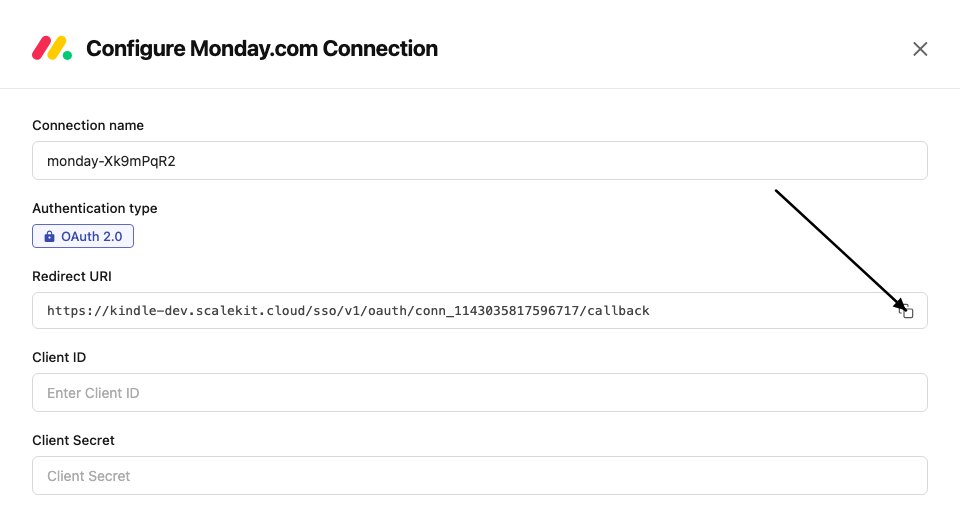
-
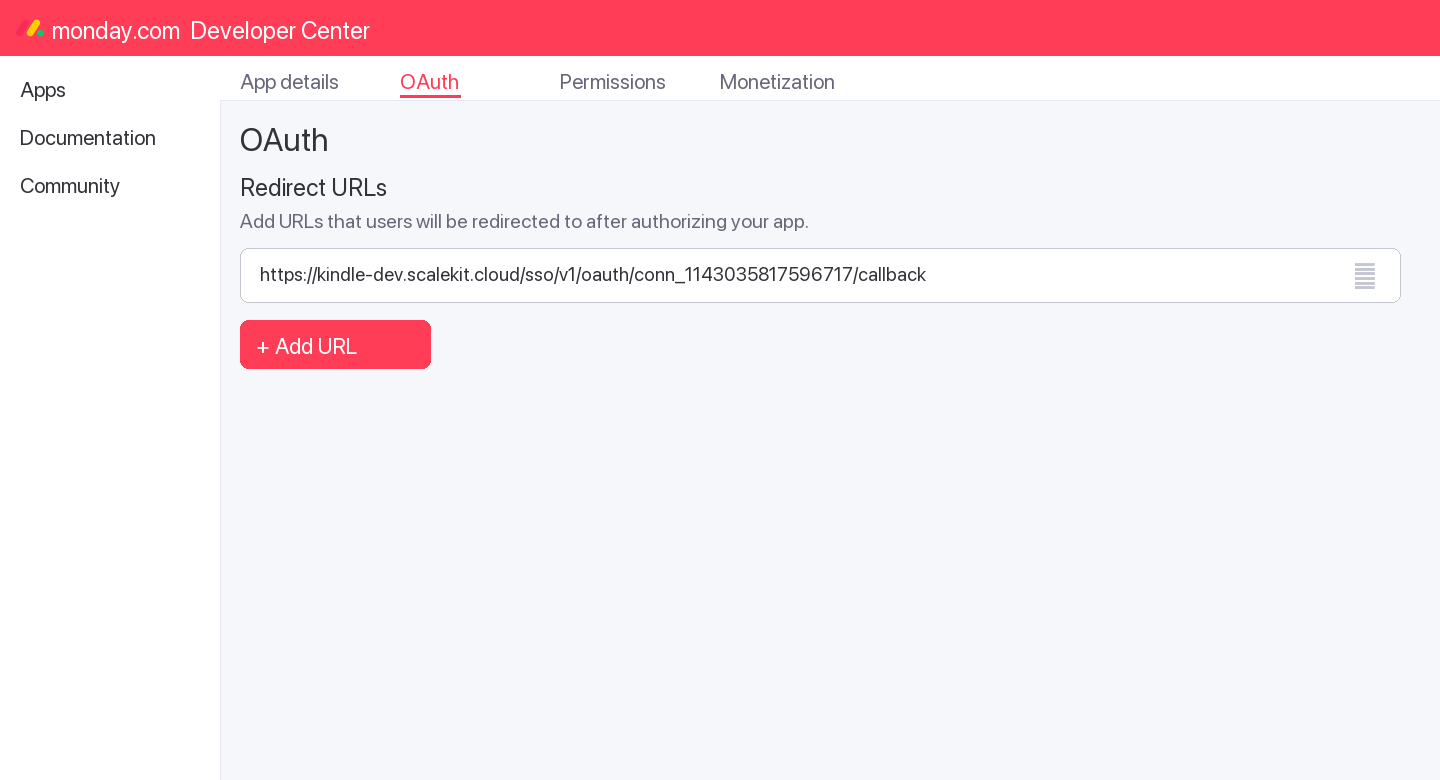
In the Monday.com Developer Center, open your app and go to the OAuth tab.
-
Add the copied URI under Redirect URLs and save.
-
-
Get client credentials
- In the Monday.com Developer Center, open your app and go to the Basic Information tab:
- Client ID — listed under Client ID
- Client Secret — listed under Client Secret
- In the Monday.com Developer Center, open your app and go to the Basic Information tab:
-
Add credentials in Scalekit
-
In Scalekit dashboard, go to AgentKit > Connections and open the connection you created.
-
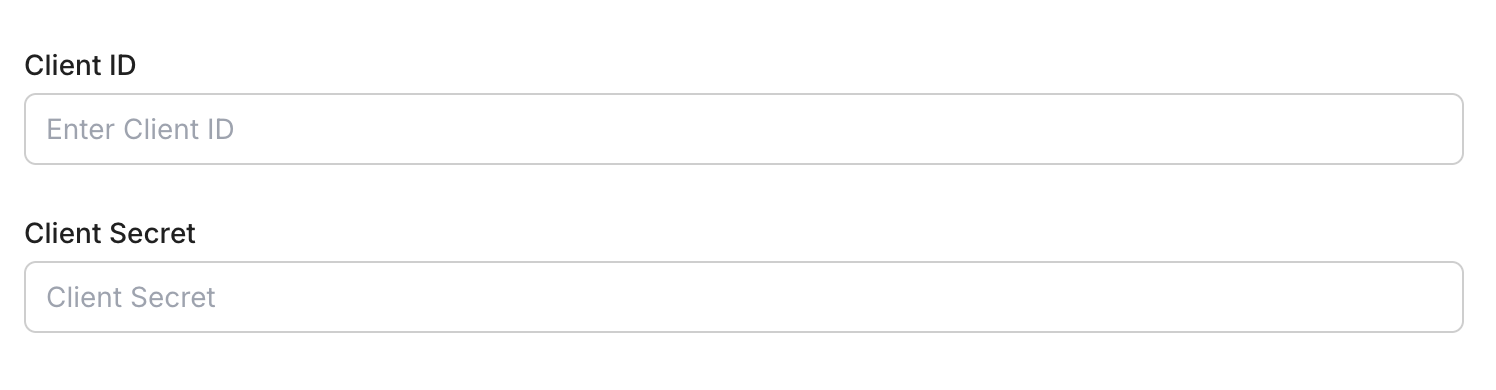
Enter your credentials:
- Client ID (from your Monday.com app)
- Client Secret (from your Monday.com app)
- Permissions — select the scopes your app needs (see Monday.com OAuth scopes)
-
Click Save.
-
-
-
Authorize and make your first call
Section titled “Authorize and make your first call”quickstart.ts import { ScalekitClient } from '@scalekit-sdk/node'import 'dotenv/config'const scalekit = new ScalekitClient(process.env.SCALEKIT_ENV_URL,process.env.SCALEKIT_CLIENT_ID,process.env.SCALEKIT_CLIENT_SECRET,)const actions = scalekit.actionsconst connector = 'monday'const identifier = 'user_123'// Generate an authorization link for the userconst { link } = await actions.getAuthorizationLink({ connectionName: connector, identifier })console.log('Authorize Monday:', link)process.stdout.write('Press Enter after authorizing...')await new Promise(r => process.stdin.once('data', r))// Make your first API call through the proxyconst result = await actions.request({connectionName: connector,identifier,path: '/v2',method: 'POST',body: JSON.stringify({ query: '{ boards (limit: 5) { id name } }' }),})console.log(result)quickstart.py import osimport jsonfrom scalekit.client import ScalekitClientfrom dotenv import load_dotenvload_dotenv()scalekit_client = ScalekitClient(env_url=os.getenv("SCALEKIT_ENV_URL"),client_id=os.getenv("SCALEKIT_CLIENT_ID"),client_secret=os.getenv("SCALEKIT_CLIENT_SECRET"),)actions = scalekit_client.actionsconnection_name = "monday"identifier = "user_123"# Generate an authorization link for the userlink_response = actions.get_authorization_link(connection_name=connection_name,identifier=identifier,)print("Authorize Monday:", link_response.link)input("Press Enter after authorizing...")# Make your first API call through the proxyresult = actions.request(connection_name=connection_name,identifier=identifier,path="/v2",method="POST",body=json.dumps({"query": "{ boards (limit: 5) { id name } }"}),)print(result)
What you can do
Section titled “What you can do”Connect this agent connector to let your agent:
- Manage boards — create, update, archive, duplicate, and delete boards across workspaces
- Manage items — create, update, move, duplicate, archive, and delete items (rows) on any board
- Update column values — set single or multiple column values including status, date, people, and custom types
- Manage groups — create, rename, reorder, duplicate, archive, and delete groups within a board
- Post updates — add, edit, and delete comments and activity updates on items
- Manage structure — create and delete columns, manage subitems, webhooks, workspaces, teams, and tags
Common workflows
Section titled “Common workflows”Proxy API call
const result = await actions.request({ connectionName: 'monday', identifier: 'user_123', path: '/v2', method: 'POST', body: JSON.stringify({ query: '{ boards (limit: 5) { id name } }' }),});console.log(result);import json
result = actions.request( connection_name='monday', identifier='user_123', path="/v2", method="POST", body=json.dumps({"query": "{ boards (limit: 5) { id name } }"}))print(result)Execute a tool
const result = await actions.executeTool({ connector: 'monday', identifier: 'user_123', toolName: 'monday_list', toolInput: {},});console.log(result);result = actions.execute_tool( connection_name='monday', identifier='user_123', tool_name='monday_list', tool_input={},)print(result)Getting resource IDs
Section titled “Getting resource IDs”Most Monday.com tools require one or more resource IDs. Run list/read tools first to discover real IDs — never guess them.
| Resource | Tool to get ID | Field in response |
|---|---|---|
| Board ID | monday_boards_list | data.boards[].id |
| Item ID | monday_items_list (requires board_id) | data.boards[].items_page.items[].id |
| Group ID | monday_items_list | data.boards[].items_page.items[].group.id |
| Column ID | monday_items_list | data.boards[].items_page.items[].column_values[].id |
| User ID | monday_users_list or monday_me_get | data.users[].id / data.me.id |
| Workspace ID | monday_workspaces_list | data.workspaces[].id |
| Update ID | monday_updates_list | data.updates[].id |
| Tag ID | monday_tags_list | data.tags[].id |
| Team ID | monday_teams_list | data.teams[].id |
| Webhook ID | monday_webhooks_list (requires board_id) | data.webhooks[].id |
| Doc ID | monday_docs_list | data.docs[].id |
| Subitem ID | monday_subitem_create response | data.create_subitem.id |
Tool list
Section titled “Tool list”Use the exact tool names from the Tool list below when you call execute_tool. If you’re not sure which name to use, list the tools available for the current user first.
monday_board_activity_logs_list#Query a board's activity log: who changed what column, item, or group and when. Filterable by user, item, column, group, and time range. Maximum 10,000 records; narrow with filters or a date range for large boards.9 params
Query a board's activity log: who changed what column, item, or group and when. Filterable by user, item, column, group, and time range. Maximum 10,000 records; narrow with filters or a date range for large boards.
board_idstringrequiredID of the board to fetch activity logs forcolumn_idsarrayoptionalFilter to activity on these column IDsfromstringoptionalOnly return activity at or after this ISO 8601 timestampgroup_idsarrayoptionalFilter to activity on these group IDsitem_idsarrayoptionalFilter to activity on these item IDslimitintegeroptionalMaximum number of activity log entries to return (default 25)pageintegeroptionalPage number for paginationtostringoptionalOnly return activity at or before this ISO 8601 timestampuser_idsarrayoptionalFilter to activity performed by these user IDsmonday_board_archive#Archive a board in Monday.com.1 param
Archive a board in Monday.com.
board_idstringrequiredID of the board to archivemonday_board_create#Create a new board in Monday.com.6 params
Create a new board in Monday.com.
board_kindstringrequiredBoard type: public, private, or shareboard_namestringrequiredName for the new boarddescriptionstringoptionalDescription for the boardfolder_idintegeroptionalFolder ID to place the board intemplate_idintegeroptionalTemplate ID to base the board onworkspace_idintegeroptionalID of the workspace to create the board inmonday_board_delete#Permanently delete a board from Monday.com.1 param
Permanently delete a board from Monday.com.
board_idstringrequiredID of the board to deletemonday_board_duplicate#Create a copy of an existing board.5 params
Create a copy of an existing board.
board_idstringrequiredID of the board to duplicateduplicate_typestringrequiredWhat to duplicate: duplicate_board_with_structure, duplicate_board_with_pulses, or duplicate_board_with_pulses_and_updatesboard_namestringoptionalName for the duplicated boardkeep_subscribersbooleanoptionalWhether to keep board subscribersworkspace_idstringoptionalDestination workspace IDmonday_board_hierarchy_update#Move a board to a different workspace, folder, or account product. Provide at least one of workspace_id, folder_id, or account_product_id.4 params
Move a board to a different workspace, folder, or account product. Provide at least one of workspace_id, folder_id, or account_product_id.
board_idstringrequiredID of the board to relocateaccount_product_idstringoptionalID of the account product (e.g. CRM, work management) to move the board intofolder_idstringoptionalID of the folder to move the board intoworkspace_idstringoptionalID of the workspace to move the board intomonday_board_permission_set#Set a board's default access role, controlling what non-owner members can do on the board by default.3 params
Set a board's default access role, controlling what non-owner members can do on the board by default.
basic_role_namestringrequiredDefault role: contributor, editor, or viewerboard_idstringrequiredID of the board to set permissions oncross_product_collaborativebooleanoptionalWhether the board allows cross-product collaborationmonday_board_subscribers_add#Subscribe users to a board so they receive notifications.3 params
Subscribe users to a board so they receive notifications.
board_idstringrequiredID of the board to add subscribers touser_idsarrayrequiredArray of user IDs to subscribekindstringoptionalRole: subscriber or ownermonday_board_subscribers_remove#Unsubscribe users from a board so they stop receiving its notifications. Complements monday_board_subscribers_add.2 params
Unsubscribe users from a board so they stop receiving its notifications. Complements monday_board_subscribers_add.
board_idstringrequiredID of the board to remove subscribers fromuser_idsarrayrequiredIDs of the users to unsubscribemonday_board_update#Update a board's name, description, or communication settings.3 params
Update a board's name, description, or communication settings.
board_attributestringrequiredAttribute to update: name, description, or communicationboard_idstringrequiredID of the board to updatenew_valuestringrequiredNew value for the attributemonday_boards_list#Retrieve a list of boards from your Monday.com account with optional filtering.6 params
Retrieve a list of boards from your Monday.com account with optional filtering.
board_kindstringoptionalFilter by kind: public, private, sharelimitintegeroptionalNumber of boards to return (default 10)order_bystringoptionalSort order: created_at or used_atpageintegeroptionalPage number for paginationstatestringoptionalFilter by state: active, archived, deleted, allworkspace_idsarrayoptionalFilter by workspace IDsmonday_column_create#Add a new column to a Monday.com board.6 params
Add a new column to a Monday.com board.
board_idstringrequiredID of the board to add the column tocolumn_typestringrequiredColumn type: text, long_text, numbers, status, dropdown, date, timeline, people, checkbox, email, phone, link, file, color_picker, rating, time_tracking, formula, auto_number, etc.titlestringrequiredTitle/name for the new columnafter_column_idstringoptionalColumn ID to insert this column afterdefaultsstringoptionalJSON of default settings for the columndescriptionstringoptionalOptional description for the columnmonday_column_delete#Permanently delete a column from a board.2 params
Permanently delete a column from a board.
board_idstringrequiredID of the boardcolumn_idstringrequiredID of the column to deletemonday_column_title_change#Rename a column on a board.3 params
Rename a column on a board.
board_idstringrequiredID of the boardcolumn_idstringrequiredID of the column to renametitlestringrequiredNew title for the columnmonday_column_update#Comprehensively update a board column's title, description, width, or type-specific settings. Requires the column's current revision number for optimistic concurrency control (read it via monday_boards_list or a columns query first).8 params
Comprehensively update a board column's title, description, width, or type-specific settings. Requires the column's current revision number for optimistic concurrency control (read it via monday_boards_list or a columns query first).
board_idstringrequiredID of the board the column belongs tocolumn_idstringrequiredID of the column to updatecolumn_typestringrequiredThe column's type (must match its existing type)revisionstringrequiredCurrent revision number of the column, for concurrency controldescriptionstringoptionalNew description for the columnsettingsstringoptionalJSON-encoded type-specific settings for the columntitlestringoptionalNew title for the columnwidthintegeroptionalNew width for the column, in pixelsmonday_doc_add_markdown_content#Add markdown content to an existing monday Doc. The markdown is parsed and converted into the doc's native block structure (headings, lists, quotes, bold/italic/code, etc).3 params
Add markdown content to an existing monday Doc. The markdown is parsed and converted into the doc's native block structure (headings, lists, quotes, bold/italic/code, etc).
doc_idstringrequiredID of the doc to add content tomarkdownstringrequiredMarkdown content to convert and add to the docafter_block_idstringoptionalID of the block to insert the new content after. If omitted, content is added at the end of the doc.monday_doc_create#Create a new monday Doc, either attached to an item's doc-type column on a board, or as a standalone doc directly inside a workspace. Provide either (item_id and column_id) for the board placement, or (workspace_id and name) for the workspace placement.5 params
Create a new monday Doc, either attached to an item's doc-type column on a board, or as a standalone doc directly inside a workspace. Provide either (item_id and column_id) for the board placement, or (workspace_id and name) for the workspace placement.
column_idstringoptionalID of the doc-type column on the item (board placement mode). Requires item_id to also be set.item_idstringoptionalID of the item containing the doc-type column (board placement mode). Requires column_id to also be set.kindstringoptionalVisibility kind for the new doc when created in a workspace, e.g. private.namestringoptionalName for the new doc (workspace placement mode only).workspace_idstringoptionalID of the workspace to create the doc directly in (workspace placement mode). Requires name to also be set.monday_doc_delete#Permanently delete a monday Doc.1 param
Permanently delete a monday Doc.
doc_idstringrequiredID of the doc to deletemonday_doc_update_name#Rename an existing monday Doc.2 params
Rename an existing monday Doc.
doc_idintegerrequiredID of the doc to renamenamestringrequiredNew name for the docmonday_docs_list#List documents (monday Docs) in your account.4 params
List documents (monday Docs) in your account.
idsarrayoptionalFilter by specific doc IDslimitintegeroptionalNumber of docs to returnpageintegeroptionalPage number for paginationworkspace_idsarrayoptionalFilter by workspace IDsmonday_group_archive#Archive a group on a board.2 params
Archive a group on a board.
board_idstringrequiredID of the boardgroup_idstringrequiredID of the group to archivemonday_group_create#Create a new group on a Monday.com board.4 params
Create a new group on a Monday.com board.
board_idstringrequiredID of the board to add the group togroup_namestringrequiredName of the group to createposition_relative_methodstringoptionalPositioning: before_at or after_atrelative_tostringoptionalGroup ID to position this group relative tomonday_group_delete#Permanently delete a group from a board.2 params
Permanently delete a group from a board.
board_idstringrequiredID of the boardgroup_idstringrequiredID of the group to deletemonday_group_duplicate#Create a copy of a group on a board.3 params
Create a copy of a group on a board.
board_idstringrequiredID of the boardgroup_idstringrequiredID of the group to duplicateadd_to_topbooleanoptionalWhether to add the duplicate at the top of the boardmonday_group_update#Update a group's name, color, or position on a board.4 params
Update a group's name, color, or position on a board.
attributestringrequiredAttribute to update: title or colorboard_idstringrequiredID of the boardgroup_idstringrequiredID of the group to updatenew_valuestringrequiredNew value for the attributemonday_item_archive#Archive an item on a Monday.com board.1 param
Archive an item on a Monday.com board.
item_idstringrequiredID of the item to archivemonday_item_column_simple_value_change#Update a single column's value on an item using a plain text string, instead of the JSON shape required by monday_item_column_value_change. Simpler for text-like columns, but not all column types support simple string values.5 params
Update a single column's value on an item using a plain text string, instead of the JSON shape required by monday_item_column_value_change. Simpler for text-like columns, but not all column types support simple string values.
board_idstringrequiredID of the board the item belongs tocolumn_idstringrequiredID of the column to updateitem_idstringrequiredID of the item to updatecreate_labels_if_missingbooleanoptionalAuto-create labels if they don't exist (status/dropdown columns)valuestringoptionalPlain text value to set on the columnmonday_item_column_value_change#Update the value of a single column on an item.5 params
Update the value of a single column on an item.
board_idstringrequiredID of the board the item belongs tocolumn_idstringrequiredID of the column to update (e.g., status, date4, text)item_idstringrequiredID of the item to updatevaluestringrequiredNew value as a JSON string. Format varies by column type.create_labels_if_missingbooleanoptionalAuto-create labels if they don't existmonday_item_column_values_change#Update multiple column values on an item in a single request (up to 50 columns).4 params
Update multiple column values on an item in a single request (up to 50 columns).
board_idstringrequiredID of the board the item belongs tocolumn_valuesstringrequiredJSON object mapping column IDs to their new valuesitem_idstringrequiredID of the item to updatecreate_labels_if_missingbooleanoptionalAuto-create labels if they don't existmonday_item_create#Create a new item (row) on a Monday.com board.5 params
Create a new item (row) on a Monday.com board.
board_idstringrequiredID of the board to create the item onitem_namestringrequiredName of the item to createcolumn_valuesstringoptionalJSON string of column values to setcreate_labels_if_missingbooleanoptionalAuto-create status/dropdown labels if they don't existgroup_idstringoptionalID of the group to add the item tomonday_item_delete#Permanently delete an item from a Monday.com board.1 param
Permanently delete an item from a Monday.com board.
item_idstringrequiredID of the item to deletemonday_item_description_set#Set an item's description content, using markdown formatting.2 params
Set an item's description content, using markdown formatting.
item_idstringrequiredID of the item to updatemarkdownstringrequiredDescription content, as markdownmonday_item_duplicate#Create a copy of an item on the same board.3 params
Create a copy of an item on the same board.
board_idstringrequiredID of the board the item belongs toitem_idstringrequiredID of the item to duplicatewith_updatesbooleanoptionalWhether to copy the item's updates/commentsmonday_item_move_to_board#Transfer an item to a different board.4 params
Transfer an item to a different board.
board_idstringrequiredID of the destination boardgroup_idstringrequiredID of the group on the destination boarditem_idstringrequiredID of the item to movecolumns_mappingstringoptionalJSON array mapping source column IDs to destination column IDsmonday_item_move_to_group#Move an item to a different group on the same board.2 params
Move an item to a different group on the same board.
group_idstringrequiredID of the destination groupitem_idstringrequiredID of the item to movemonday_item_position_change#Move an item to a new position within the same board -- to the top of a group, or immediately before/after another item.5 params
Move an item to a new position within the same board -- to the top of a group, or immediately before/after another item.
item_idstringrequiredID of the item to repositiongroup_idstringoptionalMove the item to this group before repositioninggroup_topbooleanoptionalMove the item to the top of its groupposition_relative_methodstringoptionalWhether to place the item before or after relative_torelative_tostringoptionalID of the item to position relative tomonday_item_updates_clear#Permanently remove all updates (including replies and likes) from an item. This cannot be undone.1 param
Permanently remove all updates (including replies and likes) from an item. This cannot be undone.
item_idstringrequiredID of the item whose updates should be clearedmonday_items_get#Fetch one or more items directly by ID, without going through their board. Returns item metadata and column values.5 params
Fetch one or more items directly by ID, without going through their board. Returns item metadata and column values.
idsarrayrequiredIDs of the items to fetchexclude_nonactivebooleanoptionalExclude archived/deleted itemslimitintegeroptionalMaximum number of items to return (default 25)newest_firstbooleanoptionalReturn newest items firstpageintegeroptionalPage number to fetch (1-indexed)monday_items_list#Retrieve items from a Monday.com board. Returns items with their column values, group, and creator details.4 params
Retrieve items from a Monday.com board. Returns items with their column values, group, and creator details.
board_idstringrequiredID of the board to list items fromcursorstringoptionalPagination cursor from a previous responsegroup_idstringoptionalFilter by group IDlimitintegeroptionalNumber of items to return per page (max 500)monday_items_search#Search for items on a board filtered by specific column values.5 params
Search for items on a board filtered by specific column values.
board_idstringrequiredID of the board to searchcolumn_idstringrequiredID of the column to filter bycolumn_valuestringrequiredValue to search for in the columncursorstringoptionalPagination cursor from a previous responselimitintegeroptionalNumber of items to return per pagemonday_me_get#Retrieve the profile of the currently authenticated Monday.com user.0 params
Retrieve the profile of the currently authenticated Monday.com user.
monday_notification_create#Send a notification to a user in Monday.com.4 params
Send a notification to a user in Monday.com.
target_idstringrequiredID of the target item or board for contexttarget_typestringrequiredTarget type: Project (board) or Post (item)textstringrequiredNotification message textuser_idstringrequiredID of the user to notifymonday_search#Full-text search across your monday.com account: items, boards, docs, users, workspaces, updates, and Emails & Activities timeline items, all in one call via the namespaced `search` query. Distinct from monday_items_search, which only filters items on a single board by column value.2 params
Full-text search across your monday.com account: items, boards, docs, users, workspaces, updates, and Emails & Activities timeline items, all in one call via the namespaced `search` query. Distinct from monday_items_search, which only filters items on a single board by column value.
querystringrequiredSearch term to match across items, boards, docs, users, workspaces, updates, and timeline itemslimitintegeroptionalMaximum number of results to return per entity type (e.g. up to this many boards, up to this many items, etc)monday_subitem_create#Create a subitem (child item) under a parent item.4 params
Create a subitem (child item) under a parent item.
item_namestringrequiredName of the subitemparent_item_idstringrequiredID of the parent itemcolumn_valuesstringoptionalJSON object of column values to set on creationcreate_labels_if_missingbooleanoptionalAuto-create labels if they don't existmonday_tag_create_or_get#Create a new tag or retrieve an existing one by name.2 params
Create a new tag or retrieve an existing one by name.
tag_namestringrequiredName of the tag to create or retrieveboard_idstringoptionalID of the board to associate the tag withmonday_tags_list#Retrieve tags from Monday.com.1 param
Retrieve tags from Monday.com.
idsarrayoptionalFilter by specific tag IDsmonday_team_users_add#Add one or more users to a Monday.com team.2 params
Add one or more users to a Monday.com team.
team_idstringrequiredID of the team to add users touser_idsarrayrequiredArray of user IDs to add to the teammonday_team_users_remove#Remove one or more users from a Monday.com team.2 params
Remove one or more users from a Monday.com team.
team_idstringrequiredID of the team to remove users fromuser_idsarrayrequiredArray of user IDs to remove from the teammonday_teams_list#List teams in your Monday.com account.1 param
List teams in your Monday.com account.
idsarrayoptionalFilter by specific team IDsmonday_update_create#Post a comment or update on a Monday.com item.2 params
Post a comment or update on a Monday.com item.
bodystringrequiredContent of the update/comment (HTML supported)item_idstringrequiredID of the item to post the update onmonday_update_delete#Delete an update/comment from an item.1 param
Delete an update/comment from an item.
idstringrequiredID of the update to deletemonday_update_edit#Edit the text of an existing update/comment.2 params
Edit the text of an existing update/comment.
bodystringrequiredNew content for the updateidstringrequiredID of the update to editmonday_update_like#Add a like reaction to an update (comment) from the connected user.1 param
Add a like reaction to an update (comment) from the connected user.
update_idstringrequiredID of the update to likemonday_update_pin#Pin an update to the top of its item's update thread.2 params
Pin an update to the top of its item's update thread.
update_idstringrequiredID of the update to pinitem_idstringoptionalID of the item the update belongs tomonday_update_unlike#Remove the connected user's like reaction from an update (comment).1 param
Remove the connected user's like reaction from an update (comment).
update_idstringrequiredID of the update to unlikemonday_update_unpin#Remove an update from the pinned position at the top of its item's update thread.2 params
Remove an update from the pinned position at the top of its item's update thread.
update_idstringrequiredID of the update to unpinitem_idstringoptionalID of the item the update belongs tomonday_updates_list#Retrieve updates (comments/activity posts) from Monday.com.3 params
Retrieve updates (comments/activity posts) from Monday.com.
item_idstringoptionalFilter updates by item IDlimitintegeroptionalNumber of updates to returnpageintegeroptionalPage number for paginationmonday_user_role_update#Change the account role for up to 200 users at once, using either a default role or a custom role ID.3 params
Change the account role for up to 200 users at once, using either a default role or a custom role ID.
user_idsarrayrequiredIDs of the users to update (max 200)new_rolestringoptionalDefault role to assignrole_idstringoptionalCustom role ID to assign, instead of a default rolemonday_users_activate#Reactivate up to 200 previously deactivated user accounts on the monday.com account.1 param
Reactivate up to 200 previously deactivated user accounts on the monday.com account.
user_idsarrayrequiredIDs of the users to reactivate (max 200)monday_users_deactivate#Deactivate up to 200 user accounts on the monday.com account, revoking their access.1 param
Deactivate up to 200 user accounts on the monday.com account, revoking their access.
user_idsarrayrequiredIDs of the users to deactivate (max 200)monday_users_invite#Invite one or more people to join the monday.com account by email. Invitees remain pending until they accept.3 params
Invite one or more people to join the monday.com account by email. Invitees remain pending until they accept.
emailsarrayrequiredEmail addresses to inviteproductstringoptionalProduct area to invite the users intouser_rolestringoptionalRole to grant the invited usersmonday_users_list#List users in your Monday.com account.7 params
List users in your Monday.com account.
emailsarrayoptionalFilter by email addressesidsarrayoptionalFilter by specific user IDskindstringoptionalUser kind: all, non_guests, guests, non_pendinglimitintegeroptionalNumber of users to returnnamestringoptionalFilter by name (partial match)newest_firstbooleanoptionalSort newest users firstpageintegeroptionalPage number for paginationmonday_webhook_create#Register a new webhook for a board event.4 params
Register a new webhook for a board event.
board_idstringrequiredID of the board to watcheventstringrequiredEvent to trigger on: change_column_value, create_item, delete_item, create_update, change_status_column_value, change_subitem_column_value, create_subitem, move_item_to_group, etc.urlstringrequiredURL to send webhook payloads toconfigstringoptionalOptional JSON configuration for the event (e.g., specific column filter)monday_webhook_delete#Delete a webhook registration.1 param
Delete a webhook registration.
idstringrequiredID of the webhook to deletemonday_webhooks_list#List all webhooks registered for a board.2 params
List all webhooks registered for a board.
board_idstringrequiredID of the board to list webhooks forapp_webhooks_onlybooleanoptionalReturn only webhooks created by the current appmonday_workspace_create#Create a new workspace in Monday.com.3 params
Create a new workspace in Monday.com.
kindstringrequiredWorkspace type: open or closednamestringrequiredName for the new workspacedescriptionstringoptionalOptional description for the workspacemonday_workspace_delete#Permanently delete a workspace and remove it from the account. This is a destructive operation.1 param
Permanently delete a workspace and remove it from the account. This is a destructive operation.
workspace_idstringrequiredID of the workspace to deletemonday_workspace_teams_add#Grant one or more teams access to a workspace, as an owner or subscriber.3 params
Grant one or more teams access to a workspace, as an owner or subscriber.
team_idsarrayrequiredIDs of the teams to addworkspace_idstringrequiredID of the workspace to add teams tokindstringoptionalAccess level to grant: owner or subscribermonday_workspace_teams_remove#Remove one or more teams' access to a workspace.2 params
Remove one or more teams' access to a workspace.
team_idsarrayrequiredIDs of the teams to removeworkspace_idstringrequiredID of the workspace to remove teams frommonday_workspace_update#Update a workspace's name, description, or account product.4 params
Update a workspace's name, description, or account product.
workspace_idstringrequiredID of the workspace to updateaccount_product_idstringoptionalAccount product to associate with the workspacedescriptionstringoptionalNew description for the workspacenamestringoptionalNew name for the workspacemonday_workspace_users_add#Grant one or more users access to a workspace, as an owner or subscriber.3 params
Grant one or more users access to a workspace, as an owner or subscriber.
user_idsarrayrequiredIDs of the users to addworkspace_idstringrequiredID of the workspace to add users tokindstringoptionalAccess level to grant: owner or subscribermonday_workspace_users_remove#Remove one or more users' access to a workspace.2 params
Remove one or more users' access to a workspace.
user_idsarrayrequiredIDs of the users to removeworkspace_idstringrequiredID of the workspace to remove users frommonday_workspaces_list#List all workspaces in your Monday.com account.5 params
List all workspaces in your Monday.com account.
idsarrayoptionalFilter by specific workspace IDskindstringoptionalWorkspace kind: open or closedlimitintegeroptionalNumber of workspaces to returnpageintegeroptionalPage number for paginationstatestringoptionalWorkspace state: all, active, archived, deleted