


HubSpot connector
OAuth 2.0CRM & SalesConnect to HubSpot CRM. Manage contacts, deals, companies, and marketing automation
HubSpot connector
-
Install the SDK
Section titled “Install the SDK”Terminal window npm install @scalekit-sdk/nodeTerminal window pip install scalekit -
Set your credentials
Section titled “Set your credentials”Add your Scalekit credentials to your
.envfile. Find values in app.scalekit.com > Developers > API Credentials..env SCALEKIT_ENVIRONMENT_URL=<your-environment-url>SCALEKIT_CLIENT_ID=<your-client-id>SCALEKIT_CLIENT_SECRET=<your-client-secret> -
Set up the connector
Section titled “Set up the connector”Register your HubSpot credentials with Scalekit so it handles the token lifecycle. You do this once per environment.
Dashboard setup steps
Register your Scalekit environment with the HubSpot connector so Scalekit handles the authentication flow and token lifecycle for you. The connection name you create will be used to identify and invoke the connection programmatically. Then complete the configuration in your application as follows:
-
Set up auth redirects
-
In Scalekit dashboard, go to AgentKit > Connections > Create Connection. Find HubSpot and click Create. Copy the redirect URI. It looks like
https://<SCALEKIT_ENVIRONMENT_URL>/sso/v1/oauth/<CONNECTION_ID>/callback.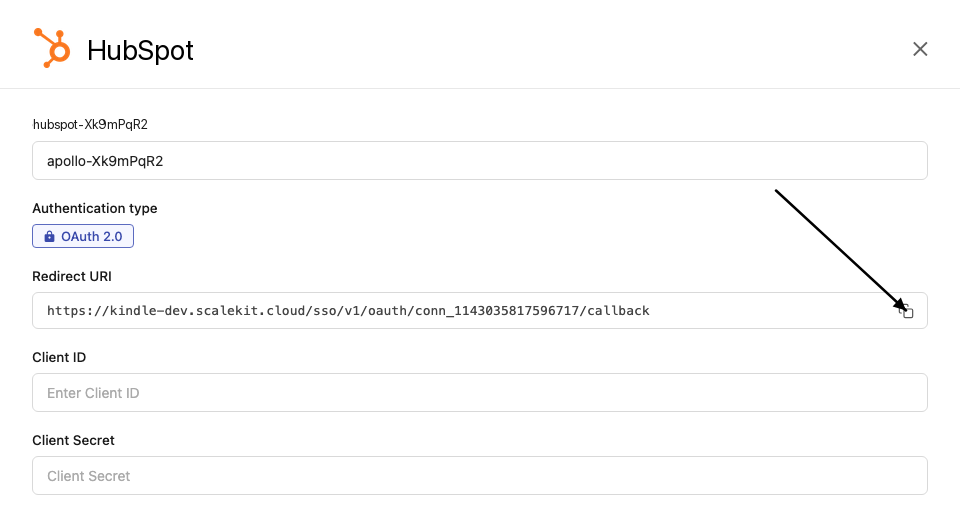
-
Log in to your HubSpot developer dashboard, click Manage apps, click Create app, and select Public app. If you already have an existing HubSpot app, open that app instead — see the Choosing a HubSpot app type section above for guidance on Public, Private, and legacy apps.
-
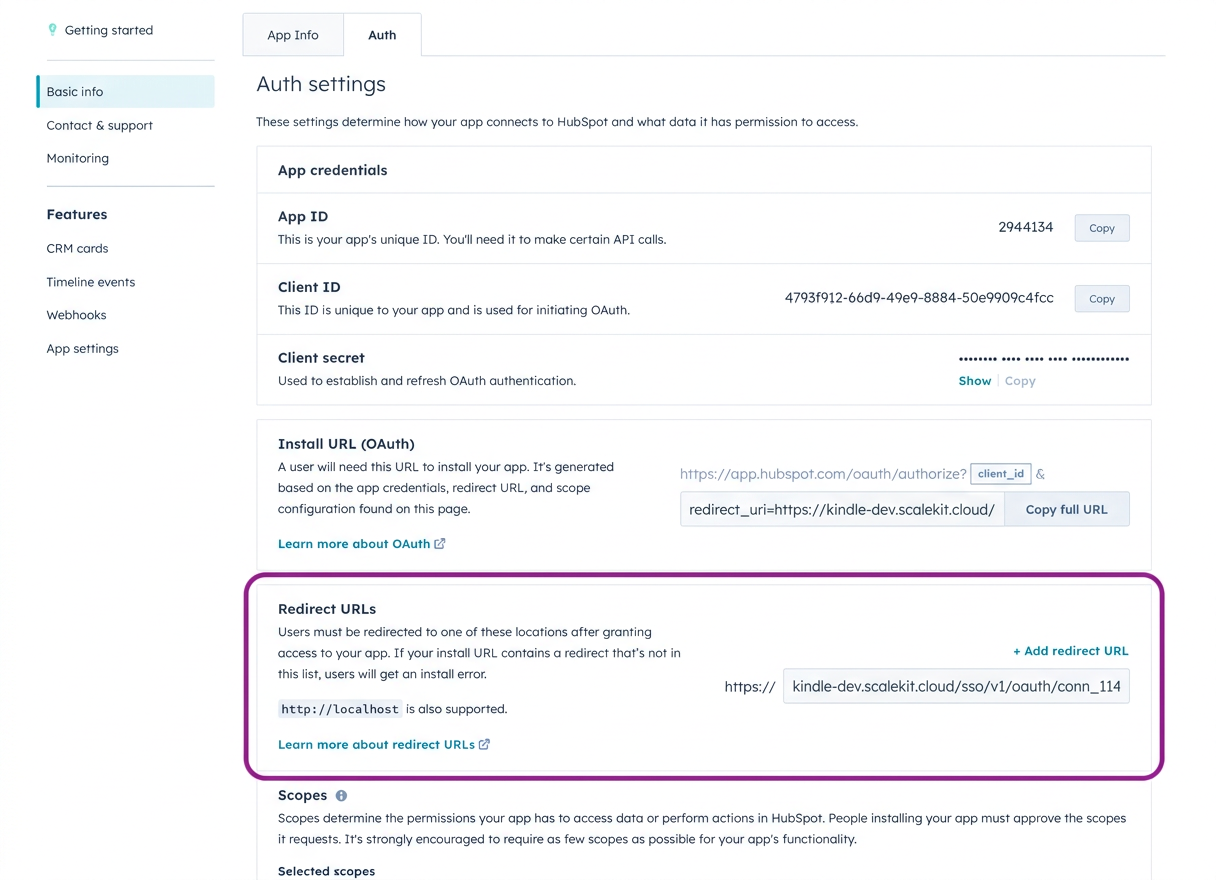
Go to Auth > Auth settings > Redirect URL, paste the redirect URI from Scalekit, and click Save.
-
Under Auth > Auth settings > Scopes, select the scopes your application needs. The scopes you select here must match exactly what you configure in Scalekit. For a read-only CRM enrichment flow, start with:
crm.objects.contacts.readcrm.objects.companies.readcrm.objects.deals.readThese assume a modern Public app with dotted scope names. For legacy apps or the full scope reference, see the Required and optional scopes section on this page.
-
-
Get client credentials
-
In your HubSpot app, go to Auth > Auth settings.
-
Copy your Client ID and Client Secret.
-
-
Add credentials in Scalekit
-
In Scalekit dashboard, go to AgentKit > Connections and open the connection you created.
-
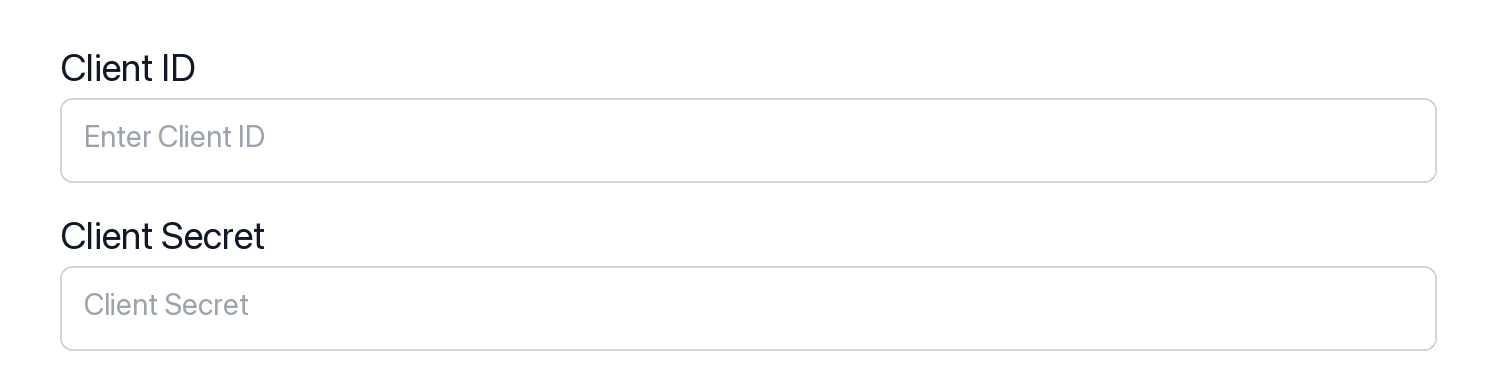
Enter your credentials:
- Client ID (from your HubSpot app)
- Client Secret (from your HubSpot app)
- Permissions (OAuth scope strings such as
crm.objects.contacts.read, entered exactly as configured in the HubSpot app). For a full list of available scopes and guidance on optional scopes, see the Required and optional scopes section on this page.
-
Click Save.
-
-
-
Authorize and make your first call
Section titled “Authorize and make your first call”quickstart.ts import { ScalekitClient } from '@scalekit-sdk/node'import 'dotenv/config'const scalekit = new ScalekitClient(process.env.SCALEKIT_ENV_URL,process.env.SCALEKIT_CLIENT_ID,process.env.SCALEKIT_CLIENT_SECRET,)const actions = scalekit.actionsconst connector = 'hubspot'const identifier = 'user_123'// Generate an authorization link for the userconst { link } = await actions.getAuthorizationLink({ connectionName: connector, identifier })console.log('Authorize HubSpot:', link)process.stdout.write('Press Enter after authorizing...')await new Promise(r => process.stdin.once('data', r))// Make your first call — list CRM ownersconst result = await actions.executeTool({connector,identifier,toolName: 'hubspot_owners_list',toolInput: {},})console.log('HubSpot owners:', result)quickstart.py import osfrom scalekit.client import ScalekitClientfrom dotenv import load_dotenvload_dotenv()scalekit_client = ScalekitClient(env_url=os.getenv("SCALEKIT_ENV_URL"),client_id=os.getenv("SCALEKIT_CLIENT_ID"),client_secret=os.getenv("SCALEKIT_CLIENT_SECRET"),)actions = scalekit_client.actionsconnection_name = "hubspot"identifier = "user_123"# Generate an authorization link for the userlink_response = actions.get_authorization_link(connection_name=connection_name,identifier=identifier,)print("Authorize HubSpot:", link_response.link)input("Press Enter after authorizing...")# Make your first call — list CRM ownersresult = actions.execute_tool(tool_input={},tool_name="hubspot_owners_list",connection_name=connection_name,identifier=identifier,)print("HubSpot owners:", result)
What you can do
Section titled “What you can do”Connect this agent connector to let your agent:
- Manage contacts — create, update, search, and list contacts; batch create, update, upsert, read, and archive
- Manage companies and deals — create and update company records and deals; batch create, update, upsert, read, and archive
- Manage tickets and tasks — create and update support tickets; create tasks with due dates and priorities
- Batch operations with inline associations — create contacts, companies, deals, or tickets and link them to related records in a single call
- Log engagements — record calls, meetings, notes, and emails against any CRM record
- Search, associate, and extend — full-text search across all CRM objects, batch-manage associations, list owners, discover properties, and work with custom objects
Choosing a HubSpot app type
Section titled “Choosing a HubSpot app type”HubSpot has three app shapes. The shape you choose determines which OAuth flow, scope format, and Scalekit configuration apply.
| App type | OAuth redirect | Scope format | Use with Scalekit |
|---|---|---|---|
| Public app | Supported | Modern (crm.objects.contacts.read) | Recommended |
| Private app | Not supported | N/A — static API token only | Not supported |
| Legacy / developer-account app | Supported | Bare strings (contacts, automation) | Supported — enter bare strings in Permissions |
Public apps are the standard choice for production integrations. They support the OAuth redirect flow that Scalekit manages, and they use the modern dotted scope format.
Private apps issue static API tokens and have no OAuth redirect endpoint. Scalekit’s HubSpot connector requires an OAuth flow, so Private apps are not compatible.
Legacy apps (older apps created in HubSpot developer test accounts before the current console) still support OAuth but use an older scope vocabulary. If you already have a legacy app, you can connect it — you just need to enter the older bare scope strings exactly as HubSpot lists them in that app’s Auth > Scopes page.
Common workflows
Section titled “Common workflows”Proxy API call
const result = await actions.request({ connectionName: 'hubspot', identifier: 'user_123', path: '/crm/v3/owners', method: 'GET',});console.log(result);result = actions.request( connection_name='hubspot', identifier='user_123', path="/crm/v3/owners", method="GET")print(result)Create a contact
const contact = await actions.executeTool({ connector: 'hubspot', identifier: 'user_123', toolName: 'hubspot_contact_create', toolInput: { email: 'jane.smith@acme.com', firstname: 'Jane', lastname: 'Smith', jobtitle: 'VP of Engineering', company: 'Acme Corp', lifecyclestage: 'lead', },});console.log('Created contact ID:', contact.id);contact = actions.execute_tool( connection_name='hubspot', identifier='user_123', tool_name="hubspot_contact_create", tool_input={ "email": "jane.smith@acme.com", "firstname": "Jane", "lastname": "Smith", "jobtitle": "VP of Engineering", "company": "Acme Corp", "lifecyclestage": "lead", },)print("Created contact ID:", contact["id"])Search deals
const deals = await actions.executeTool({ connector: 'hubspot', identifier: 'user_123', toolName: 'hubspot_deals_search', toolInput: { query: 'enterprise', filterGroups: JSON.stringify([{ filters: [{ propertyName: 'dealstage', operator: 'EQ', value: 'qualifiedtobuy' }] }]), properties: 'dealname,amount,dealstage,closedate', limit: 10, },});console.log('Found deals:', deals.results);import json
deals = actions.execute_tool( connection_name='hubspot', identifier='user_123', tool_name="hubspot_deals_search", tool_input={ "query": "enterprise", "filterGroups": json.dumps([{ "filters": [{"propertyName": "dealstage", "operator": "EQ", "value": "qualifiedtobuy"}] }]), "properties": "dealname,amount,dealstage,closedate", "limit": 10, },)print("Found deals:", deals["results"])Log a call
const call = await actions.executeTool({ connector: 'hubspot', identifier: 'user_123', toolName: 'hubspot_call_log', toolInput: { hs_call_title: 'Q4 Renewal Discussion', hs_timestamp: new Date().toISOString(), hs_call_body: 'Discussed renewal terms. Customer is interested in the enterprise plan.', hs_call_direction: 'OUTBOUND', hs_call_duration: 900000, // 15 minutes in ms hs_call_status: 'COMPLETED', },});console.log('Logged call ID:', call.id);from datetime import datetime, timezone
call = actions.execute_tool( connection_name='hubspot', identifier='user_123', tool_name="hubspot_call_log", tool_input={ "hs_call_title": "Q4 Renewal Discussion", "hs_timestamp": datetime.now(timezone.utc).isoformat(), "hs_call_body": "Discussed renewal terms. Customer is interested in the enterprise plan.", "hs_call_direction": "OUTBOUND", "hs_call_duration": 900000, # 15 minutes in ms "hs_call_status": "COMPLETED", },)print("Logged call ID:", call["id"])Create and associate a ticket
// Create the ticketconst ticket = await actions.executeTool({ connector: 'hubspot', identifier: 'user_123', toolName: 'hubspot_ticket_create', toolInput: { subject: 'Cannot export data to CSV', hs_pipeline_stage: '1', // "New" stage content: 'Customer reports that the CSV export button is unresponsive on the Reports page.', hs_ticket_priority: 'HIGH', },});
// Associate with a contactawait actions.executeTool({ connector: 'hubspot', identifier: 'user_123', toolName: 'hubspot_association_create', toolInput: { from_object_type: 'tickets', from_object_id: ticket.id, to_object_type: 'contacts', to_object_id: '12345', },});console.log('Ticket created and associated:', ticket.id);# Create the ticketticket = actions.execute_tool( connection_name='hubspot', identifier='user_123', tool_name="hubspot_ticket_create", tool_input={ "subject": "Cannot export data to CSV", "hs_pipeline_stage": "1", # "New" stage "content": "Customer reports that the CSV export button is unresponsive on the Reports page.", "hs_ticket_priority": "HIGH", },)
# Associate with a contactactions.execute_tool( connection_name='hubspot', identifier='user_123', tool_name="hubspot_association_create", tool_input={ "from_object_type": "tickets", "from_object_id": ticket["id"], "to_object_type": "contacts", "to_object_id": "12345", },)print("Ticket created and associated:", ticket["id"])Required and optional scopes
Section titled “Required and optional scopes”HubSpot’s OAuth connection requires one scope and supports up to 23 optional scopes. Grant only the scopes your tools actually need — a smaller scope set means a simpler consent screen and a faster app review for public listings.
Required scope
oauth — included automatically on every HubSpot connection. You do not need to add it manually.
Optional scopes
Add scopes that match the tools you plan to call. Common choices:
| Scope | Enables |
|---|---|
crm.objects.contacts.read | Read contacts |
crm.objects.contacts.write | Create and update contacts |
crm.objects.companies.read | Read companies |
crm.objects.companies.write | Create and update companies |
crm.objects.deals.read | Read deals |
crm.objects.deals.write | Create and update deals |
crm.objects.line_items.read | Read line items |
crm.objects.line_items.write | Create and update line items |
crm.objects.quotes.read | Read quotes |
crm.lists.read | Read contact lists |
crm.lists.write | Create and manage contact lists |
tickets | Read and write support tickets |
forms | Read forms and form submissions |
automation | Read and trigger workflows and engagements |
e-commerce | Products and orders |
See HubSpot’s scope reference for the full list.
Configure optional scopes in your HubSpot app
In your HubSpot app, go to Auth > Auth settings > Scopes. You’ll see three categories: Required scopes (always requested), Conditionally required scopes, and Optional scopes (requested only when the user’s account has access to them).

Click Add new scope and select the optional scopes your app needs. Optional scopes let users without access to a feature still install your app — HubSpot simply skips those scopes at consent time.
Enable the same optional scopes in Scalekit
- Open the connection in AgentKit > Connections.
- In the Permissions field, enter the scopes you need, space-separated. Example for a read-only CRM flow:
crm.objects.contacts.read crm.objects.companies.read crm.objects.deals.read. - Make sure the scope set here matches exactly what you’ve configured in your HubSpot app. A mismatch causes an
invalid_scopeerror when the user authorizes.
Getting resource IDs
Section titled “Getting resource IDs”Most HubSpot batch and update tools require record IDs. Always fetch IDs from the API — never guess or hard-code them.
| Resource | Tool to get ID | Field in response |
|---|---|---|
| Contact ID | hubspot_contacts_search or hubspot_contacts_list | results[].id |
| Company ID | hubspot_companies_search | results[].id |
| Deal ID | hubspot_deals_search | results[].id |
| Ticket ID | hubspot_tickets_search | results[].id |
| Line Item ID | hubspot_deal_line_items_get | results[].id |
| Product ID | hubspot_products_list | results[].id |
| Owner ID | hubspot_owners_list | results[].id |
| Pipeline ID | hubspot_deal_pipelines_list | results[].id |
| Pipeline Stage ID | hubspot_deal_pipelines_list | results[].stages[].id |
| Custom Object Type ID | hubspot_schemas_list | results[].objectTypeId |
| Custom Object Record ID | hubspot_custom_object_records_search | results[].id |
| Quote ID | hubspot_quote_get | id |
Association type IDs
When linking records, use the correct association_type_id for the object pair:
| From → To | Association Type ID |
|---|---|
| Contact → Company (primary) | 1 |
| Contact → Company | 279 |
| Contact → Deal | 4 |
| Contact → Ticket | 15 |
| Deal → Contact | 3 |
| Deal → Company | 5 |
| Ticket → Contact | 16 |
| Ticket → Company | 340 |
| Line Item → Deal | 20 |
| Company → Contact | 280 |
| Company → Deal | 6 |
Tool list
Section titled “Tool list”Use the exact tool names from the Tool list below when you call execute_tool. If you’re not sure which name to use, list the tools available for the current user first.
hubspot_account_details_get#Retrieve account details for the HubSpot portal including hub ID, timezone, currency, and data hosting location.2 params
Retrieve account details for the HubSpot portal including hub ID, timezone, currency, and data hosting location.
schema_versionstringoptionalSchema versiontool_versionstringoptionalTool versionhubspot_all_files_list#List files stored in the HubSpot file manager, with pagination and date-range filtering. Requires the 'files' scope.12 params
List files stored in the HubSpot file manager, with pagination and date-range filtering. Requires the 'files' scope.
afterstringoptionalPagination cursor for the next page of results.archivedbooleanoptionalIf true, return only archived (soft-deleted) records.created_afterstringoptionalReturn records created on or after this ISO 8601 datetime.created_beforestringoptionalReturn records created on or before this ISO 8601 datetime.limitintegeroptionalMaximum number of results to return per page (max 100).parent_folder_idstringoptionalRestrict results to files inside a specific folder.propertiesstringoptionalComma-separated list of additional file properties to include in the response.schema_versionstringoptionalOptional schema version to use for tool execution.sortstringoptionalProperty to sort results by; prefix with '-' for descending order.tool_versionstringoptionalOptional tool version to use for execution.updated_afterstringoptionalReturn records updated on or after this ISO 8601 datetime.updated_beforestringoptionalReturn records updated on or before this ISO 8601 datetime.hubspot_association_create#Create a default association between two HubSpot CRM objects. For example, associate a contact with a deal, or a company with a ticket.4 params
Create a default association between two HubSpot CRM objects. For example, associate a contact with a deal, or a company with a ticket.
from_object_idstringrequiredID of the source objectfrom_object_typestringrequiredType of the source object (e.g. contacts, companies, deals, tickets)to_object_idstringrequiredID of the target objectto_object_typestringrequiredType of the target object (e.g. contacts, companies, deals, tickets)hubspot_association_delete#Remove all associations between two specific HubSpot CRM records.4 params
Remove all associations between two specific HubSpot CRM records.
object_idstringrequiredThe HubSpot ID of the source record.object_typestringrequiredThe CRM object type of the source record.to_object_idstringrequiredThe HubSpot ID of the target record.to_object_typestringrequiredThe CRM object type of the target record.hubspot_association_label_create#Create a new association label between two CRM object types.7 params
Create a new association label between two CRM object types.
from_object_typestringrequiredFrom object type.labelstringrequiredLabel display text.namestringrequiredLabel name.to_object_typestringrequiredTo object type.inverse_labelstringoptionalInverse label.schema_versionstringoptionalSchema versiontool_versionstringoptionalTool versionhubspot_association_label_delete#Delete a custom association label definition.5 params
Delete a custom association label definition.
association_type_idstringrequiredAssociation type ID.from_object_typestringrequiredFrom object type.to_object_typestringrequiredTo object type.schema_versionstringoptionalSchema versiontool_versionstringoptionalTool versionhubspot_association_label_update#Update an existing association label definition.7 params
Update an existing association label definition.
association_type_idstringrequiredAssociation type ID.from_object_typestringrequiredFrom object type.labelstringrequiredLabel display text.to_object_typestringrequiredTo object type.inverse_labelstringoptionalInverse label.schema_versionstringoptionalSchema versiontool_versionstringoptionalTool versionhubspot_association_labels_batch_archive#Remove specific association labels between many pairs of CRM records in a single batch call, without removing the underlying association.3 params
Remove specific association labels between many pairs of CRM records in a single batch call, without removing the underlying association.
from_object_typestringrequiredThe CRM object type of the source records.inputsstringrequiredJSON array of {from, to, types} objects identifying which labeled associations to remove. Pass as a JSON array via the SDK, not as a string.to_object_typestringrequiredThe CRM object type of the target records.hubspot_association_labels_list#List all association label definitions between two CRM object types.4 params
List all association label definitions between two CRM object types.
from_object_typestringrequiredFrom object type.to_object_typestringrequiredTo object type.schema_versionstringoptionalSchema versiontool_versionstringoptionalTool versionhubspot_association_limits_batch_create#Configure a maximum number of associations allowed between two CRM object types.3 params
Configure a maximum number of associations allowed between two CRM object types.
from_object_typestringrequiredThe source CRM object type.inputsstringrequiredJSON array of limit configurations, each with associationTypeId, maxToObjectIds, and categoryId. Pass as a JSON array via the SDK, not as a string.to_object_typestringrequiredThe target CRM object type.hubspot_association_limits_batch_purge#Remove previously configured association limits between two CRM object types.3 params
Remove previously configured association limits between two CRM object types.
from_object_typestringrequiredThe source CRM object type.inputsstringrequiredJSON array of {associationTypeId, categoryId} objects identifying which limits to remove. Pass as a JSON array via the SDK, not as a string.to_object_typestringrequiredThe target CRM object type.hubspot_association_limits_batch_update#Update previously configured association limits between two CRM object types.3 params
Update previously configured association limits between two CRM object types.
from_object_typestringrequiredThe source CRM object type.inputsstringrequiredJSON array of updated limit configurations, each with associationTypeId, maxToObjectIds, and categoryId. Pass as a JSON array via the SDK, not as a string.to_object_typestringrequiredThe target CRM object type.hubspot_association_limits_get#Retrieve the configured association limits between two specific CRM object types.2 params
Retrieve the configured association limits between two specific CRM object types.
from_object_typestringrequiredThe source CRM object type.to_object_typestringrequiredThe target CRM object type.hubspot_association_limits_list#Retrieve all configured association limits across every object type pair in the account.0 params
Retrieve all configured association limits across every object type pair in the account.
hubspot_association_set#Create or update a labeled association between two CRM records.8 params
Create or update a labeled association between two CRM records.
association_categorystringrequiredAssociation category.association_type_idintegerrequiredAssociation type ID.object_idstringrequiredFrom object ID.object_typestringrequiredFrom object type.to_object_idstringrequiredTo object ID.to_object_typestringrequiredTo object type.schema_versionstringoptionalSchema versiontool_versionstringoptionalTool versionhubspot_associations_batch_archive#Remove an association between two HubSpot CRM objects using the v4 associations API.3 params
Remove an association between two HubSpot CRM objects using the v4 associations API.
from_object_typestringrequiredThe type of the source objectinputsstringrequiredJSON array of associations to archive in HubSpot v4 format.to_object_typestringrequiredThe type of the target objecthubspot_associations_batch_create#Create one or more associations between HubSpot records using the batch API. Pass arrays of IDs — up to 100 pairs per call.3 params
Create one or more associations between HubSpot records using the batch API. Pass arrays of IDs — up to 100 pairs per call.
from_object_typestringrequiredObject type of the source records (e.g. contacts, deals, companies, tickets)inputsstringrequiredJSON array of association objects in HubSpot v4 format.to_object_typestringrequiredObject type of the target records (e.g. deals, companies, contacts, tickets)hubspot_associations_batch_create_default#Create default (unlabeled) associations between many pairs of CRM records in a single batch call.3 params
Create default (unlabeled) associations between many pairs of CRM records in a single batch call.
from_object_typestringrequiredThe CRM object type of the source records.inputsstringrequiredJSON array of {"from":{"id":"<id>"},"to":{"id":"<id>"}} pairs to associate. Pass as a JSON array via the SDK, not as a string.to_object_typestringrequiredThe CRM object type of the target records.hubspot_associations_batch_read#Retrieve associations (including labels) for many CRM records at once in a single batch call, given their IDs.3 params
Retrieve associations (including labels) for many CRM records at once in a single batch call, given their IDs.
from_object_typestringrequiredThe CRM object type of the source records.inputsstringrequiredJSON array of {"id": "<record_id>"} objects to fetch associations for. Pass as a JSON array via the SDK, not as a string.to_object_typestringrequiredThe CRM object type to fetch associations for.hubspot_audit_logs_get#Retrieve account audit logs filtered by user, event type, object type, or date range.9 params
Retrieve account audit logs filtered by user, event type, object type, or date range.
acting_user_idintegeroptionalFilter by user ID who performed the action.afterstringoptionalPagination cursor.fill_final_timestampbooleanoptionalInclude final timestamp in response.limitintegeroptionalMaximum number of results per page.occurred_afterstringoptionalReturn logs after this timestamp.occurred_beforestringoptionalReturn logs before this timestamp.schema_versionstringoptionalSchema versionsortstringoptionalSort parameters.tool_versionstringoptionalTool versionhubspot_blog_author_create#Create a new blog author in HubSpot CMS. Requires the 'content' scope.13 params
Create a new blog author in HubSpot CMS. Requires the 'content' scope.
full_namestringrequiredDisplay name of the blog author.avatarstringoptionalURL of the author's avatar image.biostringoptionalShort biography of the blog author.display_namestringoptionalThe full name of the blog author as displayed publicly (may differ from the internal full_name).emailstringoptionalEmail address of the blog author.facebookstringoptionalFacebook profile URL for the author.languagestringoptionalISO 639 language code for this author record.linkedinstringoptionalLinkedIn profile URL for the author.schema_versionstringoptionalOptional schema version to use for tool execution.slugstringoptionalURL path segment for the author's profile page.tool_versionstringoptionalOptional tool version to use for execution.twitterstringoptionalTwitter/X handle or profile URL for the author.websitestringoptionalPersonal or company website URL for the author.hubspot_blog_author_delete#Permanently delete a blog author from HubSpot CMS by author ID. Requires the 'content' scope.4 params
Permanently delete a blog author from HubSpot CMS by author ID. Requires the 'content' scope.
author_idstringrequiredID of the blog author to delete.archivedbooleanoptionalIf true, request a permanent hard-delete of an already-archived author instead of a soft-delete. HubSpot currently rejects hard deletes for this resource family ('Hard deletes of objects are not supported'), so leave this false/unset for a normal delete.schema_versionstringoptionalOptional schema version to use for tool execution.tool_versionstringoptionalOptional tool version to use for execution.hubspot_blog_author_get#Retrieve a single blog author from HubSpot CMS by author ID. Requires the 'content' scope.4 params
Retrieve a single blog author from HubSpot CMS by author ID. Requires the 'content' scope.
author_idstringrequiredID of the blog author to retrieve.propertystringoptionalComma-separated list of blog author properties to include in the response.schema_versionstringoptionalOptional schema version to use for tool execution.tool_versionstringoptionalOptional tool version to use for execution.hubspot_blog_author_update#Update an existing blog author in HubSpot CMS by author ID. Only provided fields are changed. Requires the 'content' scope.14 params
Update an existing blog author in HubSpot CMS by author ID. Only provided fields are changed. Requires the 'content' scope.
author_idstringrequiredID of the blog author to update.avatarstringoptionalURL of the author's avatar image.biostringoptionalShort biography of the blog author.display_namestringoptionalThe full name of the blog author as displayed publicly (may differ from the internal full_name).emailstringoptionalEmail address of the blog author.facebookstringoptionalFacebook profile URL for the author.full_namestringoptionalDisplay name of the blog author.languagestringoptionalISO 639 language code for this author record.linkedinstringoptionalLinkedIn profile URL for the author.schema_versionstringoptionalOptional schema version to use for tool execution.slugstringoptionalURL path segment for the author's profile page.tool_versionstringoptionalOptional tool version to use for execution.twitterstringoptionalTwitter/X handle or profile URL for the author.websitestringoptionalPersonal or company website URL for the author.hubspot_blog_authors_batch_archive#Archive multiple blog authors in a single request (up to 100). Requires the 'content' scope.3 params
Archive multiple blog authors in a single request (up to 100). Requires the 'content' scope.
inputsstringrequiredJSON array of author IDs (strings) to archive, e.g. ["<author_id>", ...].schema_versionstringoptionalOptional schema version to use for tool execution.tool_versionstringoptionalOptional tool version to use for execution.hubspot_blog_authors_batch_create#Create multiple blog authors in a single request (up to 100). Requires the 'content' scope.3 params
Create multiple blog authors in a single request (up to 100). Requires the 'content' scope.
inputsstringrequiredJSON array for the batch request. Each item is a full blog author object, e.g. {"fullName": "...", "email": "..."}.schema_versionstringoptionalOptional schema version to use for tool execution.tool_versionstringoptionalOptional tool version to use for execution.hubspot_blog_authors_batch_read#Retrieve multiple blog authors by ID in a single request (up to 100). Requires the 'content' scope.3 params
Retrieve multiple blog authors by ID in a single request (up to 100). Requires the 'content' scope.
inputsstringrequiredJSON array of author IDs (strings) to fetch, e.g. ["<author_id>", ...].schema_versionstringoptionalOptional schema version to use for tool execution.tool_versionstringoptionalOptional tool version to use for execution.hubspot_blog_authors_batch_update#Update multiple blog authors in a single request (up to 100). Requires the 'content' scope.3 params
Update multiple blog authors in a single request (up to 100). Requires the 'content' scope.
inputsstringrequiredJSON array for the batch request. Each item: {"id": "<author_id>", ...fields to update}.schema_versionstringoptionalOptional schema version to use for tool execution.tool_versionstringoptionalOptional tool version to use for execution.hubspot_blog_authors_list#List blog authors configured in HubSpot CMS. Supports pagination and sorting. Requires the 'content' scope.13 params
List blog authors configured in HubSpot CMS. Supports pagination and sorting. Requires the 'content' scope.
afterstringoptionalPagination cursor for the next page of results.archivedbooleanoptionalIf true, include archived (soft-deleted) records alongside active ones (confirmed live: this does not exclude active records).created_afterstringoptionalReturn records created on or after this ISO 8601 datetime.created_atstringoptionalReturn records created at exactly this ISO 8601 datetime.created_beforestringoptionalReturn records created on or before this ISO 8601 datetime.limitintegeroptionalMaximum number of results to return per page (max 100).propertystringoptionalComma-separated list of blog author properties to include in the response.schema_versionstringoptionalOptional schema version to use for tool execution.sortarrayoptionalFields to sort results by; prefix a field with '-' for descending order. Multiple fields are applied in order.tool_versionstringoptionalOptional tool version to use for execution.updated_afterstringoptionalReturn records updated on or after this ISO 8601 datetime.updated_atstringoptionalReturn records updated at exactly this ISO 8601 datetime.updated_beforestringoptionalReturn records updated on or before this ISO 8601 datetime.hubspot_blog_post_archive#Archive (soft-delete) a blog post in HubSpot CMS by post ID. Requires the 'content' scope.4 params
Archive (soft-delete) a blog post in HubSpot CMS by post ID. Requires the 'content' scope.
post_idstringrequiredID of the blog post to archive.archivedbooleanoptionalIf true, request a permanent hard-delete of an already-archived post instead of a soft-delete/archive. HubSpot currently rejects hard deletes for this resource family ('Hard deletes of objects are not supported'), so leave this false/unset for a normal archive.schema_versionstringoptionalOptional schema version to use for tool execution.tool_versionstringoptionalOptional tool version to use for execution.hubspot_blog_post_create#Create a new blog post in HubSpot CMS. Requires the 'content' scope.24 params
Create a new blog post in HubSpot CMS. Requires the 'content' scope.
content_group_idstringrequiredID of the parent blog (content group) this post is published under.namestringrequiredTitle of the blog post.additional_propertiesobjectoptionalAdditional raw HubSpot blog post fields to merge into the request (e.g. widgets, layoutSections, archivedAt).blog_author_idstringoptionalID of the blog author to attribute this post to.campaignstringoptionalHubSpot marketing campaign GUID to associate with this post.featured_imagestringoptionalURL of the featured image.featured_image_alt_textstringoptionalAlt text for the featured image.html_titlestringoptionalBrowser tab / SEO title for the post.languagestringoptionalISO 639 language code for this post (used for multi-language variants).link_rel_canonical_urlstringoptionalCanonical URL to use for this post's <link rel="canonical"> tag, overriding the default.meta_descriptionstringoptionalSEO meta description for the post.passwordstringoptionalPassword to protect the post with. Leave unset for no password protection.post_bodystringoptionalHTML content of the blog post body.post_summarystringoptionalShort summary shown on blog listing pages.publish_datestringoptionalISO 8601 datetime to schedule publishing.publish_immediatelybooleanoptionalWhether to publish the post immediately rather than leaving it as a draft/scheduled.rss_bodystringoptionalHTML content to use in the RSS feed for this post, if different from postBody.rss_summarystringoptionalSummary text to use in the RSS feed for this post, if different from postSummary.schema_versionstringoptionalOptional schema version to use for tool execution.slugstringoptionalURL path segment for the post.statestringoptionalCurrent state of the post (e.g. DRAFT, PUBLISHED, SCHEDULED).tag_idsarrayoptionalIDs of blog tags to associate with this post.tool_versionstringoptionalOptional tool version to use for execution.use_featured_imagebooleanoptionalWhether to show a featured image on the post.hubspot_blog_post_get#Retrieve a single blog post from HubSpot CMS by its post ID. Requires the 'content' scope.5 params
Retrieve a single blog post from HubSpot CMS by its post ID. Requires the 'content' scope.
post_idstringrequiredID of the blog post to retrieve.archivedbooleanoptionalIf true, return only archived (soft-deleted) records.propertystringoptionalComma-separated list of blog post properties to include in the response.schema_versionstringoptionalOptional schema version to use for tool execution.tool_versionstringoptionalOptional tool version to use for execution.hubspot_blog_post_revision_get#Retrieve a specific historical revision of a blog post by revision ID. Requires the 'content' scope.4 params
Retrieve a specific historical revision of a blog post by revision ID. Requires the 'content' scope.
post_idstringrequiredID of the blog post.revision_idstringrequiredID of the specific revision to retrieve.schema_versionstringoptionalOptional schema version to use for tool execution.tool_versionstringoptionalOptional tool version to use for execution.hubspot_blog_post_revision_restore#Restore a blog post to a previous revision. Requires the 'content' scope.4 params
Restore a blog post to a previous revision. Requires the 'content' scope.
post_idstringrequiredID of the blog post.revision_idstringrequiredID of the revision to restore.schema_versionstringoptionalOptional schema version to use for tool execution.tool_versionstringoptionalOptional tool version to use for execution.hubspot_blog_post_revisions_list#List the revision history of a blog post in HubSpot CMS. Requires the 'content' scope.6 params
List the revision history of a blog post in HubSpot CMS. Requires the 'content' scope.
post_idstringrequiredID of the blog post whose revisions to list.afterstringoptionalPagination cursor for the next page of results.beforestringoptionalPagination cursor for the previous page of results.limitintegeroptionalMaximum number of results to return per page (max 100).schema_versionstringoptionalOptional schema version to use for tool execution.tool_versionstringoptionalOptional tool version to use for execution.hubspot_blog_post_update#Update an existing blog post in HubSpot CMS by post ID. Only provided fields are changed. Requires the 'content' scope.25 params
Update an existing blog post in HubSpot CMS by post ID. Only provided fields are changed. Requires the 'content' scope.
post_idstringrequiredID of the blog post to update.additional_propertiesobjectoptionalAdditional raw HubSpot blog post fields to merge into the request (e.g. widgets, layoutSections, archivedAt).blog_author_idstringoptionalID of the blog author to attribute this post to.campaignstringoptionalHubSpot marketing campaign GUID to associate with this post.content_group_idstringoptionalID of the parent blog (content group) this post is published under.featured_imagestringoptionalURL of the featured image.featured_image_alt_textstringoptionalAlt text for the featured image.html_titlestringoptionalBrowser tab / SEO title for the post.languagestringoptionalISO 639 language code for this post (used for multi-language variants).link_rel_canonical_urlstringoptionalCanonical URL to use for this post's <link rel="canonical"> tag, overriding the default.meta_descriptionstringoptionalSEO meta description for the post.namestringoptionalTitle of the blog post.passwordstringoptionalPassword to protect the post with. Leave unset for no password protection.post_bodystringoptionalHTML content of the blog post body.post_summarystringoptionalShort summary shown on blog listing pages.publish_datestringoptionalISO 8601 datetime to schedule publishing.publish_immediatelybooleanoptionalWhether to publish the post immediately rather than leaving it as a draft/scheduled.rss_bodystringoptionalHTML content to use in the RSS feed for this post, if different from postBody.rss_summarystringoptionalSummary text to use in the RSS feed for this post, if different from postSummary.schema_versionstringoptionalOptional schema version to use for tool execution.slugstringoptionalURL path segment for the post.statestringoptionalCurrent state of the post (e.g. DRAFT, PUBLISHED, SCHEDULED).tag_idsarrayoptionalIDs of blog tags to associate with this post.tool_versionstringoptionalOptional tool version to use for execution.use_featured_imagebooleanoptionalWhether to show a featured image on the post.hubspot_blog_posts_batch_archive#Archive multiple blog posts in a single request (up to 100). Requires the 'content' scope.3 params
Archive multiple blog posts in a single request (up to 100). Requires the 'content' scope.
inputsstringrequiredJSON array of post IDs (strings) to archive, e.g. ["<post_id>", ...].schema_versionstringoptionalOptional schema version to use for tool execution.tool_versionstringoptionalOptional tool version to use for execution.hubspot_blog_posts_batch_create#Create multiple blog posts in a single request (up to 100). Requires the 'content' scope.3 params
Create multiple blog posts in a single request (up to 100). Requires the 'content' scope.
inputsstringrequiredJSON array for the batch request. Each item is a full blog post object, e.g. {"name": "...", "contentGroupId": "...", "slug": "..."}.schema_versionstringoptionalOptional schema version to use for tool execution.tool_versionstringoptionalOptional tool version to use for execution.hubspot_blog_posts_batch_read#Retrieve multiple blog posts by ID in a single request (up to 100). Requires the 'content' scope.3 params
Retrieve multiple blog posts by ID in a single request (up to 100). Requires the 'content' scope.
inputsstringrequiredJSON array of post IDs (strings) to fetch, e.g. ["<post_id>", ...].schema_versionstringoptionalOptional schema version to use for tool execution.tool_versionstringoptionalOptional tool version to use for execution.hubspot_blog_posts_batch_update#Update multiple blog posts in a single request (up to 100). Requires the 'content' scope.3 params
Update multiple blog posts in a single request (up to 100). Requires the 'content' scope.
inputsstringrequiredJSON array for the batch request. Each item: {"id": "<post_id>", ...fields to update}.schema_versionstringoptionalOptional schema version to use for tool execution.tool_versionstringoptionalOptional tool version to use for execution.hubspot_blog_posts_list#List blog posts in HubSpot CMS. Supports pagination, sorting, and archived/date-range filtering. Requires the 'content' scope.14 params
List blog posts in HubSpot CMS. Supports pagination, sorting, and archived/date-range filtering. Requires the 'content' scope.
afterstringoptionalPagination cursor for the next page of results.archivedbooleanoptionalIf true, include archived (soft-deleted) records alongside active ones (matches confirmed behavior on the sibling authors-list endpoint; this is not an exclusive filter).content_group_idstringoptionalFilter to posts belonging to a specific blog.created_afterstringoptionalReturn records created on or after this ISO 8601 datetime.created_atstringoptionalReturn records created at exactly this ISO 8601 datetime.created_beforestringoptionalReturn records created on or before this ISO 8601 datetime.limitintegeroptionalMaximum number of results to return per page (max 100).propertystringoptionalComma-separated list of blog post properties to include in the response.schema_versionstringoptionalOptional schema version to use for tool execution.sortarrayoptionalFields to sort results by; prefix a field with '-' for descending order. Multiple fields are applied in order.tool_versionstringoptionalOptional tool version to use for execution.updated_afterstringoptionalReturn records updated on or after this ISO 8601 datetime.updated_atstringoptionalReturn records updated at exactly this ISO 8601 datetime.updated_beforestringoptionalReturn records updated on or before this ISO 8601 datetime.hubspot_blog_settings_get#List blogs configured in the HubSpot account along with their settings (name, slug, language, description, access rules). Supports pagination, sorting, and archived/date-range filtering. Requires the 'content' scope.12 params
List blogs configured in the HubSpot account along with their settings (name, slug, language, description, access rules). Supports pagination, sorting, and archived/date-range filtering. Requires the 'content' scope.
afterstringoptionalPagination cursor for the next page of results.archivedbooleanoptionalIf true, include archived blogs alongside active ones (matches confirmed behavior on the sibling authors-list endpoint; this is not an exclusive filter).created_afterstringoptionalReturn blogs created on or after this ISO 8601 datetime.created_atstringoptionalReturn blogs created at exactly this ISO 8601 datetime.created_beforestringoptionalReturn blogs created on or before this ISO 8601 datetime.limitintegeroptionalMaximum number of results to return per page (default 100).schema_versionstringoptionalOptional schema version to use for tool execution.sortarrayoptionalFields to sort results by; prefix a field with '-' for descending order.tool_versionstringoptionalOptional tool version to use for execution.updated_afterstringoptionalReturn blogs updated on or after this ISO 8601 datetime.updated_atstringoptionalReturn blogs updated at exactly this ISO 8601 datetime.updated_beforestringoptionalReturn blogs updated on or before this ISO 8601 datetime.hubspot_blog_tag_create#Create a new blog tag in HubSpot CMS. Requires the 'content' scope.6 params
Create a new blog tag in HubSpot CMS. Requires the 'content' scope.
namestringrequiredName of the blog tag.languagestringoptionalISO 639 language code for this tag. Omit to make the tag available for all languages.schema_versionstringoptionalOptional schema version to use for tool execution.slugstringoptionalURL-friendly identifier for the tag.tool_versionstringoptionalOptional tool version to use for execution.translated_from_idintegeroptionalID of the primary tag this tag was translated from, for multi-language tag groups.hubspot_blog_tag_delete#Permanently delete a blog tag from HubSpot CMS by tag ID. Requires the 'content' scope.4 params
Permanently delete a blog tag from HubSpot CMS by tag ID. Requires the 'content' scope.
tag_idstringrequiredID of the blog tag to delete.archivedbooleanoptionalIf true, request a permanent hard-delete of an already-archived tag instead of a soft-delete. HubSpot currently rejects hard deletes for this resource family ('Hard deletes of objects are not supported'), so leave this false/unset for a normal delete.schema_versionstringoptionalOptional schema version to use for tool execution.tool_versionstringoptionalOptional tool version to use for execution.hubspot_blog_tag_get#Retrieve a single blog tag from HubSpot CMS by tag ID. Requires the 'content' scope.4 params
Retrieve a single blog tag from HubSpot CMS by tag ID. Requires the 'content' scope.
tag_idstringrequiredID of the blog tag to retrieve.propertystringoptionalComma-separated list of blog tag properties to include in the response.schema_versionstringoptionalOptional schema version to use for tool execution.tool_versionstringoptionalOptional tool version to use for execution.hubspot_blog_tag_update#Update an existing blog tag in HubSpot CMS by tag ID. Requires the 'content' scope.7 params
Update an existing blog tag in HubSpot CMS by tag ID. Requires the 'content' scope.
tag_idstringrequiredID of the blog tag to update.languagestringoptionalISO 639 language code for this tag. Omit to make the tag available for all languages.namestringoptionalName of the blog tag.schema_versionstringoptionalOptional schema version to use for tool execution.slugstringoptionalURL-friendly identifier for the tag.tool_versionstringoptionalOptional tool version to use for execution.translated_from_idintegeroptionalID of the primary tag this tag was translated from, for multi-language tag groups.hubspot_blog_tags_batch_archive#Archive multiple blog tags in a single request (up to 100). Requires the 'content' scope.3 params
Archive multiple blog tags in a single request (up to 100). Requires the 'content' scope.
inputsstringrequiredJSON array of tag IDs (strings) to archive, e.g. ["<tag_id>", ...].schema_versionstringoptionalOptional schema version to use for tool execution.tool_versionstringoptionalOptional tool version to use for execution.hubspot_blog_tags_batch_create#Create multiple blog tags in a single request (up to 100). Requires the 'content' scope.3 params
Create multiple blog tags in a single request (up to 100). Requires the 'content' scope.
inputsstringrequiredJSON array for the batch request. Each item is a full blog tag object, e.g. {"name": "..."}.schema_versionstringoptionalOptional schema version to use for tool execution.tool_versionstringoptionalOptional tool version to use for execution.hubspot_blog_tags_batch_read#Retrieve multiple blog tags by ID in a single request (up to 100). Requires the 'content' scope.3 params
Retrieve multiple blog tags by ID in a single request (up to 100). Requires the 'content' scope.
inputsstringrequiredJSON array of tag IDs (strings) to fetch, e.g. ["<tag_id>", ...].schema_versionstringoptionalOptional schema version to use for tool execution.tool_versionstringoptionalOptional tool version to use for execution.hubspot_blog_tags_batch_update#Update multiple blog tags in a single request (up to 100). Requires the 'content' scope.3 params
Update multiple blog tags in a single request (up to 100). Requires the 'content' scope.
inputsstringrequiredJSON array for the batch request. Each item: {"id": "<tag_id>", ...fields to update}.schema_versionstringoptionalOptional schema version to use for tool execution.tool_versionstringoptionalOptional tool version to use for execution.hubspot_blog_tags_list#List blog tags configured in HubSpot CMS. Supports pagination and sorting. For search-by-name/slug/id and active/blog-ID filtering not available here, see hubspot_blog_topics_search (HubSpot's legacy name for tags). Requires the 'content' scope.13 params
List blog tags configured in HubSpot CMS. Supports pagination and sorting. For search-by-name/slug/id and active/blog-ID filtering not available here, see hubspot_blog_topics_search (HubSpot's legacy name for tags). Requires the 'content' scope.
afterstringoptionalPagination cursor for the next page of results.archivedbooleanoptionalIf true, include archived (soft-deleted) records alongside active ones (matches confirmed behavior on the sibling authors-list endpoint; this is not an exclusive filter).created_afterstringoptionalReturn records created on or after this ISO 8601 datetime.created_atstringoptionalReturn records created at exactly this ISO 8601 datetime.created_beforestringoptionalReturn records created on or before this ISO 8601 datetime.limitintegeroptionalMaximum number of results to return per page (max 100).propertystringoptionalComma-separated list of blog tag properties to include in the response.schema_versionstringoptionalOptional schema version to use for tool execution.sortarrayoptionalFields to sort results by; prefix a field with '-' for descending order. Multiple fields are applied in order.tool_versionstringoptionalOptional tool version to use for execution.updated_afterstringoptionalReturn records updated on or after this ISO 8601 datetime.updated_atstringoptionalReturn records updated at exactly this ISO 8601 datetime.updated_beforestringoptionalReturn records updated on or before this ISO 8601 datetime.hubspot_blog_topics_search#Search blog topics using HubSpot's legacy Blog Topics API. 'Topics' is the legacy name for what the newer CMS v3 API calls blog tags (see hubspot_blog_tags_list / hubspot_blog_tag_get for the modern equivalent); this endpoint offers search-by-name/slug/id and active/blog-ID filtering not available on the v3 tags endpoints. Requires the 'content' scope.12 params
Search blog topics using HubSpot's legacy Blog Topics API. 'Topics' is the legacy name for what the newer CMS v3 API calls blog tags (see hubspot_blog_tags_list / hubspot_blog_tag_get for the modern equivalent); this endpoint offers search-by-name/slug/id and active/blog-ID filtering not available on the v3 tags endpoints. Requires the 'content' scope.
activebooleanoptionalRestrict results to topics that are (or are not) associated with any published blog posts.blogintegeroptionalRestrict results to topics used on a specific blog.casingstringoptionalSet to 'snake' to have the response returned with snake_case field names instead of camelCase.createdintegeroptionalFilter results by creation date, in milliseconds since the Unix epoch.idstringoptionalSearch for topics by ID. Supports exact value matching.limitintegeroptionalMaximum number of results to return per page.namestringoptionalSearch for topics by name. Supports exact value matching.offsetintegeroptionalNumber of results to skip, for pagination.qstringoptionalSearch for topics whose name or URL slug contains this string.schema_versionstringoptionalOptional schema version to use for tool execution.slugstringoptionalSearch for topics by URL-friendly slug.tool_versionstringoptionalOptional tool version to use for execution.hubspot_bulk_export#Initiate a bulk export of CRM records for the specified object type.15 params
Initiate a bulk export of CRM records for the specified object type.
export_namestringrequiredName for the export.export_typestringrequiredType of export.formatstringrequiredFile format for the export.include_labeled_associationsstringrequiredInclude labeled associations.include_primary_display_propertystringrequiredInclude primary display property for associated objects.languagestringrequiredLanguage for the export.object_propertiesstringrequiredProperties to include in the export.object_typestringrequiredCRM object type to export.override_association_limitstringrequiredOverride 1000 association limit per row.associated_object_typestringoptionalAssociated object types to include.export_internal_values_optionsstringoptionalHow to export internal values.list_idstringoptionalList ID for LIST exports.public_crm_search_requestobjectoptionalAdvanced filter and sort criteria for the export.schema_versionstringoptionalSchema versiontool_versionstringoptionalTool versionhubspot_bulk_export_status#Check the status of a bulk export job and retrieve the download URL when complete.3 params
Check the status of a bulk export job and retrieve the download URL when complete.
export_idstringrequiredExport job ID.schema_versionstringoptionalSchema versiontool_versionstringoptionalTool versionhubspot_call_delete#Archive (soft delete) a single call by ID. Archived records can typically be restored within 90 days.1 param
Archive (soft delete) a single call by ID. Archived records can typically be restored within 90 days.
call_idstringrequiredThe ID of the call to delete.hubspot_call_get#Retrieve a single call engagement by its ID.8 params
Retrieve a single call engagement by its ID.
call_idstringrequiredCall ID.archivedbooleanoptionalReturn archived record.associationsstringoptionalAssociations to return.id_propertystringoptionalID property name.propertiesstringoptionalProperties to return.properties_with_historystringoptionalProperties with history.schema_versionstringoptionalSchema versiontool_versionstringoptionalTool versionhubspot_call_log#Log a call engagement in HubSpot CRM. Records details of a phone call including title, duration, notes, status, and direction.6 params
Log a call engagement in HubSpot CRM. Records details of a phone call including title, duration, notes, status, and direction.
hs_call_titlestringrequiredTitle or subject of the callhs_timestampstringrequiredDate and time when the call took place (ISO 8601 format)hs_call_bodystringoptionalNotes or transcript from the callhs_call_directionstringoptionalDirection of the callhs_call_durationnumberoptionalDuration of the call in millisecondshs_call_statusstringoptionalOutcome status of the callhubspot_call_transcript_get#Retrieve the full transcript for a recorded HubSpot call by transcript ID.1 param
Retrieve the full transcript for a recorded HubSpot call by transcript ID.
transcript_idstringrequiredThe unique ID of the call transcript.hubspot_call_update#Update an existing call engagement in HubSpot CRM by call ID. Provide any fields to update — only the fields you include will be changed.11 params
Update an existing call engagement in HubSpot CRM by call ID. Provide any fields to update — only the fields you include will be changed.
call_idstringrequiredID of the call to updatehs_call_bodystringoptionalNotes or transcript from the callhs_call_directionstringoptionalDirection of the callhs_call_durationnumberoptionalDuration of the call in millisecondshs_call_from_numberstringoptionalPhone number the call originated fromhs_call_recording_urlstringoptionalHTTPS URL pointing to the call recording (.mp3 or .wav)hs_call_statusstringoptionalOutcome status of the callhs_call_titlestringoptionalTitle or subject of the callhs_call_to_numberstringoptionalPhone number that received the callhs_timestampstringoptionalDate and time when the call took placehubspot_owner_idstringoptionalID of the HubSpot owner associated with the callhubspot_calls_list#Retrieve a plain paginated list of calls from HubSpot, without search filters.4 params
Retrieve a plain paginated list of calls from HubSpot, without search filters.
afterstringoptionalPagination cursor from the previous response's paging.next.after field.archivedbooleanoptionalWhether to include archived records in the results.limitnumberoptionalNumber of results to return per page (max 100).propertiesstringoptionalComma-separated list of properties to include in the response.hubspot_calls_search#Search HubSpot call engagements using filters and full-text search. Returns logged calls with their properties.5 params
Search HubSpot call engagements using filters and full-text search. Returns logged calls with their properties.
afterstringoptionalPagination offset to get results starting from a specific positionfilterGroupsstringoptionalJSON string containing filter groups for advanced filteringlimitnumberoptionalNumber of results to return per page (max 100)propertiesstringoptionalComma-separated list of properties to include in the responsequerystringoptionalFull-text search term across call propertieshubspot_campaign_asset_create#Associate a marketing asset with a HubSpot campaign. Supported asset types include BLOG_POST, LANDING_PAGE, MARKETING_EMAIL, CTA, FORM, VIDEO, SOCIAL_POST, WORKFLOW, and more.5 params
Associate a marketing asset with a HubSpot campaign. Supported asset types include BLOG_POST, LANDING_PAGE, MARKETING_EMAIL, CTA, FORM, VIDEO, SOCIAL_POST, WORKFLOW, and more.
assetIdstringrequiredThe unique ID of the asset to associate.assetTypestringrequiredType of asset. Accepted values: MARKETING_EMAIL, LANDING_PAGE, BLOG_POST, CTA, SOCIAL.campaignGuidstringrequiredThe unique GUID of the campaign.schema_versionstringoptionalOptional schema versiontool_versionstringoptionalOptional tool versionhubspot_campaign_asset_delete#Remove the association between a marketing asset and a campaign.5 params
Remove the association between a marketing asset and a campaign.
assetIdstringrequiredThe unique ID of the asset to disassociate.assetTypestringrequiredType of asset to disassociate.campaignGuidstringrequiredThe unique GUID of the campaign.schema_versionstringoptionalOptional schema versiontool_versionstringoptionalOptional tool versionhubspot_campaign_assets_get#List all assets of a specific type associated with a HubSpot campaign. Optionally include asset metrics by providing startDate and endDate.8 params
List all assets of a specific type associated with a HubSpot campaign. Optionally include asset metrics by providing startDate and endDate.
assetTypestringrequiredType of assets to retrieve. Accepted values: MARKETING_EMAIL, LANDING_PAGE, BLOG_POST, CTA, SOCIAL.campaignGuidstringrequiredThe unique GUID of the campaign.afterstringoptionalPagination cursor from previous response paging.next.after.endDatestringoptionalEnd date for asset metrics (YYYY-MM-DD).limitstringoptionalMaximum number of results per page.schema_versionstringoptionalOptional schema versionstartDatestringoptionalStart date for asset metrics (YYYY-MM-DD).tool_versionstringoptionalOptional tool versionhubspot_campaign_create#Create a new HubSpot marketing campaign.3 params
Create a new HubSpot marketing campaign.
propertiesobjectrequiredCampaign property key-value pairs.schema_versionstringoptionalOptional schema versiontool_versionstringoptionalOptional tool versionhubspot_campaign_delete#Permanently delete a HubSpot marketing campaign by its GUID.3 params
Permanently delete a HubSpot marketing campaign by its GUID.
campaignGuidstringrequiredThe unique GUID of the campaign to delete.schema_versionstringoptionalOptional schema versiontool_versionstringoptionalOptional tool versionhubspot_campaign_get#Retrieve details of a specific HubSpot marketing campaign by campaign ID.1 param
Retrieve details of a specific HubSpot marketing campaign by campaign ID.
campaign_idstringrequiredID of the campaign to retrievehubspot_campaign_revenue_get#Retrieve revenue attribution report for a specific HubSpot marketing campaign.6 params
Retrieve revenue attribution report for a specific HubSpot marketing campaign.
campaignGuidstringrequiredThe unique GUID of the campaign.attributionModelstringoptionalRevenue attribution model for calculating deal revenue credit.endDatestringoptionalEnd date for attribution data (YYYY-MM-DD).schema_versionstringoptionalOptional schema versionstartDatestringoptionalStart date for attribution data (YYYY-MM-DD).tool_versionstringoptionalOptional tool versionhubspot_campaign_update#Update an existing HubSpot marketing campaign by its GUID.4 params
Update an existing HubSpot marketing campaign by its GUID.
campaignGuidstringrequiredThe unique GUID of the campaign to update.propertiesobjectrequiredCampaign property key-value pairs to update.schema_versionstringoptionalOptional schema versiontool_versionstringoptionalOptional tool versionhubspot_campaigns_list#List all HubSpot marketing campaigns with pagination support.2 params
List all HubSpot marketing campaigns with pagination support.
afterstringoptionalPagination cursor for the next page of resultslimitnumberoptionalNumber of campaigns to return per pagehubspot_comment_create#Create a new comment on a blog post or other content in HubSpot CMS. Requires the 'content' scope.12 params
Create a new comment on a blog post or other content in HubSpot CMS. Requires the 'content' scope.
collection_idintegerrequiredID of the blog containing the post being commented on.commentstringrequiredText content of the comment.content_author_emailstringrequiredEmail address of the blog post's author.content_author_namestringrequiredName of the blog post's author.content_idintegerrequiredID of the blog post or content being commented on.content_permalinkstringrequiredPublic URL of the blog post or content being commented on.content_titlestringrequiredTitle of the blog post or content being commented on.user_emailstringrequiredEmail address of the person leaving the comment.user_namestringrequiredName of the person leaving the comment.schema_versionstringoptionalOptional schema version to use for tool execution.tool_versionstringoptionalOptional tool version to use for execution.user_urlstringoptionalOptional homepage URL for the person leaving the comment.hubspot_comment_delete#Permanently delete a comment from HubSpot CMS by comment ID. Requires the 'content' scope.3 params
Permanently delete a comment from HubSpot CMS by comment ID. Requires the 'content' scope.
comment_idstringrequiredID of the comment to delete.schema_versionstringoptionalOptional schema version to use for tool execution.tool_versionstringoptionalOptional tool version to use for execution.hubspot_comment_get#Retrieve a single comment from HubSpot CMS by comment ID. Requires the 'content' scope.3 params
Retrieve a single comment from HubSpot CMS by comment ID. Requires the 'content' scope.
comment_idstringrequiredID of the comment to retrieve.schema_versionstringoptionalOptional schema version to use for tool execution.tool_versionstringoptionalOptional tool version to use for execution.hubspot_comment_update#Update a comment's moderation state or text in HubSpot CMS. Requires the 'content' scope.5 params
Update a comment's moderation state or text in HubSpot CMS. Requires the 'content' scope.
comment_idstringrequiredID of the comment to update.commentstringoptionalUpdated comment text.schema_versionstringoptionalOptional schema version to use for tool execution.statestringoptionalNew moderation state for the comment.tool_versionstringoptionalOptional tool version to use for execution.hubspot_comments_list#List blog/page comments in HubSpot CMS, optionally filtered by content ID, moderation state, or free-text query. Requires the 'content' scope.9 params
List blog/page comments in HubSpot CMS, optionally filtered by content ID, moderation state, or free-text query. Requires the 'content' scope.
content_idintegeroptionalRestrict results to comments on a specific blog post or page.limitintegeroptionalNumber of comments to return.offsetintegeroptionalRow offset to start returning results from.portal_idintegeroptionalThe Hub ID (portal ID) of the HubSpot account the comments belong to.querystringoptionalFree-text search matched against comment content.reversebooleanoptionalIf true, return comments oldest to newest instead of newest to oldest.schema_versionstringoptionalOptional schema version to use for tool execution.statestringoptionalRestrict results to comments in this moderation state.tool_versionstringoptionalOptional tool version to use for execution.hubspot_companies_batch_archive#Archive (soft delete) a company in HubSpot CRM using the batch archive API. Archived records are hidden from the UI but can be restored.1 param
Archive (soft delete) a company in HubSpot CRM using the batch archive API. Archived records are hidden from the UI but can be restored.
inputsstringrequiredJSON array of record IDs to archive. Each item has an 'id' field.hubspot_companies_batch_create#Create one or more companys in HubSpot using the batch API. Pass a list of records — up to 100 per call.1 param
Create one or more companys in HubSpot using the batch API. Pass a list of records — up to 100 per call.
inputsstringrequiredJSON array of objects to create in HubSpot batch format.hubspot_companies_batch_read#Retrieve a company record from HubSpot CRM using the batch read API. Returns the specified properties for the record.2 params
Retrieve a company record from HubSpot CRM using the batch read API. Returns the specified properties for the record.
inputsstringrequiredJSON array of record IDs to read. Each item has an 'id' field.propertiesstringoptionalJSON array of property names to return. Omit to get default properties.hubspot_companies_batch_update#Update one or more companys in HubSpot using the batch API. Pass a list of records with IDs — up to 100 per call.1 param
Update one or more companys in HubSpot using the batch API. Pass a list of records with IDs — up to 100 per call.
inputsstringrequiredJSON array of objects to update in HubSpot batch format.hubspot_companies_batch_upsert#Upsert one or more companys in HubSpot using the batch API. Pass a list of records — up to 100 per call.1 param
Upsert one or more companys in HubSpot using the batch API. Pass a list of records — up to 100 per call.
inputsstringrequiredJSON array of objects to upsert in HubSpot batch format.hubspot_companies_list#Retrieve a plain paginated list of companies from HubSpot, without search filters.4 params
Retrieve a plain paginated list of companies from HubSpot, without search filters.
afterstringoptionalPagination cursor from the previous response's paging.next.after field.archivedbooleanoptionalWhether to include archived records in the results.limitnumberoptionalNumber of results to return per page (max 100).propertiesstringoptionalComma-separated list of properties to include in the response.hubspot_companies_merge#Merge two company records into one, keeping the primary company.4 params
Merge two company records into one, keeping the primary company.
object_id_to_mergestringrequiredRecord ID to merge.primary_object_idstringrequiredPrimary record ID.schema_versionstringoptionalSchema versiontool_versionstringoptionalTool versionhubspot_companies_search#Search HubSpot companies using full-text search and pagination. Returns matching companies with specified properties.5 params
Search HubSpot companies using full-text search and pagination. Returns matching companies with specified properties.
afterstringoptionalPagination offset to get results starting from a specific positionfilterGroupsstringoptionalJSON string containing filter groups for advanced filteringlimitnumberoptionalNumber of results to return per page (max 100)propertiesarrayoptionalList of properties to include in the responsequerystringoptionalSearch term for full-text search across company propertieshubspot_company_create#Create a new company in HubSpot CRM. Requires a company name as the unique identifier. Supports additional properties like domain, industry, phone, location, and revenue information.10 params
Create a new company in HubSpot CRM. Requires a company name as the unique identifier. Supports additional properties like domain, industry, phone, location, and revenue information.
namestringrequiredCompany name (required, serves as primary identifier)annualrevenuenumberoptionalAnnual revenue of the companycitystringoptionalCompany city locationcountrystringoptionalCompany country locationdescriptionstringoptionalCompany description or overviewdomainstringoptionalCompany website domainindustrystringoptionalIndustry type of the companynumberofemployeesnumberoptionalNumber of employees at the companyphonestringoptionalCompany phone numberstatestringoptionalCompany state or regionhubspot_company_delete#Archive (soft delete) a single company by ID. Archived records can typically be restored within 90 days.1 param
Archive (soft delete) a single company by ID. Archived records can typically be restored within 90 days.
company_idstringrequiredThe ID of the company to delete.hubspot_company_get#Retrieve details of a specific company from HubSpot by company ID. Returns company properties and associated data.2 params
Retrieve details of a specific company from HubSpot by company ID. Returns company properties and associated data.
company_idstringrequiredID of the company to retrievepropertiesstringoptionalComma-separated list of properties to include in the responsehubspot_company_update#Update an existing company in HubSpot CRM by company ID. Provide any fields to update.12 params
Update an existing company in HubSpot CRM by company ID. Provide any fields to update.
company_idstringrequiredID of the company to updateannualrevenuestringoptionalAnnual revenue of the companycitystringoptionalCity where the company is locatedcountrystringoptionalCountry where the company is locateddescriptionstringoptionalDescription of the companydomainstringoptionalCompany website domainindustrystringoptionalIndustry the company operates innamestringoptionalName of the companynumberofemployeesnumberoptionalNumber of employees at the companyphonestringoptionalCompany phone numberstatestringoptionalState or region where the company is locatedwebsitestringoptionalCompany website URLhubspot_contact_create#Create a new contact in HubSpot CRM. Requires an email address as the unique identifier. Supports additional properties like name, company, phone, and lifecycle stage.9 params
Create a new contact in HubSpot CRM. Requires an email address as the unique identifier. Supports additional properties like name, company, phone, and lifecycle stage.
emailstringrequiredPrimary email address for the contact (required, serves as unique identifier)companystringoptionalCompany name where the contact worksfirstnamestringoptionalFirst name of the contacths_lead_statusstringoptionalLead status of the contactjobtitlestringoptionalJob title of the contactlastnamestringoptionalLast name of the contactlifecyclestagestringoptionalLifecycle stage of the contactphonestringoptionalPhone number of the contactwebsitestringoptionalPersonal or company website URLhubspot_contact_delete#Archive (soft delete) a single contact by ID. Archived records can typically be restored within 90 days.1 param
Archive (soft delete) a single contact by ID. Archived records can typically be restored within 90 days.
contact_idstringrequiredThe ID of the contact to delete.hubspot_contact_email_events_get#Retrieve marketing email events for a specific contact by their email address. Returns open, click, bounce, and unsubscribe events.3 params
Retrieve marketing email events for a specific contact by their email address. Returns open, click, bounce, and unsubscribe events.
emailstringrequiredEmail address of the contact to retrieve events foreventTypestringoptionalFilter by event type (e.g., OPEN, CLICK, BOUNCE, UNSUBSCRIBE)limitnumberoptionalNumber of events to return per pagehubspot_contact_gdpr_delete#Permanently delete a contact and its associated content to comply with GDPR erasure requests. Unlike hubspot_contact_delete (which archives), this cannot be undone.2 params
Permanently delete a contact and its associated content to comply with GDPR erasure requests. Unlike hubspot_contact_delete (which archives), this cannot be undone.
object_idstringrequiredThe contact's ID, or the value of id_property if set.id_propertystringoptionalThe property to use to look up the contact. Defaults to the record ID.hubspot_contact_get#Retrieve details of a specific contact from HubSpot by contact ID. Returns contact properties and associated data.2 params
Retrieve details of a specific contact from HubSpot by contact ID. Returns contact properties and associated data.
contact_idstringrequiredID of the contact to retrievepropertiesstringoptionalComma-separated list of properties to include in the responsehubspot_contact_list_membership_get#Retrieve all HubSpot lists that a specific contact belongs to, identified by contact ID.1 param
Retrieve all HubSpot lists that a specific contact belongs to, identified by contact ID.
contact_idstringrequiredID of the contact to retrieve list memberships forhubspot_contact_sequence_enrollments_get#Retrieve all sequence enrollments for a specific contact, showing which sequences they are currently enrolled in.1 param
Retrieve all sequence enrollments for a specific contact, showing which sequences they are currently enrolled in.
contact_idstringrequiredThe ID of the contact whose sequence enrollments to retrieve.hubspot_contact_update#Update an existing contact in HubSpot CRM by contact ID. Provide any fields to update.10 params
Update an existing contact in HubSpot CRM by contact ID. Provide any fields to update.
contact_idstringrequiredID of the contact to updatecompanystringoptionalCompany name where the contact worksemailstringoptionalPrimary email address of the contactfirstnamestringoptionalFirst name of the contacths_lead_statusstringoptionalLead status of the contactjobtitlestringoptionalJob title of the contactlastnamestringoptionalLast name of the contactlifecyclestagestringoptionalLifecycle stage of the contactphonestringoptionalPhone number of the contactwebsitestringoptionalWebsite URL of the contacthubspot_contacts_batch_archive#Archive (soft delete) a contact in HubSpot CRM using the batch archive API. Archived records are hidden from the UI but can be restored.1 param
Archive (soft delete) a contact in HubSpot CRM using the batch archive API. Archived records are hidden from the UI but can be restored.
inputsstringrequiredJSON array of record IDs to archive. Each item has an 'id' field.hubspot_contacts_batch_create#Create one or more contacts in HubSpot using the batch API. Pass the inputs array in native HubSpot format — up to 100 records per call.1 param
Create one or more contacts in HubSpot using the batch API. Pass the inputs array in native HubSpot format — up to 100 records per call.
inputsstringrequiredJSON array of contact objects in HubSpot batch format. Each item has a 'properties' object and optional 'associations' array.hubspot_contacts_batch_read#Retrieve a contact record from HubSpot CRM using the batch read API. Returns the specified properties for the record.2 params
Retrieve a contact record from HubSpot CRM using the batch read API. Returns the specified properties for the record.
inputsstringrequiredJSON array of record IDs to read. Each item has an 'id' field.propertiesstringoptionalJSON array of property names to return. Omit to get default properties.hubspot_contacts_batch_update#Update one or more contacts in HubSpot using the batch API. Pass a list of records with IDs — up to 100 per call.1 param
Update one or more contacts in HubSpot using the batch API. Pass a list of records with IDs — up to 100 per call.
inputsstringrequiredJSON array of objects to update in HubSpot batch format.hubspot_contacts_batch_upsert#Upsert one or more contacts in HubSpot using the batch API. Pass a list of records — up to 100 per call.1 param
Upsert one or more contacts in HubSpot using the batch API. Pass a list of records — up to 100 per call.
inputsstringrequiredJSON array of objects to upsert in HubSpot batch format.hubspot_contacts_list#Retrieve a list of contacts from HubSpot with filtering and pagination. Returns contact properties and supports pagination through cursor-based navigation.4 params
Retrieve a list of contacts from HubSpot with filtering and pagination. Returns contact properties and supports pagination through cursor-based navigation.
afterstringoptionalPagination cursor to get the next set of resultsarchivedbooleanoptionalWhether to include archived contacts in the resultslimitnumberoptionalNumber of results to return per page (max 100)propertiesstringoptionalComma-separated list of properties to include in the responsehubspot_contacts_merge#Merge two contact records into one, keeping the primary contact.4 params
Merge two contact records into one, keeping the primary contact.
object_id_to_mergestringrequiredRecord ID to merge.primary_object_idstringrequiredPrimary record ID.schema_versionstringoptionalSchema versiontool_versionstringoptionalTool versionhubspot_contacts_search#Search HubSpot contacts using full-text search and pagination. Returns matching contacts with specified properties.5 params
Search HubSpot contacts using full-text search and pagination. Returns matching contacts with specified properties.
afterstringoptionalPagination offset to get results starting from a specific positionfilterGroupsstringoptionalJSON string containing filter groups for advanced filteringlimitnumberoptionalNumber of results to return per page (max 100)propertiesarrayoptionalList of properties to include in the responsequerystringoptionalSearch term for full-text search across contact propertieshubspot_content_audit_logs_get#Retrieve the content audit log in HubSpot CMS, recording who changed what content and when (pages, posts, HubDB tables, redirects, domains, and more). Requires the 'content' scope.10 params
Retrieve the content audit log in HubSpot CMS, recording who changed what content and when (pages, posts, HubDB tables, redirects, domains, and more). Requires the 'content' scope.
afterstringoptionalPagination cursor for the next page of results.beforestringoptionalPagination cursor for the previous page of results.event_typesarrayoptionalRestrict results to one or more event (action) types.limitintegeroptionalMaximum number of results to return per page.object_idsarrayoptionalRestrict results to one or more specific content object IDs.object_typesarrayoptionalRestrict results to one or more content object types.schema_versionstringoptionalOptional schema version to use for tool execution.sortarrayoptionalFields to sort results by.tool_versionstringoptionalOptional tool version to use for execution.user_idsarrayoptionalRestrict results to changes made by one or more specific user IDs.hubspot_custom_object_record_create#Create a new record for a HubSpot custom object type.2 params
Create a new record for a HubSpot custom object type.
object_type_idstringrequiredThe object type ID of the custom object (e.g., contacts)propertiesstringrequiredJSON object containing the properties for the new recordhubspot_custom_object_record_delete#Archive (soft delete) a single custom object record by ID.2 params
Archive (soft delete) a single custom object record by ID.
object_type_idstringrequiredThe object type ID or fully qualified name of the custom object.record_idstringrequiredThe ID of the record to delete.hubspot_custom_object_record_get#Retrieve a specific record of a HubSpot custom object by object type ID and record ID.3 params
Retrieve a specific record of a HubSpot custom object by object type ID and record ID.
object_type_idstringrequiredThe object type ID of the custom object (e.g., contacts)record_idstringrequiredID of the record to retrievepropertiesstringoptionalComma-separated list of properties to include in the responsehubspot_custom_object_record_update#Update an existing record of a HubSpot custom object by object type ID and record ID. Use hubspot_schemas_list to discover available object type IDs and their properties.3 params
Update an existing record of a HubSpot custom object by object type ID and record ID. Use hubspot_schemas_list to discover available object type IDs and their properties.
object_type_idstringrequiredThe object type ID of the custom object (e.g., contacts)propertiesobjectrequiredKey-value pairs of custom object properties to updaterecord_idstringrequiredID of the record to updatehubspot_custom_object_records_batch_archive#Archive (soft delete) a batch of custom object records by ID.2 params
Archive (soft delete) a batch of custom object records by ID.
inputsstringrequiredJSON array of record IDs to archive. Each item: {"id": "<record_id>"}. Up to 100 records.object_type_idstringrequiredThe object type ID or fully qualified name of the custom object.hubspot_custom_object_records_batch_create#Create a batch of custom object records in a single call. Up to 100 per request.2 params
Create a batch of custom object records in a single call. Up to 100 per request.
inputsstringrequiredJSON array of records to create. Each item: {"properties": {...}}. Up to 100 records.object_type_idstringrequiredThe object type ID or fully qualified name of the custom object.hubspot_custom_object_records_batch_read#Retrieve a batch of custom object records by internal ID or unique property value.3 params
Retrieve a batch of custom object records by internal ID or unique property value.
inputsstringrequiredJSON array of record IDs to read. Each item: {"id": "<record_id>"}. Up to 100 records.object_type_idstringrequiredThe object type ID or fully qualified name of the custom object.propertiesstringoptionalJSON array of property names to return. Leave empty for defaults.hubspot_custom_object_records_batch_update#Update a batch of custom object records by internal ID or unique property value.2 params
Update a batch of custom object records by internal ID or unique property value.
inputsstringrequiredJSON array of updates. Each item: {"id": "<record_id>", "properties": {...}}. Up to 100 records.object_type_idstringrequiredThe object type ID or fully qualified name of the custom object.hubspot_custom_object_records_batch_upsert#Create or update a batch of custom object records by unique property value. Up to 100 per request.2 params
Create or update a batch of custom object records by unique property value. Up to 100 per request.
inputsstringrequiredJSON array of records to upsert. Each item: {"idProperty": "<unique property name>", "id": "<value>", "properties": {...}}. Up to 100 records.object_type_idstringrequiredThe object type ID or fully qualified name of the custom object.hubspot_custom_object_records_merge#Merge two custom object records of the same type into one.3 params
Merge two custom object records of the same type into one.
object_id_to_mergestringrequiredThe ID of the record to merge into the primary (this record will be removed).object_type_idstringrequiredThe object type ID or fully qualified name of the custom object.primary_object_idstringrequiredThe ID of the record to keep as primary after the merge.hubspot_custom_object_records_search#Search records of a HubSpot custom object by object type ID. Use hubspot_schemas_list to find the objectTypeId for your custom object.6 params
Search records of a HubSpot custom object by object type ID. Use hubspot_schemas_list to find the objectTypeId for your custom object.
object_type_idstringrequiredThe object type ID of the custom object (e.g., contacts)afterstringoptionalPagination offset to get results starting from a specific positionfilterGroupsstringoptionalJSON string containing filter groups for advanced filteringlimitnumberoptionalNumber of results to return per page (max 100)propertiesstringoptionalComma-separated list of properties to include in the responsequerystringoptionalFull-text search term across record propertieshubspot_deal_create#Create a new deal in HubSpot CRM. Requires dealname and dealstage. Supports additional properties like amount, pipeline, close date, and deal type.8 params
Create a new deal in HubSpot CRM. Requires dealname and dealstage. Supports additional properties like amount, pipeline, close date, and deal type.
dealnamestringrequiredName of the deal (required)dealstagestringrequiredCurrent stage of the deal (required)amountnumberoptionalDeal amount/valueclosedatestringoptionalExpected close date (YYYY-MM-DD format)dealtypestringoptionalType of dealdescriptionstringoptionalDeal descriptionhs_prioritystringoptionalDeal priority (high, medium, low)pipelinestringoptionalDeal pipelinehubspot_deal_delete#Archive (soft delete) a single deal by ID. Archived records can typically be restored within 90 days.1 param
Archive (soft delete) a single deal by ID. Archived records can typically be restored within 90 days.
deal_idstringrequiredThe ID of the deal to delete.hubspot_deal_get#Retrieve details of a specific deal from HubSpot by deal ID. Returns deal properties and associated data.3 params
Retrieve details of a specific deal from HubSpot by deal ID. Returns deal properties and associated data.
deal_idstringrequiredID of the deal to retrieveassociationsstringoptionalComma-separated list of object types to retrieve associations forpropertiesstringoptionalComma-separated list of properties to include in the responsehubspot_deal_line_items_get#Retrieve all line items associated with a specific HubSpot deal.1 param
Retrieve all line items associated with a specific HubSpot deal.
deal_idstringrequiredID of the deal to retrieve line items forhubspot_deal_pipelines_list#Retrieve all deal pipelines in HubSpot, including pipeline stages. Use this to get valid pipeline IDs and stage IDs for creating or updating deals.1 param
Retrieve all deal pipelines in HubSpot, including pipeline stages. Use this to get valid pipeline IDs and stage IDs for creating or updating deals.
archivedstringoptionalInclude archived pipelines in the responsehubspot_deal_splits_read#Retrieve deal split records for a batch of deal IDs.3 params
Retrieve deal split records for a batch of deal IDs.
inputsarrayrequiredDeal split IDs to read.schema_versionstringoptionalSchema versiontool_versionstringoptionalTool versionhubspot_deal_splits_upsert#Create or update deal splits for a batch of deals.3 params
Create or update deal splits for a batch of deals.
inputsarrayrequiredDeal split inputs to upsert.schema_versionstringoptionalSchema versiontool_versionstringoptionalTool versionhubspot_deal_update#Update an existing deal in HubSpot CRM by deal ID. Provide any fields to update.9 params
Update an existing deal in HubSpot CRM by deal ID. Provide any fields to update.
deal_idstringrequiredID of the deal to updateamountnumberoptionalUpdated deal amount/valueclosedatestringoptionalUpdated expected close date (YYYY-MM-DD format)dealnamestringoptionalUpdated name of the dealdealstagestringoptionalUpdated stage of the dealdealtypestringoptionalUpdated type of dealdescriptionstringoptionalUpdated deal descriptionhs_prioritystringoptionalUpdated deal prioritypipelinestringoptionalUpdated deal pipelinehubspot_deals_batch_archive#Archive (soft delete) a deal in HubSpot CRM using the batch archive API. Archived records are hidden from the UI but can be restored.1 param
Archive (soft delete) a deal in HubSpot CRM using the batch archive API. Archived records are hidden from the UI but can be restored.
inputsstringrequiredJSON array of record IDs to archive. Each item has an 'id' field.hubspot_deals_batch_create#Create one or more deals in HubSpot using the batch API. Pass a list of records — up to 100 per call.1 param
Create one or more deals in HubSpot using the batch API. Pass a list of records — up to 100 per call.
inputsstringrequiredJSON array of objects to create in HubSpot batch format.hubspot_deals_batch_read#Retrieve a deal record from HubSpot CRM using the batch read API. Returns the specified properties for the record.2 params
Retrieve a deal record from HubSpot CRM using the batch read API. Returns the specified properties for the record.
inputsstringrequiredJSON array of record IDs to read. Each item has an 'id' field.propertiesstringoptionalJSON array of property names to return. Omit to get default properties.hubspot_deals_batch_update#Update one or more deals in HubSpot using the batch API. Pass a list of records with IDs — up to 100 per call.1 param
Update one or more deals in HubSpot using the batch API. Pass a list of records with IDs — up to 100 per call.
inputsstringrequiredJSON array of objects to update in HubSpot batch format.hubspot_deals_batch_upsert#Upsert one or more deals in HubSpot using the batch API. Pass a list of records — up to 100 per call.1 param
Upsert one or more deals in HubSpot using the batch API. Pass a list of records — up to 100 per call.
inputsstringrequiredJSON array of objects to upsert in HubSpot batch format.hubspot_deals_list#Retrieve a plain paginated list of deals from HubSpot, without search filters.4 params
Retrieve a plain paginated list of deals from HubSpot, without search filters.
afterstringoptionalPagination cursor from the previous response's paging.next.after field.archivedbooleanoptionalWhether to include archived records in the results.limitnumberoptionalNumber of results to return per page (max 100).propertiesstringoptionalComma-separated list of properties to include in the response.hubspot_deals_merge#Merge two deal records of the same type into one, keeping the primary deal.4 params
Merge two deal records of the same type into one, keeping the primary deal.
object_id_to_mergestringrequiredRecord ID to merge.primary_object_idstringrequiredPrimary record ID.schema_versionstringoptionalSchema versiontool_versionstringoptionalTool versionhubspot_deals_search#Search HubSpot deals using full-text search and pagination. Returns matching deals with specified properties.5 params
Search HubSpot deals using full-text search and pagination. Returns matching deals with specified properties.
afterstringoptionalPagination offset to get results starting from a specific positionfilterGroupsstringoptionalJSON string containing filter groups for advanced filteringlimitnumberoptionalNumber of results to return per page (max 100)propertiesarrayoptionalList of properties to include in the responsequerystringoptionalSearch term for full-text search across deal propertieshubspot_domain_get#Retrieve details for a single domain connected to the HubSpot account by domain ID. Requires the 'cms.domains.read' scope.3 params
Retrieve details for a single domain connected to the HubSpot account by domain ID. Requires the 'cms.domains.read' scope.
domain_idstringrequiredID of the domain to retrieve.schema_versionstringoptionalOptional schema version to use for tool execution.tool_versionstringoptionalOptional tool version to use for execution.hubspot_domains_list#List domains connected to the HubSpot account (used for hosting pages, blogs, and email). Requires the 'cms.domains.read' scope.5 params
List domains connected to the HubSpot account (used for hosting pages, blogs, and email). Requires the 'cms.domains.read' scope.
afterstringoptionalPagination cursor for the next page of results.archivedbooleanoptionalIf true, return only archived (soft-deleted) records.limitintegeroptionalMaximum number of results to return per page (max 100).schema_versionstringoptionalOptional schema version to use for tool execution.tool_versionstringoptionalOptional tool version to use for execution.hubspot_email_create#Create an email engagement in HubSpot CRM to log an email interaction on a record's timeline. Use this to record sent, received, or forwarded emails against contacts, companies, or deals.8 params
Create an email engagement in HubSpot CRM to log an email interaction on a record's timeline. Use this to record sent, received, or forwarded emails against contacts, companies, or deals.
hs_email_directionstringrequiredDirection the email was senths_timestampstringrequiredDate and time of the emailhs_email_headersstringoptionalEmail headers as a JSON-escaped string containing sender and recipient detailshs_email_htmlstringoptionalHTML body of the emailhs_email_statusstringoptionalSend status of the emailhs_email_subjectstringoptionalSubject line of the emailhs_email_textstringoptionalPlain-text body of the emailhubspot_owner_idstringoptionalID of the HubSpot owner associated with the emailhubspot_email_delete#Archive (soft delete) a single email by ID. Archived records can typically be restored within 90 days.1 param
Archive (soft delete) a single email by ID. Archived records can typically be restored within 90 days.
email_idstringrequiredThe ID of the email to delete.hubspot_email_engagement_get#Retrieve a single email engagement record by its ID.8 params
Retrieve a single email engagement record by its ID.
email_idstringrequiredEmail ID.archivedbooleanoptionalReturn archived record.associationsstringoptionalAssociations to return.id_propertystringoptionalID property name.propertiesstringoptionalProperties to return.properties_with_historystringoptionalProperties with history.schema_versionstringoptionalSchema versiontool_versionstringoptionalTool versionhubspot_email_statistics_histogram#Retrieve a time-series histogram of marketing email statistics (opens, clicks, deliveries, etc.) bucketed by a specified interval over a time range.5 params
Retrieve a time-series histogram of marketing email statistics (opens, clicks, deliveries, etc.) bucketed by a specified interval over a time range.
endTimestampstringrequiredEnd of the time range for the histogram in ISO 8601 date-time formatintervalstringrequiredTime bucket interval for grouping histogram datastartTimestampstringrequiredStart of the time range for the histogram in ISO 8601 date-time formatafterstringoptionalPagination cursor to get the next set of resultsemailIdsarrayoptionalList of marketing email IDs to filter histogram data byhubspot_email_statistics_list#Retrieve aggregated send, open, click, and other statistics for marketing emails over a specified time range. Optionally filter by specific email IDs.4 params
Retrieve aggregated send, open, click, and other statistics for marketing emails over a specified time range. Optionally filter by specific email IDs.
endTimestampstringrequiredEnd of the time range for statistics in ISO 8601 date-time formatstartTimestampstringrequiredStart of the time range for statistics in ISO 8601 date-time formatemailIdsarrayoptionalList of marketing email IDs to filter statistics bypropertystringoptionalComma-separated list of metric properties to include in the responsehubspot_email_update#Update an existing email engagement in HubSpot CRM by email ID. Provide any fields to update — only the fields you include will be changed.9 params
Update an existing email engagement in HubSpot CRM by email ID. Provide any fields to update — only the fields you include will be changed.
email_idstringrequiredID of the email engagement to updatehs_email_directionstringoptionalDirection the email was senths_email_headersstringoptionalEmail headers as a JSON-escaped string containing sender and recipient detailshs_email_htmlstringoptionalHTML body of the emailhs_email_statusstringoptionalSend status of the emailhs_email_subjectstringoptionalSubject line of the emailhs_email_textstringoptionalPlain-text body of the emailhs_timestampstringoptionalDate and time of the emailhubspot_owner_idstringoptionalID of the HubSpot owner associated with the emailhubspot_emails_list#Retrieve a plain paginated list of emails from HubSpot, without search filters.4 params
Retrieve a plain paginated list of emails from HubSpot, without search filters.
afterstringoptionalPagination cursor from the previous response's paging.next.after field.archivedbooleanoptionalWhether to include archived records in the results.limitnumberoptionalNumber of results to return per page (max 100).propertiesstringoptionalComma-separated list of properties to include in the response.hubspot_emails_search#Search HubSpot email engagements (logged emails) using filters and full-text search. Returns logged email records with their properties.5 params
Search HubSpot email engagements (logged emails) using filters and full-text search. Returns logged email records with their properties.
afterstringoptionalPagination offset to get results starting from a specific positionfilterGroupsstringoptionalJSON string containing filter groups for advanced filteringlimitnumberoptionalNumber of results to return per page (max 100)propertiesstringoptionalComma-separated list of properties to include in the responsequerystringoptionalFull-text search term across email propertieshubspot_engagements_list#List engagements (notes, tasks, calls, emails, meetings) from HubSpot CRM. Supports filtering by engagement type and pagination.3 params
List engagements (notes, tasks, calls, emails, meetings) from HubSpot CRM. Supports filtering by engagement type and pagination.
engagement_typestringrequiredType of engagement to listafterstringoptionalPagination cursor to get the next page of resultslimitintegeroptionalNumber of results to return (max 100)hubspot_event_definition_create#Define a new custom behavioral event type (schema) in HubSpot. Once created, occurrences can be sent to it with hubspot_event_send or hubspot_events_send_batch. The CRM object association cannot be changed after creation.8 params
Define a new custom behavioral event type (schema) in HubSpot. Once created, occurrences can be sent to it with hubspot_event_send or hubspot_events_send_batch. The CRM object association cannot be changed after creation.
labelstringrequiredHuman-readable label for the event, shown in the HubSpot UI. Max 100 characters.descriptionstringoptionalDescription of what this event represents.include_default_propertiesbooleanoptionalWhether to include HubSpot's default event properties (e.g. source, URL). Defaults to true.namestringoptionalInternal name for the event. Max 50 characters. Auto-generated from the label if omitted.primary_objectstringoptionalThe CRM object type this event is associated with: CONTACT, COMPANY, DEAL, TICKET, or a custom object name. Defaults to CONTACT if omitted. Cannot be changed after creation.property_definitionsarrayoptionalUp to 50 custom property definitions to capture on each occurrence of this event. Pass as a JSON array of objects, each with at least a name, label, and type.schema_versionstringoptionalSchema versiontool_versionstringoptionalTool versionhubspot_event_definition_delete#Permanently delete a custom behavioral event definition, along with all of its recorded occurrences. This cannot be undone.3 params
Permanently delete a custom behavioral event definition, along with all of its recorded occurrences. This cannot be undone.
event_namestringrequiredThe internal name of the custom event definition to delete.schema_versionstringoptionalSchema versiontool_versionstringoptionalTool versionhubspot_event_definition_get#Retrieve a single custom behavioral event definition by its internal event name.3 params
Retrieve a single custom behavioral event definition by its internal event name.
event_namestringrequiredThe internal name of the custom event definition to retrieve.schema_versionstringoptionalSchema versiontool_versionstringoptionalTool versionhubspot_event_definition_update#Update the label and/or description of an existing custom behavioral event definition. These are the only two fields that can be modified after creation — the CRM object association and properties cannot be changed via this endpoint.5 params
Update the label and/or description of an existing custom behavioral event definition. These are the only two fields that can be modified after creation — the CRM object association and properties cannot be changed via this endpoint.
event_namestringrequiredThe internal name of the custom event definition to update.descriptionstringoptionalNew description of what this event represents.labelstringoptionalNew human-readable label for the event.schema_versionstringoptionalSchema versiontool_versionstringoptionalTool versionhubspot_event_definitions_list#Retrieve custom behavioral event definitions (schemas) configured in this HubSpot account, optionally filtered by a search string. Only returns custom event definitions — use hubspot_event_types_list for the full inventory including standard analytics events.6 params
Retrieve custom behavioral event definitions (schemas) configured in this HubSpot account, optionally filtered by a search string. Only returns custom event definitions — use hubspot_event_types_list for the full inventory including standard analytics events.
afterstringoptionalPagination cursor from a previous response.include_propertiesbooleanoptionalWhether to include each definition's property details in the response.limitintegeroptionalMaximum number of definitions to return.schema_versionstringoptionalSchema versionsearch_stringstringoptionalFilter definitions whose name matches this search string.tool_versionstringoptionalTool versionhubspot_event_send#Send a single custom behavioral event occurrence to HubSpot for an existing custom event definition. The event must already be defined (see hubspot_event_definition_create) before occurrences can be sent. Identify the target CRM record via object_id, email, or utk.9 params
Send a single custom behavioral event occurrence to HubSpot for an existing custom event definition. The event must already be defined (see hubspot_event_definition_create) before occurrences can be sent. Identify the target CRM record via object_id, email, or utk.
event_namestringrequiredThe fully qualified or internal name of the custom event to send, as returned by hubspot_event_definition_create or hubspot_event_definitions_list.emailstringoptionalEmail address identifying the contact, used instead of object_id for contact-associated events.object_idstringoptionalThe CRM object ID (contact, company, deal, ticket, or custom object record) this occurrence should be associated with.occurred_atstringoptionalWhen the event occurred, as an ISO 8601 datetime. Only used to backdate occurrences; omit to use the current time.propertiesobjectoptionalKey-value pairs of custom property values for this event occurrence, matching the properties defined on the event definition.schema_versionstringoptionalSchema versiontool_versionstringoptionalTool versionutkstringoptionalThe HubSpot user token (hubspotutk cookie value) identifying the contact, used instead of object_id or email.uuidstringoptionalA unique identifier for this event occurrence, used to prevent duplicate processing. Auto-generated by HubSpot if omitted.hubspot_event_types_list#Retrieve an account-wide inventory of all event types that have occurrence data available, including standard analytics events (e.g. page views, sequence email opens) as well as custom events and app events. Distinct from hubspot_event_definitions_list, which only returns custom event definitions.2 params
Retrieve an account-wide inventory of all event types that have occurrence data available, including standard analytics events (e.g. page views, sequence email opens) as well as custom events and app events. Distinct from hubspot_event_definitions_list, which only returns custom event definitions.
schema_versionstringoptionalSchema versiontool_versionstringoptionalTool versionhubspot_events_list#Retrieve behavioral event occurrences that have already happened (analytics events and custom events), optionally filtered by event type, CRM object, or time range. This queries recorded occurrences — use hubspot_event_definitions_list or hubspot_event_types_list to see what event types exist.8 params
Retrieve behavioral event occurrences that have already happened (analytics events and custom events), optionally filtered by event type, CRM object, or time range. This queries recorded occurrences — use hubspot_event_definitions_list or hubspot_event_types_list to see what event types exist.
event_typestringoptionalFilter to occurrences of a specific event, by its fully qualified name.idstringoptionalRetrieve a single occurrence by its unique event ID, instead of filtering a list.object_idstringoptionalFilter to occurrences associated with a specific record ID. Requires object_type to also be set.object_typestringoptionalFilter to occurrences associated with a specific CRM object type (e.g. contact, company, deal). Required when object_id is provided.occurred_afterstringoptionalOnly return occurrences that happened after this timestamp (ISO 8601 or Unix millis).occurred_beforestringoptionalOnly return occurrences that happened before this timestamp (ISO 8601 or Unix millis).schema_versionstringoptionalSchema versiontool_versionstringoptionalTool versionhubspot_events_send_batch#Send up to 500 custom behavioral event occurrences to HubSpot in a single batch request. Each event must reference an already-defined custom event (see hubspot_event_definition_create) and identify its target CRM record via objectId, email, or utk.3 params
Send up to 500 custom behavioral event occurrences to HubSpot in a single batch request. Each event must reference an already-defined custom event (see hubspot_event_definition_create) and identify its target CRM record via objectId, email, or utk.
eventsarrayrequiredArray of event occurrence objects (up to 500). Each object supports the same fields as hubspot_event_send: eventName (required), and one of objectId/email/utk, plus optional properties, occurredAt, and uuid. Pass as a JSON array via the SDK, or as a JSON-encoded string.schema_versionstringoptionalSchema versiontool_versionstringoptionalTool versionhubspot_export_details_get#Retrieve details and download URL for a completed bulk export job.3 params
Retrieve details and download URL for a completed bulk export job.
task_idstringrequiredTask ID.schema_versionstringoptionalSchema versiontool_versionstringoptionalTool versionhubspot_export_get#Retrieve detailed information about a specific CRM export by its export ID.3 params
Retrieve detailed information about a specific CRM export by its export ID.
export_idstringrequiredExport ID.schema_versionstringoptionalSchema versiontool_versionstringoptionalTool versionhubspot_feedback_submission_get#Retrieve a single feedback submission by ID, including survey type, response, and contact association.6 params
Retrieve a single feedback submission by ID, including survey type, response, and contact association.
submission_idstringrequiredThe unique ID of the feedback submission.archivedbooleanoptionalWhether to return only archived submissions.associationsstringoptionalObject types to retrieve associated IDs for.id_propertystringoptionalName of a unique property to use for lookup.propertiesstringoptionalProperties to include in the response.properties_with_historystringoptionalProperties to return with their full change history.hubspot_feedback_submissions_list#List feedback survey submissions (NPS, CSAT, CES) from HubSpot with pagination.6 params
List feedback survey submissions (NPS, CSAT, CES) from HubSpot with pagination.
afterstringoptionalPagination cursor from the previous response.archivedbooleanoptionalWhether to return only archived submissions.associationsstringoptionalObject types to retrieve associated IDs for.limitintegeroptionalNumber of results per page (max 100).propertiesstringoptionalProperties to include in the response.properties_with_historystringoptionalProperties to return with their full change history.hubspot_file_delete#Permanently delete a file from the HubSpot file manager by file ID. Requires the 'files' scope.3 params
Permanently delete a file from the HubSpot file manager by file ID. Requires the 'files' scope.
file_idstringrequiredID of the file to delete.schema_versionstringoptionalOptional schema version to use for tool execution.tool_versionstringoptionalOptional tool version to use for execution.hubspot_file_gdpr_delete#Permanently delete a file for GDPR compliance. This cannot be undone, unlike hubspot_file_delete which only archives the file.1 param
Permanently delete a file for GDPR compliance. This cannot be undone, unlike hubspot_file_delete which only archives the file.
file_idstringrequiredThe unique ID of the file to permanently delete.hubspot_file_get#Retrieve metadata for a file stored in HubSpot by its file ID.4 params
Retrieve metadata for a file stored in HubSpot by its file ID.
file_idstringrequiredFile ID.propertiesstringoptionalProperties to return.schema_versionstringoptionalSchema versiontool_versionstringoptionalTool versionhubspot_file_import_from_url#Create a new file in the HubSpot file manager by importing it from a publicly reachable URL (asynchronous, no multipart upload required). Returns a task ID; poll hubspot_file_import_from_url_status_get to check completion and get the new file's ID. Requires the 'files' scope.12 params
Create a new file in the HubSpot file manager by importing it from a publicly reachable URL (asynchronous, no multipart upload required). Returns a task ID; poll hubspot_file_import_from_url_status_get to check completion and get the new file's ID. Requires the 'files' scope.
accessstringrequiredPrivacy/indexing level for the new file.urlstringrequiredPublicly reachable URL to download the new file from.duplicate_validation_scopestringoptionalWhere to look for a duplicate file before importing.duplicate_validation_strategystringoptionalWhat to do if a duplicate file is found.expires_atstringoptionalISO 8601 datetime when the imported file should expire.folder_idstringoptionalDestination folder ID. One of folder_id or folder_path is required by HubSpot but neither is enforced here; omitting both imports to the root.folder_pathstringoptionalDestination folder path. Created automatically if it doesn't already exist.namestringoptionalName to give the file in the file manager.overwritebooleanoptionalIf true, overwrite an existing file with the same name/extension in the destination folder.schema_versionstringoptionalOptional schema version to use for tool execution.tool_versionstringoptionalOptional tool version to use for execution.ttlstringoptionalTime-to-live after which the file is automatically deleted.hubspot_file_import_from_url_status_get#Check the status of an asynchronous file import task started by hubspot_file_import_from_url. Once status is COMPLETE, the response includes the new file's details. Requires the 'files' scope.3 params
Check the status of an asynchronous file import task started by hubspot_file_import_from_url. Once status is COMPLETE, the response includes the new file's details. Requires the 'files' scope.
task_idstringrequiredID of the import task to check, returned by hubspot_file_import_from_url.schema_versionstringoptionalOptional schema version to use for tool execution.tool_versionstringoptionalOptional tool version to use for execution.hubspot_file_signed_url_get#Get a signed download URL for a file in HubSpot. The URL expires after the specified duration.6 params
Get a signed download URL for a file in HubSpot. The URL expires after the specified duration.
file_idstringrequiredFile ID.expiration_secondsintegeroptionalExpiration seconds.schema_versionstringoptionalSchema versionsizestringoptionalImage resize size.tool_versionstringoptionalTool versionupscalebooleanoptionalUpscale image to fit size.hubspot_file_update#Update metadata for an existing file in the HubSpot file manager (name, folder, or access level). Requires the 'files' scope.10 params
Update metadata for an existing file in the HubSpot file manager (name, folder, or access level). Requires the 'files' scope.
file_idstringrequiredID of the file to update.accessstringoptionalNew privacy/indexing level for the file.clear_expiresbooleanoptionalRemove the file's existing expiration date, if any.expires_atstringoptionalNew expiration date/time for the file, in ISO 8601 format.folder_idstringoptionalMove the file into this folder ID. Do not set together with folder_path.folder_pathstringoptionalMove the file into this folder path. Do not set together with folder_id.is_usable_in_contentbooleanoptionalWhether this file can be used in content (e.g. inserted into pages, emails).namestringoptionalNew name for the file.schema_versionstringoptionalOptional schema version to use for tool execution.tool_versionstringoptionalOptional tool version to use for execution.hubspot_files_search#Search files in the HubSpot file manager by name, type, extension, path, dimensions, size, hash, dates, or ID ranges.38 params
Search files in the HubSpot file manager by name, type, extension, path, dimensions, size, hash, dates, or ID ranges.
afterstringoptionalPagination cursor.allows_anonymous_accessbooleanoptionalPublic files only.beforestringoptionalBefore timestamp.created_atstringoptionalExact creation time.created_at_gtestringoptionalCreated after.created_at_ltestringoptionalCreated before.encodingstringoptionalFile encoding.expires_atstringoptionalExact expiry time.expires_at_gtestringoptionalExpiring after.expires_at_ltestringoptionalExpiring before.extensionstringoptionalFile extension.file_md5stringoptionalMD5 hash.heightintegeroptionalExact image/video height.height_gteintegeroptionalMinimum height.height_lteintegeroptionalMaximum height.id_gteintegeroptionalMinimum file ID.id_lteintegeroptionalMaximum file ID.idsarrayoptionalSpecific file IDs to match.is_usable_in_contentbooleanoptionalUsable in content.limitintegeroptionalPage size.namestringoptionalFile name search.parent_folder_idsarrayoptionalRestrict to specific parent folders.pathstringoptionalFile path.propertiesarrayoptionalProperties to return.schema_versionstringoptionalOptional schema version to use for tool execution.sizeintegeroptionalExact file size.size_gteintegeroptionalMin file size.size_lteintegeroptionalMax file size.sortarrayoptionalSort field.tool_versionstringoptionalOptional tool version to use for execution.typestringoptionalFile type.updated_atstringoptionalExact update time.updated_at_gtestringoptionalUpdated after.updated_at_ltestringoptionalUpdated before.urlstringoptionalExact URL search.widthintegeroptionalExact image/video width.width_gteintegeroptionalMinimum width.width_lteintegeroptionalMaximum width.hubspot_folder_create#Create a new folder in the HubSpot file manager. Requires the 'files' scope.5 params
Create a new folder in the HubSpot file manager. Requires the 'files' scope.
namestringrequiredName of the new folder.parent_folder_idstringoptionalID of the parent folder to nest this folder under. Do not set together with parent_path.parent_pathstringoptionalPath of the parent folder to nest this folder under. Do not set together with parent_folder_id.schema_versionstringoptionalOptional schema version to use for tool execution.tool_versionstringoptionalOptional tool version to use for execution.hubspot_folder_delete#Delete a file manager folder by ID.1 param
Delete a file manager folder by ID.
folder_idstringrequiredThe unique ID of the folder to delete.hubspot_folder_get#Retrieve a single file manager folder by ID.2 params
Retrieve a single file manager folder by ID.
folder_idstringrequiredThe unique ID of the folder to retrieve.propertiesstringoptionalJSON array of property names to include in the response.hubspot_folder_update#Update a file manager folder's name or parent folder by folder ID.3 params
Update a file manager folder's name or parent folder by folder ID.
folder_idstringrequiredThe unique ID of the folder to update.namestringoptionalNew name for the folder.parent_folder_idstringoptionalNew parent folder ID to move this folder under.hubspot_folders_list#List folders in the HubSpot file manager, with pagination and optional parent-folder filtering. Requires the 'files' scope.7 params
List folders in the HubSpot file manager, with pagination and optional parent-folder filtering. Requires the 'files' scope.
afterstringoptionalPagination cursor for the next page of results.limitintegeroptionalMaximum number of results to return per page (max 100).namestringoptionalFilter folders by exact name.parent_folder_idstringoptionalRestrict results to sub-folders of a specific folder.schema_versionstringoptionalOptional schema version to use for tool execution.sortstringoptionalProperty to sort results by; prefix with '-' for descending order.tool_versionstringoptionalOptional tool version to use for execution.hubspot_forecast_get#Retrieve a single forecast by its ID.8 params
Retrieve a single forecast by its ID.
forecast_idstringrequiredForecast ID.archivedbooleanoptionalReturn archived.associationsstringoptionalAssociations to return.id_propertystringoptionalID property name.propertiesstringoptionalProperties to return.properties_with_historystringoptionalProperties with history.schema_versionstringoptionalSchema versiontool_versionstringoptionalTool versionhubspot_forecast_types_list#Retrieve all available forecast type definitions.2 params
Retrieve all available forecast type definitions.
schema_versionstringoptionalSchema versiontool_versionstringoptionalTool versionhubspot_forecasts_list#Retrieve a list of sales forecasts.8 params
Retrieve a list of sales forecasts.
afterstringoptionalPagination cursor.archivedbooleanoptionalReturn archived forecasts.associationsstringoptionalAssociations to return.limitintegeroptionalPage size.propertiesstringoptionalProperties to return.properties_with_historystringoptionalProperties with history.schema_versionstringoptionalSchema versiontool_versionstringoptionalTool versionhubspot_form_create#Create a new HubSpot form with fields, configuration, and submission settings.10 params
Create a new HubSpot form with fields, configuration, and submission settings.
archivedbooleanrequiredWhether the form is archived.configurationobjectrequiredForm configuration including post-submit action, language, lifecycle stages, and notification settings.createdAtstringrequiredCreation timestamp in ISO 8601 format.displayOptionsobjectrequiredVisual display options for the form including submit button text, CSS styling, and render mode.fieldGroupsarrayrequiredArray of field groups defining the form layout and fields.formTypestringrequiredType of form. Accepted values: hubspot, captured, flow, blog_comment, hubspot_internal.legalConsentOptionsobjectrequiredGDPR legal consent configuration. Accepted types: none, implicit_consent_to_process, legitimate_interest, explicit_consent_to_process.namestringrequiredDisplay name for the form.schema_versionstringoptionalOptional schema versiontool_versionstringoptionalOptional tool versionhubspot_form_delete#Archive a HubSpot form definition. New submissions will not be accepted and the form will be permanently deleted after 3 months.3 params
Archive a HubSpot form definition. New submissions will not be accepted and the form will be permanently deleted after 3 months.
formIdstringrequiredThe unique ID of the form to delete.schema_versionstringoptionalOptional schema versiontool_versionstringoptionalOptional tool versionhubspot_form_get#Retrieve a single HubSpot form definition by ID.2 params
Retrieve a single HubSpot form definition by ID.
formIdstringrequiredForm ID from the URL or hubspot_forms_list.archivedbooleanoptionalSet to true to retrieve the form even if it has been archived.hubspot_form_partial_update#Partially update a HubSpot form definition — only the fields provided are changed, unlike hubspot_form_update which requires a full replacement.7 params
Partially update a HubSpot form definition — only the fields provided are changed, unlike hubspot_form_update which requires a full replacement.
formIdstringrequiredThe unique ID of the form to update.archivedbooleanoptionalSet to true to archive the form.configurationstringoptionalPartial form configuration to merge in. Pass as a JSON object via the SDK, not as a string.displayOptionsstringoptionalPartial display options to merge in. Pass as a JSON object via the SDK, not as a string.fieldGroupsstringoptionalReplacement array of field groups defining the form layout and fields. Pass as a JSON array via the SDK, not as a string.legalConsentOptionsstringoptionalLegal consent configuration. Pass as a JSON object via the SDK, not as a string.namestringoptionalNew display name for the form.hubspot_form_submissions_get#Retrieve all submissions for a specific HubSpot form. Returns submitted field values and submission timestamps.3 params
Retrieve all submissions for a specific HubSpot form. Returns submitted field values and submission timestamps.
form_idstringrequiredID of the form to retrieve submissions forafterstringoptionalPagination offset token for the next pagelimitnumberoptionalNumber of submissions to return per pagehubspot_form_update#Update all fields of a HubSpot form definition. This is a full update — all required fields must be provided.11 params
Update all fields of a HubSpot form definition. This is a full update — all required fields must be provided.
archivedbooleanrequiredWhether the form is archived.configurationobjectrequiredForm configuration including post-submit action, language, lifecycle stages, and notification settings.createdAtstringrequiredCreation timestamp in ISO 8601 format.displayOptionsobjectrequiredVisual display options for the form.fieldGroupsarrayrequiredArray of field groups defining the form layout and fields.formIdstringrequiredThe unique ID of the form to update.formTypestringrequiredThe type of form.legalConsentOptionsobjectrequiredGDPR legal consent configuration. Accepted types: none, implicit_consent_to_process, legitimate_interest, explicit_consent_to_process.namestringrequiredThe display name of the form.schema_versionstringoptionalOptional schema versiontool_versionstringoptionalOptional tool versionhubspot_forms_list#List all HubSpot marketing forms. Returns form IDs, names, and field definitions.3 params
List all HubSpot marketing forms. Returns form IDs, names, and field definitions.
afterstringoptionalPagination cursor for the next page of resultsformTypesstringoptionalComma-separated list of form types to filter by (e.g., hubspot,captured,flow)limitnumberoptionalNumber of forms to return per page (max 50)hubspot_goal_get#Retrieve a single HubSpot goal by its ID.3 params
Retrieve a single HubSpot goal by its ID.
goal_idstringrequiredThe unique ID of the goal.associationsstringoptionalComma-separated associated object types to include.propertiesstringoptionalComma-separated list of properties to return.hubspot_goal_target_delete#Permanently delete a goal target record.3 params
Permanently delete a goal target record.
goal_target_idstringrequiredGoal target ID.schema_versionstringoptionalSchema versiontool_versionstringoptionalTool versionhubspot_goal_target_get#Retrieve a single HubSpot goal target by ID. Goal targets are the specific targets assigned to users within a goal.6 params
Retrieve a single HubSpot goal target by ID. Goal targets are the specific targets assigned to users within a goal.
goal_target_idstringrequiredThe unique ID of the goal target.archivedbooleanoptionalWhether to return only archived goal targets.associationsstringoptionalObject types to retrieve associated IDs for.id_propertystringoptionalName of a unique property to use for lookup.propertiesstringoptionalProperties to include in the response.properties_with_historystringoptionalProperties to return with full change history.hubspot_goal_target_update#Update an existing goal target record by its ID.5 params
Update an existing goal target record by its ID.
goal_target_idstringrequiredGoal target ID.id_propertystringoptionalID property name.propertiesobjectoptionalProperties to update.schema_versionstringoptionalSchema versiontool_versionstringoptionalTool versionhubspot_goal_targets_batch_update#Batch update multiple goal target records.3 params
Batch update multiple goal target records.
inputsarrayrequiredGoal target updates.schema_versionstringoptionalSchema versiontool_versionstringoptionalTool versionhubspot_goal_targets_create#Create a new goal target record with specified properties and optional associations.4 params
Create a new goal target record with specified properties and optional associations.
associationsarrayrequiredAssociations to link with this goal target.propertiesobjectrequiredGoal target properties.schema_versionstringoptionalSchema versiontool_versionstringoptionalTool versionhubspot_goal_targets_list#List HubSpot goal targets — the specific targets assigned to users within goals — with optional property filters and pagination.6 params
List HubSpot goal targets — the specific targets assigned to users within goals — with optional property filters and pagination.
afterstringoptionalPagination cursor from the previous response.archivedbooleanoptionalWhether to return only archived goal targets.associationsstringoptionalObject types to retrieve associated IDs for.limitintegeroptionalNumber of results per page (max 100).propertiesstringoptionalProperties to include in the response.properties_with_historystringoptionalProperties to return with full change history.hubspot_goals_list#List HubSpot goals with optional property selection and pagination.4 params
List HubSpot goals with optional property selection and pagination.
afterstringoptionalPagination cursor from the previous response.associationsstringoptionalComma-separated associated object types to include.limitintegeroptionalNumber of results per page (max 100).propertiesstringoptionalComma-separated list of properties to return.hubspot_graphql_execute#Execute a GraphQL query against HubSpot data using the CRM GraphQL endpoint.5 params
Execute a GraphQL query against HubSpot data using the CRM GraphQL endpoint.
querystringrequiredGraphQL query string.operation_namestringoptionalOperation name.schema_versionstringoptionalSchema versiontool_versionstringoptionalTool versionvariablesobjectoptionalQuery variables.hubspot_hubdb_draft_tables_list#List the draft (unpublished) versions of HubDB tables in the HubSpot account. Requires the 'hubdb' scope.14 params
List the draft (unpublished) versions of HubDB tables in the HubSpot account. Requires the 'hubdb' scope.
afterstringoptionalPagination cursor for the next page of results.archivedbooleanoptionalIf true, return only archived (soft-deleted) records.content_typestringoptionalRestrict results to tables with a specific content type.created_afterstringoptionalReturn records created on or after this ISO 8601 datetime.created_atstringoptionalReturn records created at exactly this ISO 8601 datetime.created_beforestringoptionalReturn records created on or before this ISO 8601 datetime.is_get_localized_schemabooleanoptionalWhether to return the table schema localized for the current account language.limitintegeroptionalMaximum number of results to return per page (max 100).schema_versionstringoptionalOptional schema version to use for tool execution.sortarrayoptionalFields to sort results by; prefix a field with '-' for descending order.tool_versionstringoptionalOptional tool version to use for execution.updated_afterstringoptionalReturn records updated on or after this ISO 8601 datetime.updated_atstringoptionalReturn records updated at exactly this ISO 8601 datetime.updated_beforestringoptionalReturn records updated on or before this ISO 8601 datetime.hubspot_hubdb_row_clone#Clone a single existing row within the draft version of a HubDB table, creating a duplicate row. For cloning many rows at once, use hubspot_hubdb_rows_batch_clone instead. Requires the 'hubdb' scope.5 params
Clone a single existing row within the draft version of a HubDB table, creating a duplicate row. For cloning many rows at once, use hubspot_hubdb_rows_batch_clone instead. Requires the 'hubdb' scope.
row_idstringrequiredID of the row to clone.table_id_or_namestringrequiredID or internal name of the HubDB table.namestringoptionalOptional name for the cloned row.schema_versionstringoptionalOptional schema version to use for tool execution.tool_versionstringoptionalOptional tool version to use for execution.hubspot_hubdb_row_create#Create a new row in a HubDB table. The new row is added to the draft version; call hubspot_hubdb_table_publish afterward to make it live. Requires the 'hubdb' scope.8 params
Create a new row in a HubDB table. The new row is added to the draft version; call hubspot_hubdb_table_publish afterward to make it live. Requires the 'hubdb' scope.
table_id_or_namestringrequiredID or internal name of the HubDB table.valuesstringrequiredJSON object mapping column names to values for this row.child_table_idstringoptionalID of a child table to associate with this row, for multi-level dynamic pages.display_indexintegeroptionalPosition index controlling where this row is displayed within the table's row order.pathstringoptionalURL path suffix for the row's dynamic page (only used if the table drives dynamic pages).row_namestringoptionalHTML title for the row's dynamic page (only used if the table drives dynamic pages).schema_versionstringoptionalOptional schema version to use for tool execution.tool_versionstringoptionalOptional tool version to use for execution.hubspot_hubdb_row_delete#Permanently delete a row from a HubDB table's draft version by row ID. Call hubspot_hubdb_table_publish afterward to make the deletion live. Requires the 'hubdb' scope.4 params
Permanently delete a row from a HubDB table's draft version by row ID. Call hubspot_hubdb_table_publish afterward to make the deletion live. Requires the 'hubdb' scope.
row_idstringrequiredID of the row to delete.table_id_or_namestringrequiredID or internal name of the HubDB table.schema_versionstringoptionalOptional schema version to use for tool execution.tool_versionstringoptionalOptional tool version to use for execution.hubspot_hubdb_row_draft_get#Retrieve a single row from the draft (unpublished) version of a HubDB table by row ID. For the published copy of the row, use hubspot_hubdb_row_get instead. Requires the 'hubdb' scope.5 params
Retrieve a single row from the draft (unpublished) version of a HubDB table by row ID. For the published copy of the row, use hubspot_hubdb_row_get instead. Requires the 'hubdb' scope.
row_idstringrequiredID of the row to retrieve.table_id_or_namestringrequiredID or internal name of the HubDB table.archivedbooleanoptionalIf true, return the row only if it has been archived (soft-deleted).schema_versionstringoptionalOptional schema version to use for tool execution.tool_versionstringoptionalOptional tool version to use for execution.hubspot_hubdb_row_get#Retrieve a single row from the published version of a HubDB table by row ID. For the unpublished draft copy of the row, use hubspot_hubdb_row_draft_get instead. Requires the 'hubdb' scope.5 params
Retrieve a single row from the published version of a HubDB table by row ID. For the unpublished draft copy of the row, use hubspot_hubdb_row_draft_get instead. Requires the 'hubdb' scope.
row_idstringrequiredID of the row to retrieve.table_id_or_namestringrequiredID or internal name of the HubDB table.archivedbooleanoptionalIf true, return the row only if it has been archived (soft-deleted).schema_versionstringoptionalOptional schema version to use for tool execution.tool_versionstringoptionalOptional tool version to use for execution.hubspot_hubdb_row_update#Update an existing row in a HubDB table by row ID. This updates the table's draft version; call hubspot_hubdb_table_publish afterward to make the change live. Only provided fields are changed. Requires the 'hubdb' scope.8 params
Update an existing row in a HubDB table by row ID. This updates the table's draft version; call hubspot_hubdb_table_publish afterward to make the change live. Only provided fields are changed. Requires the 'hubdb' scope.
row_idstringrequiredID of the row to update.table_id_or_namestringrequiredID or internal name of the HubDB table.display_indexintegeroptionalPosition index controlling where this row is displayed within the table's row order.pathstringoptionalURL path suffix for the row's dynamic page.row_namestringoptionalHTML title for the row's dynamic page.schema_versionstringoptionalOptional schema version to use for tool execution.tool_versionstringoptionalOptional tool version to use for execution.valuesstringoptionalJSON object mapping column names to values for this row.hubspot_hubdb_rows_batch_clone#Clone multiple existing rows within a HubDB table's draft version in a single request. Requires the 'hubdb' scope.4 params
Clone multiple existing rows within a HubDB table's draft version in a single request. Requires the 'hubdb' scope.
inputsstringrequiredJSON array for the batch request. Each item clones one row: {"id": "<row_id>", "name": "<optional new name>"}.table_id_or_namestringrequiredID or internal name of the HubDB table.schema_versionstringoptionalOptional schema version to use for tool execution.tool_versionstringoptionalOptional tool version to use for execution.hubspot_hubdb_rows_batch_create#Create multiple rows in a HubDB table in a single request. New rows are added to the draft version; call hubspot_hubdb_table_publish afterward to make them live. Requires the 'hubdb' scope.4 params
Create multiple rows in a HubDB table in a single request. New rows are added to the draft version; call hubspot_hubdb_table_publish afterward to make them live. Requires the 'hubdb' scope.
inputsstringrequiredJSON array for the batch request. Each item is a row object, e.g. {"values": {"col": "value"}, "path": "...", "name": "..."}.table_id_or_namestringrequiredID or internal name of the HubDB table.schema_versionstringoptionalOptional schema version to use for tool execution.tool_versionstringoptionalOptional tool version to use for execution.hubspot_hubdb_rows_batch_purge#Permanently delete multiple rows from a HubDB table's draft version by row ID in a single request. Requires the 'hubdb' scope.4 params
Permanently delete multiple rows from a HubDB table's draft version by row ID in a single request. Requires the 'hubdb' scope.
inputsstringrequiredJSON array for the batch request. A JSON array of row IDs (strings) to permanently delete.table_id_or_namestringrequiredID or internal name of the HubDB table.schema_versionstringoptionalOptional schema version to use for tool execution.tool_versionstringoptionalOptional tool version to use for execution.hubspot_hubdb_rows_batch_read#Retrieve multiple rows from a HubDB table's draft version by row ID in a single request. Requires the 'hubdb' scope.4 params
Retrieve multiple rows from a HubDB table's draft version by row ID in a single request. Requires the 'hubdb' scope.
inputsstringrequiredJSON array of row IDs (strings) to fetch, e.g. ["<row_id>", ...].table_id_or_namestringrequiredID or internal name of the HubDB table.schema_versionstringoptionalOptional schema version to use for tool execution.tool_versionstringoptionalOptional tool version to use for execution.hubspot_hubdb_rows_batch_replace#Replace multiple rows in a HubDB table's draft version wholesale in a single request (up to 100). Unlike batch update, unspecified columns in 'values' are cleared rather than left unchanged. Call hubspot_hubdb_table_publish afterward to make the changes live. Requires the 'hubdb' scope.4 params
Replace multiple rows in a HubDB table's draft version wholesale in a single request (up to 100). Unlike batch update, unspecified columns in 'values' are cleared rather than left unchanged. Call hubspot_hubdb_table_publish afterward to make the changes live. Requires the 'hubdb' scope.
inputsstringrequiredJSON array for the batch request. Each item wholesale-replaces one row: {"id": "<row_id>", "values": {...all column values}}.table_id_or_namestringrequiredID or internal name of the HubDB table.schema_versionstringoptionalOptional schema version to use for tool execution.tool_versionstringoptionalOptional tool version to use for execution.hubspot_hubdb_rows_batch_update#Update multiple rows in a HubDB table's draft version in a single request. Call hubspot_hubdb_table_publish afterward to make the changes live. Requires the 'hubdb' scope.4 params
Update multiple rows in a HubDB table's draft version in a single request. Call hubspot_hubdb_table_publish afterward to make the changes live. Requires the 'hubdb' scope.
inputsstringrequiredJSON array for the batch request. Each item: {"id": "<row_id>", "values": {...fields to update}}.table_id_or_namestringrequiredID or internal name of the HubDB table.schema_versionstringoptionalOptional schema version to use for tool execution.tool_versionstringoptionalOptional tool version to use for execution.hubspot_hubdb_rows_draft_get#List rows from the draft (unpublished) version of a HubDB table, with pagination and sorting. Requires the 'hubdb' scope.6 params
List rows from the draft (unpublished) version of a HubDB table, with pagination and sorting. Requires the 'hubdb' scope.
table_id_or_namestringrequiredID or internal name of the HubDB table.afterstringoptionalPagination cursor for the next page of results.limitintegeroptionalMaximum number of results to return per page (max 100).schema_versionstringoptionalOptional schema version to use for tool execution.sortstringoptionalProperty to sort results by; prefix with '-' for descending order.tool_versionstringoptionalOptional tool version to use for execution.hubspot_hubdb_rows_get#List rows from the published version of a HubDB table, with pagination and sorting. Requires the 'hubdb' scope.9 params
List rows from the published version of a HubDB table, with pagination and sorting. Requires the 'hubdb' scope.
table_id_or_namestringrequiredID or internal name of the HubDB table.afterstringoptionalPagination cursor for the next page of results.archivedbooleanoptionalIf true, return only archived (soft-deleted) rows.limitintegeroptionalMaximum number of results to return per page (max 100).offsetintegeroptionalRow offset to start returning results from.propertiesarrayoptionalRestrict which row properties are included in the response.schema_versionstringoptionalOptional schema version to use for tool execution.sortarrayoptionalFields to sort results by; prefix a field with '-' for descending order.tool_versionstringoptionalOptional tool version to use for execution.hubspot_hubdb_table_archive#Permanently delete (archive) a HubDB table by table ID or name. Requires the 'hubdb' scope.3 params
Permanently delete (archive) a HubDB table by table ID or name. Requires the 'hubdb' scope.
table_id_or_namestringrequiredID or internal name of the HubDB table.schema_versionstringoptionalOptional schema version to use for tool execution.tool_versionstringoptionalOptional tool version to use for execution.hubspot_hubdb_table_create#Create a new HubDB table in the HubSpot account. Requires the 'hubdb' scope.10 params
Create a new HubDB table in the HubSpot account. Requires the 'hubdb' scope.
hubdb_namestringrequiredInternal name of the table (lowercase letters, digits, underscores only; cannot start with a digit).labelstringrequiredUser-facing display label for the table.additional_propertiesobjectoptionalAdditional raw HubDB table fields to merge into the request (e.g. dynamicMetaTags).allow_child_tablesbooleanoptionalWhether this table can have child tables for multi-level dynamic pages.allow_public_api_accessbooleanoptionalWhether this table's published data is readable without authentication.columnsstringoptionalJSON array of column definitions for the table.enable_child_table_pagesbooleanoptionalWhether child table rows can power their own dynamic pages.schema_versionstringoptionalOptional schema version to use for tool execution.tool_versionstringoptionalOptional tool version to use for execution.use_for_pagesbooleanoptionalWhether rows in this table can drive dynamic pages.hubspot_hubdb_table_draft_get#Retrieve metadata for the draft (unpublished) version of a HubDB table by table ID or name. Requires the 'hubdb' scope.3 params
Retrieve metadata for the draft (unpublished) version of a HubDB table by table ID or name. Requires the 'hubdb' scope.
table_id_or_namestringrequiredID or internal name of the HubDB table.schema_versionstringoptionalOptional schema version to use for tool execution.tool_versionstringoptionalOptional tool version to use for execution.hubspot_hubdb_table_draft_reset#Discard unpublished draft changes on a HubDB table, reverting the draft to match the published version. Requires the 'hubdb' scope.3 params
Discard unpublished draft changes on a HubDB table, reverting the draft to match the published version. Requires the 'hubdb' scope.
table_id_or_namestringrequiredID or internal name of the HubDB table.schema_versionstringoptionalOptional schema version to use for tool execution.tool_versionstringoptionalOptional tool version to use for execution.hubspot_hubdb_table_draft_update#Update the draft version of a HubDB table's metadata (label, settings, columns). Only provided fields are changed. Requires the 'hubdb' scope.11 params
Update the draft version of a HubDB table's metadata (label, settings, columns). Only provided fields are changed. Requires the 'hubdb' scope.
table_id_or_namestringrequiredID or internal name of the HubDB table.additional_propertiesobjectoptionalAdditional raw HubDB table fields to merge into the request (e.g. dynamicMetaTags).allow_child_tablesbooleanoptionalWhether this table can have child tables for multi-level dynamic pages.allow_public_api_accessbooleanoptionalWhether this table's published data is readable without authentication.archivedbooleanoptionalSet to false to restore an archived table via this draft update, or true to archive it.columnsstringoptionalJSON array of column definitions for the table.enable_child_table_pagesbooleanoptionalWhether child table rows can power their own dynamic pages.labelstringoptionalUser-facing display label for the table.schema_versionstringoptionalOptional schema version to use for tool execution.tool_versionstringoptionalOptional tool version to use for execution.use_for_pagesbooleanoptionalWhether rows in this table can drive dynamic pages.hubspot_hubdb_table_get#Retrieve metadata for the published version of a HubDB table by table ID or name. Requires the 'hubdb' scope.3 params
Retrieve metadata for the published version of a HubDB table by table ID or name. Requires the 'hubdb' scope.
table_id_or_namestringrequiredID or internal name of the HubDB table.schema_versionstringoptionalOptional schema version to use for tool execution.tool_versionstringoptionalOptional tool version to use for execution.hubspot_hubdb_table_publish#Publish (push live) the draft version of a HubDB table, making draft row/column changes visible in the published table. Requires the 'hubdb' scope.3 params
Publish (push live) the draft version of a HubDB table, making draft row/column changes visible in the published table. Requires the 'hubdb' scope.
table_id_or_namestringrequiredID or internal name of the HubDB table.schema_versionstringoptionalOptional schema version to use for tool execution.tool_versionstringoptionalOptional tool version to use for execution.hubspot_hubdb_table_unpublish#Unpublish a HubDB table so that website pages using its data stop rendering that data, without deleting the table or its rows. The table and its data remain intact and can be republished later. Requires the 'hubdb' scope.3 params
Unpublish a HubDB table so that website pages using its data stop rendering that data, without deleting the table or its rows. The table and its data remain intact and can be republished later. Requires the 'hubdb' scope.
table_id_or_namestringrequiredID or internal name of the HubDB table.schema_versionstringoptionalOptional schema version to use for tool execution.tool_versionstringoptionalOptional tool version to use for execution.hubspot_hubdb_table_version_delete#Permanently delete a specific historical version (snapshot) of a HubDB table, without affecting the current table or its other versions. Requires the 'hubdb' scope.4 params
Permanently delete a specific historical version (snapshot) of a HubDB table, without affecting the current table or its other versions. Requires the 'hubdb' scope.
table_id_or_namestringrequiredID or internal name of the HubDB table.version_idintegerrequiredID of the specific table version (snapshot) to delete.schema_versionstringoptionalOptional schema version to use for tool execution.tool_versionstringoptionalOptional tool version to use for execution.hubspot_hubdb_tables_list#List HubDB tables in the HubSpot account. Requires the 'hubdb' scope.14 params
List HubDB tables in the HubSpot account. Requires the 'hubdb' scope.
afterstringoptionalPagination cursor for the next page of results.archivedbooleanoptionalIf true, return only archived (soft-deleted) records.content_typestringoptionalRestrict results to tables with a specific content type.created_afterstringoptionalReturn records created on or after this ISO 8601 datetime.created_atstringoptionalReturn records created at exactly this ISO 8601 datetime.created_beforestringoptionalReturn records created on or before this ISO 8601 datetime.is_get_localized_schemabooleanoptionalWhether to return the table schema localized for the current account language.limitintegeroptionalMaximum number of results to return per page (max 100).schema_versionstringoptionalOptional schema version to use for tool execution.sortarrayoptionalFields to sort results by; prefix a field with '-' for descending order.tool_versionstringoptionalOptional tool version to use for execution.updated_afterstringoptionalReturn records updated on or after this ISO 8601 datetime.updated_atstringoptionalReturn records updated at exactly this ISO 8601 datetime.updated_beforestringoptionalReturn records updated on or before this ISO 8601 datetime.hubspot_import_cancel#Cancel an active import job.3 params
Cancel an active import job.
import_idstringrequiredImport ID.schema_versionstringoptionalSchema versiontool_versionstringoptionalTool versionhubspot_import_errors_get#Retrieve validation errors for a specific import job.7 params
Retrieve validation errors for a specific import job.
import_idstringrequiredImport ID.afterstringoptionalPagination cursor.include_error_messagebooleanoptionalInclude error message.include_row_databooleanoptionalInclude row data.limitintegeroptionalPage size.schema_versionstringoptionalSchema versiontool_versionstringoptionalTool versionhubspot_import_get#Get details and status of a specific import job by its ID.3 params
Get details and status of a specific import job by its ID.
import_idstringrequiredImport ID.schema_versionstringoptionalSchema versiontool_versionstringoptionalTool versionhubspot_imports_list#Retrieve all active and recently completed CRM imports.4 params
Retrieve all active and recently completed CRM imports.
afterstringoptionalPagination cursor.limitintegeroptionalPage size.schema_versionstringoptionalSchema versiontool_versionstringoptionalTool versionhubspot_inboxes_list#Retrieve all conversation inboxes in the HubSpot account.6 params
Retrieve all conversation inboxes in the HubSpot account.
afterstringoptionalPagination cursor.archivedbooleanoptionalReturn archived inboxes only.limitintegeroptionalMaximum results per page.schema_versionstringoptionalSchema versionsortstringoptionalSort parameters.tool_versionstringoptionalTool versionhubspot_landing_page_archive#Archive (soft-delete) a landing page in HubSpot CMS by page ID. Requires the 'content' scope.4 params
Archive (soft-delete) a landing page in HubSpot CMS by page ID. Requires the 'content' scope.
page_idstringrequiredID of the landing page to archive.archivedbooleanoptionalIf true, request a permanent hard-delete of an already-archived page instead of a soft-delete/archive. HubSpot currently rejects hard deletes for pages ('Hard deletes of objects are not supported'), so leave this false/unset for a normal archive.schema_versionstringoptionalOptional schema version to use for tool execution.tool_versionstringoptionalOptional tool version to use for execution.hubspot_landing_page_create#Create a new landing page in HubSpot CMS. Requires the 'content' scope.17 params
Create a new landing page in HubSpot CMS. Requires the 'content' scope.
namestringrequiredTitle of the page.template_pathstringrequiredPath to the template used to render the page (without a leading slash).additional_propertiesobjectoptionalAdditional raw HubSpot page fields to merge into the request (e.g. layoutSections, widgets, translations, archivedAt).author_namestringoptionalName of the content author to display.campaignstringoptionalHubSpot marketing campaign GUID to associate with this page.domainstringoptionalCustom domain to publish the page on. Leave blank to use the primary domain.featured_imagestringoptionalURL of the featured image.featured_image_alt_textstringoptionalAlt text for the featured image.html_titlestringoptionalBrowser tab / SEO title for the page.languagestringoptionalISO 639 language code for this page (used for multi-language variants).meta_descriptionstringoptionalSEO meta description for the page.publish_datestringoptionalISO 8601 datetime to schedule publishing.schema_versionstringoptionalOptional schema version to use for tool execution.slugstringoptionalURL path segment for the page.statestringoptionalCurrent state of the page (e.g. DRAFT, PUBLISHED, SCHEDULED).tool_versionstringoptionalOptional tool version to use for execution.use_featured_imagebooleanoptionalWhether to show a featured image on the page.hubspot_landing_page_get#Retrieve a single landing page from HubSpot CMS by its page ID. Requires the 'content' scope.5 params
Retrieve a single landing page from HubSpot CMS by its page ID. Requires the 'content' scope.
page_idstringrequiredID of the landing page to retrieve.archivedbooleanoptionalIf true, return only archived (soft-deleted) records.propertystringoptionalComma-separated list of landing page properties to include in the response.schema_versionstringoptionalOptional schema version to use for tool execution.tool_versionstringoptionalOptional tool version to use for execution.hubspot_landing_page_revision_get#Retrieve a specific historical revision of a landing page by revision ID. Requires the 'content' scope.4 params
Retrieve a specific historical revision of a landing page by revision ID. Requires the 'content' scope.
page_idstringrequiredID of the landing page.revision_idstringrequiredID of the specific revision to retrieve.schema_versionstringoptionalOptional schema version to use for tool execution.tool_versionstringoptionalOptional tool version to use for execution.hubspot_landing_page_revision_restore#Restore a landing page to a previous revision. Requires the 'content' scope.4 params
Restore a landing page to a previous revision. Requires the 'content' scope.
page_idstringrequiredID of the landing page.revision_idstringrequiredID of the revision to restore.schema_versionstringoptionalOptional schema version to use for tool execution.tool_versionstringoptionalOptional tool version to use for execution.hubspot_landing_page_revisions_list#List the revision history of a landing page in HubSpot CMS. Requires the 'content' scope.6 params
List the revision history of a landing page in HubSpot CMS. Requires the 'content' scope.
page_idstringrequiredID of the landing page whose revisions to list.afterstringoptionalPagination cursor for the next page of results.beforestringoptionalPagination cursor for the previous page of results.limitintegeroptionalMaximum number of results to return per page (max 100).schema_versionstringoptionalOptional schema version to use for tool execution.tool_versionstringoptionalOptional tool version to use for execution.hubspot_landing_page_update#Update an existing landing page in HubSpot CMS by page ID. Only provided fields are changed. Requires the 'content' scope.18 params
Update an existing landing page in HubSpot CMS by page ID. Only provided fields are changed. Requires the 'content' scope.
page_idstringrequiredID of the landing page to update.additional_propertiesobjectoptionalAdditional raw HubSpot page fields to merge into the request (e.g. layoutSections, widgets, translations, archivedAt).author_namestringoptionalName of the content author to display.campaignstringoptionalHubSpot marketing campaign GUID to associate with this page.domainstringoptionalCustom domain to publish the page on. Leave blank to use the primary domain.featured_imagestringoptionalURL of the featured image.featured_image_alt_textstringoptionalAlt text for the featured image.html_titlestringoptionalBrowser tab / SEO title for the page.languagestringoptionalISO 639 language code for this page (used for multi-language variants).meta_descriptionstringoptionalSEO meta description for the page.namestringoptionalTitle of the page.publish_datestringoptionalISO 8601 datetime to schedule publishing.schema_versionstringoptionalOptional schema version to use for tool execution.slugstringoptionalURL path segment for the page.statestringoptionalCurrent state of the page (e.g. DRAFT, PUBLISHED, SCHEDULED).template_pathstringoptionalPath to the template used to render the page (without a leading slash).tool_versionstringoptionalOptional tool version to use for execution.use_featured_imagebooleanoptionalWhether to show a featured image on the page.hubspot_landing_pages_batch_archive#Archive multiple landing pages in a single request (up to 100). Requires the 'content' scope.3 params
Archive multiple landing pages in a single request (up to 100). Requires the 'content' scope.
inputsstringrequiredJSON array of page IDs (strings) to archive, e.g. ["<page_id>", ...].schema_versionstringoptionalOptional schema version to use for tool execution.tool_versionstringoptionalOptional tool version to use for execution.hubspot_landing_pages_batch_create#Create multiple landing pages in a single request (up to 100). Requires the 'content' scope.3 params
Create multiple landing pages in a single request (up to 100). Requires the 'content' scope.
inputsstringrequiredJSON array for the batch request. Each item is a full landing page object, e.g. {"name": "...", "templatePath": "...", "slug": "..."}.schema_versionstringoptionalOptional schema version to use for tool execution.tool_versionstringoptionalOptional tool version to use for execution.hubspot_landing_pages_batch_read#Retrieve multiple landing pages by ID in a single request (up to 100). Requires the 'content' scope.3 params
Retrieve multiple landing pages by ID in a single request (up to 100). Requires the 'content' scope.
inputsstringrequiredJSON array of page IDs (strings) to fetch, e.g. ["<page_id>", ...].schema_versionstringoptionalOptional schema version to use for tool execution.tool_versionstringoptionalOptional tool version to use for execution.hubspot_landing_pages_batch_update#Update multiple landing pages in a single request (up to 100). Requires the 'content' scope.3 params
Update multiple landing pages in a single request (up to 100). Requires the 'content' scope.
inputsstringrequiredJSON array for the batch request. Each item: {"id": "<page_id>", ...fields to update}.schema_versionstringoptionalOptional schema version to use for tool execution.tool_versionstringoptionalOptional tool version to use for execution.hubspot_landing_pages_list#List landing pages in HubSpot CMS. Supports pagination, sorting, and archived/date-range filtering. Requires the 'content' scope.13 params
List landing pages in HubSpot CMS. Supports pagination, sorting, and archived/date-range filtering. Requires the 'content' scope.
afterstringoptionalPagination cursor for the next page of results.archivedbooleanoptionalIf true, return only archived (soft-deleted) records.created_afterstringoptionalReturn records created on or after this ISO 8601 datetime.created_atstringoptionalReturn records created at exactly this ISO 8601 datetime.created_beforestringoptionalReturn records created on or before this ISO 8601 datetime.limitintegeroptionalMaximum number of results to return per page (max 100).propertystringoptionalComma-separated list of landing page properties to include in the response.schema_versionstringoptionalOptional schema version to use for tool execution.sortarrayoptionalFields to sort results by; prefix a field with '-' for descending order. Multiple fields are applied in order.tool_versionstringoptionalOptional tool version to use for execution.updated_afterstringoptionalReturn records updated on or after this ISO 8601 datetime.updated_atstringoptionalReturn records updated at exactly this ISO 8601 datetime.updated_beforestringoptionalReturn records updated on or before this ISO 8601 datetime.hubspot_lead_create#Create a new lead in HubSpot CRM with optional pipeline stage and contact associations.5 params
Create a new lead in HubSpot CRM with optional pipeline stage and contact associations.
associationsarrayrequiredObjects to associate with this lead.hs_lead_namestringrequiredName of the lead.hs_pipelinestringoptionalPipeline ID for this lead.hs_pipeline_stagestringoptionalPipeline stage ID.propertiesobjectoptionalAdditional lead properties as key-value pairs.hubspot_lead_get#Retrieve a single HubSpot lead by its ID with specified properties.6 params
Retrieve a single HubSpot lead by its ID with specified properties.
lead_idstringrequiredThe unique ID of the lead.archivedbooleanoptionalWhether to return only archived leads.associationsstringoptionalObject types to retrieve associated IDs for.id_propertystringoptionalName of a unique property to use for lookup instead of the internal object ID.propertiesstringoptionalProperties to include in the response.properties_with_historystringoptionalProperties to return with full change history.hubspot_lead_update#Update an existing HubSpot lead by ID. Only provided fields are modified.6 params
Update an existing HubSpot lead by ID. Only provided fields are modified.
lead_idstringrequiredThe unique ID of the lead to update.hs_lead_namestringoptionalUpdated lead name.hs_pipelinestringoptionalUpdated pipeline ID.hs_pipeline_stagestringoptionalUpdated pipeline stage ID.id_propertystringoptionalName of a unique property to use for lookup instead of the internal object ID.propertiesobjectoptionalAdditional lead properties as key-value pairs.hubspot_leads_search#Search HubSpot leads using filters, full-text query, and property selection.6 params
Search HubSpot leads using filters, full-text query, and property selection.
filterGroupsarrayrequiredFilter groups for advanced lead filtering.limitintegerrequiredNumber of results to return (max 100).propertiesarrayrequiredProperties to return for each lead.sortsarrayrequiredSort criteria as property name strings.afterstringoptionalPagination cursor from the previous response.querystringoptionalFull-text search query across lead properties.hubspot_line_item_create#Create a new line item in HubSpot. Line items represent individual products or services in a deal.5 params
Create a new line item in HubSpot. Line items represent individual products or services in a deal.
namestringrequiredName of the line itemdeal_idstringoptionalID of the deal to associate this line item withhs_product_idstringoptionalID of the associated product from HubSpot product librarypricestringoptionalUnit price of the line itemquantitystringoptionalQuantity of the line itemhubspot_line_item_delete#Archive (soft delete) a single line item by ID. Archived records can typically be restored within 90 days.1 param
Archive (soft delete) a single line item by ID. Archived records can typically be restored within 90 days.
line_item_idstringrequiredThe ID of the line item to delete.hubspot_line_item_get#Retrieve a single line item by ID.2 params
Retrieve a single line item by ID.
line_item_idstringrequiredThe ID of the line item to retrieve.propertiesstringoptionalComma-separated list of properties to include in the response.hubspot_line_item_update#Update properties of an existing line item.2 params
Update properties of an existing line item.
line_item_idstringrequiredThe ID of the line item to update.propertiesstringrequiredJSON object of property name/value pairs to update. Pass as a JSON object via the SDK, not as a string.hubspot_line_items_batch_archive#Archive (soft delete) a line item in HubSpot CRM using the batch archive API. Archived records are hidden from the UI but can be restored.1 param
Archive (soft delete) a line item in HubSpot CRM using the batch archive API. Archived records are hidden from the UI but can be restored.
inputsstringrequiredJSON array of record IDs to archive. Each item has an 'id' field.hubspot_line_items_batch_create#Create one or more line items in HubSpot using the batch API. Pass a list of records — up to 100 per call.1 param
Create one or more line items in HubSpot using the batch API. Pass a list of records — up to 100 per call.
inputsstringrequiredJSON array of objects to create in HubSpot batch format.hubspot_line_items_batch_read#Retrieve a line item record from HubSpot CRM using the batch read API. Returns the specified properties for the record.2 params
Retrieve a line item record from HubSpot CRM using the batch read API. Returns the specified properties for the record.
inputsstringrequiredJSON array of record IDs to read. Each item has an 'id' field.propertiesstringoptionalJSON array of property names to return. Omit to get default properties.hubspot_line_items_batch_update#Update one or more line items in HubSpot using the batch API. Pass a list of records with IDs — up to 100 per call.1 param
Update one or more line items in HubSpot using the batch API. Pass a list of records with IDs — up to 100 per call.
inputsstringrequiredJSON array of objects to update in HubSpot batch format.hubspot_line_items_list#Retrieve a plain paginated list of line items from HubSpot, without search filters.4 params
Retrieve a plain paginated list of line items from HubSpot, without search filters.
afterstringoptionalPagination cursor from the previous response's paging.next.after field.archivedbooleanoptionalWhether to include archived records in the results.limitnumberoptionalNumber of results to return per page (max 100).propertiesstringoptionalComma-separated list of properties to include in the response.hubspot_line_items_search#Search line item records using filters, sorting, and pagination.8 params
Search line item records using filters, sorting, and pagination.
afterstringrequiredPagination cursor.filter_groupsarrayrequiredFilter groups.limitintegerrequiredPage size.propertiesarrayrequiredProperties to return.sortsarrayrequiredSort order.querystringoptionalSearch query string.schema_versionstringoptionalSchema versiontool_versionstringoptionalTool versionhubspot_list_create#Create a new HubSpot CRM list for contacts, companies, or deals. Supports static (MANUAL), one-time snapshot (SNAPSHOT), and auto-updating dynamic (DYNAMIC) lists.8 params
Create a new HubSpot CRM list for contacts, companies, or deals. Supports static (MANUAL), one-time snapshot (SNAPSHOT), and auto-updating dynamic (DYNAMIC) lists.
namestringrequiredDisplay name of the list. Must be unique across all public lists in the portal.objectTypeIdstringrequiredObject type the list will contain. Use 0-1 for contacts, 0-2 for companies, 0-3 for deals.processingTypestringrequiredHow list membership is determined. MANUAL for static lists, SNAPSHOT for a one-time filter run, DYNAMIC for continuously updated lists.customPropertiesstringoptionalCustom key-value metadata to attach to the list.filterBranchstringoptionalNested filter tree defining membership criteria for DYNAMIC or SNAPSHOT lists.listFolderIdintegeroptionalID of the folder to place this list in. Defaults to the root folder if omitted.listPermissionsstringoptionalTeams and users that should have edit access to this list, identified by their numeric HubSpot IDs.membershipSettingsstringoptionalControls whether unassigned records are included in the list and which team owns the membership.hubspot_list_delete#Permanently delete a HubSpot CRM list by its list ID. This removes the list definition but does not delete the records it contains.1 param
Permanently delete a HubSpot CRM list by its list ID. This removes the list definition but does not delete the records it contains.
listIdstringrequiredThe ID of the list to delete.hubspot_list_filters_update#Replace the filter branch of a DYNAMIC HubSpot list. The new filterBranch fully replaces the existing definition — include any filters you want to keep. The list immediately begins reprocessing its membership after the update.2 params
Replace the filter branch of a DYNAMIC HubSpot list. The new filterBranch fully replaces the existing definition — include any filters you want to keep. The list immediately begins reprocessing its membership after the update.
filterBranchstringrequiredThe new filter branch definition that replaces the existing one. Must be a complete OR root branch with nested AND branches.listIdstringrequiredThe ID of the list whose filters should be updated.hubspot_list_folder_create#Create a new folder for organizing HubSpot lists.2 params
Create a new folder for organizing HubSpot lists.
namestringrequiredThe name of the folder to create.parentFolderIdstringoptionalThe folder this should be created in. Defaults to the root folder (0) if omitted.hubspot_list_folder_delete#Delete a HubSpot list folder by ID.1 param
Delete a HubSpot list folder by ID.
folderIdstringrequiredThe ID of the list folder to delete.hubspot_list_folder_move#Move a HubSpot list folder under a different parent folder.2 params
Move a HubSpot list folder under a different parent folder.
folderIdstringrequiredThe ID of the folder to move.newParentFolderIdstringrequiredThe ID of the new parent folder. Use 0 for the root folder.hubspot_list_folder_rename#Rename a HubSpot list folder.2 params
Rename a HubSpot list folder.
folderIdstringrequiredThe ID of the list folder to rename.namestringrequiredThe new name for the folder.hubspot_list_folders_get#Retrieve the list folders nested directly under a given parent folder (root folder by default).1 param
Retrieve the list folders nested directly under a given parent folder (root folder by default).
folderIdstringoptionalThe parent folder ID to list child folders for. Defaults to the root folder (0).hubspot_list_get#Retrieve a specific CRM list by its list ID.4 params
Retrieve a specific CRM list by its list ID.
list_idstringrequiredList ID.include_filtersbooleanoptionalInclude filters.schema_versionstringoptionalSchema versiontool_versionstringoptionalTool versionhubspot_list_get_by_name#Retrieve a HubSpot list by its name instead of its numeric ID.3 params
Retrieve a HubSpot list by its name instead of its numeric ID.
listNamestringrequiredThe exact name of the list to find.objectTypeIdstringrequiredThe object type ID the list contains records of, e.g. 0-1 for contacts.includeFiltersbooleanoptionalWhether to include the list's filter definition in the response.hubspot_list_memberships_add#Add one or more records to a MANUAL HubSpot list by their record IDs.2 params
Add one or more records to a MANUAL HubSpot list by their record IDs.
listIdstringrequiredID of the list to add contacts to.recordIdsstringrequiredJSON array of contact record IDs to add to the list.hubspot_list_memberships_add_and_remove#Add and/or remove specific records from a HubSpot list in a single atomic call.3 params
Add and/or remove specific records from a HubSpot list in a single atomic call.
listIdstringrequiredThe numeric ID of the list.recordIdsToAddstringrequiredJSON array of record IDs to add to the list. Pass as a JSON array via the SDK, not as a string.recordIdsToRemovestringrequiredJSON array of record IDs to remove from the list. Pass as a JSON array via the SDK, not as a string.hubspot_list_memberships_add_from_list#Copy every record from a source list into a destination list.2 params
Copy every record from a source list into a destination list.
listIdstringrequiredThe numeric ID of the list.sourceListIdstringrequiredThe ID of the list whose records should be copied in.hubspot_list_memberships_batch_read#Check list membership for multiple records at once, across any of their lists, in a single batch call.1 param
Check list membership for multiple records at once, across any of their lists, in a single batch call.
inputsstringrequiredJSON array of {"recordId": "<id>", "objectTypeId": "<type>"} objects to check. Pass as a JSON array via the SDK, not as a string.hubspot_list_memberships_delete_all#Remove every record from a HubSpot list, emptying it without deleting the list itself.1 param
Remove every record from a HubSpot list, emptying it without deleting the list itself.
listIdstringrequiredThe numeric ID of the list.hubspot_list_memberships_get#Fetch memberships of a list sorted by recordId. Use after/before for pagination; after takes precedence over before when both are provided.6 params
Fetch memberships of a list sorted by recordId. Use after/before for pagination; after takes precedence over before when both are provided.
list_idstringrequiredThe ILS ID of the list.afterstringoptionalPaging offset token for the next page (ascending order).beforestringoptionalPaging offset token for the previous page (descending order).limitintegeroptionalNumber of records to return per page (max 250, default 100).schema_versionstringoptionalOptional schema version to use for tool executiontool_versionstringoptionalOptional tool version to use for executionhubspot_list_memberships_join_order_get#Retrieve a list's memberships ordered by when each record was added, oldest first.4 params
Retrieve a list's memberships ordered by when each record was added, oldest first.
listIdstringrequiredThe numeric ID of the list.afterstringoptionalPagination cursor from the previous response.beforestringoptionalPagination cursor to page backwards.limitintegeroptionalMaximum number of memberships to return per page.hubspot_list_memberships_remove#Remove one or more records from a MANUAL HubSpot list by their record IDs.2 params
Remove one or more records from a MANUAL HubSpot list by their record IDs.
listIdstringrequiredID of the list to remove contacts from.recordIdsstringrequiredJSON array of contact record IDs to remove from the list.hubspot_list_move_to_folder#Move a HubSpot list into a folder.2 params
Move a HubSpot list into a folder.
folderIdstringrequiredThe ID of the destination folder. Use 0 for the root folder.listIdstringrequiredThe numeric ID of the list.hubspot_list_name_update#Rename a HubSpot CRM list. The new name must be unique across all public lists in the portal. Optionally return filter definitions in the response by setting includeFilters to true.3 params
Rename a HubSpot CRM list. The new name must be unique across all public lists in the portal. Optionally return filter definitions in the response by setting includeFilters to true.
listIdstringrequiredThe ID of the list to update.listNamestringrequiredThe new name for the list.includeFiltersbooleanoptionalWhether to include filter branch definitions in the response.hubspot_list_restore#Restore a previously deleted CRM list by its list ID.3 params
Restore a previously deleted CRM list by its list ID.
list_idstringrequiredList ID.schema_versionstringoptionalSchema versiontool_versionstringoptionalTool versionhubspot_list_schedule_conversion_cancel#Cancel a previously scheduled conversion of a dynamic list to static.1 param
Cancel a previously scheduled conversion of a dynamic list to static.
listIdstringrequiredThe numeric ID of the list.hubspot_list_schedule_conversion_get#Retrieve the scheduled conversion details for a dynamic list being converted to static.1 param
Retrieve the scheduled conversion details for a dynamic list being converted to static.
listIdstringrequiredThe numeric ID of the list.hubspot_list_schedule_conversion_set#Schedule (or update the schedule of) a dynamic list's conversion to a static list, either on a fixed date or after a period of inactivity.7 params
Schedule (or update the schedule of) a dynamic list's conversion to a static list, either on a fixed date or after a period of inactivity.
conversion_typestringrequiredThe type of scheduled conversion.listIdstringrequiredThe numeric ID of the list.dayintegeroptionalDay component of the conversion date. Required when conversion_type is CONVERSION_DATE.monthintegeroptionalMonth component (1-12) of the conversion date. Required when conversion_type is CONVERSION_DATE.offsetintegeroptionalNumber of time_unit periods of inactivity before conversion. Required when conversion_type is INACTIVITY.time_unitstringoptionalUnit of the inactivity period. Required when conversion_type is INACTIVITY.yearintegeroptionalYear component of the conversion date. Required when conversion_type is CONVERSION_DATE.hubspot_lists_list#Retrieve all CRM lists with optional filters and pagination.4 params
Retrieve all CRM lists with optional filters and pagination.
include_filtersbooleanoptionalInclude filter definitions in response.list_idsstringoptionalFilter by specific list IDs.schema_versionstringoptionalSchema versiontool_versionstringoptionalTool versionhubspot_lists_search#Search CRM lists by name, IDs, object type, or processing type with pagination.10 params
Search CRM lists by name, IDs, object type, or processing type with pagination.
additional_propertiesarrayrequiredAdditional properties.countintegeroptionalPage size.list_idsarrayoptionalList IDs to filter.object_type_idstringoptionalObject type ID.offsetintegeroptionalPagination offset.processing_typesarrayoptionalProcessing types.querystringoptionalSearch query.schema_versionstringoptionalSchema versionsortstringoptionalSort.tool_versionstringoptionalTool versionhubspot_marketing_email_ab_test_create_variation#Create an A/B test variation of an existing marketing email.2 params
Create an A/B test variation of an existing marketing email.
contentIdstringrequiredThe ID of the marketing email to A/B test.variationNamestringrequiredName of the variation to create.hubspot_marketing_email_ab_test_variation_get#Retrieve the A/B test variation details for a marketing email.1 param
Retrieve the A/B test variation details for a marketing email.
emailIdstringrequiredThe ID of the marketing email. Get it from hubspot_marketing_emails_list.hubspot_marketing_email_clone#Clone an existing marketing email into a new draft.3 params
Clone an existing marketing email into a new draft.
idstringrequiredThe ID of the marketing email to clone.cloneNamestringoptionalThe name to assign to the cloned email.languagestringoptionalThe language code for the cloned email.hubspot_marketing_email_create#Create a new HubSpot marketing email.23 params
Create a new HubSpot marketing email.
namestringrequiredInternal name for the email.activeDomainstringoptionalThe active domain of the email.archivedbooleanoptionalSet to true to archive the email.businessUnitIdintegeroptionalID of the business unit to associate with the email.campaignstringoptionalCampaign GUID to associate this email with.contentobjectoptionalEmail body content including flexAreas, widgets, and styleSettings.feedbackSurveyIdstringoptionalThe ID of the feedback survey linked to the email.folderIdV2integeroptionalID of the folder where the email will be stored.fromobjectoptionalSender details: fromName, replyTo, customReplyTo.jitterSendTimebooleanoptionalRandomize send time slightly to avoid all sends at exactly the same moment.languagestringoptionalLanguage code, e.g. en, fr, de, es.publishDatestringoptionalScheduled send date in ISO 8601 format.rssDataobjectoptionalRSS email configuration: hubspotBlogId, url, maxEntries, timing.schema_versionstringoptionalOptional schema versionsendOnPublishbooleanoptionalSet to true to send immediately on publish.statestringoptionalEmail state. Common values: DRAFT, SCHEDULED, PUBLISHED.subcategorystringoptionalEmail subcategory. Common values: batch, automated, blog_email, rss_to_email, localtime.subjectstringoptionalEmail subject line.subscriptionDetailsobjectoptionalSubscription configuration: subscriptionId, officeLocationId, preferencesGroupId.testingobjectoptionalAB testing configuration.toobjectoptionalRecipient configuration: contactLists, contactIlsLists, contactIds, suppressGraymail.tool_versionstringoptionalOptional tool versionwebversionobjectoptionalWeb version settings: enabled, slug, title, metaDescription, redirectToUrl.hubspot_marketing_email_delete#Permanently delete a HubSpot marketing email by its ID.4 params
Permanently delete a HubSpot marketing email by its ID.
emailIdstringrequiredThe ID of the marketing email to delete.archivedbooleanoptionalFilter for archived emails.schema_versionstringoptionalOptional schema versiontool_versionstringoptionalOptional tool versionhubspot_marketing_email_draft_get#Retrieve the draft (unpublished) version of a marketing email.1 param
Retrieve the draft (unpublished) version of a marketing email.
emailIdstringrequiredThe ID of the marketing email. Get it from hubspot_marketing_emails_list.hubspot_marketing_email_draft_reset#Discard the draft version of a marketing email, resetting it back to match the currently published version.1 param
Discard the draft version of a marketing email, resetting it back to match the currently published version.
emailIdstringrequiredThe ID of the marketing email. Get it from hubspot_marketing_emails_list.hubspot_marketing_email_draft_update#Create or update the draft version of a marketing email, such as its subject, content, or name, without affecting the currently published version.6 params
Create or update the draft version of a marketing email, such as its subject, content, or name, without affecting the currently published version.
emailIdstringrequiredThe ID of the marketing email. Get it from hubspot_marketing_emails_list.archivedbooleanoptionalWhether the email is archived.campaignstringoptionalThe ID of the campaign this email is associated to.contentstringoptionalEmail content object (widgets, HTML title, etc.). Pass as a JSON object via the SDK, not as a string.namestringoptionalInternal name of the email.subjectstringoptionalEmail subject line.hubspot_marketing_email_get#Retrieve a single marketing email by its ID, including subject, body, send configuration, and metadata.7 params
Retrieve a single marketing email by its ID, including subject, body, send configuration, and metadata.
emailIdstringrequiredThe ID of the marketing email to retrievearchivedbooleanoptionalWhether to return the email even if it has been archivedincludedPropertiesstringoptionalComma-separated list of property names to include in the response, limiting which fields are returnedincludeStatsbooleanoptionalWhether to include send, open, click, and other statistics in the responsemarketingCampaignNamesbooleanoptionalWhether to include the names of marketing campaigns associated with the emailvariantStatsbooleanoptionalWhether to include statistics broken down by A/B test variantworkflowNamesbooleanoptionalWhether to include the names of workflows in which this email is usedhubspot_marketing_email_publish#Publish (or send) a marketing email, making its current draft content live.1 param
Publish (or send) a marketing email, making its current draft content live.
emailIdstringrequiredThe ID of the marketing email. Get it from hubspot_marketing_emails_list.hubspot_marketing_email_revision_get#Retrieve a single revision of a marketing email.2 params
Retrieve a single revision of a marketing email.
emailIdstringrequiredThe ID of the marketing email. Get it from hubspot_marketing_emails_list.revisionIdstringrequiredThe ID of the revision to retrieve.hubspot_marketing_email_revision_restore#Restore a marketing email to a previous revision, making it the current published version.2 params
Restore a marketing email to a previous revision, making it the current published version.
emailIdstringrequiredThe ID of the marketing email. Get it from hubspot_marketing_emails_list.revisionIdstringrequiredThe ID of the revision to restore.hubspot_marketing_email_revisions_list#Retrieve the revision history of a marketing email.3 params
Retrieve the revision history of a marketing email.
emailIdstringrequiredThe ID of the marketing email. Get it from hubspot_marketing_emails_list.afterstringoptionalPagination cursor from the previous response.limitintegeroptionalMaximum number of revisions to return per page.hubspot_marketing_email_unpublish#Unpublish a marketing email, or cancel a scheduled send.1 param
Unpublish a marketing email, or cancel a scheduled send.
emailIdstringrequiredThe ID of the marketing email. Get it from hubspot_marketing_emails_list.hubspot_marketing_email_update#Update an existing HubSpot marketing email by its ID.24 params
Update an existing HubSpot marketing email by its ID.
emailIdstringrequiredThe ID of the marketing email to update.activeDomainstringoptionalThe active domain of the email.archivedbooleanoptionalSet to true to archive the email.businessUnitIdintegeroptionalID of the business unit to associate with the email.campaignstringoptionalCampaign GUID to associate this email with.contentobjectoptionalEmail body content including flexAreas, widgets, and styleSettings.feedbackSurveyIdstringoptionalThe ID of the feedback survey linked to the email.folderIdV2integeroptionalID of the folder where the email will be stored.fromobjectoptionalSender details: fromName, replyTo, customReplyTo.jitterSendTimebooleanoptionalRandomize send time slightly to avoid all sends at exactly the same moment.languagestringoptionalLanguage code, e.g. en, fr, de, es.namestringoptionalInternal name for the email.publishDatestringoptionalScheduled send date in ISO 8601 format.rssDataobjectoptionalRSS email configuration: hubspotBlogId, url, maxEntries, timing.schema_versionstringoptionalOptional schema versionsendOnPublishbooleanoptionalSet to true to send immediately on publish.statestringoptionalEmail state. Common values: DRAFT, SCHEDULED, PUBLISHED.subcategorystringoptionalEmail subcategory. Common values: batch, automated, blog_email, rss_to_email, localtime.subjectstringoptionalEmail subject line shown to recipients.subscriptionDetailsobjectoptionalSubscription configuration: subscriptionId, officeLocationId, preferencesGroupId.testingobjectoptionalAB testing configuration.toobjectoptionalRecipient configuration: contactLists, contactIlsLists, contactIds, suppressGraymail.tool_versionstringoptionalOptional tool versionwebversionobjectoptionalWeb version settings: enabled, slug, title, metaDescription, redirectToUrl.hubspot_marketing_emails_list#List marketing emails in the account with optional filtering and pagination. Use this to find email IDs before getting, updating, publishing, or deleting one.11 params
List marketing emails in the account with optional filtering and pagination. Use this to find email IDs before getting, updating, publishing, or deleting one.
afterstringoptionalPagination cursor from the previous response's paging.next.after field.archivedbooleanoptionalWhether to return only archived marketing emails.campaignstringoptionalFilter to emails associated with a specific campaign GUID.createdAfterstringoptionalOnly return emails created after this ISO 8601 timestamp.createdBeforestringoptionalOnly return emails created before this ISO 8601 timestamp.includeStatsbooleanoptionalWhether to include send/open/click statistics in the response.isPublishedbooleanoptionalFilter to only published (true) or only unpublished/draft (false) emails.limitintegeroptionalMaximum number of results to return per page.typestringoptionalFilter by marketing email type, e.g. AUTOMATED_EMAIL, BATCH_EMAIL, RSS_EMAIL.updatedAfterstringoptionalOnly return emails updated after this ISO 8601 timestamp.updatedBeforestringoptionalOnly return emails updated before this ISO 8601 timestamp.hubspot_marketing_event_attendance_record#Record attendance for contacts at a marketing event.6 params
Record attendance for contacts at a marketing event.
external_account_idstringrequiredExternal account ID.external_event_idstringrequiredExternal event ID.inputsarrayrequiredContacts to record attendance for.subscriber_statestringrequiredSubscriber state.schema_versionstringoptionalSchema versiontool_versionstringoptionalTool versionhubspot_marketing_event_attendance_record_by_email#Record attendance for contacts at a marketing event, identified by email address instead of internal contact ID.4 params
Record attendance for contacts at a marketing event, identified by email address instead of internal contact ID.
external_event_idstringrequiredYour unique identifier for this event in your system.inputsstringrequiredArray of contact objects. Each needs email, interactionDateTime (ms timestamp), contactProperties (can be {}), and properties (can be {}). Pass as a JSON array via the SDK, not as a string.subscriber_statestringrequiredThe attendance state. Accepted values: register, attend, cancel.external_account_idstringoptionalYour account ID in the external event system.hubspot_marketing_event_cancel#Mark a marketing event as cancelled, identified by your external event and account IDs.2 params
Mark a marketing event as cancelled, identified by your external event and account IDs.
external_account_idstringrequiredYour account ID in the external event system.external_event_idstringrequiredYour unique identifier for this event in your system.hubspot_marketing_event_complete#Mark a marketing event as completed.6 params
Mark a marketing event as completed.
end_date_timestringrequiredEvent end date and time.external_account_idstringrequiredExternal account ID.external_event_idstringrequiredExternal event ID.start_date_timestringrequiredEvent start date and time.schema_versionstringoptionalSchema versiontool_versionstringoptionalTool versionhubspot_marketing_event_contact_participation_breakdown_get#Retrieve a paginated breakdown of every marketing event a single contact has participated in.4 params
Retrieve a paginated breakdown of every marketing event a single contact has participated in.
contact_identifierstringrequiredThe contact's HubSpot ID or email address.afterstringoptionalPagination cursor from the previous response.limitintegeroptionalMaximum number of results to return per page.statestringoptionalFilter to a single participation state.hubspot_marketing_event_create#Create a new marketing event in HubSpot.14 params
Create a new marketing event in HubSpot.
custom_propertiesarrayrequiredCustom properties for the marketing event.event_namestringrequiredEvent name.event_organizerstringrequiredEvent organizer name.external_account_idstringrequiredExternal account ID.external_event_idstringrequiredExternal event ID.end_date_timestringoptionalEnd date/time.event_cancelledbooleanoptionalWhether the event is cancelled.event_completedbooleanoptionalWhether the event is completed.event_descriptionstringoptionalEvent description.event_typestringoptionalEvent type.event_urlstringoptionalEvent URL.schema_versionstringoptionalSchema versionstart_date_timestringoptionalStart date/time.tool_versionstringoptionalTool versionhubspot_marketing_event_delete#Permanently delete a marketing event, identified by your external event and account IDs.2 params
Permanently delete a marketing event, identified by your external event and account IDs.
external_account_idstringrequiredYour account ID in the external event system.external_event_idstringrequiredYour unique identifier for this event in your system.hubspot_marketing_event_get#Retrieve a single HubSpot marketing event by its external event ID and account ID.2 params
Retrieve a single HubSpot marketing event by its external event ID and account ID.
external_account_idstringrequiredThe external account ID of the app that created the event.external_event_idstringrequiredThe external event ID in the app that created the event.hubspot_marketing_event_list_associate#Associate a contact list with a marketing event for audience targeting, identified by your external event and account IDs.3 params
Associate a contact list with a marketing event for audience targeting, identified by your external event and account IDs.
external_account_idstringrequiredYour account ID in the external event system.external_event_idstringrequiredYour unique identifier for this event in your system.list_idstringrequiredThe ID of the contact list to associate with the event.hubspot_marketing_event_list_disassociate#Remove the association between a contact list and a marketing event, identified by your external event and account IDs.3 params
Remove the association between a contact list and a marketing event, identified by your external event and account IDs.
external_account_idstringrequiredYour account ID in the external event system.external_event_idstringrequiredYour unique identifier for this event in your system.list_idstringrequiredThe ID of the contact list to disassociate from the event.hubspot_marketing_event_lists_get#Retrieve the contact lists associated with a marketing event, identified by your external event and account IDs.2 params
Retrieve the contact lists associated with a marketing event, identified by your external event and account IDs.
external_account_idstringrequiredYour account ID in the external event system.external_event_idstringrequiredYour unique identifier for this event in your system.hubspot_marketing_event_participations_breakdown_get#Retrieve a paginated, per-contact breakdown of participation state for a marketing event.6 params
Retrieve a paginated, per-contact breakdown of participation state for a marketing event.
external_account_idstringrequiredYour account ID in the external event system.external_event_idstringrequiredYour unique identifier for this event in your system.afterstringoptionalPagination cursor from the previous response.contact_identifierstringoptionalFilter to a single contact by ID or email.limitintegeroptionalMaximum number of results to return per page.statestringoptionalFilter to a single participation state.hubspot_marketing_event_participations_get#Retrieve attendance/participation counters (registered, attended, cancelled) for a marketing event.2 params
Retrieve attendance/participation counters (registered, attended, cancelled) for a marketing event.
external_account_idstringrequiredYour account ID in the external event system.external_event_idstringrequiredYour unique identifier for this event in your system.hubspot_marketing_event_update#Partially update a marketing event's details, identified by your external event and account IDs.10 params
Partially update a marketing event's details, identified by your external event and account IDs.
external_account_idstringrequiredYour account ID in the external event system.external_event_idstringrequiredYour unique identifier for this event in your system.custom_propertiesstringoptionalArray of custom property objects (can be empty []). Pass as a JSON array via the SDK, not as a string.end_date_timestringoptionalISO 8601 end date and time of the event.event_cancelledbooleanoptionalWhether the event has been cancelled.event_completedbooleanoptionalWhether the event has been completed.event_descriptionstringoptionalDescription of the marketing event.event_namestringoptionalThe name of the marketing event.event_organizerstringoptionalThe name of the organizer of the marketing event.start_date_timestringoptionalISO 8601 start date and time of the event.hubspot_marketing_event_upsert#Create or update multiple marketing events in a single batch request.3 params
Create or update multiple marketing events in a single batch request.
inputsarrayrequiredArray of marketing event objects to upsert.schema_versionstringoptionalSchema versiontool_versionstringoptionalTool versionhubspot_marketing_events_batch_delete#Permanently delete multiple marketing events at once, identified by their external event, account, and app IDs.1 param
Permanently delete multiple marketing events at once, identified by their external event, account, and app IDs.
inputsstringrequiredJSON array of {appId, externalAccountId, externalEventId} objects identifying events to delete. Pass as a JSON array via the SDK, not as a string.hubspot_marketing_events_list#List HubSpot marketing events (webinars, conferences, virtual events) with optional filters and pagination.5 params
List HubSpot marketing events (webinars, conferences, virtual events) with optional filters and pagination.
afterstringoptionalPagination cursor from the previous response.limitintegeroptionalNumber of results per page.object_idstringoptionalCRM object ID to get associated marketing events for.object_typestringoptionalCRM object type to get associated marketing events for.qstringoptionalSearch query to filter events by name.hubspot_meeting_delete#Archive (soft delete) a single meeting by ID. Archived records can typically be restored within 90 days.1 param
Archive (soft delete) a single meeting by ID. Archived records can typically be restored within 90 days.
meeting_idstringrequiredThe ID of the meeting to delete.hubspot_meeting_get#Retrieve a single meeting engagement by its ID.8 params
Retrieve a single meeting engagement by its ID.
meeting_idstringrequiredMeeting ID.archivedbooleanoptionalReturn archived record.associationsstringoptionalAssociations to return.id_propertystringoptionalID property name.propertiesstringoptionalProperties to return.properties_with_historystringoptionalProperties with history.schema_versionstringoptionalSchema versiontool_versionstringoptionalTool versionhubspot_meeting_links_list#List all HubSpot meeting scheduler links (booking pages) for the connected account.5 params
List all HubSpot meeting scheduler links (booking pages) for the connected account.
afterstringoptionalPagination cursor from the previous response.limitintegeroptionalNumber of meeting links to return per page.namestringoptionalFilter meeting links by name.organizer_user_idstringoptionalFilter meeting links by the organizer's HubSpot user ID.typestringoptionalFilter by meeting link type.hubspot_meeting_log#Log a meeting engagement in HubSpot CRM. Records details of a meeting including title, start/end time, description, and outcome.6 params
Log a meeting engagement in HubSpot CRM. Records details of a meeting including title, start/end time, description, and outcome.
hs_meeting_end_timestringrequiredEnd time of the meeting (ISO 8601 format)hs_meeting_start_timestringrequiredStart time of the meeting (ISO 8601 format)hs_meeting_titlestringrequiredTitle of the meetinghs_timestampstringrequiredTimestamp for the meeting (ISO 8601 format)hs_meeting_bodystringoptionalDescription or agenda for the meetinghs_meeting_outcomestringoptionalOutcome of the meetinghubspot_meeting_update#Update an existing meeting engagement in HubSpot CRM by meeting ID. Provide any fields to update — only the fields you include will be changed.10 params
Update an existing meeting engagement in HubSpot CRM by meeting ID. Provide any fields to update — only the fields you include will be changed.
meeting_idstringrequiredID of the meeting to updatehs_internal_meeting_notesstringoptionalInternal notes not shared with attendeeshs_meeting_bodystringoptionalDescription or agenda for the meetinghs_meeting_end_timestringoptionalEnd time of the meeting (ISO 8601 format)hs_meeting_locationstringoptionalLocation of the meetinghs_meeting_outcomestringoptionalOutcome of the meetinghs_meeting_start_timestringoptionalStart time of the meeting (ISO 8601 format)hs_meeting_titlestringoptionalTitle of the meetinghs_timestampstringoptionalTimestamp for the meeting (ISO 8601 format)hubspot_owner_idstringoptionalID of the HubSpot owner associated with the meetinghubspot_meetings_list#Retrieve a plain paginated list of meetings from HubSpot, without search filters.4 params
Retrieve a plain paginated list of meetings from HubSpot, without search filters.
afterstringoptionalPagination cursor from the previous response's paging.next.after field.archivedbooleanoptionalWhether to include archived records in the results.limitnumberoptionalNumber of results to return per page (max 100).propertiesstringoptionalComma-separated list of properties to include in the response.hubspot_meetings_search#Search HubSpot meeting engagements using filters and full-text search. Returns logged meetings with their properties.5 params
Search HubSpot meeting engagements using filters and full-text search. Returns logged meetings with their properties.
afterstringoptionalPagination offset to get results starting from a specific positionfilterGroupsstringoptionalJSON string containing filter groups for advanced filteringlimitnumberoptionalNumber of results to return per page (max 100)propertiesstringoptionalComma-separated list of properties to include in the responsequerystringoptionalFull-text search term across meeting propertieshubspot_note_create#Create a note in HubSpot CRM to log interactions, meeting summaries, or important information. Notes can be associated with contacts, companies, or deals.1 param
Create a note in HubSpot CRM to log interactions, meeting summaries, or important information. Notes can be associated with contacts, companies, or deals.
propsobjectrequiredNote properties. hs_note_body (required) is the note content. hs_timestamp (required) is Unix ms timestamp e.g. 1700000000000.hubspot_note_delete#Archive (soft delete) a single note by ID. Archived records can typically be restored within 90 days.1 param
Archive (soft delete) a single note by ID. Archived records can typically be restored within 90 days.
note_idstringrequiredThe ID of the note to delete.hubspot_note_get#Retrieve a single note engagement by its ID.8 params
Retrieve a single note engagement by its ID.
note_idstringrequiredNote ID.archivedbooleanoptionalReturn archived record.associationsstringoptionalAssociations to return.id_propertystringoptionalID property name.propertiesstringoptionalProperties to return.properties_with_historystringoptionalProperties with history.schema_versionstringoptionalSchema versiontool_versionstringoptionalTool versionhubspot_note_log#Log a note engagement in HubSpot CRM. Creates a text note that can be associated with contacts, companies, or deals.2 params
Log a note engagement in HubSpot CRM. Creates a text note that can be associated with contacts, companies, or deals.
hs_note_bodystringrequiredContent of the notehs_timestampstringrequiredTimestamp for the note (ISO 8601 format)hubspot_note_update#Update an existing note in HubSpot CRM by note ID. Provide any fields to update — only the fields you include will be changed.4 params
Update an existing note in HubSpot CRM by note ID. Provide any fields to update — only the fields you include will be changed.
note_idstringrequiredID of the note to updatehs_note_bodystringoptionalText content of the notehs_timestampstringoptionalDate and time of the notehubspot_owner_idstringoptionalID of the HubSpot owner associated with the notehubspot_notes_list#Retrieve a plain paginated list of notes from HubSpot, without search filters.4 params
Retrieve a plain paginated list of notes from HubSpot, without search filters.
afterstringoptionalPagination cursor from the previous response's paging.next.after field.archivedbooleanoptionalWhether to include archived records in the results.limitnumberoptionalNumber of results to return per page (max 100).propertiesstringoptionalComma-separated list of properties to include in the response.hubspot_notes_search#Search HubSpot note engagements using filters and full-text search. Returns logged notes with their content and timestamps.5 params
Search HubSpot note engagements using filters and full-text search. Returns logged notes with their content and timestamps.
afterstringoptionalPagination offset to get results starting from a specific positionfilterGroupsstringoptionalJSON string containing filter groups for advanced filteringlimitnumberoptionalNumber of results to return per page (max 100)propertiesstringoptionalComma-separated list of properties to include in the responsequerystringoptionalFull-text search term across note contenthubspot_object_properties_list#Retrieve all properties defined for a HubSpot CRM object type (contacts, companies, deals, tickets, etc.).2 params
Retrieve all properties defined for a HubSpot CRM object type (contacts, companies, deals, tickets, etc.).
object_typestringrequiredThe CRM object type to list properties forarchivedstringoptionalInclude archived properties in the responsehubspot_owner_get#Retrieve a single HubSpot owner (user) by owner ID.2 params
Retrieve a single HubSpot owner (user) by owner ID.
owner_idstringrequiredThe unique ID of the owner. Get it from hubspot_owners_list.archivedbooleanoptionalSet to true to retrieve the owner even if it has been deactivated.hubspot_owners_list#List all HubSpot owners (users). Use this to find owner IDs for assigning contacts, deals, tickets, and other CRM records.3 params
List all HubSpot owners (users). Use this to find owner IDs for assigning contacts, deals, tickets, and other CRM records.
afterstringoptionalPagination cursor for the next page of resultsemailstringoptionalFilter owners by email addresslimitnumberoptionalNumber of owners to return per page (max 500)hubspot_pipeline_audit_log_get#Retrieve the audit log for a specific pipeline showing all changes made over time.4 params
Retrieve the audit log for a specific pipeline showing all changes made over time.
object_typestringrequiredObject type.pipeline_idstringrequiredPipeline ID.schema_versionstringoptionalSchema versiontool_versionstringoptionalTool versionhubspot_pipeline_create#Create a new pipeline for the specified object type.7 params
Create a new pipeline for the specified object type.
display_orderintegerrequiredDisplay order.labelstringrequiredPipeline label.object_typestringrequiredObject type.stagesarrayrequiredPipeline stages.pipeline_idstringoptionalOptional pipeline identifier.schema_versionstringoptionalSchema versiontool_versionstringoptionalTool versionhubspot_pipeline_delete#Permanently delete a pipeline for the specified object type.5 params
Permanently delete a pipeline for the specified object type.
object_typestringrequiredObject type.pipeline_idstringrequiredPipeline ID.schema_versionstringoptionalSchema versiontool_versionstringoptionalTool versionvalidate_referencesbooleanoptionalValidate references.hubspot_pipeline_get#Retrieve a single pipeline by ID for a given CRM object type.2 params
Retrieve a single pipeline by ID for a given CRM object type.
object_typestringrequiredThe CRM object type the pipeline belongs to.pipeline_idstringrequiredThe ID of the pipeline to retrieve.hubspot_pipeline_stage_audit_log_get#Retrieve the audit log of changes made to a single pipeline stage.3 params
Retrieve the audit log of changes made to a single pipeline stage.
object_typestringrequiredThe CRM object type the pipeline belongs to.pipeline_idstringrequiredThe ID of the pipeline the stage belongs to.stage_idstringrequiredThe ID of the stage to retrieve the audit log for.hubspot_pipeline_stage_create#Create a new stage within an existing pipeline.8 params
Create a new stage within an existing pipeline.
display_orderintegerrequiredDisplay order.labelstringrequiredStage label.metadataobjectrequiredStage metadata.object_typestringrequiredObject type.pipeline_idstringrequiredPipeline ID.schema_versionstringoptionalSchema versionstage_idstringoptionalOptional custom stage identifier.tool_versionstringoptionalTool versionhubspot_pipeline_stage_delete#Permanently delete a stage from a pipeline.5 params
Permanently delete a stage from a pipeline.
object_typestringrequiredObject type.pipeline_idstringrequiredPipeline ID.stage_idstringrequiredStage ID.schema_versionstringoptionalSchema versiontool_versionstringoptionalTool versionhubspot_pipeline_stage_get#Retrieve a single pipeline stage by ID.3 params
Retrieve a single pipeline stage by ID.
object_typestringrequiredThe CRM object type the pipeline belongs to.pipeline_idstringrequiredThe ID of the pipeline the stage belongs to.stage_idstringrequiredThe ID of the stage to retrieve.hubspot_pipeline_stage_update#Update an existing stage within a pipeline.8 params
Update an existing stage within a pipeline.
display_orderintegerrequiredDisplay order.labelstringrequiredStage label.metadataobjectrequiredStage metadata.object_typestringrequiredObject type.pipeline_idstringrequiredPipeline ID.stage_idstringrequiredStage ID.schema_versionstringoptionalSchema versiontool_versionstringoptionalTool versionhubspot_pipeline_stages_list#Retrieve all stages of a single pipeline.2 params
Retrieve all stages of a single pipeline.
object_typestringrequiredThe CRM object type the pipeline belongs to.pipeline_idstringrequiredThe ID of the pipeline to list stages for.hubspot_pipeline_update#Update an existing pipeline for the specified object type.9 params
Update an existing pipeline for the specified object type.
display_orderintegerrequiredDisplay order.labelstringrequiredPipeline label.object_typestringrequiredObject type.pipeline_idstringrequiredPipeline ID.stagesarrayrequiredPipeline stages to replace.schema_versionstringoptionalSchema versiontool_versionstringoptionalTool versionvalidate_deal_stage_usagesbooleanoptionalValidate deal stage usages before delete.validate_referencesbooleanoptionalValidate references before delete.hubspot_pipelines_list#Retrieve all pipelines defined for a given CRM object type (e.g. deals, tickets, or a custom object).1 param
Retrieve all pipelines defined for a given CRM object type (e.g. deals, tickets, or a custom object).
object_typestringrequiredThe CRM object type to list pipelines for.hubspot_product_create#Create a new product in the HubSpot product library.4 params
Create a new product in the HubSpot product library.
namestringrequiredName of the productdescriptionstringoptionalDescription of the producths_skustringoptionalStock keeping unit (SKU) identifier for the productpricestringoptionalPrice of the producthubspot_product_delete#Archive (soft delete) a single product by ID. Archived records can typically be restored within 90 days.1 param
Archive (soft delete) a single product by ID. Archived records can typically be restored within 90 days.
product_idstringrequiredThe ID of the product to delete.hubspot_product_get#Retrieve a single product by its ID.8 params
Retrieve a single product by its ID.
product_idstringrequiredProduct ID.archivedbooleanoptionalReturn archived.associationsstringoptionalAssociations.id_propertystringoptionalID property name.propertiesstringoptionalProperties.properties_with_historystringoptionalProperties with history.schema_versionstringoptionalSchema versiontool_versionstringoptionalTool versionhubspot_product_update#Update an existing product in the HubSpot product library by its product ID.9 params
Update an existing product in the HubSpot product library by its product ID.
product_idstringrequiredThe ID of the product to update.descriptionstringoptionalNew description of the product.hs_cost_of_goods_soldstringoptionalCost of goods sold for the product.hs_recurring_billing_periodstringoptionalBilling period for recurring products (e.g. P1M for monthly, P1Y for annual).hs_skustringoptionalNew stock keeping unit (SKU) identifier for the product.idPropertystringoptionalThe name of a unique property to use as the identifier instead of the default productId.namestringoptionalNew name of the product.pricestringoptionalNew unit price of the product.propertiesstringoptionalArbitrary key-value pairs of any HubSpot product properties to update.hubspot_products_batch_archive#Archive (soft delete) a product in HubSpot CRM using the batch archive API. Archived records are hidden from the UI but can be restored.1 param
Archive (soft delete) a product in HubSpot CRM using the batch archive API. Archived records are hidden from the UI but can be restored.
inputsstringrequiredJSON array of record IDs to archive. Each item has an 'id' field.hubspot_products_batch_read#Retrieve a product record from HubSpot CRM using the batch read API. Returns the specified properties for the record.2 params
Retrieve a product record from HubSpot CRM using the batch read API. Returns the specified properties for the record.
inputsstringrequiredJSON array of record IDs to read. Each item has an 'id' field.propertiesstringoptionalJSON array of property names to return. Omit to get default properties.hubspot_products_list#Retrieve a list of products from the HubSpot product library.3 params
Retrieve a list of products from the HubSpot product library.
afterstringoptionalPagination cursor for the next page of resultslimitnumberoptionalNumber of products to return per page (max 100)propertiesstringoptionalComma-separated list of product properties to include in responsehubspot_products_search#Search product records using filters, sorting, and pagination.8 params
Search product records using filters, sorting, and pagination.
afterstringrequiredPagination cursor.filter_groupsarrayrequiredFilter groups.limitintegerrequiredPage size.propertiesarrayrequiredProperties to return.sortsarrayrequiredSort order.querystringoptionalSearch query string.schema_versionstringoptionalSchema versiontool_versionstringoptionalTool versionhubspot_property_create#Create a custom property on any HubSpot CRM object type (contacts, companies, deals, tickets, etc.).20 params
Create a custom property on any HubSpot CRM object type (contacts, companies, deals, tickets, etc.).
field_typestringrequiredUI field type for the property.group_namestringrequiredProperty group this field belongs to. Get groups from HubSpot or use defaults like contactinformation.labelstringrequiredDisplay label shown in HubSpot UI.object_typestringrequiredCRM object type to create the property on.property_namestringrequiredInternal name for the property (lowercase, underscores, no spaces).property_typestringrequiredData type of the property.calculation_formulastringoptionalFormula for calculated properties. Only applicable when fieldType=calculation_equation.currency_property_namestringoptionalProperty name used to determine the currency for currency-type properties.data_sensitivitystringoptionalSensitivity level of the property data.descriptionstringoptionalOptional description of the property.display_orderintegeroptionalDisplay order for the property. Lower positive integers appear first; -1 places after all positive values.external_optionsbooleanoptionalSet to true for enumeration properties that pull options from HubSpot users. Use with referencedObjectType='OWNER'.form_fieldbooleanoptionalWhether the property can be used in HubSpot forms.hasUniqueValuebooleanoptionalSet to true to enforce unique values across all records.hiddenbooleanoptionalSet to true to hide the property in HubSpot UI.number_display_hintstringoptionalControls how number values are formatted in HubSpot.optionsarrayoptionalOptions for enumeration/select fields.referenced_object_typestringoptionalSet to 'OWNER' when externalOptions is true to pull option values from HubSpot users.show_currency_symbolbooleanoptionalWhether to display the currency symbol alongside the property value.text_display_hintstringoptionalControls the display format for text properties.hubspot_property_delete#Permanently delete a custom property from a HubSpot CRM object. Built-in HubSpot properties cannot be deleted.2 params
Permanently delete a custom property from a HubSpot CRM object. Built-in HubSpot properties cannot be deleted.
object_typestringrequiredCRM object type the property belongs to.property_namestringrequiredInternal name of the custom property to delete.hubspot_property_group_create#Create a new property group for the specified object type.6 params
Create a new property group for the specified object type.
labelstringrequiredDisplay label.namestringrequiredGroup name.object_typestringrequiredObject type.display_orderintegeroptionalDisplay order.schema_versionstringoptionalSchema versiontool_versionstringoptionalTool versionhubspot_property_group_delete#Permanently delete a property group for the specified object type.4 params
Permanently delete a property group for the specified object type.
group_namestringrequiredGroup name.object_typestringrequiredObject type.schema_versionstringoptionalSchema versiontool_versionstringoptionalTool versionhubspot_property_group_update#Update an existing property group for the specified object type.6 params
Update an existing property group for the specified object type.
group_namestringrequiredGroup name.object_typestringrequiredObject type.display_orderintegeroptionalDisplay order.labelstringoptionalDisplay label.schema_versionstringoptionalSchema versiontool_versionstringoptionalTool versionhubspot_property_groups_list#Retrieve all property groups for the specified object type.4 params
Retrieve all property groups for the specified object type.
object_typestringrequiredObject type.localestringoptionalLocale for the response.schema_versionstringoptionalSchema versiontool_versionstringoptionalTool versionhubspot_property_update#Update an existing custom property on a HubSpot CRM object. Only provided fields are modified.16 params
Update an existing custom property on a HubSpot CRM object. Only provided fields are modified.
object_typestringrequiredCRM object type the property belongs to.property_namestringrequiredInternal name of the property to update.calculation_formulastringoptionalUpdated formula for calculated properties.currency_property_namestringoptionalUpdated property name used to determine currency for currency-type properties.descriptionstringoptionalNew description for the property.display_orderintegeroptionalDisplay order for the property.field_typestringoptionalUpdated UI field type.form_fieldbooleanoptionalWhether the property can be used in HubSpot forms.group_namestringoptionalThe property group to move this property to.hiddenbooleanoptionalSet to true to hide the property in HubSpot UI.labelstringoptionalNew display label for the property.number_display_hintstringoptionalUpdated display format for number properties.optionsarrayoptionalUpdated options for enumeration fields.property_typestringoptionalUpdated data type of the property.show_currency_symbolbooleanoptionalWhether to display the currency symbol alongside the value.text_display_hintstringoptionalUpdated display format for text properties.hubspot_property_validation_rule_get#Retrieve the validation rule for a specific property on a given object type.5 params
Retrieve the validation rule for a specific property on a given object type.
object_type_idstringrequiredObject type ID.property_namestringrequiredProperty name.rule_typestringrequiredRule type.schema_versionstringoptionalSchema versiontool_versionstringoptionalTool versionhubspot_property_validation_rule_set#Create or update the validation rule for a specific property on a given object type.7 params
Create or update the validation rule for a specific property on a given object type.
object_type_idstringrequiredObject type ID.property_namestringrequiredProperty name.rule_argumentsstringrequiredArguments defining the constraints for the validation rule.rule_typestringrequiredRule type.schema_versionstringoptionalSchema versionshould_apply_normalizationbooleanoptionalWhether normalization should be applied to the value.tool_versionstringoptionalTool versionhubspot_quote_create#Create a new quote in HubSpot. Requires a title and language. Optionally associate with a deal and set expiration date, currency, status, and additional properties. Returns the created quote ID.8 params
Create a new quote in HubSpot. Requires a title and language. Optionally associate with a deal and set expiration date, currency, status, and additional properties. Returns the created quote ID.
hs_expiration_datestringrequiredExpiration date of the quote (YYYY-MM-DD format)hs_languagestringrequiredLanguage of the quote (ISO 639-1 code, e.g. en, de, fr, es)hs_titlestringrequiredTitle of the quotedeal_idstringoptionalID of the deal to associate this quote withhs_currencystringoptionalCurrency code for the quote (e.g. USD, EUR).hs_sender_company_namestringoptionalSender company name shown on the quote.hs_statusstringoptionalStatus of the quote (DRAFT, PENDING_APPROVAL, APPROVED, REJECTED)propertiesobjectoptionalAdditional HubSpot quote properties as a JSON object.hubspot_quote_delete#Archive (soft delete) a single quote by ID. Archived records can typically be restored within 90 days.1 param
Archive (soft delete) a single quote by ID. Archived records can typically be restored within 90 days.
quote_idstringrequiredThe ID of the quote to delete.hubspot_quote_get#Retrieve a specific HubSpot quote by its ID.2 params
Retrieve a specific HubSpot quote by its ID.
quote_idstringrequiredID of the quote to retrievepropertiesstringoptionalComma-separated list of quote properties to include in responsehubspot_quote_update#Update an existing quote in HubSpot by its quote ID. Use this to change the title, status, expiration date, or currency of a quote.8 params
Update an existing quote in HubSpot by its quote ID. Use this to change the title, status, expiration date, or currency of a quote.
quote_idstringrequiredThe ID of the quote to update.hs_currencystringoptionalCurrency code for the quote (ISO 4217).hs_expiration_datestringoptionalNew expiration date for the quote (YYYY-MM-DD).hs_languagestringoptionalLanguage of the quote (ISO 639-1 code).hs_statusstringoptionalNew status of the quote.hs_titlestringoptionalNew title of the quote.idPropertystringoptionalThe name of a unique property to use as the identifier instead of the default quoteId.propertiesstringoptionalArbitrary key-value pairs of any HubSpot quote properties to update.hubspot_quotes_list#Retrieve a paginated list of quote records.8 params
Retrieve a paginated list of quote records.
afterstringoptionalPagination cursor.archivedbooleanoptionalReturn archived.associationsstringoptionalAssociations to return.limitintegeroptionalPage size.propertiesstringoptionalProperties.properties_with_historystringoptionalProperties with history.schema_versionstringoptionalSchema versiontool_versionstringoptionalTool versionhubspot_quotes_search#Search quote records using filters, sorting, and pagination.8 params
Search quote records using filters, sorting, and pagination.
afterstringrequiredPagination cursor.filter_groupsarrayrequiredFilter groups.limitintegerrequiredPage size.propertiesarrayrequiredProperties to return.sortsarrayrequiredSort order.querystringoptionalSearch query string.schema_versionstringoptionalSchema versiontool_versionstringoptionalTool versionhubspot_record_associations_get#Retrieve all associations for a specific CRM record.7 params
Retrieve all associations for a specific CRM record.
object_idstringrequiredObject ID.object_typestringrequiredObject type.to_object_typestringrequiredTo object type.afterstringoptionalPagination cursor.limitintegeroptionalPage size.schema_versionstringoptionalSchema versiontool_versionstringoptionalTool versionhubspot_record_list_memberships_get#Retrieve all lists that a given CRM record is a member of, identified by object type and record ID.4 params
Retrieve all lists that a given CRM record is a member of, identified by object type and record ID.
object_type_idstringrequiredThe object type ID of the record.record_idstringrequiredThe ID of the CRM record.schema_versionstringoptionalOptional schema version to use for tool executiontool_versionstringoptionalOptional tool version to use for executionhubspot_record_with_history_get#Retrieve a CRM record including full property change history for specified properties.9 params
Retrieve a CRM record including full property change history for specified properties.
object_idstringrequiredObject ID.object_typestringrequiredObject type.properties_with_historystringrequiredProperties with history.archivedbooleanoptionalReturn archived.associationsstringoptionalAssociations.id_propertystringoptionalID property.propertiesstringoptionalAdditional properties.schema_versionstringoptionalSchema versiontool_versionstringoptionalTool versionhubspot_schema_association_create#Create a new association definition between a custom object schema and another object type.6 params
Create a new association definition between a custom object schema and another object type.
from_object_type_idstringrequiredFrom object type ID.namestringrequiredAssociation name.object_type_idstringrequiredObject type ID.to_object_type_idstringrequiredTo object type ID.schema_versionstringoptionalSchema versiontool_versionstringoptionalTool versionhubspot_schema_association_delete#Delete an existing association definition between a custom object schema and another object type.2 params
Delete an existing association definition between a custom object schema and another object type.
association_identifierstringrequiredThe ID of the association definition to delete. Get it from hubspot_schema_get.object_type_idstringrequiredThe fully qualified name or ID of the custom object type that owns the association.hubspot_schema_create#Create a new custom CRM object schema (type definition) in HubSpot.11 params
Create a new custom CRM object schema (type definition) in HubSpot.
associated_objectsarrayrequiredAssociated object types.labelsobjectrequiredDisplay labels.namestringrequiredSchema name.propertiesarrayrequiredProperty definitions.required_propertiesarrayrequiredRequired property names.descriptionstringoptionalSchema description.primary_display_propertystringoptionalPrimary display property.schema_versionstringoptionalSchema versionsearchable_propertiesarrayoptionalSearchable properties.secondary_display_propertiesarrayoptionalSecondary display properties.tool_versionstringoptionalTool versionhubspot_schema_delete#Delete a custom CRM object schema. Set purge=true to permanently delete including all records.4 params
Delete a custom CRM object schema. Set purge=true to permanently delete including all records.
object_typestringrequiredObject type.archivedbooleanoptionalPurge schema.schema_versionstringoptionalSchema versiontool_versionstringoptionalTool versionhubspot_schema_get#Retrieve the full schema definition (properties, associations, labels) for a single custom object type.4 params
Retrieve the full schema definition (properties, associations, labels) for a single custom object type.
object_typestringrequiredFully qualified name or object type ID of the schema to retrieve.include_association_definitionsbooleanoptionalWhether to include association definitions in the response. Defaults to true.include_audit_metadatabooleanoptionalWhether to include audit metadata (created/updated by) in the response. Defaults to true.include_property_definitionsbooleanoptionalWhether to include property definitions in the response. Defaults to true.hubspot_schema_update#Update an existing custom CRM object schema definition.12 params
Update an existing custom CRM object schema definition.
object_typestringrequiredObject type.allows_sensitive_propertiesbooleanoptionalAllows sensitive properties.clear_descriptionbooleanoptionalClear description.descriptionstringoptionalDescription.labelsobjectoptionalDisplay labels.primary_display_propertystringoptionalPrimary display property.required_propertiesarrayoptionalRequired properties.restorablebooleanoptionalRestorable.schema_versionstringoptionalSchema versionsearchable_propertiesarrayoptionalSearchable properties.secondary_display_propertiesarrayoptionalSecondary display properties.tool_versionstringoptionalTool versionhubspot_schemas_batch_read#Retrieve multiple custom object schemas at once by object type, in a single batch request.4 params
Retrieve multiple custom object schemas at once by object type, in a single batch request.
inputsstringrequiredJSON array of object type names or IDs to fetch schemas for. Pass as a JSON array via the SDK, not as a string.include_association_definitionsbooleanoptionalWhether to include association definitions in the response.include_audit_metadatabooleanoptionalWhether to include audit metadata in the response.include_property_definitionsbooleanoptionalWhether to include property definitions in the response.hubspot_schemas_list#List all custom object schemas defined in HubSpot. Returns object type IDs, labels, and property definitions needed to work with custom objects.1 param
List all custom object schemas defined in HubSpot. Returns object type IDs, labels, and property definitions needed to work with custom objects.
archivedstringoptionalInclude archived schemas in the responsehubspot_sequence_enroll#Enroll a contact into a HubSpot sequence. Requires the sequence ID, contact ID, sender email, and the enrolling user's ID.5 params
Enroll a contact into a HubSpot sequence. Requires the sequence ID, contact ID, sender email, and the enrolling user's ID.
contact_idstringrequiredThe ID of the contact to enroll in the sequence.sender_emailstringrequiredThe email address of the sender enrolling the contact.sequence_idstringrequiredThe ID of the sequence to enroll the contact in.user_idstringrequiredThe ID of the HubSpot user enrolling the contact.sender_alias_addressstringoptionalAn alias email address used by the sender when enrolling the contact.hubspot_sequence_get#Retrieve details of a specific sequence by ID, including its steps, status, and settings.2 params
Retrieve details of a specific sequence by ID, including its steps, status, and settings.
sequence_idstringrequiredThe ID of the sequence to retrieve.user_idstringrequiredThe ID of the HubSpot user associated with the sequence.hubspot_sequences_list#List all sequences in HubSpot. Returns a paginated list of sequences with their IDs, names, and status.4 params
List all sequences in HubSpot. Returns a paginated list of sequences with their IDs, names, and status.
user_idstringrequiredThe ID of the HubSpot user whose sequences to list.afterstringoptionalCursor token for the next page of results.limitintegeroptionalMaximum number of sequences to return per page.namestringoptionalFilter sequences by name.hubspot_site_page_archive#Archive (soft-delete) a website (site) page in HubSpot CMS by page ID. Requires the 'content' scope.4 params
Archive (soft-delete) a website (site) page in HubSpot CMS by page ID. Requires the 'content' scope.
page_idstringrequiredID of the site page to archive.archivedbooleanoptionalIf true, request a permanent hard-delete of an already-archived page instead of a soft-delete/archive. HubSpot currently rejects hard deletes for pages ('Hard deletes of objects are not supported'), so leave this false/unset for a normal archive.schema_versionstringoptionalOptional schema version to use for tool execution.tool_versionstringoptionalOptional tool version to use for execution.hubspot_site_page_create#Create a new website (site) page in HubSpot CMS. Requires the 'content' scope.17 params
Create a new website (site) page in HubSpot CMS. Requires the 'content' scope.
namestringrequiredTitle of the page.template_pathstringrequiredPath to the template used to render the page (without a leading slash).additional_propertiesobjectoptionalAdditional raw HubSpot page fields to merge into the request (e.g. layoutSections, widgets, translations, archivedAt).author_namestringoptionalName of the content author to display.campaignstringoptionalHubSpot marketing campaign GUID to associate with this page.domainstringoptionalCustom domain to publish the page on. Leave blank to use the primary domain.featured_imagestringoptionalURL of the featured image.featured_image_alt_textstringoptionalAlt text for the featured image.html_titlestringoptionalBrowser tab / SEO title for the page.languagestringoptionalISO 639 language code for this page (used for multi-language variants).meta_descriptionstringoptionalSEO meta description for the page.publish_datestringoptionalISO 8601 datetime to schedule publishing.schema_versionstringoptionalOptional schema version to use for tool execution.slugstringoptionalURL path segment for the page.statestringoptionalCurrent state of the page (e.g. DRAFT, PUBLISHED, SCHEDULED).tool_versionstringoptionalOptional tool version to use for execution.use_featured_imagebooleanoptionalWhether to show a featured image on the page.hubspot_site_page_get#Retrieve a single website (site) page from HubSpot CMS by its page ID. Requires the 'content' scope.5 params
Retrieve a single website (site) page from HubSpot CMS by its page ID. Requires the 'content' scope.
page_idstringrequiredID of the site page to retrieve.archivedbooleanoptionalIf true, return only archived (soft-deleted) records.propertystringoptionalComma-separated list of page properties to include in the response.schema_versionstringoptionalOptional schema version to use for tool execution.tool_versionstringoptionalOptional tool version to use for execution.hubspot_site_page_revision_get#Retrieve a specific historical revision of a website (site) page by revision ID. Requires the 'content' scope.4 params
Retrieve a specific historical revision of a website (site) page by revision ID. Requires the 'content' scope.
page_idstringrequiredID of the site page.revision_idstringrequiredID of the specific revision to retrieve.schema_versionstringoptionalOptional schema version to use for tool execution.tool_versionstringoptionalOptional tool version to use for execution.hubspot_site_page_revision_restore#Restore a website (site) page to a previous revision. Requires the 'content' scope.4 params
Restore a website (site) page to a previous revision. Requires the 'content' scope.
page_idstringrequiredID of the site page.revision_idstringrequiredID of the revision to restore.schema_versionstringoptionalOptional schema version to use for tool execution.tool_versionstringoptionalOptional tool version to use for execution.hubspot_site_page_revisions_list#List the revision history of a website (site) page in HubSpot CMS. Requires the 'content' scope.6 params
List the revision history of a website (site) page in HubSpot CMS. Requires the 'content' scope.
page_idstringrequiredID of the site page whose revisions to list.afterstringoptionalPagination cursor for the next page of results.beforestringoptionalPagination cursor for the previous page of results.limitintegeroptionalMaximum number of results to return per page (max 100).schema_versionstringoptionalOptional schema version to use for tool execution.tool_versionstringoptionalOptional tool version to use for execution.hubspot_site_page_update#Update an existing website (site) page in HubSpot CMS by page ID. Only provided fields are changed. Requires the 'content' scope.18 params
Update an existing website (site) page in HubSpot CMS by page ID. Only provided fields are changed. Requires the 'content' scope.
page_idstringrequiredID of the site page to update.additional_propertiesobjectoptionalAdditional raw HubSpot page fields to merge into the request (e.g. layoutSections, widgets, translations, archivedAt).author_namestringoptionalName of the content author to display.campaignstringoptionalHubSpot marketing campaign GUID to associate with this page.domainstringoptionalCustom domain to publish the page on. Leave blank to use the primary domain.featured_imagestringoptionalURL of the featured image.featured_image_alt_textstringoptionalAlt text for the featured image.html_titlestringoptionalBrowser tab / SEO title for the page.languagestringoptionalISO 639 language code for this page (used for multi-language variants).meta_descriptionstringoptionalSEO meta description for the page.namestringoptionalTitle of the page.publish_datestringoptionalISO 8601 datetime to schedule publishing.schema_versionstringoptionalOptional schema version to use for tool execution.slugstringoptionalURL path segment for the page.statestringoptionalCurrent state of the page (e.g. DRAFT, PUBLISHED, SCHEDULED).template_pathstringoptionalPath to the template used to render the page (without a leading slash).tool_versionstringoptionalOptional tool version to use for execution.use_featured_imagebooleanoptionalWhether to show a featured image on the page.hubspot_site_pages_batch_archive#Archive multiple website (site) pages in a single request (up to 100). Requires the 'content' scope.3 params
Archive multiple website (site) pages in a single request (up to 100). Requires the 'content' scope.
inputsstringrequiredJSON array of page IDs (strings) to archive, e.g. ["<page_id>", ...].schema_versionstringoptionalOptional schema version to use for tool execution.tool_versionstringoptionalOptional tool version to use for execution.hubspot_site_pages_batch_create#Create multiple website (site) pages in a single request (up to 100). Requires the 'content' scope.3 params
Create multiple website (site) pages in a single request (up to 100). Requires the 'content' scope.
inputsstringrequiredJSON array for the batch request. Each item is a full page object, e.g. {"name": "...", "templatePath": "...", "slug": "..."}.schema_versionstringoptionalOptional schema version to use for tool execution.tool_versionstringoptionalOptional tool version to use for execution.hubspot_site_pages_batch_read#Retrieve multiple website (site) pages by ID in a single request (up to 100). Requires the 'content' scope.3 params
Retrieve multiple website (site) pages by ID in a single request (up to 100). Requires the 'content' scope.
inputsstringrequiredJSON array of page IDs (strings) to fetch, e.g. ["<page_id>", ...].schema_versionstringoptionalOptional schema version to use for tool execution.tool_versionstringoptionalOptional tool version to use for execution.hubspot_site_pages_batch_update#Update multiple website (site) pages in a single request (up to 100). Requires the 'content' scope.3 params
Update multiple website (site) pages in a single request (up to 100). Requires the 'content' scope.
inputsstringrequiredJSON array for the batch request. Each item: {"id": "<page_id>", ...fields to update}.schema_versionstringoptionalOptional schema version to use for tool execution.tool_versionstringoptionalOptional tool version to use for execution.hubspot_site_pages_list#List website (site) pages in HubSpot CMS. Supports pagination, sorting, and archived/date-range filtering. Requires the 'content' scope.13 params
List website (site) pages in HubSpot CMS. Supports pagination, sorting, and archived/date-range filtering. Requires the 'content' scope.
afterstringoptionalPagination cursor for the next page of results.archivedbooleanoptionalIf true, return only archived (soft-deleted) records.created_afterstringoptionalReturn records created on or after this ISO 8601 datetime.created_atstringoptionalReturn records created at exactly this ISO 8601 datetime.created_beforestringoptionalReturn records created on or before this ISO 8601 datetime.limitintegeroptionalMaximum number of results to return per page (max 100).propertystringoptionalComma-separated list of page properties to include in the response.schema_versionstringoptionalOptional schema version to use for tool execution.sortarrayoptionalFields to sort results by; prefix a field with '-' for descending order. Multiple fields are applied in order.tool_versionstringoptionalOptional tool version to use for execution.updated_afterstringoptionalReturn records updated on or after this ISO 8601 datetime.updated_atstringoptionalReturn records updated at exactly this ISO 8601 datetime.updated_beforestringoptionalReturn records updated on or before this ISO 8601 datetime.hubspot_site_search#Run a full-text search across a HubSpot-hosted website's public pages, blog posts, and knowledge base articles using the legacy Content Search v2 API (the same index that powers the on-site search widget). Requires the portal's Hub ID (use hubspot_account_details_get to look it up) and the 'content' scope. For the newer, richer v3 endpoint see hubspot_site_search_v3.21 params
Run a full-text search across a HubSpot-hosted website's public pages, blog posts, and knowledge base articles using the legacy Content Search v2 API (the same index that powers the on-site search widget). Requires the portal's Hub ID (use hubspot_account_details_get to look it up) and the 'content' scope. For the newer, richer v3 endpoint see hubspot_site_search_v3.
portal_idstringrequiredThe Hub ID (portal ID) of the HubSpot account to search against.termstringrequiredSearch term to run against the site's indexed content.analyticsbooleanoptionalWhether to enable tracking links in results for site search analytics.autocompletebooleanoptionalWhether to run the query in autocomplete mode (matches partial terms as-you-type).boost_recentstringoptionalTime window used to boost recently published/updated content in the ranking.content_typesarrayoptionalRestrict results to one or more content types.domainarrayoptionalRestrict results to one or more domains, for accounts with multiple sites.group_idarrayoptionalRestrict results to one or more content group (blog) IDs.hubdb_querystringoptionalAdditional HubDB-specific query used to filter results when searching a table via table_id.languagestringoptionalRestrict results to a specific document language.limitintegeroptionalMaximum number of results to return per page (max 100).match_prefixbooleanoptionalInverts the path_prefix filter's default matching behavior.max_boostnumberoptionalMaximum multiplier applied by the popularity boost.offsetintegeroptionalNumber of results to skip, for pagination.path_prefixarrayoptionalRestrict results to URLs starting with one or more path prefixes (max 30 characters each).popularity_boostnumberoptionalWeight applied to boost more popular (higher-traffic) content in the ranking.propertiesarrayoptionalRestrict full-text matching to specific content properties instead of all indexed fields.result_lengthstringoptionalControls how much of the result description/snippet is returned.schema_versionstringoptionalOptional schema version to use for tool execution.table_idstringoptionalHubDB table ID to scope the search to, for searching dynamic pages backed by that table.tool_versionstringoptionalOptional tool version to use for execution.hubspot_site_search_indexed_data_get#Retrieve the indexed search data HubSpot has stored for a specific content asset by ID. Useful for debugging why a particular page, post, or article is not being returned from a site search query. Requires the 'content' scope.4 params
Retrieve the indexed search data HubSpot has stored for a specific content asset by ID. Useful for debugging why a particular page, post, or article is not being returned from a site search query. Requires the 'content' scope.
content_idstringrequiredID of the content asset (page, post, or article) to fetch indexed search data for.content_typestringoptionalRestrict the lookup to a specific content type.schema_versionstringoptionalOptional schema version to use for tool execution.tool_versionstringoptionalOptional tool version to use for execution.hubspot_site_search_v3#Run a full-text search across a HubSpot-hosted website's public pages, blog posts, and knowledge base articles using the v3 site search API. Richer than hubspot_site_search (v2): supports content-type filtering, path prefix, language, popularity/recency boosting, and HubDB dynamic page queries. Requires the 'site-search-read' scope (not 'content').21 params
Run a full-text search across a HubSpot-hosted website's public pages, blog posts, and knowledge base articles using the v3 site search API. Richer than hubspot_site_search (v2): supports content-type filtering, path prefix, language, popularity/recency boosting, and HubDB dynamic page queries. Requires the 'site-search-read' scope (not 'content').
analyticsbooleanoptionalWhether to record this request in HubSpot's site search analytics.autocompletebooleanoptionalWhether to run the query in autocomplete mode (matches partial terms as-you-type).boost_limitnumberoptionalMaximum number of top results eligible for recency/popularity boosting.boost_recentstringoptionalWeight search results by recency.content_typearrayoptionalRestrict results to a single content type (legacy alias; prefer content_types for the validated enum).content_typesarrayoptionalRestrict results to one or more content types.domainarrayoptionalRestrict results to one or more domains, for accounts with multiple sites.group_idarrayoptionalRestrict results to one or more content group (blog) IDs.hubdb_querystringoptionalAdditional HubDB-specific query string, for searching dynamic pages backed by a HubDB table.languagestringoptionalRestrict results to a specific document language.limitintegeroptionalMaximum number of results to return per page.match_prefixbooleanoptionalWhether to match the search term as a prefix rather than a whole-word/phrase match.offsetintegeroptionalNumber of results to skip, for pagination.path_prefixarrayoptionalRestrict results to URLs starting with one or more path prefixes.popularity_boostnumberoptionalWeight search results by page popularity/traffic.propertiesarrayoptionalRestrict full-text matching to specific content properties instead of all indexed fields.qstringoptionalSearch term to run against the site's indexed content.result_lengthstringoptionalControls how much of the result description/snippet is returned.schema_versionstringoptionalOptional schema version to use for tool execution.table_idintegeroptionalHubDB table ID to scope the search to, for searching dynamic pages backed by that table.tool_versionstringoptionalOptional tool version to use for execution.hubspot_source_code_content_get#Download the raw content of a file in the HubSpot CMS Developer File System (themes, templates, modules, CSS/JS). Returns the file's raw bytes/text, not a JSON object. Requires the 'content' scope.4 params
Download the raw content of a file in the HubSpot CMS Developer File System (themes, templates, modules, CSS/JS). Returns the file's raw bytes/text, not a JSON object. Requires the 'content' scope.
environmentstringrequiredWhether to download the file from the draft (unpublished) or published (live) file system.pathstringrequiredPath to the file in the Developer File System, without a leading slash.schema_versionstringoptionalOptional schema version to use for tool execution.tool_versionstringoptionalOptional tool version to use for execution.hubspot_source_code_delete#Permanently delete a file from the HubSpot CMS Developer File System (themes, templates, modules, CSS/JS). Requires the 'content' scope.4 params
Permanently delete a file from the HubSpot CMS Developer File System (themes, templates, modules, CSS/JS). Requires the 'content' scope.
environmentstringrequiredWhether to delete the file from the draft (unpublished) or published (live) file system.pathstringrequiredPath to the file to delete in the Developer File System, without a leading slash.schema_versionstringoptionalOptional schema version to use for tool execution.tool_versionstringoptionalOptional tool version to use for execution.hubspot_source_code_extract#Asynchronously extract a zip package already uploaded to the HubSpot CMS Developer File System, unpacking its contents in place into the containing folder. Requires the 'content' scope.3 params
Asynchronously extract a zip package already uploaded to the HubSpot CMS Developer File System, unpacking its contents in place into the containing folder. Requires the 'content' scope.
pathstringrequiredPath to the zip file to extract in the Developer File System, without a leading slash.schema_versionstringoptionalOptional schema version to use for tool execution.tool_versionstringoptionalOptional tool version to use for execution.hubspot_source_code_metadata_get#Fetch metadata (timestamps, size, folder structure) for a file or folder in the HubSpot CMS Developer File System (themes, templates, modules, CSS/JS). Requires the 'content' scope.5 params
Fetch metadata (timestamps, size, folder structure) for a file or folder in the HubSpot CMS Developer File System (themes, templates, modules, CSS/JS). Requires the 'content' scope.
environmentstringrequiredWhether to look up the file in the draft (unpublished) or published (live) file system.pathstringrequiredPath to the file or folder in the Developer File System, without a leading slash.propertiesstringoptionalComma-separated list of additional metadata properties to retrieve.schema_versionstringoptionalOptional schema version to use for tool execution.tool_versionstringoptionalOptional tool version to use for execution.hubspot_subscription_definitions_list#Retrieve all email subscription type definitions for the portal.2 params
Retrieve all email subscription type definitions for the portal.
schema_versionstringoptionalSchema versiontool_versionstringoptionalTool versionhubspot_subscription_status_get#Get the email subscription status for a contact by their email address.3 params
Get the email subscription status for a contact by their email address.
email_addressstringrequiredContact email address.schema_versionstringoptionalSchema versiontool_versionstringoptionalTool versionhubspot_task_complete#Mark a HubSpot task as completed or update its status. Use the task ID from hubspot_tasks_search or hubspot_task_create.3 params
Mark a HubSpot task as completed or update its status. Use the task ID from hubspot_tasks_search or hubspot_task_create.
task_idstringrequiredID of the task to updatehs_task_bodystringoptionalUpdated notes for the taskhs_task_statusstringoptionalNew status to set for the taskhubspot_task_create#Create a new task in HubSpot CRM. Tasks can be assigned to owners and associated with contacts, companies, or deals.6 params
Create a new task in HubSpot CRM. Tasks can be assigned to owners and associated with contacts, companies, or deals.
hs_task_subjectstringrequiredSubject or title of the taskhs_timestampstringrequiredDue date and time for the task (ISO 8601 format)hs_task_bodystringoptionalNotes or description for the taskhs_task_prioritystringoptionalPriority level of the taskhs_task_statusstringoptionalStatus of the taskhs_task_typestringoptionalType of taskhubspot_task_delete#Archive (soft delete) a single task by ID. Archived records can typically be restored within 90 days.1 param
Archive (soft delete) a single task by ID. Archived records can typically be restored within 90 days.
task_idstringrequiredThe ID of the task to delete.hubspot_task_get#Retrieve a single task by its ID.8 params
Retrieve a single task by its ID.
task_idstringrequiredTask ID.archivedbooleanoptionalReturn archived record.associationsstringoptionalAssociations to return.id_propertystringoptionalID property name.propertiesstringoptionalProperties to return.properties_with_historystringoptionalProperties with history.schema_versionstringoptionalSchema versiontool_versionstringoptionalTool versionhubspot_task_update#Update an existing task record in HubSpot CRM.10 params
Update an existing task record in HubSpot CRM.
task_idstringrequiredTask ID.hs_task_bodystringoptionalTask notes.hs_task_prioritystringoptionalTask priority.hs_task_statusstringoptionalTask status.hs_task_subjectstringoptionalTask subject.hs_task_typestringoptionalTask type.hs_timestampstringoptionalDue date.propertiesobjectoptionalAdditional properties.schema_versionstringoptionalSchema versiontool_versionstringoptionalTool versionhubspot_tasks_list#Retrieve a plain paginated list of tasks from HubSpot, without search filters.4 params
Retrieve a plain paginated list of tasks from HubSpot, without search filters.
afterstringoptionalPagination cursor from the previous response's paging.next.after field.archivedbooleanoptionalWhether to include archived records in the results.limitnumberoptionalNumber of results to return per page (max 100).propertiesstringoptionalComma-separated list of properties to include in the response.hubspot_tasks_search#Search HubSpot tasks using filters and full-text search. Returns tasks with their subject, status, due date, and priority.5 params
Search HubSpot tasks using filters and full-text search. Returns tasks with their subject, status, due date, and priority.
afterstringoptionalPagination offset to get results starting from a specific positionfilterGroupsstringoptionalJSON string containing filter groups for advanced filteringlimitnumberoptionalNumber of results to return per page (max 100)propertiesstringoptionalComma-separated list of properties to include in the responsequerystringoptionalFull-text search term across task propertieshubspot_teams_list#Retrieve all teams in the HubSpot account.2 params
Retrieve all teams in the HubSpot account.
schema_versionstringoptionalSchema versiontool_versionstringoptionalTool versionhubspot_thread_get#Retrieve a specific conversation thread by its ID.5 params
Retrieve a specific conversation thread by its ID.
thread_idstringrequiredThread ID.archivedbooleanoptionalReturn archived thread.propertystringoptionalSpecific property to return.schema_versionstringoptionalSchema versiontool_versionstringoptionalTool versionhubspot_thread_message_send#Send a new message to a conversation thread. Option 1 (MESSAGE): requires senderActorId, channelId, channelAccountId, recipients. Option 2 (COMMENT): only requires type, text, and attachments.12 params
Send a new message to a conversation thread. Option 1 (MESSAGE): requires senderActorId, channelId, channelAccountId, recipients. Option 2 (COMMENT): only requires type, text, and attachments.
textstringrequiredMessage text.thread_idstringrequiredThread ID.typestringrequiredMessage type.attachmentsarrayoptionalMessage attachments.channel_account_idstringoptionalChannel account ID.channel_idstringoptionalChannel ID.recipientsarrayoptionalMessage recipients.rich_textstringoptionalRich text content.schema_versionstringoptionalSchema versionsender_actor_idstringoptionalSender actor ID.subjectstringoptionalMessage subject.tool_versionstringoptionalTool versionhubspot_thread_messages_get#Retrieve all messages in a specific conversation thread.8 params
Retrieve all messages in a specific conversation thread.
thread_idstringrequiredThread ID.afterstringoptionalPagination cursor.archivedbooleanoptionalReturn archived messages only.limitintegeroptionalPage size.propertystringoptionalSpecific property to return.schema_versionstringoptionalSchema versionsortstringoptionalSort parameters.tool_versionstringoptionalTool versionhubspot_thread_update#Update a conversation thread status, assignment, or inbox.6 params
Update a conversation thread status, assignment, or inbox.
thread_idstringrequiredThread ID to update.archivedbooleanoptionalArchive or restore thread.archived_querybooleanoptionalFilter archived threads.schema_versionstringoptionalSchema versionstatusstringoptionalThread status.tool_versionstringoptionalTool versionhubspot_threads_list#Retrieve a paginated list of conversation threads, optionally filtered by inbox or status.13 params
Retrieve a paginated list of conversation threads, optionally filtered by inbox or status.
afterstringoptionalPagination cursor.archivedbooleanoptionalReturn archived threads only.associated_contact_idintegeroptionalFilter by associated contact ID.associated_ticket_idintegeroptionalFilter by associated ticket ID.inbox_idstringoptionalInbox ID.latest_message_afterstringoptionalFilter by latest message timestamp.limitintegeroptionalPage size.propertystringoptionalProperty to return.schema_versionstringoptionalSchema versionsortstringoptionalSort parameters.statusstringoptionalThread status.thread_statusstringoptionalFilter by thread status.tool_versionstringoptionalTool versionhubspot_ticket_create#Create a new support ticket in HubSpot. Use hubspot_deal_pipelines_list with object type 'tickets' to find valid pipeline and stage IDs.5 params
Create a new support ticket in HubSpot. Use hubspot_deal_pipelines_list with object type 'tickets' to find valid pipeline and stage IDs.
hs_pipeline_stagestringrequiredPipeline stage ID for the ticketsubjectstringrequiredSubject of the ticketcontentstringoptionalDetailed description of the support issuehs_pipelinestringoptionalPipeline ID for the ticket (defaults to '0' for the default pipeline)hs_ticket_prioritystringoptionalPriority level of the tickethubspot_ticket_delete#Archive (soft delete) a single ticket by ID. Archived records can typically be restored within 90 days.1 param
Archive (soft delete) a single ticket by ID. Archived records can typically be restored within 90 days.
ticket_idstringrequiredThe ID of the ticket to delete.hubspot_ticket_get#Retrieve details of a specific HubSpot support ticket by ticket ID.2 params
Retrieve details of a specific HubSpot support ticket by ticket ID.
ticket_idstringrequiredID of the ticket to retrievepropertiesstringoptionalComma-separated list of properties to include in the responsehubspot_ticket_update#Update an existing HubSpot support ticket by ticket ID. Provide any fields to update.6 params
Update an existing HubSpot support ticket by ticket ID. Provide any fields to update.
ticket_idstringrequiredID of the ticket to updatecontentstringoptionalUpdated description of the support issuehs_pipelinestringoptionalUpdated pipeline ID for the tickeths_pipeline_stagestringoptionalUpdated pipeline stage ID for the tickeths_ticket_prioritystringoptionalUpdated priority level of the ticketsubjectstringoptionalUpdated subject of the tickethubspot_tickets_batch_archive#Archive (soft delete) a ticket in HubSpot CRM using the batch archive API. Archived records are hidden from the UI but can be restored.1 param
Archive (soft delete) a ticket in HubSpot CRM using the batch archive API. Archived records are hidden from the UI but can be restored.
inputsstringrequiredJSON array of record IDs to archive. Each item has an 'id' field.hubspot_tickets_batch_create#Create one or more tickets in HubSpot using the batch API. Pass a list of records — up to 100 per call.1 param
Create one or more tickets in HubSpot using the batch API. Pass a list of records — up to 100 per call.
inputsstringrequiredJSON array of objects to create in HubSpot batch format.hubspot_tickets_batch_read#Retrieve a ticket record from HubSpot CRM using the batch read API. Returns the specified properties for the record.2 params
Retrieve a ticket record from HubSpot CRM using the batch read API. Returns the specified properties for the record.
inputsstringrequiredJSON array of record IDs to read. Each item has an 'id' field.propertiesstringoptionalJSON array of property names to return. Omit to get default properties.hubspot_tickets_batch_update#Update one or more tickets in HubSpot using the batch API. Pass a list of records with IDs — up to 100 per call.1 param
Update one or more tickets in HubSpot using the batch API. Pass a list of records with IDs — up to 100 per call.
inputsstringrequiredJSON array of objects to update in HubSpot batch format.hubspot_tickets_batch_upsert#Upsert one or more tickets in HubSpot using the batch API. Pass a list of records — up to 100 per call.1 param
Upsert one or more tickets in HubSpot using the batch API. Pass a list of records — up to 100 per call.
inputsstringrequiredJSON array of objects to upsert in HubSpot batch format.hubspot_tickets_list#Retrieve a plain paginated list of tickets from HubSpot, without search filters.4 params
Retrieve a plain paginated list of tickets from HubSpot, without search filters.
afterstringoptionalPagination cursor from the previous response's paging.next.after field.archivedbooleanoptionalWhether to include archived records in the results.limitnumberoptionalNumber of results to return per page (max 100).propertiesstringoptionalComma-separated list of properties to include in the response.hubspot_tickets_merge#Merge two support tickets into one, keeping the primary ticket.2 params
Merge two support tickets into one, keeping the primary ticket.
object_id_to_mergestringrequiredThe ID of the ticket to merge into the primary (this ticket will be removed).primary_object_idstringrequiredThe ID of the ticket to keep as primary after the merge.hubspot_tickets_search#Search HubSpot support tickets using filters and full-text search. Returns matching tickets with their properties.5 params
Search HubSpot support tickets using filters and full-text search. Returns matching tickets with their properties.
afterstringoptionalPagination offset to get results starting from a specific positionfilterGroupsstringoptionalJSON string containing filter groups for advanced filteringlimitnumberoptionalNumber of results to return per page (max 100)propertiesstringoptionalComma-separated list of properties to include in the responsequerystringoptionalFull-text search term across ticket propertieshubspot_timeline_event_create#Send a single custom timeline event onto a CRM record's timeline, using a previously created event template.7 params
Send a single custom timeline event onto a CRM record's timeline, using a previously created event template.
event_template_idstringrequiredThe ID of the event template this event is an instance of. Get it from hubspot_timeline_event_templates_list.tokensstringrequiredKey-value pairs matching the tokens defined on the event template. Pass as a JSON object via the SDK, not as a string.emailstringoptionalEmail address to identify the contact, if the event is for a contact and object_id is not known.extra_datastringoptionalAdditional event-specific data available to the template's markdown, as a JSON object.idstringoptionalOptional unique identifier for this event. Leave empty to let HubSpot generate one. `{{uuid}}` anywhere in the value generates a unique string.object_idstringoptionalThe CRM object ID the event should appear on. Required for every object type except contacts.utkstringoptionalThe HubSpot user token (hubspotutk cookie value) to identify the contact instead of object_id or email.hubspot_timeline_event_get#Retrieve a single timeline event instance by its template ID and event ID.2 params
Retrieve a single timeline event instance by its template ID and event ID.
event_idstringrequiredThe ID of the event instance to retrieve.event_template_idstringrequiredThe ID of the event template the event was created from.hubspot_timeline_event_template_create#Create a new timeline event template for an app, defining how future events of this type render on a CRM record's timeline.6 params
Create a new timeline event template for an app, defining how future events of this type render on a CRM record's timeline.
app_idintegerrequiredThe ID of the HubSpot developer app that will own this template.namestringrequiredThe template name.object_typestringrequiredThe type of CRM object this template is for. Contacts, companies, tickets, and deals are supported.tokensstringrequiredJSON array of token definitions usable in the template markdown. Each needs name, label, and type (string, number, date, enumeration). Pass as a JSON array via the SDK, not as a string.detail_templatestringoptionalMarkdown with Handlebars tokens rendered when the timeline entry is expanded.header_templatestringoptionalMarkdown with Handlebars tokens rendered as the timeline entry header.hubspot_timeline_event_template_delete#Delete a timeline event template. Existing events created from it are not removed.2 params
Delete a timeline event template. Existing events created from it are not removed.
app_idintegerrequiredThe ID of the HubSpot developer app that owns the template.event_template_idstringrequiredThe ID of the event template to delete.hubspot_timeline_event_template_get#Retrieve a single timeline event template by ID.2 params
Retrieve a single timeline event template by ID.
app_idintegerrequiredThe ID of the HubSpot developer app that owns the template.event_template_idstringrequiredThe ID of the event template to retrieve.hubspot_timeline_event_template_token_create#Add a new token (custom property placeholder) to an existing timeline event template.7 params
Add a new token (custom property placeholder) to an existing timeline event template.
app_idintegerrequiredThe ID of the HubSpot developer app that owns the template.event_template_idstringrequiredThe ID of the event template to add the token to.labelstringrequiredLabel used for list segmentation and reporting.namestringrequiredUnique token name referenced in the templates. Alphanumeric, periods, dashes, or underscores only.typestringrequiredThe data type of the token.object_property_namestringoptionalThe name of the CRM object property this token should populate, if any.optionsstringoptionalIf type is enumeration, the list of {label, value} options to choose from. Pass as a JSON array via the SDK, not as a string.hubspot_timeline_event_template_token_delete#Delete a token from a timeline event template.3 params
Delete a token from a timeline event template.
app_idintegerrequiredThe ID of the HubSpot developer app that owns the template.event_template_idstringrequiredThe ID of the event template the token belongs to.token_namestringrequiredThe name of the token to delete.hubspot_timeline_event_template_token_update#Update an existing token on a timeline event template.5 params
Update an existing token on a timeline event template.
app_idintegerrequiredThe ID of the HubSpot developer app that owns the template.event_template_idstringrequiredThe ID of the event template the token belongs to.token_namestringrequiredThe name of the token to update.labelstringoptionalNew label for the token.optionsstringoptionalNew list of {label, value} options if type is enumeration. Pass as a JSON array via the SDK, not as a string.hubspot_timeline_event_template_update#Update an existing timeline event template's name or rendering templates.5 params
Update an existing timeline event template's name or rendering templates.
app_idintegerrequiredThe ID of the HubSpot developer app that owns the template.event_template_idstringrequiredThe ID of the event template to update.detail_templatestringoptionalNew detail markdown template.header_templatestringoptionalNew header markdown template.namestringoptionalNew template name.hubspot_timeline_event_templates_list#Retrieve all timeline event templates defined for an app.1 param
Retrieve all timeline event templates defined for an app.
app_idintegerrequiredThe ID of the HubSpot developer app that owns the event templates.hubspot_timeline_events_batch_create#Send multiple custom timeline events in a single batch call.1 param
Send multiple custom timeline events in a single batch call.
inputsstringrequiredJSON array of timeline event objects to create. Each needs eventTemplateId, tokens, and one of objectId/email/utk. Pass as a JSON array via the SDK, not as a string.hubspot_transactional_email_send#Send a transactional (single) email using a HubSpot email template.6 params
Send a transactional (single) email using a HubSpot email template.
email_idintegerrequiredEmail template ID.messageobjectrequiredEmail delivery details.contact_propertiesobjectoptionalContact property values to set.custom_propertiesobjectoptionalCustom property values for template.schema_versionstringoptionalSchema versiontool_versionstringoptionalTool versionhubspot_url_redirect_create#Create a new URL redirect rule in HubSpot CMS. Requires the 'content' scope.17 params
Create a new URL redirect rule in HubSpot CMS. Requires the 'content' scope.
destinationstringrequiredThe URL the visitor is redirected to when routePrefix matches.route_prefixstringrequiredThe incoming URL, path, or pattern to match for redirection.content_group_idstringoptionalID of a blog (content group) this redirect is scoped to, if it should only apply within that blog.is_match_full_urlbooleanoptionalIf true, routePrefix must match the entire URL, not just the path.is_match_query_stringbooleanoptionalIf true, the query string must also match.is_only_after_not_foundbooleanoptionalIf true, this redirect only applies when no matching page/post is found.is_patternbooleanoptionalIf true, routePrefix is treated as a wildcard pattern rather than an exact path.is_protocol_agnosticbooleanoptionalIf true, the redirect matches regardless of http/https.is_regexbooleanoptionalIf true, route_prefix is interpreted as a regular expression rather than a literal path/pattern.is_trailing_slash_optionalbooleanoptionalIf true, a trailing slash on the incoming URL is optional.labelstringoptionalInternal label to help identify this redirect rule in the HubSpot UI.namestringoptionalInternal name for this redirect rule (distinct from the label shown in the UI).notestringoptionalFree-text internal note about why this redirect exists.precedenceintegeroptionalOrder in which this redirect is evaluated relative to others (lower runs first).redirect_styleintegeroptionalHTTP redirect type: 301 (permanent), 302 (temporary), or 305 (proxy).schema_versionstringoptionalOptional schema version to use for tool execution.tool_versionstringoptionalOptional tool version to use for execution.hubspot_url_redirect_delete#Permanently delete a URL redirect rule from HubSpot CMS by its ID. Requires the 'content' scope.3 params
Permanently delete a URL redirect rule from HubSpot CMS by its ID. Requires the 'content' scope.
url_redirect_idstringrequiredID of the URL redirect rule to delete.schema_versionstringoptionalOptional schema version to use for tool execution.tool_versionstringoptionalOptional tool version to use for execution.hubspot_url_redirect_get#Retrieve a single URL redirect rule from HubSpot CMS by its ID. Requires the 'content' scope.3 params
Retrieve a single URL redirect rule from HubSpot CMS by its ID. Requires the 'content' scope.
url_redirect_idstringrequiredID of the URL redirect rule to retrieve.schema_versionstringoptionalOptional schema version to use for tool execution.tool_versionstringoptionalOptional tool version to use for execution.hubspot_url_redirect_update#Update an existing URL redirect rule in HubSpot CMS by its ID. Only provided fields are changed. Requires the 'content' scope.18 params
Update an existing URL redirect rule in HubSpot CMS by its ID. Only provided fields are changed. Requires the 'content' scope.
url_redirect_idstringrequiredID of the URL redirect rule to update.content_group_idstringoptionalID of a blog (content group) this redirect is scoped to, if it should only apply within that blog.destinationstringoptionalThe URL the visitor is redirected to when routePrefix matches.is_match_full_urlbooleanoptionalIf true, routePrefix must match the entire URL, not just the path.is_match_query_stringbooleanoptionalIf true, the query string must also match.is_only_after_not_foundbooleanoptionalIf true, this redirect only applies when no matching page/post is found.is_patternbooleanoptionalIf true, routePrefix is treated as a wildcard pattern rather than an exact path.is_protocol_agnosticbooleanoptionalIf true, the redirect matches regardless of http/https.is_regexbooleanoptionalIf true, route_prefix is interpreted as a regular expression rather than a literal path/pattern.is_trailing_slash_optionalbooleanoptionalIf true, a trailing slash on the incoming URL is optional.labelstringoptionalInternal label to help identify this redirect rule in the HubSpot UI.namestringoptionalInternal name for this redirect rule (distinct from the label shown in the UI).notestringoptionalFree-text internal note about why this redirect exists.precedenceintegeroptionalOrder in which this redirect is evaluated relative to others (lower runs first).redirect_styleintegeroptionalHTTP redirect type: 301 (permanent), 302 (temporary), or 305 (proxy).route_prefixstringoptionalThe incoming URL, path, or pattern to match for redirection.schema_versionstringoptionalOptional schema version to use for tool execution.tool_versionstringoptionalOptional tool version to use for execution.hubspot_url_redirects_list#List URL redirect rules configured in HubSpot CMS. Requires the 'content' scope.10 params
List URL redirect rules configured in HubSpot CMS. Requires the 'content' scope.
afterstringoptionalPagination cursor for the next page of results.archivedbooleanoptionalIf true, return only archived (soft-deleted) records.created_afterstringoptionalReturn records created on or after this ISO 8601 datetime.created_beforestringoptionalReturn records created on or before this ISO 8601 datetime.limitintegeroptionalMaximum number of results to return per page (max 100).schema_versionstringoptionalOptional schema version to use for tool execution.sortstringoptionalProperty to sort results by; prefix with '-' for descending order.tool_versionstringoptionalOptional tool version to use for execution.updated_afterstringoptionalReturn records updated on or after this ISO 8601 datetime.updated_beforestringoptionalReturn records updated on or before this ISO 8601 datetime.hubspot_user_create#Provision a new user in the HubSpot account via the Settings User Provisioning API. Requires an email address; optionally assigns a permission set (role), primary/secondary teams, and controls whether a welcome email is sent.7 params
Provision a new user in the HubSpot account via the Settings User Provisioning API. Requires an email address; optionally assigns a permission set (role), primary/secondary teams, and controls whether a welcome email is sent.
emailstringrequiredEmail address of the user to create.primary_team_idstringoptionalID of the team to set as the user's primary team.role_idstringoptionalID of the permission set (role) to assign to the user.schema_versionstringoptionalSchema versionsecondary_team_idsarrayoptionalIDs of additional teams the user should belong to.send_welcome_emailbooleanoptionalWhether to send the user a welcome email prompting them to set a password and log in. Defaults to true.tool_versionstringoptionalTool versionhubspot_user_delete#Permanently remove (deprovision) a user from the HubSpot account via the Settings User Provisioning API. This does not deactivate a paid seat — it removes the user's access entirely.4 params
Permanently remove (deprovision) a user from the HubSpot account via the Settings User Provisioning API. This does not deactivate a paid seat — it removes the user's access entirely.
user_idstringrequiredUser ID (or email, if id_property is EMAIL) of the user to remove.id_propertystringoptionalHow to interpret user_id — as a user ID or email address.schema_versionstringoptionalSchema versiontool_versionstringoptionalTool versionhubspot_user_get#Retrieve details of a specific user by their user ID.4 params
Retrieve details of a specific user by their user ID.
user_idstringrequiredUser ID.id_propertystringoptionalHow to interpret the userId — as a user ID or email address.schema_versionstringoptionalSchema versiontool_versionstringoptionalTool versionhubspot_user_update#Modify an existing HubSpot user's role/permission set, primary team, secondary teams, or super admin status via the Settings User Provisioning API.8 params
Modify an existing HubSpot user's role/permission set, primary team, secondary teams, or super admin status via the Settings User Provisioning API.
user_idstringrequiredUser ID (or email, if id_property is EMAIL) of the user to update.id_propertystringoptionalHow to interpret user_id — as a user ID or email address.primary_team_idstringoptionalID of the team to set as the user's primary team.role_idstringoptionalID of the permission set (role) to assign to the user.schema_versionstringoptionalSchema versionsecondary_team_idsarrayoptionalIDs of additional teams the user should belong to. Replaces the existing set.super_adminbooleanoptionalWhether the user should be granted super admin status.tool_versionstringoptionalTool versionhubspot_users_list#Retrieve a list of all users in the HubSpot account.4 params
Retrieve a list of all users in the HubSpot account.
afterstringoptionalPagination cursor.limitintegeroptionalPage size.schema_versionstringoptionalSchema versiontool_versionstringoptionalTool versionhubspot_webhook_settings_delete#Delete an app's webhook settings, stopping all webhook delivery for that app.1 param
Delete an app's webhook settings, stopping all webhook delivery for that app.
app_idintegerrequiredThe ID of the HubSpot developer app whose webhook settings should be removed.hubspot_webhook_settings_get#Retrieve the current webhook target URL and throttling settings for an app.1 param
Retrieve the current webhook target URL and throttling settings for an app.
app_idintegerrequiredThe ID of the HubSpot developer app to look up webhook settings for.hubspot_webhook_settings_update#Create or update the webhook target URL and throttling settings for an app. HubSpot delivers all subscribed events to this URL.4 params
Create or update the webhook target URL and throttling settings for an app. HubSpot delivers all subscribed events to this URL.
app_idintegerrequiredThe ID of the HubSpot developer app to configure webhook settings for.max_concurrent_requestsintegerrequiredMaximum number of concurrent webhook requests HubSpot should send.periodstringrequiredThe throttling time window. Accepted values: SECONDLY, ROLLING_MINUTE.target_urlstringrequiredA publicly reachable URL where HubSpot will POST event payloads.hubspot_webhook_subscription_create#Create a new webhook event subscription for an app, so HubSpot delivers matching events to the app's configured target URL.4 params
Create a new webhook event subscription for an app, so HubSpot delivers matching events to the app's configured target URL.
app_idintegerrequiredThe ID of the HubSpot developer app to add the subscription to.event_typestringrequiredType of CRM event to listen for, e.g. contact.creation, contact.propertyChange, deal.creation, deal.propertyChange, company.merge, deal.deletion.activebooleanoptionalWhether the subscription is active immediately. Defaults to false (paused) if omitted.property_namestringoptionalRequired when event_type is a propertyChange event: the property to watch for changes.hubspot_webhook_subscription_delete#Delete a webhook event subscription.2 params
Delete a webhook event subscription.
app_idintegerrequiredThe ID of the HubSpot developer app that owns the subscription.subscription_idintegerrequiredThe ID of the webhook subscription to delete.hubspot_webhook_subscription_get#Retrieve a single webhook event subscription by ID.2 params
Retrieve a single webhook event subscription by ID.
app_idintegerrequiredThe ID of the HubSpot developer app that owns the subscription.subscription_idintegerrequiredThe ID of the webhook subscription to retrieve.hubspot_webhook_subscription_update#Activate or pause a single webhook event subscription.3 params
Activate or pause a single webhook event subscription.
activebooleanrequiredSet to true to activate the subscription, false to pause it.app_idintegerrequiredThe ID of the HubSpot developer app that owns the subscription.subscription_idintegerrequiredThe ID of the webhook subscription to update.hubspot_webhook_subscriptions_batch_update#Update multiple webhook subscriptions (e.g. activate or pause) for an app in a single batch call.2 params
Update multiple webhook subscriptions (e.g. activate or pause) for an app in a single batch call.
app_idintegerrequiredThe ID of the HubSpot developer app that owns the subscriptions.inputsstringrequiredJSON array of {"id": "<subscription_id>", "active": <bool>} objects. Pass as a JSON array via the SDK, not as a string.hubspot_webhook_subscriptions_list#Retrieve all webhook event subscriptions configured for an app.1 param
Retrieve all webhook event subscriptions configured for an app.
app_idintegerrequiredThe ID of the HubSpot developer app to list subscriptions for.hubspot_workflow_create#Create a new automation workflow in HubSpot. Use type CONTACT_FLOW for contact-based workflows. The workflow starts disabled by default unless isEnabled is set to true.21 params
Create a new automation workflow in HubSpot. Use type CONTACT_FLOW for contact-based workflows. The workflow starts disabled by default unless isEnabled is set to true.
namestringrequiredDisplay name of the workflow.objectTypeIdstringrequiredObject type the workflow operates on.typestringrequiredWorkflow type. Use CONTACT_FLOW for contact-based workflows.actionsstringoptionalArray of action steps in the workflow. Each action type can be STATIC_BRANCH, LIST_BRANCH, AB_TEST_BRANCH, CUSTOM_CODE, WEBHOOK, or SINGLE_CONNECTION.blockedDatesstringoptionalDates on which workflow actions are suppressed.canEnrollFromSalesforcebooleanoptionalWhether contacts can be enrolled from Salesforce. Only applicable for CONTACT_FLOW type.customPropertiesstringoptionalCustom metadata key-value pairs attached to the workflow.dataSourcesstringoptionalData sources the workflow can reference, such as associated objects.descriptionstringoptionalOptional description of the workflow's purpose.enrollmentCriteriastringoptionalCriteria for enrolling contacts into the workflow.enrollmentSchedulestringoptionalSchedule for re-enrollment checks.eventAnchorstringoptionalThe anchor point for date-based workflows, referencing a contact property or a static date.flowTypestringoptionalFlow sub-type. Use WORKFLOW for standard automation or ACTION_SET for action-only flows.goalFilterBranchstringoptionalFilter branch defining the goal criteria that unenrolls contacts when met. Only for CONTACT_FLOW.isEnabledbooleanoptionalWhether the workflow is active immediately after creation. Defaults to false.startActionIdstringoptionalThe ID of the first action to execute in the workflow.suppressionFilterBranchstringoptionalFilter branch defining contacts to exclude from enrollment. Only for PLATFORM_FLOW type.suppressionListIdsstringoptionalArray of list IDs whose members are excluded from workflow enrollment.timeWindowsstringoptionalTime windows that restrict when workflow actions can execute.unEnrollmentSettingstringoptionalControls when and how contacts are unenrolled. Only for CONTACT_FLOW.uuidstringoptionalOptional stable identifier for the workflow, preserved across revisions.hubspot_workflow_delete#Permanently delete a HubSpot workflow by its workflow ID. This action cannot be undone.1 param
Permanently delete a HubSpot workflow by its workflow ID. This action cannot be undone.
flow_idstringrequiredThe ID of the workflow to delete.hubspot_workflow_email_campaigns_get#Retrieve email campaigns associated with one or more HubSpot workflows. Filter by flow IDs to see which email campaigns a specific workflow sends.4 params
Retrieve email campaigns associated with one or more HubSpot workflows. Filter by flow IDs to see which email campaigns a specific workflow sends.
flowIdstringrequiredComma-separated list of flow IDs to filter email campaigns by specific workflows.afterstringoptionalPagination cursor from the previous response to fetch the next page.beforestringoptionalPagination cursor from the previous response to fetch the previous page.limitintegeroptionalMaximum number of results to return per page.hubspot_workflow_enroll#Enroll a contact into a HubSpot workflow by workflow ID and the contact's email address.2 params
Enroll a contact into a HubSpot workflow by workflow ID and the contact's email address.
emailstringrequiredThe email address of the contact to enroll in the workflow.workflow_idstringrequiredThe ID of the workflow to enroll the contact into.hubspot_workflow_get#Retrieve details of a specific automation workflow by flow ID, including its trigger, actions, and enrollment criteria.1 param
Retrieve details of a specific automation workflow by flow ID, including its trigger, actions, and enrollment criteria.
flow_idstringrequiredThe ID of the workflow to retrieve.hubspot_workflow_get_v3#Retrieve metadata for a specific v3 workflow by its v3 workflow ID, including name, type, enabled status, and optionally validation errors and statistics.3 params
Retrieve metadata for a specific v3 workflow by its v3 workflow ID, including name, type, enabled status, and optionally validation errors and statistics.
workflow_idstringrequiredThe ID of the v3 workflow to retrieve.errorsbooleanoptionalWhether to include validation errors and warnings in the response.statsbooleanoptionalWhether to include workflow statistics in the response.hubspot_workflow_performance_get#Retrieve performance metrics (enrollment and completion counts over time) for a single automation workflow.4 params
Retrieve performance metrics (enrollment and completion counts over time) for a single automation workflow.
flow_idstringrequiredThe ID of the workflow to retrieve performance metrics for.bucket_typestringoptionalHow to bucket the performance data. Accepted values: DAY, WEEK, MONTH.endintegeroptionalEnd of the reporting window, as epoch milliseconds.startintegeroptionalStart of the reporting window, as epoch milliseconds.hubspot_workflow_unenroll#Remove a contact from a HubSpot workflow by workflow ID and the contact's email address.2 params
Remove a contact from a HubSpot workflow by workflow ID and the contact's email address.
emailstringrequiredThe email address of the contact to unenroll from the workflow.workflow_idstringrequiredThe ID of the workflow to unenroll the contact from.hubspot_workflow_update#Replace a HubSpot workflow's full definition by flow ID. Requires the current revisionId for optimistic locking — fetch it first with Get Workflow. Provide all required fields (actions, blockedDates, customProperties, timeWindows, type, isEnabled) plus the revisionId.19 params
Replace a HubSpot workflow's full definition by flow ID. Requires the current revisionId for optimistic locking — fetch it first with Get Workflow. Provide all required fields (actions, blockedDates, customProperties, timeWindows, type, isEnabled) plus the revisionId.
flow_idstringrequiredThe ID of the workflow to update.isEnabledbooleanrequiredWhether the workflow should be active after the update.revisionIdstringrequiredThe current revision ID of the workflow, used for optimistic locking to prevent concurrent overwrites.typestringrequiredWorkflow type. Must match the existing workflow type.actionsstringoptionalArray of action steps in the workflow. Replaces the existing actions. Each action type can be STATIC_BRANCH, LIST_BRANCH, AB_TEST_BRANCH, CUSTOM_CODE, WEBHOOK, or SINGLE_CONNECTION.blockedDatesstringoptionalArray of date ranges during which the workflow will not send actions.canEnrollFromSalesforcebooleanoptionalWhether contacts can be enrolled from Salesforce. Only applicable for CONTACT_FLOW type.customPropertiesstringoptionalCustom metadata key-value pairs attached to the workflow.descriptionstringoptionalUpdated description of the workflow's purpose.enrollmentCriteriastringoptionalHow contacts are enrolled into the workflow.enrollmentSchedulestringoptionalSchedule for re-enrollment checks.goalFilterBranchstringoptionalFilter branch defining the goal criteria that unenrolls contacts when met. Only for CONTACT_FLOW workflows.namestringoptionalNew display name for the workflow.startActionIdstringoptionalThe ID of the first action to execute in the workflow.suppressionFilterBranchstringoptionalFilter branch defining contacts to exclude from enrollment. Only for PLATFORM_FLOW workflows.suppressionListIdsstringoptionalArray of list IDs whose members are excluded from workflow enrollment.timeWindowsstringoptionalTime windows that restrict when workflow actions can execute.unEnrollmentSettingstringoptionalControls when and how contacts are unenrolled from the workflow. Only for CONTACT_FLOW workflows.uuidstringoptionalOptional stable identifier for the workflow, useful for tracking across revisions.hubspot_workflows_batch_read#Retrieve multiple automation workflows (flows) at once by ID, in a single batch request.1 param
Retrieve multiple automation workflows (flows) at once by ID, in a single batch request.
flow_idsstringrequiredJSON array of workflow (flow) IDs to fetch. Pass as a JSON array via the SDK, not as a string.hubspot_workflows_list#List all automation workflows in HubSpot. Returns workflow IDs, names, types, and enabled status.2 params
List all automation workflows in HubSpot. Returns workflow IDs, names, types, and enabled status.
afterstringoptionalCursor token for the next page of results.limitintegeroptionalMaximum number of workflows to return per page.hubspot_workflows_list_v3#List all v3 (v2) automation workflows in HubSpot. Returns the workflow IDs required by the Enroll in Workflow and Unenroll from Workflow tools. Use this instead of List Workflows when you need to enroll or unenroll a contact.0 params
List all v3 (v2) automation workflows in HubSpot. Returns the workflow IDs required by the Enroll in Workflow and Unenroll from Workflow tools. Use this instead of List Workflows when you need to enroll or unenroll a contact.