


Supadata connector
API KeyAnalyticsSearchConnect with Supadata to extract transcripts, metadata, and structured content from YouTube, social media, and the web using AI.
Supadata connector
-
Install the SDK
Section titled “Install the SDK”Terminal window npm install @scalekit-sdk/nodeTerminal window pip install scalekit -
Set your credentials
Section titled “Set your credentials”Add your Scalekit credentials to your
.envfile. Find values in app.scalekit.com > Developers > API Credentials..env SCALEKIT_ENVIRONMENT_URL=<your-environment-url>SCALEKIT_CLIENT_ID=<your-client-id>SCALEKIT_CLIENT_SECRET=<your-client-secret> -
Set up the connector
Section titled “Set up the connector”Register your Supadata credentials with Scalekit so it can authenticate requests on your behalf. You do this once per environment.
Dashboard setup steps
Register your Scalekit environment with the Supadata connector so Scalekit can proxy API requests and inject your API key automatically. Unlike OAuth connectors, Supadata uses API key authentication — there is no redirect URI or OAuth flow.
-
Get a Supadata API key
Your Supadata API key is generated automatically when you create an account.
- Go to dash.supadata.ai and sign up or sign in. No credit card is required for the free tier.
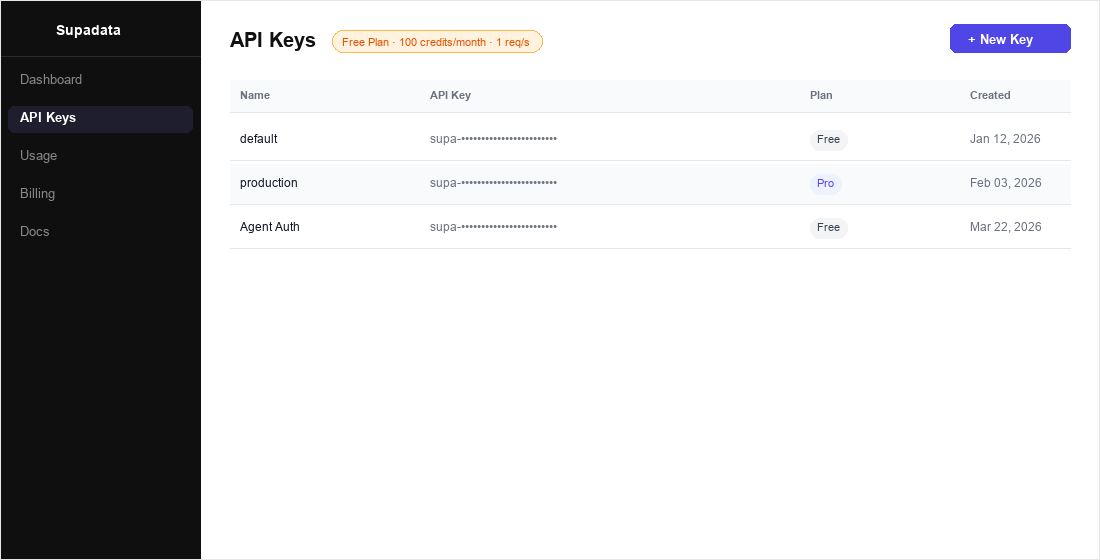
- After signing in, click API Keys in the left sidebar.
- Your auto-generated key is listed in the table. Click the key row to reveal or copy it.
- To create a new dedicated key for this integration, click + New Key, give it a name (e.g.,
Agent Auth), and click Create.
-
Create a connection in Scalekit
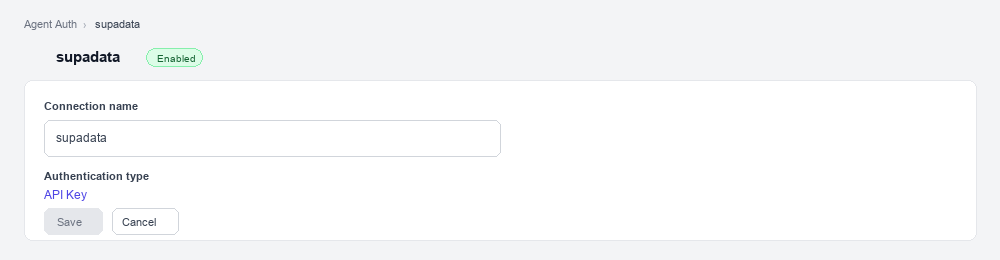
- In Scalekit dashboard, go to AgentKit > Connections > Create Connection. Find Supadata and click Create.
- Note the Connection name — you will use this as
connection_namein your code (e.g.,supadata). - Click Save.
-
Add a connected account
Connected accounts link a specific user identifier in your system to a Supadata API key. Add them via the dashboard for testing, or via the Scalekit API in production.
Via dashboard (for testing)
-
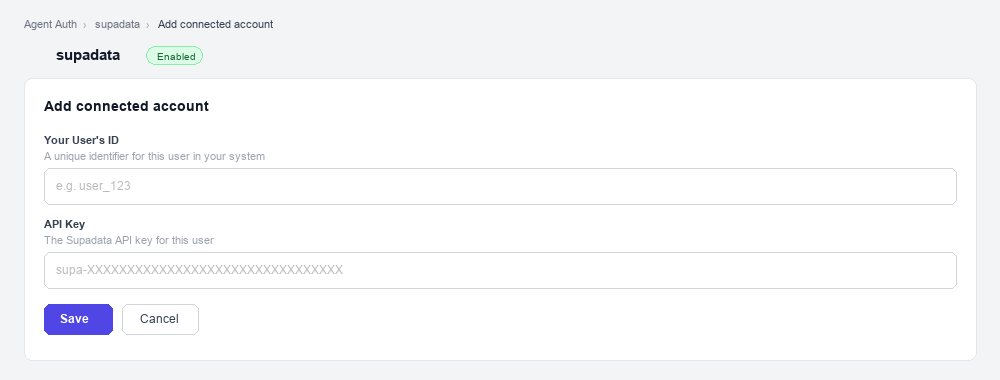
Open the connection you created and click the Connected Accounts tab → Add account.
-
Fill in:
- Your User’s ID — a unique identifier for this user in your system (e.g.,
user_123) - API Key — the Supadata API key you copied in step 1
- Your User’s ID — a unique identifier for this user in your system (e.g.,
-
Click Save.
Via API (for production)
// Never hard-code API keys — read from secure storage or user inputconst supadataApiKey = getUserSupadataKey(); // retrieve from your secure storeawait scalekit.actions.upsertConnectedAccount({connectionName: 'supadata',identifier: 'user_123', // your user's unique IDcredentials: { api_key: supadataApiKey },});# Never hard-code API keys — read from secure storage or user inputsupadata_api_key = get_user_supadata_key() # retrieve from your secure storescalekit_client.actions.upsert_connected_account(connection_name="supadata",identifier="user_123",credentials={"api_key": supadata_api_key}) -
-
-
Make your first call
Section titled “Make your first call”quickstart.ts import { ScalekitClient } from '@scalekit-sdk/node'import 'dotenv/config'const scalekit = new ScalekitClient(process.env.SCALEKIT_ENV_URL,process.env.SCALEKIT_CLIENT_ID,process.env.SCALEKIT_CLIENT_SECRET,)const actions = scalekit.actionsconst connector = 'supadata'const identifier = 'user_123'// Make your first callconst result = await actions.executeTool({connector,identifier,toolName: 'supadata_account_get',toolInput: {},})console.log(result)quickstart.py import osfrom scalekit.client import ScalekitClientfrom dotenv import load_dotenvload_dotenv()scalekit_client = ScalekitClient(env_url=os.getenv("SCALEKIT_ENV_URL"),client_id=os.getenv("SCALEKIT_CLIENT_ID"),client_secret=os.getenv("SCALEKIT_CLIENT_SECRET"),)actions = scalekit_client.actionsconnection_name = "supadata"identifier = "user_123"# Make your first callresult = actions.execute_tool(tool_input={},tool_name="supadata_account_get",connection_name=connection_name,identifier=identifier,)print(result)
What you can do
Section titled “What you can do”Connect this agent connector to let your agent:
- Batch youtube video, youtube transcript — Start an asynchronous batch job that fetches metadata for multiple YouTube videos in one call
- Videos youtube playlist, youtube channel — Retrieve the video IDs contained in a YouTube playlist, in playlist order
- Get youtube batch, web crawl, transcript job — Check the status of a YouTube batch job (transcripts or video metadata) and retrieve its results once complete
- Start web crawl — Start an asynchronous crawl job that extracts content from all pages on a website, following internal links up to the given page limit
- Extract records — Use AI to analyze a video or media URL and extract structured data from it, guided by a natural-language prompt and/or a JSON schema
- Scrape web — Scrape a web page and return its content as clean Markdown
Common workflows
Section titled “Common workflows”Proxy API call
// Get a YouTube transcript — no API key needed hereconst result = await actions.request({ connectionName: 'supadata', identifier: 'user_123', path: '/v1/youtube/transcript', method: 'GET', queryParams: { videoId: 'dQw4w9WgXcQ', text: 'true' },});console.log(result);# Get a YouTube transcript — no API key needed hereresult = actions.request( connection_name='supadata', identifier='user_123', path="/v1/youtube/transcript", method="GET", params={"videoId": "dQw4w9WgXcQ", "text": True})print(result)Execute a tool
const result = await actions.executeTool({ connector: 'supadata', identifier: 'user_123', toolName: 'supadata_metadata_get', toolInput: {},});console.log(result);result = actions.execute_tool( tool_input={}, tool_name='supadata_metadata_get', connection_name='supadata', identifier='user_123',)print(result)Tool list
Section titled “Tool list”Use the exact tool names from the Tool list below when you call execute_tool. If you’re not sure which name to use, list the tools available for the current user first.
supadata_account_get#Retrieve organization details, plan information, and credit usage for the connected Supadata account. Use this to check remaining credits before running credit-consuming operations.0 params
Retrieve organization details, plan information, and credit usage for the connected Supadata account. Use this to check remaining credits before running credit-consuming operations.
supadata_extract#Use AI to analyze a video or media URL and extract structured data from it, guided by a natural-language prompt and/or a JSON schema. Returns a jobId — poll Get Extract Results with it until extraction finishes.3 params
Use AI to analyze a video or media URL and extract structured data from it, guided by a natural-language prompt and/or a JSON schema. Returns a jobId — poll Get Extract Results with it until extraction finishes.
urlstringrequiredURL of the video or media to extract structured data from.promptstringoptionalNatural-language instructions describing what data to extract.schemaobjectoptionalJSON schema describing the exact shape of the structured data to extract.supadata_extract_get#Check the status of an AI structured-data extraction job and retrieve its results once complete. Use the jobId returned by Extract Structured Data.1 param
Check the status of an AI structured-data extraction job and retrieve its results once complete. Use the jobId returned by Extract Structured Data.
jobIdstringrequiredID of the extraction job to check, returned by Extract Structured Data.supadata_metadata_get#Retrieve unified metadata for a video or media URL including title, description, author info, engagement stats, media details, and creation date. Supports YouTube, TikTok, Instagram, X (Twitter), Facebook, and more.1 param
Retrieve unified metadata for a video or media URL including title, description, author info, engagement stats, media details, and creation date. Supports YouTube, TikTok, Instagram, X (Twitter), Facebook, and more.
urlstringrequiredURL of the video or media to retrieve metadata for.supadata_transcript_get#Extract transcripts from YouTube, TikTok, Instagram, X (Twitter), Facebook, or direct file URLs. Supports native captions, auto-generated captions, or AI-generated transcripts. Returns timestamped segments with speaker labels.5 params
Extract transcripts from YouTube, TikTok, Instagram, X (Twitter), Facebook, or direct file URLs. Supports native captions, auto-generated captions, or AI-generated transcripts. Returns timestamped segments with speaker labels.
urlstringrequiredURL of the video or media file to transcribe. Supports YouTube, TikTok, Instagram, X, Facebook, or direct video/audio file URLs.chunkSizeintegeroptionalMaximum number of characters per transcript segment chunk.langstringoptionalISO 639-1 language code for the transcript (e.g., en, fr, de). Defaults to the video's original language.modestringoptionalTranscript generation mode: native (use existing captions, 1 credit), auto (native with AI fallback), or generate (AI-generated, 2 credits/minute).textbooleanoptionalReturn plain text instead of timestamped segments. Defaults to false.supadata_transcript_job_get#Poll the status and result of an asynchronous transcript job. supadata_transcript_get switches to async mode (returning a 202 with a jobId) for videos longer than roughly 20 minutes; use this tool to poll that jobId until status is completed or failed. Recommended poll interval is 1 second; results remain available for 1 hour after completion.1 param
Poll the status and result of an asynchronous transcript job. supadata_transcript_get switches to async mode (returning a 202 with a jobId) for videos longer than roughly 20 minutes; use this tool to poll that jobId until status is completed or failed. Recommended poll interval is 1 second; results remain available for 1 hour after completion.
jobIdstringrequiredID of the transcript job to check, returned by Get Transcript when it responds asynchronously.supadata_web_crawl_get#Check the status of a web crawl job and retrieve its results once complete. Use the jobId returned by Start Web Crawl.1 param
Check the status of a web crawl job and retrieve its results once complete. Use the jobId returned by Start Web Crawl.
jobIdstringrequiredID of the crawl job to check, returned by Start Web Crawl.supadata_web_crawl_start#Start an asynchronous crawl job that extracts content from all pages on a website, following internal links up to the given page limit. Returns a jobId — poll Get Web Crawl Results with it until the crawl finishes.2 params
Start an asynchronous crawl job that extracts content from all pages on a website, following internal links up to the given page limit. Returns a jobId — poll Get Web Crawl Results with it until the crawl finishes.
urlstringrequiredBase URL of the website to crawl.limitintegeroptionalMaximum number of pages to crawl.supadata_web_map#Discover and return all URLs found on a website. Useful for site structure analysis, link auditing, and building crawl lists. Costs 1 credit per request.1 param
Discover and return all URLs found on a website. Useful for site structure analysis, link auditing, and building crawl lists. Costs 1 credit per request.
urlstringrequiredBase URL of the website to map.supadata_web_scrape#Scrape a web page and return its content as clean Markdown. Ideal for extracting readable content from any URL while stripping away navigation and ads.3 params
Scrape a web page and return its content as clean Markdown. Ideal for extracting readable content from any URL while stripping away navigation and ads.
urlstringrequiredURL of the web page to scrape.langstringoptionalISO 639-1 language code to request content in a specific language (e.g., en, fr, de).noLinksbooleanoptionalStrip all hyperlinks from the Markdown output. Defaults to false.supadata_youtube_batch_get#Check the status of a YouTube batch job (transcripts or video metadata) and retrieve its results once complete. Use the jobId returned by Batch Get YouTube Transcripts or Batch Get YouTube Video Metadata.1 param
Check the status of a YouTube batch job (transcripts or video metadata) and retrieve its results once complete. Use the jobId returned by Batch Get YouTube Transcripts or Batch Get YouTube Video Metadata.
jobIdstringrequiredID of the batch job to check.supadata_youtube_channel_get#Retrieve metadata for a YouTube channel including name, description, subscriber count, video count, and thumbnails.1 param
Retrieve metadata for a YouTube channel including name, description, subscriber count, video count, and thumbnails.
channelIdstringrequiredYouTube channel ID, handle (@username), or full channel URL.supadata_youtube_channel_videos#Retrieve the video IDs published by a YouTube channel. Use Get YouTube Channel first to resolve a handle to a channel ID if needed.2 params
Retrieve the video IDs published by a YouTube channel. Use Get YouTube Channel first to resolve a handle to a channel ID if needed.
channelIdstringrequiredYouTube channel ID, handle (@username), or full channel URL.limitintegeroptionalMaximum number of video IDs to return.supadata_youtube_playlist_get#Retrieve metadata and video list for a YouTube playlist including title, description, video count, and individual video details.1 param
Retrieve metadata and video list for a YouTube playlist including title, description, video count, and individual video details.
playlistIdstringrequiredYouTube playlist ID or full playlist URL.supadata_youtube_playlist_videos#Retrieve the video IDs contained in a YouTube playlist, in playlist order.2 params
Retrieve the video IDs contained in a YouTube playlist, in playlist order.
playlistIdstringrequiredYouTube playlist ID or full playlist URL.limitintegeroptionalMaximum number of video IDs to return.supadata_youtube_search#Search YouTube for videos, channels, or playlists. Returns results with titles, IDs, descriptions, thumbnails, and metadata.4 params
Search YouTube for videos, channels, or playlists. Returns results with titles, IDs, descriptions, thumbnails, and metadata.
querystringrequiredSearch query string to find videos, channels, or playlists on YouTube.langstringoptionalISO 639-1 language code to filter results by language (e.g., en, fr).limitintegeroptionalMaximum number of results to return.typestringoptionalType of results to return: video, channel, or playlist.supadata_youtube_transcript_batch#Start an asynchronous batch job that fetches transcripts for multiple YouTube videos in one call. Returns a jobId — poll Get YouTube Batch Results with it until the batch finishes.3 params
Start an asynchronous batch job that fetches transcripts for multiple YouTube videos in one call. Returns a jobId — poll Get YouTube Batch Results with it until the batch finishes.
videoIdsarrayrequiredJSON array of YouTube video IDs or URLs to fetch transcripts for.langstringoptionalISO 639-1 language code for the transcripts (e.g., en, fr, de). Defaults to each video's original language.textbooleanoptionalReturn plain text instead of timestamped segments for each video. Defaults to false.supadata_youtube_transcript_get#Retrieve the transcript for a YouTube video by video ID or URL. Returns timestamped segments with text content.3 params
Retrieve the transcript for a YouTube video by video ID or URL. Returns timestamped segments with text content.
videoIdstringrequiredYouTube video ID or full YouTube URL to retrieve the transcript for.langstringoptionalISO 639-1 language code for the transcript (e.g., en, fr, de).textbooleanoptionalReturn plain text instead of timestamped segments. Defaults to false.supadata_youtube_transcript_translate#Retrieve and translate a YouTube video transcript into a target language. Returns translated timestamped segments.3 params
Retrieve and translate a YouTube video transcript into a target language. Returns translated timestamped segments.
langstringrequiredISO 639-1 language code to translate the transcript into (e.g., en, fr, es).videoIdstringrequiredYouTube video ID or full YouTube URL to translate the transcript for.textbooleanoptionalReturn plain text instead of timestamped segments. Defaults to false.supadata_youtube_video_batch#Start an asynchronous batch job that fetches metadata for multiple YouTube videos in one call. Returns a jobId — poll Get YouTube Batch Results with it until the batch finishes.1 param
Start an asynchronous batch job that fetches metadata for multiple YouTube videos in one call. Returns a jobId — poll Get YouTube Batch Results with it until the batch finishes.
videoIdsarrayrequiredJSON array of YouTube video IDs or URLs to fetch metadata for.supadata_youtube_video_get#Retrieve detailed metadata for a YouTube video including title, description, view count, like count, duration, tags, thumbnails, and channel info.1 param
Retrieve detailed metadata for a YouTube video including title, description, view count, like count, duration, tags, thumbnails, and channel info.
videoIdstringrequiredYouTube video ID or full YouTube URL.