


Xero connector
OAuth 2.0Accounting & FinanceConnect to Xero. Manage accounting, invoices, contacts, payments, bank transactions, and financial workflows
Xero connector
-
Install the SDK
Section titled “Install the SDK”Terminal window npm install @scalekit-sdk/nodeTerminal window pip install scalekit -
Set your credentials
Section titled “Set your credentials”Add your Scalekit credentials to your
.envfile. Find values in app.scalekit.com > Developers > API Credentials..env SCALEKIT_ENVIRONMENT_URL=<your-environment-url>SCALEKIT_CLIENT_ID=<your-client-id>SCALEKIT_CLIENT_SECRET=<your-client-secret> -
Set up the connector
Section titled “Set up the connector”Register your Xero credentials with Scalekit so it handles the token lifecycle. You do this once per environment.
Dashboard setup steps
Register your Scalekit environment with the Xero connector so Scalekit handles the OAuth 2.0 flow and token lifecycle for you. The connection name you create is used to identify and invoke the connection in your code.
-
Set up auth redirects
-
In Scalekit dashboard, go to AgentKit > Connections > Create Connection. Find Xero and click Create. Copy the redirect URI — it looks like
https://<SCALEKIT_ENVIRONMENT_URL>/sso/v1/oauth/<CONNECTION_ID>/callback. -
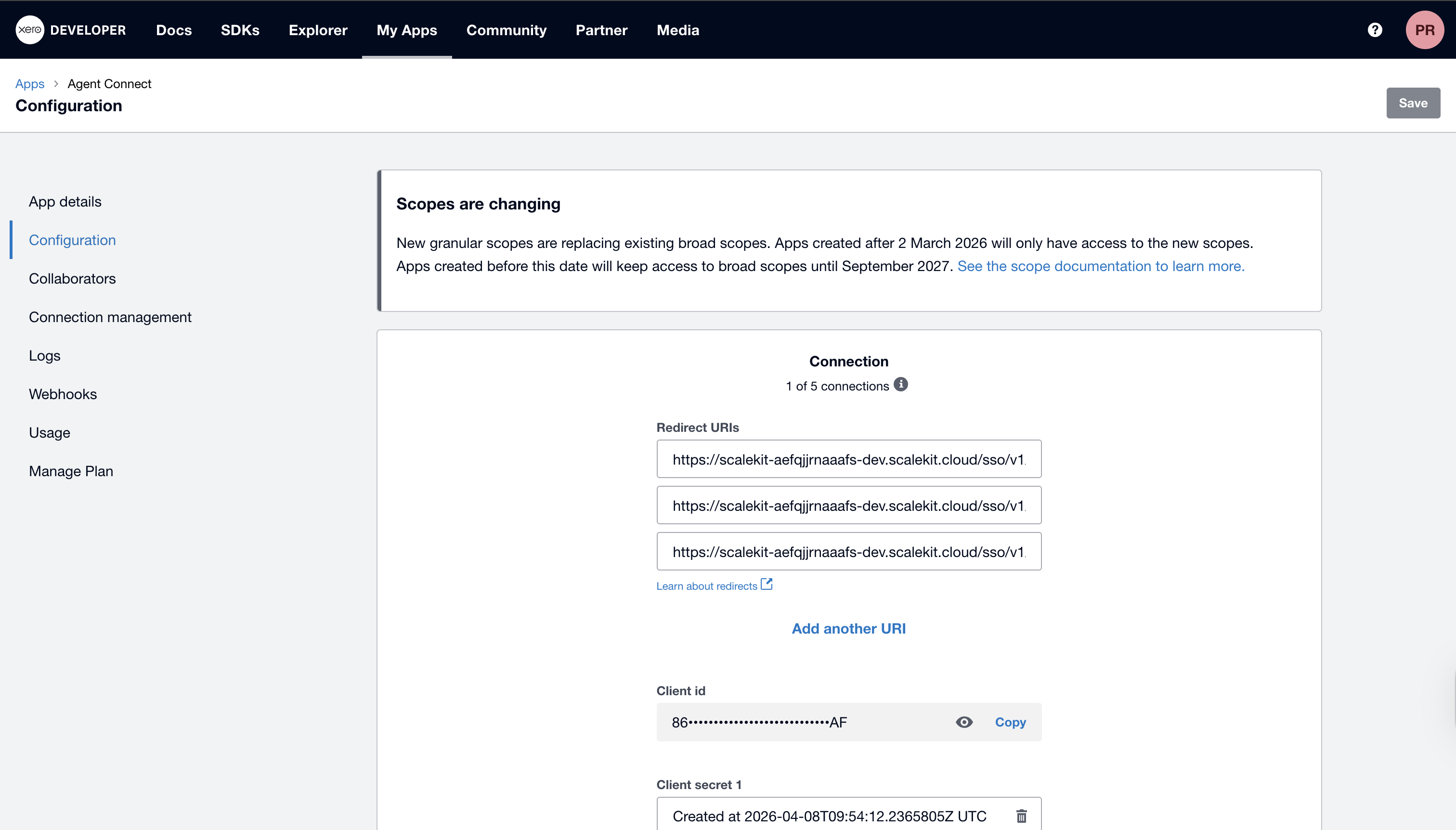
Log in to developer.xero.com, open your app (or create one under My Apps → New app), and go to Configuration.
-
Paste the redirect URI into the Redirect URIs field and click Save.
-
-
Get client credentials
-
In your Xero app, open the Configuration tab.
-
Copy your Client ID and generate a Client Secret.
-
-
Add credentials in Scalekit
-
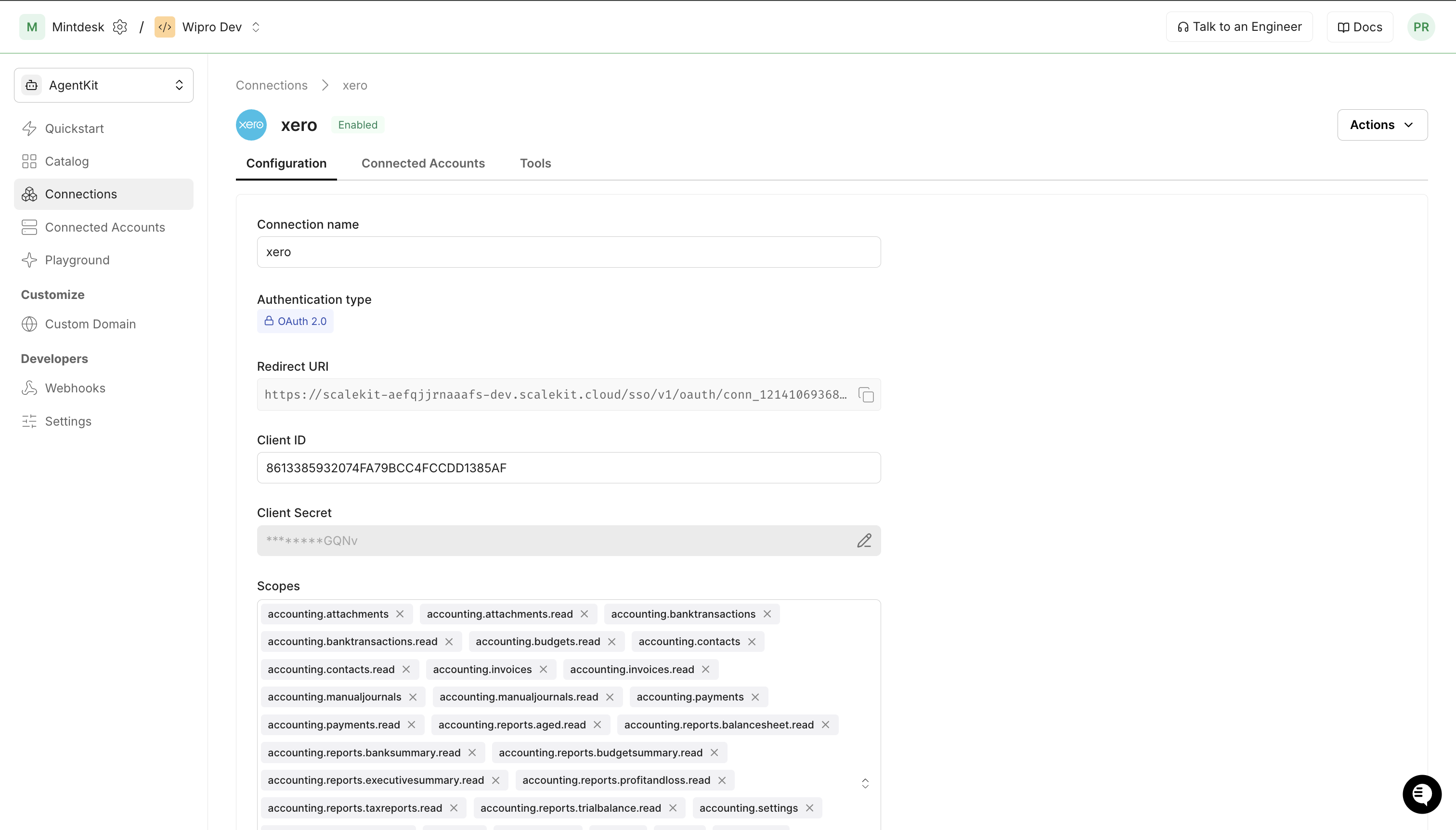
In Scalekit dashboard, go to AgentKit > Connections and open the connection you created.
-
Enter your Xero Client ID and Client Secret, then click Save.
-
-
Connect a user account
Your users must authorize access to their Xero organisation. Generate an authorization link and direct them through the OAuth flow.
Via dashboard (for testing)
-
Open the connection and click the Connected Accounts tab → Add Account.
-
Fill in Your User’s ID (e.g.,
user_123) and follow the Xero OAuth prompt.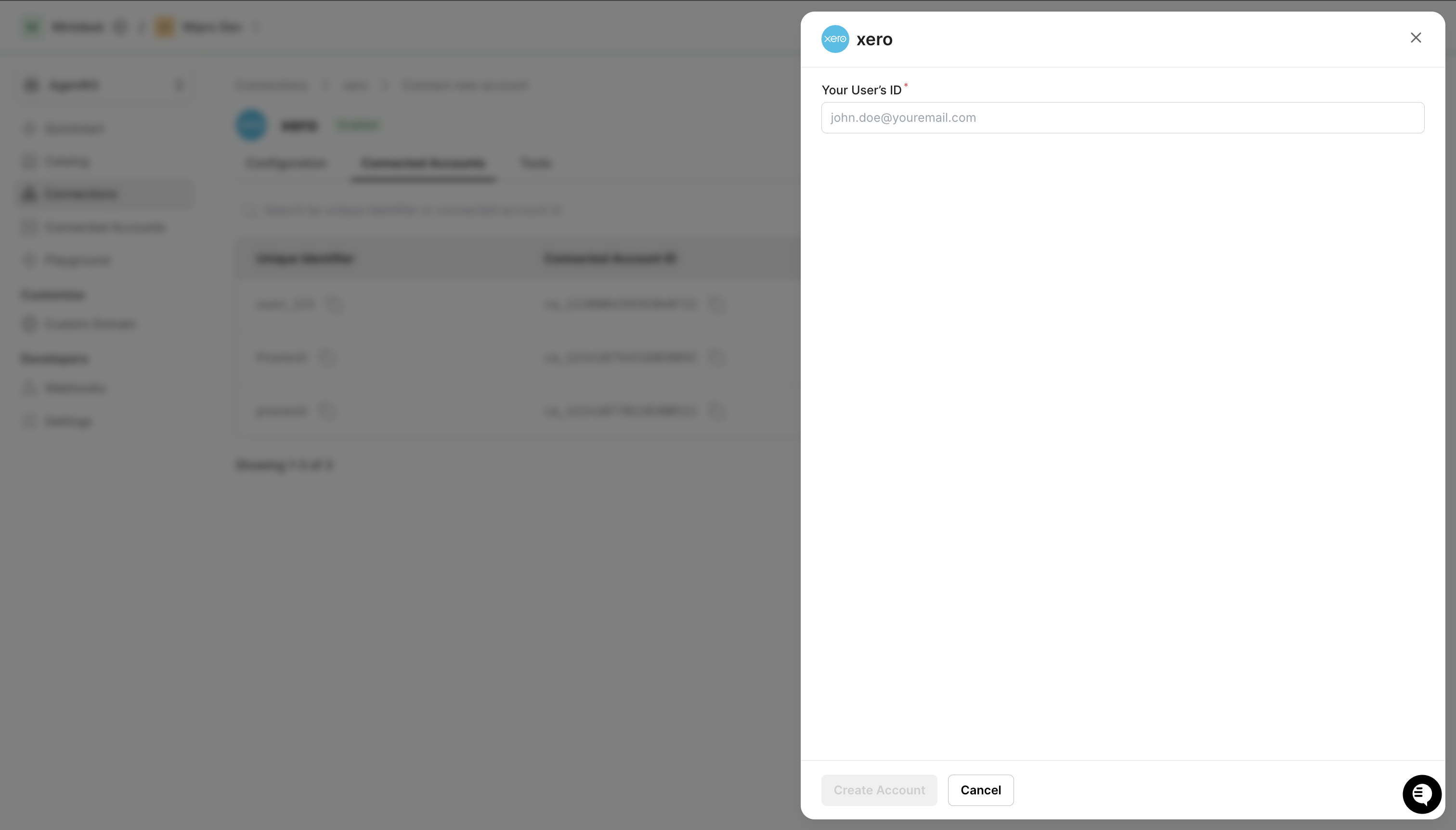
Via API (for production)
const { link } = await scalekit.actions.getAuthorizationLink({connectionName: 'xero',identifier: 'user_123',});// Redirect your user to `link` — they complete OAuth on Xero's sideconsole.log('Authorize Xero:', link);link_response = scalekit_client.actions.get_authorization_link(connection_name="xero",identifier="user_123")# Redirect your user to link_response.linkprint("Authorize Xero:", link_response.link) -
-
-
Authorize and make your first call
Section titled “Authorize and make your first call”quickstart.ts import { ScalekitClient } from '@scalekit-sdk/node'import 'dotenv/config'const scalekit = new ScalekitClient(process.env.SCALEKIT_ENV_URL,process.env.SCALEKIT_CLIENT_ID,process.env.SCALEKIT_CLIENT_SECRET,)const actions = scalekit.actionsconst connector = 'xero'const identifier = 'user_123'// Generate an authorization link for the userconst { link } = await actions.getAuthorizationLink({ connectionName: connector, identifier })console.log('Authorize Xero:', link)process.stdout.write('Press Enter after authorizing...')await new Promise(r => process.stdin.once('data', r))// Make your first callconst result = await actions.executeTool({connector,identifier,toolName: 'xero_accounts_list',toolInput: {},})console.log(result)quickstart.py import osfrom scalekit.client import ScalekitClientfrom dotenv import load_dotenvload_dotenv()scalekit_client = ScalekitClient(env_url=os.getenv("SCALEKIT_ENV_URL"),client_id=os.getenv("SCALEKIT_CLIENT_ID"),client_secret=os.getenv("SCALEKIT_CLIENT_SECRET"),)actions = scalekit_client.actionsconnection_name = "xero"identifier = "user_123"# Generate an authorization link for the userlink_response = actions.get_authorization_link(connection_name=connection_name,identifier=identifier,)print("Authorize Xero:", link_response.link)input("Press Enter after authorizing...")# Make your first callresult = actions.execute_tool(tool_input={},tool_name="xero_accounts_list",connection_name=connection_name,identifier=identifier,)print(result)
What you can do
Section titled “What you can do”Connect this agent connector to let your agent:
- Update tracking option, bank transaction, tracking category — Update a specific option for a specific tracking category in Xero
- Delete tracking option, tracking category, item — Delete a specific option for a specific tracking category in Xero
- Get tracking category, tax rate, report by id — Retrieve a specific tracking category and its options using a unique tracking category ID
- Create tracking category, repeating invoice, payment — Create a new tracking category in Xero
- List reports, journals, invoice attachments — Retrieve a list of the organisation’s available ad-hoc reports, each with a unique ReportID needed to fetch its contents
- Summary report budget, report executive, report bank — Retrieve the Budget Summary report for a Xero organisation
Common workflows
Section titled “Common workflows”Proxy API call
For raw proxy requests, you must supply the Xero-Tenant-Id header yourself. Trigger any tool call first (e.g. xero_accounts_list) so Scalekit caches the tenant ID, then retrieve it from the connected account’s api_config.path_variables.
const { connectedAccount } = await actions.getConnectedAccount({ connectionName: 'xero', identifier: 'user_123',});const xeroTenantId = connectedAccount.apiConfig?.pathVariables?.xero_tenant_id;
const result = await actions.request({ connectionName: 'xero', identifier: 'user_123', path: '/Invoices', method: 'GET', headers: { 'Xero-Tenant-Id': xeroTenantId },});console.log(result);connected_account = actions.get_connected_account( connection_name='xero', identifier='user_123').connected_accountxero_tenant_id = connected_account.api_config["path_variables"]["xero_tenant_id"]
result = actions.request( connection_name='xero', identifier='user_123', path="/Invoices", method="GET", headers={"Xero-Tenant-Id": xero_tenant_id},)print(result)Create and authorise an invoice
The Contact field must be a JSON string and LineItems must be a JSON array. Include AccountCode in each line item — Xero requires it when authorising or voiding the invoice.
const contacts = await actions.executeTool({ connector: 'xero', identifier: 'user_123', toolName: 'xero_contacts_list', toolInput: {},});const contactId = contacts.Contacts[0].ContactID;
const invoice = await actions.executeTool({ connector: 'xero', identifier: 'user_123', toolName: 'xero_invoice_create', toolInput: { Type: 'ACCREC', Contact: JSON.stringify({ ContactID: contactId }), LineItems: [ { Description: 'Consulting services', Quantity: 1, UnitAmount: 500, AccountCode: '200' }, ], },});const invoiceId = invoice.Invoices[0].InvoiceID;
await actions.executeTool({ connector: 'xero', identifier: 'user_123', toolName: 'xero_invoice_update', toolInput: { invoice_id: invoiceId, Status: 'AUTHORISED', DueDate: '2026-06-30', },});import json
contacts = actions.execute_tool( connection_name='xero', identifier='user_123', tool_name="xero_contacts_list", tool_input={},)contact_id = contacts["Contacts"][0]["ContactID"]
invoice = actions.execute_tool( connection_name='xero', identifier='user_123', tool_name="xero_invoice_create", tool_input={ "Type": "ACCREC", "Contact": json.dumps({"ContactID": contact_id}), "LineItems": [ {"Description": "Consulting services", "Quantity": 1, "UnitAmount": 500, "AccountCode": "200"}, ], },)invoice_id = invoice["Invoices"][0]["InvoiceID"]
actions.execute_tool( connection_name='xero', identifier='user_123', tool_name="xero_invoice_update", tool_input={ "invoice_id": invoice_id, "Status": "AUTHORISED", "DueDate": "2026-06-30", },)Void an invoice
xero_invoice_delete voids an invoice by setting its status to VOIDED. Xero only permits voiding AUTHORISED invoices — calling it on a DRAFT invoice returns a validation error. Authorise the invoice first (see above), then call delete.
await actions.executeTool({ connector: 'xero', identifier: 'user_123', toolName: 'xero_invoice_delete', toolInput: { invoice_id: invoiceId },});actions.execute_tool( connection_name='xero', identifier='user_123', tool_name="xero_invoice_delete", tool_input={"invoice_id": invoice_id},)Create a quote
xero_quote_create requires Contact (JSON string), LineItems (array), and Date (ISO 8601). Without Date, Xero returns "Date cannot be empty".
const quote = await actions.executeTool({ connector: 'xero', identifier: 'user_123', toolName: 'xero_quote_create', toolInput: { Contact: JSON.stringify({ ContactID: contactId }), LineItems: [{ Description: 'Project estimate', Quantity: 1, UnitAmount: 2000 }], Date: '2026-04-29', },});const quoteId = quote.Quotes[0].QuoteID;import json
quote = actions.execute_tool( connection_name='xero', identifier='user_123', tool_name="xero_quote_create", tool_input={ "Contact": json.dumps({"ContactID": contact_id}), "LineItems": [{"Description": "Project estimate", "Quantity": 1, "UnitAmount": 2000}], "Date": "2026-04-29", },)quote_id = quote["Quotes"][0]["QuoteID"]Run aged payables or receivables report
The aged report tools require a contactID parameter. The other reports (Balance Sheet, Profit & Loss, Trial Balance, Bank Summary, Executive Summary) need no inputs beyond the auto-injected tenant ID.
const report = await actions.executeTool({ connector: 'xero', identifier: 'user_123', toolName: 'xero_report_aged_receivables', toolInput: { contactID: contactId },});report = actions.execute_tool( connection_name='xero', identifier='user_123', tool_name="xero_report_aged_receivables", tool_input={"contactID": contact_id},)Common patterns
Section titled “Common patterns”Void (delete) an invoice
xero_invoice_delete voids an invoice by setting its status to VOIDED. Xero only allows voiding invoices that are in AUTHORISED status — calling it on a DRAFT invoice returns a validation error.
The correct sequence is:
- Authorise the invoice with
xero_invoice_update, passingStatus: "AUTHORISED"and aDueDate. - Call
xero_invoice_deletewith the sameinvoice_id.
Node.js example
// Step 1 — authorise the invoiceawait actions.executeTool({ connectionName, identifier, toolName: 'xero_invoice_update', parameters: { invoice_id: invoiceId, Status: 'AUTHORISED', DueDate: '2026-06-30', },});
// Step 2 — void itawait actions.executeTool({ connectionName, identifier, toolName: 'xero_invoice_delete', parameters: { invoice_id: invoiceId },});Python example
# Step 1 — authorise the invoiceactions.execute_tool( connection_name=connection_name, identifier=identifier, tool_name="xero_invoice_update", parameters={ "invoice_id": invoice_id, "Status": "AUTHORISED", "DueDate": "2026-06-30", },)
# Step 2 — void itactions.execute_tool( connection_name=connection_name, identifier=identifier, tool_name="xero_invoice_delete", parameters={"invoice_id": invoice_id},)Pass Contact and LineItems correctly
Several tools (xero_invoice_create, xero_credit_note_create, xero_purchase_order_create, xero_quote_create) take a Contact field and a LineItems field.
Contact— pass as a JSON string:'{"ContactID": "abc123..."}'LineItems— pass as a JSON array (not a string):[{"Description": "...", "Quantity": 1, "UnitAmount": 100, "AccountCode": "200"}]
Include AccountCode in each line item whenever the invoice may later be authorised or voided.
Quotes require a Date
xero_quote_create and xero_quote_update both require a Date field (ISO 8601, e.g. "2026-04-29"). Xero returns a validation error "Date cannot be empty" without it.
xero_quote_update also requires Contact (JSON string) in addition to Date.
Aged reports require a contactID
xero_report_aged_payables and xero_report_aged_receivables require a contactID parameter. The other five report tools (xero_report_balance_sheet, xero_report_profit_and_loss, xero_report_trial_balance, xero_report_bank_summary, xero_report_executive_summary) require no inputs beyond the auto-injected tenant ID.
Update an item
xero_item_update requires Code in the request body (in addition to item_id in the path). Pass the item’s existing code or a new one — Xero uses it to identify the item being updated.
Tool list
Section titled “Tool list”Use the exact tool names from the Tool list below when you call execute_tool. If you’re not sure which name to use, list the tools available for the current user first.
xero_account_create#Create a new account in the Xero chart of accounts.8 params
Create a new account in the Xero chart of accounts.
CodestringrequiredCustomer defined alpha numeric account code.NamestringrequiredName of the account.TypestringrequiredAccount type (e.g. BANK, CURRENT, EQUITY, EXPENSE, FIXED, LIABILITY, OTHERINCOME, OVERHEADS, PREPAYMENT, REVENUE, SALES, TERMLIAB, PAYGLIABILITY).BankAccountNumberstringoptionalFor bank accounts, the bank account number.CurrencyCodestringoptionalFor bank accounts, the currency of the account.DescriptionstringoptionalDescription of the account.EnablePaymentsToAccountbooleanoptionalIf true, payments can be made to this account.TaxTypestringoptionalDefault tax type for the account.xero_account_delete#Archive (soft-delete) an account from the Xero chart of accounts by setting its status to ARCHIVED.1 param
Archive (soft-delete) an account from the Xero chart of accounts by setting its status to ARCHIVED.
account_idstringrequiredXero account GUID to archive.xero_account_get#Retrieve a single account by its AccountID.1 param
Retrieve a single account by its AccountID.
account_idstringrequiredXero account GUID.xero_account_update#Update an existing account in the Xero chart of accounts.6 params
Update an existing account in the Xero chart of accounts.
account_idstringrequiredXero account GUID.CodestringoptionalUpdated account code.DescriptionstringoptionalUpdated description.EnablePaymentsToAccountbooleanoptionalEnable/disable payments to account.NamestringoptionalUpdated name of the account.TaxTypestringoptionalUpdated tax type.xero_accounts_list#Retrieve the full chart of accounts for a Xero organisation.3 params
Retrieve the full chart of accounts for a Xero organisation.
modified_afterstringoptionalReturn records modified after this UTC datetime (ISO 8601).orderstringoptionalOrder results (e.g. Name ASC).wherestringoptionalFilter expression (e.g. Type=="BANK").xero_bank_transaction_create#Create a new spend or receive money bank transaction in Xero.8 params
Create a new spend or receive money bank transaction in Xero.
BankAccountstringrequiredBank account object with Code or AccountID e.g. {"Code":"090"}.LineItemsarrayrequiredArray of line items. Each needs Description, Quantity, UnitAmount, AccountCode.TypestringrequiredBank transaction type: SPEND, RECEIVE, SPEND-OVERPAYMENT, RECEIVE-OVERPAYMENT, SPEND-PREPAYMENT, or RECEIVE-PREPAYMENT.ContactstringoptionalContact object with ContactID e.g. {"ContactID":"guid"}.CurrencyCodestringoptionalCurrency (defaults to org default).DatestringoptionalDate of the transaction in YYYY-MM-DD format.ReferencestringoptionalReference for the transaction (SPEND/RECEIVE only).StatusstringoptionalBank transaction status (DRAFT or AUTHORISED).xero_bank_transaction_get#Retrieve a single spend or receive money bank transaction by its BankTransactionID.1 param
Retrieve a single spend or receive money bank transaction by its BankTransactionID.
bank_transaction_idstringrequiredXero bank transaction GUID.xero_bank_transaction_history_get#Get the change history and notes trail for a Xero bank transaction.1 param
Get the change history and notes trail for a Xero bank transaction.
bank_transaction_idstringrequiredXero bank transaction GUID.xero_bank_transaction_update#Update an existing spend or receive money bank transaction in Xero.5 params
Update an existing spend or receive money bank transaction in Xero.
bank_transaction_idstringrequiredXero bank transaction GUID to update.LineItemsarrayoptionalUpdated array of line items. Each needs Description, Quantity, UnitAmount, AccountCode.ReferencestringoptionalUpdated reference for the transaction.StatusstringoptionalUpdated status (DRAFT, AUTHORISED, or DELETED).UrlstringoptionalUpdated URL link to a source document.xero_bank_transactions_list#Retrieve spend or receive money bank transactions from Xero.4 params
Retrieve spend or receive money bank transactions from Xero.
modified_afterstringoptionalModified after UTC datetime.orderstringoptionalSort order.pagenumberoptionalPage number.wherestringoptionalFilter expression.xero_bank_transfers_list#Retrieve bank transfers between accounts in Xero.3 params
Retrieve bank transfers between accounts in Xero.
modified_afterstringoptionalModified after UTC datetime.orderstringoptionalSort order.wherestringoptionalFilter expression.xero_batch_payment_create#Create a batch payment covering one or more invoice or credit note payments in Xero.6 params
Create a batch payment covering one or more invoice or credit note payments in Xero.
AccountstringrequiredBank account object with AccountID or Code e.g. {"AccountID":"guid"}.DatestringrequiredDate of the batch payment in YYYY-MM-DD format.PaymentsarrayrequiredArray of payment objects, each with Invoice, Account, Date, and Amount.DetailsstringoptionalDetails to appear on the bank statement (max 18 chars, UK/NZ only).ParticularsstringoptionalParticulars to appear on the bank statement (max 12 chars, NZ only).ReferencestringoptionalReference for the batch payment.xero_batch_payment_get#Retrieve a specific batch payment using a unique batch payment ID.1 param
Retrieve a specific batch payment using a unique batch payment ID.
batch_payment_idstringrequiredXero batch payment GUID.xero_batch_payments_list#Retrieve batch payments from a Xero organisation.3 params
Retrieve batch payments from a Xero organisation.
modified_afterstringoptionalModified after UTC datetime.orderstringoptionalSort order.wherestringoptionalFilter expression.xero_contact_create#Create a new contact (customer or supplier) in Xero.10 params
Create a new contact (customer or supplier) in Xero.
NamestringrequiredFull name of the contact / company.AccountNumberstringoptionalUnique account number for this contact.AddressesarrayoptionalArray of address objects.DefaultCurrencystringoptionalDefault currency for this contact.EmailAddressstringoptionalEmail address of the contact.FirstNamestringoptionalFirst name of primary contact person.IsCustomerbooleanoptionalTrue if contact is a customer.IsSupplierbooleanoptionalTrue if contact is a supplier.LastNamestringoptionalLast name of primary contact person.PhonesarrayoptionalArray of phone objects e.g. [{"PhoneType":"DEFAULT","PhoneNumber":"021-123456"}].xero_contact_get#Retrieve a single contact by its ContactID.1 param
Retrieve a single contact by its ContactID.
contact_idstringrequiredXero contact GUID.xero_contact_group_create#Create a new contact group in Xero.1 param
Create a new contact group in Xero.
NamestringrequiredName of the contact group.xero_contact_group_delete#Delete (soft-delete) a contact group in Xero by setting its status to DELETED.1 param
Delete (soft-delete) a contact group in Xero by setting its status to DELETED.
contact_group_idstringrequiredXero contact group GUID to delete.xero_contact_group_get#Retrieve a single contact group by its ContactGroupID.1 param
Retrieve a single contact group by its ContactGroupID.
contact_group_idstringrequiredXero contact group GUID.xero_contact_group_update#Update a contact group name in Xero.2 params
Update a contact group name in Xero.
contact_group_idstringrequiredXero contact group GUID.NamestringrequiredNew name for the contact group.xero_contact_groups_list#Retrieve all contact groups in a Xero organisation.2 params
Retrieve all contact groups in a Xero organisation.
orderstringoptionalSort order.wherestringoptionalFilter expression.xero_contact_update#Update an existing contact in Xero.8 params
Update an existing contact in Xero.
contact_idstringrequiredXero contact GUID.DefaultCurrencystringoptionalUpdated default currency.EmailAddressstringoptionalUpdated email address.FirstNamestringoptionalUpdated first name.IsCustomerbooleanoptionalUpdate customer flag.IsSupplierbooleanoptionalUpdate supplier flag.LastNamestringoptionalUpdated last name.NamestringoptionalUpdated name.xero_contacts_list#Retrieve contacts (customers and suppliers) from a Xero organisation.6 params
Retrieve contacts (customers and suppliers) from a Xero organisation.
modified_afterstringoptionalReturn contacts modified after this UTC datetime.orderstringoptionalSort order (e.g. Name ASC).pagenumberoptionalPage number for pagination.pageSizenumberoptionalNumber of records per page (max 1000).searchTermstringoptionalSearch term to filter contacts by name or email.wherestringoptionalFilter expression (e.g. IsSupplier==true).xero_credit_note_allocation_create#Allocate a specific credit note to an invoice in Xero.4 params
Allocate a specific credit note to an invoice in Xero.
AmountnumberrequiredAmount of the credit note to allocate.credit_note_idstringrequiredXero credit note GUID to allocate from.DatestringrequiredDate the allocation is made in YYYY-MM-DD format.InvoicestringrequiredInvoice object with InvoiceID e.g. {"InvoiceID":"guid"}.xero_credit_note_create#Create a new credit note in Xero.7 params
Create a new credit note in Xero.
ContactstringrequiredContact object e.g. {"ContactID":"guid"}.LineItemsarrayrequiredArray of line item objects.TypestringrequiredCredit note type: ACCRECCREDIT (sales credit) or ACCPAYCREDIT (purchase credit).CurrencyCodestringoptionalCurrency code.DatestringoptionalDate of credit note (YYYY-MM-DD).ReferencestringoptionalReference number.StatusstringoptionalStatus: DRAFT or AUTHORISED.xero_credit_note_get#Retrieve a single credit note by its CreditNoteID.1 param
Retrieve a single credit note by its CreditNoteID.
credit_note_idstringrequiredXero credit note GUID.xero_credit_note_update#Update an existing credit note in Xero.3 params
Update an existing credit note in Xero.
credit_note_idstringrequiredXero credit note GUID.ReferencestringoptionalUpdated reference.StatusstringoptionalNew status (DRAFT, AUTHORISED, VOIDED).xero_credit_notes_list#Retrieve credit notes from a Xero organisation.4 params
Retrieve credit notes from a Xero organisation.
modified_afterstringoptionalModified after UTC datetime.orderstringoptionalSort order.pagenumberoptionalPage number.wherestringoptionalFilter expression.xero_currencies_list#Retrieve enabled currencies for a Xero organisation.2 params
Retrieve enabled currencies for a Xero organisation.
orderstringoptionalSort order.wherestringoptionalFilter expression.xero_employee_create#Create a new employee record in Xero.4 params
Create a new employee record in Xero.
FirstNamestringrequiredFirst name of the employee.LastNamestringrequiredLast name of the employee.ExternalLinkstringoptionalLink to employee in external system e.g. {"Url":"https://...","Description":"Employee record"}.StatusstringoptionalEmployee status (ACTIVE or TERMINATED).xero_employee_get#Retrieve a single employee by their EmployeeID.1 param
Retrieve a single employee by their EmployeeID.
employee_idstringrequiredXero employee GUID.xero_employee_update#Update an existing employee in Xero.4 params
Update an existing employee in Xero.
employee_idstringrequiredXero employee GUID.FirstNamestringoptionalUpdated first name.LastNamestringoptionalUpdated last name.StatusstringoptionalUpdated status (ACTIVE or TERMINATED).xero_employees_list#Retrieve employees from a Xero organisation.3 params
Retrieve employees from a Xero organisation.
modified_afterstringoptionalModified after UTC datetime.orderstringoptionalSort order.wherestringoptionalFilter expression.xero_invoice_attachments_list#List attachments (receipts, supporting PDFs or images) on a Xero invoice.1 param
List attachments (receipts, supporting PDFs or images) on a Xero invoice.
invoice_idstringrequiredXero invoice GUID.xero_invoice_create#Create a new invoice (ACCREC) or bill (ACCPAY) in Xero.8 params
Create a new invoice (ACCREC) or bill (ACCPAY) in Xero.
ContactstringrequiredContact object with ContactID e.g. {"ContactID":"guid"}.LineItemsarrayrequiredArray of line items. Each needs Description, Quantity, UnitAmount, AccountCode.TypestringrequiredInvoice type: ACCREC (sales invoice) or ACCPAY (bill/purchase invoice).CurrencyCodestringoptionalCurrency (defaults to org default).DueDatestringoptionalDue date in YYYY-MM-DD format.InvoiceNumberstringoptionalCustom invoice reference number.ReferencestringoptionalAdditional reference number.StatusstringoptionalInvoice status (DRAFT or AUTHORISED).xero_invoice_delete#Void (soft-delete) an invoice or bill in Xero by setting its status to VOIDED.1 param
Void (soft-delete) an invoice or bill in Xero by setting its status to VOIDED.
invoice_idstringrequiredXero invoice GUID to void.xero_invoice_email_send#Send a copy of a specific Xero invoice to its related contact via email.1 param
Send a copy of a specific Xero invoice to its related contact via email.
invoice_idstringrequiredXero invoice GUID to email.xero_invoice_get#Retrieve a single invoice or bill by its InvoiceID.1 param
Retrieve a single invoice or bill by its InvoiceID.
invoice_idstringrequiredXero invoice GUID.xero_invoice_online_url_get#Retrieve the shareable online invoice URL for a specific Xero invoice.1 param
Retrieve the shareable online invoice URL for a specific Xero invoice.
invoice_idstringrequiredXero invoice GUID.xero_invoice_update#Update an existing invoice or bill in Xero. Note: DueDate is required when setting Status to AUTHORISED.5 params
Update an existing invoice or bill in Xero. Note: DueDate is required when setting Status to AUTHORISED.
invoice_idstringrequiredXero invoice GUID.DueDatestringoptionalUpdated due date (YYYY-MM-DD). Required when Status is AUTHORISED.LineItemsarrayoptionalUpdated line items array.ReferencestringoptionalUpdated reference.StatusstringoptionalNew status (DRAFT, SUBMITTED, AUTHORISED, DELETED, VOIDED).xero_invoices_list#Retrieve sales invoices and bills from a Xero organisation.7 params
Retrieve sales invoices and bills from a Xero organisation.
ContactIDsstringoptionalComma-separated ContactIDs to filter invoices.modified_afterstringoptionalReturn invoices modified after this UTC datetime.orderstringoptionalSort order.pagenumberoptionalPage number.pageSizenumberoptionalRecords per page (max 1000).StatusesstringoptionalComma-separated statuses to filter (e.g. DRAFT,AUTHORISED).wherestringoptionalFilter expression (e.g. Type=="ACCREC" && Status=="AUTHORISED").xero_item_create#Create a new inventory item in Xero.8 params
Create a new inventory item in Xero.
CodestringrequiredUnique item code.DescriptionstringoptionalDescription for sales invoices.InventoryAssetAccountCodestringoptionalAccount code for inventory asset (required if tracked).IsTrackedAsInventorybooleanoptionalTrack this item as inventory.NamestringoptionalName of the item.PurchaseDescriptionstringoptionalDescription for purchase orders.PurchaseDetailsstringoptionalPurchase pricing JSON e.g. {"UnitPrice":5.00,"AccountCode":"300","TaxType":"INPUT2"}.SalesDetailsstringoptionalSales pricing JSON e.g. {"UnitPrice":9.99,"AccountCode":"200","TaxType":"OUTPUT2"}.xero_item_delete#Delete an inventory item from Xero.1 param
Delete an inventory item from Xero.
item_idstringrequiredXero item GUID to delete.xero_item_get#Retrieve a single item by its ItemID or Code.1 param
Retrieve a single item by its ItemID or Code.
item_idstringrequiredXero item GUID or item Code.xero_item_update#Update an existing inventory item in Xero.7 params
Update an existing inventory item in Xero.
CodestringrequiredItem code (required by Xero for item updates).item_idstringrequiredXero item GUID.DescriptionstringoptionalUpdated sales description.NamestringoptionalUpdated item name.PurchaseDescriptionstringoptionalUpdated purchase description.PurchaseDetailsstringoptionalUpdated purchase details JSON.SalesDetailsstringoptionalUpdated sales details JSON.xero_items_list#Retrieve inventory items from a Xero organisation.3 params
Retrieve inventory items from a Xero organisation.
modified_afterstringoptionalModified after UTC datetime.orderstringoptionalSort order.wherestringoptionalFilter expression.xero_journal_get#Retrieve a specific system-generated accounting journal using a unique journal ID.1 param
Retrieve a specific system-generated accounting journal using a unique journal ID.
journal_idstringrequiredXero journal GUID.xero_journals_list#Retrieve the system-generated accounting journals for a Xero organisation.2 params
Retrieve the system-generated accounting journals for a Xero organisation.
offsetintegeroptionalOffset by a specific journal number to fetch journals after that point (max 100 returned per call).paymentsOnlybooleanoptionalFilter to journals from payments only.xero_manual_journal_create#Create a new manual journal entry in Xero.4 params
Create a new manual journal entry in Xero.
JournalLinesarrayrequiredArray of journal line objects with LineAmount, AccountCode, Description.NarrationstringrequiredDescription of the manual journal.DatestringoptionalJournal date (YYYY-MM-DD).StatusstringoptionalStatus: DRAFT or POSTED.xero_manual_journal_get#Retrieve a single manual journal by its ManualJournalID.1 param
Retrieve a single manual journal by its ManualJournalID.
manual_journal_idstringrequiredXero manual journal GUID.xero_manual_journal_update#Update an existing manual journal in Xero. Note: JournalLines are required when setting Status to POSTED.5 params
Update an existing manual journal in Xero. Note: JournalLines are required when setting Status to POSTED.
manual_journal_idstringrequiredXero manual journal GUID.DatestringoptionalUpdated date (YYYY-MM-DD).JournalLinesarrayoptionalArray of journal lines (required when changing Status to POSTED).NarrationstringoptionalUpdated narration.StatusstringoptionalUpdated status (DRAFT or POSTED).xero_manual_journals_list#Retrieve manual journals from a Xero organisation.4 params
Retrieve manual journals from a Xero organisation.
modified_afterstringoptionalModified after UTC datetime.orderstringoptionalSort order.pagenumberoptionalPage number.wherestringoptionalFilter expression.xero_overpayment_get#Retrieve a specific overpayment using a unique overpayment ID.1 param
Retrieve a specific overpayment using a unique overpayment ID.
overpayment_idstringrequiredXero overpayment GUID.xero_overpayments_list#Retrieve overpayments from a Xero organisation.4 params
Retrieve overpayments from a Xero organisation.
modified_afterstringoptionalModified after UTC datetime.orderstringoptionalSort order.pagenumberoptionalPage number.wherestringoptionalFilter expression.xero_payment_create#Create a new payment against an invoice, bill, or credit note in Xero.5 params
Create a new payment against an invoice, bill, or credit note in Xero.
AccountstringrequiredAccount object with Code or AccountID e.g. {"Code":"970"}.AmountnumberrequiredAmount of the payment.DatestringrequiredDate the payment is being made in YYYY-MM-DD format.InvoicestringrequiredInvoice object with InvoiceID e.g. {"InvoiceID":"guid"}.ReferencestringoptionalReference for the payment.xero_payment_get#Retrieve a specific payment for invoices and credit notes using a unique payment ID.1 param
Retrieve a specific payment for invoices and credit notes using a unique payment ID.
payment_idstringrequiredXero payment GUID.xero_payments_list#Retrieve payments applied to invoices, credit notes, or prepayments in Xero.4 params
Retrieve payments applied to invoices, credit notes, or prepayments in Xero.
modified_afterstringoptionalModified after UTC datetime.orderstringoptionalSort order.pagenumberoptionalPage number.wherestringoptionalFilter expression.xero_prepayment_get#Retrieve a specific prepayment using a unique prepayment ID.1 param
Retrieve a specific prepayment using a unique prepayment ID.
prepayment_idstringrequiredXero prepayment GUID.xero_prepayments_list#Retrieve prepayments from a Xero organisation.4 params
Retrieve prepayments from a Xero organisation.
modified_afterstringoptionalModified after UTC datetime.orderstringoptionalSort order.pagenumberoptionalPage number.wherestringoptionalFilter expression.xero_purchase_order_create#Create a new purchase order in Xero.8 params
Create a new purchase order in Xero.
ContactstringrequiredSupplier contact object e.g. {"ContactID":"guid"}.LineItemsarrayrequiredArray of line item objects.CurrencyCodestringoptionalCurrency code.DatestringoptionalPO date (YYYY-MM-DD).DeliveryDatestringoptionalExpected delivery date (YYYY-MM-DD).PurchaseOrderNumberstringoptionalCustom PO number.ReferencestringoptionalReference.StatusstringoptionalStatus: DRAFT or SUBMITTED.xero_purchase_order_get#Retrieve a single purchase order by its PurchaseOrderID.1 param
Retrieve a single purchase order by its PurchaseOrderID.
purchase_order_idstringrequiredXero purchase order GUID.xero_purchase_order_update#Update an existing purchase order in Xero.5 params
Update an existing purchase order in Xero.
purchase_order_idstringrequiredXero purchase order GUID.DeliveryDatestringoptionalUpdated delivery date (YYYY-MM-DD).LineItemsarrayoptionalUpdated line items.ReferencestringoptionalUpdated reference.StatusstringoptionalNew status (DRAFT, SUBMITTED, AUTHORISED, BILLED, DELETED).xero_purchase_orders_list#Retrieve purchase orders from a Xero organisation.5 params
Retrieve purchase orders from a Xero organisation.
DateFromstringoptionalFilter POs issued from this date (YYYY-MM-DD).DateTostringoptionalFilter POs issued to this date (YYYY-MM-DD).orderstringoptionalSort order.pagenumberoptionalPage number.StatusstringoptionalFilter by status (DRAFT, SUBMITTED, AUTHORISED, BILLED, DELETED).xero_quote_create#Create a new quote in Xero.10 params
Create a new quote in Xero.
ContactstringrequiredContact object e.g. {"ContactID":"guid"}.DatestringrequiredQuote date (YYYY-MM-DD).LineItemsarrayrequiredArray of line item objects.CurrencyCodestringoptionalCurrency code.ExpiryDatestringoptionalQuote expiry date (YYYY-MM-DD).QuoteNumberstringoptionalCustom quote number.ReferencestringoptionalReference.StatusstringoptionalStatus: DRAFT or SENT.SummarystringoptionalQuote summary.TitlestringoptionalQuote title.xero_quote_get#Retrieve a single quote by its QuoteID.1 param
Retrieve a single quote by its QuoteID.
quote_idstringrequiredXero quote GUID.xero_quote_update#Update an existing quote in Xero.7 params
Update an existing quote in Xero.
ContactstringrequiredContact object e.g. {"ContactID":"guid"} (required by Xero for quote updates).DatestringrequiredQuote date YYYY-MM-DD (required by Xero for quote updates).quote_idstringrequiredXero quote GUID.ExpiryDatestringoptionalUpdated expiry date (YYYY-MM-DD).LineItemsarrayoptionalUpdated line items.ReferencestringoptionalUpdated reference.StatusstringoptionalNew status (DRAFT, SENT, DECLINED, ACCEPTED, INVOICED, DELETED).xero_quotes_list#Retrieve quotes from a Xero organisation.6 params
Retrieve quotes from a Xero organisation.
ContactIDstringoptionalFilter by contact GUID.DateFromstringoptionalQuote date from (YYYY-MM-DD).DateTostringoptionalQuote date to (YYYY-MM-DD).orderstringoptionalSort order.pagenumberoptionalPage number.StatusstringoptionalFilter by status (DRAFT, SENT, DECLINED, ACCEPTED, INVOICED, DELETED).xero_repeating_invoice_create#Create a new repeating invoice template in Xero.6 params
Create a new repeating invoice template in Xero.
ContactstringrequiredContact object with ContactID e.g. {"ContactID":"guid"}.LineItemsarrayrequiredArray of line items. Each needs Description, Quantity, UnitAmount, AccountCode.SchedulestringrequiredSchedule object describing recurrence e.g. {"Period":1,"Unit":"MONTHLY","DueDate":10,"DueDateType":"OFFOLLOWINGMONTH","StartDate":"2024-07-01"}.TypestringrequiredInvoice type: ACCREC (sales invoice) or ACCPAY (bill/purchase invoice).ReferencestringoptionalReference for the generated invoices. Supports placeholders such as [Week] or [Month].StatusstringoptionalStatus of the repeating invoice template (DRAFT or AUTHORISED).xero_repeating_invoice_get#Retrieve a specific repeating invoice template using a unique repeating invoice ID.1 param
Retrieve a specific repeating invoice template using a unique repeating invoice ID.
repeating_invoice_idstringrequiredXero repeating invoice GUID.xero_repeating_invoices_list#Retrieve repeating invoice templates from a Xero organisation.2 params
Retrieve repeating invoice templates from a Xero organisation.
orderstringoptionalSort order.wherestringoptionalFilter expression.xero_report_aged_payables#Retrieve the Aged Payables Outstanding report for a Xero organisation.4 params
Retrieve the Aged Payables Outstanding report for a Xero organisation.
contactIDstringrequiredContact GUID (required by Xero for AgedPayablesByContact report).datestringoptionalReport date (YYYY-MM-DD).fromDatestringoptionalStart date for transactions.toDatestringoptionalEnd date for transactions.xero_report_aged_receivables#Retrieve the Aged Receivables Outstanding report for a Xero organisation.4 params
Retrieve the Aged Receivables Outstanding report for a Xero organisation.
contactIDstringrequiredContact GUID (required by Xero for AgedReceivablesByContact report).datestringoptionalReport date (YYYY-MM-DD).fromDatestringoptionalStart date for transactions.toDatestringoptionalEnd date for transactions.xero_report_balance_sheet#Retrieve the Balance Sheet report for a Xero organisation.5 params
Retrieve the Balance Sheet report for a Xero organisation.
datestringoptionalReport date (YYYY-MM-DD). Defaults to today.periodsnumberoptionalNumber of periods to compare.standardLayoutbooleanoptionalUse standard layout.timeframestringoptionalTimeframe for comparison: MONTH, QUARTER, or YEAR.trackingCategoryIDstringoptionalTracking category ID to segment by.xero_report_bank_summary#Retrieve the Bank Summary report for a Xero organisation.2 params
Retrieve the Bank Summary report for a Xero organisation.
fromDatestringoptionalStart date (YYYY-MM-DD).toDatestringoptionalEnd date (YYYY-MM-DD).xero_report_budget_summary#Retrieve the Budget Summary report for a Xero organisation.3 params
Retrieve the Budget Summary report for a Xero organisation.
datestringoptionalReport date (YYYY-MM-DD). Defaults to today.periodsintegeroptionalNumber of periods to compare (integer from 1 to 12).timeframeintegeroptionalPeriod size to compare to: 1=month, 3=quarter, 12=year.xero_report_by_id_get#Retrieve a specific ad-hoc report using a unique ReportID, e.g. one returned by List Available Reports.1 param
Retrieve a specific ad-hoc report using a unique ReportID, e.g. one returned by List Available Reports.
report_idstringrequiredXero ReportID to retrieve.xero_report_executive_summary#Retrieve the Executive Summary report for a Xero organisation.1 param
Retrieve the Executive Summary report for a Xero organisation.
datestringoptionalReport month (YYYY-MM-DD, first day of month).xero_report_profit_and_loss#Retrieve the Profit and Loss report for a Xero organisation.6 params
Retrieve the Profit and Loss report for a Xero organisation.
fromDatestringoptionalReport start date (YYYY-MM-DD).periodsnumberoptionalNumber of periods to compare.standardLayoutbooleanoptionalUse standard layout.timeframestringoptionalTimeframe: MONTH, QUARTER, or YEAR.toDatestringoptionalReport end date (YYYY-MM-DD).trackingCategoryIDstringoptionalTracking category ID to segment by.xero_report_trial_balance#Retrieve the Trial Balance report for a Xero organisation.2 params
Retrieve the Trial Balance report for a Xero organisation.
datestringoptionalReport date (YYYY-MM-DD).paymentsOnlybooleanoptionalIf true, include only cash-basis transactions.xero_reports_list#Retrieve a list of the organisation's available ad-hoc reports, each with a unique ReportID needed to fetch its contents.0 params
Retrieve a list of the organisation's available ad-hoc reports, each with a unique ReportID needed to fetch its contents.
xero_tax_rate_create#Create a new tax rate in Xero.2 params
Create a new tax rate in Xero.
NamestringrequiredName of the tax rate.TaxComponentsarrayrequiredArray of tax components e.g. [{"Name":"GST","Rate":15,"IsCompound":false}].xero_tax_rate_get#Retrieve a specific tax rate according to a given TaxType code.1 param
Retrieve a specific tax rate according to a given TaxType code.
tax_typestringrequiredXero TaxType code to look up.xero_tax_rate_update#Update an existing tax rate in Xero.4 params
Update an existing tax rate in Xero.
TaxComponentsarrayrequiredArray of tax component objects e.g. [{"Name":"Tax","Rate":15,"IsCompound":false}]. Required by Xero when updating a tax rate.TaxTypestringrequiredTax type identifier to update.NamestringoptionalUpdated name.StatusstringoptionalUpdated status (ACTIVE or DELETED).xero_tax_rates_list#Retrieve tax rates from a Xero organisation.3 params
Retrieve tax rates from a Xero organisation.
orderstringoptionalSort order.TaxTypestringoptionalFilter by specific tax type.wherestringoptionalFilter expression.xero_tracking_categories_list#Retrieve tracking categories and their options from Xero.2 params
Retrieve tracking categories and their options from Xero.
orderstringoptionalSort order.wherestringoptionalFilter expression.xero_tracking_category_create#Create a new tracking category in Xero.1 param
Create a new tracking category in Xero.
NamestringrequiredName of the tracking category.xero_tracking_category_delete#Delete a tracking category from Xero.1 param
Delete a tracking category from Xero.
tracking_category_idstringrequiredXero tracking category GUID to delete.xero_tracking_category_get#Retrieve a specific tracking category and its options using a unique tracking category ID.1 param
Retrieve a specific tracking category and its options using a unique tracking category ID.
tracking_category_idstringrequiredXero tracking category GUID.xero_tracking_category_update#Update a tracking category name or status in Xero.3 params
Update a tracking category name or status in Xero.
tracking_category_idstringrequiredXero tracking category GUID.NamestringoptionalUpdated name.StatusstringoptionalUpdated status (ACTIVE or ARCHIVED).xero_tracking_option_create#Create a new option within a tracking category in Xero.2 params
Create a new option within a tracking category in Xero.
NamestringrequiredName of the tracking option.tracking_category_idstringrequiredXero tracking category GUID.xero_tracking_option_delete#Delete a specific option for a specific tracking category in Xero.2 params
Delete a specific option for a specific tracking category in Xero.
tracking_category_idstringrequiredXero tracking category GUID.tracking_option_idstringrequiredXero tracking option GUID to delete.xero_tracking_option_update#Update a specific option for a specific tracking category in Xero.3 params
Update a specific option for a specific tracking category in Xero.
NamestringrequiredUpdated name of the tracking option.tracking_category_idstringrequiredXero tracking category GUID.tracking_option_idstringrequiredXero tracking option GUID to update.xero_user_get#Retrieve a single Xero organisation user by their UserID.1 param
Retrieve a single Xero organisation user by their UserID.
user_idstringrequiredXero user GUID.xero_users_list#Retrieve users of a Xero organisation.3 params
Retrieve users of a Xero organisation.
modified_afterstringoptionalModified after UTC datetime.orderstringoptionalSort order.wherestringoptionalFilter expression.