


Box connector
OAuth 2.0ProductivityFiles & DocumentsBox is a cloud content management platform. Manage files, folders, users, groups, collaborations, tasks, comments, webhooks, search, and more using the...
Box connector
-
Install the SDK
Section titled “Install the SDK”Terminal window npm install @scalekit-sdk/nodeTerminal window pip install scalekit -
Set your credentials
Section titled “Set your credentials”Add your Scalekit credentials to your
.envfile. Find values in app.scalekit.com > Developers > API Credentials..env SCALEKIT_ENVIRONMENT_URL=<your-environment-url>SCALEKIT_CLIENT_ID=<your-client-id>SCALEKIT_CLIENT_SECRET=<your-client-secret> -
Set up the connector
Section titled “Set up the connector”Register your Box credentials with Scalekit so it handles the token lifecycle. You do this once per environment.
Dashboard setup steps
Connect Box to Scalekit so your agent can manage files, folders, users, tasks, and more on behalf of your users. Box uses OAuth 2.0 — users authorize access through Box’s login flow, and Scalekit handles token storage and refresh automatically.
You will need:
- A Box developer account (free at developer.box.com)
- Your Box OAuth app’s Client ID and Client Secret
- The redirect URI from Scalekit to paste into Box
-
Create a Box OAuth app
-
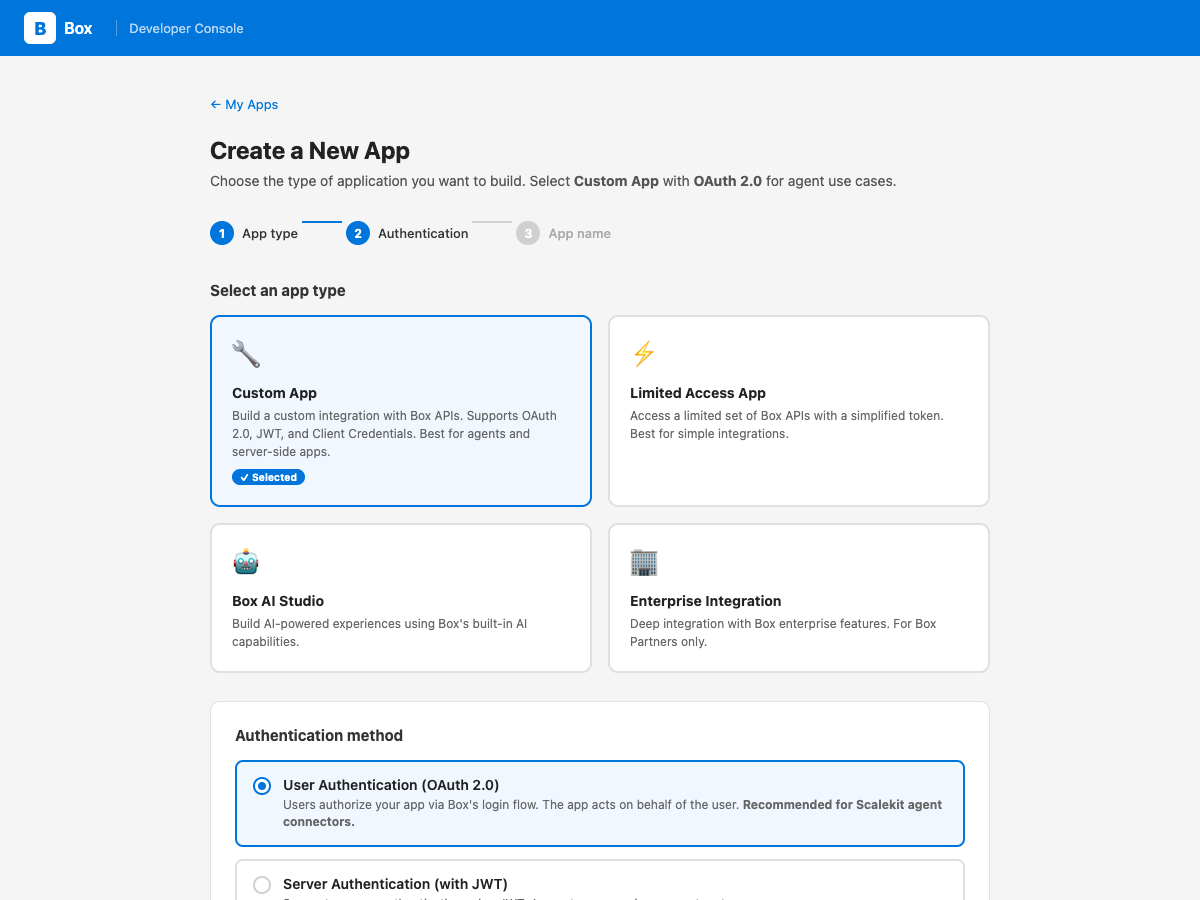
Go to the Box Developer Console and click Create New App.
-
Select Custom App as the app type.
-
Under authentication method, choose User Authentication (OAuth 2.0). This lets your agent act on behalf of each user who authorizes access.
-
Enter an app name (e.g. “My Agent App”) and click Create App.
-
-
Copy the redirect URI from Scalekit
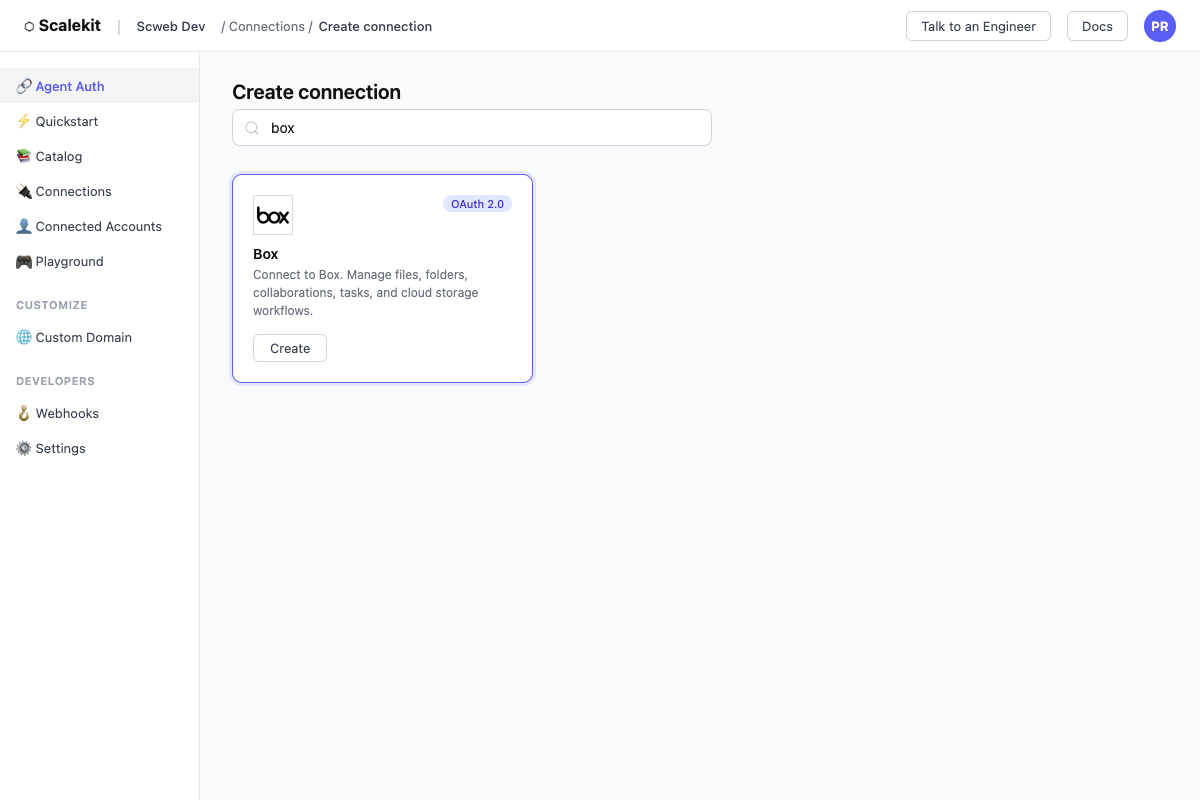
- In Scalekit dashboard, go to AgentKit > Connections > Create Connection.
- Find Box and click Create.
- Click Use your own credentials and copy the redirect URI. It looks like:
https://<env>.scalekit.cloud/sso/v1/oauth/<conn_id>/callback
-
Add the redirect URI to Box
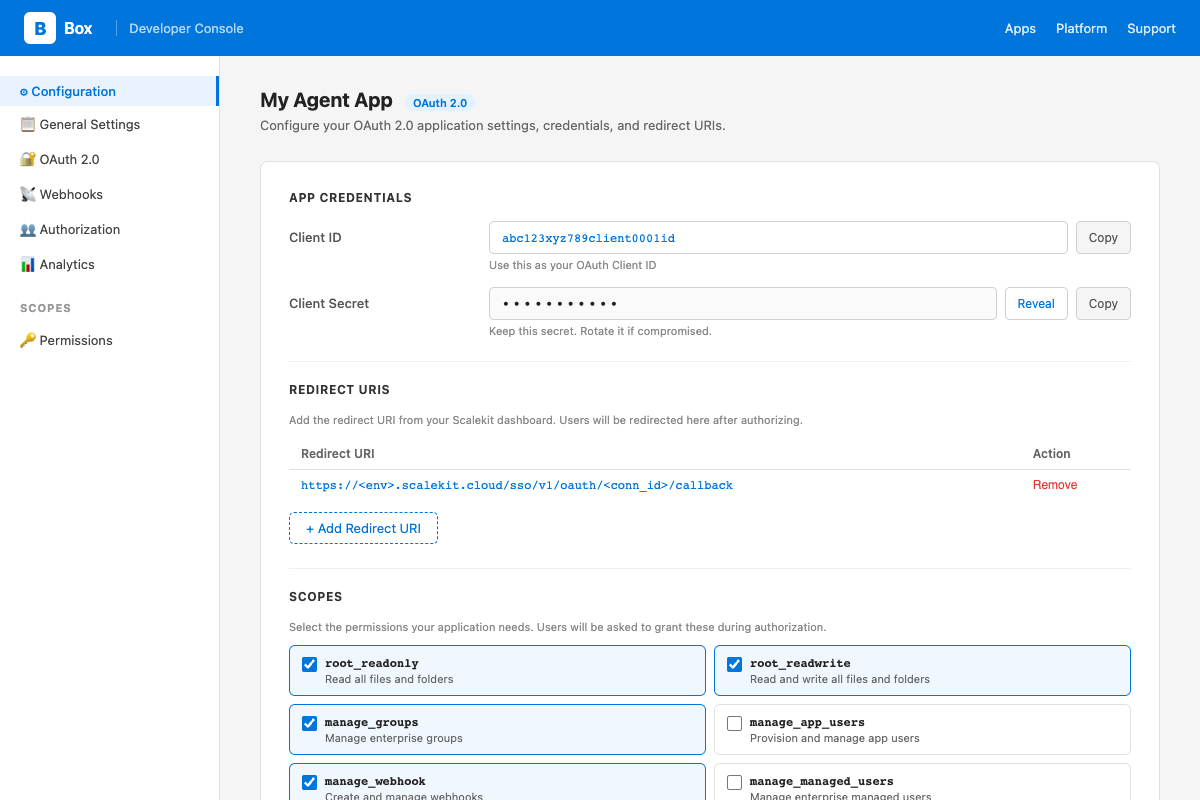
- In the Box Developer Console, open your app and go to the Configuration tab.
- Under OAuth 2.0 Redirect URI, paste the redirect URI from Scalekit and click Save Changes.
-
Select scopes for your app
Still on the Configuration tab in Box, scroll down to Application Scopes and enable the permissions your agent needs:
Scope Required for root_readonlyReading files and folders root_readwriteCreating, updating, and deleting files/folders manage_groupsCreating and managing groups manage_webhookCreating and managing webhooks manage_managed_usersCreating and managing enterprise users manage_enterprise_propertiesAccessing enterprise events Click Save Changes after selecting scopes.
-
Add credentials in Scalekit
- In the Box Developer Console, open your app → Configuration tab.
- Copy your Client ID and Client Secret.
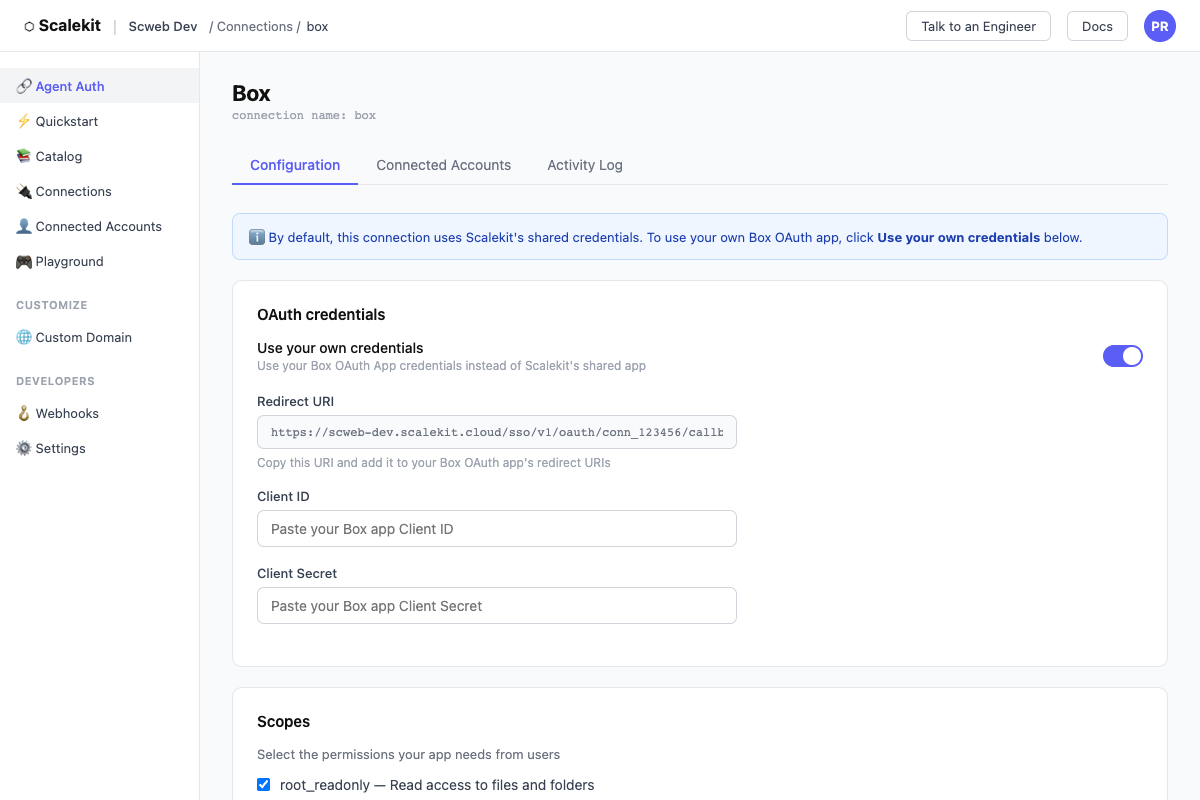
- In Scalekit dashboard, go to AgentKit > Connections, open the Box connection you created, and enter:
- Client ID — from Box
- Client Secret — from Box
- Scopes — select the same scopes you enabled in Box (e.g.
root_readonly,root_readwrite)
- Click Save.
-
Add a connected account for each user
Each user who authorizes Box access becomes a connected account. During authorization, Box will show your app name and request the scopes you configured.
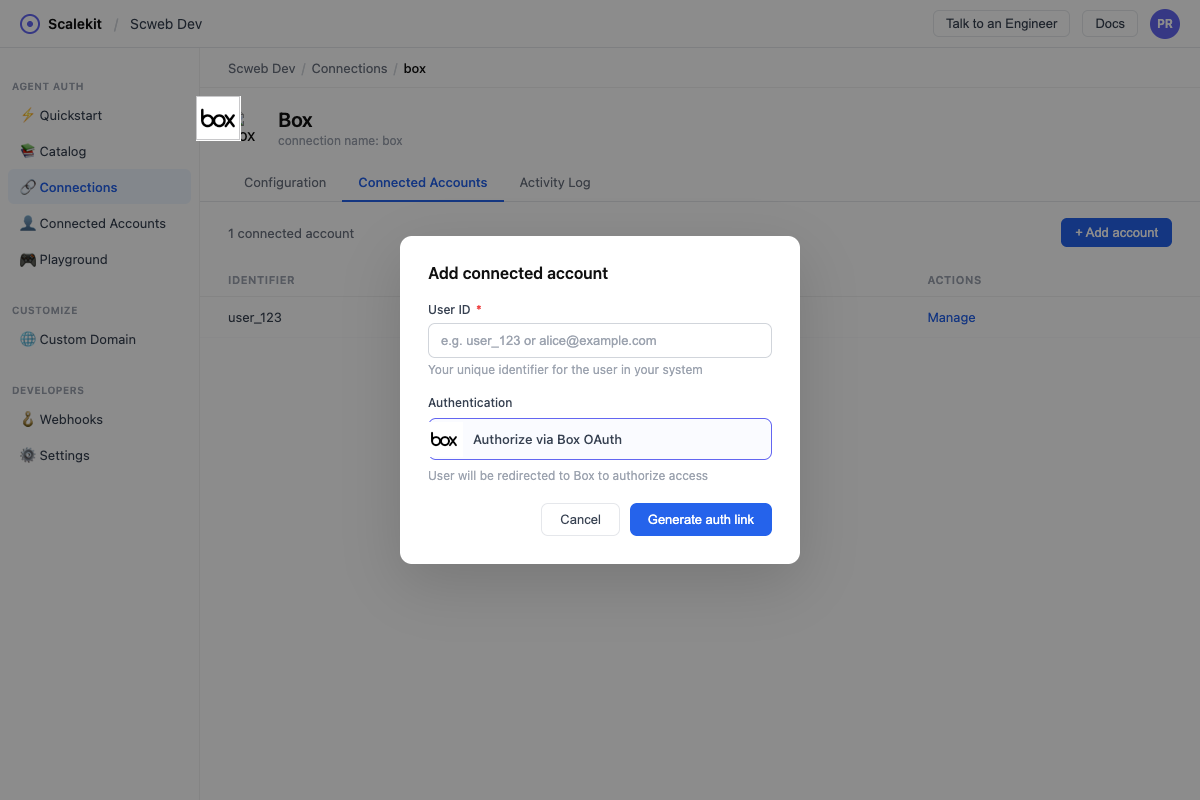
Via dashboard (for testing)
- In Scalekit dashboard, go to your Box connection → Connected Accounts → Add Account.
- Enter a User ID (your internal identifier for this user, e.g.
user_123). - Click Add — you will be redirected to Box’s OAuth consent screen to authorize.
Via API (for production)
In production, generate an authorization link and redirect your user to it:
const { link } = await scalekit.actions.getAuthorizationLink({connectionName: 'box',identifier: 'user_123',});// Redirect your user to `link`link_response = scalekit_client.actions.get_authorization_link(connection_name="box",identifier="user_123",)# Redirect your user to link_response.linkAfter the user authorizes, Scalekit stores their tokens. Your agent can then call Box tools on their behalf without any further redirects.
-
Authorize and make your first call
Section titled “Authorize and make your first call”quickstart.ts import { ScalekitClient } from '@scalekit-sdk/node'import 'dotenv/config'const scalekit = new ScalekitClient(process.env.SCALEKIT_ENV_URL,process.env.SCALEKIT_CLIENT_ID,process.env.SCALEKIT_CLIENT_SECRET,)const actions = scalekit.actionsconst connector = 'box'const identifier = 'user_123'// Generate an authorization link for the userconst { link } = await actions.getAuthorizationLink({ connectionName: connector, identifier })console.log('Authorize Box:', link)process.stdout.write('Press Enter after authorizing...')await new Promise(r => process.stdin.once('data', r))// Make your first callconst result = await actions.executeTool({connector,identifier,toolName: 'box_collections_list',toolInput: {},})console.log(result)quickstart.py import osfrom scalekit.client import ScalekitClientfrom dotenv import load_dotenvload_dotenv()scalekit_client = ScalekitClient(env_url=os.getenv("SCALEKIT_ENV_URL"),client_id=os.getenv("SCALEKIT_CLIENT_ID"),client_secret=os.getenv("SCALEKIT_CLIENT_SECRET"),)actions = scalekit_client.actionsconnection_name = "box"identifier = "user_123"# Generate an authorization link for the userlink_response = actions.get_authorization_link(connection_name=connection_name,identifier=identifier,)print("Authorize Box:", link_response.link)input("Press Enter after authorizing...")# Make your first callresult = actions.execute_tool(tool_input={},tool_name="box_collections_list",connection_name=connection_name,identifier=identifier,)print(result)
What you can do
Section titled “What you can do”Connect this agent connector to let your agent:
- Get upload session, sign request, retention policy — Retrieve the status and configuration of a chunked upload session, including its part size, total parts expected, and number of parts processed so far
- Create upload session, sign request, retention policy — Create a chunked upload session for uploading a new large file (over 50MB) to a Box folder
- Abort upload session — Abort and remove a chunked upload session, discarding any parts already uploaded
- List sign requests, retention policy assignments, retention policies — Lists Box Sign requests in the enterprise
- Cancel sign request — Cancels an in-progress Box Sign request so it can no longer be signed
- Update retention policy, webhook, web link — Update an existing retention policy’s name, description, disposition action, modifiability, notification settings, or status
Common workflows
Section titled “Common workflows”Proxy API call
// List files in the root folderconst result = await actions.request({ connectionName: 'box', identifier: 'user_123', path: '/2.0/folders/0/items', method: 'GET',});console.log(result);# List files in the root folderresult = actions.request( connection_name="box", identifier="user_123", path="/2.0/folders/0/items", method="GET",)print(result)List folder contents
Start here to discover file and folder IDs. Use "0" for the root folder.
const result = await actions.executeTool({ toolName: 'box_folder_items_list', connector: 'box', identifier: 'user_123', toolInput: { folder_id: '0', // root folder },});// result.entries[] contains files and folders with their IDsresult = actions.execute_tool( tool_name="box_folder_items_list", connection_name='box', identifier='user_123', tool_input={"folder_id": "0"},)# result["entries"] contains files and folders with their IDsGet file details
const file = await actions.executeTool({ toolName: 'box_file_get', connector: 'box', identifier: 'user_123', toolInput: { file_id: '12345678' },});file = actions.execute_tool( tool_name="box_file_get", connection_name='box', identifier='user_123', tool_input={"file_id": "12345678"},)Search Box
const results = await actions.executeTool({ toolName: 'box_search', connector: 'box', identifier: 'user_123', toolInput: { query: 'quarterly report', type: 'file', file_extensions: 'pdf,docx', },});results = actions.execute_tool( tool_name="box_search", connection_name='box', identifier='user_123', tool_input={ "query": "quarterly report", "type": "file", "file_extensions": "pdf,docx", },)Create a task on a file
const task = await actions.executeTool({ toolName: 'box_task_create', connector: 'box', identifier: 'user_123', toolInput: { file_id: '12345678', message: 'Please review this document', action: 'review', due_at: '2025-12-31T00:00:00Z', },});// task.id is the task ID — use it with box_task_assignment_createtask = actions.execute_tool( tool_name="box_task_create", connection_name='box', identifier='user_123', tool_input={ "file_id": "12345678", "message": "Please review this document", "action": "review", "due_at": "2025-12-31T00:00:00Z", },)# task["id"] is the task IDShare a file
const link = await actions.executeTool({ toolName: 'box_shared_link_file_create', connector: 'box', identifier: 'user_123', toolInput: { file_id: '12345678', access: 'company', // open | company | collaborators can_download: true, },});link = actions.execute_tool( tool_name="box_shared_link_file_create", connection_name='box', identifier='user_123', tool_input={ "file_id": "12345678", "access": "company", "can_download": True, },)Create a webhook
Webhooks require the manage_webhook scope. The triggers field is an array of event strings.
const webhook = await actions.executeTool({ toolName: 'box_webhook_create', connector: 'box', identifier: 'user_123', toolInput: { target_id: '0', target_type: 'folder', address: 'https://your-app.com/webhooks/box', triggers: ['FILE.UPLOADED', 'FILE.DELETED', 'FOLDER.CREATED'], },});webhook = actions.execute_tool( tool_name="box_webhook_create", connection_name='box', identifier='user_123', tool_input={ "target_id": "0", "target_type": "folder", "address": "https://your-app.com/webhooks/box", "triggers": ["FILE.UPLOADED", "FILE.DELETED", "FOLDER.CREATED"], },)Add a collaborator to a folder
Collaborations grant a user or group access to a specific file or folder. You need the user’s Box ID or email login.
// First, get the user's Box ID using box_users_list or box_user_me_getconst collab = await actions.executeTool({ toolName: 'box_collaboration_create', connector: 'box', identifier: 'user_123', toolInput: { item_id: 'FOLDER_ID', item_type: 'folder', accessible_by_id: 'USER_BOX_ID', accessible_by_type: 'user', role: 'editor', },});// To find the collaboration ID later, use box_folder_collaborations_listcollab = actions.execute_tool( tool_name="box_collaboration_create", connection_name='box', identifier='user_123', tool_input={ "item_id": "FOLDER_ID", "item_type": "folder", "accessible_by_id": "USER_BOX_ID", "accessible_by_type": "user", "role": "editor", },)# To find the collaboration ID later, use box_folder_collaborations_listTool list
Section titled “Tool list”Use the exact tool names from the Tool list below when you call execute_tool. If you’re not sure which name to use, list the tools available for the current user first.
box_ai_ask#Sends a natural-language question plus up to 25 Box files as context to a supported LLM and returns an answer, optionally with citations and prior dialogue history for follow-up questions.5 params
Sends a natural-language question plus up to 25 Box files as context to a supported LLM and returns an answer, optionally with citations and prior dialogue history for follow-up questions.
itemsstringrequiredJSON array of 1-25 Box files to use as context, each with a unique file ID. Example: [{"id": "12345", "type": "file"}]modestringrequiredWhether the question is about a single item or multiple items. If 'single_item_qa', the items list must contain exactly one item.promptstringrequiredThe question to ask about the given items. Max 10000 characters.dialogue_historystringoptionalJSON array of previous question/answer turns, to give the LLM conversational context for a follow-up question.include_citationsbooleanoptionalWhether to include citations (the specific file passages the answer is based on) in the response.box_ai_extract#Sends a freeform extraction prompt plus Box files to an LLM and returns extracted data as key-value pairs, without needing a predefined metadata template. Use AI Extract Structured instead when you have a metadata template or a fixed field schema.2 params
Sends a freeform extraction prompt plus Box files to an LLM and returns extracted data as key-value pairs, without needing a predefined metadata template. Use AI Extract Structured instead when you have a metadata template or a fixed field schema.
itemsstringrequiredJSON array of 1-25 Box files to extract data from, each with a unique file ID. Example: [{"id": "12345", "type": "file"}]promptstringrequiredInstructions telling the LLM what data to extract, e.g. a list of fields to pull out. Can be plain text or an XML/JSON schema. Max 10000 characters.box_ai_extract_structured#Extracts structured metadata from Box files using a metadata template or an explicit typed field list, returning key-value pairs matching that schema. Provide either metadata_template_key (with metadata_template_scope) or fields, but not both.5 params
Extracts structured metadata from Box files using a metadata template or an explicit typed field list, returning key-value pairs matching that schema. Provide either metadata_template_key (with metadata_template_scope) or fields, but not both.
itemsstringrequiredJSON array of 1-25 Box files to extract data from, each with a unique file ID. Example: [{"id": "12345", "type": "file"}]fieldsstringoptionalJSON array of field definitions to extract, used instead of a metadata template. Each field needs a unique 'key' and a 'type' (string, float, date, enum, or multiSelect). Mutually exclusive with metadata_template_key.include_confidence_scorebooleanoptionalWhether to include a confidence score for each extracted field in the response.metadata_template_keystringoptionalThe key of an existing Box metadata template to extract fields for. Provide metadata_template_scope alongside this. Mutually exclusive with 'fields'.metadata_template_scopestringoptionalThe scope of the metadata template: 'global' or an enterprise scope like 'enterprise_12345'. Required when metadata_template_key is set.box_collaboration_create#Grants a user or group access to a file or folder.8 params
Grants a user or group access to a file or folder.
accessible_by_idstringrequiredID of the user or group to collaborate with.accessible_by_typestringrequiredType: user or group.item_idstringrequiredID of the file or folder.item_typestringrequiredType of item: file or folder.rolestringrequiredCollaboration role: viewer, previewer, uploader, previewer_uploader, viewer_uploader, co-owner, or editor.can_view_pathstringoptionalAllow user to see path to item (true/false).expires_atstringoptionalExpiry date in ISO 8601 format.notifystringoptionalNotify collaborator via email (true/false).box_collaboration_delete#Removes a collaboration, revoking user or group access.1 param
Removes a collaboration, revoking user or group access.
collaboration_idstringrequiredID of the collaboration to delete.box_collaboration_get#Retrieves details of a specific collaboration.3 params
Retrieves details of a specific collaboration.
collaboration_idstringrequiredID of the collaboration.fieldsstringoptionalComma-separated list of fields to return.xero_tenant_idstringoptionalXero tenant (organisation) ID.box_collaboration_update#Updates the role or status of a collaboration.5 params
Updates the role or status of a collaboration.
collaboration_idstringrequiredID of the collaboration.can_view_pathbooleanoptionalAllow user to see path to item.expires_atstringoptionalNew expiry date in ISO 8601 format.rolestringoptionalNew collaboration role.statusstringoptionalCollaboration status: accepted or rejected.box_collection_items_list#Retrieves the items in a collection (e.g. Favorites).4 params
Retrieves the items in a collection (e.g. Favorites).
collection_idstringrequiredID of the collection.fieldsstringoptionalComma-separated list of fields to return.limitintegeroptionalMax results.offsetintegeroptionalPagination offset.box_collections_list#Retrieves all collections (e.g. Favorites) for the user.3 params
Retrieves all collections (e.g. Favorites) for the user.
fieldsstringoptionalComma-separated list of fields to return.limitintegeroptionalMax results.offsetintegeroptionalPagination offset.box_comment_create#Adds a comment to a file.4 params
Adds a comment to a file.
item_idstringrequiredID of the file to comment on.item_typestringrequiredType of item: file or comment.messagestringrequiredText of the comment.tagged_messagestringoptionalComment text with @mentions using @[user_id:user_name] syntax.box_comment_delete#Removes a comment.1 param
Removes a comment.
comment_idstringrequiredID of the comment to delete.box_comment_get#Retrieves a comment.2 params
Retrieves a comment.
comment_idstringrequiredID of the comment.fieldsstringoptionalComma-separated list of fields to return.box_comment_update#Updates the text of a comment.2 params
Updates the text of a comment.
comment_idstringrequiredID of the comment to update.messagestringrequiredNew text for the comment.box_events_list#Retrieves events from the event stream.6 params
Retrieves events from the event stream.
created_afterstringoptionalReturn events after this date (ISO 8601).created_beforestringoptionalReturn events before this date (ISO 8601).event_typestringoptionalComma-separated list of event types to filter.limitintegeroptionalMax events to return.stream_positionstringoptionalPagination position from a previous response.stream_typestringoptionalEvent stream type: all, changes, sync, or admin_logs.box_file_collaborations_list#Retrieves all collaborations on a file.2 params
Retrieves all collaborations on a file.
file_idstringrequiredID of the file.fieldsstringoptionalComma-separated list of fields to return.box_file_comments_list#Retrieves all comments on a file.2 params
Retrieves all comments on a file.
file_idstringrequiredID of the file.fieldsstringoptionalComma-separated list of fields to return.box_file_copy#Creates a copy of a file in a specified folder.3 params
Creates a copy of a file in a specified folder.
file_idstringrequiredID of the file to copy.parent_idstringrequiredID of the destination folder.namestringoptionalNew name for the copied file (optional).box_file_delete#Moves a file to the trash.1 param
Moves a file to the trash.
file_idstringrequiredID of the file to delete.box_file_get#Retrieves detailed information about a file.2 params
Retrieves detailed information about a file.
file_idstringrequiredID of the file.fieldsstringoptionalComma-separated list of fields to return.box_file_metadata_create#Applies metadata to a file.4 params
Applies metadata to a file.
data_jsonstringrequiredJSON object of metadata fields and values.file_idstringrequiredID of the file.scopestringrequiredScope: global or enterprise.template_keystringrequiredMetadata template key.box_file_metadata_delete#Removes a metadata instance from a file.3 params
Removes a metadata instance from a file.
file_idstringrequiredID of the file.scopestringrequiredScope: global or enterprise.template_keystringrequiredMetadata template key.box_file_metadata_get#Retrieves a specific metadata instance on a file.3 params
Retrieves a specific metadata instance on a file.
file_idstringrequiredID of the file.scopestringrequiredScope: global or enterprise.template_keystringrequiredMetadata template key.box_file_metadata_list#Retrieves all metadata instances attached to a file.1 param
Retrieves all metadata instances attached to a file.
file_idstringrequiredID of the file.box_file_representations_get#Retrieves available representations for a file, such as thumbnails, PDFs, or extracted text. Use the x_rep_hints parameter to request specific formats.2 params
Retrieves available representations for a file, such as thumbnails, PDFs, or extracted text. Use the x_rep_hints parameter to request specific formats.
file_idstringrequiredID of the file.x_rep_hintsstringrequiredHints for which representations to generate, e.g. [pdf][extracted_text][jpg?dimensions=320x320].box_file_tasks_list#Retrieves all tasks associated with a file.1 param
Retrieves all tasks associated with a file.
file_idstringrequiredID of the file.box_file_thumbnail_get#Retrieves a thumbnail image for a file.4 params
Retrieves a thumbnail image for a file.
extensionstringrequiredThumbnail format: jpg or png.file_idstringrequiredID of the file.min_heightintegeroptionalMinimum height of the thumbnail in pixels.min_widthintegeroptionalMinimum width of the thumbnail in pixels.box_file_update#Updates a file's name, description, tags, or moves it to another folder.5 params
Updates a file's name, description, tags, or moves it to another folder.
file_idstringrequiredID of the file to update.descriptionstringoptionalNew description for the file.namestringoptionalNew name for the file.parent_idstringoptionalID of the folder to move the file into.tagsstringoptionalComma-separated list of tags. Pass as JSON string.box_file_upload#Upload a new file (up to 50MB) to a Box folder in a single request. The file content must be supplied as a base64-encoded string along with a filename and destination folder. For larger files, use the Create Upload Session tool instead.5 params
Upload a new file (up to 50MB) to a Box folder in a single request. The file content must be supplied as a base64-encoded string along with a filename and destination folder. For larger files, use the Create Upload Session tool instead.
file_content_base64stringrequiredBase64-encoded contents of the file to upload.filenamestringrequiredName the uploaded file will have in Box, including extension.parent_idstringrequiredID of the folder to upload the file into. Use '0' for root.content_created_atstringoptionalThe date and time the file was originally created, in ISO 8601 format. Defaults to the upload time if omitted.content_modified_atstringoptionalThe date and time the file was last modified before upload, in ISO 8601 format. Defaults to the upload time if omitted.box_file_version_retention_get#Retrieve a single file version retention record by ID, showing the file version it locks, the policy that created it, and when its retention period ends.1 param
Retrieve a single file version retention record by ID, showing the file version it locks, the policy that created it, and when its retention period ends.
file_version_retention_idstringrequiredID of the file version retention record to retrieve.box_file_version_retentions_list#List the file version retention records showing which specific file versions are currently locked under a retention policy, and when their retention period will end.6 params
List the file version retention records showing which specific file versions are currently locked under a retention policy, and when their retention period will end.
disposition_actionstringoptionalFilter by what happens when retention ends: permanently_delete or remove_retention.disposition_afterstringoptionalFilter to retentions whose disposition date is after this timestamp (ISO 8601).disposition_beforestringoptionalFilter to retentions whose disposition date is before this timestamp (ISO 8601).file_idstringoptionalFilter to retentions on this file ID.file_version_idstringoptionalFilter to the retention on this specific file version ID.policy_idstringoptionalFilter to retentions created by this retention policy ID.box_file_version_upload_session_create#Create a chunked upload session for uploading a new large version (over 50MB) of an existing Box file. Returns an upload URL and the part size the caller uses to upload the new version's content in subsequent part uploads, followed by a commit call.3 params
Create a chunked upload session for uploading a new large version (over 50MB) of an existing Box file. Returns an upload URL and the part size the caller uses to upload the new version's content in subsequent part uploads, followed by a commit call.
file_idstringrequiredID of the existing file to upload a new version for.file_sizeintegerrequiredTotal size of the new version's file content, in bytes.file_namestringoptionalOptional new name for the file. Leave blank to keep the current name.box_file_versions_list#Retrieves all previous versions of a file.1 param
Retrieves all previous versions of a file.
file_idstringrequiredID of the file.box_folder_collaborations_list#Retrieves all collaborations on a folder.2 params
Retrieves all collaborations on a folder.
folder_idstringrequiredID of the folder.fieldsstringoptionalComma-separated list of fields to return.box_folder_copy#Creates a copy of a folder and its contents.3 params
Creates a copy of a folder and its contents.
folder_idstringrequiredID of the folder to copy.parent_idstringrequiredID of the destination folder.namestringoptionalNew name for the copied folder (optional).box_folder_create#Creates a new folder inside a parent folder.3 params
Creates a new folder inside a parent folder.
namestringrequiredName of the new folder.parent_idstringrequiredID of the parent folder. Use '0' for root.fieldsstringoptionalComma-separated list of fields to return.box_folder_delete#Moves a folder to the trash.2 params
Moves a folder to the trash.
folder_idstringrequiredID of the folder to delete.recursivestringoptionalDelete non-empty folders recursively (true/false).box_folder_get#Retrieves a folder's details and its items.6 params
Retrieves a folder's details and its items.
folder_idstringrequiredID of the folder. Use '0' for root.directionstringoptionalSort direction: ASC or DESC.fieldsstringoptionalComma-separated list of fields to return.limitintegeroptionalMax items to return (max 1000).offsetintegeroptionalPagination offset.sortstringoptionalSort order: id, name, date, or size.box_folder_items_list#Retrieves a paginated list of items in a folder.6 params
Retrieves a paginated list of items in a folder.
folder_idstringrequiredID of the folder. Use '0' for root.directionstringoptionalASC or DESC.fieldsstringoptionalComma-separated list of fields to return.limitintegeroptionalMax items to return (max 1000).offsetintegeroptionalPagination offset.sortstringoptionalSort field: id, name, date, or size.box_folder_metadata_list#Retrieves all metadata instances on a folder.1 param
Retrieves all metadata instances on a folder.
folder_idstringrequiredID of the folder.box_folder_update#Updates a folder's name, description, or moves it.4 params
Updates a folder's name, description, or moves it.
folder_idstringrequiredID of the folder to update.descriptionstringoptionalNew description for the folder.namestringoptionalNew name for the folder.parent_idstringoptionalID of the new parent folder to move into.box_group_create#Creates a new group in the enterprise.5 params
Creates a new group in the enterprise.
namestringrequiredName of the group.descriptionstringoptionalDescription of the group.invitability_levelstringoptionalWho can invite to group: admins_only, admins_and_members, all_managed_users.member_viewability_levelstringoptionalWho can view group members: admins_only, admins_and_members, all_managed_users.provenancestringoptionalIdentifier to distinguish manually vs synced groups.box_group_delete#Permanently deletes a group.1 param
Permanently deletes a group.
group_idstringrequiredID of the group to delete.box_group_get#Retrieves information about a group.2 params
Retrieves information about a group.
group_idstringrequiredID of the group.fieldsstringoptionalComma-separated list of fields to return.box_group_members_list#Retrieves all members of a group.3 params
Retrieves all members of a group.
group_idstringrequiredID of the group.limitintegeroptionalMax results.offsetintegeroptionalPagination offset.box_group_membership_add#Adds a user to a group.3 params
Adds a user to a group.
group_idstringrequiredID of the group.user_idstringrequiredID of the user to add.rolestringoptionalRole in the group: member or admin.box_group_membership_get#Retrieves a specific group membership.2 params
Retrieves a specific group membership.
group_membership_idstringrequiredID of the group membership.fieldsstringoptionalComma-separated list of fields to return.box_group_membership_remove#Removes a user from a group.1 param
Removes a user from a group.
group_membership_idstringrequiredID of the group membership to remove.box_group_membership_update#Updates a user's role in a group.2 params
Updates a user's role in a group.
group_membership_idstringrequiredID of the membership to update.rolestringoptionalNew role: member or admin.box_group_update#Updates a group's properties.5 params
Updates a group's properties.
group_idstringrequiredID of the group to update.descriptionstringoptionalNew description.invitability_levelstringoptionalWho can invite: admins_only, admins_and_members, all_managed_users.member_viewability_levelstringoptionalWho can view members.namestringoptionalNew name for the group.box_groups_list#Retrieves all groups in the enterprise.4 params
Retrieves all groups in the enterprise.
fieldsstringoptionalComma-separated list of fields to return.filter_termstringoptionalFilter groups by name.limitintegeroptionalMax results.offsetintegeroptionalPagination offset.box_metadata_template_get#Retrieves a metadata template schema.2 params
Retrieves a metadata template schema.
scopestringrequiredScope of the template: global or enterprise.template_keystringrequiredKey of the metadata template.box_metadata_templates_list#Retrieves all metadata templates for the enterprise.2 params
Retrieves all metadata templates for the enterprise.
limitintegeroptionalMax results.markerstringoptionalPagination marker.box_recent_items_list#Retrieves files and folders accessed recently.3 params
Retrieves files and folders accessed recently.
fieldsstringoptionalComma-separated list of fields to return.limitintegeroptionalMax results.markerstringoptionalPagination marker.box_retention_policies_list#List the retention policies configured for the enterprise. Filter by name prefix, policy type, or the user who created the policy.5 params
List the retention policies configured for the enterprise. Filter by name prefix, policy type, or the user who created the policy.
created_by_user_idstringoptionalFilter results to retention policies created by this user ID.limitintegeroptionalMax results per page (max 1000).markerstringoptionalPagination marker from a previous response's next_marker.policy_namestringoptionalCase-sensitive prefix to filter retention policies by name.policy_typestringoptionalFilter by policy type: finite or indefinite.box_retention_policy_assignment_create#Assign a retention policy to the whole enterprise, a specific folder, or all files matching a metadata template. filter_fields is only used when assigning to a metadata_template.5 params
Assign a retention policy to the whole enterprise, a specific folder, or all files matching a metadata template. filter_fields is only used when assigning to a metadata_template.
assign_to_typestringrequiredType of object to assign the retention policy to.policy_idstringrequiredID of the retention policy to assign.assign_to_idstringoptionalID of the object to assign the policy to. Required for 'folder' (folder ID) and 'metadata_template' (template scope.key, e.g. 'enterprise_12345.contractTemplate'). Omit for 'enterprise'.filter_fieldsstringoptionalJSON array of {field, value} pairs identifying the metadata template field and value that content must match. Only used when assign_to_type is metadata_template.start_date_fieldstringoptionalField that determines when the retention period begins: 'upload_date', 'created_at', or a metadata template date field key. Only used when assign_to_type is metadata_template.box_retention_policy_assignment_delete#Remove a retention policy assignment by ID, unassigning the policy from the enterprise, folder, or metadata template it was applied to. This does not delete files already under retention.1 param
Remove a retention policy assignment by ID, unassigning the policy from the enterprise, folder, or metadata template it was applied to. This does not delete files already under retention.
retention_policy_assignment_idstringrequiredID of the retention policy assignment to remove.box_retention_policy_assignment_get#Retrieve a single retention policy assignment by ID, showing which policy is assigned and to what enterprise, folder, or metadata template.1 param
Retrieve a single retention policy assignment by ID, showing which policy is assigned and to what enterprise, folder, or metadata template.
retention_policy_assignment_idstringrequiredID of the retention policy assignment to retrieve.box_retention_policy_assignments_list#List the assignments (enterprise, folders, or metadata templates) that a retention policy has been applied to.4 params
List the assignments (enterprise, folders, or metadata templates) that a retention policy has been applied to.
retention_policy_idstringrequiredID of the retention policy whose assignments to list.limitintegeroptionalMax results per page (max 1000).markerstringoptionalPagination marker from a previous response's next_marker.typestringoptionalFilter assignments by the type of object they were assigned to: enterprise, folder, or metadata_template.box_retention_policy_create#Create a new retention policy for the enterprise, defining how long files under it are kept and what happens when the retention period ends (permanently delete, or just remove the retention restriction).9 params
Create a new retention policy for the enterprise, defining how long files under it are kept and what happens when the retention period ends (permanently delete, or just remove the retention restriction).
disposition_actionstringrequiredWhat happens when the retention period ends: permanently_delete or remove_retention (release the restriction, keeping the file).policy_namestringrequiredName of the retention policy.policy_typestringrequiredWhether the policy retains files for a fixed number of days (finite) or forever until manually released (indefinite).are_owners_notifiedbooleanoptionalWhether owners are notified when their files are nearing the end of the retention period.can_owner_extend_retentionbooleanoptionalWhether the file owner can extend the retention period once it is about to end.custom_notification_recipientsarrayoptionalJSON array of user IDs to notify in addition to file owners when files are nearing the end of retention.descriptionstringoptionalDescription of the retention policy's purpose, up to 500 characters.retention_lengthintegeroptionalNumber of days to retain files. Required when policy_type is 'finite'; ignored for 'indefinite'.retention_typestringoptionalWhether the policy can be modified/removed by an admin after creation: modifiable or non_modifiable.box_retention_policy_delete#Permanently delete a retention policy. The policy must have no active assignments; remove all retention policy assignments first.1 param
Permanently delete a retention policy. The policy must have no active assignments; remove all retention policy assignments first.
retention_policy_idstringrequiredID of the retention policy to delete.box_retention_policy_get#Retrieve detailed information about a single retention policy by ID.1 param
Retrieve detailed information about a single retention policy by ID.
retention_policy_idstringrequiredID of the retention policy to retrieve.box_retention_policy_update#Update an existing retention policy's name, description, disposition action, modifiability, notification settings, or status. Set status to 'retired' to stop the policy from applying to newly assigned content.8 params
Update an existing retention policy's name, description, disposition action, modifiability, notification settings, or status. Set status to 'retired' to stop the policy from applying to newly assigned content.
retention_policy_idstringrequiredID of the retention policy to update.are_owners_notifiedbooleanoptionalWhether owners are notified when their files are nearing the end of the retention period.can_owner_extend_retentionbooleanoptionalWhether the file owner can extend the retention period once it is about to end.descriptionstringoptionalUpdated description of the retention policy's purpose.disposition_actionstringoptionalWhat happens when the retention period ends: permanently_delete or remove_retention.policy_namestringoptionalUpdated name of the retention policy.retention_typestringoptionalWhether the policy can be modified/removed after creation: modifiable or non_modifiable. Can only be changed from non_modifiable in limited cases.statusstringoptionalSet to 'retired' to retire the policy so it no longer applies to newly assigned content.box_search#Searches files, folders, and web links in Box.12 params
Searches files, folders, and web links in Box.
querystringrequiredSearch query string.ancestor_folder_idsstringoptionalComma-separated folder IDs to search within.content_typesstringoptionalComma-separated content types: name, description, tag, comments, file_content.created_at_rangestringoptionalDate range in ISO 8601: 2024-01-01T00:00:00Z,2024-12-31T23:59:59ZfieldsstringoptionalComma-separated list of fields to return.file_extensionsstringoptionalComma-separated file extensions to filter.limitintegeroptionalMax results (max 200).offsetintegeroptionalPagination offset.owner_user_idsstringoptionalComma-separated user IDs.scopestringoptionalSearch scope: user_content or enterprise_content.typestringoptionalFilter by type: file, folder, or web_link.updated_at_rangestringoptionalDate range for last updated.box_sign_request_cancel#Cancels an in-progress Box Sign request so it can no longer be signed.2 params
Cancels an in-progress Box Sign request so it can no longer be signed.
sign_request_idstringrequiredID of the sign request to cancel.reasonstringoptionalAn optional reason for cancelling the sign request.box_sign_request_create#Creates a Box Sign e-signature request for one or more files (up to ten), sending it to the given signers. Provide either source_files or template_id.14 params
Creates a Box Sign e-signature request for one or more files (up to ten), sending it to the given signers. Provide either source_files or template_id.
signersstringrequiredJSON array of signers, each requiring at least an email address. Up to 35 signers.are_reminders_enabledbooleanoptionalWhether to automatically send reminder emails to signers on days 3, 8, 13, and 18.are_text_signatures_enabledbooleanoptionalWhether signers are allowed to type their signature instead of drawing it. Defaults to true.days_validintegeroptionalNumber of days the signature request remains valid before it expires. Max 730.declined_redirect_urlstringoptionalURL to redirect signers to after they have declined to sign the document.email_messagestringoptionalCustom message included in the signature request email. Supports a limited set of HTML tags.email_subjectstringoptionalCustom subject line for the signature request email.external_idstringoptionalA reference ID for this signature request in an external system.is_document_preparation_neededbooleanoptionalWhether the sender needs to prepare the document (place signature fields) before it is sent to signers. When true, the response includes a prepare_url.namestringoptionalName of the signature request.parent_folder_idstringoptionalID of the Box folder where the signed documents and audit log will be placed. Cannot be the root folder.redirect_urlstringoptionalURL to redirect signers to after they have signed the document.source_filesstringoptionalJSON array of up to ten Box files to sign, each with a unique file ID. Required unless template_id is set.template_idstringoptionalID of a pre-configured Box Sign template to use instead of source_files.box_sign_request_get#Retrieves a single Box Sign request's status, signers, and file info.1 param
Retrieves a single Box Sign request's status, signers, and file info.
sign_request_idstringrequiredID of the sign request to retrieve.box_sign_requests_list#Lists Box Sign requests in the enterprise.3 params
Lists Box Sign requests in the enterprise.
limitintegeroptionalMaximum number of sign requests to return per page (max 1000).markerstringoptionalPagination marker from a previous response, indicating where to continue.shared_requestsbooleanoptionalWhen true, returns only sign requests where the current user is a collaborator rather than the sender.box_task_assignment_create#Assigns a task to a user.3 params
Assigns a task to a user.
task_idstringrequiredID of the task to assign.user_idstringoptionalID of the user to assign the task to.user_loginstringoptionalEmail login of the user (alternative to user_id).box_task_assignment_delete#Removes a task assignment from a user.1 param
Removes a task assignment from a user.
task_assignment_idstringrequiredID of the task assignment to remove.box_task_assignment_get#Retrieves a specific task assignment.1 param
Retrieves a specific task assignment.
task_assignment_idstringrequiredID of the task assignment.box_task_assignment_update#Updates a task assignment (complete, approve, or reject).3 params
Updates a task assignment (complete, approve, or reject).
task_assignment_idstringrequiredID of the task assignment.messagestringoptionalOptional message/comment for the resolution.resolution_statestringoptionalResolution state: completed, incomplete, approved, or rejected.box_task_assignments_list#Retrieves all assignments for a task.1 param
Retrieves all assignments for a task.
task_idstringrequiredID of the task.box_task_create#Creates a task on a file.5 params
Creates a task on a file.
file_idstringrequiredID of the file to attach the task to.actionstringoptionalAction: review or complete.completion_rulestringoptionalCompletion rule: all_assignees or any_assignee.due_atstringoptionalDue date in ISO 8601 format.messagestringoptionalTask message/description.box_task_delete#Removes a task from a file.1 param
Removes a task from a file.
task_idstringrequiredID of the task to delete.box_task_get#Retrieves a task's details.1 param
Retrieves a task's details.
task_idstringrequiredID of the task.box_task_update#Updates a task's message, due date, or completion rule.5 params
Updates a task's message, due date, or completion rule.
task_idstringrequiredID of the task to update.actionstringoptionalNew action: review or complete.completion_rulestringoptionalNew completion rule: all_assignees or any_assignee.due_atstringoptionalNew due date in ISO 8601 format.messagestringoptionalNew message for the task.box_trash_file_permanently_delete#Permanently deletes a trashed file.1 param
Permanently deletes a trashed file.
file_idstringrequiredID of the trashed file.box_trash_file_restore#Restores a file from the trash.3 params
Restores a file from the trash.
file_idstringrequiredID of the trashed file.namestringoptionalNew name if original name is taken.parent_idstringoptionalParent folder ID if original is unavailable.box_trash_folder_permanently_delete#Permanently deletes a trashed folder.1 param
Permanently deletes a trashed folder.
folder_idstringrequiredID of the trashed folder.box_trash_folder_restore#Restores a folder from the trash.3 params
Restores a folder from the trash.
folder_idstringrequiredID of the trashed folder.namestringoptionalNew name if original is taken.parent_idstringoptionalNew parent folder ID if original is unavailable.box_trash_list#Retrieves items in the user's trash.5 params
Retrieves items in the user's trash.
directionstringoptionalSort direction: ASC or DESC.fieldsstringoptionalComma-separated list of fields to return.limitintegeroptionalMax results.offsetintegeroptionalPagination offset.sortstringoptionalSort field: name, date, or size.box_upload_session_abort#Abort and remove a chunked upload session, discarding any parts already uploaded. Use this to cancel an in-progress large file upload.1 param
Abort and remove a chunked upload session, discarding any parts already uploaded. Use this to cancel an in-progress large file upload.
upload_session_idstringrequiredID of the upload session to abort.box_upload_session_create#Create a chunked upload session for uploading a new large file (over 50MB) to a Box folder. Returns an upload URL and the part size the caller uses to upload the file content in subsequent part uploads, followed by a commit call. Use Upload File instead for files under 50MB.3 params
Create a chunked upload session for uploading a new large file (over 50MB) to a Box folder. Returns an upload URL and the part size the caller uses to upload the file content in subsequent part uploads, followed by a commit call. Use Upload File instead for files under 50MB.
file_namestringrequiredName the uploaded file will have in Box, including extension.file_sizeintegerrequiredTotal size of the file to be uploaded, in bytes.folder_idstringrequiredID of the folder to upload the file into. Use '0' for root.box_upload_session_get#Retrieve the status and configuration of a chunked upload session, including its part size, total parts expected, and number of parts processed so far.1 param
Retrieve the status and configuration of a chunked upload session, including its part size, total parts expected, and number of parts processed so far.
upload_session_idstringrequiredID of the upload session to retrieve.box_user_create#Creates a new user in the enterprise.5 params
Creates a new user in the enterprise.
namestringrequiredFull name of the user.is_platform_access_onlybooleanoptionalSet true for app users (no login).loginstringoptionalEmail address (login) for managed users.rolestringoptionalUser role: user or coadmin.space_amountintegeroptionalStorage quota in bytes (-1 for unlimited).box_user_delete#Removes a user from the enterprise.3 params
Removes a user from the enterprise.
user_idstringrequiredID of the user to delete.forcestringoptionalForce deletion even if user owns content (true/false).notifystringoptionalNotify user via email (true/false).box_user_get#Retrieves information about a specific user.2 params
Retrieves information about a specific user.
user_idstringrequiredID of the user.fieldsstringoptionalComma-separated list of fields to return.box_user_me_get#Retrieves information about the currently authenticated user.1 param
Retrieves information about the currently authenticated user.
fieldsstringoptionalComma-separated list of fields to return.box_user_memberships_list#Retrieves all group memberships for a user.3 params
Retrieves all group memberships for a user.
user_idstringrequiredID of the user.limitintegeroptionalMax results.offsetintegeroptionalPagination offset.box_user_update#Updates a user's properties in the enterprise.6 params
Updates a user's properties in the enterprise.
user_idstringrequiredID of the user to update.namestringoptionalNew full name.rolestringoptionalNew role: user or coadmin.space_amountintegeroptionalStorage quota in bytes.statusstringoptionalNew status: active, inactive, or cannot_delete_edit.tracking_codesstringoptionalTracking codes as JSON array string.box_users_list#Retrieves all users in the enterprise.5 params
Retrieves all users in the enterprise.
fieldsstringoptionalComma-separated list of fields to return.filter_termstringoptionalFilter users by name or login.limitintegeroptionalMax users to return.offsetintegeroptionalPagination offset.user_typestringoptionalFilter by type: all, managed, or external.box_web_link_create#Creates a web link (bookmark) inside a folder.4 params
Creates a web link (bookmark) inside a folder.
parent_idstringrequiredID of the parent folder.urlstringrequiredURL of the web link.descriptionstringoptionalDescription of the web link.namestringoptionalName for the web link.box_web_link_delete#Removes a web link.1 param
Removes a web link.
web_link_idstringrequiredID of the web link to delete.box_web_link_get#Retrieves a web link's details.2 params
Retrieves a web link's details.
web_link_idstringrequiredID of the web link.fieldsstringoptionalComma-separated list of fields to return.box_web_link_update#Updates a web link's URL, name, or description.5 params
Updates a web link's URL, name, or description.
web_link_idstringrequiredID of the web link to update.descriptionstringoptionalNew description.namestringoptionalNew name.parent_idstringoptionalNew parent folder ID.urlstringoptionalNew URL.box_webhook_create#Creates a webhook to receive event notifications.4 params
Creates a webhook to receive event notifications.
addressstringrequiredHTTPS URL to receive webhook notifications.target_idstringrequiredID of the file or folder to watch.target_typestringrequiredType of target: file or folder.triggersarrayrequiredArray of trigger events, e.g. ["FILE.UPLOADED","FILE.DELETED"].box_webhook_delete#Removes a webhook.1 param
Removes a webhook.
webhook_idstringrequiredID of the webhook to delete.box_webhook_get#Retrieves a webhook's details.1 param
Retrieves a webhook's details.
webhook_idstringrequiredID of the webhook.box_webhook_update#Updates a webhook's address or triggers.5 params
Updates a webhook's address or triggers.
webhook_idstringrequiredID of the webhook to update.addressstringoptionalNew HTTPS URL for notifications.target_idstringoptionalNew target ID.target_typestringoptionalNew target type: file or folder.triggersarrayoptionalNew array of trigger events, e.g. ["FILE.UPLOADED","FILE.DELETED"].box_webhooks_list#Retrieves all webhooks for the application.2 params
Retrieves all webhooks for the application.
limitintegeroptionalMax results.markerstringoptionalPagination marker.