


Google Sheets connector
OAuth 2.0Files & DocumentsAnalyticsConnect to Google Sheets. Create, edit, and analyze spreadsheets with powerful data management capabilities
Google Sheets connector
-
Install the SDK
Section titled “Install the SDK”Terminal window npm install @scalekit-sdk/nodeTerminal window pip install scalekit -
Set your credentials
Section titled “Set your credentials”Add your Scalekit credentials to your
.envfile. Find values in app.scalekit.com > Developers > API Credentials..env SCALEKIT_ENVIRONMENT_URL=<your-environment-url>SCALEKIT_CLIENT_ID=<your-client-id>SCALEKIT_CLIENT_SECRET=<your-client-secret> -
Set up the connector
Section titled “Set up the connector”Register your Google Sheets credentials with Scalekit so it handles the token lifecycle. You do this once per environment.
Dashboard setup steps
Register your Scalekit environment with the Google Sheets connector so Scalekit handles the authentication flow and token lifecycle for you. The connection name you create will be used to identify and invoke the connection programmatically. Then complete the configuration in your application as follows:
-
Set up auth redirects
-
In Scalekit dashboard, go to AgentKit > Connections > Create Connection. Find Google Sheets and click Create. Click Use your own credentials and copy the redirect URI. It looks like
https://<SCALEKIT_ENVIRONMENT_URL>/sso/v1/oauth/<CONNECTION_ID>/callback.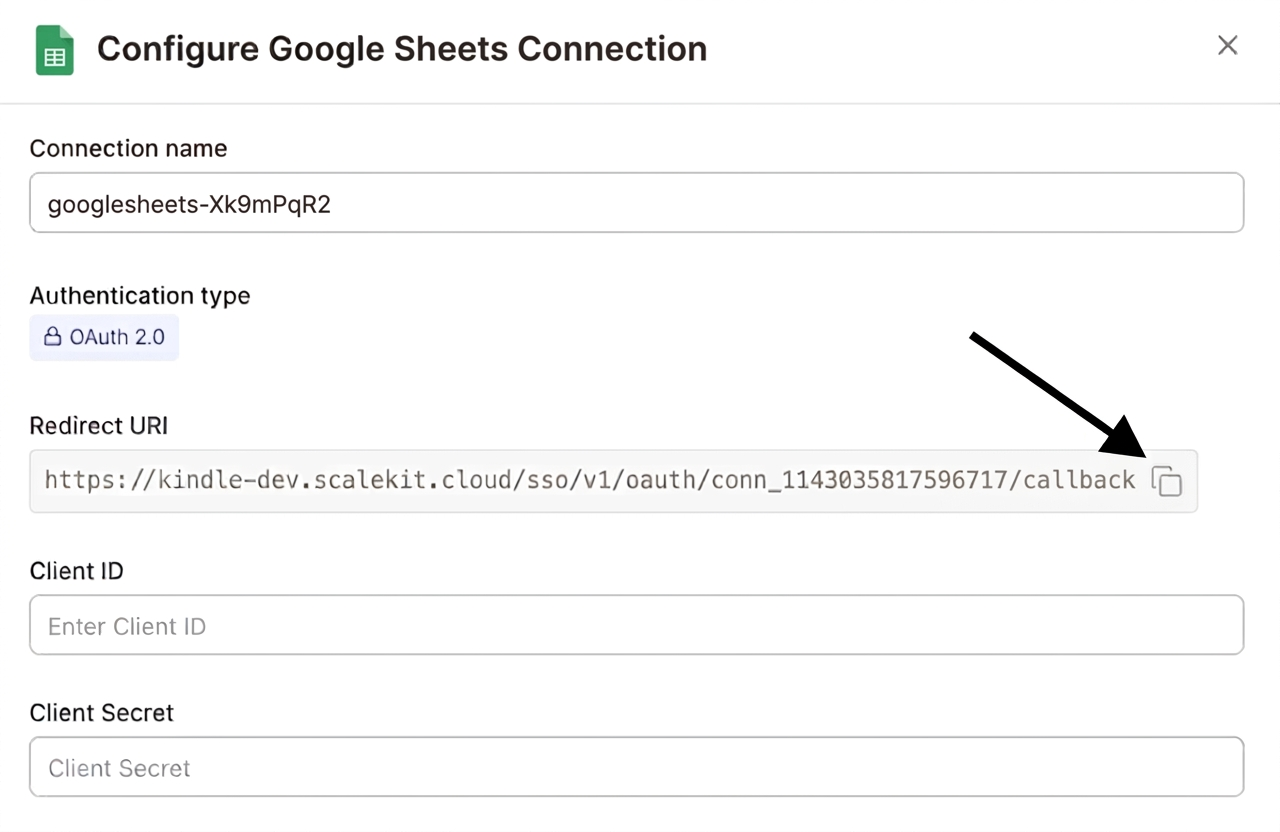
-
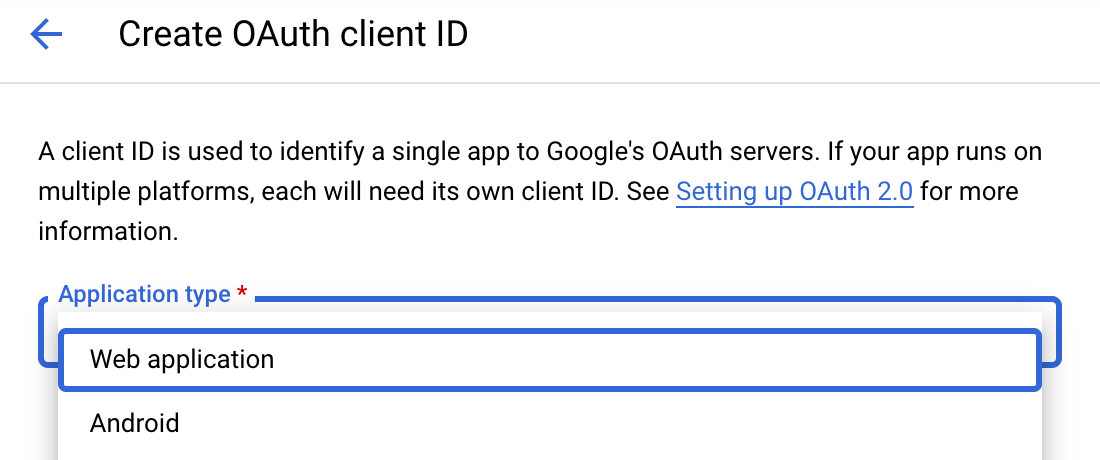
Navigate to Google Cloud Console → APIs & Services → Credentials. Select + Create Credentials, then OAuth client ID. Choose Web application from the Application type menu.
-
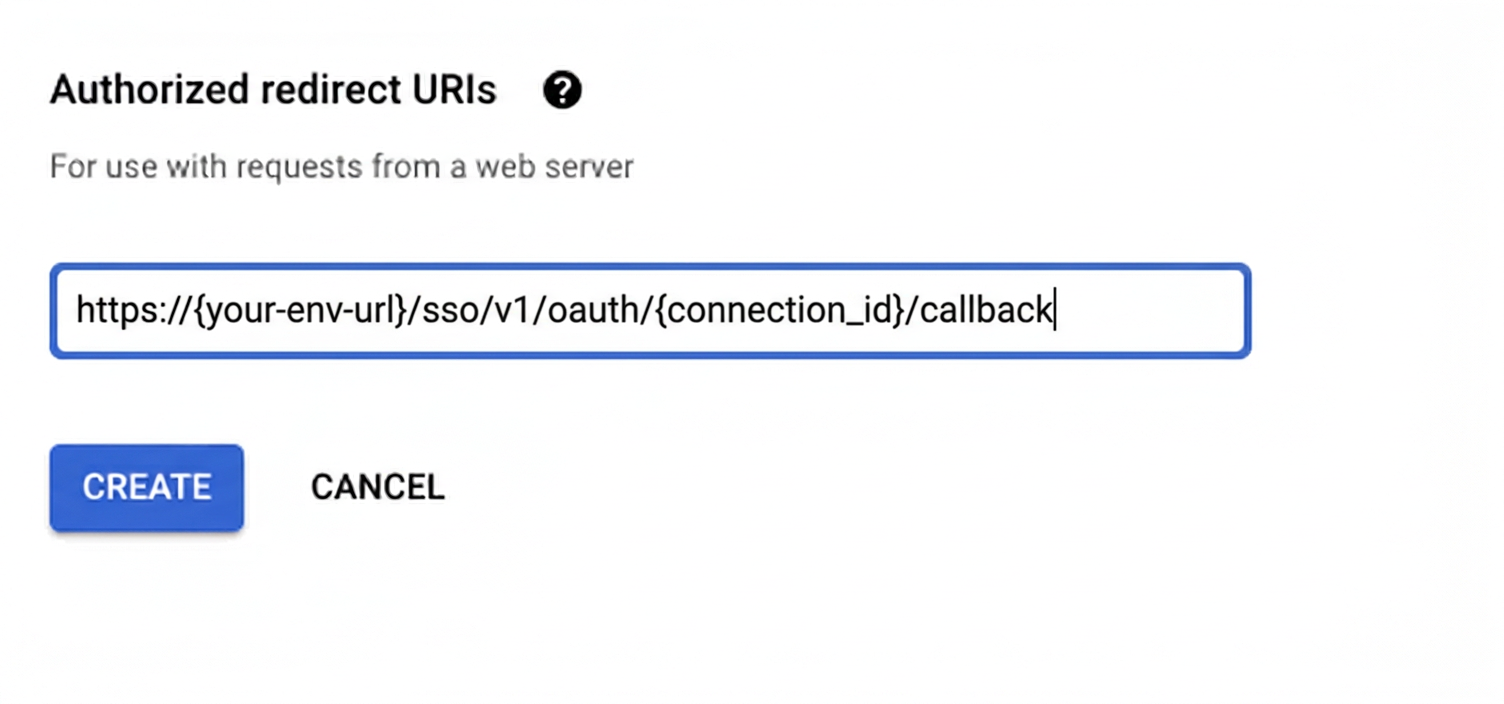
Under Authorized redirect URIs, click + Add URI, paste the redirect URI, and click Create.
-
-
Enable the Google Sheets API
- In Google Cloud Console, go to APIs & Services → Library. Search for “Google Sheets API” and click Enable.
-
Get client credentials
- Google provides your Client ID and Client Secret after you create the OAuth client ID in step 1.
-
Add credentials in Scalekit
-
In Scalekit dashboard, go to AgentKit > Connections and open the connection you created.
-
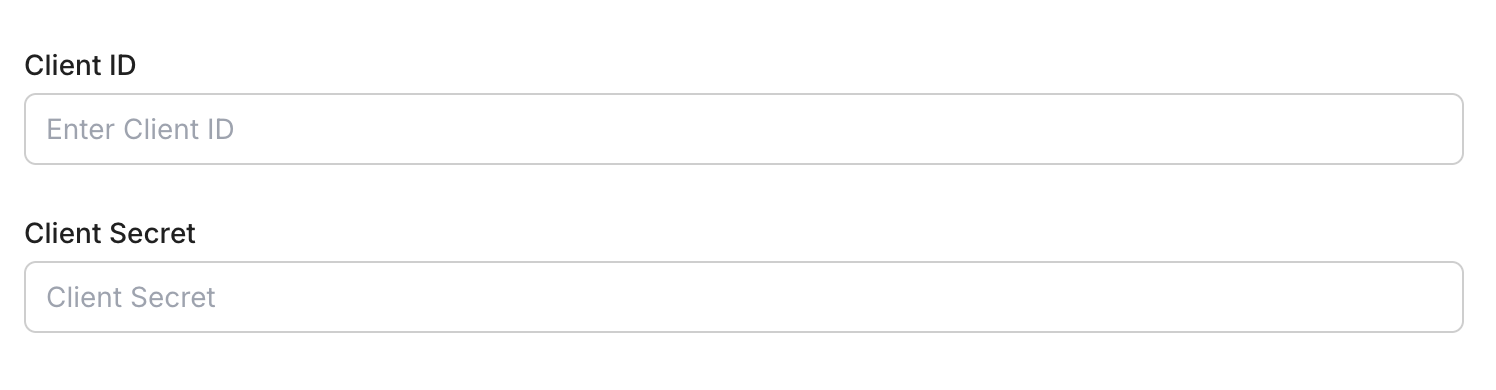
Enter your credentials:
- Client ID (from above)
- Client Secret (from above)
- Permissions (scopes — see Google API Scopes reference)
-
Click Save.
-
-
-
Authorize and make your first call
Section titled “Authorize and make your first call”quickstart.ts import { ScalekitClient } from '@scalekit-sdk/node'import 'dotenv/config'const scalekit = new ScalekitClient(process.env.SCALEKIT_ENV_URL,process.env.SCALEKIT_CLIENT_ID,process.env.SCALEKIT_CLIENT_SECRET,)const actions = scalekit.actionsconst connector = 'googlesheets'const identifier = 'user_123'// Generate an authorization link for the userconst { link } = await actions.getAuthorizationLink({ connectionName: connector, identifier })console.log('Authorize Google Sheets:', link)process.stdout.write('Press Enter after authorizing...')await new Promise(r => process.stdin.once('data', r))// Make your first callconst result = await actions.executeTool({connector,identifier,toolName: 'googlesheets_read_spreadsheet',toolInput: { spreadsheet_id: 'YOUR_SPREADSHEET_ID' },})console.log(result)quickstart.py import osfrom scalekit.client import ScalekitClientfrom dotenv import load_dotenvload_dotenv()scalekit_client = ScalekitClient(env_url=os.getenv("SCALEKIT_ENV_URL"),client_id=os.getenv("SCALEKIT_CLIENT_ID"),client_secret=os.getenv("SCALEKIT_CLIENT_SECRET"),)actions = scalekit_client.actionsconnection_name = "googlesheets"identifier = "user_123"# Generate an authorization link for the userlink_response = actions.get_authorization_link(connection_name=connection_name,identifier=identifier,)print("Authorize Google Sheets:", link_response.link)input("Press Enter after authorizing...")# Make your first callresult = actions.execute_tool(tool_input={"spreadsheet_id":"YOUR_SPREADSHEET_ID"},tool_name="googlesheets_read_spreadsheet",connection_name=connection_name,identifier=identifier,)print(result)
What you can do
Section titled “What you can do”Connect this agent connector to let your agent:
- Update spreadsheet properties, dimension properties, batch — Update spreadsheet-level properties of a Google Sheet, such as its title, locale, or time zone
- Whitespace trim — Remove leading and trailing whitespace, and collapse internal whitespace to single spaces, for every cell in a range of a Google Sheet
- Columns text to — Split the text in a single column of a Google Sheet into multiple columns, using a delimiter such as comma, semicolon, or a custom character
- Range sort, insert, add protected — Sort the rows within a range in a Google Sheet by a single column, ascending or descending
- Filter set basic, clear basic, batch clear values by data — Create the standard ‘basic filter’ on a range in a Google Sheet, enabling the filter dropdown arrows in the header row
- Search developer metadata — Search for developer metadata entries in a Google Sheet by key, or by the sheet/row/column they are attached to
Common workflows
Section titled “Common workflows”Proxy API call
const result = await actions.request({ connectionName: 'googlesheets', identifier: 'user_123', path: '/v4/spreadsheets', method: 'GET',});console.log(result);result = actions.request( connection_name='googlesheets', identifier='user_123', path="/v4/spreadsheets", method="GET")print(result)googlesheets_create_spreadsheet
Create a new Google Sheets spreadsheet with an optional title and initial sheet configuration. Returns the new spreadsheet ID and metadata.
| Name | Type | Required | Description |
|---|---|---|---|
locale | string | No | Locale of the spreadsheet |
schema_version | string | No | Optional schema version to use for tool execution |
sheets | array<object> | No | Initial sheets to include in the spreadsheet |
time_zone | string | No | Time zone for the spreadsheet |
title | string | No | Title of the new spreadsheet |
tool_version | string | No | Optional tool version to use for execution |
googlesheets_get_values
Returns only the cell values from a specific range in a Google Sheet — no metadata, no formatting, just the data. For full spreadsheet metadata and formatting, use googlesheets_read_spreadsheet instead.
| Name | Type | Required | Description |
|---|---|---|---|
major_dimension | string | No | Whether values are returned by rows or columns |
range | string | Yes | Cell range to read in A1 notation |
schema_version | string | No | Optional schema version to use for tool execution |
spreadsheet_id | string | Yes | The ID of the Google Sheet |
tool_version | string | No | Optional tool version to use for execution |
value_render_option | string | No | How values should be rendered in the response |
googlesheets_read_spreadsheet
Returns everything about a spreadsheet — including spreadsheet metadata, sheet properties, cell values, formatting, themes, and pixel sizes. If you only need cell values, use googlesheets_get_values instead.
| Name | Type | Required | Description |
|---|---|---|---|
include_grid_data | boolean | No | Include cell data in the response |
ranges | string | No | Cell range to read in A1 notation |
schema_version | string | No | Optional schema version to use for tool execution |
spreadsheet_id | string | Yes | The ID of the Google Sheet to read |
tool_version | string | No | Optional tool version to use for execution |
googlesheets_update_values
Update cell values in a specific range of a Google Sheet. Supports writing single cells or multiple rows and columns at once.
| Name | Type | Required | Description |
|---|---|---|---|
include_values_in_response | boolean | No | Return the updated cell values in the response |
range | string | Yes | Cell range to update in A1 notation |
schema_version | string | No | Optional schema version to use for tool execution |
spreadsheet_id | string | Yes | The ID of the Google Sheet to update |
tool_version | string | No | Optional tool version to use for execution |
value_input_option | string | No | How input values should be interpreted |
values | array<array> | Yes | 2D array of values to write to the range |
Execute a tool
const result = await actions.executeTool({ connector: 'googlesheets', identifier: 'user_123', toolName: 'googlesheets_get_values', toolInput: { spreadsheet_id: '<SPREADSHEET_ID>', range: 'Sheet1!A1:D10', },});console.log(result);result = actions.execute_tool( connection_name='googlesheets', identifier='user_123', tool_name='googlesheets_get_values', tool_input={ "spreadsheet_id": "<SPREADSHEET_ID>", "range": "Sheet1!A1:D10", },)print(result)Google OAuth consent screen verification
Before you use your own Google OAuth credentials in production, understand what end users see on Google’s consent screen when they authorize a connected account.
| Audience type | Consent screen behavior | When to use |
|---|---|---|
| Internal | Shows your App Name and logo from Branding settings | Only users in your Google Workspace or Cloud Identity organization can authorize the connector |
| External | Shows {env_name}.scalekit.dev until Google verifies your app | Any user with a Google account can authorize the connector |
Why External is required for most AgentKit connectors:
- Internal restricts authorization to users in your Google Workspace or Cloud Identity organization. Users with
@gmail.comor other Google accounts outside your organization cannot complete OAuth. - External is required when end users outside your organization authorize tool access through connected accounts.
- Organization-managed OAuth clients follow the same rules as personal or developer OAuth clients. Switching to an org-owned client does not bypass Google verification.
- Until Google completes verification of your External app, users see
scalekit.devon the consent screen. After verification, your App Name and logo appear.
During development:
- Add Test users under APIs & Services → OAuth consent screen while publishing status is Testing.
- On unverified apps, users can click Advanced → Go to app (unsafe) to proceed during testing.
- Google Workspace admins may need to allowlist your OAuth client.
For Google’s verification requirements and timeline, refer to Google’s OAuth consent screen verification guide.
Tool list
Section titled “Tool list”Use the exact tool names from the Tool list below when you call execute_tool. If you’re not sure which name to use, list the tools available for the current user first.
googlesheets_add_banding#Apply alternating row colors (banding) to a range in a Google Sheet, using explicit hex colors for the two alternating bands and an optional header row color.9 params
Apply alternating row colors (banding) to a range in a Google Sheet, using explicit hex colors for the two alternating bands and an optional header row color.
end_column_indexintegerrequiredZero-based end column index of the range (exclusive).end_row_indexintegerrequiredZero-based end row index of the range (exclusive).first_band_color_hexstringrequiredHex color for odd-numbered rows in the band.second_band_color_hexstringrequiredHex color for even-numbered rows in the band.sheet_idintegerrequiredThe ID of the sheet (tab) containing the range to band.spreadsheet_idstringrequiredThe ID of the Google Sheet to modifystart_column_indexintegerrequiredZero-based start column index of the range (inclusive).start_row_indexintegerrequiredZero-based start row index of the range (inclusive).header_color_hexstringoptionalOptional hex color for the first (header) row of the range, drawn distinct from the alternating bands.googlesheets_add_chart#Add a basic chart (column, bar, line, area, scatter, or combo) to a Google Sheet, built from a labeled range of source data. The chart is placed on a new sheet.10 params
Add a basic chart (column, bar, line, area, scatter, or combo) to a Google Sheet, built from a labeled range of source data. The chart is placed on a new sheet.
chart_typestringrequiredThe type of chart to createend_column_indexintegerrequiredThe zero-based end column index (exclusive) of the data range, including the value columnsend_row_indexintegerrequiredThe zero-based end row index (exclusive) of the data rangesheet_idintegerrequiredThe ID of the sheet (tab) holding the source data for the chartspreadsheet_idstringrequiredThe ID of the Google Sheet to modifystart_column_indexintegerrequiredThe zero-based start column index of the data range. This column is used as the chart's domain (labels/categories)start_row_indexintegerrequiredThe zero-based start row index of the data rangeschema_versionstringoptionalOptional schema version to use for tool executiontitlestringoptionalTitle displayed on the charttool_versionstringoptionalOptional tool version to use for executiongooglesheets_add_conditional_format#Add a conditional formatting rule to a range in a Google Sheet, applying bold text formatting when the specified condition is met.11 params
Add a conditional formatting rule to a range in a Google Sheet, applying bold text formatting when the specified condition is met.
condition_typestringrequiredThe type of condition that triggers the formattingend_column_indexintegerrequiredThe zero-based end column index (exclusive) of the rangeend_row_indexintegerrequiredThe zero-based end row index (exclusive) of the rangesheet_idintegerrequiredThe ID of the sheet (tab) containing the rangespreadsheet_idstringrequiredThe ID of the Google Sheet to modifystart_column_indexintegerrequiredThe zero-based start column index of the rangestart_row_indexintegerrequiredThe zero-based start row index of the rangeboldbooleanoptionalWhether matching cells should be formatted boldcondition_valuestringoptionalThe comparison value used by the condition (not needed for BLANK/NOT_BLANK)schema_versionstringoptionalOptional schema version to use for tool executiontool_versionstringoptionalOptional tool version to use for executiongooglesheets_add_named_range#Create a named range in a Google Sheet, letting formulas and scripts reference a fixed cell range by a friendly name instead of A1 notation.7 params
Create a named range in a Google Sheet, letting formulas and scripts reference a fixed cell range by a friendly name instead of A1 notation.
end_column_indexintegerrequiredZero-based end column index of the range (exclusive).end_row_indexintegerrequiredZero-based end row index of the range (exclusive).namestringrequiredThe name to give this range.sheet_idintegerrequiredThe ID of the sheet (tab) containing the range.spreadsheet_idstringrequiredThe ID of the Google Sheet to modifystart_column_indexintegerrequiredZero-based start column index of the range (inclusive).start_row_indexintegerrequiredZero-based start row index of the range (inclusive).googlesheets_add_protected_range#Protect a range of cells (or an entire sheet) in a Google Sheet from being edited by anyone other than the specified editors.9 params
Protect a range of cells (or an entire sheet) in a Google Sheet from being edited by anyone other than the specified editors.
sheet_idintegerrequiredThe ID of the sheet (tab) containing the range to protect.spreadsheet_idstringrequiredThe ID of the Google Sheet to modifydescriptionstringoptionalDescription of this protected range, shown to users who try to edit it.editor_emailsstringoptionalEmail addresses of the only users allowed to edit this range. Leave blank to restrict to the sheet's existing editors.end_column_indexintegeroptionalZero-based end column index of the protected range (exclusive).end_row_indexintegeroptionalZero-based end row index of the protected range (exclusive).start_column_indexintegeroptionalZero-based start column index of the protected range (inclusive).start_row_indexintegeroptionalZero-based start row index of the protected range (inclusive). Omit along with the other range fields to protect the entire sheet.warning_onlybooleanoptionalIf true, edits are allowed but show a warning instead of being blocked.googlesheets_add_sheet#Add a new sheet (tab) to an existing Google Sheets spreadsheet, with an optional position and grid size.7 params
Add a new sheet (tab) to an existing Google Sheets spreadsheet, with an optional position and grid size.
spreadsheet_idstringrequiredThe ID of the spreadsheet to add a sheet totitlestringrequiredTitle of the new sheetcolumn_countintegeroptionalNumber of columns for the new sheet's gridindexintegeroptionalZero-based position at which to insert the new sheetrow_countintegeroptionalNumber of rows for the new sheet's gridschema_versionstringoptionalOptional schema version to use for tool executiontool_versionstringoptionalOptional tool version to use for executiongooglesheets_append_values#Append rows of data to a Google Sheets spreadsheet. Data is added after the last row with existing content in the specified range.5 params
Append rows of data to a Google Sheets spreadsheet. Data is added after the last row with existing content in the specified range.
rangestringrequiredThe A1 notation range to append data to (e.g. Sheet1!A1)spreadsheet_idstringrequiredThe ID of the spreadsheet to append data tovaluesarrayrequired2D array of values to append. Each inner array is a row.insert_data_optionstringoptionalHow the input data should be inserted. Options: INSERT_ROWS (inserts new rows), OVERWRITE (overwrites existing data). Default: OVERWRITEvalue_input_optionstringoptionalHow input data should be interpreted. Options: RAW (literal values), USER_ENTERED (as if typed in UI, parses formulas/dates). Default: USER_ENTEREDgooglesheets_batch_clear_values#Clear all values across multiple ranges of a Google Sheet in a single request. Formatting is preserved; only the cell values are cleared.4 params
Clear all values across multiple ranges of a Google Sheet in a single request. Formatting is preserved; only the cell values are cleared.
rangesarrayrequiredList of A1 notation ranges to clearspreadsheet_idstringrequiredThe ID of the spreadsheet to clear values inschema_versionstringoptionalOptional schema version to use for tool executiontool_versionstringoptionalOptional tool version to use for executiongooglesheets_batch_clear_values_by_data_filter#Clear values from one or more ranges of a Google Sheet, with each range selected by DataFilter (an A1 range, a GridRange, or a developer metadata lookup) instead of a plain A1 string. Formatting is preserved; only cell values are cleared. Use this instead of googlesheets_batch_clear_values when you need to target ranges by developer metadata or a structured GridRange.4 params
Clear values from one or more ranges of a Google Sheet, with each range selected by DataFilter (an A1 range, a GridRange, or a developer metadata lookup) instead of a plain A1 string. Formatting is preserved; only cell values are cleared. Use this instead of googlesheets_batch_clear_values when you need to target ranges by developer metadata or a structured GridRange.
data_filtersarrayrequiredList of DataFilter objects selecting which ranges to clear. Each object must set exactly one of 'a1Range' (string), 'gridRange' (object), or 'developerMetadataLookup' (object).spreadsheet_idstringrequiredThe ID of the spreadsheet to clear values inschema_versionstringoptionalOptional schema version to use for tool executiontool_versionstringoptionalOptional tool version to use for executiongooglesheets_batch_get_values#Return cell values for multiple ranges of a Google Sheet in a single request. More efficient than calling googlesheets_get_values repeatedly when you need several ranges at once.6 params
Return cell values for multiple ranges of a Google Sheet in a single request. More efficient than calling googlesheets_get_values repeatedly when you need several ranges at once.
rangesarrayrequiredList of A1 notation ranges to fetch values forspreadsheet_idstringrequiredThe ID of the Google Sheet to read frommajor_dimensionstringoptionalWhether values are returned by rows or columnsschema_versionstringoptionalOptional schema version to use for tool executiontool_versionstringoptionalOptional tool version to use for executionvalue_render_optionstringoptionalHow values should be rendered in the responsegooglesheets_batch_get_values_by_data_filter#Return cell values for one or more ranges of a Google Sheet, selected by DataFilter (an A1 range, a GridRange, or a developer metadata lookup) instead of a plain A1 string. Use this instead of googlesheets_batch_get_values when you need to select ranges by developer metadata or a structured GridRange.7 params
Return cell values for one or more ranges of a Google Sheet, selected by DataFilter (an A1 range, a GridRange, or a developer metadata lookup) instead of a plain A1 string. Use this instead of googlesheets_batch_get_values when you need to select ranges by developer metadata or a structured GridRange.
data_filtersarrayrequiredList of DataFilter objects selecting which ranges to fetch values for. Each object must set exactly one of 'a1Range' (string), 'gridRange' (object), or 'developerMetadataLookup' (object).spreadsheet_idstringrequiredThe ID of the Google Sheet to read fromdate_time_render_optionstringoptionalHow dates, times, and durations should be represented in the responsemajor_dimensionstringoptionalWhether values are returned by rows or columnsschema_versionstringoptionalOptional schema version to use for tool executiontool_versionstringoptionalOptional tool version to use for executionvalue_render_optionstringoptionalHow values should be rendered in the responsegooglesheets_batch_update_values#Update values across multiple ranges of a Google Sheet in a single request. Each entry in the data array specifies its own range and 2D array of values, so you can write to several non-contiguous ranges at once.6 params
Update values across multiple ranges of a Google Sheet in a single request. Each entry in the data array specifies its own range and 2D array of values, so you can write to several non-contiguous ranges at once.
dataarrayrequiredList of range/values pairs to update. Each object must contain a 'range' (A1 notation string) and a 'values' key (2D array of rows, e.g. [["a","b"],["c","d"]]). Example: [{"range": "Sheet1!A1:B2", "values": [["a","b"],["c","d"]]}]spreadsheet_idstringrequiredThe ID of the Google Sheet to updatevalue_input_optionstringrequiredHow input values should be interpretedinclude_values_in_responsebooleanoptionalReturn the updated cell values in the responseschema_versionstringoptionalOptional schema version to use for tool executiontool_versionstringoptionalOptional tool version to use for executiongooglesheets_batch_update_values_by_data_filter#Set values in one or more ranges of a Google Sheet, with each range selected by DataFilter (an A1 range, a GridRange, or a developer metadata lookup) instead of a plain A1 string. Use this instead of googlesheets_batch_update_values when you need to target ranges by developer metadata or a structured GridRange.8 params
Set values in one or more ranges of a Google Sheet, with each range selected by DataFilter (an A1 range, a GridRange, or a developer metadata lookup) instead of a plain A1 string. Use this instead of googlesheets_batch_update_values when you need to target ranges by developer metadata or a structured GridRange.
dataarrayrequiredList of DataFilterValueRange objects to write. Each object must contain a 'dataFilter' (DataFilter object, e.g. {"a1Range": "Sheet1!A1:B2"}) and a 'values' key (2D array of rows). Example: [{"dataFilter": {"a1Range": "Sheet1!A1:B2"}, "values": [["a","b"],["c","d"]]}]spreadsheet_idstringrequiredThe ID of the Google Sheet to updatevalue_input_optionstringrequiredHow input values should be interpretedinclude_values_in_responsebooleanoptionalReturn the updated cell values in the responseresponse_date_time_render_optionstringoptionalHow dates/times should be represented in the response, when include_values_in_response is trueresponse_value_render_optionstringoptionalHow values should be rendered in the response, when include_values_in_response is trueschema_versionstringoptionalOptional schema version to use for tool executiontool_versionstringoptionalOptional tool version to use for executiongooglesheets_clear_basic_filter#Remove the basic filter from a sheet (tab) in a Google Sheet, hiding the filter dropdown arrows and clearing any active filter criteria.2 params
Remove the basic filter from a sheet (tab) in a Google Sheet, hiding the filter dropdown arrows and clearing any active filter criteria.
sheet_idintegerrequiredThe ID of the sheet (tab) to remove the basic filter from.spreadsheet_idstringrequiredThe ID of the Google Sheet to modifygooglesheets_clear_values#Clear all values in a specified range of a Google Sheets spreadsheet. Formatting is preserved; only the cell values are cleared.2 params
Clear all values in a specified range of a Google Sheets spreadsheet. Formatting is preserved; only the cell values are cleared.
rangestringrequiredThe A1 notation range to clear (e.g. Sheet1!A1:D10)spreadsheet_idstringrequiredThe ID of the spreadsheet to clear values ingooglesheets_copy_sheet_to#Copy a sheet (tab) from one Google Sheets spreadsheet into another spreadsheet as a new sheet.5 params
Copy a sheet (tab) from one Google Sheets spreadsheet into another spreadsheet as a new sheet.
destination_spreadsheet_idstringrequiredThe ID of the spreadsheet to copy the sheet intosheet_idintegerrequiredThe numeric ID of the sheet to copyspreadsheet_idstringrequiredThe ID of the source spreadsheet containing the sheet to copyschema_versionstringoptionalOptional schema version to use for tool executiontool_versionstringoptionalOptional tool version to use for executiongooglesheets_create_developer_metadata#Attach a hidden developer metadata key-value entry to a Google Sheet, either at the spreadsheet level, a specific sheet, or a specific row/column. Useful for storing app-specific state alongside spreadsheet data.7 params
Attach a hidden developer metadata key-value entry to a Google Sheet, either at the spreadsheet level, a specific sheet, or a specific row/column. Useful for storing app-specific state alongside spreadsheet data.
metadata_keystringrequiredThe key for this metadata entry. Multiple entries may share the same key.spreadsheet_idstringrequiredThe ID of the Google Sheet to modifydimensionstringoptionalIf scoping to a single row or column, whether the index refers to a row or a column. Requires sheet_id and dimension_index.dimension_indexintegeroptionalZero-based index of the row or column to attach the metadata to. Requires sheet_id and dimension.metadata_valuestringoptionalThe value to associate with the metadata key.sheet_idintegeroptionalIf set, scopes the metadata to this sheet (tab) instead of the whole spreadsheet. Cannot be combined with row/column scoping.visibilitystringoptionalDOCUMENT makes the metadata readable by any project with access to the spreadsheet; PROJECT restricts it to the creating project only.googlesheets_create_spreadsheet#Create a new Google Sheets spreadsheet with an optional title and initial sheet configuration. Returns the new spreadsheet ID and metadata.6 params
Create a new Google Sheets spreadsheet with an optional title and initial sheet configuration. Returns the new spreadsheet ID and metadata.
localestringoptionalLocale of the spreadsheetschema_versionstringoptionalOptional schema version to use for tool executionsheetsarrayoptionalInitial sheets to include in the spreadsheettime_zonestringoptionalTime zone for the spreadsheettitlestringoptionalTitle of the new spreadsheettool_versionstringoptionalOptional tool version to use for executiongooglesheets_delete_banding#Remove a banded (alternating color) range from a Google Sheet by its banded range ID.2 params
Remove a banded (alternating color) range from a Google Sheet by its banded range ID.
banded_range_idintegerrequiredThe ID of the banded range to remove, as returned when it was created.spreadsheet_idstringrequiredThe ID of the Google Sheet to modifygooglesheets_delete_conditional_format_rule#Delete a conditional formatting rule from a sheet in a Google Sheet, identified by its zero-based position in that sheet's rule list.3 params
Delete a conditional formatting rule from a sheet in a Google Sheet, identified by its zero-based position in that sheet's rule list.
indexintegerrequiredZero-based index of the conditional format rule to delete, within that sheet's list of rules.sheet_idintegerrequiredThe ID of the sheet (tab) containing the rule to delete.spreadsheet_idstringrequiredThe ID of the Google Sheet to modifygooglesheets_delete_developer_metadata#Delete all developer metadata entries in a Google Sheet matching a given key.2 params
Delete all developer metadata entries in a Google Sheet matching a given key.
metadata_keystringrequiredDelete every developer metadata entry with this exact key.spreadsheet_idstringrequiredThe ID of the Google Sheet to modifygooglesheets_delete_dimension#Permanently delete a range of rows or columns from a Google Sheet. Data in the deleted rows or columns is lost and remaining dimensions shift to fill the gap.7 params
Permanently delete a range of rows or columns from a Google Sheet. Data in the deleted rows or columns is lost and remaining dimensions shift to fill the gap.
dimensionstringrequiredWhether to delete rows or columnsend_indexintegerrequiredThe zero-based end index (exclusive) of the range to deletesheet_idintegerrequiredThe ID of the sheet (tab) to delete the dimension fromspreadsheet_idstringrequiredThe ID of the Google Sheet to modifystart_indexintegerrequiredThe zero-based start index of the range to deleteschema_versionstringoptionalOptional schema version to use for tool executiontool_versionstringoptionalOptional tool version to use for executiongooglesheets_delete_embedded_object#Delete a chart or other embedded object from a Google Sheet by its object ID.2 params
Delete a chart or other embedded object from a Google Sheet by its object ID.
object_idintegerrequiredThe ID of the chart or embedded object to delete, as returned when it was created.spreadsheet_idstringrequiredThe ID of the Google Sheet to modifygooglesheets_delete_named_range#Delete an existing named range from a Google Sheet by its named range ID.2 params
Delete an existing named range from a Google Sheet by its named range ID.
named_range_idstringrequiredThe ID of the named range to delete, as returned when it was created.spreadsheet_idstringrequiredThe ID of the Google Sheet to modifygooglesheets_delete_protected_range#Remove protection from a previously protected range in a Google Sheet by its protected range ID.2 params
Remove protection from a previously protected range in a Google Sheet by its protected range ID.
protected_range_idintegerrequiredThe ID of the protected range to remove, as returned when it was created.spreadsheet_idstringrequiredThe ID of the Google Sheet to modifygooglesheets_delete_range#Delete a range of cells from a Google Sheet, shifting the remaining cells up or left to fill the gap. Unlike deleting a whole row/column, this only affects the given range's rows/columns.7 params
Delete a range of cells from a Google Sheet, shifting the remaining cells up or left to fill the gap. Unlike deleting a whole row/column, this only affects the given range's rows/columns.
end_column_indexintegerrequiredZero-based end column index of the range to delete (exclusive).end_row_indexintegerrequiredZero-based end row index of the range to delete (exclusive).sheet_idintegerrequiredThe ID of the sheet (tab) to delete cells from.shift_dimensionstringrequiredDirection remaining cells shift to fill the gap left by the deleted range.spreadsheet_idstringrequiredThe ID of the Google Sheet to modifystart_column_indexintegerrequiredZero-based start column index of the range to delete (inclusive).start_row_indexintegerrequiredZero-based start row index of the range to delete (inclusive).googlesheets_delete_sheet#Permanently delete a sheet (tab) from a Google Sheets spreadsheet by its sheet ID. This cannot be undone.4 params
Permanently delete a sheet (tab) from a Google Sheets spreadsheet by its sheet ID. This cannot be undone.
sheet_idintegerrequiredThe numeric ID of the sheet to deletespreadsheet_idstringrequiredThe ID of the spreadsheet containing the sheet to deleteschema_versionstringoptionalOptional schema version to use for tool executiontool_versionstringoptionalOptional tool version to use for executiongooglesheets_duplicate_sheet#Duplicate an existing sheet (tab) within the same Google Sheets spreadsheet, with an optional new name and insert position.6 params
Duplicate an existing sheet (tab) within the same Google Sheets spreadsheet, with an optional new name and insert position.
source_sheet_idintegerrequiredThe numeric ID of the sheet to duplicatespreadsheet_idstringrequiredThe ID of the spreadsheet containing the sheet to duplicateinsert_indexintegeroptionalZero-based position at which to insert the duplicated sheetnew_sheet_namestringoptionalName for the duplicated sheetschema_versionstringoptionalOptional schema version to use for tool executiontool_versionstringoptionalOptional tool version to use for executiongooglesheets_find_and_replace#Find and replace text within a Google Sheet, either in a specific sheet (tab) or across all sheets in the spreadsheet.10 params
Find and replace text within a Google Sheet, either in a specific sheet (tab) or across all sheets in the spreadsheet.
findstringrequiredThe text to search forreplacementstringrequiredThe text to replace matches withspreadsheet_idstringrequiredThe ID of the Google Sheet to modifyinclude_formulasbooleanoptionalWhether to search within formula text as well as cell valuesmatch_casebooleanoptionalWhether the search should be case-sensitivematch_entire_cellbooleanoptionalWhether the search should match the entire cell contentsschema_versionstringoptionalOptional schema version to use for tool executionsearch_by_regexbooleanoptionalWhether the find text should be treated as a regular expressionsheet_idintegeroptionalThe ID of the sheet (tab) to search within. Omit to search all sheets in the spreadsheettool_versionstringoptionalOptional tool version to use for executiongooglesheets_format_cells#Apply text and number formatting (bold, italic, font size, number format, horizontal alignment) to a range of cells in a Google Sheet.14 params
Apply text and number formatting (bold, italic, font size, number format, horizontal alignment) to a range of cells in a Google Sheet.
end_column_indexintegerrequiredThe zero-based end column index (exclusive) of the rangeend_row_indexintegerrequiredThe zero-based end row index (exclusive) of the rangesheet_idintegerrequiredThe ID of the sheet (tab) containing the range to formatspreadsheet_idstringrequiredThe ID of the Google Sheet to modifystart_column_indexintegerrequiredThe zero-based start column index of the rangestart_row_indexintegerrequiredThe zero-based start row index of the rangeboldbooleanoptionalWhether text in the range should be boldfont_sizeintegeroptionalFont size in points to apply to the rangehorizontal_alignmentstringoptionalHorizontal alignment of text in the rangeitalicbooleanoptionalWhether text in the range should be italicnumber_format_patternstringoptionalCustom number format pattern to apply (used with number_format_type)number_format_typestringoptionalThe type of number format to apply to the rangeschema_versionstringoptionalOptional schema version to use for tool executiontool_versionstringoptionalOptional tool version to use for executiongooglesheets_freeze_panes#Freeze a number of rows and/or columns at the top or left of a Google Sheet so they stay visible while scrolling.6 params
Freeze a number of rows and/or columns at the top or left of a Google Sheet so they stay visible while scrolling.
sheet_idintegerrequiredThe ID of the sheet (tab) to freeze panes onspreadsheet_idstringrequiredThe ID of the Google Sheet to modifyfrozen_column_countintegeroptionalNumber of columns to freeze starting from the leftfrozen_row_countintegeroptionalNumber of rows to freeze starting from the topschema_versionstringoptionalOptional schema version to use for tool executiontool_versionstringoptionalOptional tool version to use for executiongooglesheets_get_developer_metadata#Retrieve a single developer metadata entry from a Google Sheet by its metadata ID. Developer metadata lets apps attach hidden key-value data to a spreadsheet, sheet, row, or column.2 params
Retrieve a single developer metadata entry from a Google Sheet by its metadata ID. Developer metadata lets apps attach hidden key-value data to a spreadsheet, sheet, row, or column.
metadata_idintegerrequiredThe spreadsheet-scoped ID of the developer metadata entry to retrieve.spreadsheet_idstringrequiredThe ID of the Google Sheet to read fromgooglesheets_get_spreadsheet_by_data_filter#Return spreadsheet metadata and (optionally) cell data for only the ranges that match one or more DataFilters (an A1 range, a GridRange, or a developer metadata lookup). Use this instead of googlesheets_read_spreadsheet when you need to select ranges by developer metadata or a structured GridRange rather than a plain A1 string.5 params
Return spreadsheet metadata and (optionally) cell data for only the ranges that match one or more DataFilters (an A1 range, a GridRange, or a developer metadata lookup). Use this instead of googlesheets_read_spreadsheet when you need to select ranges by developer metadata or a structured GridRange rather than a plain A1 string.
data_filtersarrayrequiredList of DataFilter objects selecting which parts of the spreadsheet to return. Each object must set exactly one of 'a1Range' (string), 'gridRange' (object), or 'developerMetadataLookup' (object).spreadsheet_idstringrequiredThe ID of the Google Sheet to read frominclude_grid_databooleanoptionalInclude cell data in the responseschema_versionstringoptionalOptional schema version to use for tool executiontool_versionstringoptionalOptional tool version to use for executiongooglesheets_get_values#Returns only the cell values from a specific range in a Google Sheet — no metadata, no formatting, just the data. For full spreadsheet metadata and formatting, use googlesheets_read_spreadsheet instead.6 params
Returns only the cell values from a specific range in a Google Sheet — no metadata, no formatting, just the data. For full spreadsheet metadata and formatting, use googlesheets_read_spreadsheet instead.
rangestringrequiredCell range to read in A1 notationspreadsheet_idstringrequiredThe ID of the Google Sheetmajor_dimensionstringoptionalWhether values are returned by rows or columnsschema_versionstringoptionalOptional schema version to use for tool executiontool_versionstringoptionalOptional tool version to use for executionvalue_render_optionstringoptionalHow values should be rendered in the responsegooglesheets_insert_dimension#Insert new rows or columns into a Google Sheet at a specific position. Existing rows or columns are shifted to make room for the new ones.8 params
Insert new rows or columns into a Google Sheet at a specific position. Existing rows or columns are shifted to make room for the new ones.
dimensionstringrequiredWhether to insert rows or columnsend_indexintegerrequiredThe zero-based end index (exclusive) of the range to insertsheet_idintegerrequiredThe ID of the sheet (tab) to insert the dimension intospreadsheet_idstringrequiredThe ID of the Google Sheet to modifystart_indexintegerrequiredThe zero-based start index of the range to insertinherit_from_beforebooleanoptionalWhether new rows/columns should inherit properties from the dimension before themschema_versionstringoptionalOptional schema version to use for tool executiontool_versionstringoptionalOptional tool version to use for executiongooglesheets_insert_range#Insert empty cells into a Google Sheet at a given range, shifting existing cells down or right to make room. Unlike inserting a whole row/column, this only affects the given range's rows/columns.7 params
Insert empty cells into a Google Sheet at a given range, shifting existing cells down or right to make room. Unlike inserting a whole row/column, this only affects the given range's rows/columns.
end_column_indexintegerrequiredZero-based end column index of the range to insert (exclusive).end_row_indexintegerrequiredZero-based end row index of the range to insert (exclusive).sheet_idintegerrequiredThe ID of the sheet (tab) to insert cells into.shift_dimensionstringrequiredDirection existing cells shift to make room for the inserted range.spreadsheet_idstringrequiredThe ID of the Google Sheet to modifystart_column_indexintegerrequiredZero-based start column index of the range to insert (inclusive).start_row_indexintegerrequiredZero-based start row index of the range to insert (inclusive).googlesheets_merge_cells#Merge a range of cells in a Google Sheet into a single cell, merging all cells, only columns, or only rows within the range.9 params
Merge a range of cells in a Google Sheet into a single cell, merging all cells, only columns, or only rows within the range.
end_column_indexintegerrequiredThe zero-based end column index (exclusive) of the rangeend_row_indexintegerrequiredThe zero-based end row index (exclusive) of the rangesheet_idintegerrequiredThe ID of the sheet (tab) containing the range to mergespreadsheet_idstringrequiredThe ID of the Google Sheet to modifystart_column_indexintegerrequiredThe zero-based start column index of the rangestart_row_indexintegerrequiredThe zero-based start row index of the rangemerge_typestringoptionalHow the range should be mergedschema_versionstringoptionalOptional schema version to use for tool executiontool_versionstringoptionalOptional tool version to use for executiongooglesheets_move_dimension#Move a contiguous range of rows or columns to a different position within the same sheet in a Google Sheet.6 params
Move a contiguous range of rows or columns to a different position within the same sheet in a Google Sheet.
destination_indexintegerrequiredZero-based index of where to move the rows/columns to, measured before the source rows/columns are removed.dimensionstringrequiredWhether to move rows or columns.end_indexintegerrequiredZero-based end index of the rows/columns to move (exclusive).sheet_idintegerrequiredThe ID of the sheet (tab) containing the rows or columns to move.spreadsheet_idstringrequiredThe ID of the Google Sheet to modifystart_indexintegerrequiredZero-based start index of the rows/columns to move (inclusive).googlesheets_read_spreadsheet#Returns everything about a spreadsheet — including spreadsheet metadata, sheet properties, cell values, formatting, themes, and pixel sizes. If you only need cell values, use googlesheets_get_values instead.5 params
Returns everything about a spreadsheet — including spreadsheet metadata, sheet properties, cell values, formatting, themes, and pixel sizes. If you only need cell values, use googlesheets_get_values instead.
spreadsheet_idstringrequiredThe ID of the Google Sheet to readinclude_grid_databooleanoptionalInclude cell data in the responserangesstringoptionalCell range to read in A1 notationschema_versionstringoptionalOptional schema version to use for tool executiontool_versionstringoptionalOptional tool version to use for executiongooglesheets_rename_sheet#Rename an existing sheet (tab) within a Google Sheets spreadsheet.5 params
Rename an existing sheet (tab) within a Google Sheets spreadsheet.
sheet_idintegerrequiredThe numeric ID of the sheet to renamespreadsheet_idstringrequiredThe ID of the spreadsheet containing the sheet to renametitlestringrequiredNew title for the sheetschema_versionstringoptionalOptional schema version to use for tool executiontool_versionstringoptionalOptional tool version to use for executiongooglesheets_search_developer_metadata#Search for developer metadata entries in a Google Sheet by key, or by the sheet/row/column they are attached to. Returns all matching entries with their location and value.2 params
Search for developer metadata entries in a Google Sheet by key, or by the sheet/row/column they are attached to. Returns all matching entries with their location and value.
metadata_keystringrequiredOnly return developer metadata entries with this exact key.spreadsheet_idstringrequiredThe ID of the Google Sheet to searchgooglesheets_set_basic_filter#Create the standard 'basic filter' on a range in a Google Sheet, enabling the filter dropdown arrows in the header row. Replaces any existing basic filter on the sheet.6 params
Create the standard 'basic filter' on a range in a Google Sheet, enabling the filter dropdown arrows in the header row. Replaces any existing basic filter on the sheet.
end_column_indexintegerrequiredZero-based end column index of the filtered range (exclusive).end_row_indexintegerrequiredZero-based end row index of the filtered range (exclusive).sheet_idintegerrequiredThe ID of the sheet (tab) to apply the filter to.spreadsheet_idstringrequiredThe ID of the Google Sheet to modifystart_column_indexintegerrequiredZero-based start column index of the filtered range (inclusive).start_row_indexintegerrequiredZero-based start row index of the filtered range (inclusive), typically the header row.googlesheets_sort_range#Sort the rows within a range in a Google Sheet by a single column, ascending or descending. Only the rows inside the given range are reordered.8 params
Sort the rows within a range in a Google Sheet by a single column, ascending or descending. Only the rows inside the given range are reordered.
end_column_indexintegerrequiredZero-based end column index of the data to sort (exclusive).end_row_indexintegerrequiredZero-based end row index of the data to sort (exclusive).sheet_idintegerrequiredThe ID of the sheet (tab) containing the range to sort.sort_column_indexintegerrequiredZero-based column index (absolute, within the sheet) to sort by.spreadsheet_idstringrequiredThe ID of the Google Sheet to modifystart_column_indexintegerrequiredZero-based start column index of the data to sort (inclusive).start_row_indexintegerrequiredZero-based start row index of the data to sort (inclusive). Exclude header rows from this range.sort_orderstringoptionalSort direction for the chosen column.googlesheets_text_to_columns#Split the text in a single column of a Google Sheet into multiple columns, using a delimiter such as comma, semicolon, or a custom character.7 params
Split the text in a single column of a Google Sheet into multiple columns, using a delimiter such as comma, semicolon, or a custom character.
column_indexintegerrequiredZero-based index of the single source column to split.end_row_indexintegerrequiredZero-based end row index of the source data (exclusive).sheet_idintegerrequiredThe ID of the sheet (tab) containing the column to split.spreadsheet_idstringrequiredThe ID of the Google Sheet to modifystart_row_indexintegerrequiredZero-based start row index of the source data (inclusive). The range must span exactly one column.custom_delimiterstringoptionalThe custom delimiter character to split on. Only used when delimiter_type is CUSTOM.delimiter_typestringoptionalThe delimiter category to split on. Use CUSTOM together with custom_delimiter for an arbitrary character, or AUTODETECT to let Sheets pick automatically.googlesheets_trim_whitespace#Remove leading and trailing whitespace, and collapse internal whitespace to single spaces, for every cell in a range of a Google Sheet.6 params
Remove leading and trailing whitespace, and collapse internal whitespace to single spaces, for every cell in a range of a Google Sheet.
end_column_indexintegerrequiredZero-based end column index of the range to trim (exclusive).end_row_indexintegerrequiredZero-based end row index of the range to trim (exclusive).sheet_idintegerrequiredThe ID of the sheet (tab) containing the range to trim.spreadsheet_idstringrequiredThe ID of the Google Sheet to modifystart_column_indexintegerrequiredZero-based start column index of the range to trim (inclusive).start_row_indexintegerrequiredZero-based start row index of the range to trim (inclusive).googlesheets_update_dimension_properties#Resize or hide/unhide a range of rows or columns in a Google Sheet.7 params
Resize or hide/unhide a range of rows or columns in a Google Sheet.
dimensionstringrequiredWhether to operate on rows or columns.end_indexintegerrequiredZero-based end index of the rows/columns to update (exclusive).sheet_idintegerrequiredThe ID of the sheet (tab) containing the rows or columns to update.spreadsheet_idstringrequiredThe ID of the Google Sheet to modifystart_indexintegerrequiredZero-based start index of the rows/columns to update (inclusive).hiddenbooleanoptionalWhether the rows/columns should be hidden from view.pixel_sizeintegeroptionalNew height (for rows) or width (for columns) in pixels.googlesheets_update_spreadsheet_properties#Update spreadsheet-level properties of a Google Sheet, such as its title, locale, or time zone. Only the fields you provide are changed.4 params
Update spreadsheet-level properties of a Google Sheet, such as its title, locale, or time zone. Only the fields you provide are changed.
spreadsheet_idstringrequiredThe ID of the Google Sheet to modifylocalestringoptionalNew locale for the spreadsheet, affecting how values and formulas are parsed and displayed.time_zonestringoptionalNew time zone for the spreadsheet, used for date/time functions.titlestringoptionalNew title for the spreadsheet. Leave blank to keep the current title.googlesheets_update_values#Update cell values in a specific range of a Google Sheet. Supports writing single cells or multiple rows and columns at once.7 params
Update cell values in a specific range of a Google Sheet. Supports writing single cells or multiple rows and columns at once.
rangestringrequiredCell range to update in A1 notationspreadsheet_idstringrequiredThe ID of the Google Sheet to updatevaluesarrayrequired2D array of values to write to the rangeinclude_values_in_responsebooleanoptionalReturn the updated cell values in the responseschema_versionstringoptionalOptional schema version to use for tool executiontool_versionstringoptionalOptional tool version to use for executionvalue_input_optionstringoptionalHow input values should be interpreted