


Google BigQuery connector
OAuth 2.0AnalyticsDatabasesBigQuery is Google Cloud’s fully-managed enterprise data warehouse for analytics at scale.
Google BigQuery connector
-
Install the SDK
Section titled “Install the SDK”Terminal window npm install @scalekit-sdk/nodeTerminal window pip install scalekit -
Set your credentials
Section titled “Set your credentials”Add your Scalekit credentials to your
.envfile. Find values in app.scalekit.com > Developers > API Credentials..env SCALEKIT_ENVIRONMENT_URL=<your-environment-url>SCALEKIT_CLIENT_ID=<your-client-id>SCALEKIT_CLIENT_SECRET=<your-client-secret> -
Set up the connector
Section titled “Set up the connector”Register your Google BigQuery credentials with Scalekit so it handles the token lifecycle. You do this once per environment.
Dashboard setup steps
Register your Scalekit environment with the Google BigQuery connector so Scalekit handles the authentication flow and token lifecycle for you. The connection name you create will be used to identify and invoke the connection programmatically. Then complete the configuration in your application as follows:
-
Set up auth redirects
-
In Scalekit dashboard, go to AgentKit > Connections > Create Connection. Find Google BigQuery and click Create. Click Use your own credentials and copy the redirect URI. It looks like
https://<SCALEKIT_ENVIRONMENT_URL>/sso/v1/oauth/<CONNECTION_ID>/callback.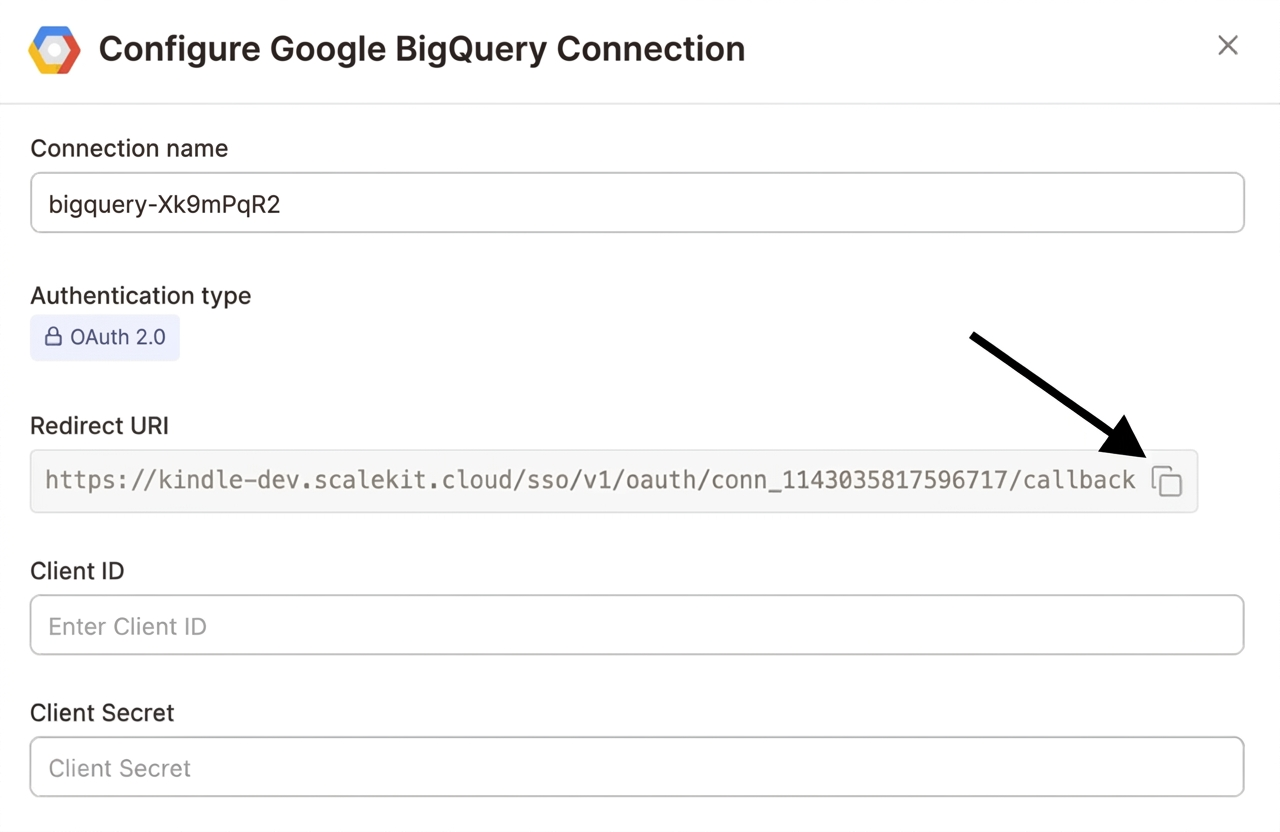
-
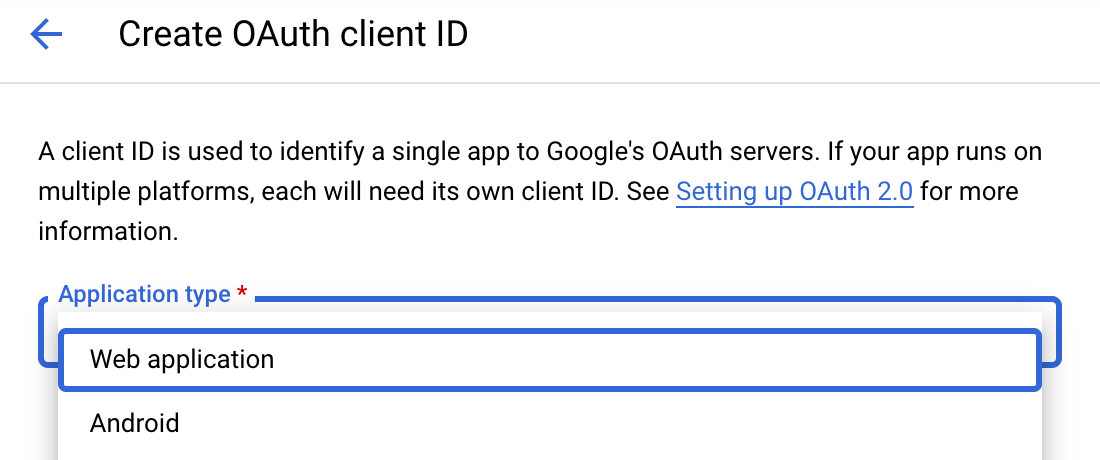
Navigate to Google Cloud Console → APIs & Services → Credentials. Select + Create Credentials, then OAuth client ID. Choose Web application from the Application type menu.
-
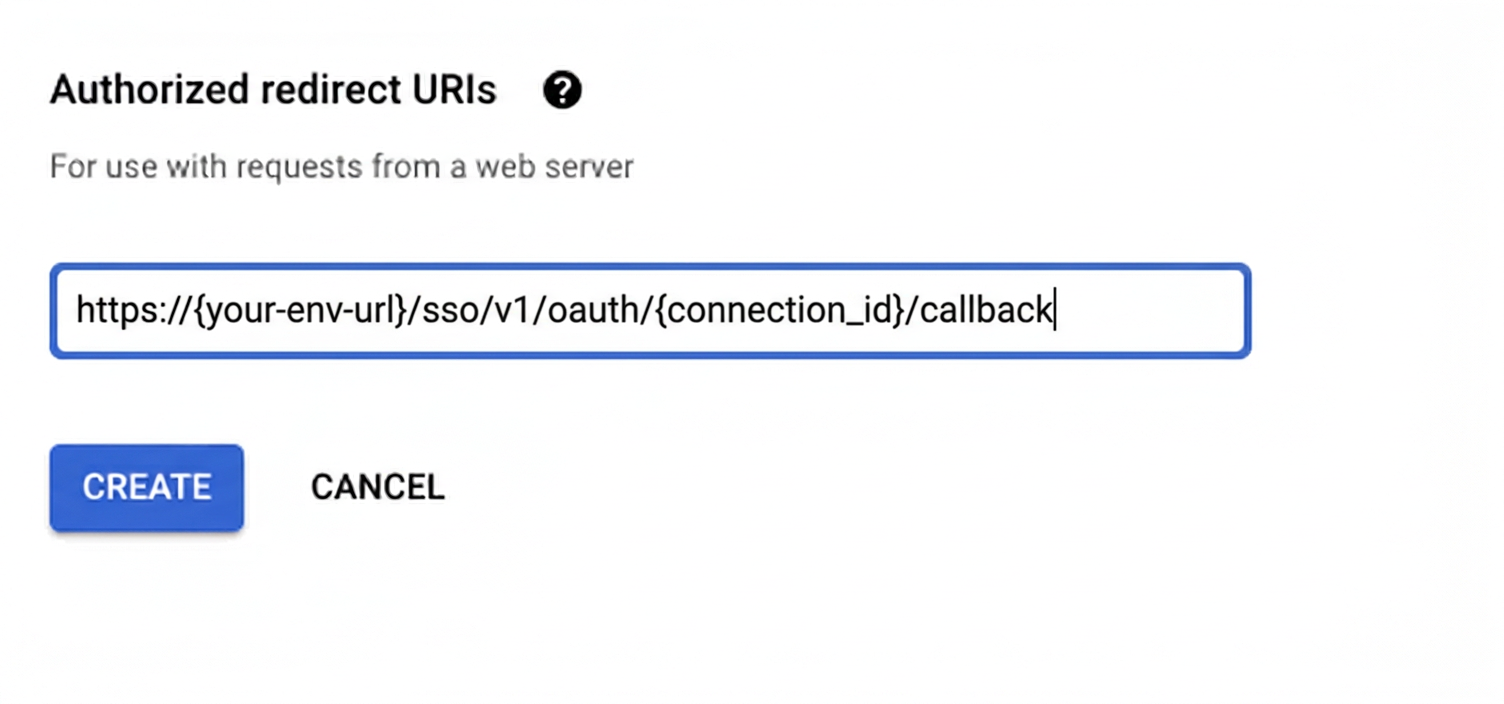
Under Authorized redirect URIs, click + Add URI, paste the redirect URI, and click Create.
-
-
Enable the BigQuery API
-
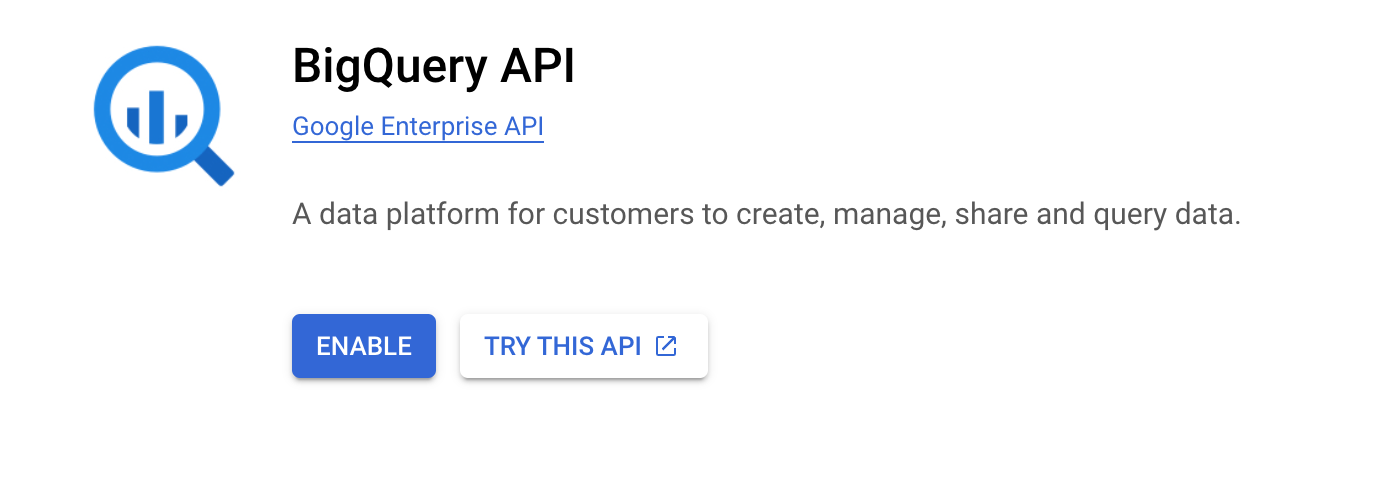
In Google Cloud Console, go to APIs & Services → Library. Search for “BigQuery API” and click Enable.
-
-
Get client credentials
- Google provides your Client ID and Client Secret after you create the OAuth client ID in step 1.
-
Add credentials in Scalekit
-
In Scalekit dashboard, go to AgentKit > Connections and open the connection you created.
-
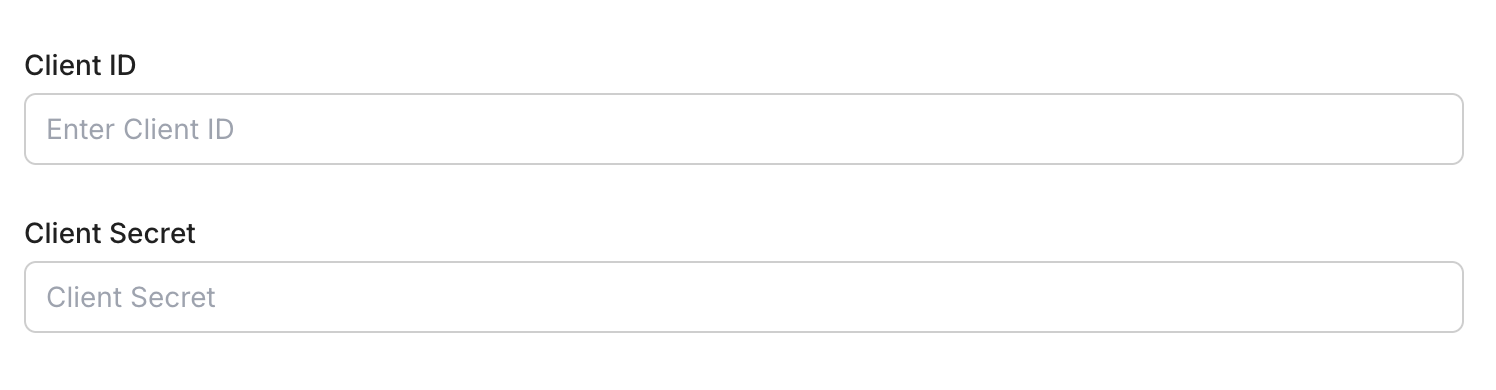
Enter your credentials:
- Client ID (from above)
- Client Secret (from above)
- Permissions (scopes — see Google API Scopes reference)
-
Click Save.
-
-
-
Authorize and make your first call
Section titled “Authorize and make your first call”quickstart.ts import { ScalekitClient } from '@scalekit-sdk/node'import 'dotenv/config'const scalekit = new ScalekitClient(process.env.SCALEKIT_ENV_URL,process.env.SCALEKIT_CLIENT_ID,process.env.SCALEKIT_CLIENT_SECRET,)const actions = scalekit.actionsconst connector = 'bigquery'const identifier = 'user_123'// Generate an authorization link for the userconst { link } = await actions.getAuthorizationLink({ connectionName: connector, identifier })console.log('Authorize Google BigQuery:', link)process.stdout.write('Press Enter after authorizing...')await new Promise(r => process.stdin.once('data', r))// Make your first callconst result = await actions.executeTool({connector,identifier,toolName: 'bigquery_list_projects',toolInput: {},})console.log(result)quickstart.py import osfrom scalekit.client import ScalekitClientfrom dotenv import load_dotenvload_dotenv()scalekit_client = ScalekitClient(env_url=os.getenv("SCALEKIT_ENV_URL"),client_id=os.getenv("SCALEKIT_CLIENT_ID"),client_secret=os.getenv("SCALEKIT_CLIENT_SECRET"),)actions = scalekit_client.actionsconnection_name = "bigquery"identifier = "user_123"# Generate an authorization link for the userlink_response = actions.get_authorization_link(connection_name=connection_name,identifier=identifier,)print("Authorize Google BigQuery:", link_response.link)input("Press Enter after authorizing...")# Make your first callresult = actions.execute_tool(tool_input={},tool_name="bigquery_list_projects",connection_name=connection_name,identifier=identifier,)print(result)
What you can do
Section titled “What you can do”Connect this agent connector to let your agent:
- Update table, row access policy, routine — Update metadata for an existing BigQuery table, such as its schema (e.g
- Dataset undelete, replace, insert — Restore a recently deleted BigQuery dataset
- Permissions test table iam, test row access policy iam, test routine iam — Check which of a given set of IAM permissions the caller has on a BigQuery table or view
- Policy set table iam, set routine iam, insert row access — Set the IAM access control policy on a BigQuery table or view, replacing any existing policy bindings
- Run query — Execute a SQL query synchronously against BigQuery and return results immediately
- Table replace, insert — Full replace of a table’s mutable metadata (PUT semantics) — any field you omit will be reset to its default, unlike bigquery_update_table which only changes fields you provide
Common workflows
Section titled “Common workflows”Proxy API call
const result = await actions.request({ connectionName: 'bigquery', identifier: 'user_123', path: '/bigquery/v2/projects', method: 'GET',});console.log(result);result = actions.request( connection_name='bigquery', identifier='user_123', path="/bigquery/v2/projects", method="GET",)print(result)Execute a tool
const result = await actions.executeTool({ connector: 'bigquery', identifier: 'user_123', toolName: 'bigquery_list', toolInput: {},});console.log(result);result = actions.execute_tool( connection_name='bigquery', identifier='user_123', tool_name='bigquery_list', tool_input={},)print(result)Google OAuth consent screen verification
Before you use your own Google OAuth credentials in production, understand what end users see on Google’s consent screen when they authorize a connected account.
| Audience type | Consent screen behavior | When to use |
|---|---|---|
| Internal | Shows your App Name and logo from Branding settings | Only users in your Google Workspace or Cloud Identity organization can authorize the connector |
| External | Shows {env_name}.scalekit.dev until Google verifies your app | Any user with a Google account can authorize the connector |
Why External is required for most AgentKit connectors:
- Internal restricts authorization to users in your Google Workspace or Cloud Identity organization. Users with
@gmail.comor other Google accounts outside your organization cannot complete OAuth. - External is required when end users outside your organization authorize tool access through connected accounts.
- Organization-managed OAuth clients follow the same rules as personal or developer OAuth clients. Switching to an org-owned client does not bypass Google verification.
- Until Google completes verification of your External app, users see
scalekit.devon the consent screen. After verification, your App Name and logo appear.
During development:
- Add Test users under APIs & Services → OAuth consent screen while publishing status is Testing.
- On unverified apps, users can click Advanced → Go to app (unsafe) to proceed during testing.
- Google Workspace admins may need to allowlist your OAuth client.
For Google’s verification requirements and timeline, refer to Google’s OAuth consent screen verification guide.
Tool list
Section titled “Tool list”Use the exact tool names from the Tool list below when you call execute_tool. If you’re not sure which name to use, list the tools available for the current user first.
bigquery_batch_delete_row_access_policies#Delete multiple row access policies from a BigQuery table in a single call.5 params
Delete multiple row access policies from a BigQuery table in a single call.
dataset_idstringrequiredThe ID of the dataset containing the tablepolicy_idsarrayrequiredThe IDs of the row access policies to deleteproject_idstringrequiredThe Google Cloud project ID that owns this BigQuery resource.table_idstringrequiredThe ID of the table to delete row access policies fromforcebooleanoptionalIf true, allows removing all row access policies on the table even though this would make the table fully accessible to all existing table readersbigquery_cancel_job#Request cancellation of a running BigQuery job. Cancellation is best-effort; the job may complete before the cancellation takes effect.3 params
Request cancellation of a running BigQuery job. Cancellation is best-effort; the job may complete before the cancellation takes effect.
job_idstringrequiredThe ID of the job to cancelproject_idstringrequiredThe Google Cloud project ID that owns this BigQuery resource.locationstringoptionalGeographic location where the job was created, e.g. US or EUbigquery_delete_dataset#Delete a BigQuery dataset. By default the dataset must be empty; set delete_contents to true to also delete all tables within it.3 params
Delete a BigQuery dataset. By default the dataset must be empty; set delete_contents to true to also delete all tables within it.
dataset_idstringrequiredThe ID of the dataset to deleteproject_idstringrequiredThe Google Cloud project ID that owns this BigQuery resource.delete_contentsbooleanoptionalIf true, deletes all tables in the dataset before deleting the dataset itselfbigquery_delete_job#Delete a BigQuery job's metadata. This only works on jobs that are in a DONE state and still within the job retention window.3 params
Delete a BigQuery job's metadata. This only works on jobs that are in a DONE state and still within the job retention window.
job_idstringrequiredThe ID of the DONE job to deleteproject_idstringrequiredThe Google Cloud project ID that owns this BigQuery resource.locationstringoptionalGeographic location where the job was created, e.g. US or EUbigquery_delete_model#Delete a BigQuery ML model from a dataset. This permanently removes the model and cannot be undone.3 params
Delete a BigQuery ML model from a dataset. This permanently removes the model and cannot be undone.
dataset_idstringrequiredThe ID of the dataset containing the modelmodel_idstringrequiredThe ID of the model to deleteproject_idstringrequiredThe Google Cloud project ID that owns this BigQuery resource.bigquery_delete_routine#Delete a stored procedure or user-defined function (UDF) from a BigQuery dataset. This permanently removes the routine and cannot be undone.3 params
Delete a stored procedure or user-defined function (UDF) from a BigQuery dataset. This permanently removes the routine and cannot be undone.
dataset_idstringrequiredThe ID of the dataset containing the routineproject_idstringrequiredThe Google Cloud project ID that owns this BigQuery resource.routine_idstringrequiredThe ID of the routine to deletebigquery_delete_row_access_policy#Permanently delete a row access policy from a BigQuery table.5 params
Permanently delete a row access policy from a BigQuery table.
dataset_idstringrequiredThe ID of the dataset containing the tableproject_idstringrequiredThe Google Cloud project ID that owns this BigQuery resource.row_access_policy_idstringrequiredThe ID of the row access policy to deletetable_idstringrequiredThe ID of the table containing the row access policyforcebooleanoptionalIf true, allows deleting the last remaining row access policy on the table even though this would make the table fully accessible to all existing table readersbigquery_delete_table#Permanently delete a BigQuery table or view from a dataset.3 params
Permanently delete a BigQuery table or view from a dataset.
dataset_idstringrequiredThe ID of the dataset containing the tableproject_idstringrequiredThe Google Cloud project ID that owns this BigQuery resource.table_idstringrequiredThe ID of the table to deletebigquery_get_dataset#Retrieve metadata for a specific BigQuery dataset, including location, description, labels, access controls, and creation/modification times.2 params
Retrieve metadata for a specific BigQuery dataset, including location, description, labels, access controls, and creation/modification times.
dataset_idstringrequiredThe ID of the dataset to retrieveproject_idstringrequiredThe Google Cloud project ID that owns this BigQuery resource.bigquery_get_job#Retrieve the status and configuration of a BigQuery job by its job ID. Use this to poll for completion of an async query job submitted via Insert Query Job.3 params
Retrieve the status and configuration of a BigQuery job by its job ID. Use this to poll for completion of an async query job submitted via Insert Query Job.
job_idstringrequiredThe ID of the job to retrieveproject_idstringrequiredThe Google Cloud project ID that owns this BigQuery resource.locationstringoptionalGeographic location where the job was created, e.g. US or EUbigquery_get_model#Retrieve metadata for a specific BigQuery ML model, including model type, feature columns, label columns, and training run details.3 params
Retrieve metadata for a specific BigQuery ML model, including model type, feature columns, label columns, and training run details.
dataset_idstringrequiredThe ID of the dataset containing the modelmodel_idstringrequiredThe ID of the model to retrieveproject_idstringrequiredThe Google Cloud project ID that owns this BigQuery resource.bigquery_get_query_results#Retrieve the results of a completed BigQuery query job. Supports pagination via page tokens. Use after polling Get Job until status is DONE.6 params
Retrieve the results of a completed BigQuery query job. Supports pagination via page tokens. Use after polling Get Job until status is DONE.
job_idstringrequiredThe ID of the completed query jobproject_idstringrequiredThe Google Cloud project ID that owns this BigQuery resource.locationstringoptionalGeographic location where the job was created, e.g. US or EUmax_resultsintegeroptionalMaximum number of rows to return per pagepage_tokenstringoptionalPage token from a previous response to retrieve the next page of resultstimeout_msintegeroptionalMaximum milliseconds to wait if the query has not yet completedbigquery_get_routine#Retrieve the definition and metadata of a specific BigQuery routine (stored procedure or UDF), including its arguments, return type, and body.3 params
Retrieve the definition and metadata of a specific BigQuery routine (stored procedure or UDF), including its arguments, return type, and body.
dataset_idstringrequiredThe ID of the dataset containing the routineproject_idstringrequiredThe Google Cloud project ID that owns this BigQuery resource.routine_idstringrequiredThe ID of the routine to retrievebigquery_get_routine_iam_policy#Retrieve the IAM access control policy currently set on a BigQuery routine (stored procedure or UDF).4 params
Retrieve the IAM access control policy currently set on a BigQuery routine (stored procedure or UDF).
dataset_idstringrequiredThe ID of the dataset containing the routineproject_idstringrequiredThe Google Cloud project ID that owns this BigQuery resource.routine_idstringrequiredThe ID of the routine to fetch the IAM policy forrequested_policy_versionintegeroptionalThe policy format version to be returnedbigquery_get_row_access_policy#Retrieve the definition of a single row access policy on a BigQuery table.4 params
Retrieve the definition of a single row access policy on a BigQuery table.
dataset_idstringrequiredThe ID of the dataset containing the tableproject_idstringrequiredThe Google Cloud project ID that owns this BigQuery resource.row_access_policy_idstringrequiredThe ID of the row access policy to retrievetable_idstringrequiredThe ID of the table containing the row access policybigquery_get_row_access_policy_iam_policy#Retrieve the IAM policy for a row access policy on a BigQuery table.5 params
Retrieve the IAM policy for a row access policy on a BigQuery table.
dataset_idstringrequiredThe ID of the dataset containing the tableproject_idstringrequiredThe Google Cloud project ID that owns this BigQuery resource.row_access_policy_idstringrequiredThe ID of the row access policy to get the IAM policy fortable_idstringrequiredThe ID of the table containing the row access policyrequested_policy_versionintegeroptionalThe IAM policy format version to be returnedbigquery_get_service_account#Retrieve the email address of the BigQuery-managed service account for this project. Used, for example, to grant that service account access to a Cloud Storage bucket for load or export jobs.1 param
Retrieve the email address of the BigQuery-managed service account for this project. Used, for example, to grant that service account access to a Cloud Storage bucket for load or export jobs.
project_idstringrequiredThe Google Cloud project ID that owns this BigQuery resource.bigquery_get_table#Retrieve metadata and schema for a specific BigQuery table or view, including column names, types, descriptions, and table properties.3 params
Retrieve metadata and schema for a specific BigQuery table or view, including column names, types, descriptions, and table properties.
dataset_idstringrequiredThe ID of the dataset containing the tableproject_idstringrequiredThe Google Cloud project ID that owns this BigQuery resource.table_idstringrequiredThe ID of the table or view to retrievebigquery_get_table_iam_policy#Retrieve the IAM access control policy currently set on a BigQuery table or view.4 params
Retrieve the IAM access control policy currently set on a BigQuery table or view.
dataset_idstringrequiredThe ID of the dataset containing the tableproject_idstringrequiredThe Google Cloud project ID that owns this BigQuery resource.table_idstringrequiredThe ID of the table to fetch the IAM policy forrequested_policy_versionintegeroptionalThe policy format version to be returnedbigquery_insert_dataset#Create a new BigQuery dataset in the specified project.8 params
Create a new BigQuery dataset in the specified project.
dataset_idstringrequiredThe ID to assign to the new datasetproject_idstringrequiredThe Google Cloud project ID that owns this BigQuery resource.default_partition_expiration_msintegeroptionalDefault lifetime in milliseconds for partitions in partitioned tables created in this datasetdefault_table_expiration_msintegeroptionalDefault lifetime in milliseconds for tables created in this datasetdescriptionstringoptionalA description of the datasetfriendly_namestringoptionalA human-readable display name for the datasetlabelsobjectoptionalKey-value labels to attach to the dataset, e.g. {"env": "prod"}locationstringoptionalGeographic location where the dataset should be created, e.g. US or EUbigquery_insert_job#Submit an asynchronous BigQuery job (load, extract, copy, or query). Use this instead of Run Query for long-running or non-query operations. Poll the job status with Get Job, then fetch results with Get Query Results if it was a query job.5 params
Submit an asynchronous BigQuery job (load, extract, copy, or query). Use this instead of Run Query for long-running or non-query operations. Poll the job status with Get Job, then fetch results with Get Query Results if it was a query job.
configurationobjectrequiredThe full BigQuery JobConfiguration resource. Must specify exactly one of query, load, extract, or copy. See https://cloud.google.com/bigquery/docs/reference/rest/v2/Job#JobConfiguration for the full schema.project_idstringrequiredThe Google Cloud project ID that owns this BigQuery resource.job_idstringoptionalCaller-specified job ID, used later to poll the job with Get JoblabelsobjectoptionalLabels to attach to the job as key-value pairslocationstringoptionalGeographic location where the job should run, e.g. US or EUbigquery_insert_routine#Create a new stored procedure or user-defined function (UDF) in a BigQuery dataset.9 params
Create a new stored procedure or user-defined function (UDF) in a BigQuery dataset.
dataset_idstringrequiredThe ID of the dataset to create the routine indefinition_bodystringrequiredThe SQL body of the function or procedureproject_idstringrequiredThe Google Cloud project ID that owns this BigQuery resource.routine_idstringrequiredThe ID to assign to the new routineroutine_typestringrequiredThe type of routine to createargumentsarrayoptionalThe list of input/output arguments for the routinedescriptionstringoptionalA description of the routinelanguagestringoptionalThe language of the routine bodyreturn_typeobjectoptionalThe return type of the routine, as a StandardSqlDataType objectbigquery_insert_row_access_policy#Create a new row access policy on a BigQuery table, restricting which rows a set of grantee principals can see via a SQL boolean filter predicate.6 params
Create a new row access policy on a BigQuery table, restricting which rows a set of grantee principals can see via a SQL boolean filter predicate.
dataset_idstringrequiredThe ID of the dataset containing the tablefilter_predicatestringrequiredA SQL boolean expression restricting which rows are visible to the granteesgranteesarrayrequiredThe principals this row access policy grants row visibility toproject_idstringrequiredThe Google Cloud project ID that owns this BigQuery resource.row_access_policy_idstringrequiredThe ID to assign to the new row access policytable_idstringrequiredThe ID of the table to create the row access policy onbigquery_insert_table#Create a new BigQuery table or view in the specified dataset.8 params
Create a new BigQuery table or view in the specified dataset.
dataset_idstringrequiredThe ID of the dataset in which to create the tableproject_idstringrequiredThe Google Cloud project ID that owns this BigQuery resource.table_idstringrequiredThe ID to assign to the new tabledescriptionstringoptionalA description of the tableexpiration_timestringoptionalThe time when this table expires, in milliseconds since the epoch, as a stringfriendly_namestringoptionalA human-readable display name for the tablelabelsobjectoptionalKey-value labels to attach to the table, e.g. {"env": "prod"}schemaobjectoptionalThe table schema, as the BigQuery Table.schema resource: an object with a 'fields' array, e.g. {"fields":[{"name":"col1","type":"STRING"}]}bigquery_insert_table_data#Stream insert rows directly into a BigQuery table via the tabledata.insertAll API.7 params
Stream insert rows directly into a BigQuery table via the tabledata.insertAll API.
dataset_idstringrequiredThe ID of the dataset containing the tableproject_idstringrequiredThe Google Cloud project ID that owns this BigQuery resource.rowsarrayrequiredRows to insert, where each row is a plain object mapping column names to valuestable_idstringrequiredThe ID of the table to insert rows intoignore_unknown_valuesbooleanoptionalIf true, values for fields not present in the table schema are ignoredskip_invalid_rowsbooleanoptionalIf true, rows with invalid data are skipped and remaining valid rows are insertedtemplate_suffixstringoptionalIf specified, rows are inserted into a template table named tableId + templateSuffixbigquery_list_datasets#List all BigQuery datasets in the project. Supports filtering by label and pagination.5 params
List all BigQuery datasets in the project. Supports filtering by label and pagination.
project_idstringrequiredThe Google Cloud project ID that owns this BigQuery resource.allbooleanoptionalIf true, includes hidden datasets in the resultsfilterstringoptionalLabel filter expression to restrict results, e.g. labels.env:prodmax_resultsintegeroptionalMaximum number of datasets to return per pagepage_tokenstringoptionalPage token from a previous response to retrieve the next pagebigquery_list_jobs#List BigQuery jobs in the project. Supports filtering by state and projection, and pagination.6 params
List BigQuery jobs in the project. Supports filtering by state and projection, and pagination.
project_idstringrequiredThe Google Cloud project ID that owns this BigQuery resource.all_usersbooleanoptionalIf true, returns jobs for all users in the project; otherwise returns only the current user's jobsmax_resultsintegeroptionalMaximum number of jobs to return per pagepage_tokenstringoptionalPage token from a previous response to retrieve the next pageprojectionstringoptionalControls the fields returned: minimal (default) or fullstate_filterstringoptionalFilter jobs by state: done, pending, or runningbigquery_list_models#List all BigQuery ML models in a dataset, including their model type, training status, and creation time.4 params
List all BigQuery ML models in a dataset, including their model type, training status, and creation time.
dataset_idstringrequiredThe ID of the dataset to list models fromproject_idstringrequiredThe Google Cloud project ID that owns this BigQuery resource.max_resultsintegeroptionalMaximum number of models to return per pagepage_tokenstringoptionalPage token from a previous response to retrieve the next pagebigquery_list_projects#List Google Cloud projects accessible to the authenticated account that have BigQuery enabled. Use this first to discover valid project_id values for every other bigquery_* tool.2 params
List Google Cloud projects accessible to the authenticated account that have BigQuery enabled. Use this first to discover valid project_id values for every other bigquery_* tool.
max_resultsintegeroptionalMaximum number of projects to return per pagepage_tokenstringoptionalPage token from a previous response to retrieve the next pagebigquery_list_routines#List all stored procedures and user-defined functions (UDFs) in a BigQuery dataset.5 params
List all stored procedures and user-defined functions (UDFs) in a BigQuery dataset.
dataset_idstringrequiredThe ID of the dataset to list routines fromproject_idstringrequiredThe Google Cloud project ID that owns this BigQuery resource.filterstringoptionalFilter expression to restrict results, e.g. routineType:SCALAR_FUNCTIONmax_resultsintegeroptionalMaximum number of routines to return per pagepage_tokenstringoptionalPage token from a previous response to retrieve the next pagebigquery_list_row_access_policies#List the row access policies defined on a BigQuery table. Supports pagination.4 params
List the row access policies defined on a BigQuery table. Supports pagination.
dataset_idstringrequiredThe ID of the dataset containing the tableproject_idstringrequiredThe Google Cloud project ID that owns this BigQuery resource.table_idstringrequiredThe ID of the table to list row access policies forpage_tokenstringoptionalPage token from a previous response to retrieve the next pagebigquery_list_table_data#Read rows directly from a BigQuery table without writing a SQL query. Supports pagination, row offset, and field selection.7 params
Read rows directly from a BigQuery table without writing a SQL query. Supports pagination, row offset, and field selection.
dataset_idstringrequiredThe ID of the dataset containing the tableproject_idstringrequiredThe Google Cloud project ID that owns this BigQuery resource.table_idstringrequiredThe ID of the table to read rows frommax_resultsintegeroptionalMaximum number of rows to return per pagepage_tokenstringoptionalPage token from a previous response to retrieve the next pageselected_fieldsstringoptionalComma-separated list of fields to return; if omitted all fields are returnedstart_indexintegeroptionalZero-based row index to start reading frombigquery_list_tables#List all tables and views in a BigQuery dataset. Supports pagination.4 params
List all tables and views in a BigQuery dataset. Supports pagination.
dataset_idstringrequiredThe ID of the dataset to list tables fromproject_idstringrequiredThe Google Cloud project ID that owns this BigQuery resource.max_resultsintegeroptionalMaximum number of tables to return per pagepage_tokenstringoptionalPage token from a previous response to retrieve the next pagebigquery_replace_dataset#Full replace of a dataset's mutable metadata (PUT semantics) — any field you omit will be reset to its default, unlike bigquery_update_dataset which only changes fields you provide.7 params
Full replace of a dataset's mutable metadata (PUT semantics) — any field you omit will be reset to its default, unlike bigquery_update_dataset which only changes fields you provide.
dataset_idstringrequiredThe ID of the dataset to replaceproject_idstringrequiredThe Google Cloud project ID that owns this BigQuery resource.default_partition_expiration_msintegeroptionalDefault lifetime in milliseconds for partitions in partitioned tables created in this datasetdefault_table_expiration_msintegeroptionalDefault lifetime in milliseconds for tables created in this datasetdescriptionstringoptionalA description of the datasetfriendly_namestringoptionalA human-readable display name for the datasetlabelsobjectoptionalKey-value labels to attach to the dataset, e.g. {"env": "prod"}bigquery_replace_table#Full replace of a table's mutable metadata (PUT semantics) — any field you omit will be reset to its default, unlike bigquery_update_table which only changes fields you provide.8 params
Full replace of a table's mutable metadata (PUT semantics) — any field you omit will be reset to its default, unlike bigquery_update_table which only changes fields you provide.
dataset_idstringrequiredThe ID of the dataset containing the tableproject_idstringrequiredThe Google Cloud project ID that owns this BigQuery resource.table_idstringrequiredThe ID of the table to replacedescriptionstringoptionalA description of the tableexpiration_timestringoptionalThe time when this table expires, in milliseconds since the epoch, as a stringfriendly_namestringoptionalA human-readable display name for the tablelabelsobjectoptionalKey-value labels to attach to the table, e.g. {"env": "prod"}schemaobjectoptionalThe table schema, as the BigQuery Table.schema resource: an object with a 'fields' array, e.g. {"fields":[{"name":"col1","type":"STRING"}]}bigquery_run_query#Execute a SQL query synchronously against BigQuery and return results immediately. Best for short-running queries. For long-running queries use Insert Query Job instead.8 params
Execute a SQL query synchronously against BigQuery and return results immediately. Best for short-running queries. For long-running queries use Insert Query Job instead.
project_idstringrequiredThe Google Cloud project ID that owns this BigQuery resource.querystringrequiredSQL query to executecreate_sessionbooleanoptionalIf true, creates a new session and returns a session ID in the responsedry_runbooleanoptionalIf true, validates the query and returns estimated bytes processed without executinglocationstringoptionalGeographic location of the dataset, e.g. US or EUmax_resultsintegeroptionalMaximum number of rows to return in the responsetimeout_msintegeroptionalMaximum milliseconds to wait for query completion before returninguse_legacy_sqlbooleanoptionalUse BigQuery legacy SQL syntax instead of standard SQLbigquery_set_routine_iam_policy#Set the IAM access control policy on a BigQuery routine (stored procedure or UDF), replacing any existing policy bindings.6 params
Set the IAM access control policy on a BigQuery routine (stored procedure or UDF), replacing any existing policy bindings.
bindingsarrayrequiredThe complete list of IAM policy bindings to set on the routine. Each item binds a role to a list of members, e.g. {"role":"roles/bigquery.dataViewer","members":["user:x@example.com"]}. This replaces the entire bindings list.dataset_idstringrequiredThe ID of the dataset containing the routineproject_idstringrequiredThe Google Cloud project ID that owns this BigQuery resource.routine_idstringrequiredThe ID of the routine to set the IAM policy onpolicy_etagstringoptionalThe etag of the existing policy, used for optimistic concurrency controlupdate_maskstringoptionalA FieldMask specifying which fields of the policy to modifybigquery_set_table_iam_policy#Set the IAM access control policy on a BigQuery table or view, replacing any existing policy bindings.6 params
Set the IAM access control policy on a BigQuery table or view, replacing any existing policy bindings.
bindingsarrayrequiredThe complete list of IAM policy bindings to set on the table. Each item binds a role to a list of members, e.g. {"role":"roles/bigquery.dataViewer","members":["user:x@example.com"]}. This replaces the entire bindings list.dataset_idstringrequiredThe ID of the dataset containing the tableproject_idstringrequiredThe Google Cloud project ID that owns this BigQuery resource.table_idstringrequiredThe ID of the table to set the IAM policy onpolicy_etagstringoptionalThe etag of the existing policy, used for optimistic concurrency controlupdate_maskstringoptionalA FieldMask specifying which fields of the policy to modifybigquery_test_routine_iam_permissions#Check which of a given set of IAM permissions the caller has on a BigQuery routine.4 params
Check which of a given set of IAM permissions the caller has on a BigQuery routine.
dataset_idstringrequiredThe ID of the dataset containing the routinepermissionsarrayrequiredThe set of IAM permissions to checkproject_idstringrequiredThe Google Cloud project ID that owns this BigQuery resource.routine_idstringrequiredThe ID of the routine to test permissions againstbigquery_test_row_access_policy_iam_permissions#Check which of a given set of IAM permissions the caller has on a row access policy.5 params
Check which of a given set of IAM permissions the caller has on a row access policy.
dataset_idstringrequiredThe ID of the dataset containing the tablepermissionsarrayrequiredThe set of IAM permissions to checkproject_idstringrequiredThe Google Cloud project ID that owns this BigQuery resource.row_access_policy_idstringrequiredThe ID of the row access policy to test permissions againsttable_idstringrequiredThe ID of the table containing the row access policybigquery_test_table_iam_permissions#Check which of a given set of IAM permissions the caller has on a BigQuery table or view. This is a read-only check despite being a POST request — no state is modified.4 params
Check which of a given set of IAM permissions the caller has on a BigQuery table or view. This is a read-only check despite being a POST request — no state is modified.
dataset_idstringrequiredThe ID of the dataset containing the tablepermissionsarrayrequiredThe set of IAM permissions to checkproject_idstringrequiredThe Google Cloud project ID that owns this BigQuery resource.table_idstringrequiredThe ID of the table to test permissions againstbigquery_undelete_dataset#Restore a recently deleted BigQuery dataset. Undeletion is only possible for a short retention window after deletion.3 params
Restore a recently deleted BigQuery dataset. Undeletion is only possible for a short retention window after deletion.
dataset_idstringrequiredThe ID of the deleted dataset to restoreproject_idstringrequiredThe Google Cloud project ID that owns this BigQuery resource.creation_timestringoptionalThe original dataset's creationTime timestamp, used to disambiguate which deleted generation to restorebigquery_update_dataset#Update metadata for an existing BigQuery dataset, such as its friendly name, description, default table expiration, or labels.7 params
Update metadata for an existing BigQuery dataset, such as its friendly name, description, default table expiration, or labels.
dataset_idstringrequiredThe ID of the dataset to updateproject_idstringrequiredThe Google Cloud project ID that owns this BigQuery resource.default_partition_expiration_msintegeroptionalDefault lifetime in milliseconds for partitions in partitioned tables created in this datasetdefault_table_expiration_msintegeroptionalDefault lifetime in milliseconds for tables created in this datasetdescriptionstringoptionalA description of the datasetfriendly_namestringoptionalA human-readable display name for the datasetlabelsobjectoptionalKey-value labels to attach to the dataset, e.g. {"env": "prod"}bigquery_update_model#Update metadata for an existing BigQuery ML model, such as its friendly name, description, expiration time, or labels.7 params
Update metadata for an existing BigQuery ML model, such as its friendly name, description, expiration time, or labels.
dataset_idstringrequiredThe ID of the dataset containing the modelmodel_idstringrequiredThe ID of the model to updateproject_idstringrequiredThe Google Cloud project ID that owns this BigQuery resource.descriptionstringoptionalA description of the modelexpiration_timestringoptionalExpiration time for the model, in milliseconds since the epoch, as a stringfriendly_namestringoptionalA human-readable display name for the modellabelsobjectoptionalKey-value labels to attach to the model, e.g. {"env": "prod"}bigquery_update_routine#Replace the definition of an existing BigQuery routine (stored procedure or UDF). This is a full-replace operation — the complete routine definition must be supplied.9 params
Replace the definition of an existing BigQuery routine (stored procedure or UDF). This is a full-replace operation — the complete routine definition must be supplied.
dataset_idstringrequiredThe ID of the dataset containing the routinedefinition_bodystringrequiredThe SQL body of the function or procedureproject_idstringrequiredThe Google Cloud project ID that owns this BigQuery resource.routine_idstringrequiredThe ID of the routine to updateroutine_typestringrequiredThe type of routineargumentsarrayoptionalThe list of input/output arguments for the routinedescriptionstringoptionalA description of the routinelanguagestringoptionalThe language of the routine bodyreturn_typeobjectoptionalThe return type of the routine, as a StandardSqlDataType objectbigquery_update_row_access_policy#Full replace of an existing row access policy on a BigQuery table (PUT semantics — rowAccessPolicies has no separate patch method, only this full-replace update, matching bigquery_update_routine's pattern). Both filter_predicate and grantees must be supplied.6 params
Full replace of an existing row access policy on a BigQuery table (PUT semantics — rowAccessPolicies has no separate patch method, only this full-replace update, matching bigquery_update_routine's pattern). Both filter_predicate and grantees must be supplied.
dataset_idstringrequiredThe ID of the dataset containing the tablefilter_predicatestringrequiredA SQL boolean expression restricting which rows are visible to the granteesgranteesarrayrequiredThe principals this row access policy grants row visibility toproject_idstringrequiredThe Google Cloud project ID that owns this BigQuery resource.row_access_policy_idstringrequiredThe ID of the row access policy to updatetable_idstringrequiredThe ID of the table containing the row access policybigquery_update_table#Update metadata for an existing BigQuery table, such as its schema (e.g. adding columns), description, friendly name, labels, or expiration time.8 params
Update metadata for an existing BigQuery table, such as its schema (e.g. adding columns), description, friendly name, labels, or expiration time.
dataset_idstringrequiredThe ID of the dataset containing the tableproject_idstringrequiredThe Google Cloud project ID that owns this BigQuery resource.table_idstringrequiredThe ID of the table to updatedescriptionstringoptionalA description of the tableexpiration_timestringoptionalThe time when this table expires, in milliseconds since the epoch, as a stringfriendly_namestringoptionalA human-readable display name for the tablelabelsobjectoptionalKey-value labels to attach to the table, e.g. {"env": "prod"}schemaobjectoptionalThe updated table schema, as the BigQuery Table.schema resource: an object with a 'fields' array, e.g. {"fields":[{"name":"col1","type":"STRING"}]}